
All Activity
- Past hour
-
I never saw the old option, but if I'm following correctly, being able to pick which ones and order them, then starting on the 'front' one seems very reasonable.
-
 iikhii joined the community
 -
 Testy5 joined the community
 -
 Alpha06 joined the community
 -
 Qwaszx1288** joined the community
 -
 onofretms joined the community
 -
 Fraki joined the community
 -
 ruijesus joined the community
 -
 Jamayel joined the community
 -
 beerthirsty joined the community
 -
 lcabrera joined the community
 -
Got it. Do you think Emby will consolidate those in the future? The challenge I have with tags is managing them - I don't actually know how I can delete a tag today so I've been using collections which does have a UI for deleting a collection.
-

[Legacy App] Screensaver slideshow stops after displaying first image [ET 3.0.20/21]
scottpro replied to scottpro's topic in Windows & Xbox
Update 26.0.24 fixes the missing title and date. There are still black bars (left/right) of the image. This happens on both ET Legacy and Web App. Hint: 3.6% - Today
-
Try that again tomorrow. Even the installer says it is shutting down. Will try manually tomorrow
-

Increase the number of media items in the list for the “Latest Media” section of the home page
PeteGul replied to Mister_U's topic in QNAP
Done -
Hi all! First of, sorry for the absence on both forum and developement. I have been prioritizing life for a while but now I'm starting to get some more time to keep developing the plugin! And finally, Emby has released a new stable version! This will probably increase get the userbase for the plugin a lot! Extremely exciting but will probably render more bug reports and so on. For now I believe the plugin is pretty solid, so to start with I'm gonna try to fix the current bugs. Still have a lot going on i life that is my first priority. So sorry for late reply's but I'm slowly starting to get back! This will be the first thing I'm gonna look into. Hopefully it's an easy fix! For the plugin catalog - yes there is a reason. Emby was still in beta and the plugin needed some more time for testing. Now that Emby has released a new stable version my ambition was/is to put this into the catalog. Altough - this will also increase the need for support for both bugs and "dumb" questions. And for now I'm not sure i have the time to keep up with higher demand.. We'll se. Im leaning towards posting the plugin to the catalog and being very clear about the limited support. 1) Well, the main purpose for thius plugin (for me) has alwas been to get some better home screen. To be able to customize the sections with curated media. The top-list is more of a "nice to have" feature. I'm not sure what you mean with "in fornt of the playlist"? Like in the name of the playlist? 2) Yeah, maybe. TBH the backup function came in pretty early in developement, so I have probably forgotten/overlooked to backup the functions added later on. I'll put it on my list to look into! 3) I dont think so.. Emby itself choose the version for you based of media player, connection type etc. 4) Yes and no. It could be done, but it will require a lot of work and I don't believe placeholders should be used for a media server where you have all the media on your hard drive. Are you sure a movie is coming soon? Maybe you cant get your hands on it.. I believe a self hosted media server should only show what is available. Otherwise use Netflix.. If you really want this i guess you can create a local folder on you server where you create a new textfile, rename it to the movie and year and the file ending with .strm. This will fool Emby that "oh here is a movie with this name, ill add it". Then use the plugin to create a section only using media from this folder. For example for the filename: "Fast and furious 73 (2028).strm" You could play with the AI generated list, and have it do a new list every X days. The movies that the AI will suggest AND found i your library will be tagged. Example promt: "Give me a random mixed list of 150 movies and shows" Then limit the list to 50 items OR Create a home section with all your media (or selected), then use "random" sort order. This will randomize the content every time the user loads the home screen. 1) Yes that is the mos efficent way to do it. You first create a tag, then use that tag for the top list. The movies with the tag will change over time, and the top list will auto update. 2) This could happen when the thumb haven't been identified by the server first. The way the plugin works is to download the existing image, remake it with a number on it, and then tell emby to "use this image instead". So in your example, the thumb for scary movie wasn't available at the time to download, and when added as top list item Emby did a metadata scan for this. I will look into this a bit more to see if i can find a better way to to this. 3) Yes, this is expected. This is because we set up a new library for the top-list. And if we have the same movie in two libraries, you would normally get some UI quirks. So to dix the problems the plugin merges the two files. I could explain deeper if you would like, but yes this is normal and a must for this to work properly. No, the plugin does not remove anything unless you manually do so. Any more info on this? I would love to hear if you found out something! This could be done in native Emby settings. This plugin only focusing of copying the home screen sections between users.
-
I’ll admit I didn’t read most of this thread. I just skimmed the parts that interested me. But I can honestly say that if the next beta everyone seems so excited about still has a 4 in front of it, that would be pretty disappointing. Some people seem excited about what the next shade of Emby's logo will look like, while those of us who have been around for a while are still waiting for v5, where years of promised softworkz child is supposed to finally come to light. What I’m waiting to see is real change in the core of Emby. There are parts of it that have been lingering for so long that they still feel like they belong in 1999.
-
The new Linux app should work fine on both Linux Mint and CachyOS. Sorry I missed the Windows part, for that you should try using Emby for Windows instead of Emby Theater.
-

Live TV screens not adhering to Parental Control tag exclusions
mwongjay replied to mwongjay's topic in Live TV
No problem. It was my mistake that made it appear Parental Control tag exclusions were not working in Live TV screens. I modified the channel numbers in Dispatcharr and when Emby synced those updates from the m3u the "Hidden" tag I use was not present on the new channels. -
Here’s a summary based on this conversation: Windows Platform Name Version Type URL Updates Notes Emby Theater (Legacy) 3.0.20/21 Hybrid local app / web content tv.emby.media Web content Legacy platform. Web updates are not specifically tested against this client, so compatibility issues may occur. Emby App for Windows 2.317.0.0 Standalone / native N/A Microsoft Store Application assets are bundled with the deployment package. Web Platform Name Version Type URL Updates Notes Emby Web App 26.0.24 Emby-hosted web client tv.emby.media or app.emby.media Web content Requires an internet connection to access the hosted client. Emby Web App (local) 4.10.0.40 Emby Server-hosted web client Local server <IP/URL>:8096 Emby Server updates Updated as part of the Emby Server release cycle, so client updates are less frequent. At some point, Emby appears to have discontinued active support for Emby Theater (Legacy). However, the application continues to use hosted web content that is still being updated for the current Emby Web App. Because those updates are no longer specifically tested against the legacy client, they may occasionally introduce compatibility problems or regressions. As a result, continued use of Emby Theater (Legacy) should be considered on a best-effort or use-at-your-own-risk basis. Issues that affect both Emby Theater (Legacy) and the current Emby Web App are still likely to be addressed because they affect a supported platform. However, issues that are specific to Emby Theater (Legacy) and do not affect the current Emby Web App should generally not be expected to receive dedicated fixes.
-

Increase the number of media items in the list for the “Latest Media” section of the home page
arrbee99 replied to Mister_U's topic in QNAP
Very true. If you're bored and agree maybe you could 'like' the feature request ? -
As I said in my posting, I am using Emby Theater for Windows 3.0.20 and on Linux I use the SNAP version of Emby Theater that identifies as version 3.0.19. The reason I use the SNAP version on Linux is that I use both Linux Mint LMDE (Debian-based) and CachyOS (based on Arch). The Linux version of Emby Theater available on your web site and in the app store stopped working on LMDE a version or so ago. That's when I had to go to the SNAP version for LMDE. On CachyOS I WAS using 3.0.21-3 available in CachyOS repository, but since the server update I started having issues with it. So on CachyOS I removed it and went to the SNAP version and still experienced the same problem. Ok, this is weird. I think I must be in the twilight zone. I just checked on every platform and now I am not having any issues at all with setting up recordings. The only thing different I did was reboot the servers (I have two of them). One of them was prompting to restart in response to (I think) a plugin update. The other just said it was up to date, but I restarted it anyway. Sorry for the false alarm.
-
Can you show screenshot examples to demonstrate your issue?
-
Did you make sure to shut down the server first?
-
@BlackDub HI there, can you please provide a specific example? How to Report a Problem Thanks !
-
i have the same problem with two servers, one debian and one docker. Its freeze the server completly
-
DSM 7.1.1-42962 Update 9
-
Increase the number of media items in the list for the “Latest Media” section of the home page
PeteGul replied to Mister_U's topic in QNAP
To bad, should just being a simple setting. But it is what it is. Can't everything we want -
I run the installer (setup.exe), but nothing gets updated. I'll see it works in the background and download something. But I'm still on .31 beta.
-
And what version of dsm are you on?
-
I mean the movie release date. When someone is looking at my library, I would like them to see the latest (newest) movies out, not some random 1980s movie I thought I might want to watch one day or something I found a better copy of. It is just a suggestion
-
The version I installed was emby-server-synology7_4.10.0.40_armv7 My NAS is a DS218J
-
Yes they are in the same library .. I have a Library called Sci-Fi, and I add the two folders, one from UHD and one from HD. I do this so I can add only the HD folders to users with external access (so I am not transcoding unnecessarily).. The movies are still joined. The easiest way to replicate this is to install the old version, create two folders, one called HD and one called UHD Add them both to a library In the HD folder, add a movie folder which includes the movie like 'moviename - HD.mkv or mp4', a poster.jpg and the do a file scan. View the result which should be as expected Edit the metadata and make the date added 2025 sometime Add a second movie using above process, but make the date added metadata to be sometime in early 2026 Add a second version of the first movie you added to the UHD folder, 'moviename - 4K.mkv or mp4', but no poster and do a filescan What you will notice is that the movie without the poster still has a poster showing in Latest <Library> on the homepage, you will see it is indeed joined as you can see it in the dropdown, but you will also see that it is still 'older' in the latest section.. ie. it hasnt detected the UHD as being newer than the second movie that had the 2026 date Then upgrade to the newest version, you will now see the 4K version sitting to the left on the homepage (Latest), and it will have no poster. But seriously, if this is how it 'should' work, I would prefer to work around it then have someone spend time on it.
-

[Plugin] Emby Purge - Cleanup for old plugin files, devices & Live TV tuners
SoliFlix posted a topic in Plugins
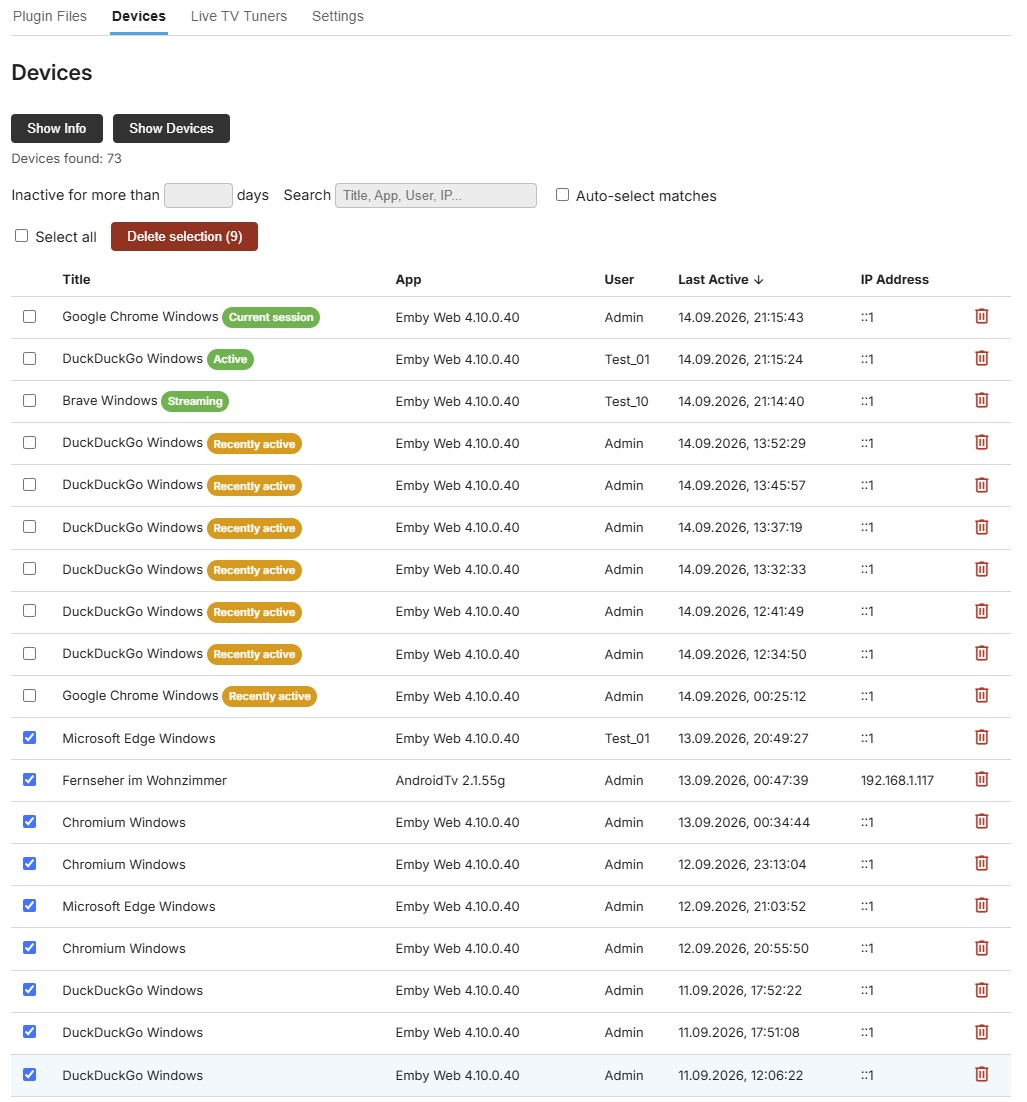
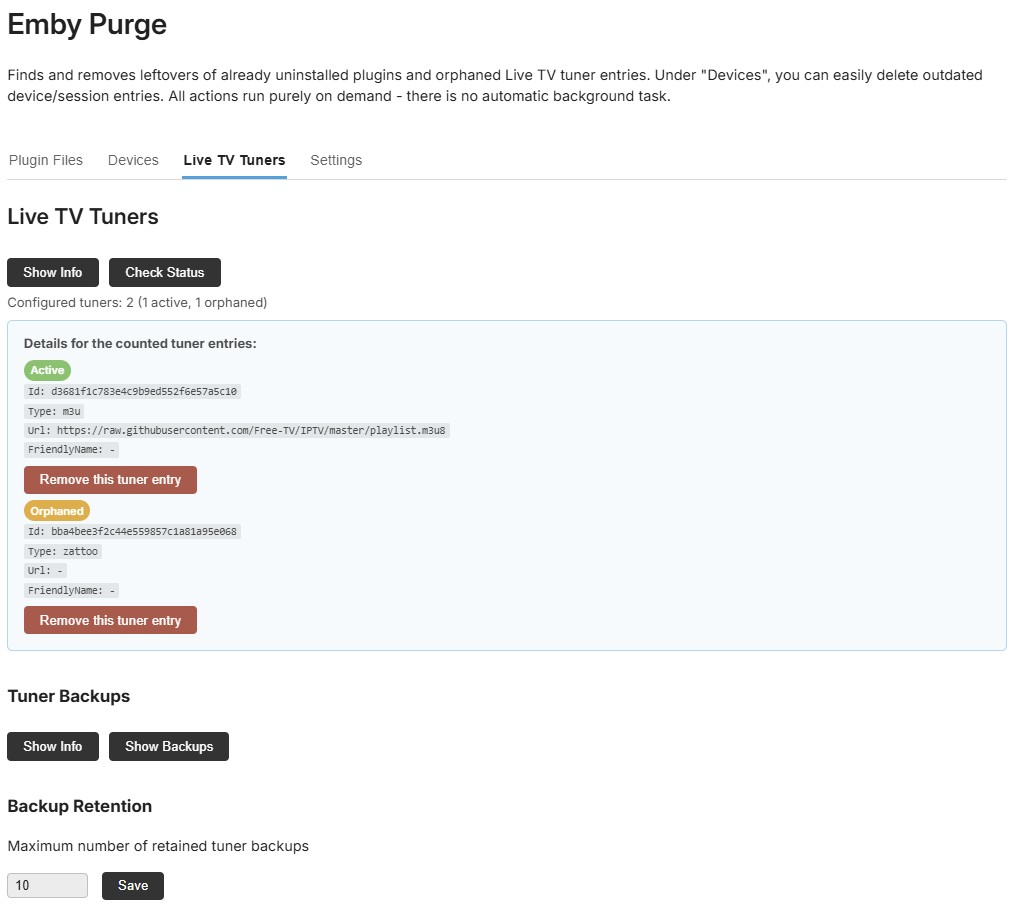
I've been trying out a lot of plugins lately on my test server, and noticed that many of them leave data behind after being uninstalled - orphaned config files, leftover folders, that kind of thing. I also ran into a stuck, empty Live TV tile on the home screen - turned out that you should remove the entry under Live TV / TV Sources before uninstalling a Live TV plugin. So I built this plugin (with the help of Claude) for myself to clean that up. Figured it might be useful to someone else too, so I'm sharing it here. What it does: - Plugin Files - scans for and removes leftover config files/folders from already-uninstalled plugins (searches ../programdata/plugins, plugins/configurations and data) - Devices - lists every device/session, with "Select all", a live search, an inactivity filter and bulk delete (my own take on Emby's Devices list) - Live TV Tuners - finds tuner entries whose plugin is gone and is able to remove them, with a restorable backup in case you remove the wrong one Added an admin-only check on every endpoint - so normal users can't see the plugin or delete anything with it. Everything runs on demand only - no background/scheduled tasks. Tested on my own QNAP and Windows servers (4.10.0.40), but only by me so far. Use at your own risk, especially since it performs deletions. Installation: 1. Download the .dll 2. Copy it into your Emby Server's plugin folder 3. Restart your Emby Server EmbyPurge.dll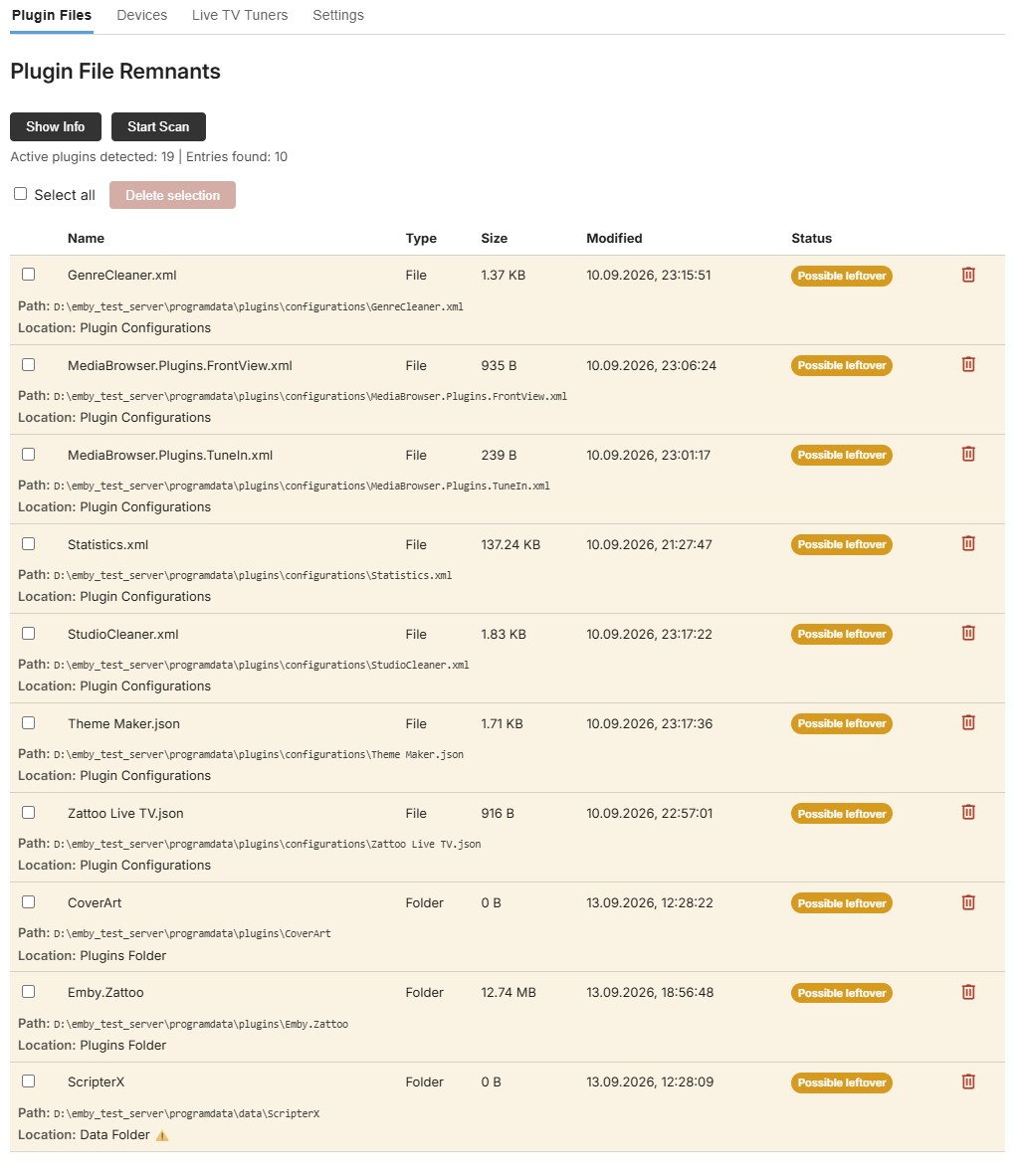
-

[Plugin / Beta] DLNA Renderer Filter – hide selected DLNA devices from “Play on”
Marcidarci posted a topic in DLNA
Hi everyone, I would like to introduce DLNA Renderer Filter, a small Emby Server plugin for users who have DLNA/UPnP renderers that they do not want to see in Emby's Play on device list. What it does The plugin detects the DLNA/UPnP MediaRenderer devices discovered by Emby Server and lists them on its settings page. Each renderer can then be enabled or hidden individually. A hidden renderer is filtered only from Emby's DLNA PlayTo discovery path. The plugin does not change the device itself, does not add firewall rules and does not patch Emby.Dlna.dll. New renderers are visible by default. Important limitation This plugin filters DLNA/UPnP renderers only. Chromecast targets and active Emby client sessions are discovered through different paths and are therefore not listed or filtered by this plugin. Compatibility / current testing Current release: v0.1.4 Tested successfully with: Emby Server 4.9.5.0 Synology DSM 7.2 Denon AVR-X4400H Sony soundbar custom DLNA-to-HEOS bridge renderer The plugin targets netstandard2.0. Technical note Emby's public device discovery API does not expose a per-renderer ignore hook. The plugin therefore uses reflection to replace only the DeviceDiscovered callback belonging to Emby.Dlna.PlayTo.PlayToManager with a proxy. The implementation is deliberately fail-open: if a future Emby release changes that internal handler and the plugin cannot locate it, nothing is blocked and Emby continues normally. Download / source GitHub repository: https://github.com/celle150190-prog/emby-dlna-renderer-filter Latest release: https://github.com/celle150190-prog/emby-dlna-renderer-filter/releases/latest The release contains Emby.DlnaRendererFilter.dll. Feedback requested I would especially appreciate tests on: Windows Linux Docker other NAS platforms other Emby Server 4.9.x versions If something does not work, please include the Emby Server version, platform and any log lines containing DLNA Renderer Filter. The project is open source under the MIT license. Thanks for testing! Emby.DlnaRendererFilter.dll








_svg.thumb.png.85e4ee6291ddd76347269c05175b5dda.png)

