All Activity
- Past hour
-
 Camilalujan joined the community
 -
 Luthor86 joined the community
 -

Emby Beta 4.10.0.15+: Crashing due to Out of Memory on DS918+ Package Center Install
DarWun replied to DarWun's topic in Synology
Actually, there are some similarities to the issue I reported originally. On my NAS the scheduled task for "Scan media library" was set to run every six hours. Throughout the day it would execute automatically without an issue. Memory usage remained stable. But when I ran the task manually first thing in the morning after the NAS had sat idle overnight memory usage immediately jumped from 1GB to 2GB. The DS918+ only has 4GB of ram, and that sudden jump brings total memory utilized to around 90%. If I do anything else in Emby while that is happening, like navigating from the Dashboard to the Home screen, Emby will become unresponsive. Usually Emby shutdown at that point due to an OOM event. A couple of times recently it was able to recover and the memory was released, usually within the next 30minutes provided I didn't do anything else in Emby. For me, this only started happening within the last month. It is occurring fairly frequently now (every couple of days). It occurs first thing in the morning after the NAS has sat idle overnight. You identified that "The process is usually sleeping after the scan completes while still holding all of the allocated memory." When the memory usage spike occurred again this morning, I checked the process status. Emby was sleeping. One thing I noticed is that you are still on DSM 7.3.2. I started seeing the issue just after updating to DSM 7.4-90075. That was coincidentally around the same time that I updated to Emby Beta 4.10.0.15. So I couldn't rule out that it was the DSM upgrade that was the culprit. The fact that you are seeing this on an earlier version of DSM might be evidence that the newer version of DSM is not the culprit. -
 stephaniemmm68 joined the community
 -
 Joakincm81 joined the community
 -
 EvilAngel joined the community
 -
 matt.bloemer joined the community
 -
 YZDPPA joined the community
 -
 Suvapong joined the community
 -
I played around a bit with the various settings and enabled that function as well. However, it seems I didn't anticipate the result and forgot where I had activated it. I find the description of the function isn't entirely clear. But now ... I know
-
 Mshl joined the community
 -
Really disappointing that this issue is not being taken care of.
-
2.2.8 is still the currently released version. New version is still in testing with Samsung, it's taking them a while this time. There should be an update for 2018 models as well
- Today
-
solved it by making brand new files, so whatever junk tags were hidden somewhere got purged.
-
That's where most of my movies are. Only a few are being recognized. Just about seven...
-
What year/model tv do you have? I've got the same release which is almost a year old on my 2018. In the past Luke has had to do a special request for TVs older than 4 years as Samsung stops supporting older models (though the most recent models now get 7 years support).
-
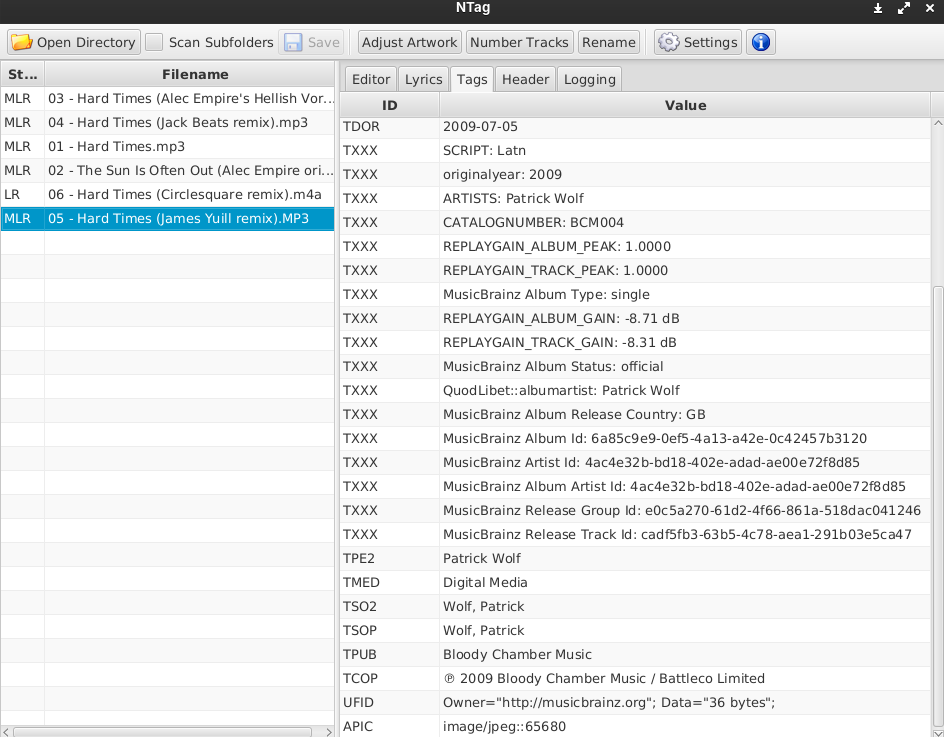
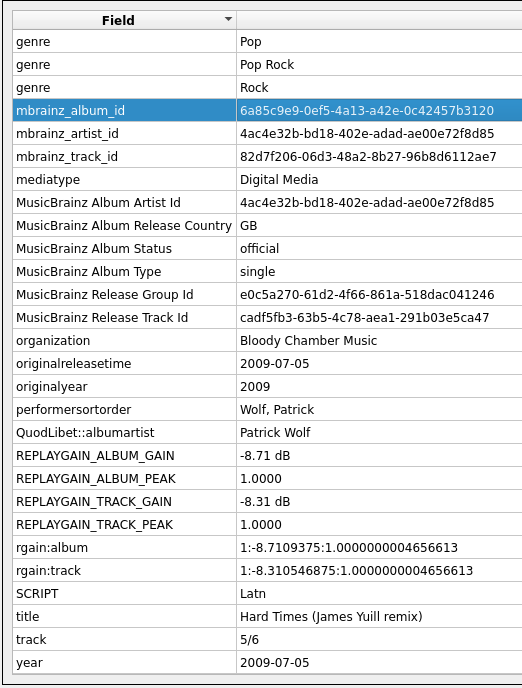
I've now checked the tags in every single piece of software I can find (musicbrainz picard, NTag, Kid3, Puddletag) and none of them display any problems with the musicbrainz tags. I don't know what to do. Could ffprobe be incorrect?

-
t doesn't sound like anything I've heard of before. Sounds like your drives might be a good place to start. You can also post server logs with an example in case there is anything useful that might identify a cause.
-
I've invited you to the beta. To set expectations straight, though: This variant does not have MPV player included, it uses the html video player for video. For audio, it's going to get interesting whether the Windows Media based playback is going to work. It has never been tried before..(nothing has ever been tried to run on Windows ARM64, actually)
-
More than happy to help beta test for you. I've been administrating and using Emby for many years on Windows, Mac, Ubuntu, Apple Watch (I have a lot of thoughts on this one!), iPad, iPhone, Xbox, Smart TVs and Web, so I'm pretty familiar with the expectations and limitations across a lot of the ecosystem.
-
> When you put it like that I'm surprised too, but what intrigues me is that the older Emby Theater works fine. It has been outdated for long time, even before the new app came. The included Chromium engine is > 6 years old and a honeypot of security vulnerabilities. I wouldn't run it anymore. It's just still available because a few users had insisted. The new app is totally different in many ways, you can't really compare these. > I guess the more modern architecture of the rebuilt version is harder for multiple layers of emulation to cope with. It could also just be that the WebView2 runtime has some interactions with the OS with a hard requirement of having the same architecture. BTW, that's really a weird use case. > Pretty sure it'd be overkill for me to push for an ARM64 build just for this reason! You may call this your lucky day, because this situation kind-of forces us to publish an ARM64 version, because the MS Store doesn't have any switch to tell like "don't install our x64 package on arm64 systems!". As we don't have evidence from a single user confirming that the app is working on arm64 (non-mac-vm), we must assume that it doesn't run there (well, this has always been the assimption, we just didn't think that it would get installed). So, we have a new version on the way (as beta), if you like to test, I'll invite you to the beta.
-
When you put it like that I'm surprised too, but what intrigues me is that the older Emby Theater works fine. I guess the more modern architecture of the rebuilt version is harder for multiple layers of emulation to cope with. It doesn't sound like there are lots of people trying to do what I'm doing though anyway so I don't mind using that. It's such an incredibly specific reason anyway: I want a news channel to keep playing even when I take out one of my Apple AirPods. MacOS pauses media by default when you take them out of your ears, but it's not clever/flexible enough to let you exclude certain apps. Since I have a VM running all day anyway, I installed Emby in it so it can't be touched by the Mac's AirPod automation. Pretty sure it'd be overkill for me to push for an ARM64 build just for this reason! On the Mac itself I use either the native app or the web app.
-
Buenos dias y feliz verano! me surgen dos dudas referente a como gestiona emby las licencias. tengo dos servidores y cada uno con su licencia individual. el caso es que como tengo 3 personas en cada servidor creo poder apañarme con una única licencia. Esto es posible? y por otra parte como puedo saber el numero de licencias que tengo aun disponibles??? no lo encuentro por ningúna parte gracias!!!
-
Hello everyone; this error showed up on my screen, i have no idea what's happened, it is only on Microsoft edge. on iPhone, i pad, windows app and tv works fine only here is problem. restarting pc or Serwer doesn't help. any idea?

-
At the time of my post it was 2.2.54, although today I got the update for version 2.2.55, which sadly did not change anything for me either.
-
Hi you do not need to compile the plugin, just drop the file attached from one of the other posts into your Emby plugins folder, restart Emby and it should be in you plugins section I think for the current version of the plugin you need to host the file online or use a link as I do not think it can use a local file, just uploaded it OneDrive/google drive and then add the link to the plugin it should work
-
And I need help with add lisI also need help adding a channel list locally from a Windows PC.
-

A new approach to making IPTV behave more like traditional tuners
flashls82 replied to PowerCC's topic in Third Party Apps
We need all the development energy we can get on this, I don't think anybody has exactly cracked it yet. Do you imagine this working alongside something like Dispatcharr or as an alternative? Dispatcharr is great overall around bundling together streams into channels and switching over automatically when things stall, but it's still not as robust as I want/as it needs to be to play nice with Emby consistently (mainly because Emby itself is coded to give up on streams and recordings way too easily). -

Live TV on Android TV stick (Strong Leap 4K) - problem with SD content
stevenpuk replied to stevenpuk's topic in Android TV / Fire TV
OK, attaching the server logs to cover use of both the stock Android app and the Android TV app. Times are the approx. times I played the various media. Stock Android app - this is the one I have problems with SD playback 7:22 Live TV channel 2 (BBC2 SD) - completely frozen 7:25 Live TV channel 102 (BBC2 HD) - plays ok 7:28 SD recording (Lord of the Flies) - completely frozen 7:31 HD recording (Back to Black) - plays ok Android TV app 7:34 Live TV channel 2 (BBC2 SD) - plays ok 7:37 Live TV channel 102 (BBC2 HD) - played ok but then froze after a few seconds 7:39 SD recording (Lord of the Flies) - plays ok 7:42 HD recording (Back to Black) - plays ok embyserver.txt ffmpeg-remux-64a14e30-9e3d-487e-8711-9c035a3a136a_1.txt ffmpeg-directstream-55a87328-1f51-4fa0-a2f8-17445f43aaab_1.txt ffmpeg-remux-905b9347-ca77-416c-9f78-0e0bd910a850_1.txt ffmpeg-remux-bef7499b-de3c-4533-af83-e35ff4d76fb9_1.txt ffmpeg-remux-ec8722e6-15a2-4eda-a4ff-546783f2734f_1.txt ffmpeg-remux-4cb5e546-2b5f-4d7a-8506-3e053a9cc06d_1.txt -
Have video media in folders like tv, movies, .... When I select the movie library I want see all the movies that are in the movie folder. It seems like thats how it was before, but now I am just be seeing a specific genre.ie all action etc
-

Emby Connect can't reach server (connection works fine via direct domain/reverse proxy)
smity3 replied to smity3's topic in General/Windows
Figured it out - solution was a mismatch in the Emby Network settings for public HTTPS port - corrected it to match the Caddy port and now Emby Connect works. I'm assuming I could still access the server remotely through the domain directly because it would default to the right port, but Emby Connect was trying to use the port I had specified in the Network settings which was wrong. -

Air Date Fixer — Corrects upcoming dates for your timezone outside the US
sh0rty replied to Blueskies278's topic in Plugins
Really interested. The upcomng section for non US users was always bothering me. There was a project almost a decade ago that replaced US airdates with european ones, but it unfortunately died. -

Custom library images dissapearing
MediaIntelNUC replied to MediaIntelNUC's topic in General/Windows
Only use Emby for basic library scanning and only in the server settings using scheduled task so third party software can see it. This also applies to identifying shows/movies when it comes to correct IMDB/TMDB info but never let Emby download new pictures/thumbs etc and only let third party software do the scraping Set emby metadata for all librarys to 0 in downloading picture/backrop etc. So basically use Emby features as little as possible. N/ -

Emby Beta 4.10.0.15+: Crashing due to Out of Memory on DS918+ Package Center Install
DiabboVerdde replied to DarWun's topic in Synology
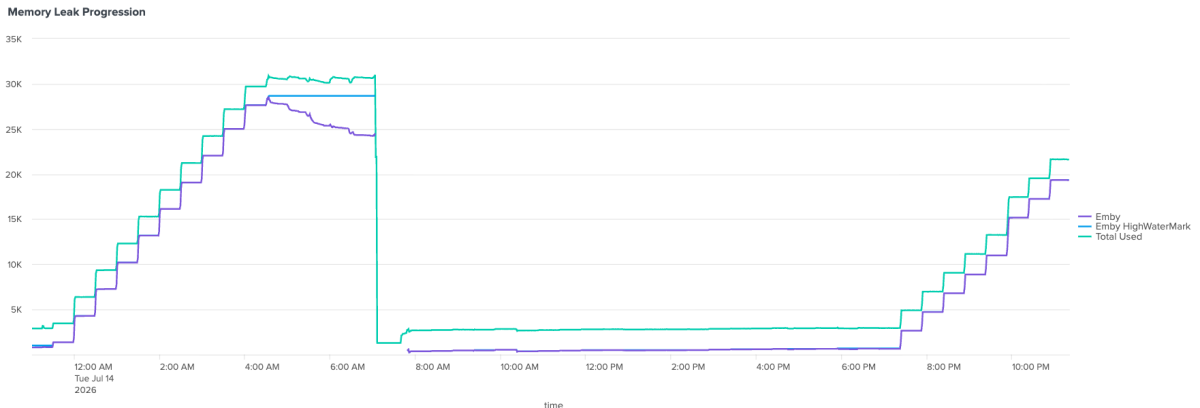
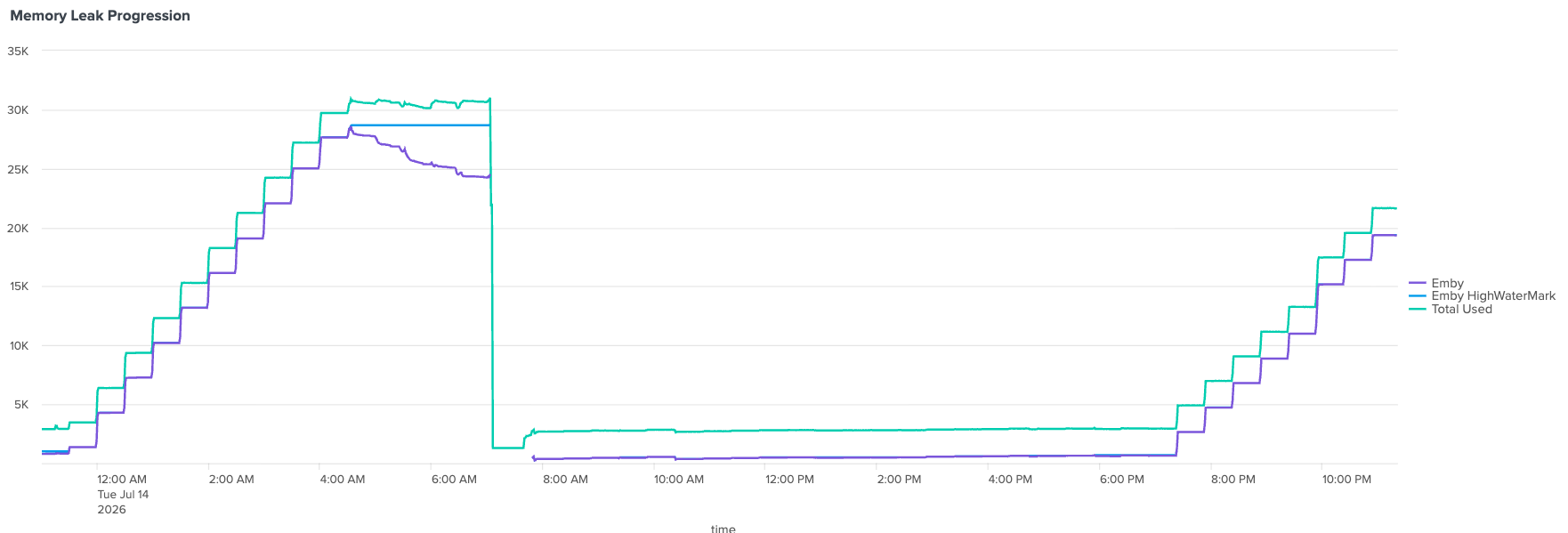
After collecting several days of logs and monitoring Emby's RSS memory usage with Splunk, I think I've narrowed the problem down considerably. Hopefully this helps identify the root cause. It seems my problem might be different from the one originally described in this post, but the consequence is the same. Environment Emby Server 4.9.5.0 Synology DS1819+ (32 GB RAM) DSM 7.3.2 Debug logging enabled I have attached graphs showing Emby's RSS memory usage together with total system memory usage. What I observed Initially I thought the problem started around midnight because that was when I first noticed the memory growth. However, after collecting more data, that doesn't appear to be the case. Emby performs a "Scan media library" task every 30 minutes throughout the day. The logs show this is completely normal: IntervalTrigger fired for task: Scan media library Queueing task RefreshMediaLibraryTask Executing Scan media library The task validates the libraries and runs the usual post-scan tasks: ValidatePhysicalRoots ValidateTopLibraryFolders CleanDatabaseScheduledTask CollectionLibraryPostScanTask RefreshIntrosScanTask The important observation is that these scans occur all day long, even while memory usage is completely stable. What changes At some point (the exact time varies it seems. I thought it was midnight but today it started out of nowhere around 7:25 PM after a whole day of stability), something changes internally. From that point forward, every subsequent scheduled library scan causes Emby's RSS memory to increase by approximately 3 GB. The scan itself only takes about one minute to complete, but the allocated memory is never released after the task finishes. The memory graph looks like a staircase. Here's a comparisson of yesterday's incident at midnight and today's incident at 7:25. They behave the same. Today hasn't failed yet but I'm letting it allocate memory until it crashes, so I have more data to keep debugging: Eventually Emby reaches approximately 25-28 GB RSS and the Linux kernel OOM killer terminates the process. Important observations The process is usually sleeping after the scan completes while still holding all of the allocated memory. the scan itself takes less than a minute but the memory is never freed. This doesn't look like continuous allocation during the scan itself. Instead, it looks as though something allocated during the scan remains referenced after the task has completed. Things I have already ruled out I tried removing the Statistics plugin as per @Lukesuggestion. No effect. Truth is: I don't use many plugins. The ones I use are: Addic7ed, Backup & Restore, Bluray Folder Support, DLNA, DVD Folder Support, Emby Guide Data, Fanart.tv, Kodi companion, M3U TV Tuner, MusicBrainz, Nfo Metadata, OMDb, OpenSubtitles, Port Mapper, Studio Images, TheAudioDb, TheMovieDb, TheTVDB, Webhooks and XmlTV If any of these plugins is bad let me know, I can remove it and see what happens. Current hypothesis At this point I don't think the 30-minute scheduler itself is the problem. The scheduler appears to be acting as the trigger for a code path that begins behaving differently after the server has been running for some time. Earlier scheduled scans complete normally and memory returns to the baseline. Later scheduled scans appear to retain several gigabytes of memory after each execution, eventually exhausting all available RAM. So the question may not be: "Why does the scheduler run every 30 minutes?" but rather: "What changes internally so that a previously healthy Scan media library task begins retaining memory after completion?" If it helps, I have: debug logs covering both the healthy period and the leaking period, graphs showing the RSS increase after each scan, kernel OOM logs, and can provide additional information if there's anything specific you'd like me to capture. I have plenty of evidence but at this point I still haven't found what damn rogue process is eating up my memory. Any suggestions would be immensely appreciated.