All Activity
- Past hour
-
 muji…. joined the community
 -
 Kirkirk joined the community
 -
Hi, there's already an open request for this or something functionally equivalent. Please join in and contribute to the existing discussion at:
-
 raf2941 joined the community
 -
 david8080 joined the community
 -
 vfred joined the community
 -
 raf3929 joined the community
 -
 xinjuck joined the community
 -
 Ca2828 joined the community
 -
Hi there, would it be possible to add the ability to search and sort by country of origin? Thanks
-
I'm sorry, I still don't know what your question is. There is a current release and a beta track in the store. Both have been updated recently. In exactly what context? Are you having a specific issue?
-
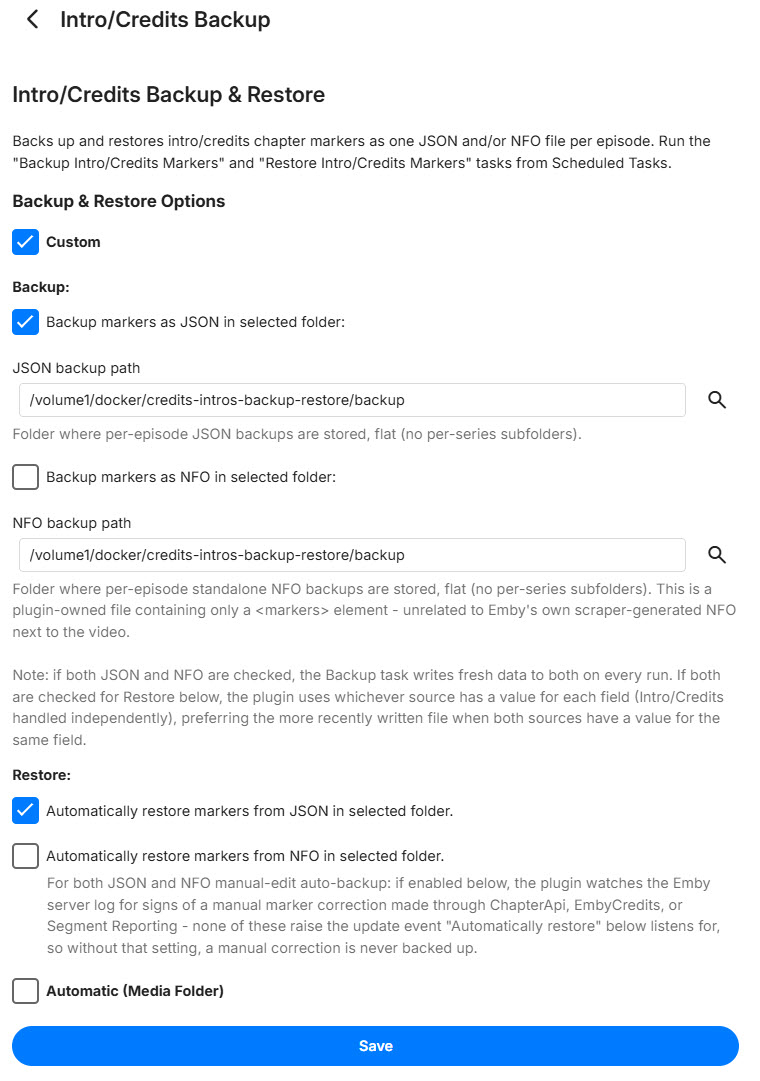
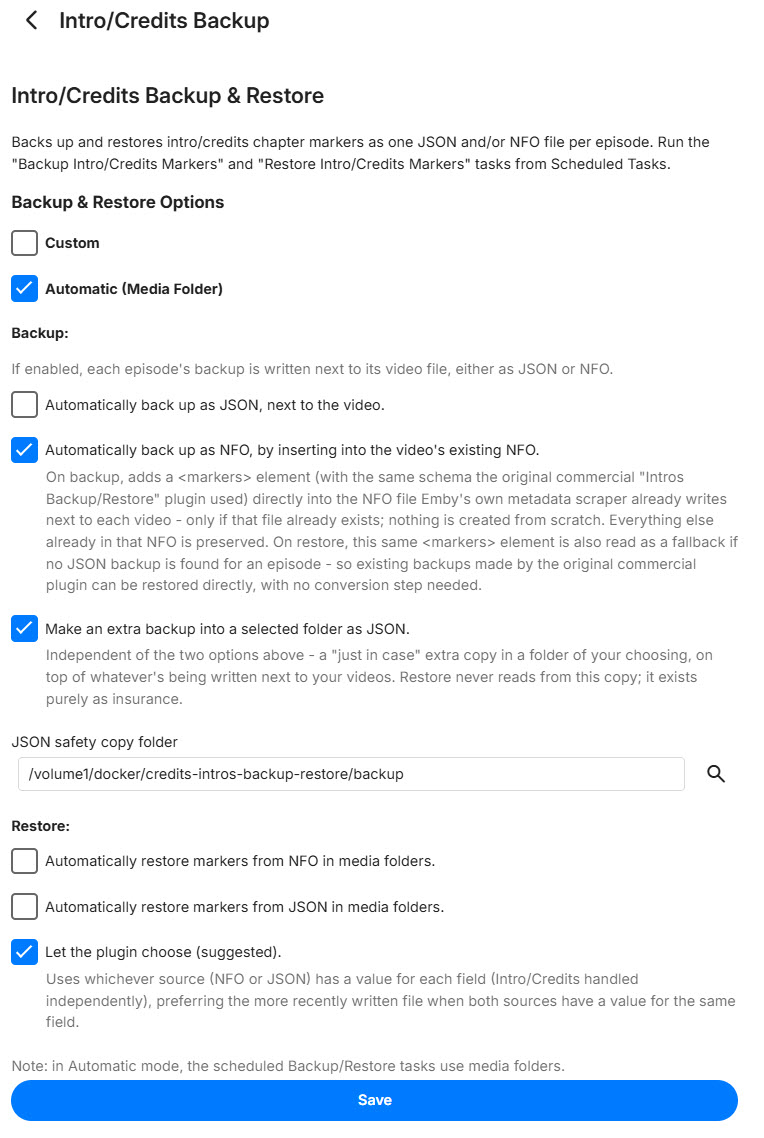
v1.9.0 is out - a full config page redesign plus a reliability fix. Config page redesign. Instead of one flat list of checkboxes, there are now two clearly separated modes: Custom: pick your own folder(s). Independent JSON and standalone-NFO toggles (the standalone NFO is the plugin's own file, just a <markers> tag - not Emby's scraper NFO), separately controllable for Backup and Restore. Automatic (Media Folder): backups live next to each video, like before. Backup now has independent JSON and NFO toggles (no more "Both" - just check one or both) plus a new "just-in-case" JSON safety copy option that writes to a folder of your choosing, completely separate from what's happening next to your videos. Restore stays NFO / JSON / "let the plugin choose" (recommended). Picking one mode now properly hides the other's section. The separate "Auto-restore" / "Auto-backup on manual edit" toggles are gone too - those background watchers are now on automatically based on whichever sources you've actually configured, instead of a switch you had to remember to flip. Reliability fix: Auto-restore occasionally missed restoring right after a Refresh Metadata, because Emby's own NFO scraper isn't always atomic about writing the file - a read could catch it mid-write. Added a short retry for that specific case; confirmed fixed across multiple shows in testing. If you're upgrading, take a look at the config page - the layout changed, worth double-checking your settings landed where you expect. Release with prebuilt DLL: https://github.com/guilty57/credits-intros-backup-restore/releases/tag/v1.9.0 Custom Selection Auto Selection
- Today
-
Hi, we'll take a look at this. Thanks.
-
Hi there, let's look at an example. Please attach the information requested in how to report a media playback issue. Thanks!
-
Hi, we'll be updating the server's ffmpeg build soon so that may help with this.
-

Feature Request: Grid Tile Format for Media Libraries in Android App
Luke replied to adreader51's topic in Feature Requests
Hi, the upcoming 4.10 server release has this now. -
The upcoming 4.10 server release has this now.
-
@LukeI'd like to offer my help with this. I'm ok signing NDAs etc.
-

Feature Request: Grid Tile Format for Media Libraries in Android App
vdb86 replied to adreader51's topic in Feature Requests
@LukeI'd like to offer my help with this. I'm ok signing NDAs etc. -
Hi Emby team, First, thanks for Emby. I run it as the media hub for my living-room HTPC and it has been rock solid. ## What I am trying to solve On a dedicated HTPC, I want the Emby client to get out of the way when I am not actively watching, and come back when I am: - Start with windows minimized to tray - so that I can use my phone to select the htpc as play on target. - Pause playback -> hide the client to the system tray. - Resume -> bring it back to the foreground. - Playback starts -> show it; playback stops/ends -> hide it. This is a really nice "appliance" experience on a TV-connected PC: the client is there when you need it and invisible when you do not, without ever landing on the desktop or taskbar. ## What I built as a stopgap Because I could not do this from within Emby, I wrote a small standalone Windows tray agent, "Emby Tray": https://github.com/vdb86/Emby-Tray It polls the server's `GET /Sessions` endpoint, filters to this machine's own session (by local network address / client name / device name), reads `PlayState.IsPaused` and the now-playing item, and then uses Win32 (`EnumWindows` + `ShowWindow`) to hide/restore the client window. It runs entirely outside the client install so client updates never touch it. It works well, but it is fundamentally a workaround, and I would much rather this behavior lived in Emby itself so nobody needs a side-car process. ## Why this cannot be done as a normal plugin today I looked hard at doing this "properly" first, and hit a wall that I think only you can remove: 1. A server-side catalog plugin can subscribe to `ISessionManager` playback events and read `PlayState.IsPaused`, so it can perfectly DETECT pause/resume. But it runs on the server and has no way to touch a client's OS window or tray. 2. A client-side (Theater web/JS) plugin knows the play/pause state directly via the web `playbackManager` events, but it runs in the web sandbox and cannot reach the OS tray or minimize the native window. 3. The server-to-client `GeneralCommand` path is the natural bridge, but `GeneralCommandType` has no command for this. It has `ToggleFullscreen`, `SetVolume`, `Mute`, `GoHome`, `DisplayMessage`, `SendKey`, `SendString`, and so on, but nothing like `MinimizeToTray` / `RestoreWindow` / `Minimize`. So detection is fully supported, but the "hide/restore the native window" half is not exposed to any plugin surface. That gap is why an external agent is currently the only option. ## What would be needed from your end Any one of these would let this be done natively (roughly in order of how self-contained they are): 1. Best: build it into the desktop client directly. Add a tray icon plus a "minimize to tray on pause / restore on resume" option (and a "start minimized to tray" option) in the client's settings. Nothing external needed, and it would be a great HTPC feature out of the box. 2. Or: add `GeneralCommandType` values such as `MinimizeToTray` / `RestoreWindow` (and ideally `Minimize` / `Restore`) that the desktop client honors. Then even a small server plugin could drive the behavior on pause/resume. 3. Or: expose a minimal NativeShell API to Theater client plugins (for example `nativeShell.window.hideToTray()` / `show()`), so a client plugin reacting to `playbackManager` pause/unpause events could do the window/tray control itself. Option 1 is what I would love most, since it removes the need for any plugin at all. Options 2 or 3 would let the community build it cleanly. ## Offer The full working implementation, including the session-matching logic and the Win32 hide/restore handling, is open source at the link above under GPLv3, so please feel free to reference it for the detection/behavior model. Happy to answer questions, test builds, or help however is useful. Thanks for considering it. P.s. I'm also open to trying to help with optimizing the windows app code (start faster, etc.)
-
Emby Server not installing on Android 7
CaptainPirate replied to CaptainPirate's topic in Android Server
By “Downloading from their repo” I meant downloading the apk from emby's GitHub repo (https://github.com/MediaBrowser/Emby.Releases/releases) Downloading isn't the issue, I can download just fine from the website also repo too but after downloading when I try to install the apk I get that “Failed To Parse” error message. -

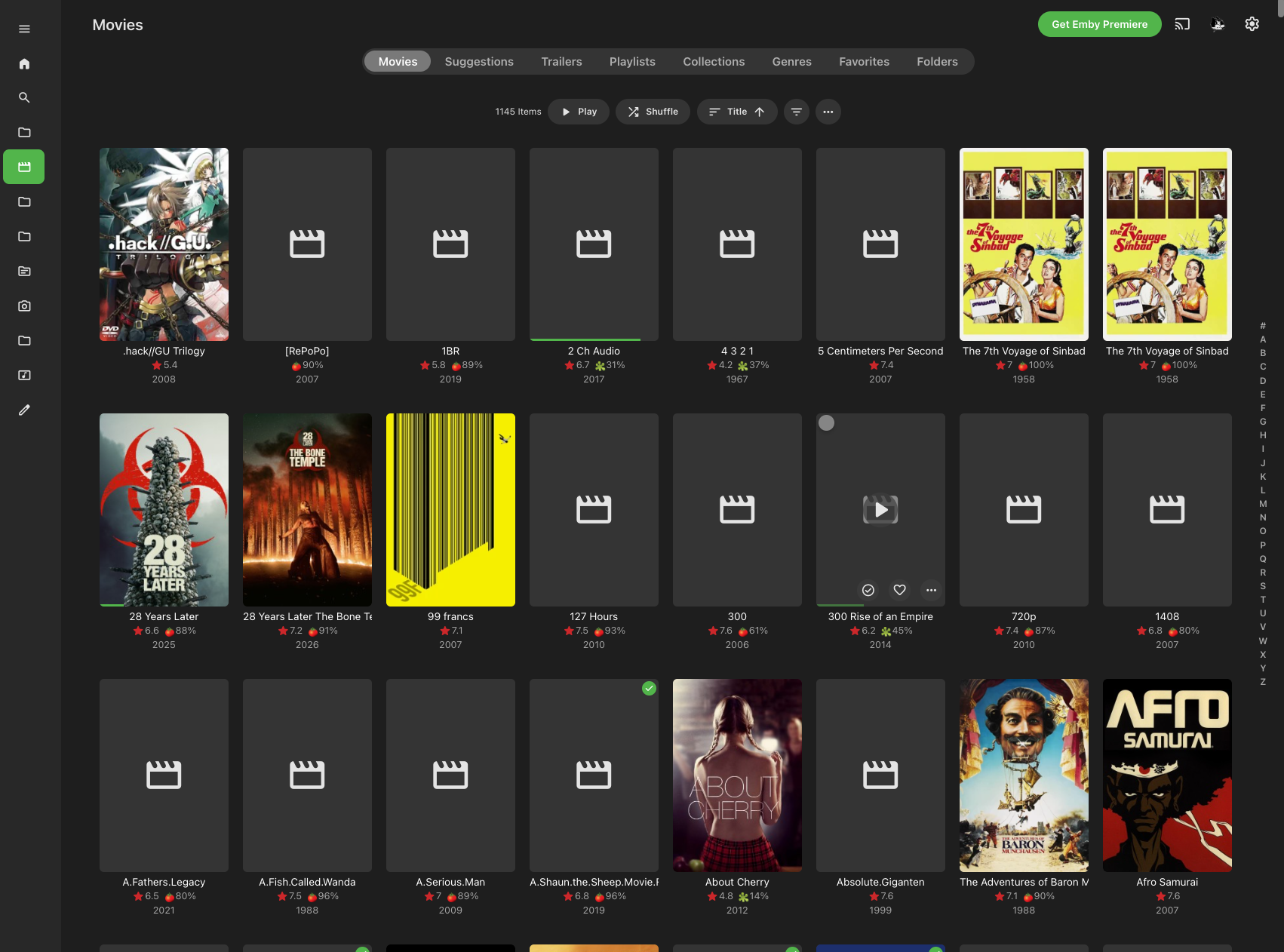
Folder images missing in Emby Theater (3.0.20/21 Legacy)
softworkz replied to scottpro's topic in Windows & Xbox
Which Windows app version - I don't see it? -
However, it says it's complete and it's not. Should say in progress as Atmos, DTSX, etc haven't been added yet.
-

Audio HLS with TranscodingContainer=mp4: the playlist is served, the segments throw a 500
vdatanet posted a topic in Developer API
On Emby 4.9.5.0, requesting an audio HLS stream with fMP4 segments produces a correct playlist whose segments cannot be fetched. Every segment request — and the init segment — returns: HTTP 500 "Object reference not set to an instance of an object." The same request with TranscodingContainer=ts works. Same code, same token, same track; the only thing that changes is the container. GET /Audio/{itemId}/universal ?UserId={userId}&DeviceId={deviceId} &MaxStreamingBitrate=192000 &Container=mp3,aac,m4a,flac &AudioCodec=aac &TranscodingProtocol=hls &TranscodingContainer=mp4 <-- ts works, mp4 does not &MaxSampleRate=48000 &PlaySessionId={uuid} &api_key={token} Follow the master playlist to main.m3u8, then request either the #EXT-X-MAP init segment or any hls1/main/N.mp4, carrying the auth query params through as usual. Retried over several seconds in case it was a transcoder warm-up: it is not, the 500 is immediate and consistent. Worth saying plainly: the playlist itself is authored correctly — version 7, an EXT-X-MAP pointing at init.mp4, segment durations, the lot. Whatever is missing looks like it sits between the playlist writer and the segment handler. Two small things that might narrow it down, or might be irrelevant — you'll know which: The ts and mp4 playlists are generated from the same request and differ exactly as you'd expect (version 3 vs 7, EXT-X-MAP present only on the second), so playlist generation looks complete. The 500 is identical for init.mp4 and for every media segment, which suggests it's one path rather than a per-segment condition. That's the whole report. I'm not asking for a feature here — just flagging that a route the server advertises can't be followed.-
- 1
-

-
i found out that when i play the video via Emby App it's displayed correctly. but when i use the web link it rotates to the side. What do you need from me to investigate the issue?
-

embyforkodi (next-gen) 12.X.X support
hansi9990 replied to quickmic's topic in Emby For Kodi Next Gen
Yes it is. However, I think that before I created a dummy playlist in Emby itself, it wasn't there. There seems to be a bug in Emby: the playlists are read and displayed within the music library (see the first image I attached), but they aren't actually added to the library until you create one within Emby. -
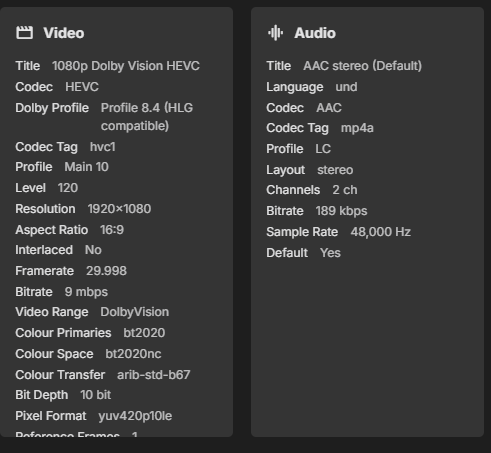
Is it possible to add a feature to detect the EAC3+JOC (EAC3+Atmos) audio codec? Currently, they are identified simply as standard EAC3. Screenshot from Emby Screenshot from MediaInfo app


-

Suddenly: Missing Movie Poster on Synology NAS
Sturmkater replied to Sturmkater's topic in Linux & Raspberry Pi
So back to square 1: Today even more posters are missing. In the log at at 04:30:34 when "Scan media library" happened: (I could not find any overlapping scheduled task which might interfered with volume2) Removing item from database, Type: Movie, Name: Ice Age - Surviving Sid, Path: /volume2/HyperActive/Video/Movies/Animation/... Removing item from database, Type: Movie, Name: Alice.In.Wonderland, Path: /volume2/HyperActive/Video/Movies/Animation/... Removing item from database, Type: Movie, Name: Bambi, Path: /volume2/HyperActive/Video/Movies/Animation/... Removing item from database, Type: Movie, Name: Finding Nemo, Path: /volume2/HyperActive/Video/Movies/Animation/... Removing item from database, Type: Movie, Name: Finding Dory, Path: /volume2/HyperActive/Video/Movies/Animation/... It seams that the Scheduled Task Scan media library deletes the movies and then reads them and probably runs in to an api block when scraping for cover art (its a big library). Any idea on why this is happening? Should I reinstall emby? embyserver (1).txt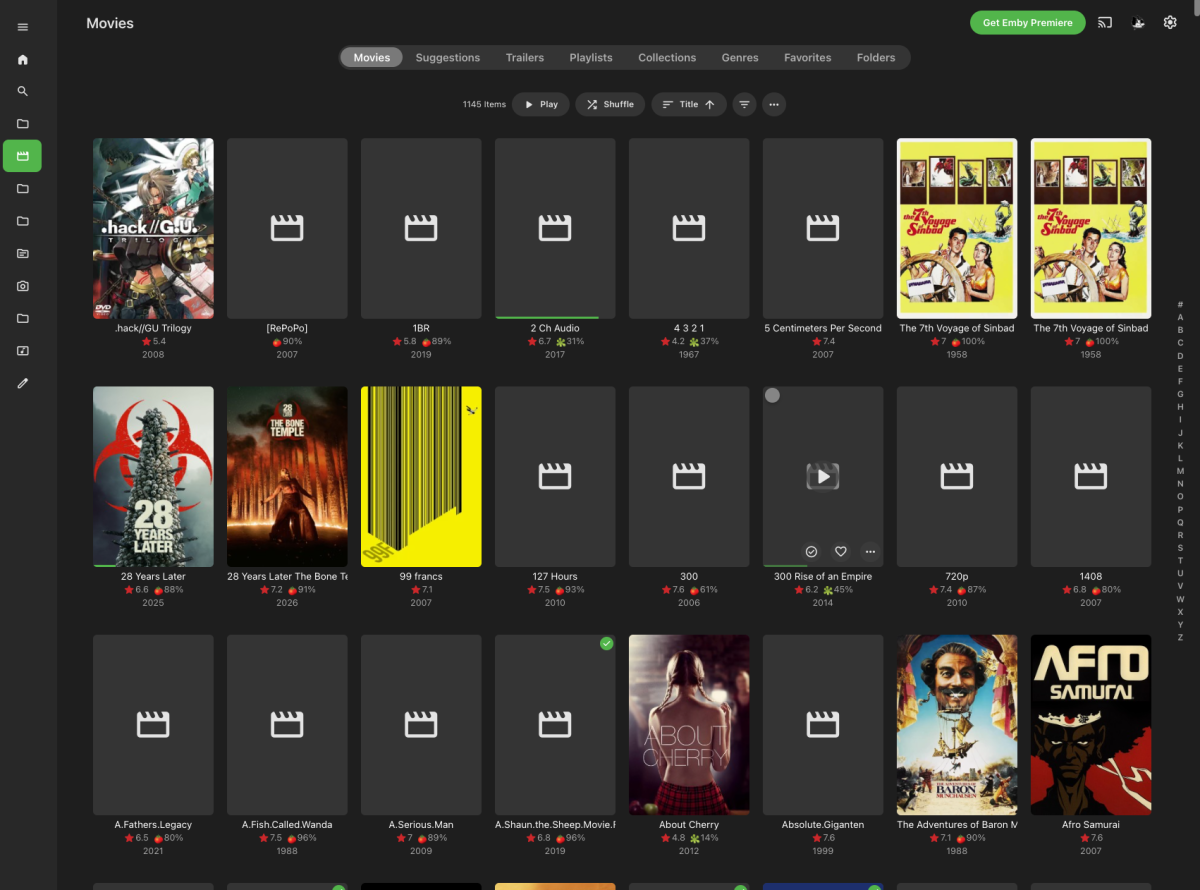
-
I uninstalled EMBYIcons and restarted EMBY. I cleared the database. Then I restarted EMBY again. I ran all my scheduled tasks, and so far, no problems. I'll keep doing this throughout the week and let you know how it goes.
-
How can I help?
-
- the new version in Play Store - the transcoded target bit rate for audio
-

Intel QuickSync H.265 Max Bitrate 39Mbit/s -> falls back to software encoding above this threshold
Mattynator replied to embart0r's topic in Linux
Hi @Luke — a couple of things worth flagging ahead of the new ffmpeg build, since they've come up in this thread: the root cause of the QSV 39 Mbps cap was traced (see jesposito's write-up and GitHub issue) to the model layer mapping the reported HEVC Level 5.1 to the wrong bitrate — the actual hardware supports much higher, as confirmed by direct ffmpeg testing. Separately, 10-bit HEVC hardware encoding via QuickSync also isn't currently offered in my case on my Intel 265K CPU, even though Arrow Lake-S's media engine officially supports 10-bit HEVC hardware encoding up to 8K/120Hz per Intel's own spec. Would it be worth someone on the team doing a full pass over the level/profile/bitrate mapping table rather than just these two spots, in case there are other entries that are similarly off or overly conservative? Is that mapping logic something that's getting revisited alongside the ffmpeg version bump, or is the beta build mainly a version update for now? Appreciate all of the hard work. -

Folder images missing in Emby Theater (3.0.20/21 Legacy)
Mahinepua replied to scottpro's topic in Windows & Xbox
Thank goodness it’s not me, I’ve been restarting the server, computers all sorts and it persists.