All Activity
- Past hour
-
 Abdulali88 joined the community
 -
 carriergab@hotmail.com joined the community
 -
 Boogs29 joined the community
 -

4.10.0.40 Regression - Android and Samsung sessions no longer remotely controllable
yocker replied to Cr8iveLosr's topic in Linux
Works fine for me. As Luke said, sure you have enabled the option in the user settings?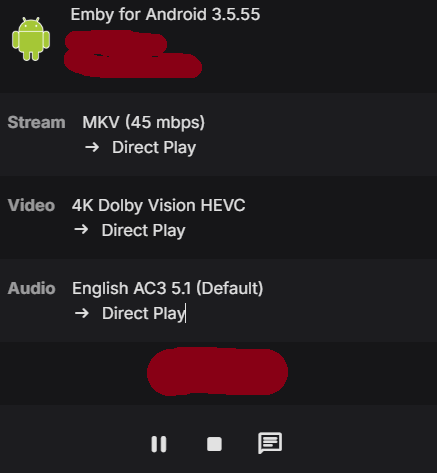
-
 Liyifei joined the community
 -
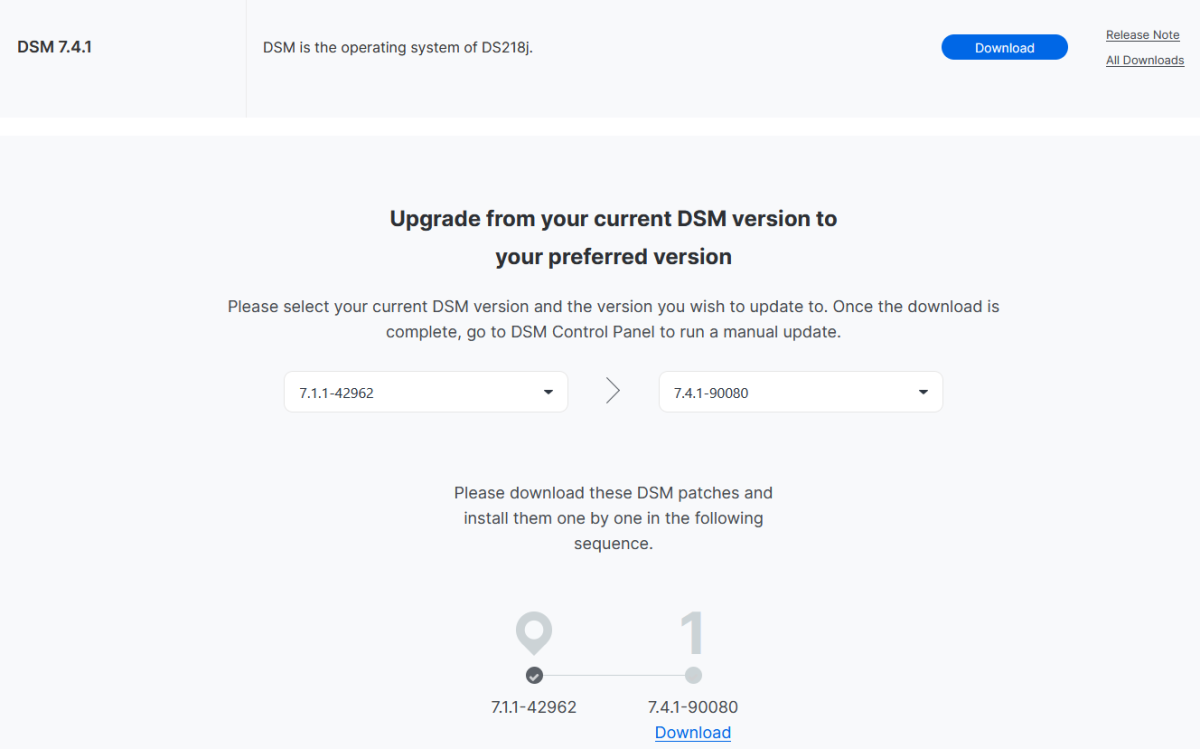
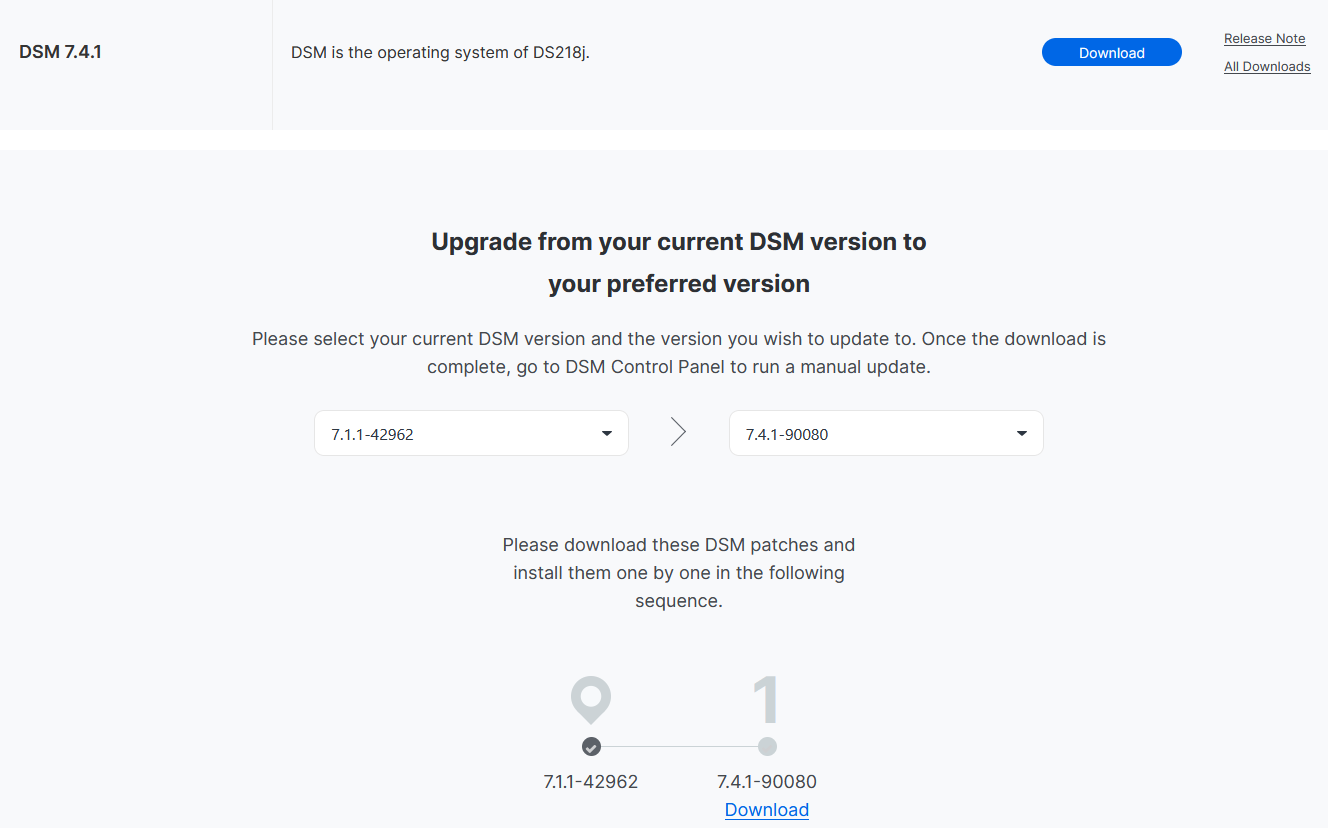
Not trying to be nosy... just curious: why are you keeping your DS218J on such an old DSM? I have both the DS918+ and the DS418J on 7.4.1 and they're both working fine (and more secure, since they have the latest security patches). Edit: You don't even need to perform any intermediate updates to reach it, you can even go directly to the 7.4.1:
-
 vernonboyes joined the community
 -
 Paz2133 joined the community
 -
 deweymeadows joined the community
 -
 Edward89 joined the community
 -
 mellat@bellsouth.net joined the community
 -
 Giu32 joined the community
 -

4.10.0.40 Regression - Android and Samsung sessions no longer remotely controllable
JMSolo replied to Cr8iveLosr's topic in Linux
Just chiming in to confirm I am seeing the exact same thing, so this is not a one-off. The only thing that changed on my end was updating to 4.10.0.40. I did not touch a single permission, I did not change any settings, and nothing in my environment changed. It just broke after the update. @Luke respectfully, this is not a user permission issue, and it is pretty easy to rule that out. On the same server, with the same users and the exact same permissions, my iOS and Apple TV clients are perfectly controllable. I literally sat down and streamed a show from my iPhone, the playback controls were right there, they worked, and messages went through fine. Meanwhile the Android and Samsung sessions from those same users show no controls at all, and messages never reach them. A per-user permission cannot explain a break that only follows the client platform. Same user, iOS works, Android does not. That alone tells you it is server side. And to be clear, this is not some third party tool or API script doing something weird on my end. I see it right inside Emby's own dashboard. Every Android and Samsung stream in there only shows the Message option, no play, no pause, no stop, and even that message does not actually get delivered to the user. I also want to back up what @cr8iveLosr said about this being a remote thing. To be upfront, this is just me and my immediate family using this server. It is a normal family setup. We simply connect in from outside the house, over the internet, to a self hosted server sitting behind an nginx reverse proxy on its own subdomain over HTTPS. This is all remote, not LAN. That distinction seems to matter a lot here, and it makes me think your quick test that worked on Android may have been done locally. If you hit it the way my family actually does, remotely through a reverse proxy and subdomain, I think you will see exactly what we are seeing. @cr8iveLosr already laid out the API evidence and it lines up exactly with what I am seeing. SupportsRemoteControl comes back false for Android and Samsung and true for iOS, Apple TV, and Web, all in the same /Sessions response with one admin key. The SupportsMediaControl field is completely gone from the payload now, and it was there before 4.10. Those broken sessions also do not show up at all under /Sessions?ControllableByUserId. Your own capabilities docs say controllability is declared through ClientCapabilities.SupportsMediaControl, and these clients are still sending a full SupportedCommands list, so the server has simply stopped treating them as controllable. You mentioned you did a quick test and Android worked for you, so this is probably build or app version specific. Can you tell us the exact server build and the exact Android app version you tested against, and whether you tested a remote session through a reverse proxy or just on your LAN? Because rolling back to the previous stable brings control right back, which points pretty clearly at something that changed in 4.10 itself. -
Interesting, I think that might be a change worth considering then, it sounds decent. I know from experience the current method has been a not-so-uniform approach where as even if you tell the server settings for a user to default to genres when opening "Movies", that isn't respected on most tv apps such as Roku until you change it on a Roku device. So my next follow-up question would be, will this new method be respected cross-platform? For example, if I have tabs re-ordered or removed completely in the server settings for the user, will that be sync'ed & respected across all tv apps? Thanks
-

4.10.0.40 Regression - Android and Samsung sessions no longer remotely controllable
Cr8iveLosr replied to Cr8iveLosr's topic in Linux
Yes, the permissions have been checked. Nothing in the user permissions, server configuration, reverse proxy, clients, or network configuration changed between the previous stable release and 4.10.0.40. That is also why I specifically tested this by reverting the server version. On the previous stable release, the same Android users and same devices immediately show as remotely controllable in the Dashboard and /Sessions reports them accordingly. After upgrading the same server back to 4.10.0.40, those same Android sessions report: SupportsRemoteControl: false and they disappear from: GET /Sessions?ControllableByUserId=<adminUserId> The Dashboard reflects the same state by removing the playback controls. No permissions are being changed between these tests. Only the Emby Server version is changing. Also, was your quick Android test performed with a remote Android client connecting through a reverse proxy, or was the Android device on the local network? The issue I am reporting is specifically with remote users. They can connect, authenticate, browse, and play normally, but 4.10.0.40 immediately classifies the Android session as non-controllable. Web, iOS, and Apple TV sessions on the same server still report SupportsRemoteControl: true, so this is not a general administrator permission issue either -

UPNP setup of Emby Server has suddenly stopped working remotely
Luke replied to Beta8088_Proto's topic in General/Windows
I think we need to learn more about this because the rule of thumb is get the direct address working first because Emby Connect is just a shortcut for that. If they are truly acting differently then it is likely because they are using different addresses, so we should get to the bottom of that. There's no magic involved here. And if they are using the same address, then we need to look at what exactly is happening that's leading you to say "not working". For example, a user who can't login to their server might also describe it as "remote connection not working", when in fact they can connect, but just had trouble signing in after that. -
With 2.1.55 and CodecEAC3 Dispositionstereo Chaînes2 ch Débit192 kbps Taux d’échantillonnage48 000 Hz I can not accelerate With Emby for Android TV_2.1.26g, I can
- Today
-

Emby server/client - ReplayGain or R128 volume normalization support for music
TariqK replied to Espen JQ's topic in Feature Requests
What do you mean? did they add it? -
Indeed. And, as I also said, highlights the shortcomings of the movie collection on the server, rather than add value (at least IMO).
-

UPNP setup of Emby Server has suddenly stopped working remotely
TaprootCI replied to Beta8088_Proto's topic in General/Windows
In order from that document (that I've done pretty much everything in that is practical for me to do) here's why it has not helped for over a year: In-Network Connections is fine and works correctly, so inapplicable. "Switch to a private network" (it is) "Turn on network discovery/file sharing" (it's on already) "Open TCP Ports 8096 / 8920 & UDP Port 7359 on your server's firewall" (I'm not running a firewall on my NAS, or my PC) "Run an AntiVirus Scan" (it's running on Terramaster OS 5, inapplicable) "Check "LAN Networks" server Network setting" (LAN works perfectly fine, so inapplicable) "Router AP Isolation" (inapplicable, all devices work on LAN, including over Wifi) "Use of VPN" (I don't use a VPN, inapplicable) "CORS Mixed Content Block" (I get the same WAN misbehaviour when I use http explicitly) "Turn on Remote Access" (it's always been on) "Enable Automatic Port Mapping" (it's been enabled this whole time) -UPnP Wizard, I just ran, and it thinks my server doesn't exist when accessing its local URL through LAN, so it wasn't able to do anything. Maybe that's an indication of something, but it's not helpful. "Setup Port Forwarding" (I've done this literally dozens of times over the past year and this has literally never once worked for me, no matter which tutorials I follow, or what ports I use) "Multiple Emby servers on the network" (inapplicable, I have one) "Double NAT" problem (funnily enough this wasn't a problem until last week, as I was able to connect using Emby Connect remotely, in spite of the downstairs network being in a double NAT situation, and it would ONLY work in said double NAT situation and refused to work unless I had the downstairs router in Router mode, with the upstairs router as its DHCP server) "Locate Your External Address & Public Port" (I have, it doesn't work directly connecting to what my server tells me, as previously stated, ad nauseum) "Verify Your External IP Address" (this I have never been able to get a positive result with, hence why I was using Emby Connect when it worked, and it worked despite, as you have previously stated, it shouldn't have) "VPN, external firewalls and antivirus" (inapplicable, Terramaster OS) "Local IP Address change" (I was using DHCP and, again, attempting to connect to the port and IP that Emby Server gave me) "cgNAT Double NAT" (there are no 100.x.x.x IP's in this house's network, only 10.0 and 192.168.1.x and as previously stated, double NAT wasn't a problem until about a week ago, and in fact, was the ONLY way remote connections would work at all, and ONLY through Emby Connect, NOT the direct address) "External Public IP Address change" (nothing I can do about this and I have tried setting up DDNS, and I have likewise never gotten this working, also, my public IPV4 is, in fact, what Emby Server says it is, and yet it still does not work) ISP Blocking (I have run the command and found no indication of an ISP block) "use Emby Connect" (what I'm trying to do and what suddenly broke) The other suggestions are largely inapplicable, but "clear the UPnP cache by restarting Emby" (I've done this at least six times with no improvement, I have even updated Emby Server). The rest is just repetitions of previous steps, but rest assured, if these steps actually were of any use to me in the last year, I wouldn't be here, I would have fixed this problem a year ago. -
But ebr's still saying that if you go to another tab, that will then be remembered. Selecting and reordering the tabs is great, but it's a slightly different issue. Paul
-
4.10.0.40 Regression - Android and Samsung sessions no longer remotely controllable
Luke replied to Cr8iveLosr's topic in Linux
Hi, I just did a quick test and I was able to remote control Emby for Android. Did you check the remote control permissions for the user? -
4.10.0.40 Regression - Android and Samsung sessions no longer remotely controllable
Cr8iveLosr posted a topic in Linux
After updating my server from the previous stable release to 4.10.0.40, remote control of Android and Samsung sessions is now broken. To be clear, nothing in my setup changed other than the Emby Server version. Same server. Same network configuration. Same reverse proxy. Same clients. Same users. Same administrator account. Same firewall and port forwarding. The regression appeared immediately after updating the server to 4.10.0.40. Remote users can still connect, authenticate, browse the library, and start playback normally. This is not a remote connection or login issue. The problem is that once these clients connect, Emby now treats them as not remotely controllable. I checked the live /Sessions data directly and found: Emby for Android: SupportsRemoteControl: false Emby for Samsung: SupportsRemoteControl: false Emby Web: SupportsRemoteControl: true Emby for iOS: SupportsRemoteControl: true Emby for Apple TV: SupportsRemoteControl: true This also matches what is shown in the Emby Dashboard. Android and Samsung sessions no longer expose the normal administrator playback controls. Pause, stop, seek, and the other remote playback controls are unavailable. This is especially significant on my server because most of my users are using Android-based devices, so this regression effectively removes administrator remote control from the majority of active sessions. I also checked: GET /Sessions?ControllableByUserId=<adminUserId> The Android sessions are completely absent from the controllable session list. At the same time, the affected Android sessions still advertise a populated SupportedCommands array and valid PlayableMediaTypes. The sessions are active, playback information is present, and the server is receiving their playback state, but SupportsRemoteControl is still being set to false. There is another change in 4.10 worth noting. SupportsMediaControl is no longer present in the /Sessions response at all. The field is not set to false. It is simply absent. According to Emby's API documentation, SupportsMediaControl is the client capability that indicates whether the client accepts remote control commands. SupportedCommands is a separate capability list. Reverting confirms the regression I also reverted the server back to the previous stable release without changing anything else in the environment. The remote controls immediately came back. Android clients were once again shown as controllable in the Emby Dashboard and could receive remote playback commands. They remain controllable for roughly 60 seconds before the separate, longstanding WebSocket timeout problem occurs. That older WebSocket issue has existed for years and is already documented elsewhere. So I wont reinvent that wheel here. The important distinction is: Previous stable: Android sessions are remotely controllable when they connect. Remote control later disappears because of the longstanding WebSocket timeout. 4.10.0.40: Android and Samsung sessions are classified as non-controllable from the beginning. The Dashboard does not provide the controls at all. So while the existing WebSocket issue already made remote control unreliable, something changed in 4.10.0.40 that has made the situation considerably worse. This is reproducible simply by changing the Emby Server version. No other configuration changes are required.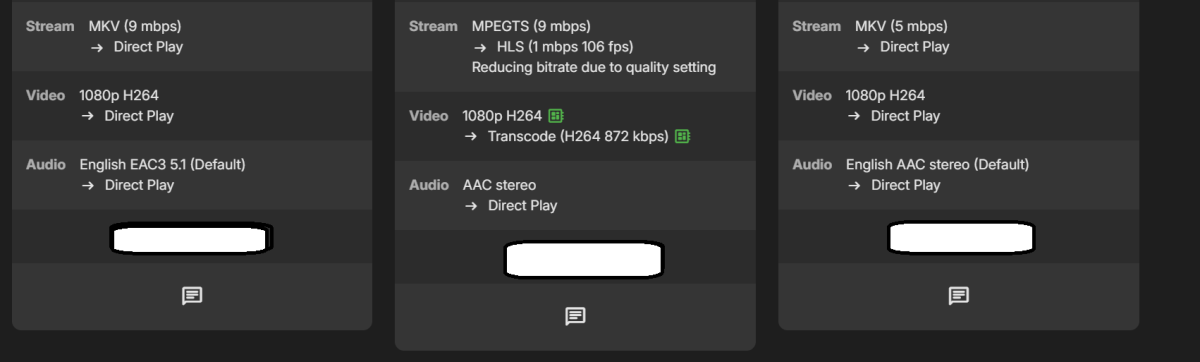
-
Which app are you testing? I believe it is correct that the standard app will just do nothing but the TV app should automatically switch playback methods if you attempt to change the speed on an item that has bitstreamed audio direct playing. Let's please look at a specific example. Thanks.
-
On my zidoo I have both Emby : Android and Android for TV
-
Because every time I do an acceleration there is nothing happening it stays in normal speed
-

Increase the number of media items in the list for the “Latest Media” section of the home page
howllor replied to Mister_U's topic in QNAP
At the other end of the spectrum, of you add a section with dynamic media, choose your media type, sort by date added, and in descending order, you get a section of all the content that matches. So I agree, a setting to decide how many items should show in a specific homepage section is needed. Both where it's currently too limited, or not limited enough. -
Hi, what makes you think that you can't ?
-
I don't think they'll be consolidated as long as users think of them as two different things.
-
Nothing happens, the video stays at normal speed
-
I never saw the old option, but if I'm following correctly, being able to pick which ones and order them, then starting on the 'front' one seems very reasonable.
-
Got it. Do you think Emby will consolidate those in the future? The challenge I have with tags is managing them - I don't actually know how I can delete a tag today so I've been using collections which does have a UI for deleting a collection.
-

[Legacy App] Screensaver slideshow stops after displaying first image [ET 3.0.20/21]
scottpro replied to scottpro's topic in Windows & Xbox
Update 26.0.24 fixes the missing title and date. There are still black bars (left/right) of the image. This happens on both ET Legacy and Web App. Hint: 3.6% -
Try that again tomorrow. Even the installer says it is shutting down. Will try manually tomorrow
-

Increase the number of media items in the list for the “Latest Media” section of the home page
PeteGul replied to Mister_U's topic in QNAP
Done


.thumb.png.1ddf135ad99a72646a26d671a28ffe35.png)