All Activity
- Past hour
-
 Aiiuytr joined the community
 -
 JurisSmedins joined the community
 -
 Oliven2009 joined the community
 -
Hi, I am about to start setting up my new Emby box on WIndows before I migrate my current setup. When I try to install it it has an error as below. Error Downloading Package. There may be a problem communicating with the update server. Please try again. System.NullReferenceException Object reference not set to an instance of an object. I did some research and I have the FW off and no AV running for the mo. Any ideas? Thanks
-
 chensky joined the community
 -
 sumesale joined the community
 -
 finnl joined the community
 -
 hpetrella joined the community
 -
 Lamyaash90 joined the community
 -
 Leulima joined the community
 -

High RAM usage on Emby Server 4.9.3.0 even with Direct Play and rclone mounts
yocker replied to jordan888's topic in Linux
Yeah you would have to watch a good deal of movies for that amount of memory. In case it has interest to you, what was found out in my case was it was the system it self caching a lot of files and that running a library scan in scheduled task would free the memory. Your case does seem different though. Sorry I'm not of any help. -

A request to Emby - please clarify the situation with the AndroidTv app
FrostByte replied to ecrispy's topic in Android TV / Fire TV
Supposedly, but Eric has also been adding a few minor things (i.e. HEVC transcoding) which are in the new app. Looking at the release notes of each show both are still being worked Eric is still busy working on the older app -

A request to Emby - please clarify the situation with the AndroidTv app
mrmech replied to ecrispy's topic in Android TV / Fire TV
Final Clarification! Emby For Android (Icon w/Black Circle) is actively developed. Emby For Android TV (Icon w/White Circle) is simply maintained. - Today
-
new version doesn't play what it used to
FrostByte replied to groovejumper's topic in Android TV / Fire TV
I believe you pushed .55 to stable on GitHub, the beta links haven't changed -

High RAM usage on Emby Server 4.9.3.0 even with Direct Play and rclone mounts
iloveparks replied to jordan888's topic in Linux
Yes there is definitely media being added consistently throughout the day but it is not too crazy in my opinion. Yesterday was ~15 movies and ~30-40 episodes of TV. -

High RAM usage on Emby Server 4.9.3.0 even with Direct Play and rclone mounts
sa2000 replied to jordan888's topic in Linux
That and hourly scans have been seen to give rise to increasing memory after every scan That has been seen to avoid the issue - but may be you have new media coming in continuously -
I'm not sure why this is only a recent thing but after a recent update in Microsoft Edge, I've noticed it's no longer possible to move the Emby window when you "install" Emby as an app in Edge. This is because Edge is no longer displaying the title bar for the window. From what I've gleamed, it looks like the app-region style is missing from the div where the custom title region has been defined. It looks like you've employed the Display content in the title bar area using Window Controls Overlay stuff because the window's title bar is now gone. This leaves a few pixels to the left of the ellipses where you can drag the window using the window's control buttons overlay. If you attempt to move the window by clicking anywhere the title bar should be, you'll notice you can't. If you inspect the page using DevTools and select the div whose container-name is appheader, you'll notice the app-region style is set to none. If you explicitly add this style to the div with the value of drag, you can now move the window around by clicking the pseudo header. The only other way to move the window is to use an old Windows 3.11 trick of using the Move command from the window's system menu. Emby Server: v4.9.5.0. Reproduction steps: Navigate to your Emby server in Edge. Click the ellipses > Move Tools > Apps > Install <ServerName>. Click Install. Emby will reload the tab into its own window as an "app". Attempt to move the window using the title region where the title bar should be in the window. Notice you can't. Open DevTools. Locate the div whose class attribute contains headerTop. Edit the style attribute to include app-region: drag; Attempt to move the window using the title region where the title bar should be. You can now move it.
-

Playing an Emby playlist downloaded to Iphone, play via Apple Car Play - How do you do it?
ginjaninja posted a topic in Apple iOS / macOS
What are the best solutions out there people have found? i dont think Emby supports offline play via Car Play, and has no concept of offline playlists in any case, is that right? Best solution i have so far is install vlc, slect the vlc app folder as a custom download folder in Emby. Play with VLC, unfortuately the playlist is not downloaded so you just have to rely on VLCs natural segmentation (Album, artist, songs, genres etc). -
High RAM usage on Emby Server 4.9.3.0 even with Direct Play and rclone mounts
iloveparks replied to jordan888's topic in Linux
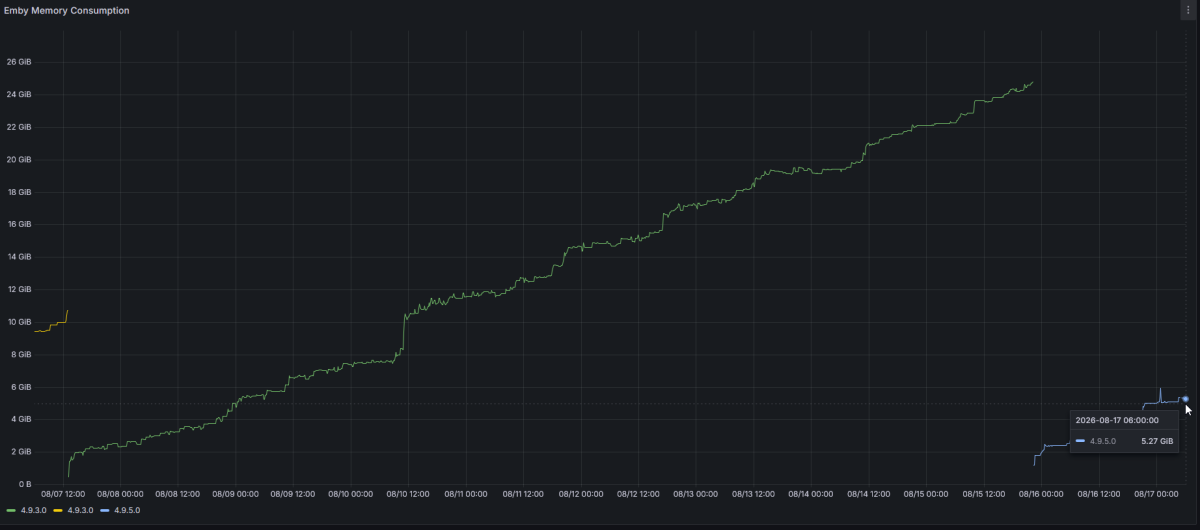
Database Cache Size - I have never changed this - it is currently 128Mb. Scan Media Library Task - This used to be scheduled for every 15 minutes and was like that for years. I have used Emby since before TrueNAS had docker support and Folder Watch was buggy on TrueNAS builds back in those days, so I needed full library scans every 15 minutes. I saw some forum posts about increasing the time between scheduled scans and/or using Folder Watch exclusively. I chose to disable all scheduled scans and just use Folder Watch. I have been testing this off and/on the past few weeks but have not seen any difference. As I mentioned earlier, I don't accept waiting 24 hours for my media to appear, especially when this was not the case previously. This server does have a decent amount of memory - 256GB - however it has a lot of other duties. This Emby instance is only for my personal use, so there has basically only ever been one stream at a time.. And memory slowly creeps up, regardless of if anything is playing it seems. 4.9.5.0 vs 4.9.3.0 memory consumption - still looks high (if not higher so far) for 4.9.5.0. Comparing memory usage after ~1 day for 4.9.3.0 - it was at about 3.5GB And looking at 4.9.5.0 after ~1 day: 5.3GB: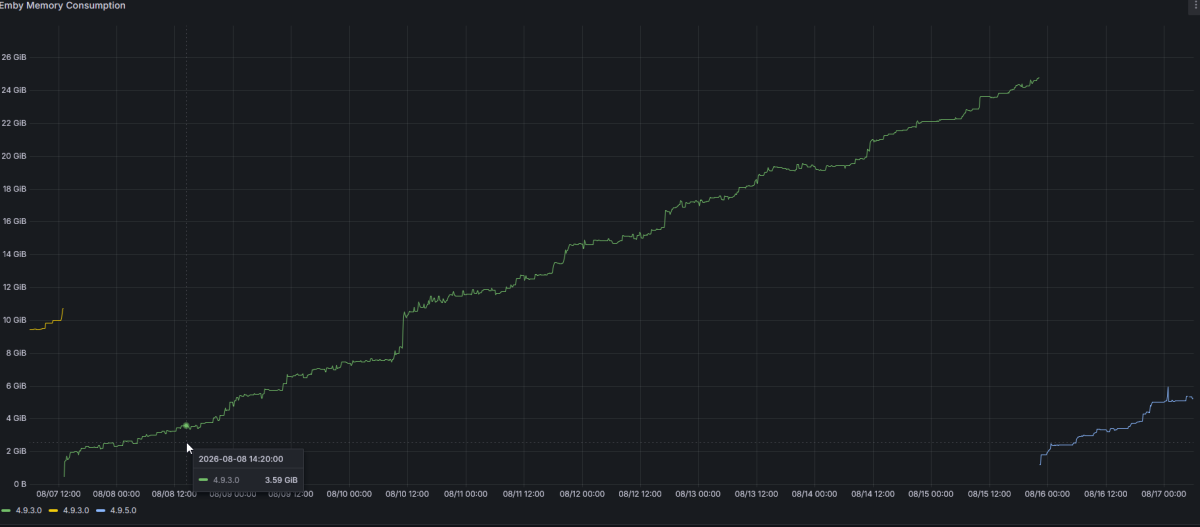
-
Hi there. Since few weeks i´ve started noticing that outside my house there are some films and series that don´t reproduce on TVs. One of them is grand torino and if i try to play it in my house nuc everything works ok but on my parent´s in law tv it shows the loading screen and after that it show an error like: can´t reproduce right now because there is no streams available. In the other hand, few movies that work or don´t, shows trailers that aren´t even related before playing the actual movie/series. How can i get rid of it? I attach the emby logs so you can see it. Thank you in advance. hardware_detection-63922575201.txt ffmpeg-transcode-9c8fc3b3-df21-448a-9c00-dafb9b70b21a_1.txt embyserver-63922575189.txt
-

new version doesn't play what it used to
CBers replied to groovejumper's topic in Android TV / Fire TV
Can you update the release notes for .55 please. -
I am running into an issue that i have no idea what is going on. The server will lock up overnight and when a client tries to connect it will just have a spinning circle. Once I restart the server it works all day until it locks up again. Any help will be greatly appreciated. Trying to attach the logs and one is more than it will let me upload please advise on what to do so you can get the log from the previos day. embyserver.txt
-
The author of the Package confirmed the compatibility of Transcode for x25 with Emby here: https://www.synology-forum.de/threads/transcode-for-x25.139541/#post-1282340 I just ordered the 425+ Regards, Jens
-
2.1.55g registered is what the screen says
-
Thanks for uploading the database. The paths for the cast / actors images appear ok now The music libraru still has the windows path. This should be removed Also you appear to have m3u playlists - the references to the windows m3u files will need to be deleted - so look at the playlists and delete them individually I see there are two sets of playlists - eg "Chemical Brothers - Surrender" is 2 playlists - one with the windows paths and one for the linux paths. After you remove the windows path for the library, i can check the database again to see if there are still references to the windows playlists
-

MediaInfo For Emby Plugin(HDR, Vision, Atmos, DTS:X)
gluk147 replied to Cheesegeezer's topic in Plugins
More than six months have passed. Is there a timeframe for updating ffmpeg? -

Users have the ability to delete any file by default?
DavidP5219 replied to DavidP5219's topic in General/Windows
I was pretty green when I set that up the first time, probably just didn't see it. Live and Learn. As a guy coming from Mezzmo back in the day, this is such a superior media server and everything just works. Wish I had found it much earlier than I did. Thanks for your help guys! -
@Lukeany thoughts on this? Thanks
-
A request to Emby - please clarify the situation with the AndroidTv app
FrostByte replied to ecrispy's topic in Android TV / Fire TV
Emby for Android is the one Emby wants to eventually consolidate to. Shares code and looks with their other clients so will require less time coding. Emby for AndroidTV is the one that is slowly being sunsetted. However, ebr is still maintaining it to fix bugs and make sure it still runs with any server changes and many people still run it. You can have them both installed. The process has been going on for about 6 years now and probably will for some time so you can run the one you like the most for right now. Both have features not found in the other. As far as that option I believe Emby for Android is the only one which allows you to do almost anything you can do on the server website. However, I'm having problems with my Shield right now and can't confirm that. -

Mint: No compatible streams are currently available
EriksUsername replied to EriksUsername's topic in Linux
Hi everyone, sorry it took so long to report back on this, but as it turns out it wasn't a sleep issue but a naming problem: one of my external hard drives is an internal disk I had removed from an older machine, and on it were two separate partitions that Linux called '[Drive name]1' and '[Drive name]2'. For some reason, every time an external device was connected or disconnected, Linux wanted to rename these partitions and as a result, my Emby libraries were disconnected from them. I have now renamed both partitions to something semantically relevant and for a few weeks now, everything has been working as it should. Thanks again for your help! -
Issues are enabled on GitHub for all users. It is a bit slow when there's a lot of data to load, I'm exploring improvements for that. You could try the beta branch which has some improvements in that regard, though I'm still exploring other ways to improve loading speed. It would be helpful if you could post your issues on GitHub for easier tracking.
-
great
-
I did not know what you mean initially, I thought you meant Refresh Metadata. Scan Metadata task took 41 seconds. I looked through some movies and so far I do not see broken images. I have also added 2 new movies and all photos are there, I will keep monitoring it. Thanks for the help.
-
I have read through the posts and the cause of the issues was this. Migration from filesystem with different delimeters in paths ("\" and "/") is not an option unless you find all the references and correct them. For example all the Images paths for the cast will have the wrong path folder delimeter Browsing the log from the 11th August - shows you have one library still referencing a windows path! Library: Muzyka, id: 7, CollectionType: music, CollapseSingleItemFolders: False, ForceCollapseSingleItemFolders: False Configured paths: /media/oomek/Data/MP3,D:\MP3 Library Folder: MP3, id: 8: path: D:\MP3 Library Folder: MP3, id: 67136: path: /media/oomek/Data/MP3 if all the media in D:\MP3 is now in /media/oomek/Data/MP3 then just edit that library and remove the D Drive windows path I will send you a link to upload a zip of the database and I will have a look to see what can be done to salvage this setup If you did have an issue with missing cast images before the migration from windows to linux then that would have been a different issue