All Activity
- Past hour
-
 cynthiaadam101@gmail.com joined the community
 -
 DJ ANDER joined the community
 -
 2040568761 joined the community
 -
 x23991247@gmail.com joined the community
 -
 Chan279 joined the community
 -
I no longer see anything in 'Manage Downloads' after installing this update. The only way to delete downloads at the moment is to delete them from the 'downloads' section on the server
-
 Acostaja joined the community
 -
 Rezoan2026 joined the community
 -
 Manvir55 joined the community
 -
 kittiewuver joined the community
 -
I keep on looking though thanks bro I'm on meta as Uncle Frank LoL come chat with me bro on bigscreen, look for UnclesChatroom
- Today
-
No it does not
-
I would pay $40 for that with big top posters combined with trailers on the home screen yep I would pay $40 easy
-
logs added, just in case embyserver.txt
-
@Luke Hi, using Version 4.10.0.30 beta. today for 1st time very wired issue happened, add a new TV Season and other chapters, Emby did update as normal, I saw all episodes and the TV season, then it Vanished the TV Season S02 but other episodes are there. It is no longer under metadata folders nor TV Season (The Gentlemen) but in my PC I see Emby did added all the info + images in regard this TV Season. If I do a manual search in Emby. I can find S01 but not S02 the one I add. it is a bug ? Never seen this
-
So this is exactly what I would love emby to look like on the home page bro Video.mp4
-
Plays ISO, 3D, all formats of everything like VLC player does it looks INSANE on a meta quest it plays every format of 3D it's nuts I love it just need the trailers hahahaha
-
I jumped into meta quest 3 and made a video of the new emby app with watch party and banners at the top bla bla bla here it is. I have lot of 3d movies so shows as doubles not sure how to solve that but whatever Video.mp4
-
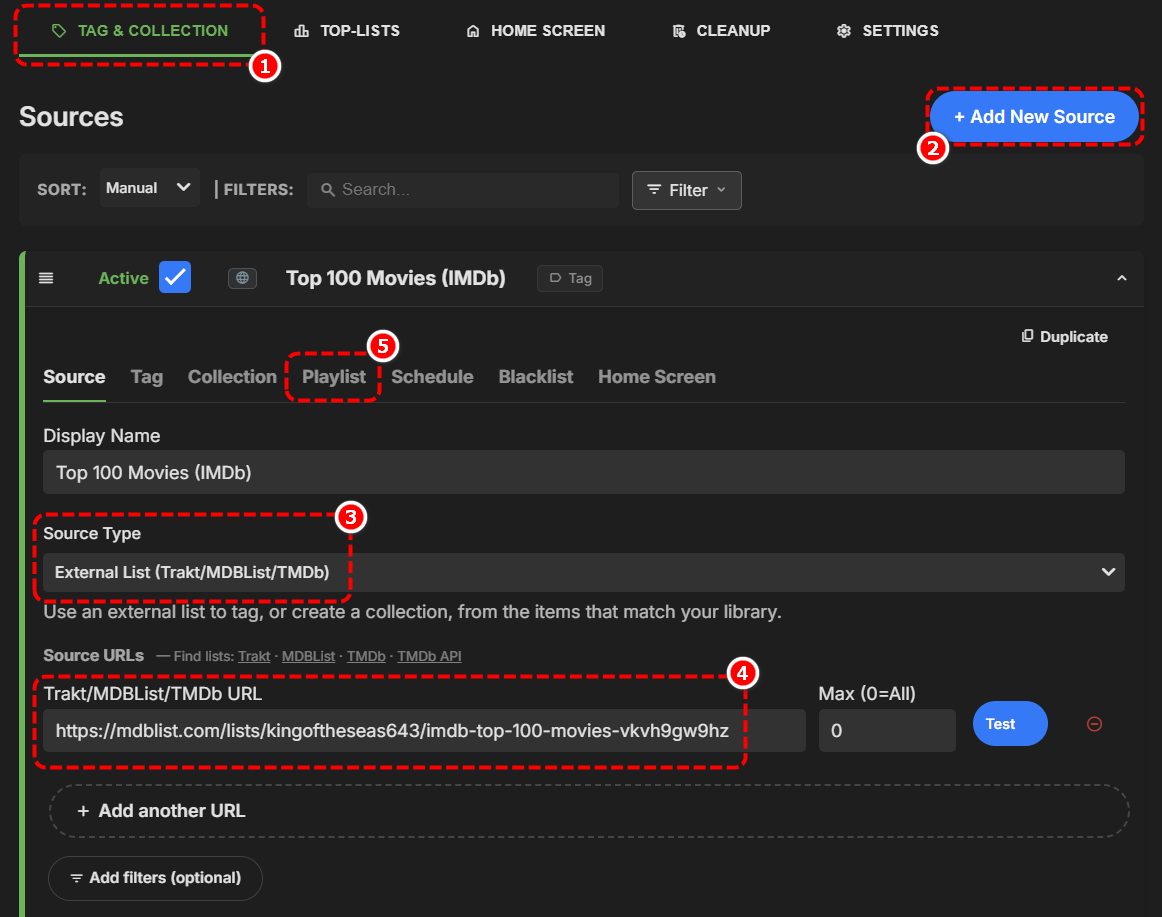
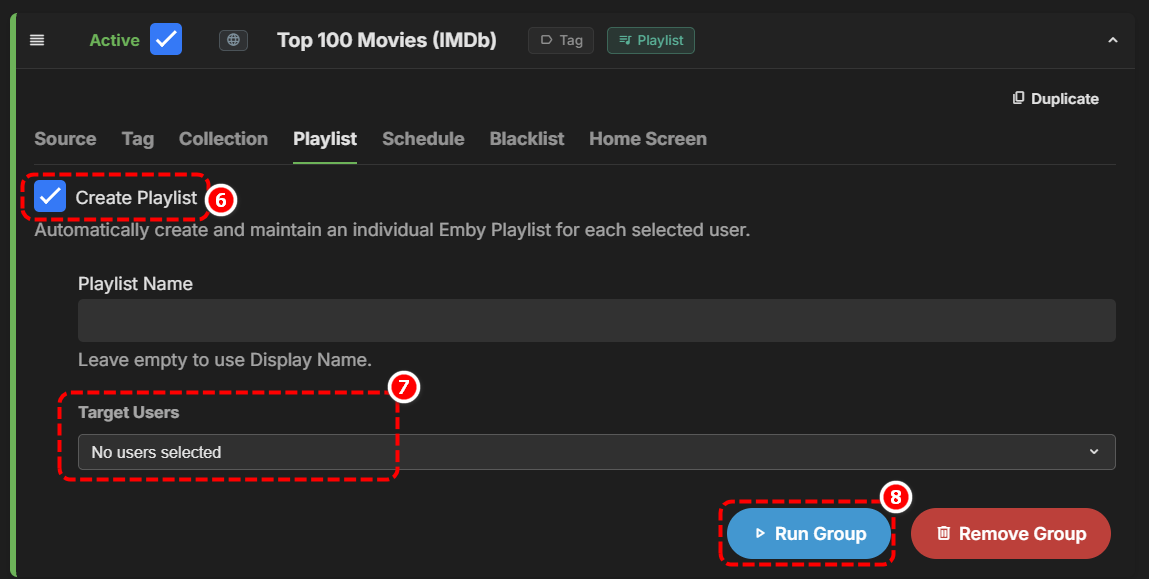
You can definitely use that plugin to achieve your goal. Browse 'Popular Lists' at MDBlist.com and search for a suitable list, once you find one you like - copy the URL eg. https://mdblist.com/lists/kingoftheseas643/imdb-top-100-movies-vkvh9gw9hz Now, using the Home Screen Companion plugin, 'Add a new Source'
-
If you want an existing TV client that auto plays trailers on the home screen - check out the Moonfin app, I'm pretty sure it already does this.
-
With a lot of help from Claude, I've built a fork of the already-very-cool Xtream Tuner plugin (by firestaerter3), which exports VODs to .strm files that Emby can scan/play and that I've found to be a lot more usable than the semi-official Webstreams plugin. My version optimizes things for using Dispatcharr as your XC provider -- so that you get the benefit of its proxy, connection management, and work to consolidate titles across multiple IPTV providers. Most notably, it adds a new review interface that makes it easier to pick the titles you want in your Emby library and exclude the rest. It gives you a de-duplicated view, so you only have to review a title once even if your Dispatcharr library has multiple verisons. It keeps track of which titles you have reviewed and only syncs titles once they've been reviewed -- so your library doesn't end up wtih a bunch of stuff you don't want while you're doing your initial review or when your provider adds a bunch of new content. You can download my fork of Emby Xtream (emby-xtream-dedupe) here. I've also built three plugins for Dispatcharr that solve other pain points around using Emby to watch your Dispatcharr VOD library. VOD Concurrency Fix helps Dispatchar see Emby's multiple seeks on playback start as just one provider connection, so VODs actually play instead of failing over to another provider and erroring out/playing garbled VOD Preferences gives you greater control over which stream of a particular movie/episode Dispatcharr serves you. You can prefer 4K/1080p/720p, prefer 5.1 audio as a tiebreaker within the same video quality tier, or always play a version you select via the Dispatcharr UI. The result is that you have one copy of the movie/show in Emby, and it automatically plays the version you want. VOD Episode Sweep ensures that Emby Xtream actually scrapes the latest episodes and copies of episodes in your Dispatcharr library. Dispatcharr won't do this refresh on its own, even when it syncs with your providers. The result: new episodes of series you're following show up in Emby automatically. Dispatcharr is a great product overall that works really well with Emby for Live TV right out of the box. After using them for a few weeks, I'm really happy that my fork of Xtream Tuner and these three plugins create a similarly seamless experience with VODs. Hope they help someone other than just me!
-
Oh not me I love auto trailers I think it makes things look so good I would love a home screen with auto trailers been wanting this on emby forever same as the banners at the top of emby I wanted that for years. If Luke can't do it im ok with that, 3rd party app is fine with me I can't crap on emby team not all coders can do certain things I get that but I always stick with emby even if Luke can't code it im good with it. 3rd party creators need to eat just like the next guy right Luke can keep the ship floating and 3rd party creators can make things look better and more polished to date One thing about Luke he never skips a day & helps everyone & is appreciated greatly!
-
Fair enough and good luck. Preferably not AUTO-trailers though. Personally not a fan of things that start playing by themselves. Options are good though.
-
Bro you are appreciated even for looking into it my friend, I'm trying to get a coder to do it on a client app that's brand new no one even knows about that has big banners at the top that we all like it has watch party loads of stuff. Just trying to get him to add auto trailers on home screen I'm trying We got the banners at the top so far so good
-
Having a look around it might need css / html / possibly JavaScript which I'm afraid is way beyond my limited abilities.
-
Your just like my son Lip Gallagher the smart one in the family I'm sure you will figure it out my boy.

- Yesterday
-
I'm flattered but I'm really not, most of my css comes from asking others, such as Happy2Play for help. I'm really a trial and error type - try, try, try, try, occasionally get somewhere, mostly give up.
-
I will have to get css from arrbee99 to do this, if anyone can get a trailer to play it's arrbee99 on the desktop version of emby I know he can do it he's the smartest css guy on the forums
-
@Lukeyou are already half way there my friend think about it ok so as of now we are able to download our own trailers add them into each folder click on a movie or whatever and have the trailer auto play in that specific area right? So on the home page where it shows recently added can you simply have the same auto play method you already have implemented play the trailer in the top right for each item on the home page Thanks.
-
I've noticed this recently, where every once in a while it will take longer. Normally it is very quick.
-
Funny but truth be told for my family I use the old app on firestick without the left menu so they don't phone me asking what's wrong with emby
-
The tubi one is just ok but to have the trailer play in the top right looks so good after a few seconds it auto plays that would be fire.
-
So you were able to find our left menu?
-
Like this bro and yes the left menu I like it. Video.mp4