
All Activity
- Past hour
-
 Todins joined the community
 -
 Sngl joined the community
 -
 qaziz1 joined the community
 -
 Tj007-123 joined the community
 -
 dhoom997 joined the community
 -
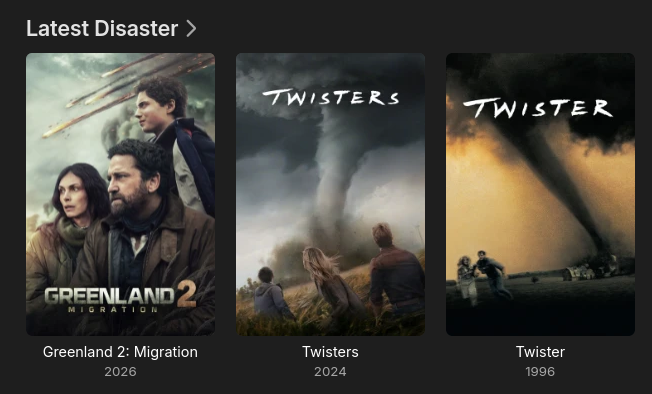
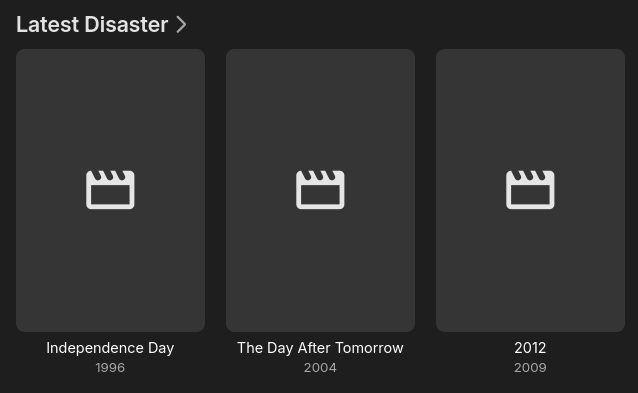
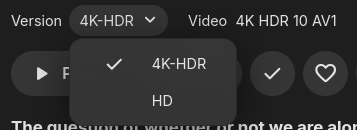
Here are some screenshots... This is just one library. The structure is like this movies - HD - Disaster - Movie (year) - movie (year) - HD.mkv - poster.jpg - UHD - Disaster - Movie (year) - movie (year) - 4K-HDR.mkv Then I have a library Disaster and I add the /HD/Disaster and /UHD/Disaster to it It joins the files perfectly as shown in join.png I have since added a few 4K movies to my library, and after the upgrade (as shown in 4.10.png), it now has the new 4K files showing as latest additions and no poster. If I add a poster to the folder and scan files, they appear fine In summary, 4.10 treats the newly added 4K files as their own entry in 'Latest' where in 4.9 they were ignored and seen as an addition to the original HD version. They are still joined, just the metadata seems to be reflected. As mentioned, I think I have been leveraging a previous bug and I honestly dont care if you just accept this is how it should be as I will work around it, I am just pointing out this upgrade changed things.
-
 jianghai joined the community
 -
 dakor993 joined the community
 -
 duzen982 joined the community
 -
 darum970 joined the community
 -
 deqon958 joined the community
 -
yes, but it is just a single 'row' where if I select Latest Media I see a row for every library
- Today
-
They sure did sadly It makes the latest stable completely unusable for me, I had to revert to last stable release. Thank god for backups
-

Plugin: Tracearr SSE - real-time playback, session, and library events
Dan_86 replied to Gallapagos's topic in Plugins
Can we get this in the catalog? -
I’ve never had this issue before but now multi word searches are completely broken across most apps for me… I’m running 4.10.0.40
-
I mean, kind of. The filter is doing what it is being told to do, yes. But I think we can all agree that a FSBS 3D movie is definitely not a 4K movie. I assume that right now it just looks at the actual resolution of the file and goes off of that. What I think might be the easiest to do is to just add a check to see if the mkv file is using the display height and display width fields. If it is, go off of those values whether it is a 4K video or not. If those fields are not used, then use the actual resolution. That would solve this problem as well as leaving open the possibility for having a 3D movie that is actually 4K.
-
So what is to be done about this? You said I was wasting time for vacuuming the database several times because I thought that might be a tool to address this possible explanation, which was flagged by another user and that you have now confirmed is a possibility. So please tell me what exactly I should be looking for and where: which files in which locations and which code.
-
It's certainly not impossible.
-

EMBY cause or consequence my files on hdd get corupted ?
David Patt replied to David Patt's topic in General/Windows
yes smart show everything ok after windows fix hdd , its just i power on pc one day and want watch movie and error and then i see movie file is 0 kb , or emby dont start at all and find out some files are 0kb , i have folder on hdd with gog installers and they dont get corrupt at all -

Exploring AudioMuse‑AI: A Self-Hosted Sonic Analysis Service for Music
Trevor68 replied to Relocate0604's topic in Third Party Apps
It is a real shame there is no Emby Plugin for this. Both Navidrome and Jellyfin have plugins, that symfonium takes advantage of for smart playlists. -
It doesn’t have to be. The latest release lets you pick what libraries go into it.
-
Unless I am mistaken, 'Recently Released Movies' or 'Recently Released Episodes' is across the all libraries and combined into a single stream, where 'Latest Media' is per library. Movies is a bit problematic for me as I have a library for each genre. That said, it could be solved by adding a new item to your dropdown 'Date Added behaviour for new content' to be 'Date Released'. You already have that date in the database, so I am just assuming you can just pass that to whatever you are using for sort order
-
That's what I asked Luke several times: is there a chance the db was keeping an artifact.
-
Might be worth checking in library.db if there's any trace of it after you remove it. I -think- this should work to pull something up if it is somehow still in there. I believe type 12 are albums. select * from MediaItems where type=12 and Name='Madrigals, Book 1'
-
OK we'll take a look at it. Thanks.
-
what address are you entering?
-
I don't know what happened with that particular album, but what you should see going forward when adding a brand new album is that the date added value of the album should match one of the tracks, whichever track gets imported first.
-
I'm sorry I don't understand what you're saying - what behavior? And I don't think this addresses my concern which is that when I importing clean, fresh files, there somehow is differential behavior in the date being assigned not to individual files but to the albums Emby "creates" from those files. Why is this happening and how can it be stopped?
-
HI, that is a tough one because I think the filter is doing the right thing. It's only job is to look at resolution. I guess we'd have to change the 3d filter from a simple toggle to an all/yes/no
-
HI, is this the web app?
-
OK I think if you tested on a fresh install of the server now you'd see the behavior I'm describing.
-
My own Server in the same Network
-

Spotlight/Fokus item not centered when navigated via keyboard
Luke replied to SoliFlix's topic in General/Windows
HI, we'll take a look at it. Thanks. -

NVIDIA Shield screensaver appears while paused, then playback resumes behind it
Lessaj replied to Dr. Technolust's topic in Android
Sounds like the app restarted. I'll try to test later tonight. -

Spotlight/Fokus item not centered when navigated via keyboard
SoliFlix posted a topic in General/Windows
When navigating the Home page's Spotlight/Fokus banner with the keyboard arrow keys, the focused item snaps to the left edge of the scroller instead of staying centered. Only affects the normal desktop web layout. In TV display mode, keyboard navigation centers the focused item correctly with no issue. This happens on a clean install with no plugins/customizations active. spotlight.mp4



