All Activity
- Past hour
-
 Ahmedlas joined the community
 -
 HIGHFIRE911 joined the community
 -
 AkersBrewer joined the community
 -
@graytincthe 4k problem should now be fixed, if not send a message Emby.FastIptv.dll
-
 M8.rb joined the community
 -
 Jefe_Maestro joined the community
 -
 Hasi1967 joined the community
 -
 ibsaabdulfath joined the community
 -
 Amor 78 joined the community
 -
 Dragonrat joined the community
 -
 Hussein98 joined the community
 -
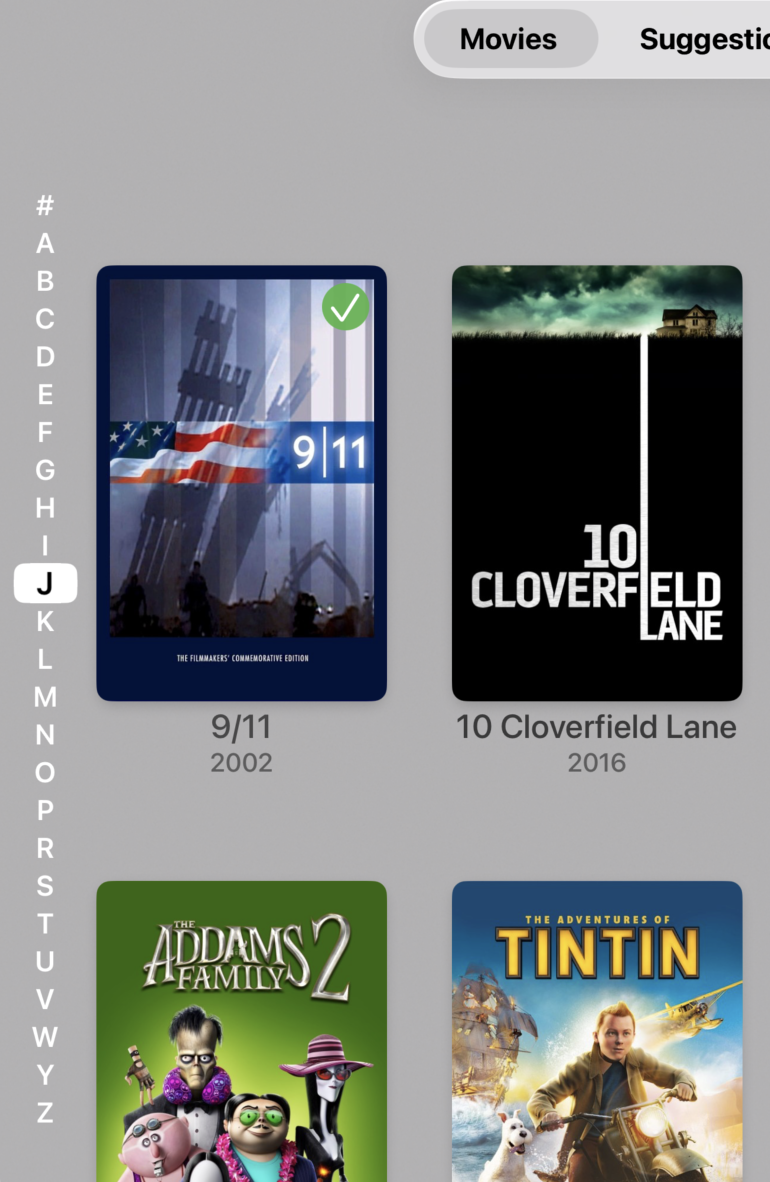
I don't own an Apple TV, but why will the letters be on the left when in all other apps they are on the right? Also provided the Apple app also has the 'side menu', chances are very high to open that menu instead of just navigating to the letters.
-

[Beta] ROMote – play your retro game collection in the browser (NES → PlayStation)
digitalirony replied to digitalirony's topic in Plugins
Update for anyone hitting the internal-vs-external issue: fixed and improved in 1.0.0.32. Two things were going on. First, a straight bug: the "Play Game" link was being forced to your Emby External Domain even though the setting said leaving it blank gives a relative link. So it worked from outside but not on the LAN, where that domain doesn't resolve. Second, the bigger point that a lot of servers have both browser users and native-app users, and those genuinely need different kinds of links (a browser wants a relative link that follows the current address; a native app opens your device browser and needs a full absolute address). Rather than pick one and break the other, each game now shows up to two launch links: - "Play Game": a relative link. Works in any browser, on your local network or remotely. Use this in the Emby web app. This is what fixes the LAN problem. - "Play Game (app)": an absolute link, for the native Emby apps (Android/iOS/TV). It appears automatically whenever an external address is available (your Emby External Domain, or an optional Public URL field in ROMote settings). If you only use a browser, you'll just use the first link, and on a simple setup with no external domain that's the only link shown. If you have app users too, they get the second one. Setting the external address adds the app link without changing the browser link, so neither breaks the other. To update: grab 1.0.0.32 (attached), stop Emby, replace ROMote.dll, start it. Browser play should work inside and outside with no settings changes. The app link shows up on newly scanned games; if you have a large existing library and want it on those right away, run a metadata refresh on the Games library. Thanks for the detailed report. It turned into a better fix than the original bug. ROMote.dll -
I removed it trying to troubleshoot why it is failing. I added back and it sees a backup in settings, but it will not run a back up in scheduled tasks.. it says "failed" if you can tell me what logs will help you help me determine,, it would be greatly appreciated.. There is a conflict somewhere and we cannot find it.
-
Hi, can you please provide the contents of the browser debug console? Thanks.
- Today
-
Is it primarily multi-word searches that is the issue?
-
@Noobrplease let us know if this helps. Thanks !
-
Hi, you're having trouble installing or trouble using it? You don't need to install it yourself because it comes included with the server. You would only need to install it if you previously removed it.
-
Thanks to all! The forced refresh with cache delete combined with a change of the version did the trick.
-
I use Dispatcharr to proxy IPTV streams to Emby. It works great with Live TV streams. When I try to get it to proxy VOD files, though (via .strm files exported from plugins like Webstreams), something goes haywire -- lots of quick connects/disconnects to Dispatcharr, and then usually erroring out. These are on streams where, if I point the .strm file straight to the provider instead of Dispatcharr, everything works fine; i.e. it's not a provider issue or an issue with Emby being able to play the streams. I realize this may be a Dispatcharr issue (and will post over on that Discord, too), but I'm attaching an Emby log from when I was trying to play one of these streams and would love anyone's expert read on what Emby doesn't seem to be liking about what Dispatcharr is serving. And obviously if anyone else has run into this (probably niche) problem and found a solution, I'm all ears. ETA: The file in question here is one Emby direct plays when I try to load it straight from the provider, so there shouldn't be a transcoding issue here (and I did not see any ffmpeg logs from this attempt anyway). emby dispatcharr VOD debug.txt
-
Because this is not the path to the movie. This is the path to the parent folder. Give it the path to the video file and it should work.
-
HI, make sure to increment the version number, otherwise it will require workarounds like mentioned above to force a refresh.
-
Hi, not yet. We need to redesign that dialog into two separate stages. Thanks.
-

Plugin: Ginjaninja Tools - Sync Channel - Radarr & Sonarr & ? Channel Sync Tool
Luke replied to ginjaninja's topic in Plugins
Thanks for sharing. -
@DarkStar1977?
-
Hi, scrolling to a specific letter will be in the next update to Emby for Apple TV: Thanks guys.
-
Hi, scrolling to a specific letter will be in the next update to Emby for Apple TV: Thanks guys.
-
Hi, scrolling to a specific letter will be in the next update to Emby for Apple TV: Thanks guys.
-
Hi, scrolling to a specific letter will be in the next update to Emby for Apple TV: Thanks guys.
-
Hi, scrolling to a specific letter will be in the next update to Emby for Apple TV: Thanks guys.
-
Hi, scrolling to a specific letter will be in the next update to Emby for Apple TV: Thanks guys.
-
Hi, scrolling to a specific letter will be in the next update to Emby for Apple TV: Thanks guys.
-
Hi, scrolling to a specific letter will be in the next update to Emby for Apple TV: Thanks guys.
-
Hi, scrolling to a specific letter will be in the next update to Emby for Apple TV: Thanks guys.
-
Thanks, much better but not enough. Will wait 3050 and than compare.