
All Activity
- Past hour
-
 Pascal50LC joined the community
 -
 Dalal.alhendi joined the community
 -
Please don't necro two year old threads.
-
 jfarnsy joined the community
 -
 lmz0608501X joined the community
 -

Android App silently "crashes" when switching networks
brothom replied to brothom's topic in General/Windows
This issue can also be reproduced somewhat easily by having Emby open via the Browser and then just disconnecting from WiFi. Emby doesn't "understand" the local IP no longer being available and doesn't attempt to connect via the public domain/hostname. Shouldn't we always connect from the hostname, rather than the local IP? The reason I'm bumping this is because some of my users have been trying out the audio feature but are running into these issues when moving into/out of the house. -
 lmz0608501 joined the community
 -
 GalMor joined the community
 -
How long did you wait? It can take a few minutes for the plugin to load the items.
-
Samsung TV App playback desync, crash after pausing longer than x-amount of time
brothom replied to brothom's topic in Samsung Smart TV
I have been unable to reproduce this issue at all anymore, which is extremely annoying. Perhaps it has been fixed or was a one-timer due to networking issues. Perhaps we should close this for now. -
Just further to this, I have noticed quite a lot of performance problems since upgrading to the latest version. Trying to watch something this afternoon via Chrome and it wouldn't play, I've tried stopping the package but the memory on my Synology kept climbing up to 380Mb so I've restarted the NAS
-
I install the plugin and try with "@MrBeast" and i let show trending but when i go in youtube plugin mrbeast folder and trending folder are both empty ?
-
 A1B1C1 joined the community
 -
 66dspan joined the community
 -
 Beboyza001 joined the community
 -
Have you checked whether the FLAC files themselves play correctly in other browsers/devices? I've seen a few cases where unusual metadata or embedded tags caused odd playback behavior. It might be worth testing one of the affected files after cleaning up the tags. I used editmp3tags.com a while back to inspect audio metadata and it helped identify a couple of problematic files.
-

Any update on hardware (Nvidia) transcoding support on ARM64 platforms?
WayneZ replied to WayneZ's topic in Linux
Yes, I tried the official image but still doesn't work. Here is my docker compose. Please find the logs attached as well. services: emby: image: emby/embyserver:beta container_name: emby runtime: nvidia restart: unless-stopped environment: - UID=1000 - GID=1000 - GIDLIST=44,993 group_add: - video volumes: - emby_config:/config:rw - emby_medias:/data/medias:rw devices: - /dev/dri:/dev/dri networks: - traefik_public deploy: resources: reservations: devices: - driver: nvidia count: all capabilities: [gpu, video] hardware_detection-63917807778.txt embyserver-63917843758.txt embyserver.txt - Today
-

The search experience in Android app needs to be fixed
crusher11 replied to ecrispy's topic in Android
I search on my phone or computer and then pin the thing I want to watch to my home screen. In fairness, I do the same thing with all my streaming services. -
The urgency from the devs does not even come close to matching the seriousness of the issue. Took weeks to get a response from @Luke, and there's still no sign of @softworkzin this thread.
-

Option: Sign out all devices after password reset
Khalixi replied to Khalixi's topic in Feature Requests
^ This is for emby connect account -
You might also want to check whether Emby is set to prefer embedded tags or downloaded metadata. I've seen cases where a library refresh or metadata refresh changes where the information is being pulled from, which can make things look inconsistent.
-

Changing the sort order of recorded tv shows
pwhodges replied to interman's topic in General/Windows
You can separate the recordings in the server settings under "Live TV". Select the "Advanced tab, and explore the options there. After setting up a separate location for recording series, and making a Series library for it, you could move your existing series recording to it as an initial setup. That shouldn't be too arduous, as you'd be moving series folders, not individual episodes. Paul -
Hello this is basic but very much needed when there’s someone on my account I don’t want anymore but at the moment emby after changing the password the other user can still be logged in could we have this option in password reset page please This is helpful because sometimes you log in on someone else’s home device or in a hotel, after I no longer need it I can’t get rid of it
-
Please reread what I wrote cause I just did and it's clear as day. Lets try it this way. 1. Open Movie Series library 2. Select folder view 3. Use multi-select to select all Movie Series folders 4. Have an option for automatically naming all with the series / collection name I gave each Movie Series folder, then automatically adding the movies in each new collection / playlist to their collection / playlist
-
here is the log file. I see errors posting and maybe related to my vpn container. I am new to docker and linux... so please feel free to help me correct it if applicable... I need emby to run behind a vpnembyserver.txt
-

Emby Low Quality Posters / Video Thumbnail Generation Failure
JsinFate replied to JsinFate's topic in General/Windows
@Luke& @Lessaj I think you both solved it. I looked at my Movie library settings and for some reason OMDB was first in both metadata and image settings. I always have them at the bottom. I have no idea how it got to be top priority. I'm refreshing metadata for several shows and movies. I have a feeling you both are right. Sadly, that means I will need to refresh all metadata for all of my movies and shows to make sure the issue is fixed. I'll let you know how it goes. Thank you both! -
Ok para la próxima hago un registro
-
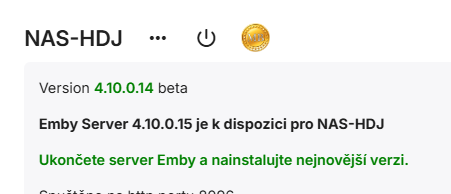
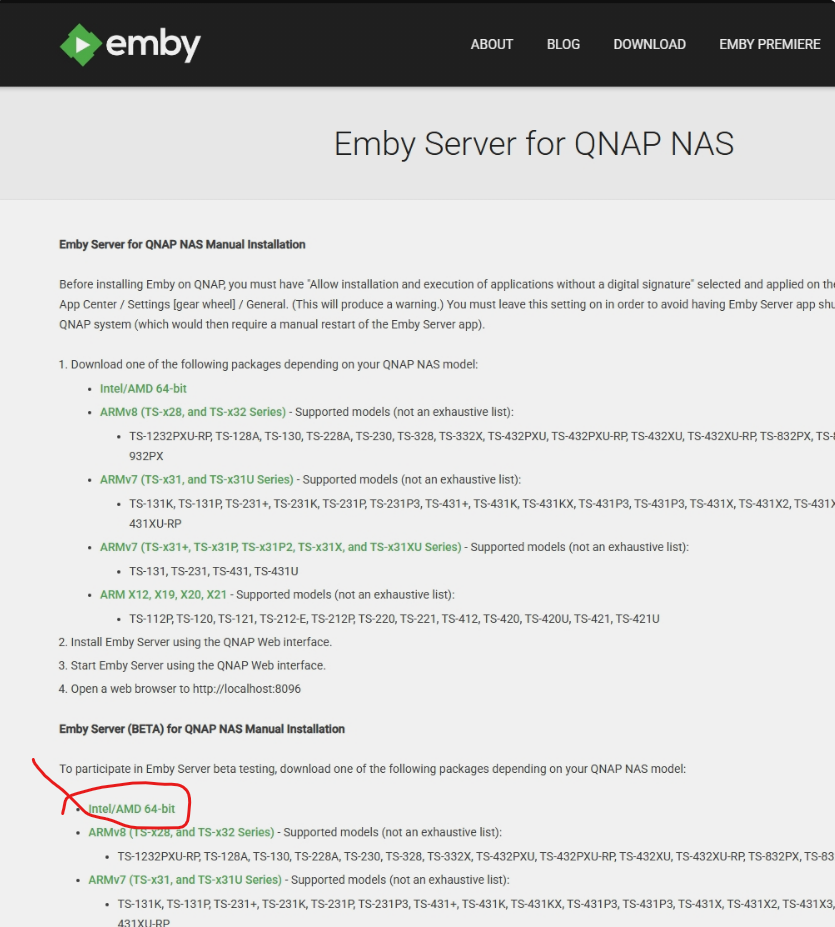
Hello, In Emby server Setting (fo QNAT Emby Serve you declere new version 4.10.0.15 (see picture), but on Web page is still old version 4.10.0.14. BR J
-

Regarding the issue of 4.9.1.80 and the plugin Bluray Folder Support 1.0.3.0 recognizing BDMV original disc fi
LonelyCat replied to LonelyCat's topic in Synology
My problem is still there, so I will stay at 4.8.10.0. I'm not sure if it's an issue with my server. -
Regarding the issue of 4.9.1.80 and the plugin Bluray Folder Support 1.0.3.0 recognizing BDMV original disc fi
LonelyCat replied to LonelyCat's topic in Synology
I tested it again on 4.9.5.0, and although the Bluray Folder Support plugin has been updated to 1.0.5.0, the vast majority of BDMV folders still cannot recognize media information and play it. Only one can recognize and play it during the test.Still the same issue, there is a similar Error Report in the log as before.Although BLURAYISO cannot recognize media information, it can be successfully played using an external player. In addition, the 4.8.10.0 plugin with Bluray Folder Support 1.0.2.0 on the same server can accurately recognize media information in the BDMV folder and play it. embyserver.txt -

2.310.2.0 cannot play videos with multiple audios
talone replied to talone's topic in Windows & Xbox
i asked Gemini, it says the problem is about the subtitle burning. Nothing about the multiple audios. Then when i choose subtitle "none", it plays fine. So it is about the subtitles. Is there any setting that I should do? -
Not yet, I always wait a little while after release to be sure it's a good release I'll do the upgrade this week and let you know if it changes something.
-
Thanks for getting back to me Luke! I actually had given up and moved on... Just fired up the emby container again after updating to the latest beta release. Guess what? It is working again I can't tell whether this was related to emby or the underlying Unraid, which I rebooted and updated along the way. Anyhow, things are back to normal and I can think again about if I should make the switch back to Emby :)
-
 hi all. I hit a weird one this week, and after staring at it for longer than I want to admit, I wanted to write it up both as a breadcrumb for the next person googling and as a question for the Emby team: what is the right upstream fix so I can remove this wrapper? short version: Intel QSV/VAAPI worked perfectly when I ran Emby's bundled `ffdetect` manually inside the container, but Emby's own hardware detection reported zero hardware codecs. The thing that fixed it was wrapping `ffmpeg`, `ffdetect`, and `ffprobe` so they close inherited file descriptors `3+` before execing the real Emby binaries. environment: - Emby Server `4.9.5.0` - official `emby/embyserver` Docker image - Emby ffmpeg `5.1-emby_2023_06_25_p4` - container running in an Ubuntu `24.04.4` VM, kernel `6.8.0-124-generic` - Docker `29.6.0`, compose `5.1.4` - VM host is Proxmox `9.2.2` - Intel mobile 12th-gen iGPU, Alder Lake-P / Iris Xe class, Minisforum MS-01, passed through to the VM - `/dev/dri/renderD128` present in the VM and mounted into the container - Emby process running as uid/gid `1000`, with the render group added through `GIDLIST` - VAAPI in the container reports libva `1.22.0` and Intel iHD driver `25.2.4` the symptom was not "the GPU is missing". The render node existed, permissions looked right, and manual probes worked. the exact bad state looked like this: - Emby's hardware codec inventory/API showed zero hardware codecs, or only software codecs like `x264`/`x265`. - the UI behaved as if hardware transcoding was not available. - Real playback could fall back to `VideoEncoder=x264` / `VideoEncoderIsHardware=false`. - meanwhile, running Emby's own detector by hand inside the same container and same image saw VAAPI/QSV just fine, for example `ffdetect ... vaencdec` and `ffdetect ... qsvencdec` returned the expected codec list. - the annoying bit was that Emby-spawned detection did not necessarily throw a clean "permission denied" style error. Would see log errors like `Hardware Detection`, `ffdetect_vaencdec`, `ffdetect_qsvencdec`, `CodecList`, `CodecInformation/Video`, `VideoEncoderIsHardware=false`, and "manual ffdetect works but Emby shows no hardware codecs". things I tried before the fix: - Verified Proxmox PCI passthrough and that the guest saw the iGPU. - Verified `/dev/dri/card0` and `/dev/dri/renderD128` in the VM and container. - Checked uid/gid/render group mapping. - Moved to the official Emby image to remove linuxserver-specific variables. - Tested the bundled `ffmpeg`, `ffprobe`, and `ffdetect` directly. - Played with the container nofile limit, because I suspected a weird fd issue. That did not fix it. - Avoided privileged/seccomp changes; those were not needed. the clue came from instrumenting the child processes that Emby was spawning. When Emby launched `ffdetect`, the child inherited an unrelated high-numbered fd from the parent EmbyServer process. In my repro it was fd `117`, pointing at an EmbyServer socket. When I launched the same binary manually with `docker exec`, that fd was not there and hardware detection worked. that was the tiny trapdoor in the floor. the workaround image keeps the vendor binaries as `*.real`, then symlinks `/bin/ffmpeg`, `/bin/ffdetect`, and `/bin/ffprobe` to a tiny launcher: #!/bin/sh set -eu name="${0##*/}" real="/bin/${name}.real" for fd_path in /proc/self/fd/*; do fd="${fd_path##*/}" case "$fd" in 0|1|2) continue ;; esac eval "exec ${fd}>&-" 2>/dev/null || true done exec "$real" "$@" after that, Emby's own hardware detection immediately reported the expected QSV and VAAPI codecs. In my case the inventory went from zero hardware codecs to 17 hardware codecs, including QuickSync H.264/H.265 decode and encode plus VAAPI entries. A real browser playback test of a 4K HEVC file then showed hardware decode and hardware encode, and the ffmpeg command line included `-init_hw_device qsv=...`, `hevc_qsv`, `vpp_qsv`, and `h264_qsv`. `intel_gpu_top` also showed Render/3D, Video, and VideoEnhance activity during the stream. so, question for the team: 1. am I crazy? did I need to do any of this? I could not find another way to get GPU transcoding working from inside Emby, even though the same tools worked manually. 2. is Emby expected to launch the ffmpeg-family tools with arbitrary non-stdio file descriptors inherited from EmbyServer? If not, would the right fix be in the process launcher, making sure only stdin/stdout/stderr are inherited, or that all other fds are marked close-on-exec before spawning `ffdetect`/`ffmpeg`/`ffprobe`? I am happy to test a build or provide more logs. the wrapper is an okay local bandage, but I would much rather remove it and run the stock image. Also entirely possible there is some very simple knob or obvious docker thing I missed, in which case I would love to be told that too.





