All Activity
- Past hour
-
 hongkongnoodles joined the community
 -
 egorsherihin@gmail.com joined the community
 -
 OmR-187 joined the community
 -
 markojudas joined the community
 -
 Parv1717 joined the community
 -
 Parv2717 joined the community
 -

4K HEVC shows as 1080p, think I can't find any setup to fix?
Teddyknuddel replied to PeteGul's topic in Android
The TV is designed to scale the content accordingly. If it didn’t do that, you’d have to slide across the sofa depending on what you’re watching – 4K or Full HD. Believe me, an LG OLED for 1,699 euros can do that better than a 7-year-old Chinese-made set for 220 euros. Generally speaking, you shouldn’t let an AV receiver process the picture at all. Pass the signal through as much as possible. Nothing else. -
 roque1234 joined the community
 -
 Alonso2408 joined the community
 -
 zhuyifan joined the community
 -
 salahj joined the community
 -

4K HEVC shows as 1080p, think I can't find any setup to fix?
PeteGul replied to PeteGul's topic in Android
I used to have it 1080, in my head that was the best because most streaming etc is in 1080p and that would not work good when GUI is on 4K. But it was in my head because I don't see point of showing in 4K when it is in 1080. But I'll try Never ever used upscaling on TV or AVR. Never heard any good about it. -
Many thanks for the offer but it's okay, i just have a lot to do lately. Again, many thanks for the offer though!!
-
Trop triste que Zatto n'est pas les chaines françaises
- Today
-
For those that want the same design across all platforms simply NO. MicroDICK tried that with computers, phones, tablets, etc and they failed miserly. Apple on the other hand took into account the sheen sizes and designed there OS to work with the particular screen.
-
Hi, I’ve been experimenting with extras again. I have an animated movie that includes a bonus film—complete with cover art, fanart, an .nfo file, etc. I’ve copied this movie—along with its cover, fanart, and .nfo file—into the "Extras" folder. It had already been scraped previously. Can't Emby use those .nfo files for the extras? Do I have to enter everything manually? What about the images? I can't seem to get them to scrape automatically either. Is there a plugin or workaround for this?
-
@fearless210thanks a lot for this! Waited a long time for this to happen and up until now, i used the original zattoo app on android (nvidia shield). Will definitely test this, if i find time and report back. P.S.: My region ist austria with an CH ultimate subscription (vpn proxy)
-

TV Show Status — TMDB-powered Returning/Ended/Cancelled badges for series
Blueskies278 replied to Blueskies278's topic in Plugins
@ginjaninja THE REAL CONSTRAINT IS THE CLIENT, NOT THE IMAGE • The current badge isn't drawn onto an image at all — it's injected into the page by JavaScript in the web client • That's why styling is basically unlimited there: colour, pill, text, position, icon shape are all just DOM and CSS • Android and tvOS can't receive any of it. The Android app loads its UI from an index.html baked into the APK at build time, not from the server — so no server-side change reaches it • There's currently no supported hook for third-party UI on those clients POSTER OVERLAY — NOT IMPOSSIBLE. IT WAS BUILT, AND IT WORKED • I've seen real badges rendered on real poster artwork • IImageEnhancer only fires when a client sends EnableImageEnhancers=true — Emby confirmed no official client does, and there's no server override • Stamping the badge into the poster file on disk does work, and does reach every client • But it looks like a sticker on the key art, and it permanently rewrites files in your real media library • So: not a logical impossibility, not an SDK impossibility — a "reaches everything but looks bad and touches your files" problem WATCH-STATUS FEATURES — YOU'RE RIGHT ABOUT THE DATA, WRONG ABOUT WHERE IT CAN GO • Yes, the plugin can know premiere/finale position and season completeness. That's just querying • Yes, I can subscribe to watched events • But a baked-in image is one file on the server, shared by every user — while watch status is per-user • So a poster overlay can only ever reflect one user's progress. That's exactly why "preferred user" exists, and exactly why it feels awkward • The web badge avoids this entirely, because it renders per session • Images are also cached aggressively, on the server and on every client. A badge that changes each time an episode is watched would mean constant redraws, plus cache invalidation that clients may simply ignore — so people could keep seeing a stale badge regardless ON THE SETTINGS MATRIX • Your framing (level × image type × data type × presentation) is logically clean, and I take the point that the current options are confusing • But it multiplies to roughly six image targets × three data types × several presentation options • Most of those combinations only work on web — I'd rather simplify than ship a page of unavailable checkboxes WHAT I'M THINKING OF DOING One on/off tick per level, with Season and Episode off by default — nothing gets removed, anyone who wants them just turns them on. And the options relabelled using your wording, since I think the terminology was the bigger problem. Concept : TV Show Status — Settings Preferred user: [ Select user ▾ ] ── SHOW ──────────────────── ☑ Show badges on shows What do you want on the show poster? ☑ Status (Ended / Continuing) ☐ Premiere / Finale ☐ Season complete How should it look? Style [ Pill ▾ ] Position [ Top right ▾ ] Icon [ Calendar ▾ ] ── SEASON ────────────────── ☐ Show badges on seasons ── EPISODE ───────────────── ☐ Show badges on episodes Season and Episode would expand to the same set of questions if you tick them. With this many features I'm never going to please everyone, so sensible defaults plus an opt-in tick seems like the fairest approach. I think this a good compromise. -
Regression in the newest version - skipping around in the video resets playback speed to default. Expected (previous) behaviour: User-selected playback speed is remembered when using skip functions Replication steps: Play a video Set playback speed to non-default (e.g. 1.5x) Press the skip forward or backward buttons, or use skip intro Playback speed is reset to default.
-
@yockerif you need help with the app, create the repo and invite me as Collaborator. It's always sad to see a good project die, you always keep advertising mine when possible, so i want to return the courtesy.
-

ElegantEmby - Dark Rounded Theme for Emby Web
MediaEmby1968 replied to Pejamas's topic in Web App CSS
I've found a bug, at least it's happening to me. The "Continue Watching" and "Latest" images under "X" and more are cut off on the right. Here's a screenshot so you can see what I mean.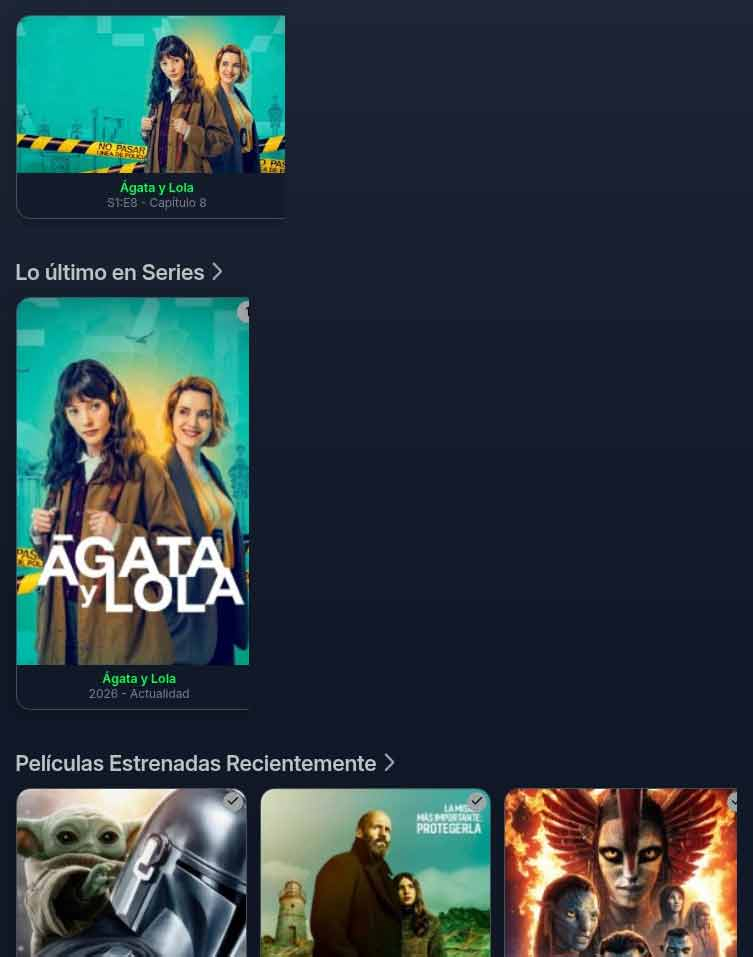
-
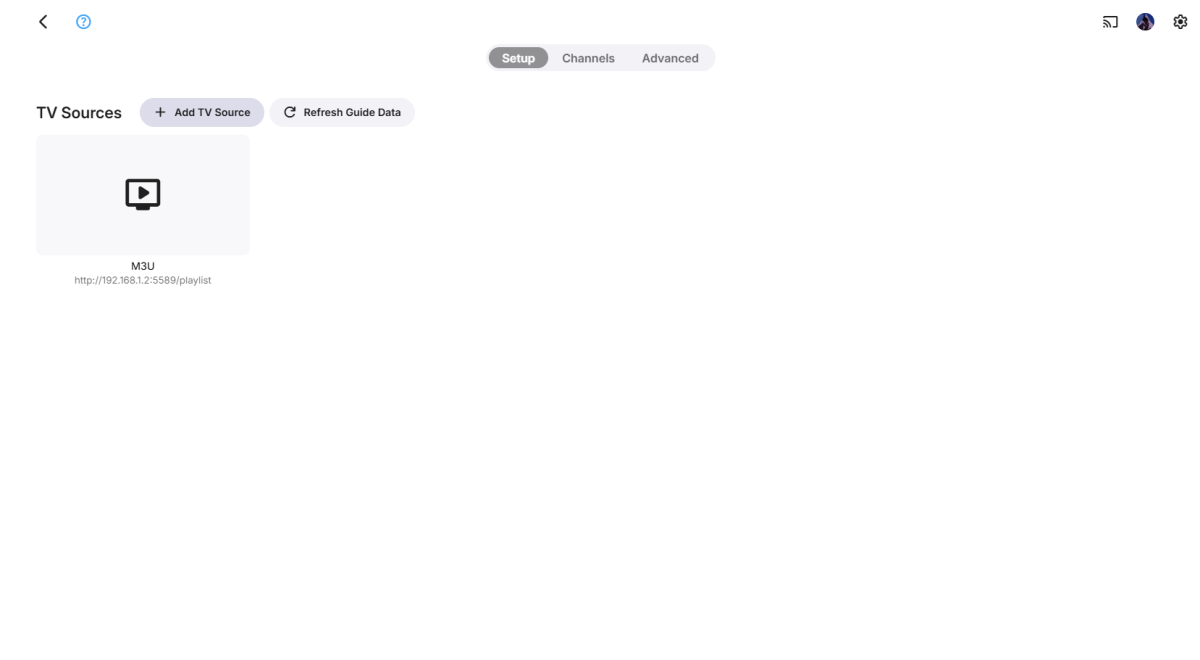
I am trying to add M3U tuners to my live tv section but the option to add guide data does not appear. Troubleshooting steps tried: Uninstalled and reinstalled M3UTuner, Emby Guide Data, and XMLTV plugins, no effect. Verified that my Premiere is active and in good standing Any suggestions? embyserver.txt
-

Additional UI Aspect Ratio Themes Support (16:9, 2.35:1, Anamorphic, etc)
Eigeplackter replied to TheWorkz's topic in Plugins
I‘m lucky number 7 ^^ But I use a Custom resolution, so I don‘t loose any context. -
As already stated above. Please review: Quick Start to understand what Emby is and is not.
-

Additional UI Aspect Ratio Themes Support (16:9, 2.35:1, Anamorphic, etc)
scottpro replied to TheWorkz's topic in Plugins
Here's what I have: JVC-NZ800 projector (4096x2160 native, 8K e-shiftX, 17:9) Panamorph lens (1.35x vertical compression) 130" CIH masking screen, range 2.40:1=>16:9 in 1% steps Custom scripts/plugins/shaders for movie scaling, screen masking, projector control, tone mapping, ... When running Emby Theater UI through this system it renders to the full imager resolution, which is 17:9, and is then compressed vertically through the lens and finally gets displayed on the 2.40:1 screen. The entire UI is displayed on the screen but is squashed by 1.35x due to the lens. It would be great if Emby Theater had an option to adjust the horizontal scale to give more area for screen elements and bring the items back to their original aspects. If this was viewed on a system without a lens it would look stretched vertically but the horizontal scale was increased by 1.35, or a virtual display of 4096x2160 => 5530x2160. There could be basically 2 options. Option 1, UI crop. Option 2, UI scale. That would give users the ability to crop the UI to fit nicely in a scope screen without a lens, like 2.35 and others users with lenses to scale the UI to correct for lens scaling. That's what I want. Oh, does that make me lucky number 7. -
If you mean to apply the overlays on season images.... I will try but not quite sure how emby handles season images. i will do my research Yes I have just created a buy me a coffee link The project is completely free to use. If you'd like to support the development, I've added a voluntary support link: Support the project: http://buymeacoffee.com/amanade3
-
Hi Ebr, although not as originally intended, it does work perfectly for this scenario. it’s a bit more nuanced than being extras as it’s really 1 event, broken into multiple sections. It is always only one event, eg ufc fight night XXX and then during that event there will be a prelim section that is free to watch (to entice you to buy the main event) and then the main event itself. As I have fight pass I record them both and then add them to the same episode and just rename the end of the file -prelim or -main event. rather than merging the files together to have 1 giant event, it’s better to be able to select the section you want to watch, so you can get to the specific fight you want quicker. the only issue is that the order isn’t always correct, but on the grand scheme of things doesn’t really matter, but for the more traditional logic of say theatrical vs extended, it would be nice that theatrical is always first in the list as the director’s cut always comes chronologically after. I also do it for episodes of tv shows when they split into part 1, part 2 on the disk (or on tv cos they need to be only 1hr segments) but tvdb for example doesn’t give them separate episode numbers. This way the metadata lines up and Happens more often than you think. being able to select a version via a dropdown is one of the main reasons I moved from plex and is a lot more than just using it to select a format more compatible with your player, eg 4k and 720p
-
New release V 1.3.7.0 Excluded Season 1 from New Season detection (toggleable), single-season shows no longer misfire the blue badge. Added a new orange "New Episode" fallback badge for existing shows with recently added episodes that don't qualify for any other badge EmbyNewOverlay.dll
-
Hello ebr, I hadn't mentioned where I instigated the download - it was under "download to" as you suggest, and there is only one user on the server. Does that make a difference?... Thank you
-
You can follow the GitHub link above to see how it works. Since these are static, unchanging lists of 100 films, we just store their values inside the compiled plugin. The largest part of the plugin are the images it uses for the Collections, without them it would be a 450K file. Sample list complied into the plugin natively: https://github.com/bespokedb/AFI-100-Plugin/blob/main/Data/TenthAnniversary2007List.cs
-
Hi. Are you sure the download was setup by the same user? It looks like you used "download to" instead of setting up the download in the actual client under the user in question...
-

4K HEVC shows as 1080p, think I can't find any setup to fix?
ebr replied to PeteGul's topic in Android
The vast majority of your content should be already working fine. It was just this one wonky crop that threw thing awry. I would say, however, that you should set your Shield to 4K unless you truly believe that your display panel does a better job of upscaling. As far as the UI is concerned, it doesn't matter - that is in 1080 all the time anyway. -
Hi. From where and how does it obtain the lists?