
All Activity
- Past hour
-
 as14as14 joined the community
 -
TBH this looks like it's made by AI. Will not be using it.
-
 Alejandra G joined the community
 -
 GordonGekko joined the community
 -

Samsung Tizen app unable to play FLAC – infinite loading, no playback, forces AAC transcoding
Redji59 replied to Liskanet99's topic in Samsung Smart TV
2026-07-18 16:45:07.635 Info PlaystateService-0HNN084NTQB99:0000000F: http/1.1 Response 204 to host4. Time: 1ms. POST http://host1:9096/emby/Sessions/Playing/Stopped?X-Emby-Client=Emby for Samsung&X-Emby-Device-Name=Samsung Smart TV (TQ65Q80CATXXC)&X-Emby-Device-Id=10bdd30f-e796-4249-8128-60a32cb9a868&X-Emby-Client-Version=2.2.8&X-Emby-Token=x_secret5_x&X-Emby-Language=fr&reqformat=json. 2026-07-18 16:45:07.645 Info UniversalAudioService-0HNN084NTQB99:00000010: http/1.1 GET http://host1:9096/emby/Audio/9303/universal?UserId=x_secret2_x&DeviceId=10bdd30f-e796-4249-8128-60a32cb9a868&MaxStreamingBitrate=200000000&Container=mp3|mp3,mp2,mp3|mp2,aac|aac,m4a|aac,flac,webma,webm,wma,asf,wav|PCM_S16LE,wav|PCM_S24LE&TranscodingContainer=aac&TranscodingProtocol=hls&AudioCodec=aac&api_key=x_secret5_x&PlaySessionId=1784385582945&StartTimeTicks=0&EnableRedirection=true&EnableRemoteMedia=false. Source Ip: host4, Accept=*/*, Connection=keep-alive, Host=host1:9096, User-Agent=Mozilla/5.0 (SMART-TV; LINUX; Tizen 9.0) AppleWebKit/537.36 (KHTML, like Gecko) 120.0.6099.5/9.0 TV Safari/537.36, Accept-Encoding=identity;q=1, *;q=0, Accept-Language=fr-FR, Range=bytes=0- 2026-07-18 16:45:07.645 Info UniversalAudioService-0HNN084NTQB99:00000010: GetPostedPlaybackInfo request. IsPlayback: true, isInLocalNetwork: True 2026-07-18 16:45:07.647 Info UniversalAudioService-0HNN084NTQB99:00000010: User policy for redji. EnableAudioPlaybackTranscoding: True 2026-07-18 16:45:07.647 Info SessionManager: Setting _lastPlaySessionId for session d33520133093f189309e70555973bab3 to 1784385582945 -
 ndyyds joined the community
 -
 Judith1989 joined the community
 -
 sakib2y48 joined the community
 -
 Patf joined the community
 -
 ru3en77 joined the community
 -
 13641453236 joined the community
 -
 Amjobidon joined the community
 -
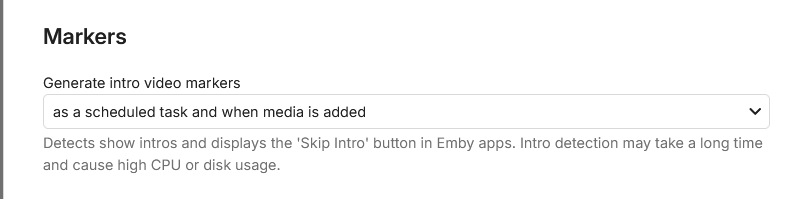
As explained, you need to have Into markers on the tvshow. intro detection must be turned on in the library itself and then Intro detection in scheduled tasksk. only then my plugin creates the themes.
-
Hi Running Emby 4.9.5.0 on Windows 11 Pro 25H2. I have 2 library locations, one is on the same machine as the server is running (NAS), the other is on another Windows 11 Pro 25H2 machine (Mediacenter). Both are on NTFS formatted drives. I am using UNC paths for both library locations. NAS is the server machine, Mediacenter is the lounge PC running Emby for Windows. \\NAS\Media\ \\Mediacenter\Media\ Both machines have subfolders under Media for TV, Movies, Music etc Real time monitoring is enabled for all libraries, but it is not working at all for any of the library locations on the Mediacenter machine. I copied a new TV series on to it today and 6 hours later it still hadn't detected it until I forced a library scan on it. The NAS machine picks up any new content pretty quickly. What steps can I take to fault find why this isn't working properly?
-

Android TV clients cannot authenticate through reverse proxy (browser and Android phone work)
ebr replied to Breezey's topic in QNAP
My 80% confidence guess is that your proxy is converting POST calls to GET OR not properly forwarding the POST data on POST calls. - Today
-
SmartPlaylist.dll Hi, Just to say upfront: I'm not a developer or programmer. With the help of Claude Code, I managed to get the SmartPlaylist plugin—which last worked for me as SmartPlaylist-2.5.0.4810 but stopped working after Emby updates—running again on Emby 4.9.5. It works perfectly on my setup (Emby Server on Ubuntu), but I have no idea whether it will work for anyone else. If anyone wants to give it a try, I've attached the updated DLL. The Emby developers have been promising to add this functionality for years, but since I no longer believe that's going to happen anytime soon, I decided to see if AI could help—and it did. As I said, I'm just a user, not a programmer, so unfortunately I can't provide support. All I did was use AI to update a version of the plugin that had worked in the past. If it doesn't work on your system, you could try using Claude Code to adapt it for your own setup. I tested several AI tools, and Claude Code was the only one that succeeded.
-
@Shortydidiyou click the link and read. Quick Start
-

Samsung TV Emby app: 'Date Added' sort showing release date instead - works fine on web/Edge
FrostByte replied to rcsnoopdog's topic in Samsung Smart TV
My guess is it's the client since it is fairly old. Like I said you can try and then go right back to the store version by uninstalling the beta and reinstalling the store version if you want. But shuttling a usb drive is kind of a pita (especially every 30 days) I for some reason like to always have the latest One of the devs will probably chime in when they see your post though and have a better idea what it is. -
Ok, now is done. I see the Plugin in my Dashboard. But I can it not use. I give the path and let all other things so. If I start the shedule ... nothing run ... 0 sec and also not a protocoll ... hm, where is my fault?
-

Samsung TV Emby app: 'Date Added' sort showing release date instead - works fine on web/Edge
rcsnoopdog replied to rcsnoopdog's topic in Samsung Smart TV
I have checked all settings & can't find anything that relates , maybe you have some setting different like layout or maybe something else, its not that big of problem - just thought you guys should know as everything else is perfect -
Samsung TV Emby app: 'Date Added' sort showing release date instead - works fine on web/Edge
rcsnoopdog replied to rcsnoopdog's topic in Samsung Smart TV
So I'm pretty updated already , dont fancy doing that every 30 days thing , I would rather leave as is , I wonder why yours is working and not me -
How do I do that
-
Samsung TV Emby app: 'Date Added' sort showing release date instead - works fine on web/Edge
FrostByte replied to rcsnoopdog's topic in Samsung Smart TV
If it's not the client then it is probably the server or a setting in the app, but I'm not sure what that setting would be since the steps you described were pretty straight forward. -
Did you install the server and add it? Have a read: Quick Start
-
Samsung TV Emby app: 'Date Added' sort showing release date instead - works fine on web/Edge
FrostByte replied to rcsnoopdog's topic in Samsung Smart TV
2.2.8 is probably the latest available to you in the Samsung store. There is a version on GitHub which is in review by Samsung which for some reason is taking a long time. Take a look at the following link on how to get the latest and sideload https://emby.media/community/topic/74969-samsung-tizen-smarttv-2015-present-beta-app-install-from-usb/ The only issue with the sideloaded version is that it comes with a timebomb of 30 days since compiled. So, you will have to then upgrade to the newer version (they release a new one at least every 30 days) or go back to the store version and wait. You can at least try it see if it fixes things though since no one knows how long it will take Samsung. Here is a list of changes since 2.2.8 https://emby.media/community/topic/31461-emby-for-samsung-smarttv-release-notes-tizen-orsay/ -
Just logged into emby keeps coming up add server or downloads won’t let me go any further help please
-
Samsung TV Emby app: 'Date Added' sort showing release date instead - works fine on web/Edge
rcsnoopdog replied to rcsnoopdog's topic in Samsung Smart TV
Are you saying mine is out of date - or seems so considering you have a different version - how do I update ? -
Samsung TV Emby app: 'Date Added' sort showing release date instead - works fine on web/Edge
FrostByte replied to rcsnoopdog's topic in Samsung Smart TV
Not a bug on my TV. When sorting by date added it shows them in the correct order. I'm running Samsung app v2.4.2 and server 4.10.0.20 beta. You could try sideloading the usb 2.4.2 release and running that until Samsung approves the new version they have and releases it to the store. However, I don't see anything in the release notes since 2.2.8 that would indicate there was any change in sorting. -

Advice please - getting the maximum from my EMBY Setup / Samsung HW-Q990C (Atmos and TrueHD)
One2Go replied to Robnaeyaert's topic in Hardware
If you want to save time and get 99% of the content formats decoded on the client there is only one, NVidea Shield TV Pro. Life is too short to drink bad wine, coffee and futz with device or component settings. I have an ntel NUC, Google Chromecast, Roku and Shield TV Pro connected to the Denon receiver and 90% of the playback goes via the Shield. Power up devices, navigate Emby and hit play, Enjoy the beverage and snack of choice. -

Advice please - getting the maximum from my EMBY Setup / Samsung HW-Q990C (Atmos and TrueHD)
Neminem replied to Robnaeyaert's topic in Hardware
I really wonder how much time OP has waited, for answers instead of just trying Turning on the Xbox and swapping ports fore those 2 cables -
Advice please - getting the maximum from my EMBY Setup / Samsung HW-Q990C (Atmos and TrueHD)
FrostByte replied to Robnaeyaert's topic in Hardware
You can only get TrueHD Atmos if the client has the encoder/decoder which supports TrueHD Atmos and is connected directly connected to a device with a decoder/encoder which supports TrueHD Atmos. Or, all devices in-between can also passthrough TrueHD. Since you are currently playing movies from your TV client no you will never get TrueHD Atmos that way because it doesn't have the necessary decoder/encoder to send it to your soundbar. Now if you connect your Xbox to your soundbar and use the Emby Xbox app then yes, you can get TrueHD Atmos. You probably can also try to add a client on your NUC which then plays your movies. Then it will all depend on your NUC hardware and whether it can passthrough TrueHD since the client would then be on your NUC and connected to your soundbar. It all depends on the client hardware though, not the server (unless the server is also your client). So yes, you probably have options now which you can try. -

Advice please - getting the maximum from my EMBY Setup / Samsung HW-Q990C (Atmos and TrueHD)
Robnaeyaert replied to Robnaeyaert's topic in Hardware
Sorry @FrostBytewhat I'm *really* asking is ---- Can I play TrueHD/Lossless Atmos media directly from my NUC PC (Emby Server) or my XBOX-X to avoid having to fork out for an nVidia Shield Pro? The only reason I'd entertain purchasing a nVidia Shield Pro is to get the most out of my HW-Q990C which you rightfully comment I paid lots of money for. I'm pulling my hair out trying to work out the best config given all the limitations of the TV being able to pass the signal to the soundbar and transcoding. I just want the best audio experience with what I have is possible. 1 x HW-Q990c + 1 x NUC PC running Emby Server + 1 x XBOX-X all connected to a 2022 Samsung Artframe TV Thanks again -
Samsung TV Emby app: 'Date Added' sort showing release date instead - works fine on web/Edge
rcsnoopdog posted a topic in Samsung Smart TV
Issue: When sorting movies by "Date Added," the app is actually sorting/displaying by the movie's release date, not the date it was added to the library. Comparison: This works correctly on the Emby web client via Edge browser — same server, same library, "Date Added" sorts and displays correctly there. It's only the Samsung Tizen TV app (v2.2.8) showing this behaviour. Steps to reproduce: Open Movies library on Samsung TV Emby app Sort by "Date Added" Result: movies appear ordered/labelled by release year, not by when they were actually added to the server Request: Please confirm if this is a known bug with Tizen client v2.2.8 specifically, or if there's a setting I'm missing that's separate from the "Date Added behavior for new content" server-side setting. -
Advice please - getting the maximum from my EMBY Setup / Samsung HW-Q990C (Atmos and TrueHD)
FrostByte replied to Robnaeyaert's topic in Hardware
If you connect your Xbox directly to your soundbar what you will gain is TrueHD Atmos/DTSHD playback because the TV won't pass those through. If you don't have any games with Atmos or use Emby on your Xbox then I can't think of any benefit to hooking it up like mine. You will probably lose the ability to place a shortcut on the Home which goes directly to the Xbox too. At least with my version of Tizen you can't have a different shortcut to each HDMI port on your soundbar. Just one and then you have to swap ports with your remote if needed. How you hook up your server doesn't have anything to do with the format of the sound file you're getting. A very slow connection can cause things to transcode and buffer but a file which is transcoded is going to be the same 384kbps AC3 format no matter how you have it set up. It's the client which determines the format by what it supports, not the server. Since the Samsung app is running on the TV itself the server knows what codecs your TV supports by what the client tells it. Those formats are indicated by the tables in your TV's user manual. If the client doesn't support or passthrough a certain codec then it will request a transcode from the server no matter how nice of an audio system or server that you have. Each codec costs Samsung money and your TV has just what's needed to stream movies from apps like Netflix online which is why it supports things DD+ Atmos. Soundbars support more formats because of things like UHD players which are meant to be directly connect to them. So, there's really no need for Samsung to pay for those decoders/encoders twice. The Shield and Xbox (at least newer versions of them) both can passthrough things like TrueHD Atmos if hooked up directly to an audio device which support them. There is a handshake between the two devices which the client device then acknowledges. That can't be done if hooking an Xbox or Shield directly to your TV so you don't gain much as far as audio goes doing it that way. If you are on the fence and think you may not need lossless audio then I would at least have an alternate audio file in my videos. Having a 640 kbps ACS track or an even better EAC3 track in your files will not only sound better than the transcoded one from the server but it will eliminate any on the fly transcoding which can slow down any streaming. All you need to do then is preselect the alternate track before clicking play. If you have the tools to make an EAC3 5.1 or 7.1 track (especially with Atmos) it can actually sound pretty good at higher bitrates when using a soundbar. I've got a lot of files with 1536kbps EAC3 7.1 Atmos tracks which are harder to tell the difference from TrueHD Atmos on my soundbar. If you have a nice expensive audio system, then you really should run Emby off something other than the TV. Why would you pay thousands of dollars and not listen to the best. Audio #2 ID : 3 Format : E-AC-3 JOC Format/Info : Enhanced AC-3 with Joint Object Coding Commercial name : Dolby Digital Plus with Dolby Atmos Format profile : Blu-ray Disc Codec ID : A_EAC3 Duration : 1 h 56 min Bit rate mode : Constant Bit rate : 1 536 kb/s Channel(s) : 8 channels Channel layout : L R C LFE Ls Rs Tfl Tfr Sampling rate : 48.0 kHz Frame rate : 31.250 FPS (1536 SPF) Compression mode : Lossy Stream size : 1.25 GiB (2%) Title : DDP Atmos 7.1 Language : English Service kind : Complete Main Default : No Forced : No Complexity index : 16 Number of dynamic objects : 15 Bed channel count : 1 channel Bed channel configuration : LFE Dialog Normalization : -27 dB compr : -0.28 dB Center mix level (cmixlev) : -3.0 dB Surround mix level (surmixlev) : -3 dB dmixmod : Lo/Ro ltrtcmixlev : -3.0 dB ltrtsurmixlev : -3.0 dB lorocmixlev : -3.0 dB lorosurmixlev : -3.0 dB Dialogue normalization, average : -27 dB Dialogue normalization, minimum : -27 dB Dialogue normalization, maximum : -27 dB






