All Activity
- Past hour
-
 BGA joined the community
 -
 MPWATERDAWG joined the community
 -
 Arizonatrl joined the community
 -
 Rylizo joined the community
 -
 Carv_alho777 joined the community
 -
 Andrés vargas joined the community
 -
 TonyMartins joined the community
 -

TrailerTheme – Trailer & Theme Song Downloader for Emby/Jellyfin/Plex (Windows)
Gembird79 posted a topic in Third Party Apps
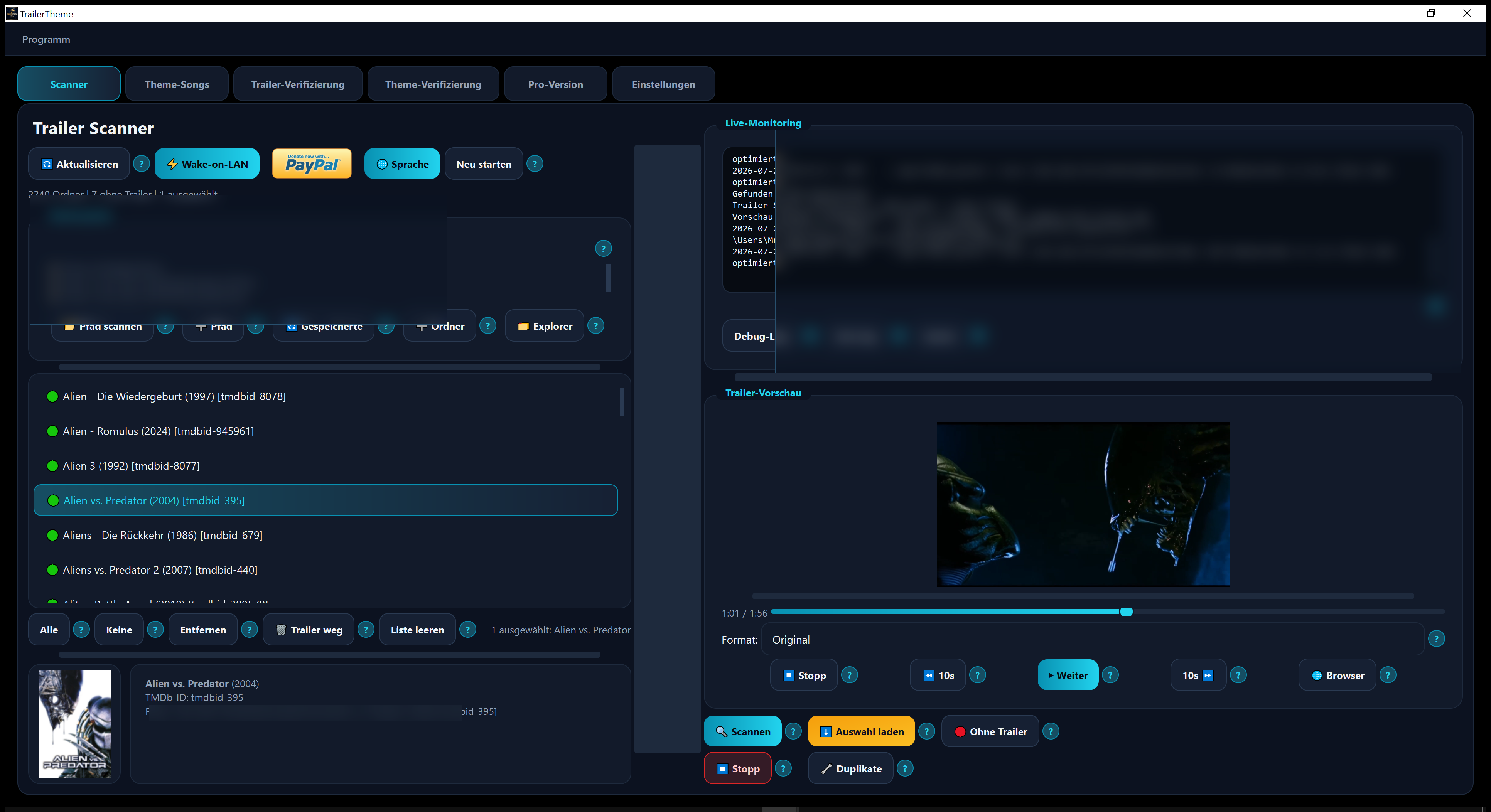
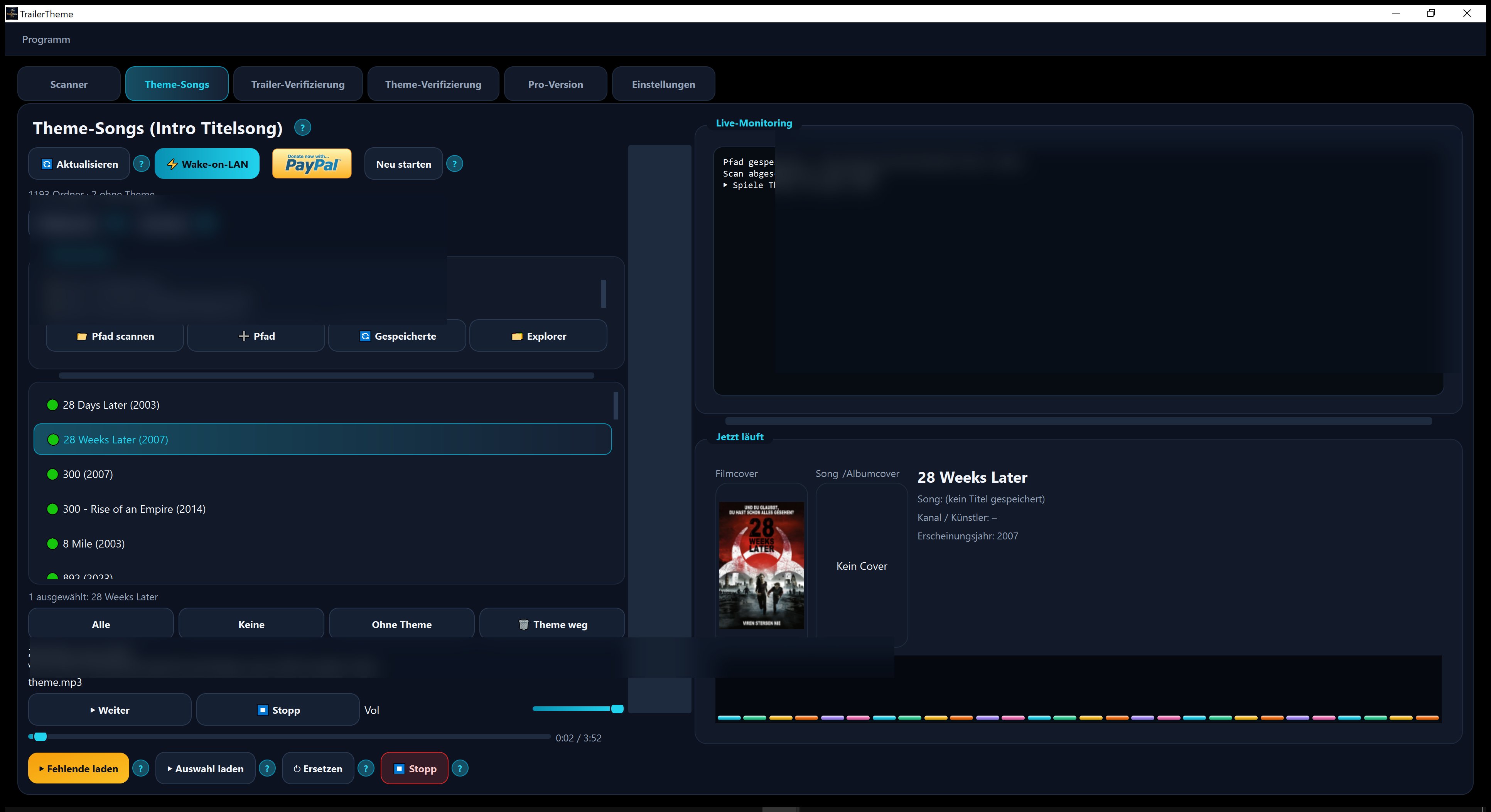
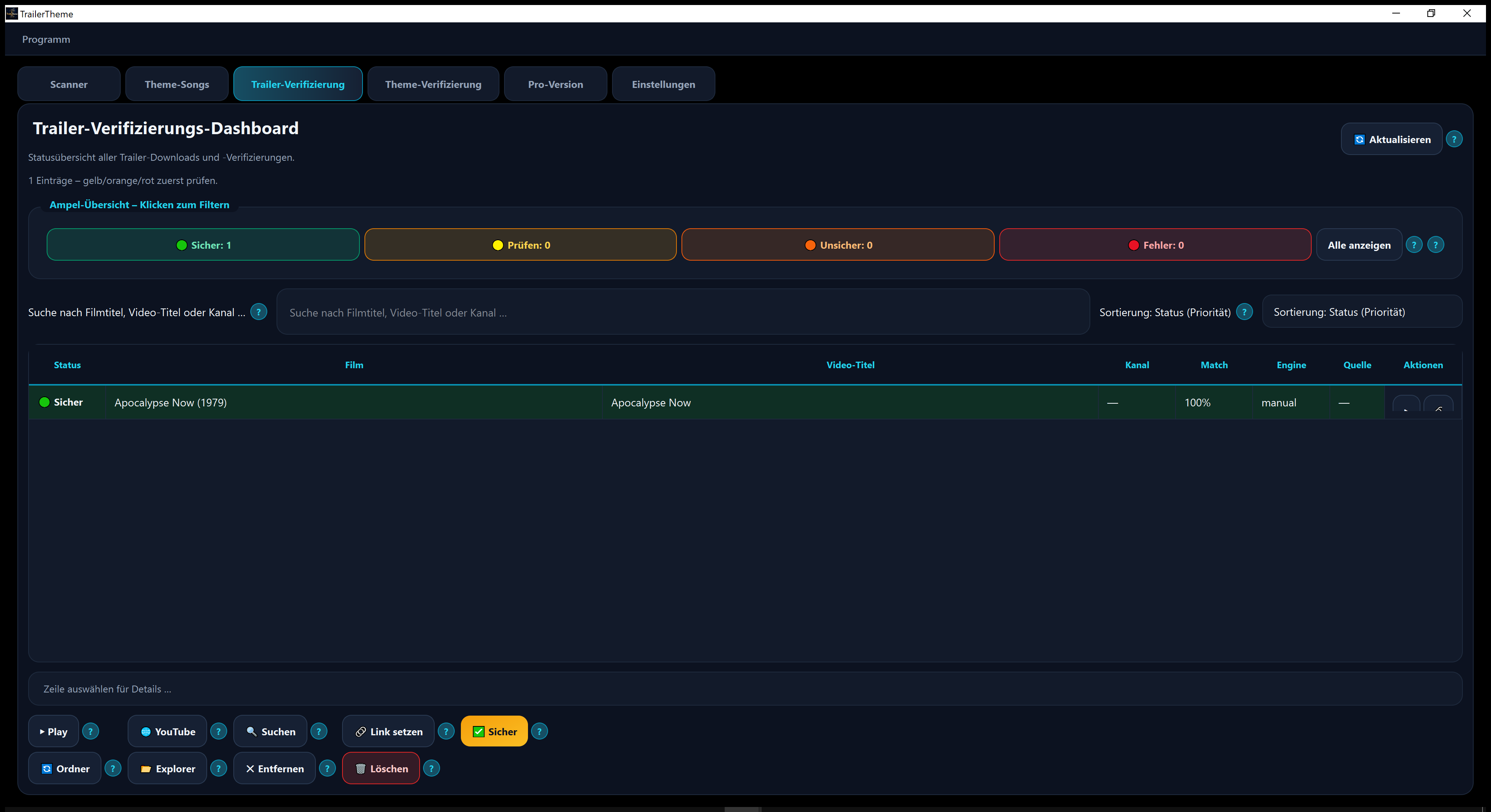
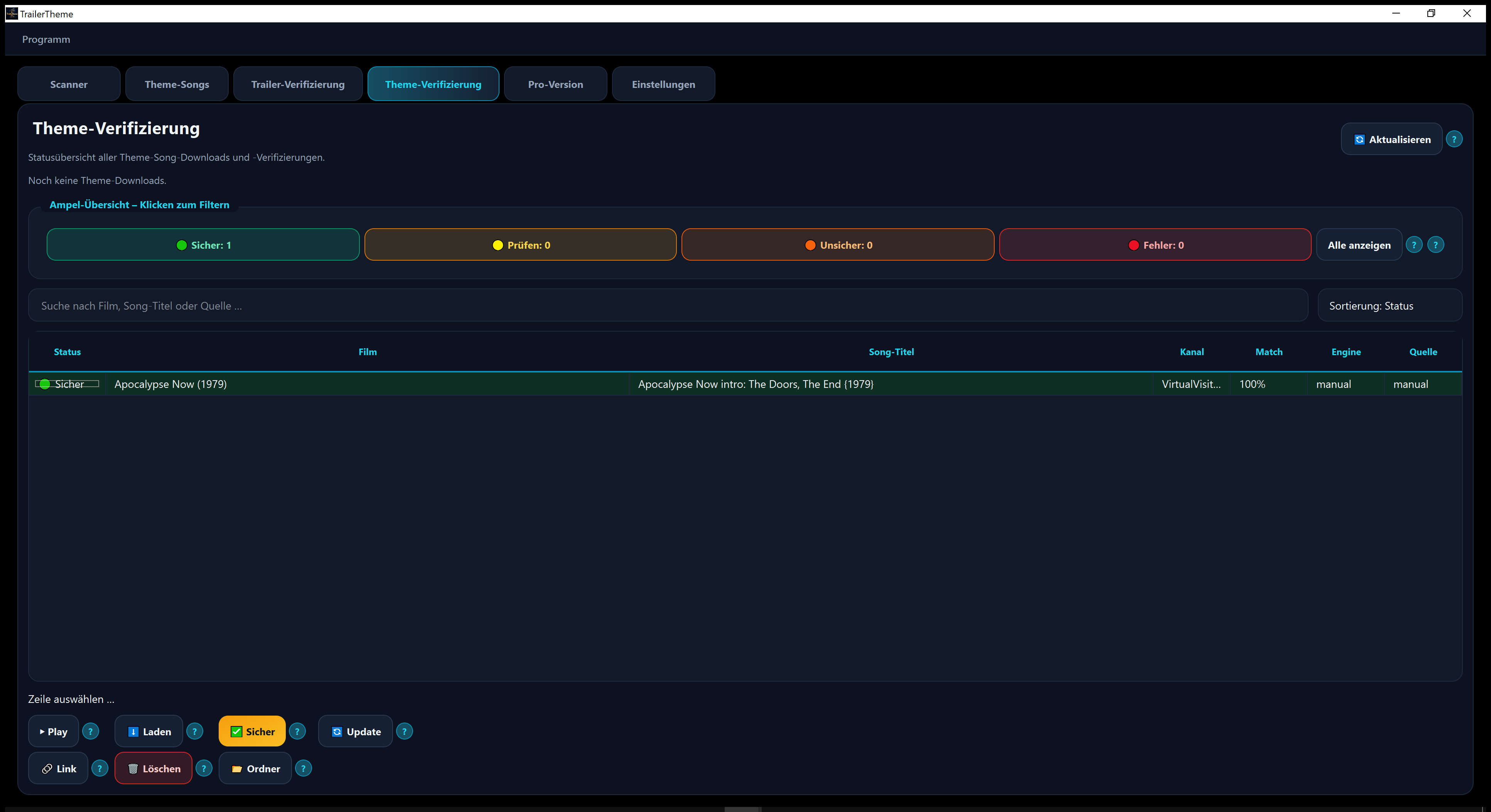
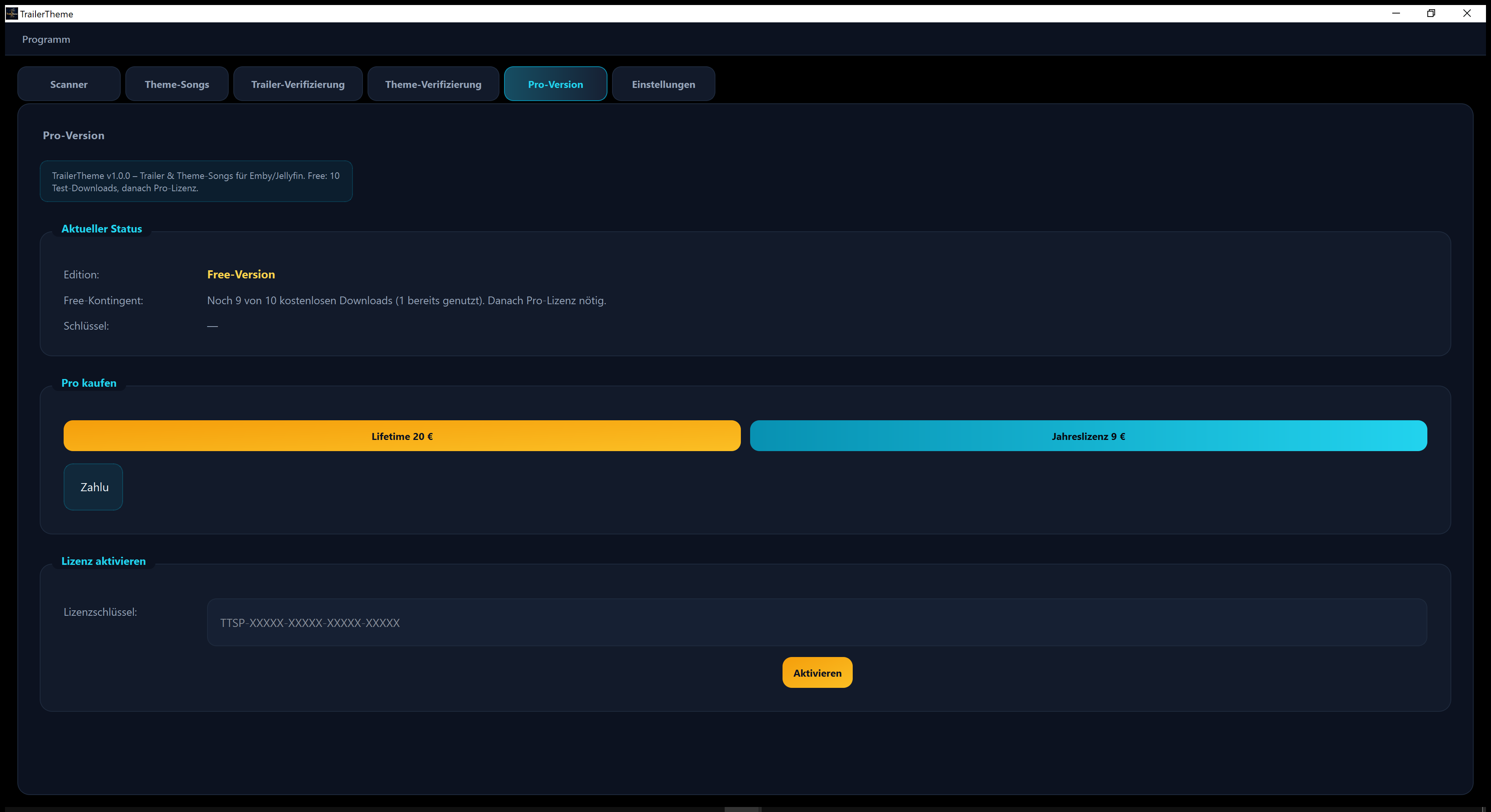
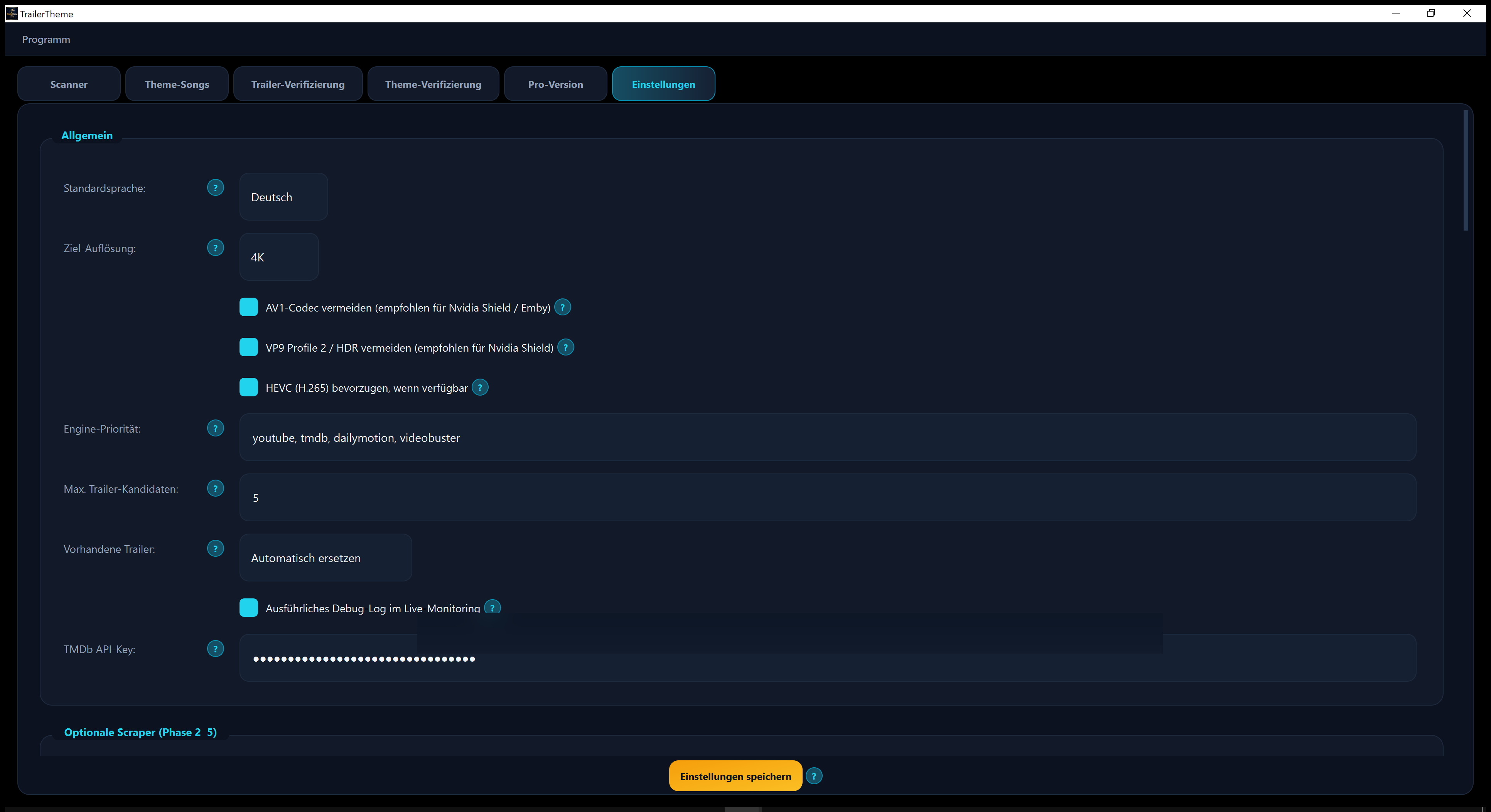
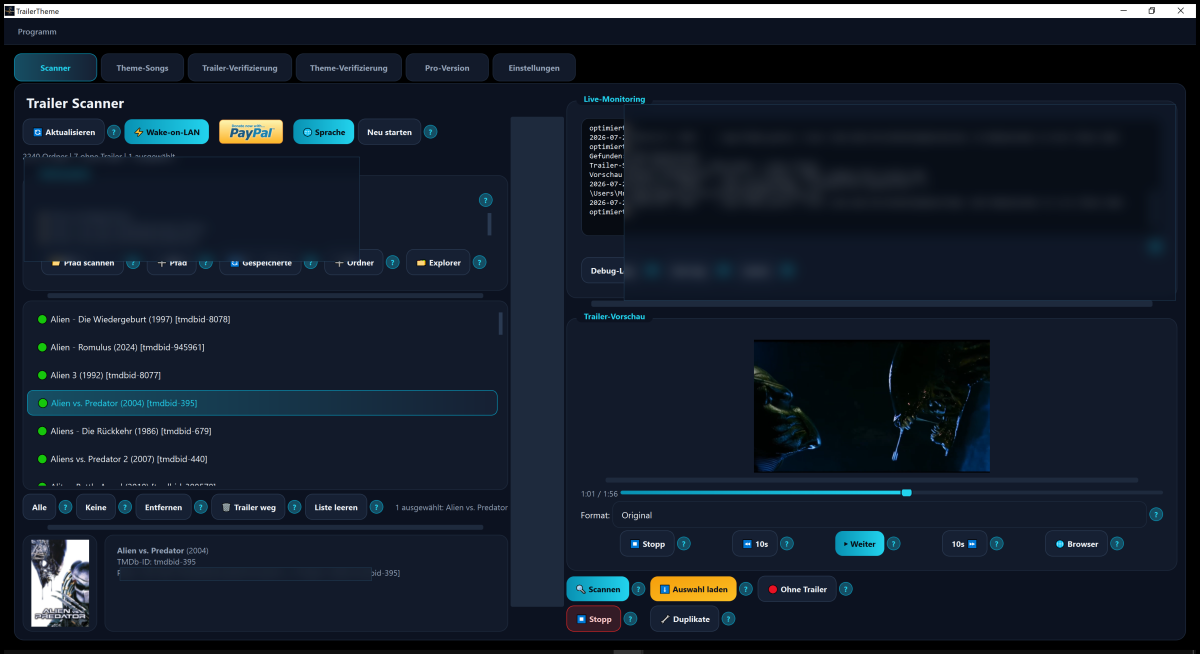
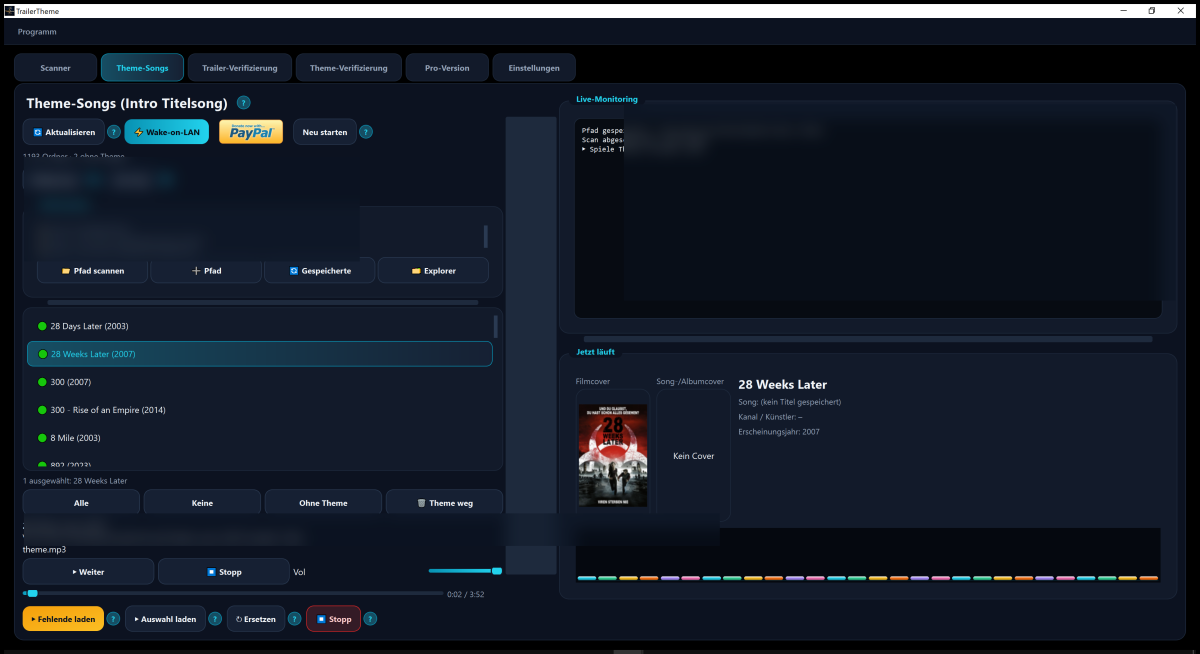
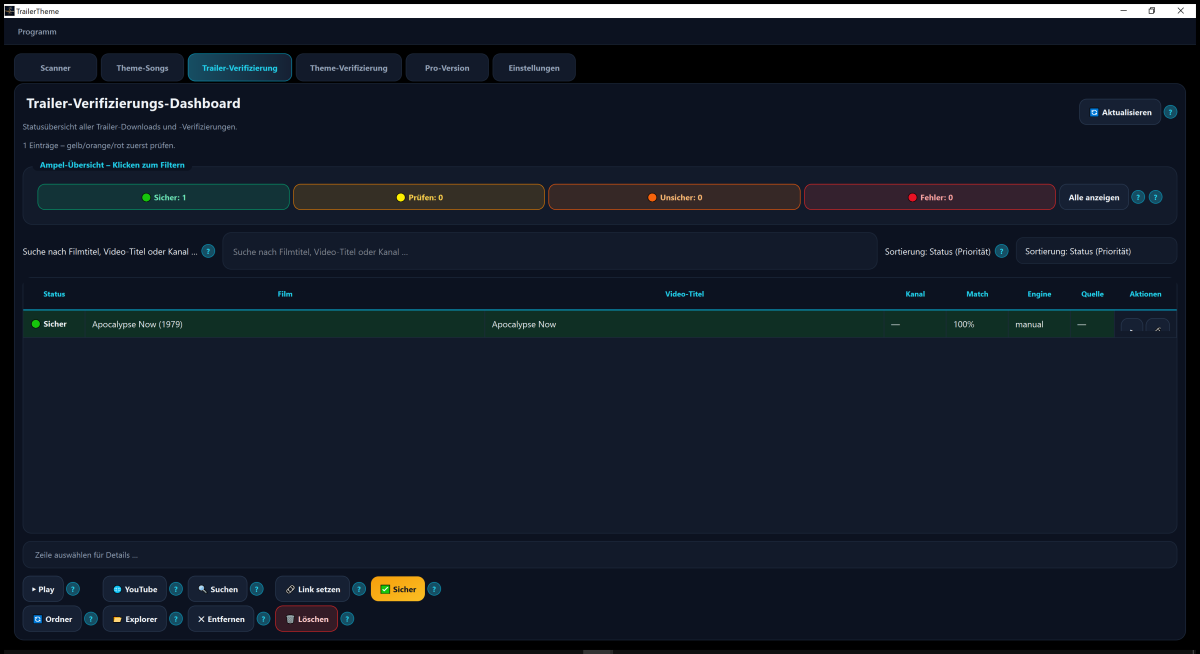
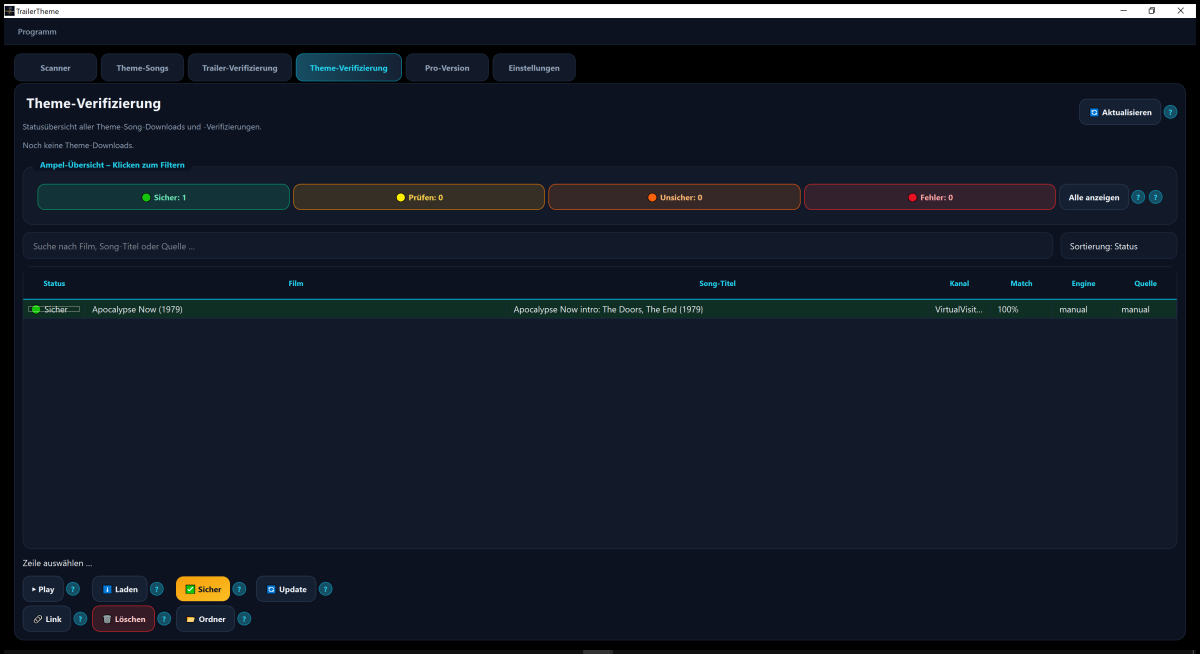
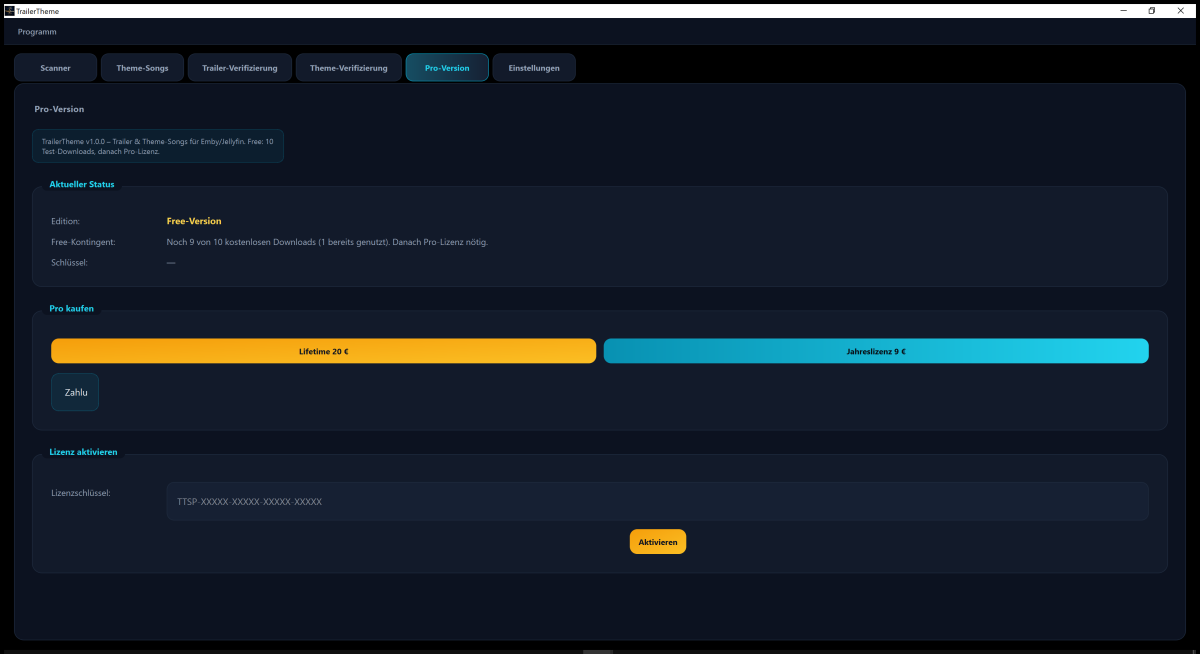
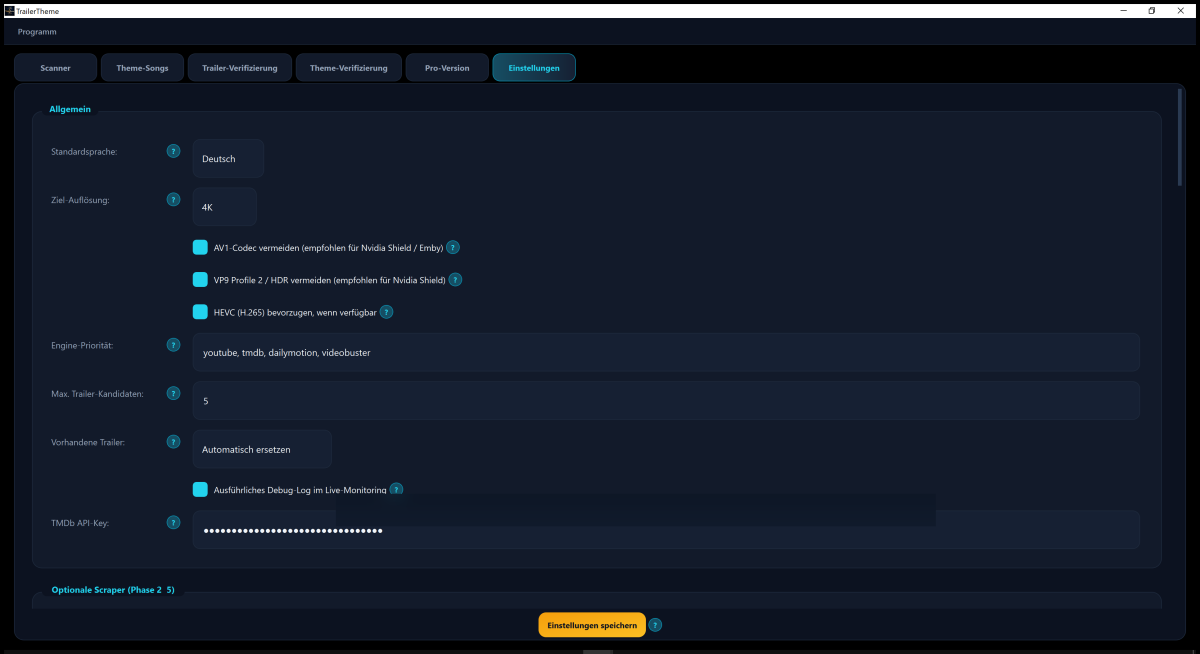
Hi everyone, I’d like to introduce TrailerTheme, a Windows desktop app I developed (Gembird79). It helps you fill missing movie/TV trailers and theme songs for libraries used with Emby (also works well with Jellyfin/Plex-style folder layouts). Permission was confirmed for the Third Party Apps section — thanks! ================================================== What it does ================================================== TrailerTheme scans your local media folders and can: • Find and download trailers next to your movies/series (Emby-friendly naming) • Find and download intro/title theme songs as theme.mp3 • Let you preview results in-app • Verify downloads with a traffic-light status (safe / check / unsure / error) • Run manually (confirm each match) or in Automatic mode (unattended batch) It does not host or redistribute media itself. It searches publicly available online sources (mainly YouTube; metadata/search may also involve sites such as TMDb, IMDb, Videobuster, MusicBrainz, etc.) and downloads into YOUR local library folders using yt-dlp. ================================================== Screenshots ================================================== Hero / overview: Scanner (scan library, select titles, preview trailer + cover): Theme Songs (find/play intro themes, save as theme.mp3): Trailer verification: Theme verification: Pro / license tab: Settings (language, quality, codecs, cookies, helper updates): ================================================== How it works (step by step) ================================================== 1) Install the Windows setup from GitHub Releases 2) Add one or more media root folders (your movie/series library paths) 3) Scan — the app lists folders it recognizes (e.g. Title (Year) …) 4) Select titles (or Select all) 5) Choose a mode: • Load selection → interactive: review/confirm candidates (popups) • Automatic → batch run without confirmation popups (good for large libraries) 6) Files are written into the media folders (trailers / theme.mp3) 7) Open Verification tabs to check matches, play them, mark as OK, or replace Emby can then pick up the local trailer/theme files like other local extras Also available: • Manual workflow: search on YouTube/Google, paste a link, download • Built-in preview player • Live log for progress/errors • In-app updates from the public Releases repo • UI in German and English • Options aimed at hardware playback (e.g. Nvidia Shield-friendly codec preferences) ================================================== Requirements (typical) ================================================== • Windows 10/11 • FFmpeg + yt-dlp (helpers can be updated in Settings) • Node.js recommended (YouTube extraction) • Optional: browser cookies if YouTube blocks anonymous downloads • Optional: free TMDb API key for better metadata matching ================================================== Download / project page ================================================== Public page (installer + screenshots, no source code — closed source): https://github.com/Gembird79/TrailerTheme-Releases Latest release: https://github.com/Gembird79/TrailerTheme-Releases/releases/latest Support / bug reports: https://github.com/Gembird79/TrailerTheme-Releases/issues ================================================== Notes ================================================== • Free trial download quota, then optional Pro license (see Pro tab) • Please use only for your private media library and respect copyright of trailers/music • Feedback and bug reports are welcome Thanks for reading — happy to answer questions here. Best regards, Gembird79
-

AndroidTv update now black screen with av1/opus videos
esaym153 replied to esaym153's topic in Android TV / Fire TV
I send logs from the client at 4:26PM EST I have not touched anything on the server for a month or two so it can't be a server update issue. Attacked some server logs too. ffmpeg-remux-f74a43bb-304c-4764-8558-96ae882396eb_1.txt embyserver.txt -

Thank you to the Emby Team (including users, of course)!
TMCsw replied to Lonald's topic in General/Windows
You could just get a second lifetime/yearly/monthly Premier license and not use it (just use a different email) - Today
-
Oh snap, that might actually be just the info I need to fix my work. Thanks dude!
-
Many thanks for the kind words, happy that people like the plugin. The icons built into the plugin are made by the user @Craggles. If you want to make your own i suggest you make them in a 97x76 scale as that fits the best. Admittedly i need to clean up the icons in the plugin as some of them i have made my self and the result isn't really what i want. I'm not a graphics designer in any way.
-
@yockerThanks man, big fan of the plugin so far, nothing else really comes close to the same quality of life features. Since Im already bugging you, would you happen to have an icon template for res sitting around? I jerry-rigged a res.1440p.icon but Ill be the first to say it doesnt look nearly as clean as the built in ones. Yours seem to scale much better. Much love.
-
Upcoming fixes: 1. Field-level merge fix Problem: Restore treated a null field in the backup as "delete it" — so if a backup only had Credits (Intro not detected yet), restoring it would wipe out live Intro values that native detection had already found. Fix: Each marker type (IntroStart, IntroEnd, CreditsStart) is now evaluated independently — a field is only overwritten if the backup actually has a value for it; otherwise the live value is preserved untouched. Proof: Verified live on a real episode — before the fix, Intro was being wiped during restore; after the fix, Intro and Credits both persist together, neither one lost. 2. Four signatures (ManualEditWatcher) ChapterApi, EmbyCredits, and Segment Reporting (three manual marker-editing tools) plus Emby's own native intro detection all call SaveChapters directly, bypassing Emby's ItemUpdated event entirely — so the server log is tailed in the background instead, watching for each tool's own log signature: ChapterApi — ID-based (URL query parameter) EmbyCredits — title-based (log line has the episode name, no ID) Segment Reporting — ID-based (cleanest format, direct itemId=) Native intro detection — ID-based; also backs up the new intro and then triggers a restore for that episode (bringing back Credits if one existed) Proof: All four verified in isolated tests, then again at scale — roughly 40 episodes edited manually across two shows in one session, all captured without error. 3. Auto-Restore AutoRestoreEntryPoint restores markers immediately from backup whenever something (Refresh Metadata, Library Scan) wipes them. Proof: Verified live on a real episode — log confirmed markers were auto-restored right after being wiped. Test logs: tail -f /path-to-server-log/embyserver.txt | grep -iE "AutoRestoreEntryPoint|ManualEditWatcher|BackupIntrosTask|RestoreIntrosTask" 1. Backup (ManualEditWatcher) 2026-07-25 20:42:03.431 Info ManualEditWatcher: Detected a manual chapter edit for /***/***.mkv - wrote a fresh backup. 2. Auto Restore (AutoRestoreEntryPoint) 2026-07-25 21:49:16.749 Info AutoRestoreEntryPoint: Auto-restored intro/credits markers for /***/***.mkv after an external update wiped them. 3. Scheduled Restore Task (RestoreIntrosTask) 2026-07-24 14:53:09.231 Info RestoreIntrosTask: Intro/credits restore complete: 588 of 589 episode(s) had a backup applied (588 by TVDB, 0 by IMDB, 0 by filename match). 0 skipped: no matching backup file.
-
Is there a recommended api call to identify series with some played episodes but are not marked as played at a series level? I was planning on comparing RecursiveUnplayedItemCount to RecursiveItemCount but was wondering if there was a better way to go about this.
-

AndroidTv update now black screen with av1/opus videos
ebr replied to esaym153's topic in Android TV / Fire TV
Still need that additional info but looks like it could be server-related: -

Change sort order for TV season folders to newest first
ThePags replied to transcoder's topic in Feature Requests
Another request for this feature Thank you -
Thanks, that clears it up. There's already an open request for this or something functionally equivalent. Please join in and contribute to the existing discussion at:
-
Take what I am about to say with the largest grain of salt you can find because I only believe this due to fragments of what others have said, lack of serious updates/features being added to in the last 20 or so beta updates, but I think they are working on a major update that has the following: New Live TV structure New search structure Updated schemas for the libraries Serious UI improvements I have no inside knowledge as I am not on the team. In fact, I would wager I am in the top 10 of most disliked users as I have said some stupid and/or rude things in the forums more than once, hell this might be one of them. It just feels like they are gearing up for something big soon to me. I have faith that this will be fixed sooner rather than later but I understand how lack of communication (or any response at all) is infuriating to those that genuinely care about the project. To that they have a passion for their homelab / media-server and feel like they are stuck in the mud and at the mercy of others. To make a long story short (I know, it's too late) its understandable being frustrated or mad, but I think there is a method to their madness
-

Plugin: Ginjaninja Tools - List Protector - [Auto] Repair your lists in step with filesystem changes.
ginjaninja posted a topic in Plugins
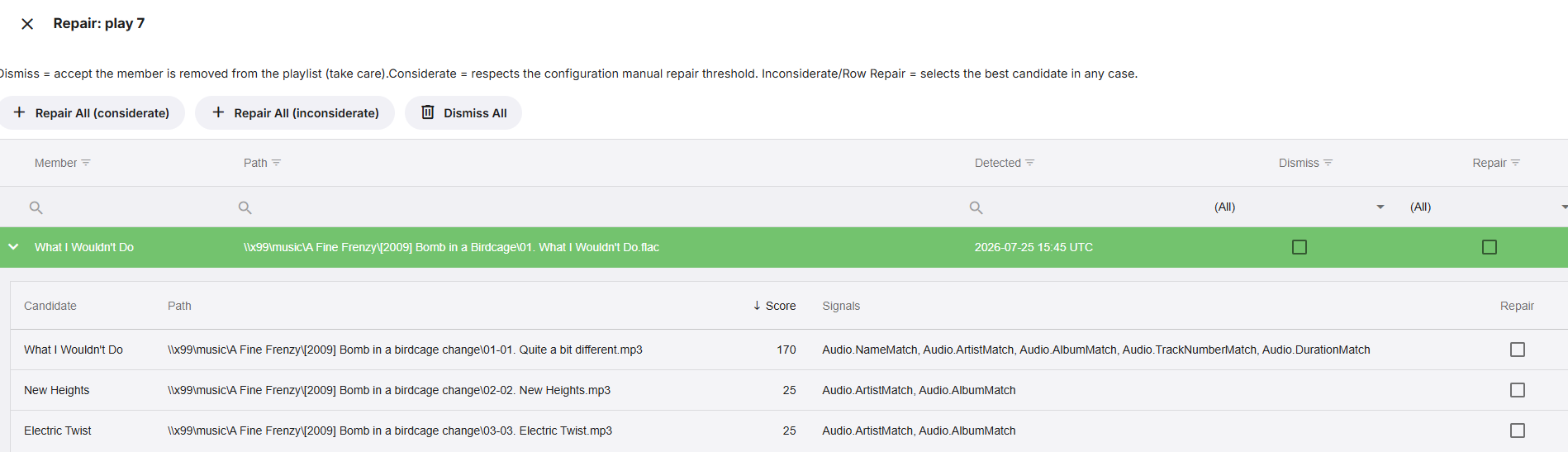
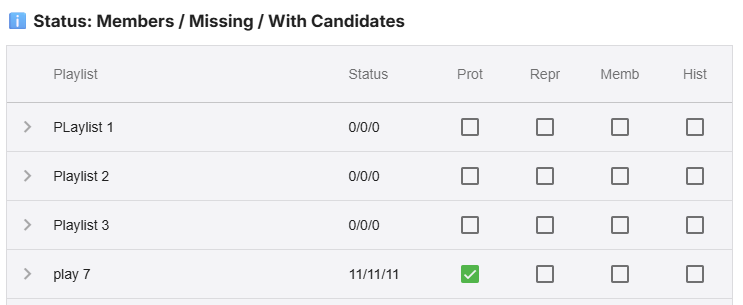
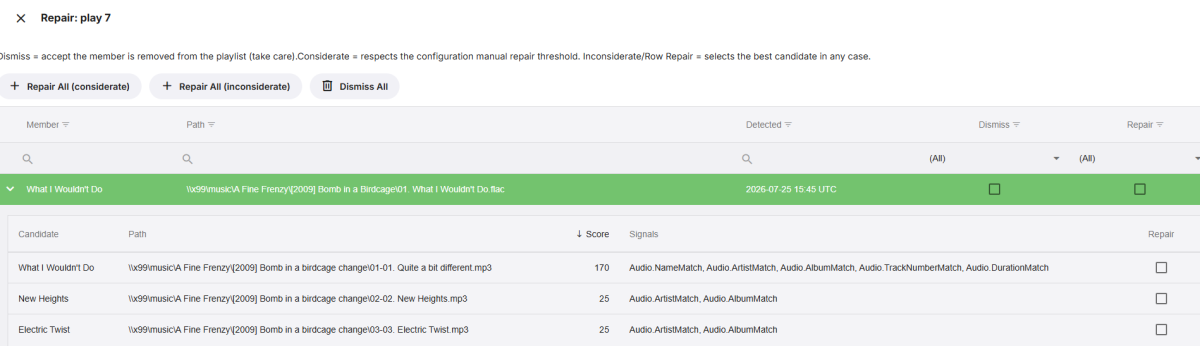
Purpose and Function Protect playlists from unintended member removal (eg Library Move). I didnt like that after a folder move i would have to manually repair my playlists [and collections]. Provides an auto and manual repair pathway using an evidential reasoning engine for candidate scoring. Evidence > Scoring > Belief > Decision (something like that :-)) Put plainly, list member goes missing, plugin looks for missing member to repair the list. Getting Started Start with auto repair disabled. Use checkboxes to protect (Prot) your playlists, and repair (Repr) your playlists. Disclaimers Vibe coded with Claude, backup database before 1st use until tested. Note this is being released in a less than perfect state, the intention is to gather feedback from users on wether the observations and weighting are establishing correctly/incorrectly scored candidates and in which circumstances. Download https://github.com/ginjaninja1/ListProtection/tree/NewScoring 0.0.0.2 ListProtection.dll Changes Known Issues The scoring engine is difficult to explain, an attempt has been made on the configuration tab. Non audio playlist items untested. Issues and suggestions welcome. Roadmap Add support for Collections. Improve candidate generation for non audio list items. Make logging and Event History better. Keep an eye on performance, in case sqlite is neccesary (currently json) toggle to hide unprotected playlists. Feedback Request Feedback on scoring, when its wrong or needs a tweak. Primarily thisis about ideas for identifying [supporting] signals of what is a good candidate. Other Info Plugin stores data in \programdata\plugins\configuration (good to know if you want to reset/uninstall)
-
Subject: Alexa skill fails during account linking (accountLink/establish?...error=1) after server selection Hi, I'm trying to set up the official Emby Alexa skill and have reached a point where I believe I've ruled out the usual configuration issues. Environment Emby Server 4.9.5.0 Synology DS220+ Emby Premiere active Google Pixel 10 (latest Android) Latest Alexa app Reverse proxy with a valid HTTPS certificate What works Remote access works correctly. I can connect to the server through app.emby.media. Emby Connect works normally. Alexa discovers my server correctly. The server appears in the skill and can be selected. Failure After selecting the server, the browser redirects to Amazon's account-link endpoint, which always ends with: .../api/v1/accountLink/establish?...&error=1&showRedirect=1 The page displays: "Please proceed by clicking the button below." After clicking the button, it returns to Alexa, but the account is never linked. Important observations A new authorization token is generated on every attempt, so this does not appear to be a stale authorization issue. The failure always occurs at Amazon's accountLink/establish step. The Emby server log shows no Alexa- or Amazon-related requests during the failed linking attempt. It appears the callback never reaches the Emby server. Troubleshooting already completed Disabled and re-enabled the Alexa skill. Waited several minutes before re-enabling. Corrected the Emby Connect email associated with my Emby user (this fixed server discovery). Verified reverse proxy configuration. Verified the HTTPS certificate. Verified remote access. Confirmed the server is discoverable by Alexa. Confirmed the issue reproduces consistently. At this point it appears the failure occurs before the Emby server is contacted. Is there additional logging that can be enabled for Alexa account linking, or is this a known issue with the current Alexa skill or Amazon's account-linking flow? Thank you.
-
That's great news, hopefully a clock will follow too.
-
Yah that's what I thought and you are not wrong either. I AM still learning. BUT, I can let everyone in my home know that they shouldn't even try to delete anything and it will be fine. The Emby media drive changes all the time and regular backups are run to prevent any data loss if the emby media drive gets borked in any way. As I understand it this is pretty much the ONLY way to do this with an NTFS formatted drive when using Linux. Do you guys know otherwise? For example, can I mount the drive via fstab and give multiple users different permissions in this manner? I have samba running also and the home account has read only access while my user has r/w access. In the Emby manager I have created 5 users, the admin user (mine) and 4 others for each member of my family, including myself. I'll have 2 accounts, admin and reg user. The reg users do not have any permissions to delete anything via Emby or Samba and none of them even logon to this server ever--not that I am aware off-we don't do DVR or camera uploads or anything that would cause them to want to write something using Emby--they'd ask me to put something on the samba share if it came to that. I understand this is not a place where I am going to learn Linux and Linux permissions however, after purchasing the software I just assumed that part of the initial support would be more clear about permissions and the initial setup for noobs like myself. I mean even Netgear will help a guy setup his AP for the first time. If anyone can make things more clear for me like the command to implement the proper permission for my Emby server drive, that would be helpful. Otherwise, everything is working right now, security aside, and I must have misunderstood the nature of this community support forum OR what I have done is about the only way to do it? I mean if there is a different more secure way using the NTFS drive please I AM WILLING to learn that's for sure. I'll take it over to my own Linux distro support forum and see if I can get more real help there. Cheers everyone!
-
A little reminder- make sure to set a higher number if you don't want your library to be flooded with most watched badge. Keep in mind that even briefly playing an item increases its play count by 1.
-
Release Note v 1.3.4.0 Added option to show overlay badge "Most Watched" for Movies shows and episodes based on a play-count. EmbyNewOverlay.dll
-
As far as i can see it looks like a media player and not a server.
-
What is this nonesense?!
-

Why is Jellyfin so much more popular than Emby?
Jdiesel replied to Nabukodonosor's topic in Non-Emby General Discussion
While I do want Emby to be successful and for the owners of Emby to be financially rewarded for their work, there are advantages to flying under the radar. A higher profile also comes with higher scrutiny from media publishers and rights holders. Secondly, with success comes interest from venture capitalists. Look no further than Plex for an example of what happens when investors get involved and the goal becomes how to extract the maximum value from the existing user base and reputation that was built over many years. Enshittification at its finest. Thirdly, projects often cater to the lowest common denominator. The more tech illiterate people that hear about Emby and wish to use it could influence how it is developed moving forward meaning less options, less customization, and fewer power user features. There is a subset of people who expect plug and play and another who expect control and flexibility. Emby has always been marketed as giving the user more control over the software than Plex. Lastly, the support burden of managing lots of new users. Unlike Jellyfish, Emby offers direct support for their product. If they continue to offer the same level of support as they always have that means there will be more users requesting support. I'd rather Luke and ebr spent time developing the project rather providing tech support on how to enable port forwarding on a router. -

There is a bug in version 2.3.8 with .ass files
visproduction replied to MediaEmby1968's topic in Samsung Smart TV
There are no fonts embedded in the .ass file. Sorry, I thought it might be font related. It isn't. Your .ass file is rather old and the referral comment is to a domain that has since changed. That would not cause any issue because the file isn't using any embedded fonts. The error for not finding a file at mb3admin.com is to an Emby server. If you ran a traceroute to mb3admin.com you might find a delayed response because the conection has to to go through 20 or more servers from Spain. If you are using a Wifi at your house that could possibly cause other delays. === Another error shows up and states that your workstation is using Framework: .NET 8.0.28. That looks to be an old version. When I go to: https://github.com/dotnet/dotnet/releases The latest stable version is NET 10.0.10 / 10.0.302 Then on line 404 the update at api.github.com can't be found. Maybe updating your .NET would help that. Your LInux version will have it's own method of updating software. You should use that. Sometimes the Linux versions are different. I did not see an easy reference on what the latest .NET should be for your workstation. If you use the proper update inside your Linux OS, it will do it correctly. === Then on line 520 you have another error regarding your drive mount path. There are 14 of these errors. WIth Linux mounting drives have to be very exact and correct. There are often problems with this. Ideally, you should corectly confirm that your mounted drives are setup the right way. === 1) I think Linux needs updating. 2) If you have Wifi in your media server setup, try direct connection via Ethernet, if possible. 3) Check your Mounted drives are setup correctly. 4) Being in Spain can take more time to reach US servers, but if everything is connected and working at top speed, it should not be a problem. === I've been to Barcelona, several times, Madrid, Malaga, Almaria and enjoyed te ocean and bay views in Valencia, That was many years ago during Franco. The Police were a little touchy about being on the beach, after dark having a camping meal. Eight police arrived, out of the darkness, armed with rifles to check us out! We moved along. Ha! Hope that helps. -
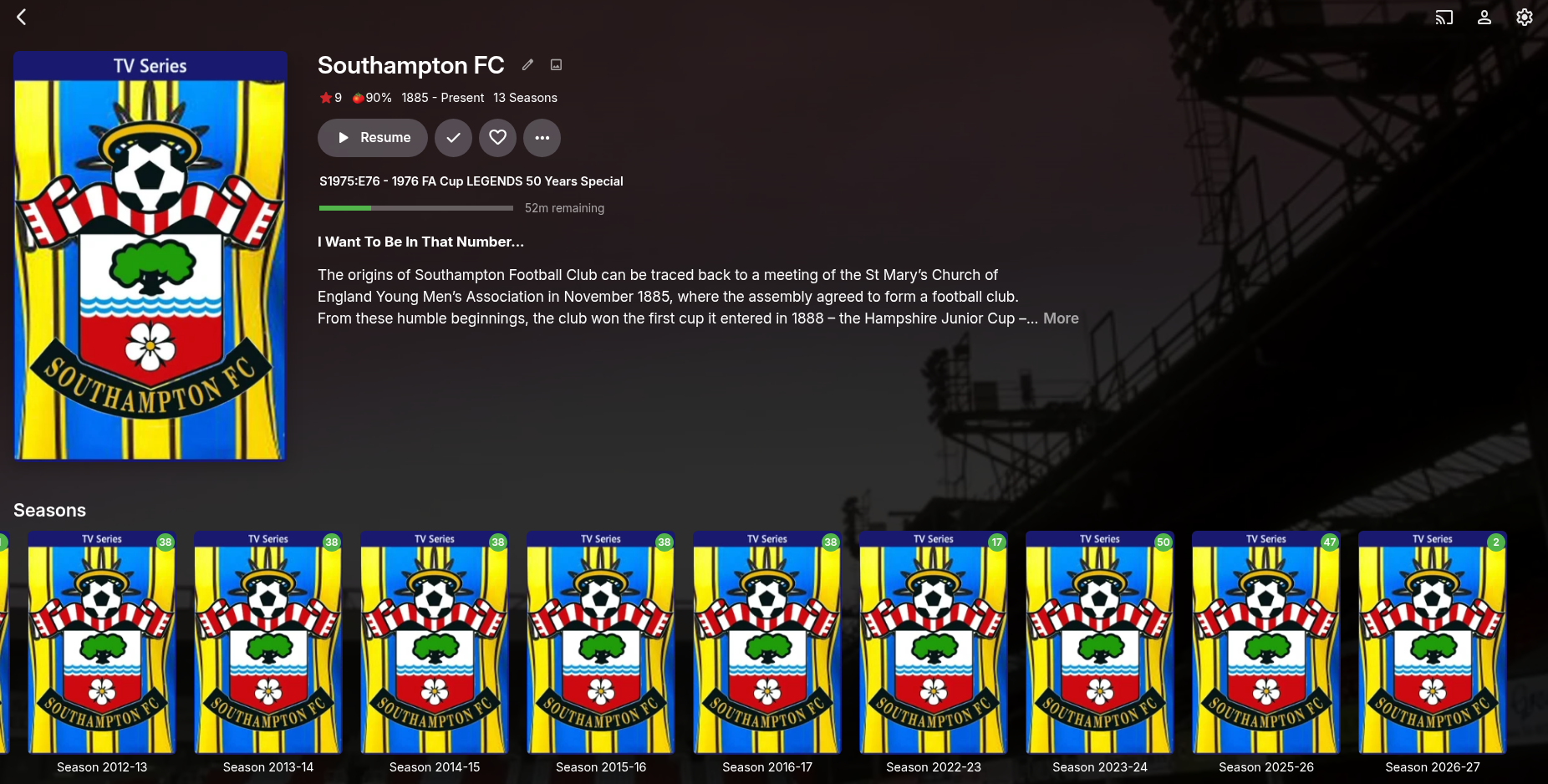
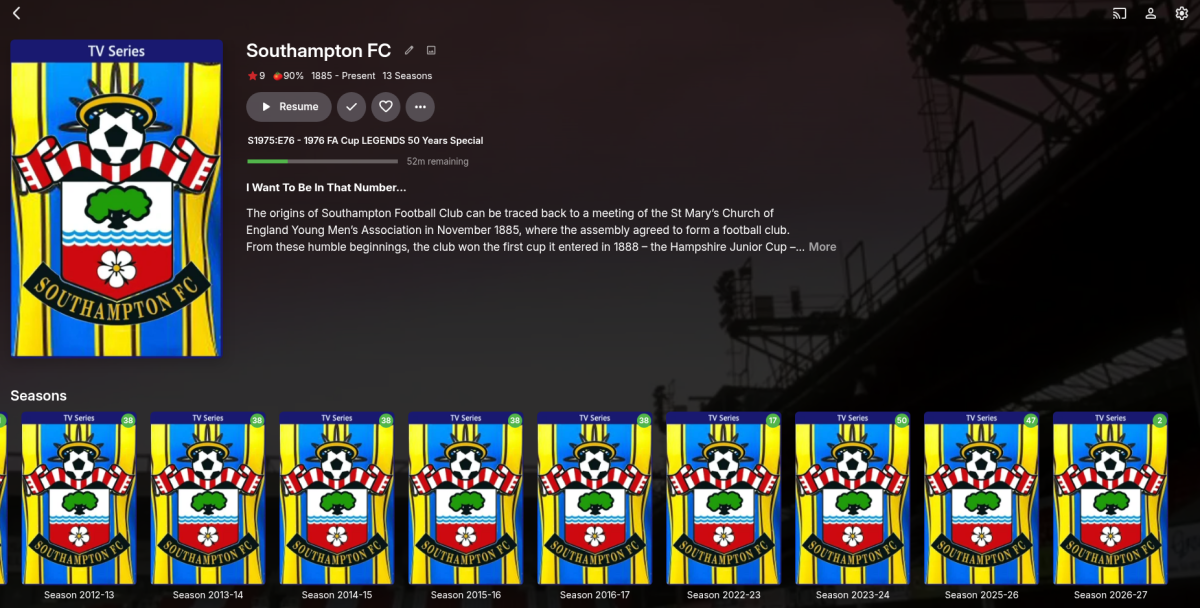
In the screen shot you can see that the top level folder has multiple seasons in it. Each season ascends as per the date, can there be a server side switch to make them descending i.e.The Season on the far right (2026-27) would be at the start on the far left and the next seasons would follow accordingly. i.e. Season 2026 -27 Season 2025 -26 Season 2023 -24 etc This also needs to be able to be done at a file level as well. Inside the season folder are multiple files that span left to right again in ascending order the switch would enable them to be turned to Descending i.e file 1 file 2 file 3 file 4 switched to file 4 file 3 file 2 file 1.
-
Please cite your source for this because I don't believe this is even remotely true.
-
Android App - Live TV Guide - Unable to navigate Categories
ebr replied to meowmix's topic in Live TV
Hi. You see that button that looks like a tag that is bright red? Click that. The red indicates that you have restricted the guide to certain tags. If you want the exact same presentation as the web, install the standard "Emby for Android" app on your TV device.