All Activity
- Past hour
-
 Lbrl.y7 joined the community
 -
 sergiolopezmenchero joined the community
 -
 liubing joined the community
 -
 Lemine joined the community
 -
 Cld joined the community
 -
Please restart Emby, go to the EmbyIcons settings, enable detailed debug, move the position of an icon and then send me the log.
-
 Rasmussen-Michael joined the community
 -
 CarolineJames joined the community
 -
 Marufa31 joined the community
 -
 usalv02259 joined the community
 -
 Ka9ooi joined the community
 -

Windows computer. Install natively or in Docker?
Nathanael replied to rob51's topic in General/Windows
I run Emby (portable) nativly on Windows Server behind a reverse proxy. This makes GPU acceleration work without any hassle. Emby runs as a service with a seperate non-admin user that only has change rights to the library folders and emby's own folder. (If you do read only you get a lot of issues). Emby's own admin user has no rights to log on remotely and none of the users have delete/admin rights. Next to that i have controlled folder acces active and the regular firewall from Windows+router -
I would really love to see a native 4-player Multiview option added to Emby Live TV. My ideal implementation would be: Up to 4 Live TV channels playing simultaneously in a 2x2 grid Ability to select/change each channel independently Audio from whichever window is currently selected One-click/remote-control option to make any pane full screen and return to Multiview Support for normal Emby Live TV tuner/IPTV channels, including dynamically created sports channels Designed to work well with TV remotes, Fire TV, Android TV, Apple TV, and similar living-room clients My main use case is sports. During NFL, NHL, college football, etc., I often have several games available at the same time. All of the channels already exist in my Emby guide, so being able to select four of them and watch them together inside Emby would be incredibly useful. I would strongly prefer this to using a separate IPTV application because Emby is already where my Live TV, guide, users, and devices are managed. A 2x2 four-channel Multiview with selectable audio would be perfect.
-
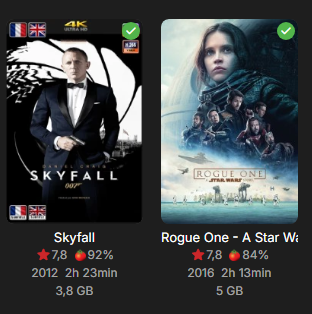
With the last version 5.60.2.0 beta :
-
Third time's the charm...?
-
Yes I was also wondering, is the ask basically to remember what sub tab you were in as you navigate between different sections?
-

Settings Submenus Always Navigate to the First Tab
GrimReaper replied to scottpro's topic in Web App
I'd assume that was a typo and that OP meant "Transcoding" tab. Though, tbh, I'm not quite clear what is this topic all about in the first place - about not remembering last visited tab? If so, I reckon I prefer it that way, always having same landing tab/anchor page, else there's a high probability of a lot of inexperienced users scratching their heads eventually. - Today
-
Or were you asking if that was the only episode in the series it was happening on? In which case, yes, as that is exactly what the log says, I'm guessing the others are fine.
-
Over a week later and nothing further? It's obviously a bug in the Android App when running on Android-TV as it doesn't EVER happen with the Android-TV version.
-

Auto Select Audio When Transcoding
visproduction replied to njmckenzie96's topic in Feature Requests
NJ, Not sure if this helps. You can try switching the audio file so the EC3 or AAC is the first choice and DTS is the second audio. This can be done with MKVToolNix or ffmpeg, which probably could do multiple files at once using a command script. Since this is not a transcoding task, it should take around 1 minute pre media on an average speed server with a 2 hour 1080P file. After doing that, most users will get the audio that works best for them first. The alternate audio is available on the media page in the pull down, for those users with everything working for higher end audio. The best designed automatic solution can fail when there is a change in connection speed from Internet traffic so the first handshake test by the Emby server, sees any audio or video issue and starts transcoding anyway to AAC. This can happen on a weekend because of heavy Internet traffic issues and not be a problem mid-week. So any automatic feature would still flip back and forth. Making AAC the first audio choice is a good idea, but that may mean transcoding and adding a new AAC audio track, which is more work. I believe AAC is better for streaming delivery because EC3 always requires more overhead processing by the user to playback. Depending on the user's setup, this can maybe get in the way of processing TCP packets and cause stuttering. The Emby server, I believe will often transcode EC3 anyway to AAC which, I think, forces a video transcode. So, even the best automatic solution will continue to cause issues. Having AAC audio, first choice, is more dependable. Any automaticfeature would also run into comment auio tracks which are typicaly AAC or AC3 stereo. You really don't want commen tracks automatically chosen. If you left the media with all the audio tracks attached an automatic solution can run into this issue, where my idea to prep your media with your preferred track in audio 1, won't have this probem. If the user wants higher end, they can pick EC3, DTS or True Audio. I think Emby remembers the audio choice per media, maybe even there is a way to pick an audio type by each user. That leave the issue you metnion above. Can Emby find audio track 2 DTS and choose it for a particular user? I think admin of a lbrary collection needs to prep the media to work best for the users. Every profesional site streaming media does this type of prep with scripts that set audio preferences and transcodes video to what works best for users. Typical online site has the HD level user have access to pick higher end resolutions and audio. Automatic features, trying to match users exactly to media preferences, from media that has every audio mixed in, is never going to work 100% of the time. Professional online sites would, I think, refuse to code an all automated feature and choose instead to prep the media, with best choice in audio track 1.. Anyway, hope that makes sense. -
Anyone with a Synology Nas willing to help test? As this is for testing it would be best with some knowledge of the terminal in case anything breaks.
-

Roku app - Channel logos/programme not loading in Guide and On Now row (show channel name text instead)
gillmacca01 replied to gillmacca01's topic in Roku
Im guessing other users are using a different guide data, because I have seen images with programmes displayed. Any how, guessing I will have to live with channel logos Thanks for the info -

Roku app - Channel logos/programme not loading in Guide and On Now row (show channel name text instead)
speechles replied to gillmacca01's topic in Roku
What he means is the Roku is actually requesting images in WebP format from your Emby server. But is being given SVG images instead. This is because Emby server doesn't support SVG and cannot convert it into WebP to feed into the Roku. So the Roku is given the SVG in normal format, not WebP. The Roku goes, I do not understand this and throws an error and refuses to display it. Other clients, such as the web app, also request WebP. But they also contain a web rendering engine. So the SVG is also sent uncoverted to them. But unlike the Roku, the web rendering engine inside can render the SVG in normal format. This is the difference. The Roku does not have a web browser possible to create. The Roku does not have a web rendering engine. -

Client video max bitrate auto detection deny transcode option
njmckenzie96 replied to Zhadum101's topic in Feature Requests
Would there be a way to make the auto remote option be for certain devices? Here's my issue. A Family member has had auto selected on their Roku. They have Gig speed, wired internet to their Roku, but if they are on auto quality, Emby keeps transcoding down to 720p for their movies. When I had them select the manual 4k-120mbps the file plays direct perfectly. I get I can force the auto remote, but if it's for all devices that means that overrides their phones and iPads which don't need direct play (especially if they are on data). Could there be a way to select what devices somehow, or even IP address based auto setting? -
Roku app - Channel logos/programme not loading in Guide and On Now row (show channel name text instead)
gillmacca01 replied to gillmacca01's topic in Roku
Sorry must be me being stupid. You say emby doesn't support svg, so can't show programme images in 'on now' but in the tv guide it is able to. I would have thought (but known to be wrong), that if it can display in the guide, it should be able to in 'on now' -
Roku app - Channel logos/programme not loading in Guide and On Now row (show channel name text instead)
speechles replied to gillmacca01's topic in Roku
@gillmacca01Yes. If you want the images displayable for all your devices, Roku included, PNG or WebP are the way to go. We will also fix the display logic for the channel grid item so it is smarter. Thanks for letting us know about this issue. If you spot anymore keep them coming... -
So I've been testing this a lot the past few months and so far here are my findings. On iOS and android apps, if both audio tracks are set to default in the mkv container, the apps select the secondary track IF the 1st track is TRUHD. If the 1st track is DTS OR DTS MA, Emby selects those and transcodes the audio even though there is a secondary track that is compatible. Today, I had a family member test playing a movie remote on their Roku. The movie played direct, and both audio files were set to default (trueHD, and Eac3),. Since Roku can't decode trued, Emby transcoded the audio without trying to switch to the second track that was compatible. I had the family member manually select the 2nd track and it played perfectly. Is there a way you could work on this behavior or anything I should try? I've scoured through all their settings and everything is set, at least from my understanding, for the movie and audio to try to play direct, and it does play direct if they select the 2nd compatible track. I've tested all this on my home setup but my chromecasts are plugged into receivers that are able to pass/unpack truehd/dts without needing anything transcoded. The goal in all this is ease for the users who don't know about these settings. I realize I could flip which default track is at the top in the container, but then that means I have to change the audio settings on my home network when my family watches movies. So, if it's possible to work that would be awesome! Thanks for all the continued support and features on Emby!
-

Roku app - Channel logos/programme not loading in Guide and On Now row (show channel name text instead)
ebr replied to gillmacca01's topic in Roku
All your other devices are using a web engine for rendering and understand SVG. Emby server does not officially support SVG so it doesn't try to convert it either. -
Roku app - Channel logos/programme not loading in Guide and On Now row (show channel name text instead)
gillmacca01 replied to gillmacca01's topic in Roku
So best option is to manually download the images in png/jpg and then import? If that works it will give me channel images, but in other devices it shows the programme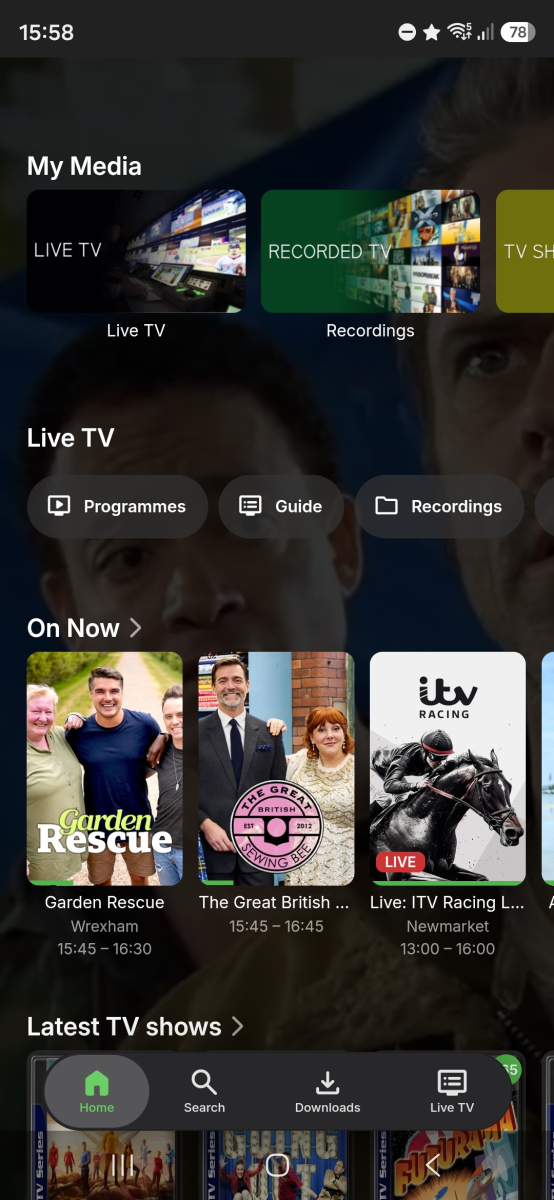
-
Roku app - Channel logos/programme not loading in Guide and On Now row (show channel name text instead)
speechles replied to gillmacca01's topic in Roku
If they are WebP the Roku will show them. But if they are SVG the Roku doesn't understand how to render those. Roku never added support for that image type. Right now it merely checks for the URL on the image to exist. If it does it gets display template A. If it doesn't it gets template B. But what happens if there is an error? Yeah. I do see what you mean in the guide display. The logic inside the guide needs to be smartened up. So it can understand when the image loading fails on the channel image. Then it can properly do as you say and display differently. When error it would display template B. Thats all that needs to be added. I can look into doing that. The cards which are shown on the "On Now" row have that smart logic for image loading already. That is why the cards show placeholder text. Its just the guide display that lacks them. Which is why it shows emptiness. -
I'm not aware that Tone Mapping is an option from the sidebar. Can you show a screenshot of where you're going to Tone Mapping from that it's not bringing you to the right place?
-
Ja das weiß, ich hatte mir das auch schon so gedacht. Ich wollte nur mitteilen, das bei mir generell wieder Themes gefunden wurden. Somit bin ich mit dem jetzigen Zustand zufrieden Yeah, I knew it was like that. I just wanted to say that I was generally found with themes again. I am satisfied with the current state
-
Roku app - Channel logos/programme not loading in Guide and On Now row (show channel name text instead)
gillmacca01 replied to gillmacca01's topic in Roku
Most of my channel logos I got from Logopedia using the "copy image URL" option. The URLs don't end in a file extension (they end in /revision/latest?cb=…), and I think some of the originals may be SVG or served as WebP. Here's an example URL for a channel whose logo doesn't show on Roku: https://static.wikia.nocookie.net/logopedia/images/9/9a/Channel_4_2022.svg/revision/latest?cb=20260614024831 Could that be the problem? -
new version doesn't play what it used to
ebr replied to groovejumper's topic in Android TV / Fire TV
Can you please confirm the version number and send a new app log? Thanks. -
Roku app - Channel logos/programme not loading in Guide and On Now row (show channel name text instead)
ebr replied to gillmacca01's topic in Roku
Are they in an odd format?