All Activity
- Past hour
-
 samuri19691205 joined the community
-
 jiasting joined the community
-
 Km5_5 joined the community
-
 duffymedia joined the community
-
It's not a plugin, it's a standalone software, which you can install in a docker. And yes, it will integrate with Radarr and Sonarr to monitor for new downloads and automatically download trailers. in fact you have a lot more options to manage the trailers and quality needed. Downside is that Emby requires the trailers to be stored with the media, which means if you are spinning down drives (like in Unraid) then drives will spin up to play the trailer. For that reason is why I made the plugin to edit the YouTube trailer links, then you avoid drive spin ups, and well you load the trailer faster. I wish there was a way to store trailers not with the media like with metadata but right that isn't an option, not unless you do some creative/stupid folder mapping.
-
 Buglyb joined the community
-
 Teemarc joined the community
-
 Raihan00007 joined the community
-
 1900c joined the community
-
 DiosRaaaaa joined the community
-
 MrMinty joined the community
-
- Today
-
Hello this bug is so annoying, i cannot use Emby anymore if it not resolved. Any plan for a new LG release? Thanks
-
 just_random_guy changed their profile photo
-
New Emby Server 4.10.2.0 Released
just_random_guy replied to Emby Releases's topic in General/Windows
Hi, I recently noticed some strange behavior in the music library. I believe this may have been present in an earlier version as well, so it is not necessarily an issue specific to the latest version. When I go to "Songs" under the music section and apply filters—for instance, by checking the "Favorites" box—the filters are applied visually, and only my marked favorites are displayed. However, when I then select "Play" or "Shuffle," the player includes all sorts of songs that happen to fall within the filter criteria, effectively ignoring the "Favorites" selection. It seems to be a problem with the Android app. -

Takes 4 minutes to skip forward 30 minutes in a video.
softworkz replied to turleym's topic in General/Windows
At least half of that AI response is not applicable to our playback.or can be quickly ruled out from viewing the log file. -
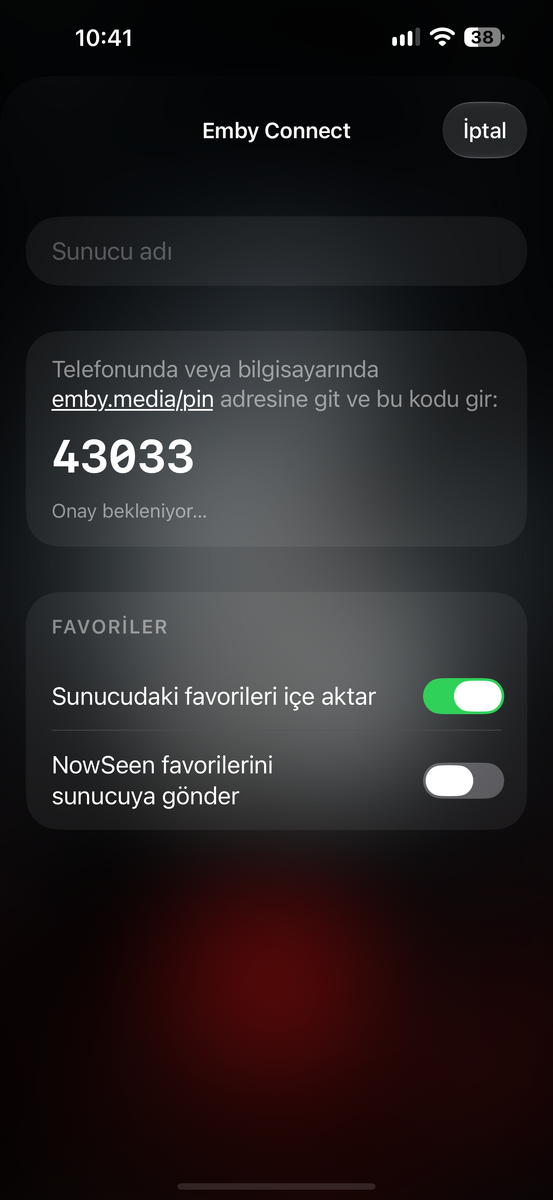
Hello, where do I enter the NowSeen code?
-
Hi, what exactly makes you think nothing happened?
-
Some might just be extracting the video URL’s and playing with their own player, but that is violating YouTube terms of service.
-
How do 3rd party apps implement YouTube trailers without subtitle etc?
-
@diaz1510It's this I guess. nandyalu/trailarr: Trailarr is a self-hosted app to download and manage trailers for your media libraries.
-
I’m trying to login to my Emby account but i couldn’t!! I clicked on forgot password but nothing happened!! I have the server and the Port number , username & password but it’s still not working! Tried to reset the password but nothing happened !!
-
We are continuing to reevaluate this. It seems to be a moving target. My guess is that even though Google still allows embedding of their content, I don’t think they’re as happy about it as they might have been in the past. It wouldn’t surprise me if at some point down the road they stop allowing it.
-
Thanks! That makes sense.
-
Is that GitHub URL still valid?
-

NVidia Shield TV with LG OLED, Dolby Vision Prompt Keeps Popping Up
CLLDR replied to planedrop's topic in Android TV / Fire TV
I came across this thread while troubleshooting the same issue with my NVIDIA Shield Pro and LG OLED, and although I didn’t find a solution here, it helped me think through what might be happening. My setup: NVIDIA Shield Pro Onkyo AV receiver LG C2 OLED Shield connected to Onkyo, with Onkyo HDMI output connected to the TV. Playback of file with Dolby Vision and TrueHD 7.1 Atmos I have the Shield connected directly to the Onkyo receiver and the receiver connected to the TV (not using eARC). The issue was that the Dolby Vision notification would randomly keep appearing in the top-right corner of the TV during playback. The picture itself never flickered, dropped out or went black. The TV remained in Dolby Vision picture mode, and playback statistics showed no change. I tried various things, including changing the Shield’s Dolby Audio Processing and Low Latency Dolby Vision settings, clearing the cache and investigating the HDMI connection none of this provided a permanent solution. I may have finally found something that works. On the LG TV, I changed: Settings → Sound → Advanced Settings → Select HDMI Input Audio Format I selected the HDMI input connected to my Onkyo receiver and changed it from Bitstream to PCM. The result: Dolby Vision continues working. The Onkyo still reports Dolby TrueHD 7.1 Atmos. The Onkyo continues decoding and playing Atmos through my speakers. The repeated Dolby Vision notification stops appearing. I also tested switching the setting back to Bitstream, and the notification returned. Switching back to PCM stopped it again. My theory is that the Onkyo is passing audio signalling through its HDMI output to the TV, even though I have no need for the TV to receive a bitstream audio signal. Changing the LG’s HDMI input audio format to PCM appears to avoid whatever interaction is causing the repeated Dolby Vision notifications. I haven’t established the exact technical cause which may still be an LG specific issue, but the PCM/Bitstream comparison has been reproducible in my setup. Hopefully this helps someone else experiencing the same issue! I’d be interested to hear whether anyone using a similar setup can reproduce this fix. -

Lost admin access / how to find user names
divide_by_zero replied to divide_by_zero's topic in Synology
Thanks for the quick reply Luke. I was able to find the plaintext user names in a local server backup file, and from there the reset worked properly. All good now. -
Hi there, please attach the Emby server log from when the problem occurred: How to Report a Problem Thanks!
-
Hi, we’ll take a look at it. Thanks.
-

Chromecast (2ed) direct play of videos with multiple audio streams
Luke replied to JosteinG's topic in General/Windows
Hi there, let's look at an example. Please attach the information requested in how to report a media playback issue. Thanks! -
Takes 4 minutes to skip forward 30 minutes in a video.
Luke replied to turleym's topic in General/Windows
As a result of this, the Roku has to download and decode the entire file in order to locate the file position to seek to, and this is why it takes so long. -
Takes 4 minutes to skip forward 30 minutes in a video.
Luke replied to turleym's topic in General/Windows
An MP4 that plays normally but cannot seek (fast-forward, rewind, or jump to a timestamp) usually has a problem with its container metadata, timestamps, or keyframe indexing. There are several possible causes, depending on how the MP4 was created and how it’s being played. Most common causes 1. Missing or improperly placed moov atom The MP4 container has a moov atom containing metadata necessary to locate samples throughout the file. Missing moov: The file may be incomplete or corrupted. Most players won’t play it at all. moov at the end: Common with traditionally muxed MP4 files. Seeking may not work properly during progressive HTTP playback until the metadata is downloaded. Invalid sample tables: The moov atom exists, but its sample offsets, sizes, or timing information are incorrect. For ordinary MP4 files, moving the moov atom to the beginning often fixes HTTP playback problems. ffmpeg -i input.mp4 -map 0 -c copy -movflags +faststart output.mp4 This remuxes the file without re-encoding. 2. Missing or incorrect keyframes Most video codecs, including H.264 and HEVC, use keyframes (IDR frames or other random-access points) to support seeking. Problems include: Very long intervals between keyframes. Keyframes incorrectly identified in the MP4 sample tables. No valid random-access points after the beginning. Incorrect sync sample (stss) information. For example, if an encoder generates only one keyframe at the beginning of a 30-minute video, seeking can be extremely slow or fail in some players. 3. Invalid timestamps This is particularly common with programmatically generated or remuxed MP4 files. Potential issues include: Non-monotonic DTS values. Incorrect PTS/DTS relationships. Invalid track durations. Incorrect timescales. Large timestamp discontinuities. Corrupted composition time offsets (ctts). A player might decode the video sequentially but fail to map a requested timestamp to the correct sample. 4. Fragmented MP4 issues If the MP4 is fragmented (fMP4), seeking behaves differently. Fragmented files typically contain: moov — initialization metadata moof — fragment metadata mdat — media data Optionally sidx or mfra — indexing information Some players require additional indexing or need to scan fragments before they can seek efficiently. A fragmented MP4 without an appropriate index can play sequentially but have limited seeking support. 5. HTTP server problems If the MP4 plays through a browser or streaming client, the file itself might be perfectly valid. The server needs to support HTTP byte-range requests for efficient seeking. For example: HTTP/1.1 206 Partial Content Accept-Ranges: bytes Content-Range: bytes 1000000-1999999/50000000 Potential issues include: Server ignores Range requests. Server returns 200 OK instead of 206 Partial Content. Incorrect Content-Length. Reverse proxy strips range headers. Dynamic streaming responses don’t support random access. This is a particularly important distinction when the file seeks correctly in VLC but not in a browser. How I’d diagnose it First, inspect the file with FFprobe: ffprobe -v error \ -show_entries format=duration,format_name,start_time \ -show_entries stream=index,codec_name,codec_type,start_time,duration,nb_frames \ -of json input.mp4 Then inspect keyframes: ffprobe -v error \ -select_streams v:0 \ -skip_frame nokey \ -show_entries frame=pts_time,key_frame,pict_type \ -of csv input.mp4 Finally, try remuxing with FFmpeg using -c copy. If the resulting file seeks correctly, that strongly suggests a container-level issue rather than a fundamental encoding problem. Three questions that would narrow this down Where does seeking fail? Browser, VLC, another media player, or a custom application? How was the MP4 generated? FFmpeg, another encoder, a custom muxer, or downloaded from somewhere? What happens when seeking? Is seeking completely disabled, does it jump to the wrong position, or does playback freeze? The distinction matters because an MP4 that cannot seek at all is a different problem from one that seeks inaccurately or only seeks backward. -
Takes 4 minutes to skip forward 30 minutes in a video.
Luke replied to turleym's topic in General/Windows
Here is the long answer… -
Takes 4 minutes to skip forward 30 minutes in a video.
Luke replied to turleym's topic in General/Windows
Hi, the short answer is the mp4 is probably not encoded properly and needs to be reencoded. -
Hi, sounds like you charged the video file or subtitle files outside of Emby. Try refreshing the metadata on that video and see if that helps.
-
Hi, try doing a password reset without entering the username. It will reset the password for every single user and it will list the names of the users. Maybe that will help you remember?