All Activity
- Past hour
-
 The_k8ng joined the community
 -
 Tejcsi joined the community
 -
Hi. There is no "stop" on the remote but we'll need to look at an example as requested by Luke. Thanks.
-
 Peanut1234 joined the community
 -
 榴莲爸比 joined the community
 -
 Revsoul.z joined the community
 -
Thanks, Babatom, for bringing up this topic. I'm not sure whether Emby has collected data on how many users are in the Apple ecosystem compared to Android. However, I think it's very common for people who have an Apple TV 4K in their living room to also own an iPhone or other Apple devices. My personal impression is that Emby tends to focus more on developing features and improving the UI for Android devices than for Apple devices. Some people here may say, "You can just use Infuse instead of the Emby app." I do have the Infuse app, but I honestly want to use the Emby app for everything because I don't like switching between apps. I appreciate the work Luke and SamE have done on Spotlight integration and other improvements. However, as Babatom mentioned, as an Apple user I would really like to see more focus on Apple devices, especially the Emby app for Apple TV 4K. Infuse is a great option, but it should be an alternative—not a replacement for the Emby app. Thank you.
-
 revsoulz joined the community
 -
 Atze2016 joined the community
 -
Apple Silicon does support hardware video encoding/decoding through VideoToolbox, so it should work in the right setup. I’d check the Emby server logs to see if VideoToolbox is actually being called, and make sure you’re using a native ARM build rather than running through Rosetta. Some codecs also won’t trigger hardware acceleration.
-
 krungy joined the community
 -
The downloads section should show items that Emby has actually started downloading through the app, not regular iOS file downloads. If nothing appears, check that the download is still active and that the app has storage permissions. Sometimes downloads can fail silently if there isn’t enough space or the server connection drops.
-
 Lunabetriz joined the community
 -

Emby's Dynamic Music Playlist: Can I customize it to play only new tracks from my library?
NormanNels replied to AshHoach's topic in NetGear ReadyNAS
Emby’s dynamic playlists are a bit limited by default. You can try using filters like recently added or unwatched criteria when creating playlists, but for more advanced rules (genre, mood, avoiding repeats) you may need plugins or manage playlists externally. The repeat issue could also be related to the shuffle algorithm rather than your library. -
 Gamermania joined the community
 -
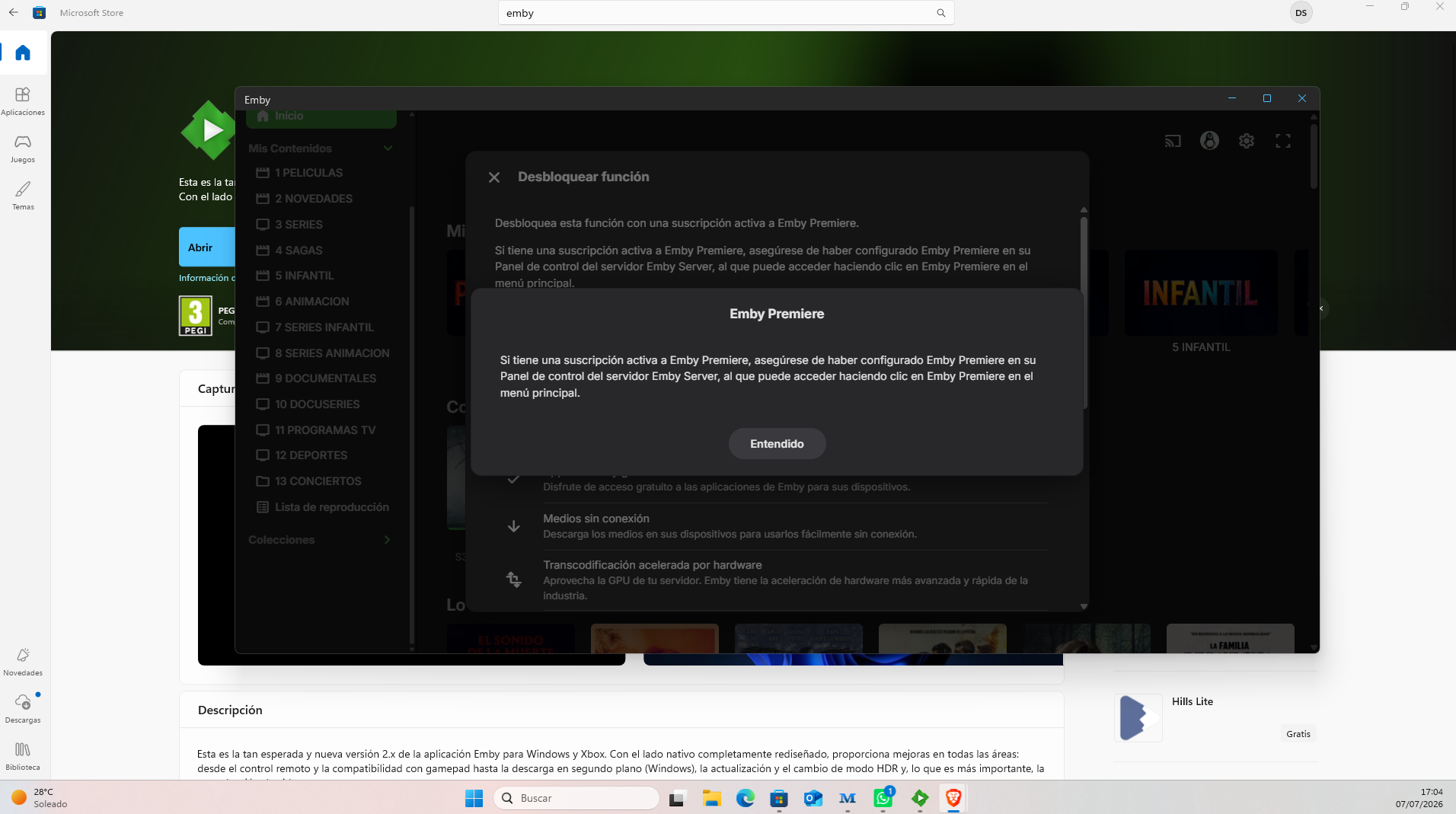
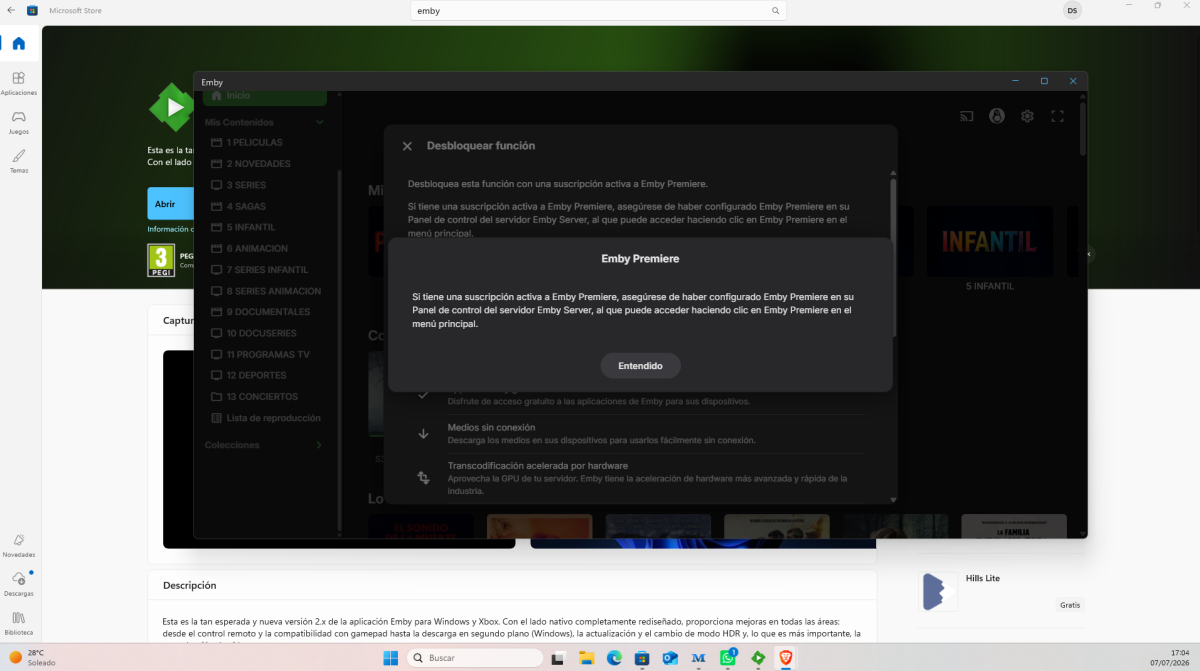
Hola, he pagado la suscripción vitalicia de Emby y quisiera conectarme a un servidor. Pero cuando me quiero conectar este me dice que desbloquee la función de Emby Premiere. He pagado más de 100 € y no puedo acceder a los servicios ni se donde conectar mi clave de Emby .... Me siento que he pagado y no obtengo los servicios que quiero ... ¿hay algo que se me escape? Agradecería la ayuda
- Today
-
You’re better off going for an Intel CPU with an integrated GPU; QSV is ideal for transcoding. I’ve built myself a Unraid server and I’m very happy with it
-
Server is 12 years old? Check your CMOS battery.
-
I do something similiar. I run win 11, the newer intel core ultra 5, 32 gigs of ram, 2 ssd drives with secondary handling recordings, etc, mid size tower case becasue it holds all the drives, I extra sata card, 2 dvd drives with one having custom firmware and I have 6 drives, 3 with media ans 3 that are complete copies. I dont use a graphics card and i dont rememebr my power supply size. Its efficient because its always on and whe. I built it last year, it was around 700 ans change. Probably more. Also I plan on moving away from ring and adding new cameras that will record onto my home server.
-
FYI - I have also tried having the strm point to an mka file on the EMBY server itself as well as to the shared NAS location.
-
from the appstore
-
Wot for Apple TV the app for Emby sever beta
-
You’ll need the Emby beta version for that; it’s a new feature.
-
Wots this spotlight thing on Apple TV Emby I don’t see it
-
Theme Maker — Emby Server plugin Auto-generate theme videos & theme music for your TV shows — straight from Emby's own Intro markers. Now as a native plugin, no external script. From script → plugin: this is the plugin version of my earlier command-line tool (Emby Theme Creator). Same idea, but it now runs inside Emby — no Python, no API key, no ffmpeg install, no path mapping. Just drop in a DLL and run it from Scheduled Tasks. Source & downloads: github.com/Oratorian/emby-theme-maker · grab the DLL from the latest release (GPL-3.0; releases carry a verifiable build attestation). Most of us let Emby's Intro Detection scan our libraries so we can skip the openings. But those IntroStart / IntroEnd markers already point at the exact theme-song sequence of every show. This plugin reuses them: it cuts that segment out of a representative episode and drops it into the series folder as a looping backdrop video (and, optionally, theme music) that plays on the detail page. See it as an alternative to the TV-Theme plugins. No manual clipping, no hunting for openings, nothing to install alongside Emby — if Emby detected the intro, you get a theme. How it works Reads each series' intro markers directly from Emby (in-process — no HTTP, no API key). Picks a representative episode per series (median intro length — robust against cold opens / creditless specials). Uses Emby's built-in ffmpeg to cut [IntroStart → IntroEnd], re-encode with fade in/out, and write the result where Emby expects it — then it kicks off a library scan so the new themes show up. video → SeriesFolder/backdrops/theme.mp4 (h264/aac video backdrop) audio → SeriesFolder/theme.mp3 (theme music, series root) both → both of the above, in one pass Highlights Native plugin — one self-contained DLL, no Python, no external ffmpeg, no API key, no path mapping. It uses the server's own ffmpeg and item database. Runs from Scheduled Tasks — set it on a schedule or run it on demand, with progress and last-run status in the dashboard. Preview task — a read-only "Theme Maker: Preview" task logs exactly what would be generated (source episode, intro span, already-has-theme) before you write anything. Full settings page — mode (video / audio / both), quality (CRF, preset, max height, peak-bitrate cap), fades, audio language, output names, parallel jobs, and an optional "only under this folder" scope. Safe by default — never overwrites an existing theme unless you enable Overwrite; even protects a hand-curated theme-music/ folder. Atomic writes — a cancelled run never leaves a half-written file, and an overwrite never leaves a series themeless. Idempotent — re-run any time and it only fills the gaps. Requirements Emby Server with Intro Detection already run on your shows (that's where the markers come from). That's it — the plugin uses Emby's bundled ffmpeg and reads your items directly. No API key, no separate install. Quick start Grab EmbyThemeMaker.dll (attached below, or from the latest GitHub release) and drop it into your Emby plugins folder, then restart the server. Open Dashboard → Theme Maker and set your options (mode, quality, etc.). Dashboard → Scheduled Tasks → run Theme Maker: Preview (read-only) first to see what it would do, then Theme Maker: Generate to create the files. Add a trigger if you want it to run on a schedule. Tip: Emby only registers new theme files on a full library scan. The plugin triggers one for you automatically at the end of a generate run (toggleable in the settings). Notes Built for Emby 4.9.x (tested on 4.9.5.0, Windows & Linux). Bare-metal / VM installs where Emby can write into your series folders. (Container/NAS setups where the series folders aren't writable by the server won't be able to drop the theme files.) Series with no detected intro are simply skipped and logged. Everything it does is logged to the Emby log with a [ThemeMaker] prefix. Provided as-is by a fellow user — feedback, issues and PRs welcome! EmbyThemeMaker.dll
-
- 1
-

-
- plugin
- theme song
- (and 6 more)
-
Well my windows 10 server has finally died after 12 odd years. Won't boot up, even with a USB boot disk. So time to replace the hardware! Any suggestions? Run a windows 11 machine? Run a proper NAS? Which one? I"m happy to build my own. I usually only have 1080p media, so not much required on transcoding. At least for now, who knows in another 10 years. Currently got the media on 5 x 3.5 WD Red HDDs. I wasn't using Raid but a software duplicator to duplicate each media across at least 2 drives. I don't have anything plugged in directly to the server, it just serves it up via ethernet to a Samsung TV, Xbox one, and sometimes via the internet to handheld. So ... just use Windows 11 again in a mini ATX case? Worth getting a seperate graphics card for any transcoding, or not bother (the last one didn't). Or just go with a plug & play NAS? Thoughts? TIA!!
-
— you were right, and I misunderstood at first. v2.0.0 now includes tmdbid/imdbid in the .nfo so Emby fetches cast, trailers, and descriptions itself via TheMovieDb. Thanks for the nudge! ## v2.0.0 - Emby now fetches cast, trailers, and descriptions automatically via TheMovieDb — no TMDB API key required - Removed yt-dlp trailer download and manual cast fetching - Added tmdbid/imdbid to .nfo for automatic Emby metadata matching - Daily sync schedule (00:01) instead of every 6 hours - XML injection protection for .nfo files - Cleanup now skipped if Radarr/Sonarr API call fails (prevents accidental wipe) GitHub: https://github.com/mrt187/release-poster-sync
-
So, when using the AndroidTV version, (which in my opinion, and after years of using both, is much better, more stable, faster) and when a video is paused for longer periods of time, and the screensaver kicks in, the video exits in the background. On the regular version this doesn't happen. The video stays on, and sometimes I forget about it, and when I come back to it, maybe the next day, the whole thing is almost frozen, I have to go to the home screen and kill the app. How to make it exit the video when the screensaver goes on?
-
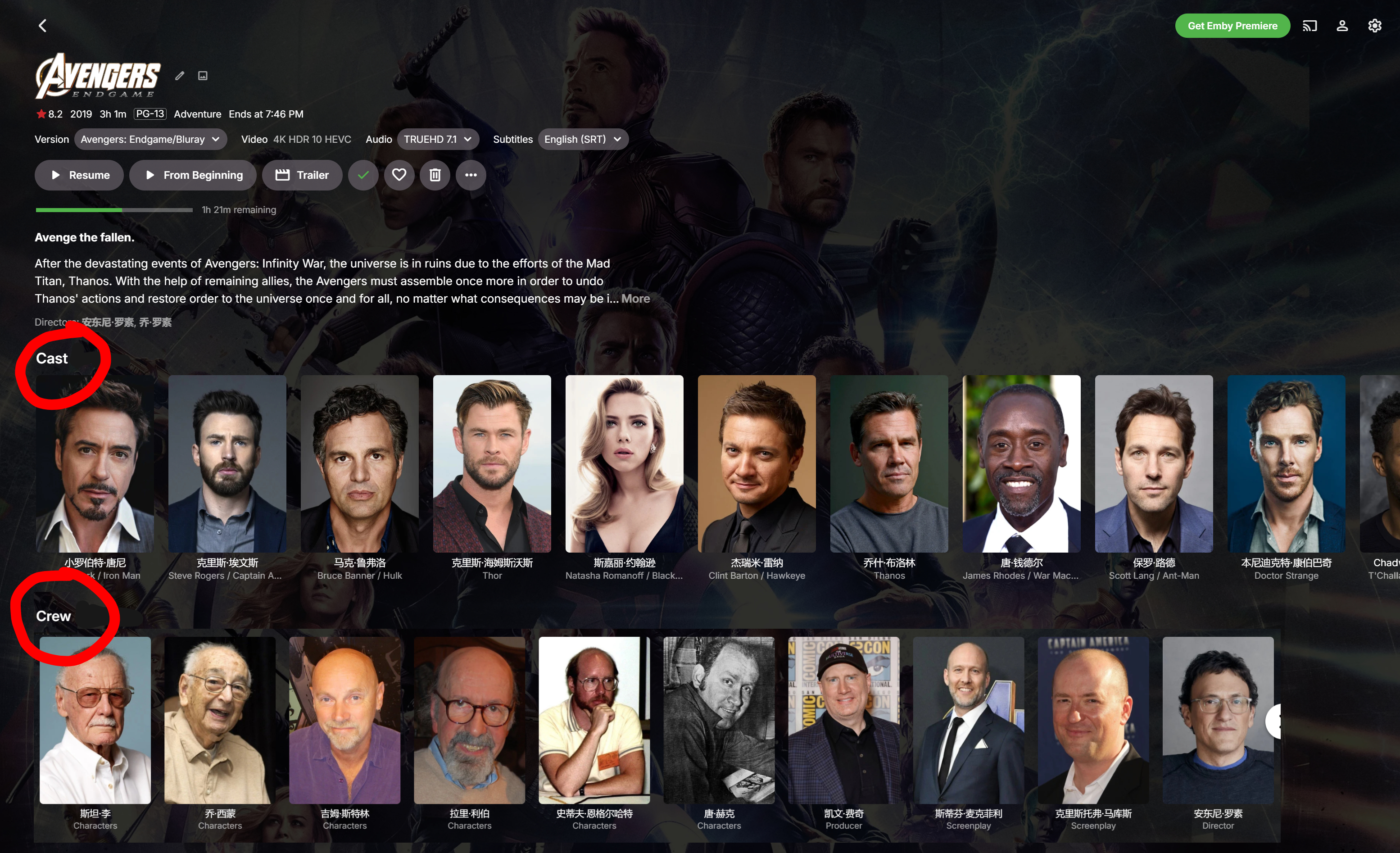
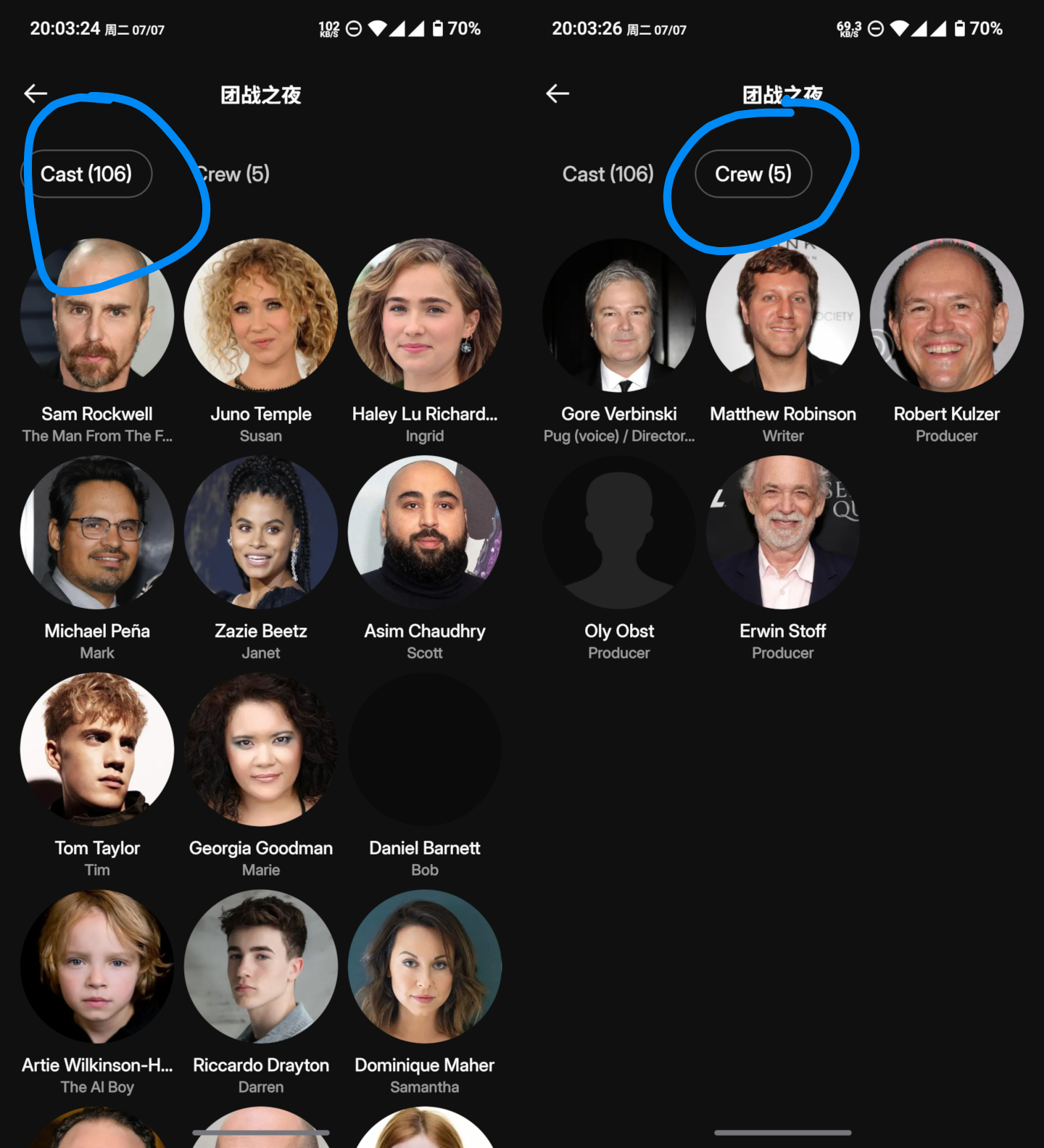
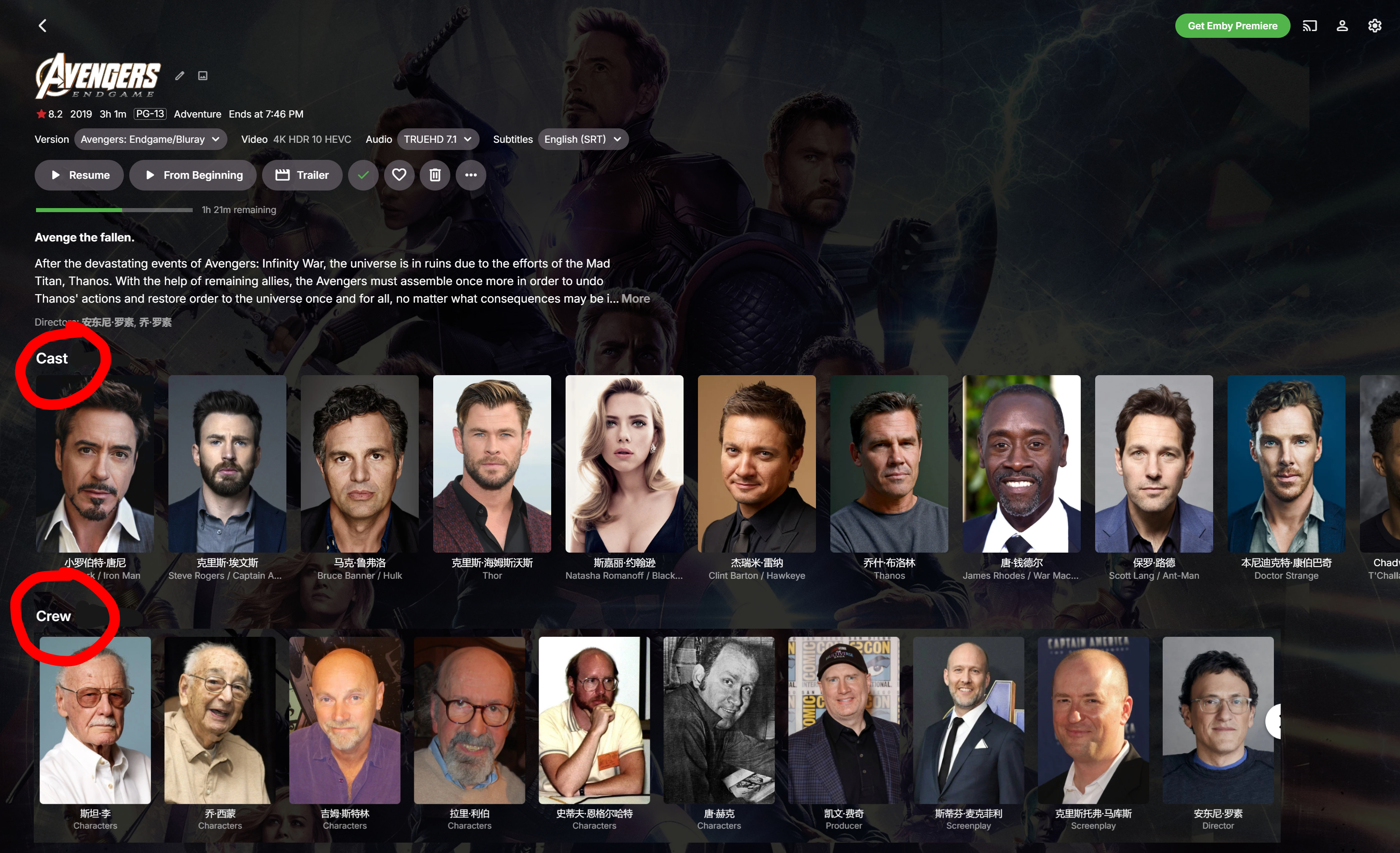
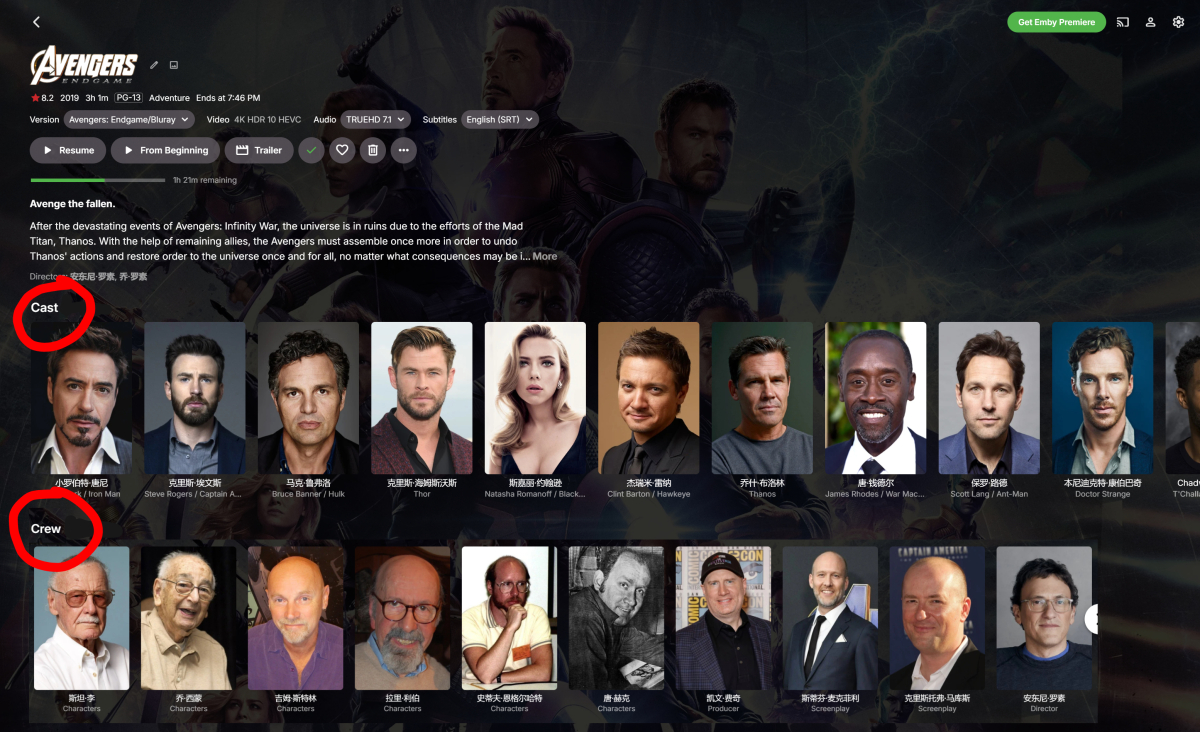
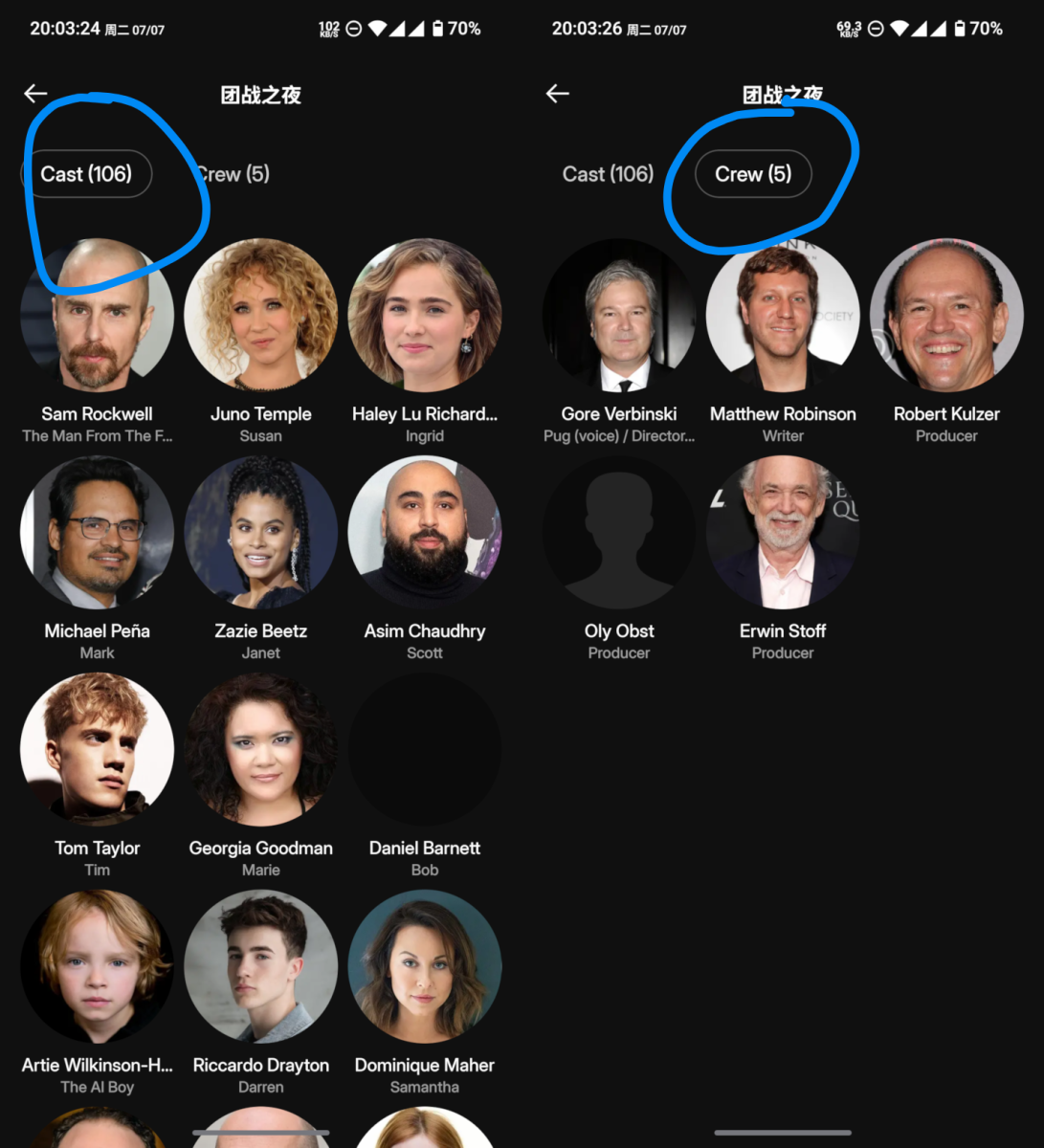
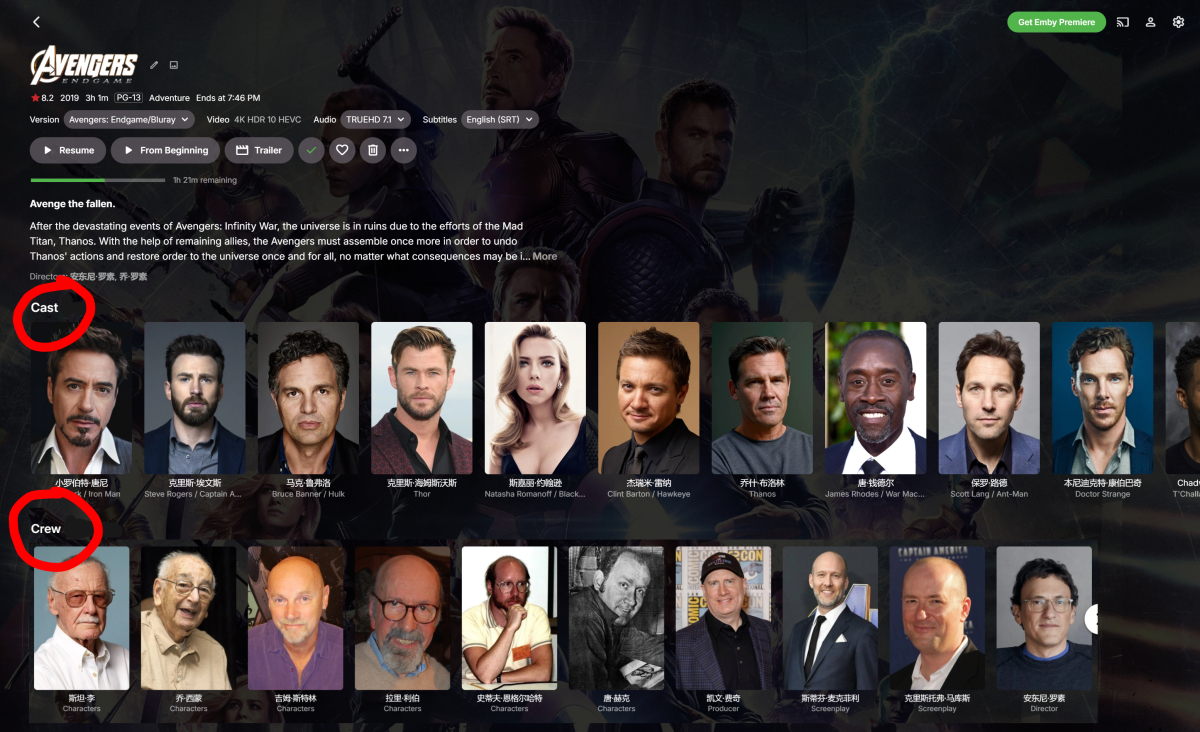
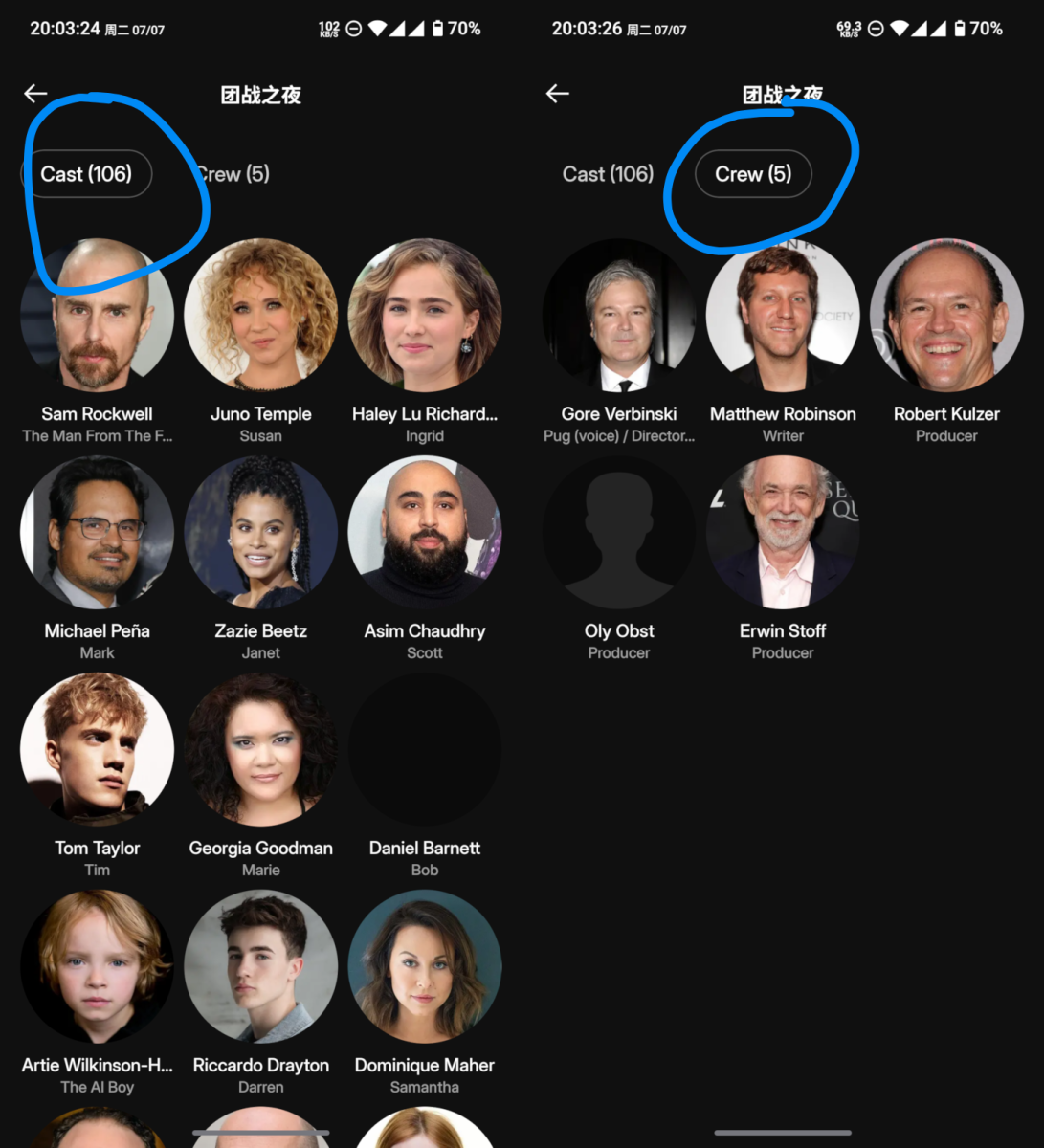
Hello @Luke, being able to quickly and easily view a movie’s crew is a very basic need. Please add this feature. How can this be implemented? As shown in the image, I think adding an option that allows us to separate the cast and crew would be a great solution. We really need this feature! Thank you! Just like Plex does
-
Hello @Luke, being able to quickly and easily view a movie’s crew is a very basic need. Please add this feature. How can this be implemented? As shown in the image, I think adding an option that allows us to separate the cast and crew would be a great solution. We really need this feature! Thank you! Just like Plex does
-

Emby Beta 4.10.0.15+: Crashing due to Out of Memory on DS918+ Package Center Install
sa2000 replied to DarWun's topic in Synology
I do not believe that a weekly need to restart is excessive whilst there is the issue with scanning large libraries. I am still interested to know what version was in use before that. -
Emby Beta 4.10.0.15+: Crashing due to Out of Memory on DS918+ Package Center Install
sa2000 replied to DarWun's topic in Synology
It could still be plugin like "TimeLordTV" requiring a lot of memory because of number of seasons or episodes in specific shows. What version was in use before this ? I will provide you the script and it needs to be running in an ssh session on the NAS. I normally would like to have the memory usage covering from the launch time of emby server up to the time when it becomes too high and the emby server ends up unresponsive or gets killed by the OS with OOM kill. So the SSH session needs to remain running - with the script starting to log memory usage before the initial relaunch of emby server and up to the time of failures. Together with the script memory usage logging, I would like to have the emby server running with debug logging enabled - enabled before the relaunch. Logs are kept for 3 days by default - so if the issue arises within the 3 days then we do not need to make any changes to extend that logs retention period Enable ssh on the NAS, login using tools such as PuTTY and navigate to a directory where the script will write the memory usage log to Then execute the script (echo "PID,time,VmPeak,VmSize,VmLck,VmPin,VmHWM,VmRSS,VmData,VmStk,VmExe,VmLib,VmPTE,VmSwap"; while :; do PID=$(pidof EmbyServer | awk '{print $1}'); [ -z "$PID" ] && { sleep 1; continue; }; printf "%s," "$PID"; date "+%F %T" | tr '\n' ','; awk '/^VmPeak|^VmSize|^VmLck|^VmPin|^VmHWM|^VmRSS|^VmData|^VmStk|^VmExe|^VmLib|^VmPTE|^VmSwap/ {gsub(/ kB/, "", $2); gsub(/[ \t]/, "", $2); printf "%s,", $2}' /proc/$PID/status | sed 's/,$//'; echo; sleep 1; done) | tee -a "$(cat /etc/hostname)_emby_memory_log_$(date +%F).csv" That will display to the screen as well as logging to a csv file - named: "<hostname>_emby_memory_log_<date>.csv" in the current directory With this run then enable debug logging on embyserver and then relaunch emby server When the issue arises, abort the script (control & c) and provide all the embyserver log files (embyserver-xxxxx.txt files and embyserver.txt) and the csv file Having said that, it would be worth trying first without the TimeLordTV plugin