All Activity
- Past hour
-
 loxuy joined the community
 -
 Ben1959 joined the community
 -
Problem is as said that some now have manually set it at the lowest possible quality. They are using Samsung but even with the feature they are no longer set to auto as they fumbled into having turned the quality setting way down. I do love the new feature though!!
-
 DrRui joined the community
 -
 Morroll joined the community
 -
Hey Luke, sorry for the delay. Question: that page talks about collecting server logs but I think this is only an issue for one client, the AppleTV. Would you still like me to provide server logs, or would you prefer I just send a small sample video that reproduces the issue reliably? I have one ready to provide if you want, let me know. Thanks!
-
 rafa62 joined the community
 -
 重蹈覆辙 joined the community
 -
 jnnnnnn60 joined the community
 -
 Familytimee joined the community
 -
 a402947069 joined the community
 -
 Tom cukran joined the community
 - Today
-

Fixed - choppy/ stuttering playback on some HEVC RARBG files
ullmat replied to Machete89's topic in Android
I might have the same problem. The solution can't possibly be to remux my entire library? -
With pleasure..
-

iOS App Error playing MKV files (only on the app)
felix89 replied to AlyEssa's topic in Apple iOS / macOS
Scarlet iOS is a helpful resource for people who want to learn about installing and managing apps on iOS devices. It provides clear installation guides, easy-to-follow tutorials, and the latest updates in simple language, making it suitable for both beginners and experienced users. The information is organized in a way that helps visitors quickly understand each step without feeling overwhelmed by technical details. It also includes useful tips and troubleshooting advice to help users solve common issues and stay up to date with new features and improvements. -
Whar are some 3rd party apps that work with emby that I can test out and play around with?
-

My experience with Intel ARC A310 Sparkle and Windows Server 2025 (Proxmox VM)
kadargof replied to kadargof's topic in General/Windows
For better understanding... [GUIDE] Intel Arc A310 Hardware Encoding & Decoding in Proxmox (Windows Server 2025 VM) on a Legacy BIOS System (No UEFI / No ReBAR) Overview After several days of troubleshooting, I successfully deployed an Intel Arc A310 LP GPU for full hardware decoding and encoding inside an Emby Server running in a Windows Server 2025 virtual machine hosted on Proxmox VE. Many online guides suggest that Intel Arc GPUs require: UEFI firmware Resizable BAR (ReBAR) Modern PCIe platforms to function correctly. For my particular workload (Emby hardware transcoding), that was not the case. This guide documents the complete process that ultimately resulted in stable hardware transcoding on the following legacy platform. Tested Hardware Host Lenovo ThinkStation D20 Dual Intel Xeon X5680 Legacy BIOS (no UEFI) PCIe 2.0 Intel Arc A310 Low Profile Proxmox VE Guest VM Windows Server 2025 Q35 machine type GPU PCI passthrough Initial Symptoms Initially I observed the following behavior: https://cdn.jsdelivr.net/joypixels/assets/8.0/png/unicode/64/2705.png Intel Arc driver installed correctly https://cdn.jsdelivr.net/joypixels/assets/8.0/png/unicode/64/2705.png GPU detected by Windows https://cdn.jsdelivr.net/joypixels/assets/8.0/png/unicode/64/2705.png GPU passed through successfully https://cdn.jsdelivr.net/joypixels/assets/8.0/png/unicode/64/2705.png Hardware decoding worked https://cdn.jsdelivr.net/joypixels/assets/8.0/png/unicode/64/274c.png Preferred Hardware Encoders always reverted to Software Encoders https://cdn.jsdelivr.net/joypixels/assets/8.0/png/unicode/64/274c.png hardware_detection.txt contained Quick Sync initialization failures (Result: null) https://cdn.jsdelivr.net/joypixels/assets/8.0/png/unicode/64/274c.png Connecting through Microsoft Remote Desktop caused hardware encoding to stop working Because the GPU itself was functioning correctly, the problem turned out not to be related to: Proxmox PCI passthrough Intel Arc drivers Legacy BIOS Missing ReBAR Instead, the issue was caused by a combination of Windows Server multimedia components, driver installation behavior, and Remote Desktop graphics policies. Phase 1 — Base Platform Preparation 1. HDMI Dummy Plug In my environment, Windows Server would not consistently initialize the Intel Arc media engine while running completely headless. Installing a simple HDMI dummy plug allowed the GPU to initialize correctly after every reboot. Although this may not be required on every system, it was required in my configuration. 2. GPU Passthrough Configure GPU passthrough normally. Recommended configuration: IOMMU enabled iommu=pt Q35 virtual machine Intel Arc A310 passed directly to the guest Phase 2 — Restore Windows Server Multimedia Components Unlike Windows 11, Windows Server intentionally removes many multimedia features that consumer applications expect. Without these components, Emby's Quick Sync detection failed and produced: Result: null inside: hardware_detection.txt Install Media Foundation Open an elevated PowerShell window: Install-WindowsFeature Server-Media-Foundation Also install the required .NET Framework Features from Server Manager. Restart Windows. Install DirectX End-User Runtime Download Microsoft's official: DirectX End-User Runtimes (June 2010) Extract the package and run: DXSETUP.exe as Administrator. Phase 3 — Install the Intel Driver Correctly The standard Intel installer detects Windows Server and may omit or block portions of the consumer multimedia stack. Instead: Extract the Intel driver package with 7-Zip. Open Device Manager. Update the Intel Arc device manually. Browse to the extracted driver folder. Enable Include subfolders. Complete the installation. This installs the raw driver without relying on Intel's installer logic. Phase 4 — Media SDK Registry Configuration Create: intel_fix.reg Paste: Windows Registry Editor Version 5.00 [HKEY_LOCAL_MACHINE\SOFTWARE\Intel\MediaSDK] "DispatchLevel"=dword:00000001 [HKEY_LOCAL_MACHINE\SOFTWARE\Wow6432Node\Intel\MediaSDK] "DispatchLevel"=dword:00000001 [HKEY_LOCAL_MACHINE\SOFTWARE\Khronos\OpenCL\Vendors] "intelocl64.dll"=dword:00000000 Merge the registry file. Phase 5 — Prevent RDP from Taking Over the GPU This ended up being one of the largest obstacles. By default, Microsoft Remote Desktop may replace the active graphics adapter with the Microsoft Remote Display Adapter during remote sessions. In my testing, this caused Emby to lose access to Intel hardware encoders even though the GPU driver remained installed. To prevent this: Open: gpedit.msc Navigate to: Computer Configuration Administrative Templates Windows Components Remote Desktop Services Remote Desktop Session Host Remote Session Environment Configure: Policy Setting Use the hardware default graphics adapter for all Remote Desktop Services sessions Disabled Prioritize H.264/AVC graphics mode for Remote Desktop Connections Disabled Use WDDM graphics display driver for Remote Desktop Connections Enabled Then run: gpupdate /force Restart the VM. Phase 6 — Configure Emby Inside Windows: Settings System Display Graphics Assign High Performance to: EmbyServer.exe and ffmpeg.exe located in the Emby installation directory. Switch Windows to the High-Performance power plan. Finally: Exit Emby completely. Delete: %appdata%\Emby-Server\programdata\cache\ffmpeg Restart Emby Server. Results After Emby rebuilt its hardware detection cache, both hardware decoding and hardware encoding became available. The Preferred Hardware Encoders list correctly displayed: Quick Sync Intel Arc A310 LP Graphics — H.264 (AVC) Quick Sync Intel Arc A310 LP Graphics — H.265 (HEVC) Hardware transcoding continued to function correctly after: Multiple server reboots Multiple RDP sessions Normal day-to-day server administration Final Notes This guide documents one verified working configuration and should not be interpreted as proof that every Intel Arc deployment behaves identically. However, it demonstrates that full Intel Arc A310 hardware transcoding is possible on a legacy BIOS platform without UEFI or Resizable BAR, provided that Windows Server's multimedia framework, graphics policies, and driver installation are configured appropriately. I hope this saves someone else the many hours of troubleshooting that went into discovering these interactions.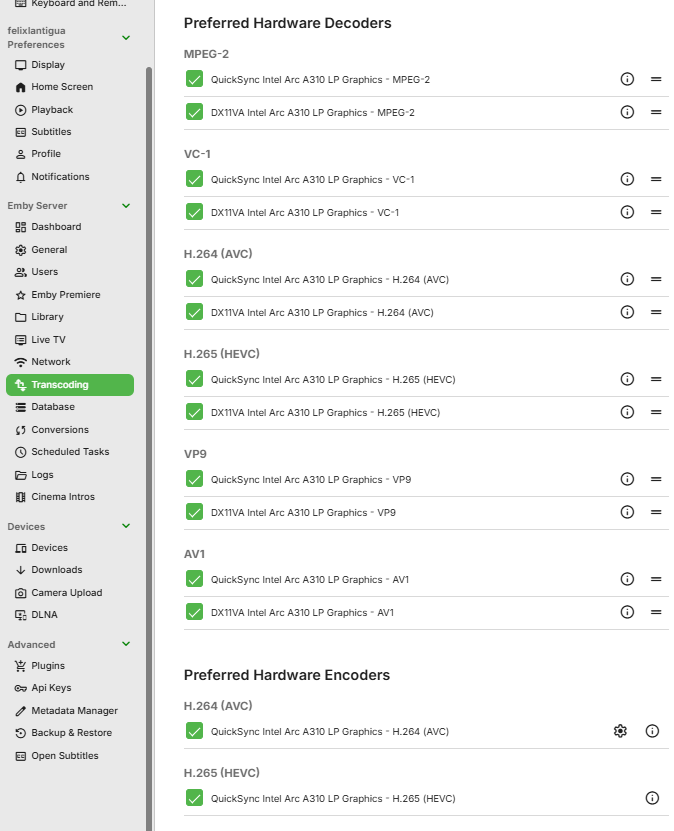
-
All of those except for Samsung and LG. Those users are still in the store review process.
-
My experience with Intel ARC A310 Sparkle and Windows Server 2025 (Proxmox VM)
kadargof replied to kadargof's topic in General/Windows
Nice -
@yockerthis new server feature was added a while back, but it is still unclear which client apps have support for it. @Lukecan you please confirm which client apps are yet to support this feature? The only ones I can see from release notes are the Android TV and Apple TV app, back in Dec 2025 Need confirmation on client apps like: Apple iOS Standard Android Samsung TV LG TV Windows / Xbox

-
Hi, you can name the files however you wish. For audio files, all metadata comes from embedded data in the file.
-
Hi, we’ll look into this issue. Thanks.
-
Hi, you can just tell them to leave it on auto and set their auto quality value.
-
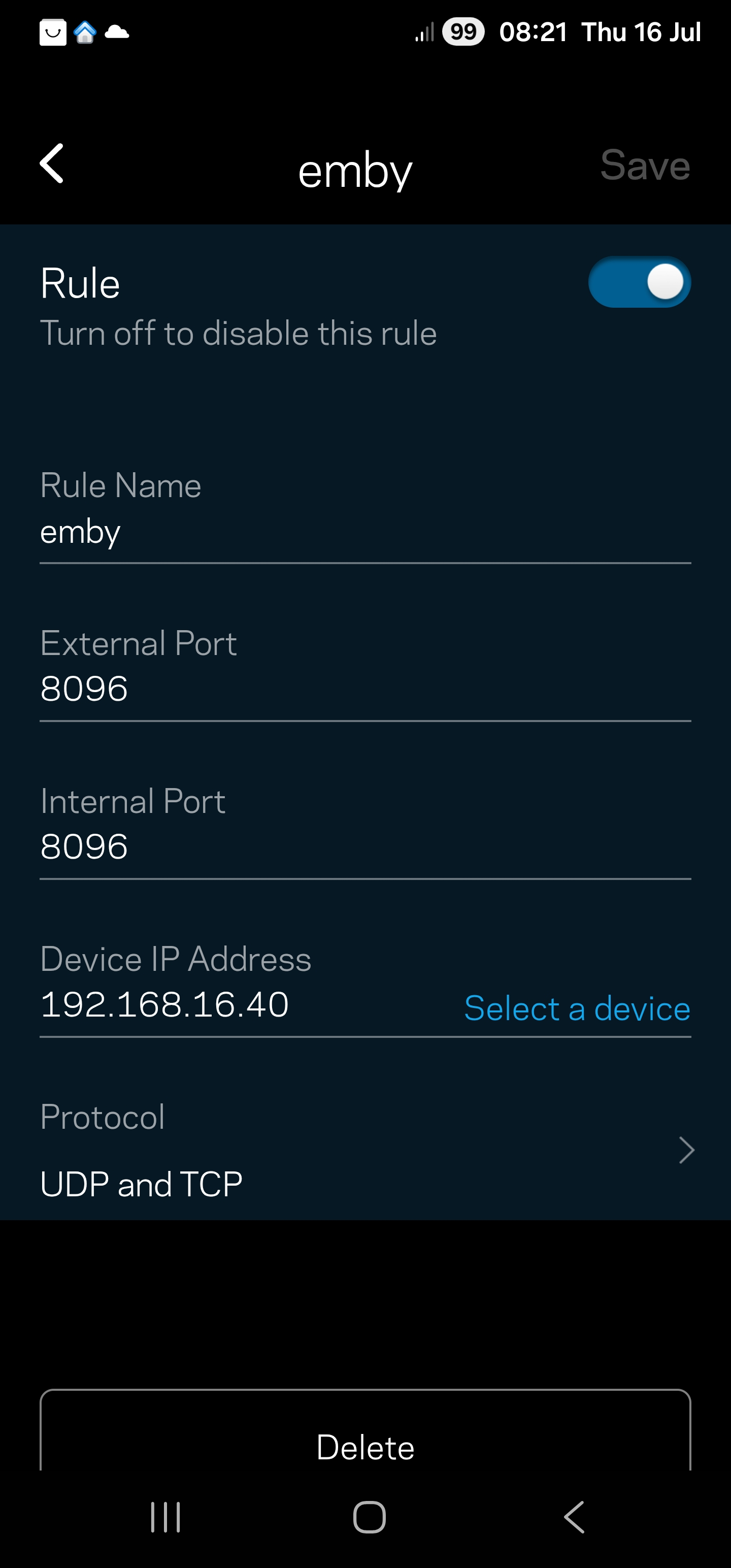
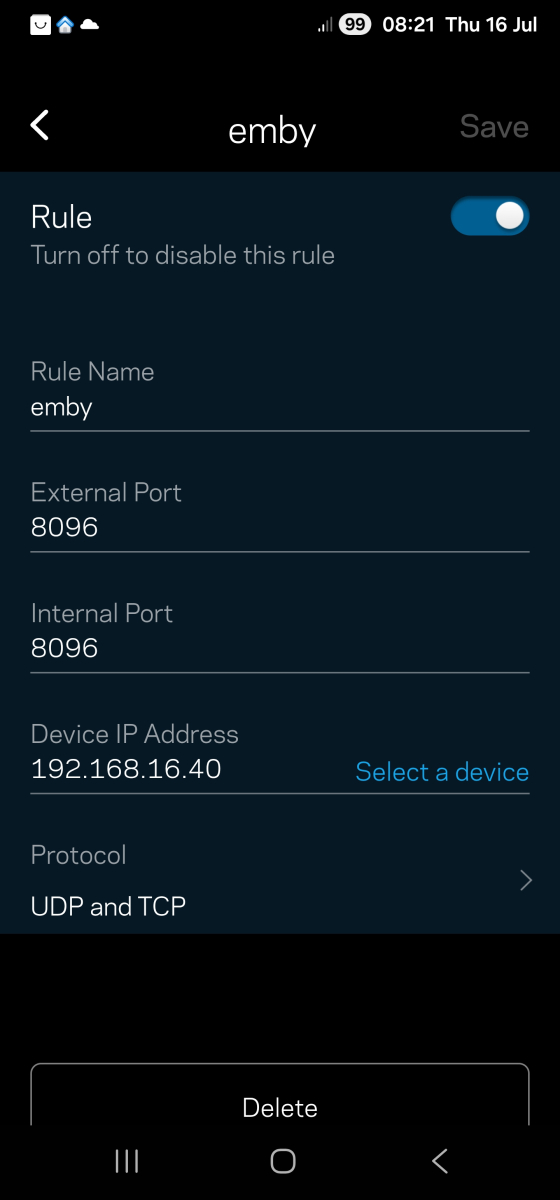
Hi, can you show a screenshot of your port forwarding? Thanks.
-

Emby Connect can't reach server (connection works fine via direct domain/reverse proxy)
Luke replied to smity3's topic in General/Windows
Right but the port is part of the address that is displayed, right? -
@Jörg79
-
Luke, sorry for late response, I've been traveling. the advice you provided for the subtitle issue really helped. I'm not having any issues with subtitles. I do have more question, if this is not the correct place to ask I'm sorry. I have created several music playlists that I listen to when traveling the issue is the downloaded playlist will only play one artist at a time. is there a way I can hit shuffle and all the playlists I've downloaded will randomly play regardless of the playlist? For example, I have 20 playlists downloaded but it won't randomly play everything unless I'm missing something. I'm still a newby beta tester so......
-

embyforkodi (next-gen) 12.X.X support
quickmic replied to quickmic's topic in Emby For Kodi Next Gen
Can you please send me a kodi.log including the playback issues for review, thanks. -

Emby for Android on Shield TV no longer passing through dolby digital 5.1 or DTS
ChateauPlex replied to Kramerika's topic in Android TV / Fire TV
Beta did not fix my situation. Now after the fourth playback correction, there are too many errors and it gives up. -
Finallization / Launching back and forth or still development back and forth?
- Yesterday
-

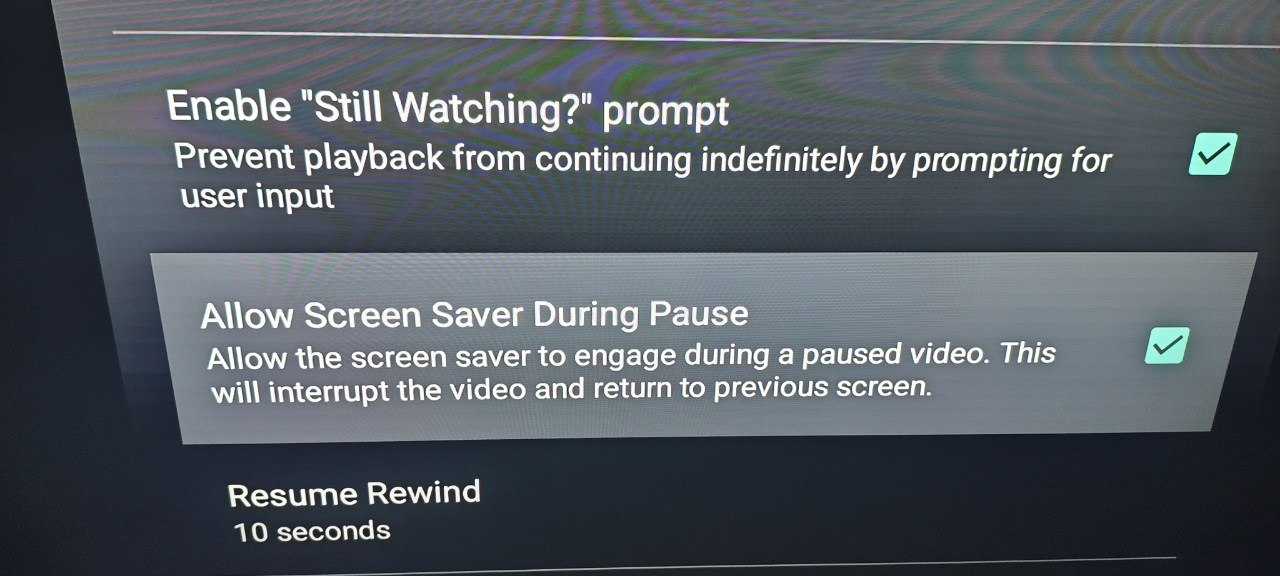
Emby doesn't exit video when Android box screensaver is on
Nabukodonosor replied to Nabukodonosor's topic in Android
I guess this is a features on TV app. I don't know why did you guys remove this feature from the regular version.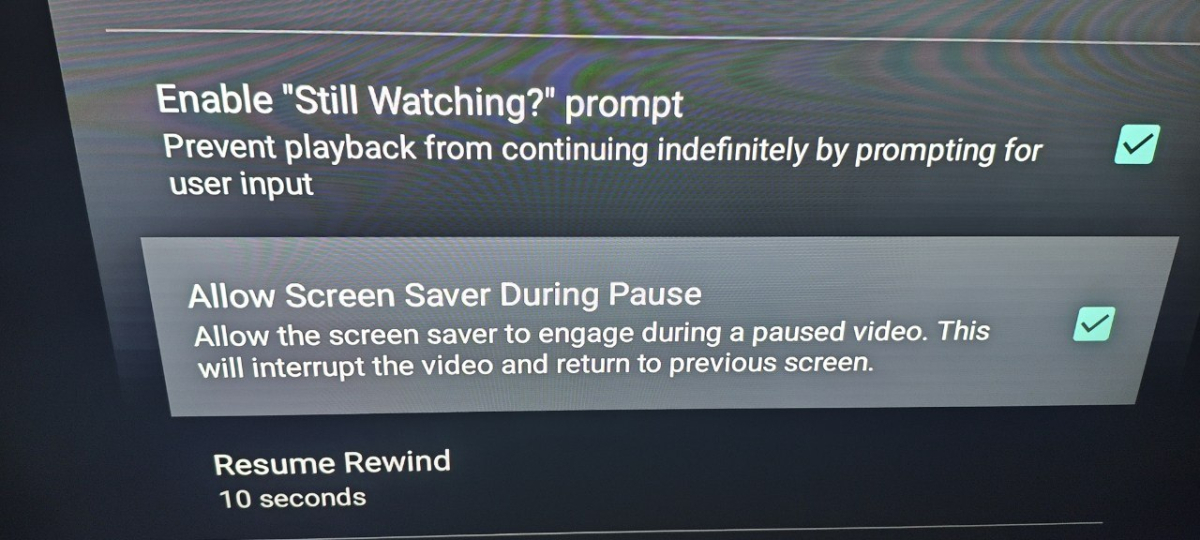
-
This release is taking a bit longer, but there are over 70 different year/model groups currently supported by this app, extending back to 2015 models. Samsung need to review, test and launch for each group. They don't exhaustively test every model group, but it still takes times. For newer, and current models, they do more exhaustive testing as new year models bring more challeges.
-

Emby Connect can't reach server (connection works fine via direct domain/reverse proxy)
smity3 replied to smity3's topic in General/Windows
Sorry I thought you meant the Dashboard where it shows the version number and Home/remote addresses, which are still correct and haven't changed. The problem was in the public port numbers in Network, I had two digits swapped that didn't match the Caddy ports I had set up. -
ok, i'll try it later