All Activity
- Past hour
-

HLS transcoding for Apple's native player: fMP4 segments, and an HDR + SDR variant pair
vdatanet replied to vdatanet's topic in Developer API
@Geordie When you suggested the engine, I said the route wasn't for me but the pointer was worth it either way. It turned out to be worth more than that. I kept turning it over — the part of your suggestion that stuck wasn't the engine, it was the route itself: stop negotiating with the server's manifest and do the remux locally. So I built a narrow version of exactly that. The app now carries its own Matroska demuxer and fMP4 muxer — about two thousand lines of Swift, no FFmpeg, no decoders, nothing bundled. It reads the MKV straight from the server with HTTP range requests (opening a 19 GB file costs 16 requests and ~300 KB, thanks to Matroska's cues), splits it into fMP4 segments on the device, writes its own HLS master — VIDEO-RANGE, CODECS, one audio rendition per track, all derived from the file itself — and hands that to the native AVPlayer. It never touches the bytes: video and audio are copied, not transcoded. HDR10, and the HDR10+ metadata that a server-side transcode strips, survive untouched. Measured last night on an Apple TV 4K, with a 19 GB 4K feature — Dolby Vision profile 8 over an HDR10 base, ~25 Mbps average: the display switches into HDR, and it switches from a 4K SDR output mode with Match Dynamic Range on, before playback starts — the case that used to be hopeless. The server's only work is serving byte ranges: the day's server log shows zero ffmpeg launches and ~1,300 HTTP 206 responses against the static file endpoint, and the dashboard reports the session as Direct Play. Seeking, chapter jumps and resume all behave like local playback — the cues map straight to byte ranges, so nothing round-trips through a session. So the line I drew in my earlier post still stands, and now it has both halves: the native player, the system track picker, no bundled engine — and the local remux you were right to point at. The difference from the engine route is only where the pieces come from: AVPlayer keeps doing the decoding and the UI, and the app only rearranges containers, which is the boring part and the one I'm happy to own. For everyone else on the thread: this doesn't retire the original request. VIDEO-RANGE and CODECS in the manifest are still what would fix this for every client that doesn't carry its own demuxer — which is nearly all of them. My app just stopped needing to wait. Thanks again, @Geordie. The nudge did more work than the suggestion. -
 StefanDL joined the community
 -
 Yolioli12 joined the community
 -
 fran_hinojos joined the community
 -
 sandielachance joined the community
 -
 david_novo joined the community
 -
It could be the mime type passed into the intent is not correct. We'll take a look at it. Thanks.
-
 Moatazzz joined the community
 -
 danielhealyy joined the community
 -
Fee11 joined the community
-
 Jocelyn Alvarado Alvarez joined the community
 -
 radamelortega joined the community
 -
@jccbsl?
-

Misleading transcode information in clients and dashboard
danergo replied to danergo's topic in Linux
Success! Retested with Emby Server v4.9.5.0 and Emby for Android (on FireTV) v3.5.44. Now it seems every single place shows the correct transcoding information. Thank you @Luke! -

Stumped trying to get an API key to work with Powershell for Movies reporting
FatherSaint replied to FatherSaint's topic in General/Windows
PLAN B: Tiny Media Manager can apparently export the list that I need. I have it installed and running right now. Unfortunately, I had done what the page shows. It doesn't make sense to me, especially since I am the ONLY configured user and so presumably the Admin by default. Co-Pilot decided at some point that instead of using localhost the script should use the IP address instead. Maybe I'll just have to manually do this, which would be a stinker, but the Reports plugin might give me some good info. -
Hi, the issue has been found and is specific to folders with dots in the name: Thanks.
-

Regarding the issue of 4.9.1.80 and the plugin Bluray Folder Support 1.0.3.0 recognizing BDMV original disc fi
Luke replied to LonelyCat's topic in Synology
Hi, the issue has been found and is specific to folders with dots in the name: Thanks. -
BDMV folder playback broken in Emby Server 4.9.5.0 – BDMV directory is incorrectly opened as a regular file
Luke replied to Jar4tt's topic in General/Windows
OK Thanks. I see the issue. It is resolved for the next release. -

TV Show Status — TMDB-powered Returning/Ended/Cancelled badges for series
GrimReaper replied to Blueskies278's topic in Plugins
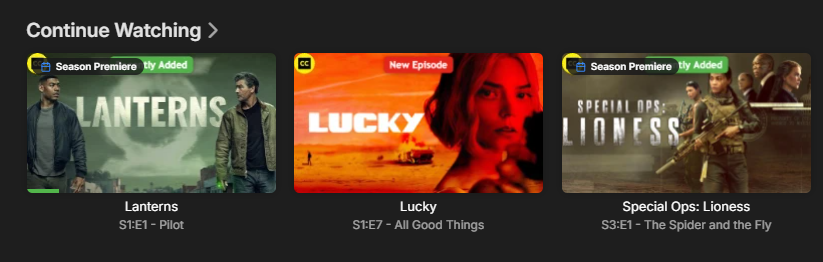
That is likely a bug as already described here: Even with all badges/everything else OFF/None, episodes 1 are getting it in CW row.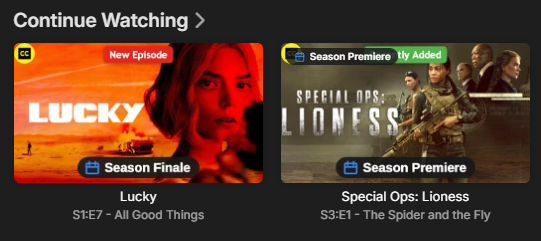
-
Stumped trying to get an API key to work with Powershell for Movies reporting
FatherSaint replied to FatherSaint's topic in General/Windows
Honestly, I thought it was more likely something in the script, even though Co-Pilot didn't agree. LOL I'll read that now, thank you! -

TV Show Status — TMDB-powered Returning/Ended/Cancelled badges for series
ginjaninja replied to Blueskies278's topic in Plugins
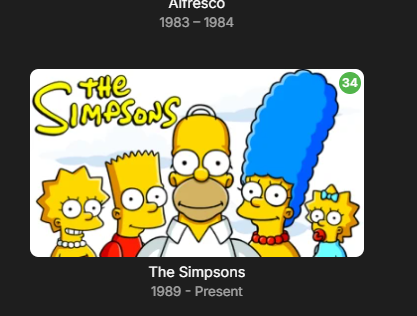
HI @Blueskies278 , I might be doing something wrong. i wanted to disabled all the web client stuff (i only want the image overlay stuff in real life and for testing). so went with config { "EditorTitle": "TV Show Status Settings", "EditorDescription": "Displays TV show status badges (Returning, Ended, Cancelled) and return dates on series pages using data from TMDB. This product uses the TMDB API but is not endorsed or certified by TMDB. The web browser badge deploys itself automatically on startup - it writes a small script into Emby's own web folder and adds a line to index.html that loads it. On some setups, most often Docker, Emby doesn't have permission to write there: the folder is owned by root while Emby runs as another user. That is an ownership problem rather than a read-only folder, and one chown fixes it permanently - the 'Web Badge/Description Script' box at the bottom of this page tells you the exact command for your platform. Everything else in this plugin works regardless. If you would rather not change permissions at all, turn on 'Prepend status to show description' instead: it writes into Emby's own metadata, needs no file access, and shows on every client including Android and tvOS.", "TmdbApiKey": "[removed]", "WriteStatusToOverview": false, "DisplayMode": "None", "BadgeStyle": "None", "EnableImageOverlay": true, "OverlaySize": "ExtraLarge", "WebGridBadges": false, "ThumbnailBadges": "Everything", "EpisodeBadges": "PremiereAndFinale", "BadgeOpacity": "Solid", "OverlayPosition": "BottomCentre", "OverlayMarker": "Calendar", "EndedMarkerColour": "Red", "CancelledMarkerColour": "Default", "AiringMarkerColour": "Default", "CompleteMarkerColour": "Default", "OverlayMode": "ReadyToBinge", "OverlayWatchedUser": "Cartman", "ForceDisableSkiaSharp": false, "OverlayModeStatus": { "Status": "Warning", "Caption": "Poster Overlay", "StatusText": "This server has 5 users.\n\nEmby draws ONE poster per show and shares it with everyone, so every user will see Cartman's watched progress - not their own. On a household server that is misleading rather than broken, which is why it is worth saying plainly.\n\n'Show when a season has finished airing' gives you the blue Complete badge without this problem - it just does not hide the badge once you have watched the show.\n\nWorth knowing: TMDB reports 'nothing scheduled' both for a season that has genuinely finished and for one that is simply between episodes with no date published yet. Those cannot be told apart from the data, so a show on a mid-season break can read Complete early. It corrects itself as soon as TMDB publishes the next date.", "CanHideInCompactView": false }, "AirDateSourceStatus": { "Status": "Succeeded", "Caption": "Air Dates", "StatusText": "Using TMDB dates. The Trakt Air Dates plugin is not installed, or has not built its cache yet.\n\nThat is a perfectly normal setup and nothing is broken. Worth knowing though: TMDB stores an air date as a bare date with no time and no timezone, so a US show broadcast in the evening can show the previous calendar day if you are outside the US. Installing Trakt Air Dates fixes that; this plugin picks it up automatically with no configuration.", "CanHideInCompactView": false }, "WebScriptStatus": { "Status": "Succeeded", "Caption": "Web Badge/Description Script", "StatusText": "Active - the badge script is deployed into Emby's web folder and index.html loads it.\n\nAn Emby app update wipes both, so the plugin now re-checks every 5 minutes and puts them back on its own. On Docker it can only do that once Emby owns its web folder again - see Setup below.", "CanHideInCompactView": false }, "FeatureRequiresPremiere": false, "IsNewItem": false } (testing 2.5.77) I am a bit unsure how to refer to what i am looking at. My previous feedback was through a mistaken lense, i think i was seing the "web client" functioanlity... In continue watching ...Are these Show thumbnails? or seasons thumbs (which have inherited the show's thumb image) or episode thumbnails (which are overridden by season > show) - not sure how emby works, or if it even matters to the logic of the image processor. something interesting is happening becuase if i look at the show thumb in library there is no overlay only on "continue watching" (not a problem but it might help to know whats going on when troubleshooting / feeding back). To me extra large on the image could not be readable if it was any smaller. In practice for screen realistic i wonder wether a dot rather than text would be a useful option (idle suggestion until i see it as a whole). I think the ultimate outcome for me would be to see text/dot which confirmed somethign on continue watching thumbs, that indicates "Ready to Binge Season(/Show)", and season premier/finale as the cherry on top. Anyways i seem to loose almost all functionality when i turn off what i assume is the web functionality, except season premiere (oddly season finale on "Bottom" doesnt work, when premier does on "The Simpsons"). Maybe some of the settings are shared by web client and image processing and i have inadvertently turned something off? Could/should the web client and image processoing be more 'obviously' separate to enable/configure in the options? That said if image processing is working and granular enough, why would you want to overlay things via webclient functionality that only works on the web client?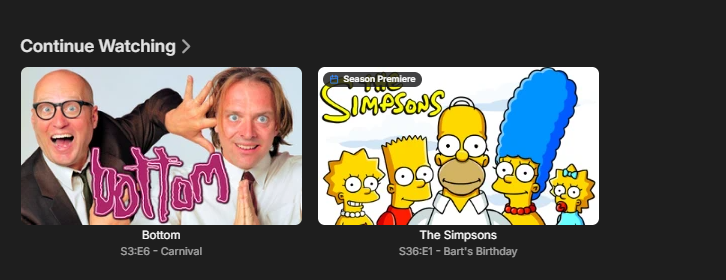
-

New Emby for Apple TV 2.0.8 Version Released
Andromeda1 replied to Emby Releases's topic in Apple TV
Since the latest update I have problems scrolling down in the list of home movies. When I play one when I quit to go back to the list it takes me back to the top of the list instead of that movies place lower down in the view. This did not happen before. Also I’ve noticed after deleting the app and reinstalling when I play a movie it disappears from the view that contained it but it is still in the library if I look in the folder that contains it. I think both of these things happened before on a previous build and you fixed them with newer builds but now they have resurfaced. Back to Infuse client for now for me. @SamES -
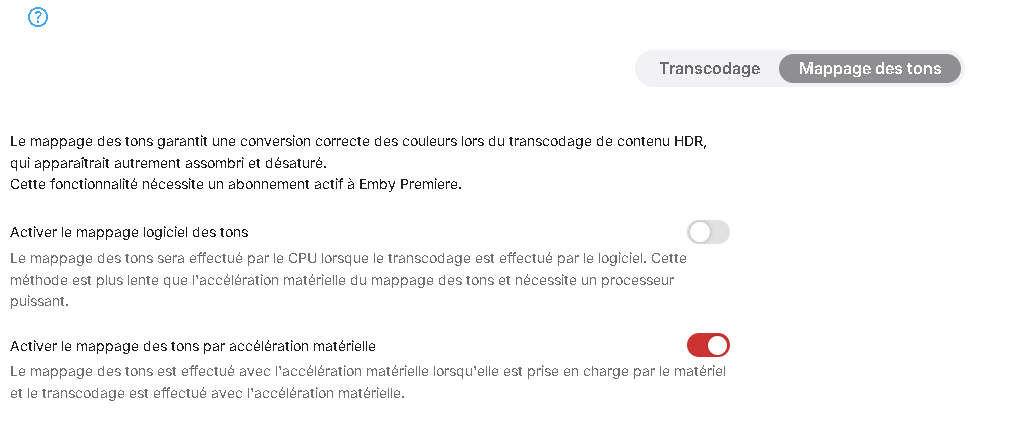
BOonjour, temps de réponse très long, mais j'ai pris le temps de me remettre sur mon problème. J'ai trouvé la solution, dans la partie transcodage, j'ai activé l'option suivante: Il me semble pourtant que ce menu n'existait pas il y a encore 2 ans. Merci d'avoir pris le temps de me répondre en tout cas
-

Please add a feature where Emby will retain data
pwhodges replied to JokerJ420's topic in Windows & Xbox
Within the base folder (s) for each library does each movie have its own directory with the correct name and year of that one movie? https://emby.media/support/articles/Movie-Naming.ht Does each series have its seasons (even if only one) in a separate Season nn directory within the series folder? https://emby.media/support/articles/TV-Naming.html Those rules as I stated them are perhaps stricter than necessary in some situations, but if you follow them, misidentification (and specifically confusion between series and movies) should be a thing of the past. Paul -
Stumped trying to get an API key to work with Powershell for Movies reporting
Luke replied to FatherSaint's topic in General/Windows
Hi, have you taken a look at this? Emby SDK Documentation: API-Key Authentication- 3 replies
-
- 1
-

-
- powershell
- script
- (and 1 more)
- Today
-
The log error_log.txt
-
Stumped trying to get an API key to work with Powershell for Movies reporting
FatherSaint posted a topic in General/Windows
I am having issues with the Reports plugin as I try to find my old movies that are 720p or even worse to upgrade. It has often wrongly identified the resolutions, usually showing 1080p as 720p... So, anyway, I've been using Co-Pilot to create reporting based using the API key that I created specifically for this. I should mention that I first tried the API key that was already with the same error. My Lifetime license appears to be fully installed and everything is happy in that regard. ERROR OCCURRED: Access token is invalid or expired. The C:\Reports path has full permissions and I'm executing the .PS1 file from within Powershell, which is running as Administrator. After a lot of back and forth, Co-Pilot thinks that the issue is related to network binding of some sort, causing the key to be rejected. Any thoughts would be much appreciated. I've attached the script here as a .TXT file, in case that helps. EmbyReportingPowershell.txt -
Hi there, let's look at an example. Please attach the information requested in how to report a media playback issue. Thanks!
-
@Eggi001?
-
@Zerberus1001 Hi there, let's look at an example. Please attach the information requested in how to report a media playback issue. Thanks!
-
Hi, we are still looking at it. Thanks.
-
Hi there, please attach the Emby server log from when the problem occurred: How to Report a Problem Thanks!
-
Add syncing of viewing progress for the external player
Luke replied to vanor's topic in Feature Requests
Hi, there's already an open request for this or something functionally equivalent. Please join in and contribute to the existing discussion at: -
HI, there is currently no option in emby server for this, if that's what you're asking.
- 1 reply
-
- 1
-

-
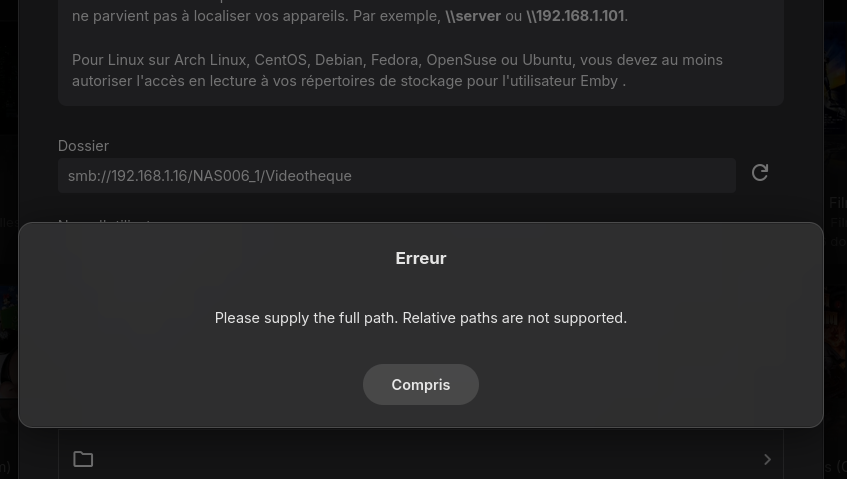
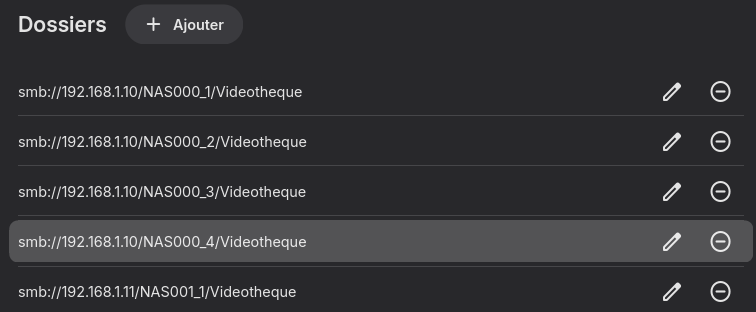
Hello, I tried to add a smb path to my library, and I received an error message. All my media libraries are organized with smb path for a long time. When I try to add, "smb://192.168.1.16/NAS006_1/Videotheque" for example , I get this error message : "Please supply the full path. Relative paths are not supported." My server is running under Linux Debian 13, with Emby version 4.10.0.27 An idea ?