All Activity
- Past hour
-
Again thx. Maybe some of the admins/dev team can share some light, how the selection is done? Would be lovely, if I could somewhere select: select based on format or based on best resolution.
-
 notion091 joined the community
 -
Thank you @soderlundfor your comments. Maybe there is any way to implement this as an option? (I don't think it's "only" an admin feature.... That's what "rankings" for movie enthusiast are all about! To see what's number 25 or what's the last ten til 100. And of course to see: Oh my collection still misses the top movies from 11 to 16 and 22-23. In addition of the ranking thought I also believe that this kind of "order" would be necessary for the collection or homescreen add on. (Because who cares of an alphabetic movie-list, if the collection is called: "Top 100 Movies of all Time".) Thanks for further thinking about it and hopefully - if necessary - the admin-team could think of adding "numbers" to playlists (optional of course).
-
The request An entry returned by /Shows/Upcoming has no image of its own. I'd like to ask for one: a per-entry image reference on that endpoint's response. The reason I maintain two plugins, TV Show Status & Tv show Air Dates. Among other things it marks season premieres and finales by drawing a small badge on artwork, through IImageEnhancer. On posters and on series thumbnails it does exactly what it should. In Upcoming it cannot, and the reason is visible in the API response. Calling /Shows/Upcoming with an API key returns entries that carry: no Id no ImageTags ParentThumbItemId and ParentThumbImageTag that are identical for every entry of the same show SeriesPrimaryImageTag, likewise identical across that show's entries Everything else is per-episode — Name, Overview, PremiereDate, IndexNumber, ParentIndexNumber, ProviderIds — but every image field points at the series. So each card in the Upcoming view is given the same picture. The clients then behave sensibly: they use an entry's own image when there is one and fall back to the series thumbnail when there isn't, and the fallback is always taken, because the first option never exists. What that means for the plugin The enhancer is handed the series, once, and asked whether to draw. It has no way to answer differently for one episode than another, because there is only one image in play. In practice: A show with a premiere inside the plugin's window gets the badge drawn on its series thumbnail — and therefore on every one of that show's Upcoming cards, which can be ten or more, not the one the badge refers to. A show whose premiere has already aired has a plain thumbnail, so none of its cards are badged. Side by side on one screen that reads as a fault: one show badged ten times, another not at all. It isn't a fault. It is the only behaviour the data permits, and no plugin setting can change it. The same limitation blocks anything else an enhancer might reasonably want to do per upcoming episode — a new-season marker, a countdown, a logo on the episodes that actually change network, a first-episode-after-the-hiatus flag. Why the existing routes don't cover it The episode name. The plugin's companion, TV Air Dates, can put "Season Premiere" in front of the episode title, and that does land on the correct card everywhere. But a name is one field and it travels: the prefix then appears on the season page, in search results and on the now-playing screen, not only in Upcoming. A marker on artwork is the right shape for this, and it is the shape Emby uses elsewhere. Injected JavaScript in the web client. This solves it per episode, and it is what the plugin does for browsers. It reaches only browsers. The apps carry their own copy of the web client, so a server has no way to reach them, and iOS cannot be modified at all. That is the gap I am asking about: the route that works is available only on the client that needs it least, and the plugin therefore cannot work seamlessly on the Emby apps — which is where most people actually look at Upcoming. IImageEnhancer. The enhancer is the right mechanism and it works well everywhere else. The difficulty is only that for Upcoming it is asked one question per show and expected to answer it per episode. Possible shapes Any of these would do it, in rough order of how small they look from outside: Set ImageTags on the entry when the episode resolves to a real (including virtual or unaired) item, so clients take the path they already prefer. Set Id on the entry, so a plugin has something to attach an image to and clients can request /Items/{id}/Images/Primary as they do everywhere else. Allow a metadata provider to supply a per-entry image reference alongside the episode, for the endpoint to carry through. The first appears to change nothing for existing clients, since they already check the entry's own image first and fall through when it is absent. What it would enable Plugins that already badge posters and thumbnails correctly would badge upcoming episodes correctly too, on every client, including the TV and mobile apps where nothing else is possible — and TV Show Status would behave the same way in the apps as it does in a browser, which is all I am really after. Everything above is observable from /Shows/Upcoming with an API key, if it is useful to reproduce. Thanks for reading, and for the plugin surface generally: the enhancer and channel APIs are good, and this is a request to extend one of them. Thanks
-
 EMB32 joined the community
 -
 Hoffi_Kino joined the community
 -
 Camster joined the community
 -
 Eng_mustafa joined the community
 -
 ssstack1 joined the community
 -
 jemeljanov joined the community
 -
Hi, I’m experiencing a persistent issue with the OpenSubtitles integration in Emby. Whenever I try to download subtitles for any item in my library, Emby returns the following error: Codice emby {"message":"invalid token","uk":"app_102497_2001:b07:5d2e:5a11:9107:5a2b:67bf:170f","uid":2,"ts":1773761929} Observed behavior The issue happens on all clients, including browser and native apps. It also occurs on direct LAN, without any reverse proxy. Logging out/in, clearing cache, and restarting the server does not fix it. The OpenSubtitles token seems to expire immediately or is not accepted by Emby. What I’ve already checked No network or DNS issues. No proxy, no header rewriting. OpenSubtitles credentials are correct. Emby server is updated to the latest stable version. No other errors in the logs besides “invalid token”. Possible cause It looks like Emby is generating or validating the OpenSubtitles token incorrectly, causing immediate expiration or rejection. Request I’d like to know whether: This is a known issue with the OpenSubtitles integration. There’s a bug in Emby’s token handling. There’s any procedure to reset or regenerate the OpenSubtitles token inside Emby. A fix is needed on Emby’s side or on the provider’s side. I can provide full logs and system details if needed. Thanks in advance.
-
 Thais92PL joined the community
 -
 rouh09 joined the community
 - Today
-
I have a problem. I have been forced to move off of Ubuntu on my EMBY installation as my graphics card is no longer supported under Linux. Tried Windows but the NIC card is not supported (it's an enterprise class so Windows 11 doesn't have the drivers) so I finally ended up with Windows Server 2025 which supports all of the hardware perfectly. EMBY Server installs and runs perfectly but I am struggling to get EMBY Theater running. This might sound like an odd setup but the server is connected to a video switch which distributes video to multiple TVs throughout my home so it is ideal for me. Windows Server doesn't support the GUI for Microsoft store but it does support installation using winget (earlier versions of Windows Server didn't). So the command (elevated powershell) "Winget install 9NBLGGH4T70L --source msstore". Works perfectly. The problem is that when I start EMBY Theater I get the splash screen and the moving lines then it freezes to a blank white rectangle and a message is displayed that either i don't have permission to access or a file is missing. Unfortunately the file name is truncated after the path (C:\Program Files\WindowsApps\) the name starts with EmbyMedia.EmbyTheater_2.317.2.0_neural-~-svmepx4c03f7m....... I've checked and there are several files in the folder with names which start like this. Any Ideas? Plan B was to use the portable version of EMBY Theater. Sadly this is no longer supported. I did sort of get it to run but key features such as being able to access the setup screens don't work. So could someone help to get the MS store version working on Windows Server 2025 or could you reinstate the .exe which i can install on my platform? Thanks.
-

A request to Emby - please clarify the situation with the AndroidTv app
NeverReadyEddie replied to ecrispy's topic in Android TV / Fire TV
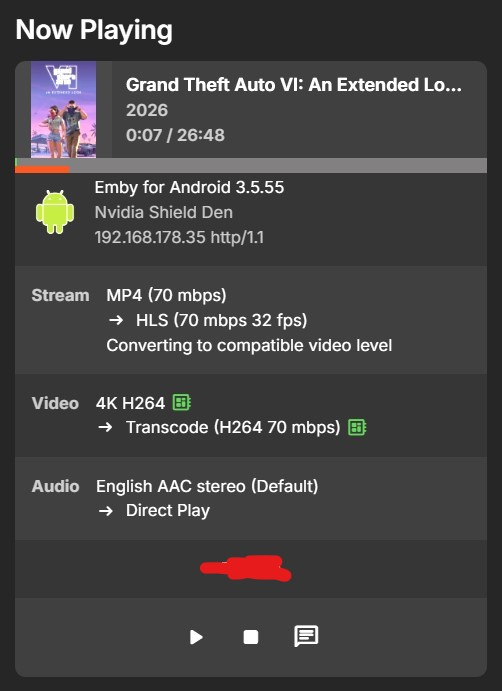
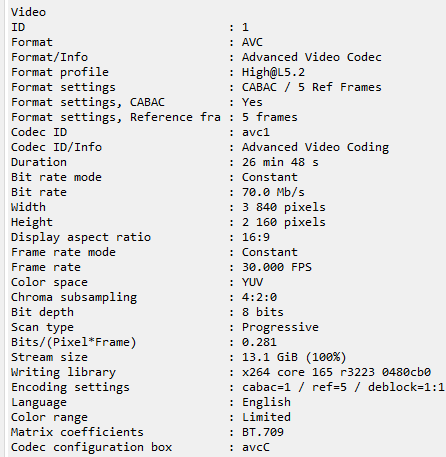
AndroidTV app FOR THE WIN! : OK here is a first for me when comparing Emby for Android TV vs Emby for Android on my Nvidia Shield Pro. The trust old Emby for Android TV direct plays but the Emby for Android transcodes (and changes the framerate from 30 FPS for some reason). Same hardware, same video file. In fact I challenge others to try this as its a free download of the GTA IV Extended Look in MP4 from Rockstar's site, linked below. Its a registered movie in TMDB too so add it to your movie folder but add the year to help Emby identification. https://www.rockstargames.com/VI/media/videos Don't even get me started on the WebOS version playing this file as it converts it to a variable frame rate from the fixed 30 FPS up to over 40 FPS for some reason and it stutters like mad. But that is for another thread I may create. Perhaps Emby should download this free file and do some testing across multiple devices and see what happens.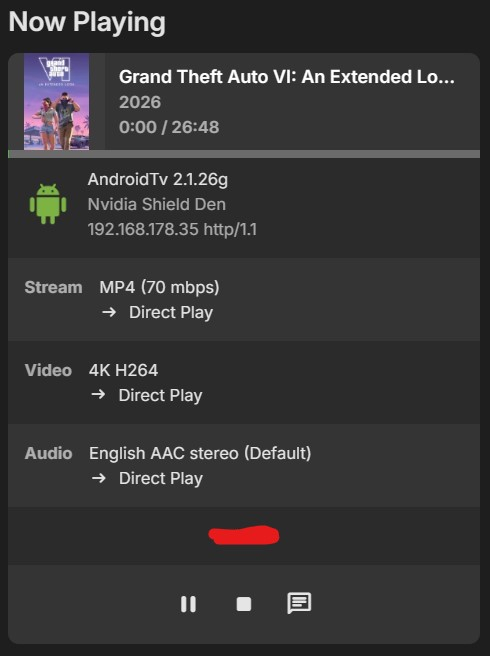
-

EmbyVision OCR - CPU Based AI Credits Detector for Emby (Docker)
enterpr1se replied to EncryptedCity's topic in Tools and Utilities
Thanks! I can pull the Docker image now. However, I’m having trouble starting the container—my NAS only has 12GB of RAM, which might not be enough. -
It's happened again. Checked the dashboard this time and it is indeed playing through the universal Android app. Doesn't seem to be playing an album, this time...it started midway through “I Did Something Bad” from Reputation and has now moved on to “Love Story” from Fearless. Might be one of my music playlists, though, which was the last thing I was doing on Emby from a music playback perspective but I've watched a dozen movies since then so it doesn't make much sense. This is also the first time I've used Beamafilm since the last time I had this issue, so it does seem to be some sort of interaction with Beamafilm specifically. I rebooted the server. It was in the middle of “Love Story” when it shut down, and when it booted up it immediately started playing “no body, no crime.” I'm unable to control playback from the dashboard. embyserver.txt embyserver-63925689323.txt
-
Hi, I am consistently getting the error "Too many errors - giving up" on playback on my firesticks. This does not happen via Browser playback, Androif phone playback or Samsung TV app playback. In the past month, I have turned in automatic subtitle downloading from Opensubtitles and Add1cted. Perhaps it is related to that. Please see log file from failed playback this morning Many thanks
-

Plugin: EmbyCredits, detect end credits and add auto skip.
fbourg replied to yocker's topic in Plugins
with cpu only solve on severance show, but for this show, another problem : credits-detection-debug-2026-09-22T07-39-28.log -
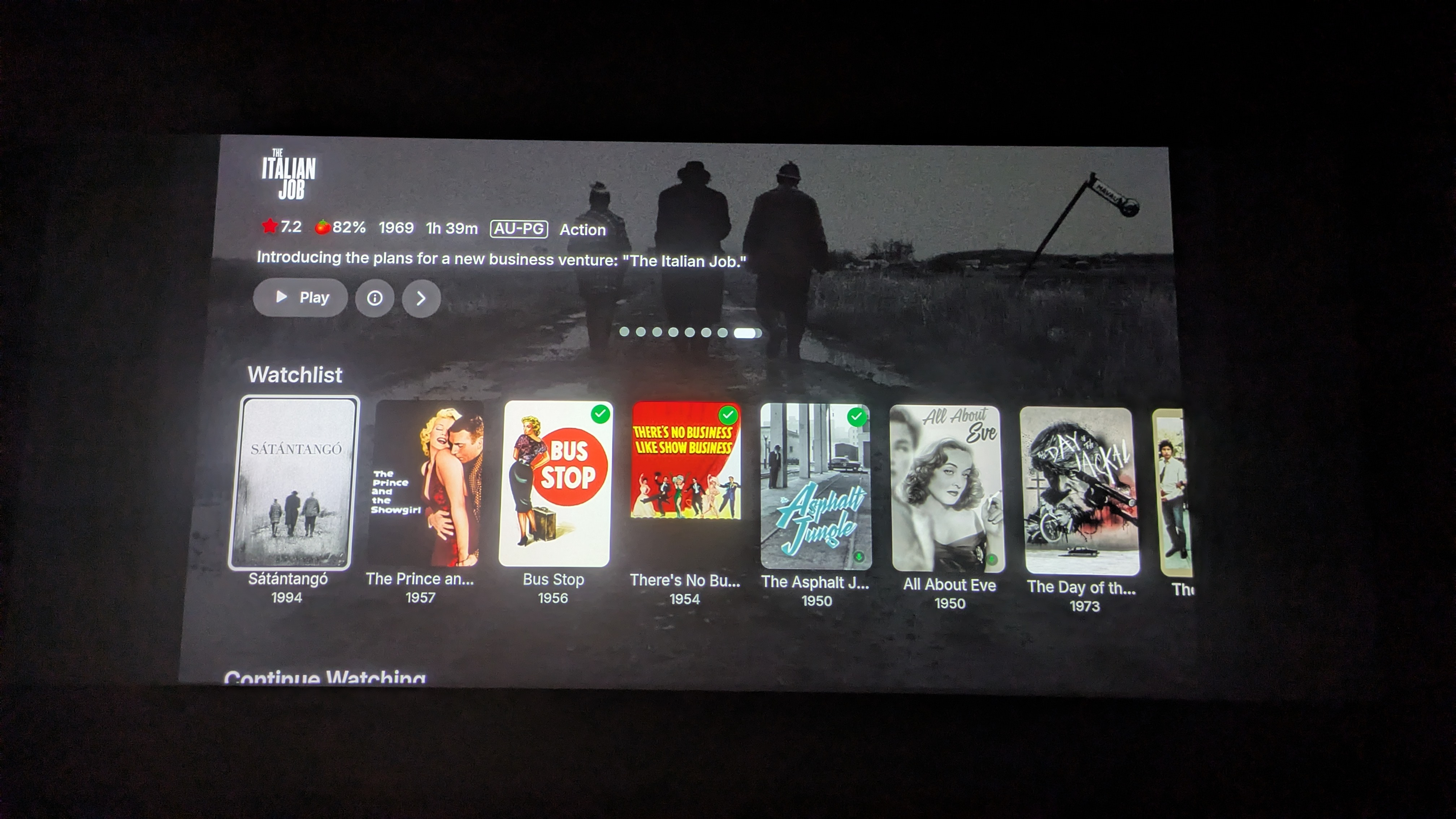
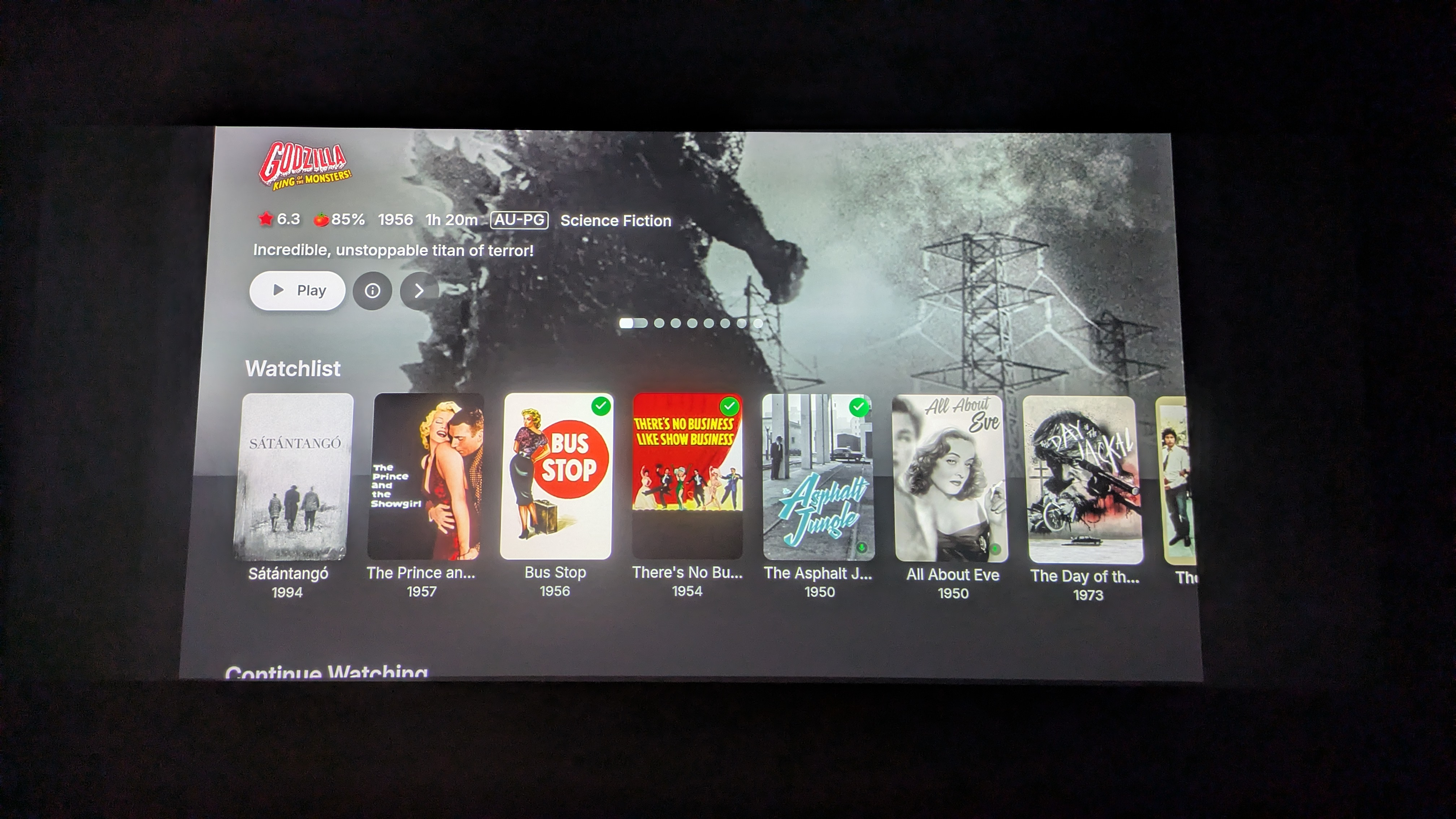
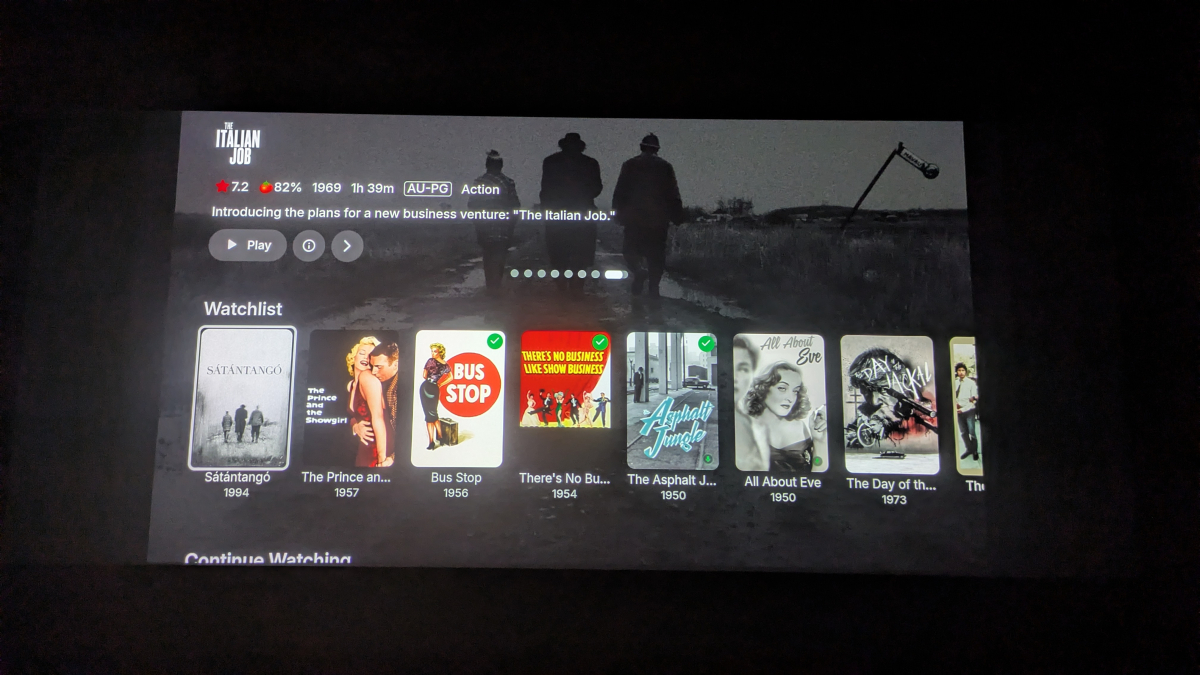
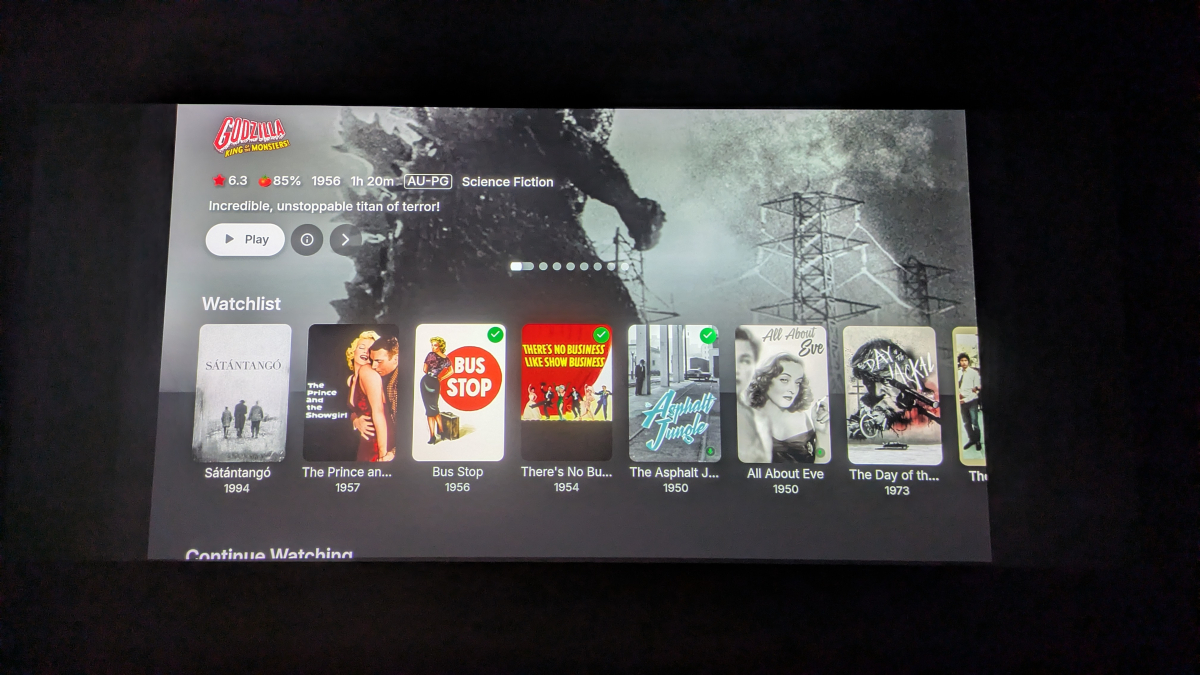
It really makes no sense that EHS isn't supported with the fullscreen spotlight display. As it is now, when I scroll down to the next row I get this: Which makes no sense at all. That top area could easily be used for EHS. Having it display the info for the spotlight, and not for the movie I have selected, is just confusing. Further, if I then press the up arrow on the remote, it focuses the spotlight but doesn't scroll back up to it:
-
Can't say I'm seeing that, version .60 on a Shield (to a Samsung soundbar to a Sony TV if it matters).
-
Okay now that I have the full-screen spotlight back...the translucent backdrop issue is still occurring. Click on the info button in the spotlight to go to the item details screen of the spotlighted title. Press the back button to return to the home screen without refreshing it. When the spotlight scrolls to the next film, the backdrop of the film whose item details screen you went to will still be visible, overlaying the backdrop of the newly-spotlighted item.
-

Linux: PathTooLongException when scanning files with long UTF-8 filenames
sichongzou replied to sichongzou's topic in Linux
Oh, sorry, this is a log embyserver.txt -

Most recordings missing from "Continue Watching" in 4.10.40
Luke replied to flashls82's topic in General/Windows
Actually I think your issue is probably this: So please follow that topic. Thanks. -

AgentNFO - Cast (Actor & Crew) and Studio management application.
MediaIntelNUC replied to marriedman's topic in Third Party Apps
Hi! Yes sir, it have installed it on my Docker, when doing a first scan it gave something like 10 or so errors so the scan wasnt succseful. From what i can gather these errors come from NFO:s missing a studio-tag. Will have another go at it shortly. Thanx! -
Linux: PathTooLongException when scanning files with long UTF-8 filenames
Luke replied to sichongzou's topic in Linux
Hi there, please attach the Emby server log from when the problem occurred: How to Report a Problem Thanks! -
But all that does is let you change the interval. It’s not an option to disable anything.
-
Hi. The option was added during 4.9 releases.
-

LG TV is Internet blocked: Emby App asks for premiere / lags when pressing play
Utini replied to Utini's topic in LG Smart TV
Ah yes true lol..well opening the domain works. -
Unable to delete a user – RemoteServiceUnavailableException
Luke replied to Juanrendon's topic in General/Windows
OK I would suggest updating to Emby Server 4.9 or later. -
Hi, what exactly happens the second time?
-
Thank you it worked. But unfortunately it only worked once with the app. In a second run the app does not connect properly anymore. I can gladly share a photo later on. My workaround is using emby with the https address over the internet browser now. That works fine, but I have to control it with a mouse cursor via tv remote.
-

Unable to delete a user – RemoteServiceUnavailableException
Juanrendon replied to Juanrendon's topic in General/Windows
Emby Server version: 4.8.10.0 Operating system: Linux (Ubuntu 22.04, kernel 5.15.0-130-generic) .NET Runtime: 6.0.31 Installation type: Native .deb package Issue: I'm unable to delete certain users from the web dashboard. The following error is logged when the delete request fails: System.ArgumentNullException: System.ArgumentNullException: Value cannot be null. (Parameter 'ConnectServerId') at Emby.Server.Connect.ConnectManager.CancelAuthorizationByConnectUserId(String connectUserId) at Emby.Server.Connect.ConnectManager.RemoveConnect(User user, String connectUserId) at Emby.Server.Implementations.Library.UserManager.DeleteUser(User user) at Emby.Server.Implementations.Services.ServiceController.GetTaskResult(Task task) at Emby.Server.Implementations.Services.ServiceHandler.ProcessRequestAsync(HttpListenerHost httpHost, IServerApplicationHost appHost, IRequest httpReq, IResponse httpRes, IStreamHelper streamHelper, RestPath restPath, String responseContentType, CancellationToken cancellationToken) at Emby.Server.Implementations.HttpServer.HttpListenerHost.RequestHandler(IRequest httpReq, ReadOnlyMemory`1 urlString, ReadOnlyMemory`1 localPath, CancellationToken cancellationToken) Source: Emby.Server.Connect TargetSite: Void MoveNext() -
Linux: PathTooLongException when scanning files with long UTF-8 filenames
sichongzou posted a topic in Linux
Hello Emby team, I am experiencing a PathTooLongException when Emby scans a media library on Linux. After investigating the issue, I found a previous Emby community thread that appears to be very similar to my case: Docker/Fedora 41 - Too long path error (actually it's not) https://emby.media/community/topic/137639-dockerfedora-41-too-long-path-error-actually-its-not/ My environment: Emby Server: 4.10.0.40 OS: Linux .NET: 8.0.28 Docker deployment Architecture: x86_64 The error is: System.IO.PathTooLongException: The path '/115_media/Media Library/GHS Media/Normal/雄神YUU' is too long, or a component of the specified path is too long. at System.IO.Enumeration.FileSystemEnumerator`1.MoveNext() at System.Collections.Generic.LargeArrayBuilder`1.AddRange(IEnumerable`1 items) at System.Collections.Generic.EnumerableHelpers.ToArray[T](IEnumerable`1 source) at Emby.Server.Implementations.IO.ManagedFileSystem.EnumerateFileSystemInfos(...) at Emby.Server.Implementations.IO.ManagedFileSystem.GetFileSystemEntries(...) at MediaBrowser.Controller.Providers.DirectoryService.GetFileSystemEntriesInternal(...) What makes this interesting is that Linux itself can access the directory normally. For example, inside the Emby container: ls -la "/115_media/Media Library/GHS Media/Normal/雄神YUU" works correctly and lists the files. The problem appears to be related to the length of individual filenames rather than the total Linux filesystem path. I measured the UTF-8 byte length of the .strm filenames and found many filenames between approximately 400 and 687 bytes. For example: 687 bytes 679 bytes 677 bytes 675 bytes ... The filenames contain a large amount of Chinese/other non-ASCII Unicode characters. The previous community thread mentioned above appears to have found that truncating filenames to approximately 255 bytes avoids the problem. However, renaming the files is not a practical solution for my setup. These are automatically generated .strm files and changing their filenames would affect my existing media library/NFO matching. My question is: Is this still a known limitation/bug in the Linux version of Emby? More specifically: Is there a recommended workaround that does not require renaming the files? Has this issue been fixed or changed in a newer Emby version? Could Emby handle this exception during directory enumeration so that files with long UTF-8 filenames do not prevent the rest of the directory from being scanned? Is there a plan to support filenames longer than approximately 255 UTF-8 bytes on Linux? The fact that Linux can enumerate the files normally with ls, while Emby's .NET System.IO.Enumeration.FileSystemEnumerator throws PathTooLongException, makes me suspect this is related to the .NET/Emby filesystem enumeration layer rather than an actual Linux filesystem path limitation. Any guidance from the development team would be greatly appreciated. Thank you.