All Activity
- Past hour
-
 Mmarwan joined the community
 -
 oscar349865 joined the community
 -
 cesarcamacho joined the community
 -
 catnis joined the community
 -
 RMorales2 joined the community
 -
 hafsukiii joined the community
 -
 emb261@servistore.org joined the community
 -
Looks to be cleared up! Thank you guys so much for your help as always.
-
26.0.20 Support new folder view style in list view Add clear recently searched button (requires Emby Server 4.10.0.31+) Various right to left layout Fixes Fix live tv setup screen showing blank on first run Fix black screen for av1 in firefox
-
Emby Web App Update: Version 26.0.20 The Emby Web app has been updated to version 26.0.20 Go and try out: https://app.emby.media/ Changes 26.0.20 Support new folder view style in list view Add clear recently searched button (requires Emby Server 4.10.0.31+) Various right to left layout Fixes
-
it will happen automatically. in the short term you may notice slower server performance as it builds back up, just like if you installed the server fresh.
-
I just deleted the specified file Luke said to I'm rebooting the server and my tv and will report back later. It'll need to repropagate right?
-

Atrium — a native tvOS app for your Emby server
arrbee99 replied to vdatanet's topic in Third Party Apps
I'm in. Yay. Excellent. Thoughts after 5 minutes - Like the details screen a lot, way better than the Emby one, though admittedly everything I've tried is better than the Emby one. Not many items in Latest rows though, and maybe Continue Watching. The Emby app has way more (might actually be accidental, but still). Pressing back seems to end up back at the first (highlight) item a lot. I guess Apple doesn't do long press ? Live TV, List and Mosaic. List, click on an item and it plays, Mosaic, click on a channel and it gives a schedule for that channel. Seems inconsistent to me, but as I'm typing I'm thinking maybe not. Oh well. Would be nice if sorting channels by type could happen, I like to have my dvb-s channels all together followed by iptv all together. Playing dvb-s fine touch wood. Probably should have looked what it said about transcoding on the dashboard, but forgot. I know you said no guide, but if you feel the urge... -
 Tashiiess joined the community
 -
Yes we added an index to resolve the issue of recently searched items coming up slowly.
-
OK we'll take a look at it. Thanks.
-
Yeah, I'm not worried about the 404s. It's the 200s on the openapi.json and swagger.json files. 200 indicates request succeeded, so if I understand correctly, they were able to read the .json files. Idk, still have remote access disabled until I have time to check it out and I'll create a new post. Here's what it looks like in my caddy reverse proxy log: 2026-09-01 | 00:09:47 | 35.231.117.184 | 200 | GET | 2114ms | myserver.com/openapi.json 2026-09-01 | 00:09:47 | 35.231.117.184 | 200 | GET | 1697ms | myserver.com/swagger.json
-
Beta and release are the same right now.
-
yes.. like on the gif.. this scroll position is lost when item is deleted or you play the item..
-
is this solution beeing investigated by the team?
-
User fix here:
- Today
-
You are just getting lucky there on the order in things are refreshing/caching. There is only one image for each item.
-
Root cause found + working workaround for "Too many packets buffered for output stream 1:1" / "Conversion failed" (and the "throttling not happening" symptom) After two years with this bug I spent a day reproducing it on my server (Emby 4.9.3 → 4.9.5, ffmpeg 5.1-emby_2023_06_25_p4, GTX 1080, Emby for Android/Android TV, Proxmox LXC). Here is what is actually happening and a server-side workaround that needs no changes to the media files and no Diagnostics-plugin tricks. 1. What ffmpeg is asked to do For every embedded *text* subtitle track, Emby adds a WebVTT HLS output and copies the full video stream into it, so the segment muxer cuts the .vtt files every 3 s in sync with the video: -map 0:6 -map 0:0 -an -c:v:0 copy -c:s:0 webvtt ... -segment_format webvtt ... _s6_%d.vtt -map 0:8 -map 0:0 -an -c:v:0 copy -c:s:0 webvtt ... -segment_format webvtt ... _s8_%d.vtt Stream mapping in the log: Stream #0:6 -> #1:0 (subrip (srt) -> webvtt (native)) Stream #0:0 -> #1:1 (copy) 2. Why it dies ffmpeg 5.1 cannot write the header of that output until the WebVTT encoder has received its first cue. Until then every copied video packet is queued in the muxing queue. With a sparse track (in my case "Castellano Forzados (SRT)": 4 cues in 2 h 01, the third at 4:53 and the fourth at 2:02:11) the header is never written, the queue reaches ~10k packets after ~60 s and ffmpeg exits: 09:24:50.323 Too many packets buffered for output stream 1:1. 09:24:50.399 Conversion failed! Two side effects explain the other symptoms reported in these threads: - `>> ThrottleBySegmentRequest: ... TranscodingPosition: 00:12:57` stays frozen for the whole session (Emby measures progress on the stalled subtitle output), so throttling never kicks in → ffmpeg races at full speed and fills the queue even faster. - After ffmpeg dies, every request for a `.vtt` of the sparse track waits 6030 ms before Emby answers with an empty file; with 3 s segments the client plays at half speed and re-buffers every 6 s. Everything that "helps" in these threads is consistent with this: `-max_muxing_queue_size 100000` just delays the overflow (and costs GBs of RAM because the queued packets are the 4K video), "Disable HLS Subtitles" removes the WebVTT outputs (but forces burn-in, which on a 59 GB remux takes >15 s to start and gets killed by the watchdog: exit code 137 in a loop), removing/stripping subtitle tracks makes the track dense or absent. Most Spanish/other-language remuxes carry a "forced" text track with a handful of cues, so this hits "every file". Fix suggestion for the devs (@Luke @sa2000): don't copy the 4K video into the WebVTT outputs. A 16x16 @ 1 fps dummy video split off the filter graph gives the same segment cadence with 1 packet/s (hours of headroom before the header), or initialise the WebVTT encoder eagerly so the header is written at start. The first option is exactly what my workaround does and it fixes all three symptoms. 3. Workaround (Linux native install, root) A small wrapper replaces `/opt/emby-server/bin/ffmpeg` (real binary kept as `ffmpeg.real`) and rewrites only the subtitle outputs: [0:0]split=2[__m0][__d0];[__d0]fps=1,scale_cuda=w=16:h=16:format=nv12,hwdownload,format=nv12,scale=16:16,format=yuv420p,split=2[__dummy0][__dummy1];[__m0]<Emby's original graph> -map 0:6 -map [__dummy0] -an -c:v:0 rawvideo -c:s:0 webvtt ... Verified on my server: no `Too many packets`, throttling works (`ThrottleBuffer 130s`), forced cues at 0:54 and 4:53 render in Emby for Android, 100 segments without a single stall, CUDA and software paths, remux commands too (a GPU decode is added just for the dummy). Survives Emby updates via a systemd path/timer unit. Attached zip with README, wrapper, installer, systemd units and a curl-based HLS client simulator that prints a pass/fail summary from the ffmpeg log. apt install -y busybox-static # Emby >= 4.9.5 ships its own glibc; the wrapper needs a static shell mkdir -p /root/emby-fix && cd /root/emby-fix # unzip here chmod +x *.sh && ./install-ffmpeg-wrapper.sh && ./install-autoupdate.sh Uninstall: `mv /opt/emby-server/bin/ffmpeg.real /opt/emby-server/bin/ffmpeg` and disable the two systemd units. Not covered: Docker images (would need the same wrapper inside the container), OpenCL/Vulkan filter graphs (passed through untouched). Use at your own risk; it is a shell script, read it before installing. Happy to provide logs or test a beta build. -- version -- Causa raíz encontrada + solución funcional para "Too many packets buffered for output stream 1:1" / "Conversion failed" (y el síntoma "throttling not happening") Tras dos años con este fallo he dedicado un día a reproducirlo en mi servidor (Emby 4.9.3 → 4.9.5, ffmpeg 5.1-emby_2023_06_25_p4, GTX 1080, Emby for Android/Android TV, LXC en Proxmox). Esto es lo que ocurre realmente y una solución en el servidor que no requiere tocar los archivos ni trucos con el plugin Diagnostics. 1. Qué le pide Emby a ffmpeg Por cada pista de subtítulos de *texto* embebida, Emby añade una salida WebVTT para HLS y copia dentro el stream de vídeo completo, para que el muxer de segmentos corte los .vtt cada 3 s en sincronía con el vídeo: -map 0:6 -map 0:0 -an -c:v:0 copy -c:s:0 webvtt ... -segment_format webvtt ... _s6_%d.vtt -map 0:8 -map 0:0 -an -c:v:0 copy -c:s:0 webvtt ... -segment_format webvtt ... _s8_%d.vtt Mapeo en el log: Stream #0:6 -> #1:0 (subrip (srt) -> webvtt (native)) Stream #0:0 -> #1:1 (copy) 2. Por qué muere ffmpeg 5.1 no puede escribir la cabecera de esa salida hasta que el codificador WebVTT recibe su primer cue. Hasta entonces, cada paquete de vídeo copiado se acumula en la cola de muxing. Con una pista escasa (en mi caso "Castellano Forzados (SRT)": 4 cues en 2 h 01, el tercero a 4:53 y el cuarto a 2:02:11) la cabecera nunca se escribe, la cola llega a ~10.000 paquetes a los ~60 s y ffmpeg termina: 09:24:50.323 Too many packets buffered for output stream 1:1. 09:24:50.399 Conversion failed! Dos efectos secundarios explican el resto de síntomas de estos hilos: - `>> ThrottleBySegmentRequest: ... TranscodingPosition: 00:12:57` se queda congelado toda la sesión (Emby mide el progreso sobre la salida de subtítulos bloqueada), así que el throttling nunca entra → ffmpeg va a máxima velocidad y llena la cola aún antes. - Cuando ffmpeg muere, cada petición de un `.vtt` de la pista escasa espera 6030 ms antes de que Emby responda con un fichero vacío; con segmentos de 3 s el cliente reproduce a mitad de velocidad y rebufferiza cada 6 s. Todo lo que "ayuda" en estos hilos encaja: `-max_muxing_queue_size 100000` solo retrasa el desbordamiento (y cuesta GB de RAM porque lo encolado es vídeo 4K), "Disable HLS Subtitles" elimina las salidas WebVTT (pero fuerza el burn-in, que en un remux de 59 GB tarda >15 s en arrancar y el vigilante lo mata: código 137 en bucle), y quitar pistas de subtítulos las hace densas o inexistentes. La mayoría de remuxes en castellano (y otros idiomas) llevan una pista de texto "forzados" con un puñado de líneas, por eso afecta a "todos los archivos". Propuesta de corrección para los desarrolladores (@Luke @sa2000): no copiar el vídeo 4K en las salidas WebVTT. Un vídeo de relleno de 16×16 a 1 fps sacado del grafo de filtros da la misma cadencia de segmentos con 1 paquete/s (horas de margen antes de la cabecera); o inicializar el codificador WebVTT de forma anticipada para que la cabecera se escriba al inicio. La primera opción es exactamente lo que hace mi solución y corrige los tres síntomas. 3. Solución (instalación nativa en Linux, root) Un pequeño wrapper sustituye a `/opt/emby-server/bin/ffmpeg` (el binario real se conserva como `ffmpeg.real`) y reescribe solo las salidas de subtítulos: [0:0]split=2[__m0][__d0];[__d0]fps=1,scale_cuda=w=16:h=16:format=nv12,hwdownload,format=nv12,scale=16:16,format=yuv420p,split=2[__dummy0][__dummy1];[__m0]<grafo original de Emby> -map 0:6 -map [__dummy0] -an -c:v:0 rawvideo -c:s:0 webvtt ... Verificado en mi servidor: sin `Too many packets`, throttling operativo (`ThrottleBuffer 130s`), los forzados de 0:54 y 4:53 se pintan en Emby for Android, 100 segmentos sin un solo corte, rutas CUDA y software, y también comandos de remux (se añade una decodificación en GPU solo para el relleno). Sobrevive a las actualizaciones de Emby mediante unidades systemd path/timer. Adjunto zip con README, wrapper, instalador, unidades systemd y un simulador de cliente HLS con curl que imprime un resumen pasa/falla a partir del log de ffmpeg. apt install -y busybox-static # Emby >= 4.9.5 incluye su propia glibc; el wrapper necesita un shell estático mkdir -p /root/emby-fix && cd /root/emby-fix # descomprimir aquí chmod +x *.sh && ./install-ffmpeg-wrapper.sh && ./install-autoupdate.sh Desinstalar: `mv /opt/emby-server/bin/ffmpeg.real /opt/emby-server/bin/ffmpeg` y desactivar las dos unidades systemd. No cubierto: imágenes Docker (habría que meter el mismo wrapper dentro del contenedor) y grafos OpenCL/Vulkan (se dejan intactos). Úsalo bajo tu responsabilidad; es un script de shell, léelo antes de instalarlo. Puedo aportar logs o probar una beta. embyffmpegwrapper.zip
-
From what I could tell, the 404's were from scanners trying to look for known resources or figure out what kind of service I'm hosting.
-
Hi, there's already an open request for this or something functionally equivalent. Please join in and contribute to the existing discussion at:
-
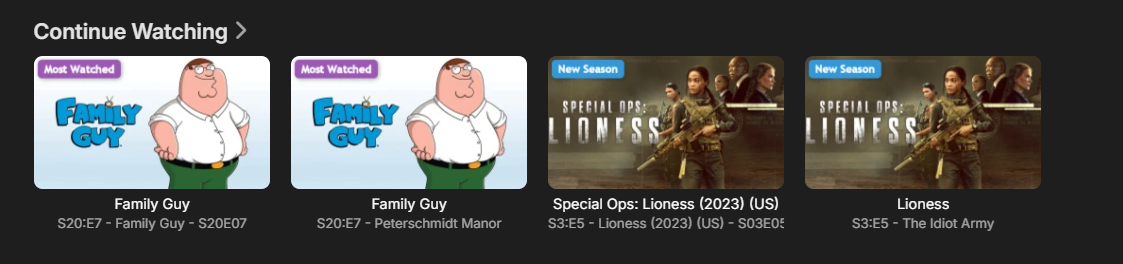
I have a request for your consideration. In my Emby setup, I have both IPTV along side the traditional Emby. So if I happen to be watching a TV Series or Movie that is available in both, I get two icons for the show or movie in "Continue Watching". Luke says this is normal, and thinking about it, makes sense. But I don't have an easy way to telling which one is from IPTV, and which is the one downloaded. It matters as one is usually 4K while the other 1080P at best. It would be really tremendous if there were an option that would show a badge which was from IPTV and which was Downloaded. Or may be an option for the resolution each one is?
-

Keep some additional labels with group by collection
ebr replied to KatchiMunki's topic in Feature Requests
Hi, there's already an open request for this or something functionally equivalent. Please join in and contribute to the existing discussion at: -
so once you see the emby logo, then it's fast?
-
Well you've seen the logs. Is there nothing in there you can see as to why it takes so long. Can you add more logging? The ATV app loads in seconds every time.
-
The actual connection speed to server is no different. He's reporting 30-40 seconds of a blank screen before he sees anything. That tells me we need to look at what happens before the UI loads and make sure we're not waiting on something to complete before showing the user interface.
-
'Here's the log file. I tuned to CNBC at 12:50 pm PDT / 3:50 EDT. Only one user (Admin). It took 2-3 minutes for the audio to resolve itself. For the first 2 minutes audio consists of periods of normal sound followed by 2-3 seconds of no sound, repeating every 15 seconds or so. embyserver.txt
-

H264 VAAPI hardware encoding not registering despite successful detection (4.9.5.0, Intel Alder Lake-N)".
Chadstratts posted a topic in Linux
Emby Server version: 4.9.5.0 (Linux) Platform: TerraMaster NAS, Ubuntu 22.04 base, kernel 6.12.63 Hardware: Intel Alder Lake-N (UHD Graphics), driver iHD 25.2.4 Device: /dev/dri/renderD128 Summary: Hardware acceleration is enabled (EnableHardwareEncoding: true, HardwareAccelerationType: vaapi), and the Hardware Detection scheduled task correctly finds the GPU adapter every time it runs. However, CodecManager's final CodecList always comes back empty for hardware encoders — only software (libx264) ever gets registered, forcing every transcode into full CPU software encoding (250%+ CPU for a single 1080p stream). Steps I've taken to rule out anything on my end: Confirmed a manual ffmpeg -hwaccel vaapi -vaapi_device /dev/dri/renderD128 -c:v h264_vaapi encode succeeds completely outside Emby — hardware and driver both work fine. Confirmed the emby user is in the render group and /dev/dri/renderD128 has correct permissions. Ran Emby's own bundled ffdetect tool manually — as the emby user, with Emby's exact environment variables (LD_LIBRARY_PATH, LIBVA_DRIVERS_PATH) — using the exact command Emby itself runs (ffdetect ... vaencdec -print_format json). This returns a full, valid Encoders array including H264_MAIN with real capabilities (MaxWidth 4096, RateControl 3294, etc.) and no errors. Server logs confirm VaapiCodecProvider successfully detects the adapter (Adapter #0: 'Alder Lake-N UHD Graphics') on every Hardware Detection run. Immediately after that same detection run, the log shows CodecManager: CodecList: with nothing following it — completely empty. Re-triggering Hardware Detection after fixing permissions doesn't change the outcome. Already on the latest stable version (4.9.5.0) — this isn't fixed by updating. Conclusion: Detection genuinely succeeds and returns valid hardware encoder capability data, but something in how CodecManager parses/consumes VaapiCodecProvider's output is failing silently for this driver version, so the working hardware encoder never gets registered for actual use. Happy to provide full logs, the raw ffdetect JSON output, or test any patch/beta build if that would help track this down. -
Just wanted some clarification on Emby clients/apps naming and issue reporting. Emby Windows/XBox App - Windows Store application, v2.317.0 Emby Web App (Legacy) - Emby Theater 3.0.20/21 with resources at https://tv.emby.media, v26.0.19 Emby Web Client - Emby Server based client, v4.9.5.0 Based on the reported information that would make this a Emby Server/Client issue, correct?