All Activity
- Past hour
-

Plugin: EmbyCredits, detect end credits and add auto skip.
yocker replied to yocker's topic in Plugins
No problem! No, it's a hardcoded value. -
 maodi18042122 joined the community
 -
 domerthhh joined the community
 -
 Roomygold71 joined the community
 -
 Tareq-PFC joined the community
 -
 Dhans joined the community
 -

Emby server/client - ReplayGain or R128 volume normalization support for music
GreatFlashMan replied to Espen JQ's topic in Feature Requests
Replaygain would be the simplest to use - check for it - apply. It really is a 10 min code job. JF does a proper media scan, this is a little more complex to do correctly (and i don't think it does - but it's still better than nothing). -
 tokihirhh joined the community
 -
 Danilo Moreno Mendes joined the community
 -

One of my camerauploads is rendered partially in Emby library?
Luke replied to danergo's topic in General/Windows
Hi, thanks for following up. -
Newly Imported Movies Have Directors/Writers With Blank Roles when First Imported
Luke replied to denzoid's topic in General/Windows
Hi, that's correct. Omdb does not have this information. -
 Falhpriiv joined the community
 -
 Lucas Moura joined the community
 -
 joshdineen13 joined the community
 -
No change. emby-server won't come back up after upgrading to 4.9.5.0 from 4.9.3.0.
- Today
-

Server connects but displays no media files
twofacetoo replied to twofacetoo's topic in General/Windows
I setup my server initially on the desktop PC, the logged into it using my laptop, they have different IP addresses when I check them on each machine, but it could be the case that it's still logging into the desktop one instead of the laptop one. I was connected on the LAN specifically. On both computers Emby has full permissions on everything, public or private, but I noticed something: on my desktop PC, the outbound rule shows for 'Emby Open 1', then the Inbound shows 'Emby Open 2', 'Emby Open 3', then 'Emby Server' and another 'Emby Server', all set to enabled, all, yes, allow, etc Then on my laptop, outbound only shows 'Emby', then inbound shows the two 'Emby Server' settings as before, but also 'Emby Server Port 7359', 'Emby Server Port 8096', and 'Emby Server Port 8920' Is the fact that they're showing differently potentially related? -
Not that I'm surprised that it's still not in development but what do you need to finally start this feature? There are constantly questions regarding something like that and this topic here is over 8.5 years old!
-
I am using Roku on my tv with the Emby app. On my Emby server, I have a Music library. When I play the Emby music library on my tv via Roku, the album cover is displayed. About 10 seconds later, the backdrop picture of the band is in the background. The album cover is still displayed in the foreground. Is there a setting that I can make on the Emby server in the Music library that will only show the backdrop picture and the album cover does not show? In the Emby music library, I edited the metadata of an individual song by deleting the album name in the Album block. I saved the change and scanned the Music library files. This did not help. I also went into the Music library settings and turned off Albums and scanned the Music library files again. Still did not help. Any suggestions? Thanks in advance for your help!!
-
I have been using tailscale. it works flawless
-

Newly Imported Movies Have Directors/Writers With Blank Roles when First Imported
HtRabbit replied to denzoid's topic in General/Windows
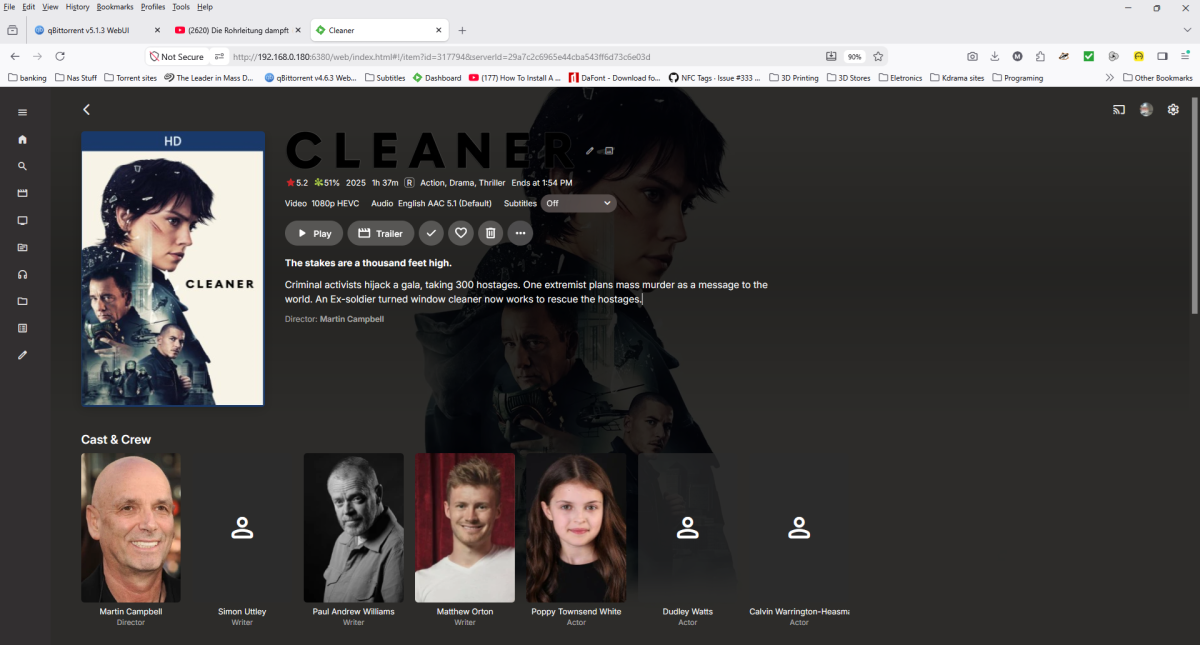
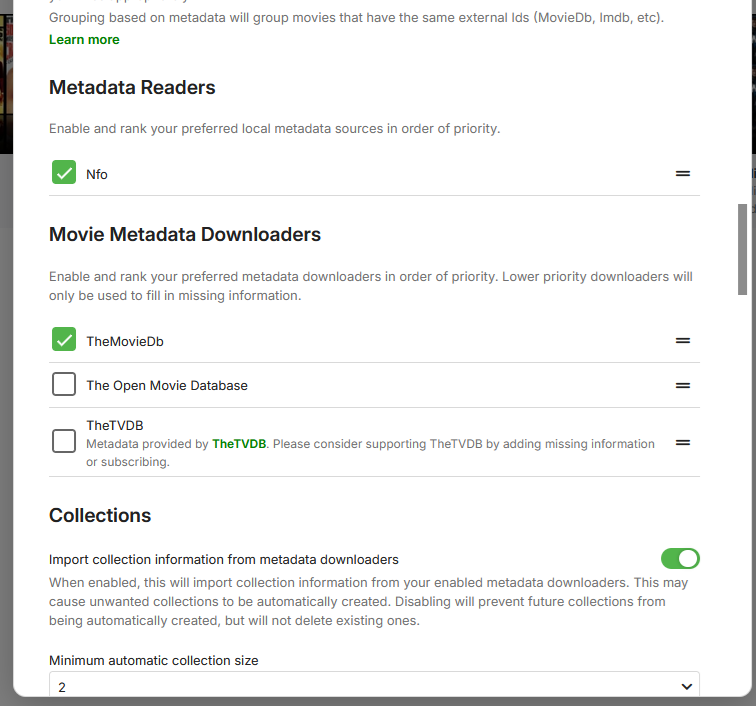
I am also having this issue. I will post some files below, I have been able to isolate the issue, to the omdb lookup.it appears if the OMDB lookup is first in the list, it returns writers and cast with no role if I change it to TMDB AND disable OMDB, it updates fine and restores all of the files with the writers at the end and the actors with their roles at the beginning I hope this helps anybody that's struggling, problem now is I have to rebuild my database and I have 4900 plus movies, I am currently on version 4.9.5.0 i Have Left OMDB disabled.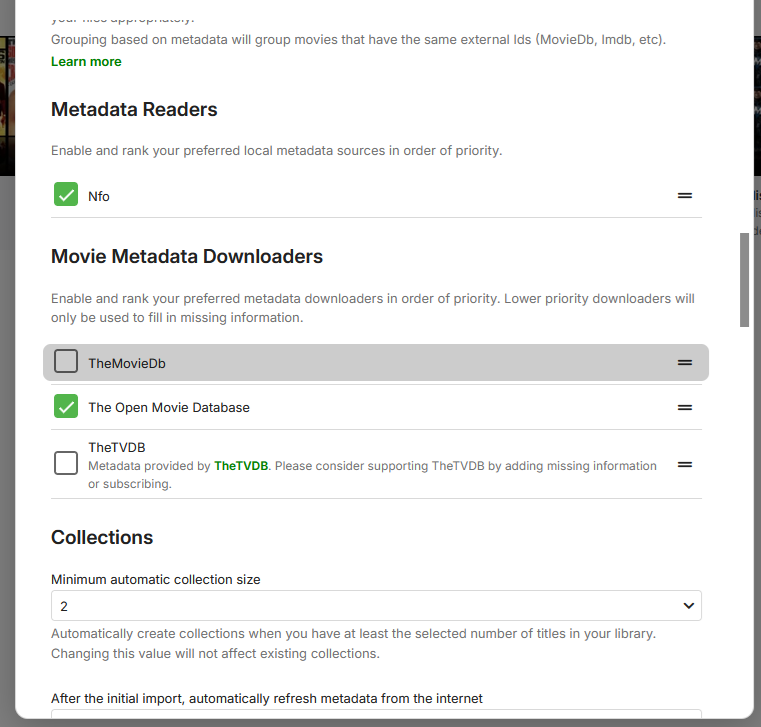

-

[4.9.5.0] Live TV stream and ffmpeg process remain orphaned after client disconnects (TVHeadend)
CrySoft replied to CrySoft's topic in Live TV
Hi, actually I'm not able to produce full log due to server remaking, however I could try to explain: I ran a series of in-depth test sessions cross-referencing Emby logs, network traffic, and tcpdump with the web browser's development tools. For clarity, I'll add an unspecified detail that, however, is key to understanding the issue. It's not directly attributable to Emby, but it causes the effect described in my post: Emby have on top a HAProxy to distribute traffic via SNI routing. That said, the problem stems from imperfect calibration of connection timeouts (internal/external), which must be carefully configured due to the unique nature of video streaming. Simply put, if the client initiates a request for a channel (any) and the HAProxy connection (in this specific case, but extendable to any network interruption) times out (or if the network between the external client and Emby fails), before Emby can apply the response to the TV channel viewing request (due to buffering and transcoding delay), which will never reach the client because the connection has been dropped, FFMPEG (not recognizing the network failure) continues to use resources indefinitely maintaining the backend connection opened. To summarize, even if the video stream cannot reach the client, ffmpeg continues to keep the connection open with TVHeadend, which in turn uses a specific tuner. The transmission chain, therefore, starting from SATIP, passes through TVHeadend, which keeps the subscription and the related connection open, from ffmpeg, which transcodes in the temporary folder, presumably until the dedicated folder is full or indefinitely. Having established that this is not an issue caused by Emby, I believe it's appropriate to invest in improving the handshaking, control and supervision process to shut down orphan ffmpeg and free up resources. This would be an opportunity to make the product even more robust and failsafe. Thank you for your attention, and I hope I was clear in my explanations in English. -
Yeah same.
-

One of my camerauploads is rendered partially in Emby library?
danergo replied to danergo's topic in General/Windows
Solved by removal of `cache/images` folder and rescan. -
chown emby:emby HomeScreenCompanion.dll chmod 644 HomeScreenCompanion.dll
-

Movie Playlist, Edit Outside, Export, Import possible?
Anderella replied to Anderella's topic in Tools and Utilities
Ah, thank you. Is there somewhere a howto (export the playlist - edit - and re-import it) on this? I didn't find it. -
it look like it. But never used Synology, so have no clue how to correct it.

-
Movie Playlist, Edit Outside, Export, Import possible?
Luke replied to Anderella's topic in Tools and Utilities
Hi, there is no automatic relinking. You can edit externally and then just refresh the metadata on the playlist in Emby after. -

Plugin: EmbyCredits, detect end credits and add auto skip.
VirulentPip replied to yocker's topic in Plugins
Thanks, shall update now and report back. Also is there anyway to extend the 1000 process limit when doing manual detection? -
I moved it to the Plugins folder: Not sure if permissions is the issue, but I haven't changed any permissions
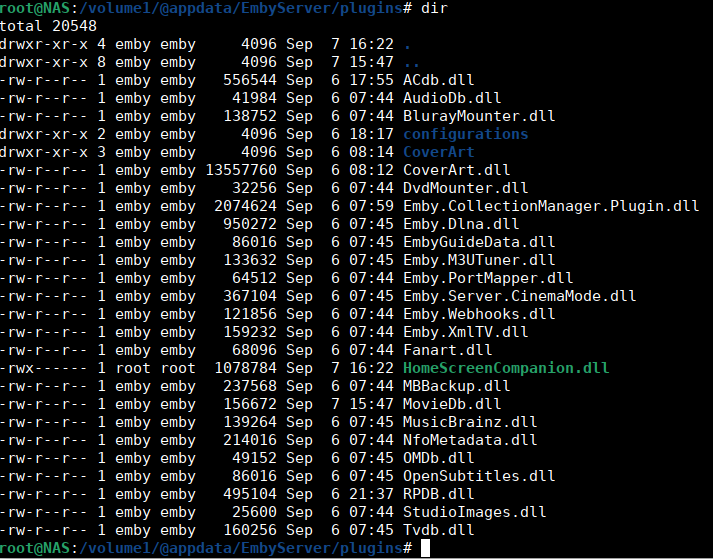
-
Movie Playlist, Edit Outside, Export, Import possible?
Anderella posted a topic in Tools and Utilities
Hi, is there any way you could suggest to modify movie playlists? I created a Top 100 movie playlist with the plugin HomeScreenCompanion. As I basically try to upgrade some of my movies from DVD-sources to Bluray.... Is there an (external or internal) way to modify the playlist entry of this movie? (if I for example add a new version of the movie to my database?) (Obviously the movie imdb-id is one reference, and I guess a kind of movie ID inside the emby database) And: As I found out that movies disappear from a playlist, if I move them to another location (change source path). Is there any chance/setting to keep the movie in the playlist (and to kind of "relink" this movie with the new source again?) -
Plugin: EmbyCredits, detect end credits and add auto skip.
yocker replied to yocker's topic in Plugins
Sorry, small error with chapter type set as "Chapter" and not "CreditStart" in your situation. Sorry for that but easy fix. Fixed in the newest version (v2.7.6.0). There is also a fix to the ffmpeg session flicker in the UI when using OCR detection. -
I was able to try this out today: I disabled both options. Still no change in the behavior.
-
I know the official Spotlight is coming soon... but yours is already awesome. Since I didn't understand almost any of the possibilities – and didn't really feel like delving into it – I asked claude to create a simple visual version for me using drag and drop. You can see the result in the video. The html-file can be downloaded below. The html preview isn't a perfect match, but it gives a visual glimpse of how it will look in Emby. Trailers not working in the html - but if activated they show up in Emby. I also added some more effects. It's far from perfect, but it's fun to play with. test_spotlight.mp4 EmbySpotlight-Editor.html
-
Same with TestFlight version 2.2.58 Build 55
-
Are you sure you put it in the right folder. And with the right permissions. I don't use Synology so can't help with that. Since it looks like you use that as your server, Taken from that post