All Activity
- Past hour
-

Air Date Fixer — Corrects upcoming dates for your timezone outside the US
Blueskies278 replied to Blueskies278's topic in Plugins
Trakt Air Dates — Beta Tester Guide Plugin version 5.0.0.0 · Updated 9 August 2026 This is the fifth ground-up rewrite of this plugin. Each earlier version worked until it ran into something Emby's plugin system doesn't allow — the last one broke outright when TheMovieDb provider changed the way it stores data, and no amount of patching would have saved that approach. It isn't perfect. The limitations below are real, and most of them aren't things I can code around — they're the boundary of what a plugin is permitted to do inside Emby. Within those limits, this is the best I've been able to manage, and the parts that do work have been tested hard. If you tested an earlier version: this was previously called Air Date Fixer. Same project, renamed to Trakt Air Dates now that Trakt — not TMDB — is where the dates come from. It installs as a separate plugin, so remove any old EmbyAirDateFixer.dll before using this one. The plugin icon will still show the old name for now — that's expected, and the name in Emby's plugin list is the one to go by. Please read the Limitations section before installing. It lists the cases where this plugin will quietly do nothing — knowing them up front saves you chasing a problem that isn't a bug. What it fixes US and Canadian shows air in the evening Eastern time, which is already the next day across Europe and anywhere further east. TMDB stores those broadcast dates as a bare date with no time or timezone, so Emby shows the episodes on the wrong calendar day for those viewers. Trakt publishes each episode's air time as a true UTC instant, so it converts correctly for any timezone. This plugin uses Trakt as the reference and corrects Emby's dates to match. Only US and Canadian shows are touched. British, Australian and European shows are left exactly as they are. Two halves, and they're independent Already-downloaded episodes Upcoming (not yet downloaded) How it's fixed Corrected directly in your library Served with corrected dates by a built-in listener Setup needed Just two API keys Keys plus a port change Works on Every client, always Every client that reaches the listener You can stop after the first half. Library corrections need no port changes and carry no risk. The port swap is only needed if you want Upcoming fixed on TV apps and phones as well as the browser. Pros No extra container, no compose changes. One DLL. Everything runs inside Emby. Upcoming loads instantly. The list is cached in memory and refreshed in the background — typically well under a millisecond, versus Emby's own endpoint which is occasionally very slow. If Upcoming has ever failed to load in an app until you opened the web UI first, this fixes that. Corrections stick. If a later metadata refresh overwrites a corrected date, the plugin notices and puts it back. Immune to TheMovieDb provider updates. An earlier version of this plugin worked by editing that provider's cache files, and broke completely when the provider stopped using them. This design never touches them. Survives Emby updates. Nothing is injected into Emby's web files, so an update can't wipe it. Recovers from port conflicts on its own. If the port it needs is busy, it keeps retrying and starts the moment it's free — no restart, no intervention. Fails safe. If Trakt is unreachable, the plugin can't start, or Emby is being slow, you get uncorrected or slightly stale dates — never an empty screen or a dead server. Cons and trade-offs Upcoming corrections require moving Emby's own HTTP port. Not difficult, but it is a change to your server's configuration, and you should be comfortable doing it. The plugin sits in front of your server. With the listener enabled, all client traffic passes through it on its way to Emby. That's the only way to reach not-yet-downloaded episodes — Emby has no plugin hook that fires for them — but it does mean a bug here can affect more than air dates. Changing the listener port can lock you out of the settings page. If you're viewing the dashboard through the listener's port and you change that port, the page disappears mid-edit. The way back in is Emby's own port — e.g. http://YOUR-SERVER:8098/web/index.html. Worth noting before you touch that field, not after. The first Upcoming load after an Emby restart is slow. The cache is empty and has to be built. Everything after that is instant. Upcoming data can be up to about five minutes old. Irrelevant for air dates, but worth knowing. Limitations — where it will do nothing These aren't bugs. If you're in one of these situations, expect no corrections. HTTPS traffic bypasses the plugin entirely. The listener is HTTP-only. If your clients connect over HTTPS (commonly port 8920), they reach Emby directly and see uncorrected dates, with no error anywhere. There is currently no workaround other than using HTTP on your local network. Remote/WAN access bypasses it unless your router's port forward points at the listener's port rather than Emby's. Otherwise, away-from-home clients get uncorrected dates. The Android app may drift back to Emby's real port. Emby's apps trust the address the server reports about itself, and Android re-checks it — so even after you type the listener's address manually, it can revert to Emby's real port on a later restart. When it does, everything works normally except that Upcoming dates are uncorrected, with nothing to indicate anything changed. To check: in the app, look at the server address under its connection/server settings. If it shows Emby's real port (e.g. :8098) rather than the listener's (:8096), that's why. Re-adding the server manually fixes it until the next drift. I've requested a "lock custom server address" option in the app — somewhere to tell it to keep the address you typed and stop switching to the one the server reports. Realistically I don't expect it to be implemented; the response so far has been that it would cause more problems than it solves and affects very few people. There is no server-side fix available to me. The plugin already reports the correct address, but the app also learns the real one through network discovery, and a plugin can't intercept that. Realtime features are under observation. The plugin relays the apps' live-updates connection to Emby. This is working in testing, but some earlier connection drops aren't fully explained. It doesn't affect dates, browsing or playback — potentially things like remote control and instant library refresh. Please report anything odd. Only US and Canadian shows are adjusted, and only by one day. Shows from elsewhere are deliberately untouched. Tested on Emby 4.9.5.0, in Docker, on Linux. That's it. Other versions and platforms are untested — which is rather the point of a beta, but please mention your setup when reporting anything. What you'll need A Trakt Client ID — from trakt.tv/oauth/applications. Free and instant. Only the Client ID; no login, no OAuth, no tokens. A TMDB API Key (v3 auth) — from themoviedb.org/settings/api. Free and instant. The TMDB key is needed because Emby's own metadata doesn't reliably record which country a show comes from — on the library this was built against, that field was empty for every show. The plugin asks TMDB directly and caches the answer permanently, once per show. Setup Part 1 — library corrections (no risk, no port changes) Copy TraktAirDates.dll into your Emby plugins folder and restart Emby. Dashboard → Plugins → Trakt Air Dates. Paste in both keys. Turn on Enable corrections. Save. Downloaded episodes start being corrected within about 30 seconds. If you only use a web browser, you're done. Part 2 — Upcoming on TV apps and phones Emby apps request the upcoming list by a fixed address that plugins aren't allowed to answer. The workaround is to have the plugin answer on the port your devices already use, and move Emby itself to a different one. Your devices don't change. On the settings page, turn on Enable native app listener. Leave the port as the one your devices already use — usually 8096. Save. Dashboard → Networking → change Local HTTP port number to something free, e.g. 8098. Save and restart Emby. Existing devices keep working with the address they already have — nothing to do. Adding a device after the port swap: don't let the app find the server by itself. Emby's automatic discovery answers with Emby's real port (8098), which goes straight past the plugin — the app will connect and work perfectly, but Upcoming dates won't be corrected and nothing will indicate why. Choose the manual / "add server by address" option instead and type the listener's address in full, e.g. http://192.168.0.160:8096. The same applies if you ever sign out and back in, or reinstall an app. Check it worked: the Native App Listener box on the settings page should be green and read "Active — listening on port 8096, forwarding everything else to Emby on port 8098." If it's red, see below. You don't need to read a server log. Running Emby in Docker Nothing extra for network_mode: host. If you publish ports explicitly (-p 8096:8096), that mapping keeps working — the plugin answers on 8096 inside the container and reaches Emby on 8098 internally. You do not need to publish 8098. Troubleshooting Red box: "Could not start on port 8096 … Retrying automatically every 15s" No rush — it will start on its own the moment the port is free, and the attempt counter shows it's still trying. Causes, in order of likelihood: Emby hasn't actually moved off that port yet — do Part 2 step 2, and make sure Emby restarted. A second Emby or Jellyfin container is running. Easy to miss, and cost a full afternoon during development. Two Emby containers on host networking will silently fight over the same port. docker ps -a — if more than one Emby container is running, stop the one you don't use, and set it not to come back: docker update --restart=no <container_name>. Something unrelated holds the port. On Linux: sudo netstat -tlnp | grep :8096. Confirming it's genuinely working: sudo netstat -tlnp | grep -E ':(8096|8098)' should show one process ID holding both ports — the plugin runs inside Emby, so they share a process. Two different IDs means something else has taken the port. I can't reach the dashboard after changing the listener port Use Emby's own port: http://YOUR-SERVER:8098/web/index.html. Set the listener port back from there. Dates are right in the browser but wrong in an app The app is probably reaching Emby directly rather than through the listener. Check the server address saved in the app — it should use the listener's port (8096), not Emby's new one. See the Android note under Limitations. Nothing is being corrected at all Check the Last Refresh box. If it reports 0 of N series matched as US/Canada, the TMDB key is likely wrong or missing. Remember only US and Canadian shows are adjusted. Upcoming was slow once, then instant Expected — see Cons. If an app gave up on that first load, open it again; the result is kept even if the app stopped waiting. Reporting a problem If there are TV shows missing from your Upcoming listing, please let me know and I'll do my best to fix it.Missing shows are just as useful to hear about as wrong dates — the plugin merges its own data with Emby's, and a show disappearing means something didn't line up. Please include: The exact text of any red status box — it's generated live from what actually failed. Your Emby version, platform, and whether you're using Docker. Whether your clients connect over HTTP or HTTPS, and locally or remotely. For a wrong date: the show, season and episode number, the date shown, and the date you expected. If you send a server log, please check it for access tokens before sharing publicly. Uninstalling Remove the plugin DLL and restart Emby. If you did the port swap, set Emby's port back to 8096 in Dashboard → Networking first — otherwise your devices won't find the server. Dates already corrected in your library stay as they are. They're ordinary Emby metadata now. TraktAirDates.dll -
 uemb762128 joined the community
 -
List of movie and TV aspect ratios used from my AR page. Perhaps useful to Emby dev so you don't have to dig through many sites to find AR sizes in use. There are also several calculators that can help find different pixel reduction sizes for all AR's for transcoding, if needed. https://www.producerelease.com/blu-ray/parcalc.htm#partable
-
 RealJamesMac1 joined the community
 -
 Henry palma joined the community
 -
 teny7635 joined the community
 -
 SMH10 joined the community
 -
Error processing type MediaBrowser.Providers.CoverArt.CoverArtAlbumEnhancer: System.ArgumentNullException: Value cannot be null. (Parameter 'source') at System.Linq.ThrowHelper.ThrowArgumentNullException(ExceptionArgument argument) at System.Linq.Enumerable.FirstOrDefault[TSource](IEnumerable`1 source) ... Error processing type MediaBrowser.Providers.CoverArt.CoverArtBannerEnhancer: System.ArgumentNullException: Value cannot be null. (Parameter 'source') Error processing type MediaBrowser.Providers.CoverArt.CoverArtBoxsetEnhancer: System.ArgumentNullException: Value cannot be null. (Parameter 'source') Error processing type MediaBrowser.Providers.CoverArt.CoverArtCollectionEnhancer: System.ArgumentNullException: Value cannot be null. (Parameter 'source') Error processing type MediaBrowser.Providers.CoverArt.CoverArtEpisodeEnhancer: System.ArgumentNullException: Value cannot be null. (Parameter 'source') emby 4.10.0.23 beta
-
 james991116 joined the community
 -
 wsf12345 joined the community
 -
 yellowcircle joined the community
 -
 urosa61167 joined the community
 -
Hi, new build is up. Please let me know if this resolves the issue. Thanks.
-
 Cmar910 joined the community
 -
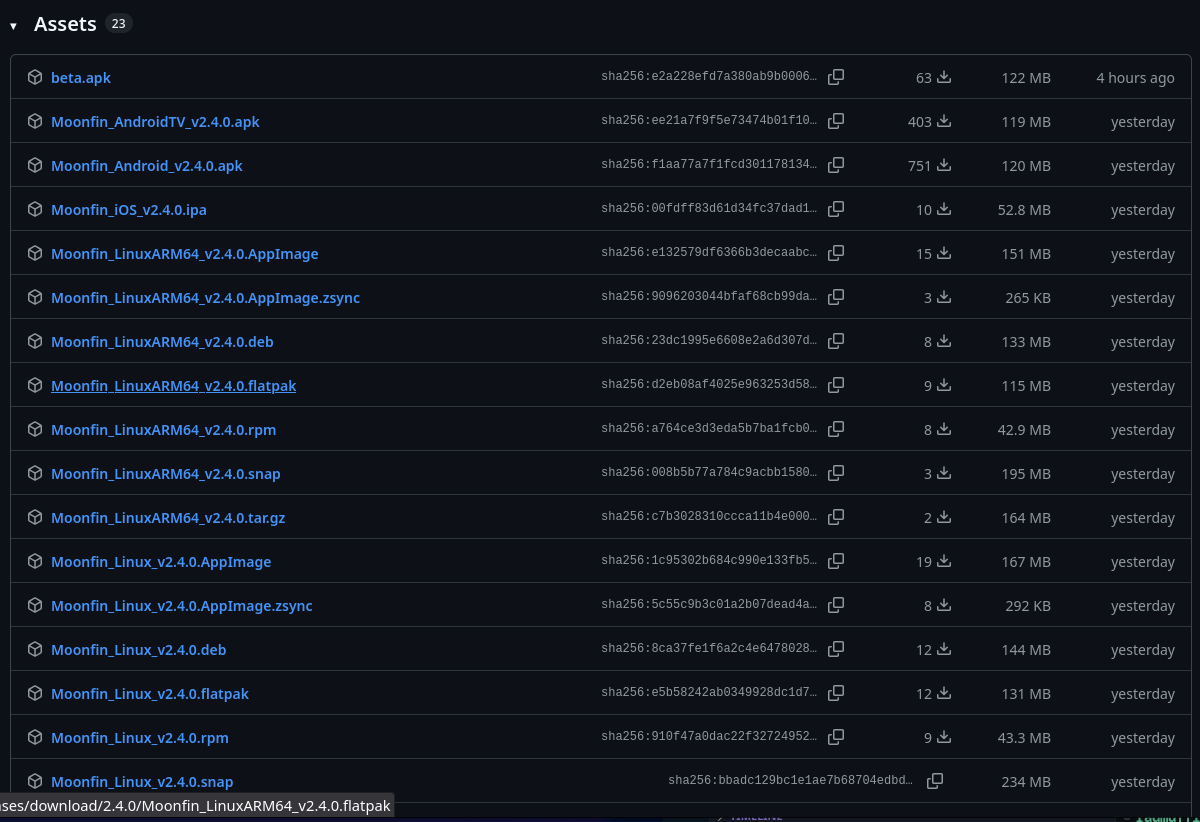
Thanks. Yep - 23 assets listed followed by assets....Hang on thats not 23, click on assets button - oops.
-
Hi @arrbee99the files are in the assets area here, for android tv you can use Downloader code 3752238 (google hasnt approved it yet), for tvOS its already released in the app store, iOS should be following shortly
-
Moonfin 2.4.0 seems to be out, but not seeing anywhere to download it (on Github releases page) ? - Nevermind, found it 30 seconds after I typed the above...
- Today
-
Hi, where did you copy them to?
-
.thumb.png.d6fa88f513d4f334d753f652097a59f5.png)
Plugin: Tracearr SSE - real-time playback, session, and library events
Gallapagos replied to Gallapagos's topic in Plugins
Certainly! -

Plugin: Tracearr SSE - real-time playback, session, and library events
Luke replied to Gallapagos's topic in Plugins
Thanks for sharing. -

Grey letterbox bars on HDR playback with Emby for Android universal - Sony TVs.
kricker replied to kricker's topic in Android
I just tried 3.5.42 and I still have gray bars on HDR content Emby displays the video as 4K Dolby Vision HEVC. MediaInfo shows it as HDR10/HDR10+ It plays in Emby ATV without grey bars. -
 Sean429 changed their profile photo
 -
The more I look into it, the more it seems like its a flaw in the google 4k streamer device. There are a handful of threads floating around that complain about persistent stutter problems on other apps as well. I didn't notice much on other apps until I really started testing, but I did find some content on the youtube app began stuttering as well. Seems like the device is just not well designed. Shame, because its not cheap and I'll need to start looking for an alternate android device. Thanks for trying to help me fix it Neminem!
- Yesterday
-
Make sure to include the total duration when submitting. Different film versions are differentiated based on the duration, which allows you to submit multiple times.
-
Do you include video duration when submitting segments? Segments can overlap if the duration is different and that at least always worked for me.
-
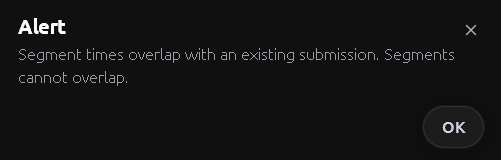
@PasitheaI just wanted to let you know of a small flaw with the introdb submissions. When there is multiple versions of a movie I cant submit times for all versions. I get a message saying For example Terminator 2 has many versions. Specifically it has the Special Edition and the Ultimate Cut. With the difference in total length of the movie being around 3 mins between them. So the credits play in different spots. I cant add the timestamps for the Ultimate Cut because it seems to be too close in time to another submission I made. Hopefully I explained this well Thanks
-
@Luke I would love to see this improved
-
 jhuebel changed their profile photo
 -
Is there a GitHub repo with the source code? I don't install plugins unless I can see the code.
-
@TugboatBillMight have found a way to stop depending on LD_LIBRARY_PATH, would you give a test build a try?
-
I've tried a few different tweaks to see what impact it would have: Ensured video streaming quality is set to auto on client side device. No impact on performance, stuttering still present. Selecting AC3 sound track (which was an audio commentary track) No impact on performance, stuttering still present. Remuxed the file with MKVtoolNix and stripped all the audio tracks besides the default DTS 5.1. Removed all subtitle tracks besides english. Improved initial speed of loading the title, but still had the same stuttering problems on playback Used Emby's conversion tool to convert the remuxed file, changed the audio track to AAC 5.1. Video format remained 1080p H264. No impact on performance, stuttering still present. No additional logs were generated on these tests aside from the usual embyserver.txt and hardware_detection logs (no ffmpeg-transcodes or ffmpeg-directstream). If they are of any help, I have attached them as well. hardware_detection-63921793644.txt embyserver (2).txt
-
Gallapagos changed their profile photo
-
Plugin: Tracearr SSE - real-time playback, session, and library events
Gallapagos posted a topic in Plugins
I built a plugin that adds a Server-Sent Events endpoint to Emby. An app with an API key opens one HTTP connection and gets events pushed as they happen, instead of polling /Sessions. curl -N -H 'X-Emby-Token: YOUR_API_KEY' http://your-server:8096/emby/sse/events The first frame is a hello event carrying the plugin version, so you know right away the connection reached it. After that it streams: - playing, progress, paused, stopped (stopped includes playedToCompletion) - session.start and session.end - library.item.added and library.item.removed - task.started, task.progress, and task.completed for scheduled tasks - server.stats with CPU and RAM utilization every 6 seconds while a client is connected - ping keepalive every 30 seconds Payloads are small JSON objects with fields like sessionId, itemId, userId, state, and positionTicks. The full event reference and wire format are in the README. I wrote it for Tracearr, which wanted to see playback start without a polling delay, but nothing in it is Tracearr-specific. Anything that speaks SSE can consume it. Why not the existing options: webhooks need Premiere plus a URL the server can push to, which means hosting a listener. Polling /Sessions works, but you only see changes as often as you poll. This is one authenticated GET with nothing to host. Install: grab the zip from the GitHub releases page, drop Emby.Plugin.Sse.dll into your plugins directory, restart. Single DLL, nothing else. Built against 4.9.1.90, so it needs Emby 4.9 or newer. Current version is 0.4.1 and the DLL is attached to this post. Some Emby-specific behavior worth knowing if you test: - Library event ids are the numeric internal ids, the same ones the REST API returns. - Emby raises library events for container folders as well. A new movie arrives as the movie plus a Folder event for its directory, and deleting a directory fires a removed event for the folder only. Treat removals as a cue to re-query rather than expecting one event per file. - Host CPU/RAM in server.stats reads /proc, so those two fields only appear on Linux hosts. The process-level values work everywhere. Source is on GitHub under GPL-3.0: Repository Releases ship SHA-256 checksums and GitHub build attestations. What I'm looking for: people willing to run it and report what breaks, especially setups I can't easily reproduce, like Windows hosts, large libraries, or many simultaneous sessions. If it holds up I'd like to get it into the plugin catalog. Emby.Plugin.Sse.dll -
Hi Yes, folder view. If I'm looking at a TV series in folder view then it does go from one episode to the next, but if it's just a bunch of random items, it plays the highlighted item then stops.
-
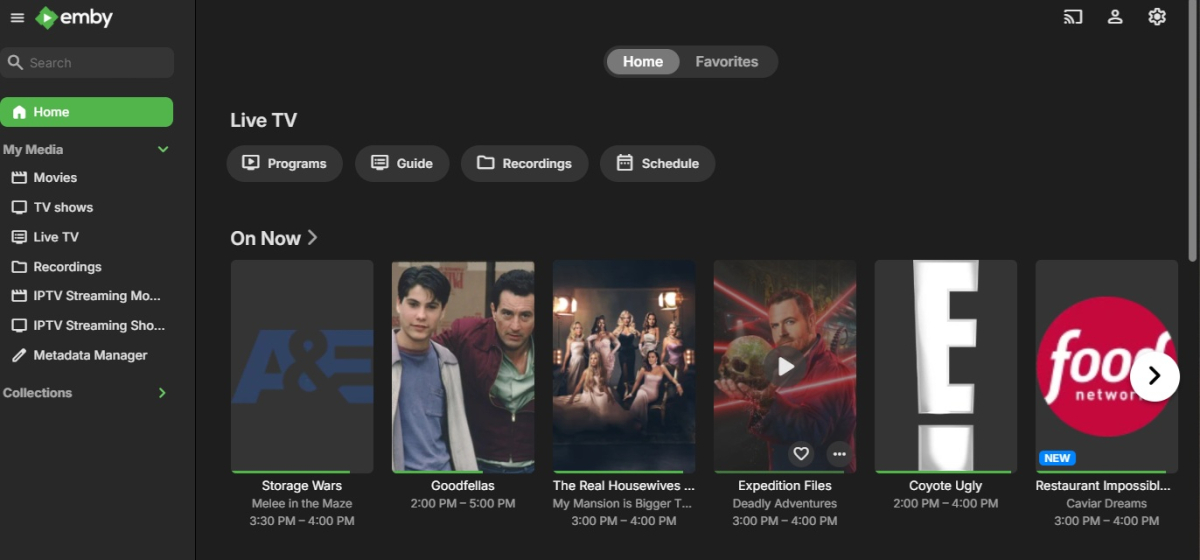
Sorry I have been tardy, but I had to setup my server from scratch and this wonderful plugin is on my extended list of things to reinstall. But before I do, I wanted to ask if this plugin has the capability to work with Emby Live-TV. In particular, it would be wonderful to have a replacement for Live-TV, What is On Now, that would show that is on now that better fit my tastes as learned from this plugin. Forgive me if this has already been answered and I missed it.
-

Plugin: Ginjaninja Tools - RecommendMe - access controlled intra user recommendations with notifications
ginjaninja replied to ginjaninja's topic in Plugins
0.1.0.2 Recommendation notification storage when offline, Event based delivery on return +20 seconds. Event led collage builder (reccomendation collections get their images updated after change) Improved presentation in search results Prevent ability to recomend what the target does not have access to (even though emby already blocked visibility). Already prevents the sender seeing what they dont have access to. Task catalogue correction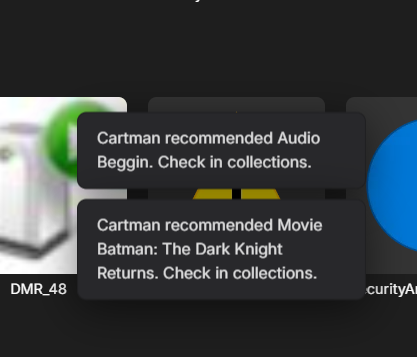
-
I'm not sure how that is relevant to the security issue but, in any case, this is such a niche situation that something custom will need to be created and it may be possible with HA as Ranma suggested.
-
This is in a folder view?