All Activity
- Past hour
-
 Bertibalou joined the community
 -
 María.sanchez joined the community
 -
 zozoooooo joined the community
 -
 57278 joined the community
 -
 iyasmeenomar joined the community
 -
 celerplay-server joined the community
 -
 Saquib26 joined the community
 -
 Massari226 joined the community
 -
 rupertbradshaw joined the community
 -
No it take your content across two different folders and merges them into one item within Emby, your folders and files stay in the same place.
-
i come back to 4.9.5.0 because the latest """""""stable"""""" is unusable
-
That's not mentioned in the update notes? The backdrop still doesn't go all the way to the top of the screen, there's still a translucent backdrop from the first spotlight item stuck over everything, and I still get the item details screen stuck over the home screen if I long press the info button. In TV mode, there's still an unnecessary right arrow button, and there's still no way to access the context menu. The display time for each spotlight item is still way too long.
-

TV Show Status — TMDB-powered Returning/Ended/Cancelled badges for series
Blueskies278 replied to Blueskies278's topic in Plugins
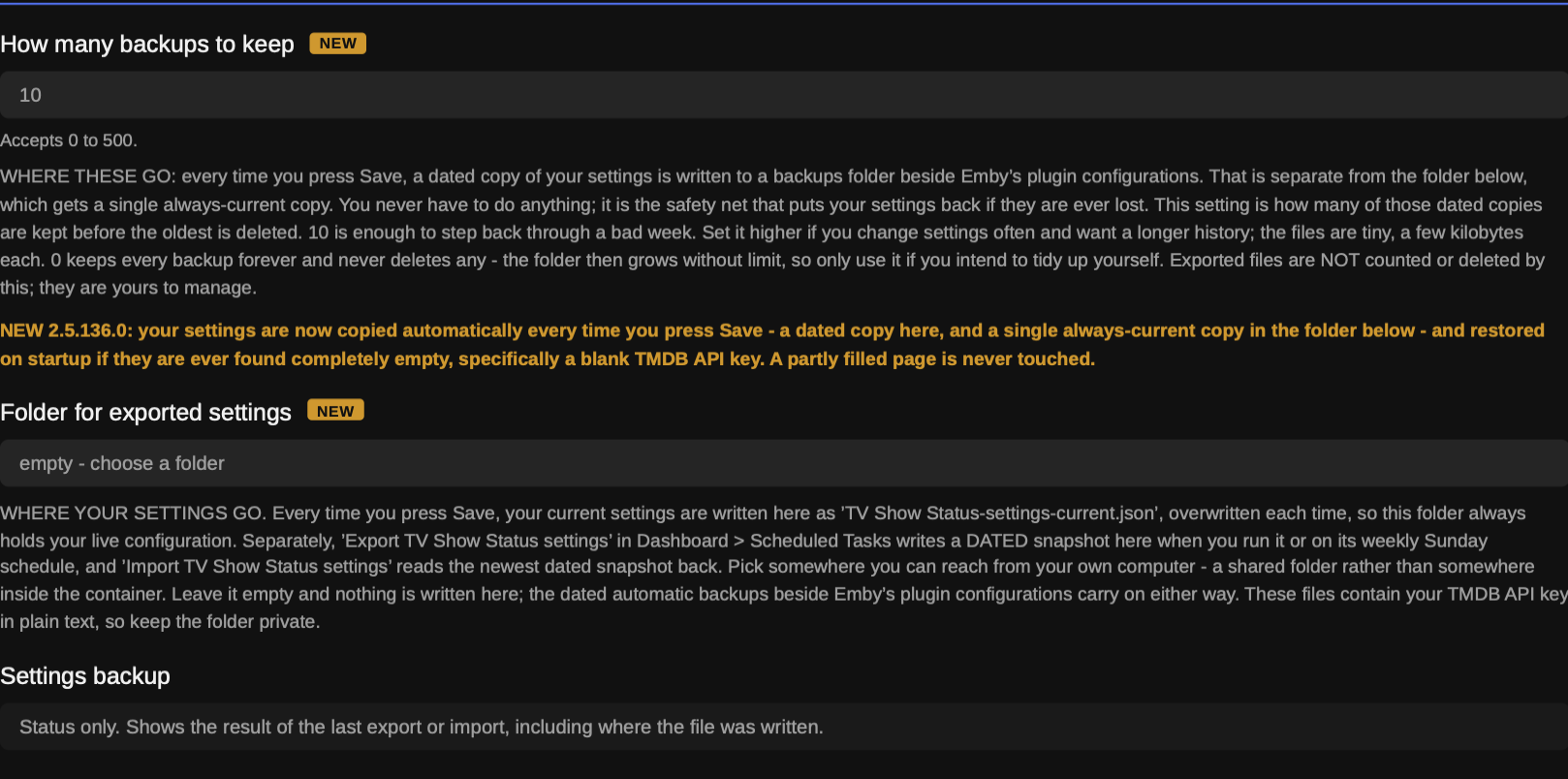
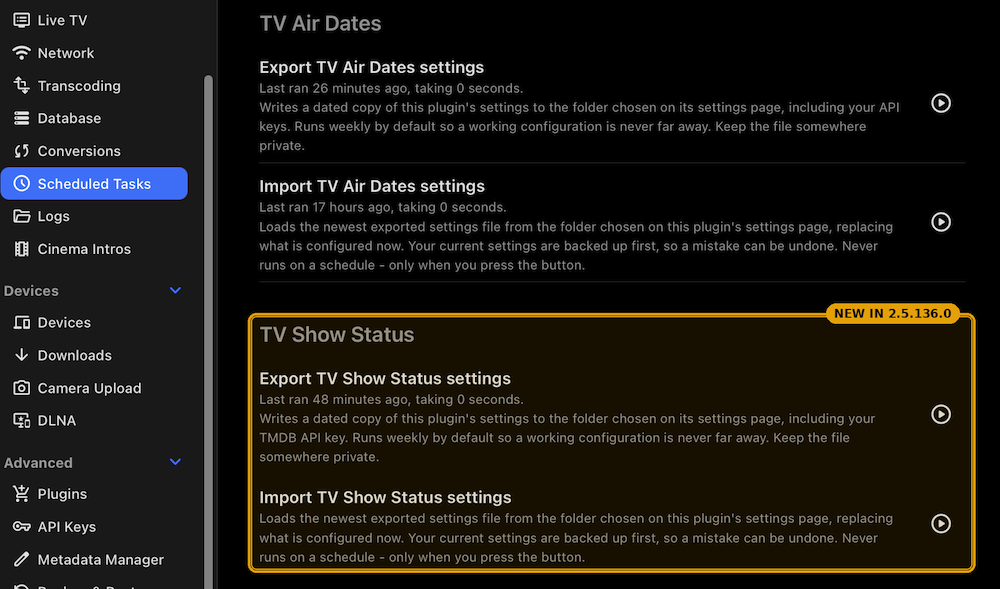
TV Show Status 2.5.136.0 Two new settings are added at the bottom of the page. Nothing you already have changes — every existing setting keeps its name and its default. New Your settings are now backed up automatically. Every time you press Save, a dated copy of your settings is written to a backups folder beside Emby's plugin configurations, and a single always-current copy goes to the folder you choose below. If the settings are ever found completely empty when the server starts, the newest copy is restored by itself and the log says so. This exists because everything on that page — the TMDB key, the preferred user, every colour, size, position and window — lives in a single file, and anything that loses that file loses all of it with no way to reconstruct the set. Server-side, so it protects every client equally and changes nothing you can see How many backups to keep — how many of those dated copies are kept before the oldest is deleted. 10 by default, which is enough to step back through a bad week. 0 keeps every backup forever and deletes nothing, so only use it if you intend to tidy the folder yourself. The files are a few kilobytes each Folder for exported settings — pick a folder you can reach from your own computer, and every time you press Save your current settings are written there as TV Show Status-settings-current.json, overwritten each time. That folder always holds your live configuration. The Settings backup box names the file it just wrote, so you can see it happen. Leave the folder empty and nothing is written there — the dated automatic backups carry on regardless Export and import, in Dashboard → Scheduled Tasks under a new "TV Show Status" category. Export TV Show Status settings writes a dated file and runs weekly on Sundays by default, so a working configuration is never more than a week from a copy; the play button runs it immediately. Import TV Show Status settingsreads the newest exported file back and never runs on a schedule — only when you press it — and it backs up what it is replacing first. Use the pair to move a working setup to another server, or to keep a copy off the machine entirely. The exported file contains your TMDB API key in plain text, so keep it somewhere private Fixed "Season Finale" was appearing on seasons that were still being published. A season showing far fewer episodes than that show normally runs was being read as finished. The finale marker is now withheld in two cases: when the episode has no real title yet, and when the season is running far shorter than that show's own completed seasons. Fixed in all four places the finale was worked out — the badge drawn into the artwork, which reaches every client; the words added to the episode name; and the two counts the browser script uses for library cards and Upcoming A season whose episode count TMDB has not caught up on no longer mis-flags its finale. Where the companion plugin supplies air dates, the season's real length is now taken from those as well, and the larger of the two counts wins. TMDB's announced count can lag reality by weeks on a running show, and a short count is exactly what made an ordinary mid-season episode look like the last one. Affects the artwork badge on every client and the browser badges alike Bad air-date corrections are now ignored rather than applied. The companion plugin's timezone correction only ever moves an episode forward by a single day, so anything larger is a mistake somewhere upstream and is now rejected with the reason written to the log. Five wrong dates were caught by this during testing. Affects every client, since it changes what the badge reports Known limitation A badge change can take a while to show up in the Emby apps. The badge is drawn into the artwork on the server, and an app keeps showing the copy it has already cached until the server redraws the image and the app fetches it again. This release changes how badges are worked out, so every badge redraws once — nothing is wrong if a card still looks the same shortly after updating. Force-closing the app makes it drop its cached artwork, and a metadata refresh on the show does the same from the server end. A browser shows the change as soon as the page is refreshed In the Emby apps, a premiere or finale badge appears on every Upcoming card of that show, not just the episode it refers to. Unaired episodes have no artwork of their own, so every card requests the same series image and the server cannot tell them apart. Only a browser can, which is why the per-episode badges are web-only To mark those episodes on TV and phone apps, the companion plugin TV Air Dates can put the words in front of the episode title instead The automatic restore only triggers on a completely empty settings file — specifically, a blank TMDB API key. A partially filled page is never touched, deliberately: silently overwriting settings you had just changed would be a worse problem than the one being solved. If you need an older configuration back, the dated files are in the backups folder and the import task will load one TV Show Status — what it is and how to use it An unofficial Emby Server plugin. Version 2.5.136.0, September 2026. The problem it solves You open your TV library and every show looks the same. Nothing tells you which ones are still running, which have finished, which were cancelled halfway through, or when the next episode of the one you're following actually lands. TV Show Status puts that on the artwork. A returning show carries its next air date, an ended show says so, a cancelled one is marked differently again, and a season that has finished airing can be flagged as ready to watch straight through. All of it comes from TMDB, and all of it is yours to configure — colour, size, position, which shows get what, and whether posters and thumbnails behave the same way. The one thing worth understanding first There are three separate ways a badge can reach you, and almost every question about this plugin turns out to be about which one is in play. They are independent, they can be used together, and they have different reach. Badges drawn into the artwork. The plugin draws the badge into the image on the server, so it appears on every client — Android TV, Fire TV, tvOS, iOS, the mobile apps and the browser — with nothing to install on the device. This is the main thing the plugin does. The trade-off is that the badge sits on the artwork itself, and because one image serves every card of a show, a per-episode badge lands on all of that show's cards rather than just the one it refers to. Badges drawn by the web script. A small script the plugin deploys into Emby's own web folder draws badges on library cards and in Upcoming. It knows which page it is on and which episode each card is, so it can be genuinely per-episode and can badge Upcoming without touching your library view. The catch, stated plainly: browser only. The Emby apps do not load it and see nothing from it. Description text. The plugin writes the status as plain text at the start of the show's description. Every client can display a description, so this reaches stock Android and tvOS too — but it is text, with no icon or colour, and it edits real library metadata. Knowing which of the three you are looking at answers most of the puzzles further down. Before you start Back up your Emby server. Two of the three routes above write to your library: the description prefix edits the show overview, and the episode-name marker edits episode titles. Both are reversible by switching the setting off, but a backup costs you nothing and is the sensible habit. If you run Emby in Docker, that means the config folder. On a NAS package, use the NAS's own backup. On Windows, macOS or Linux, stop the server and copy the Emby Server data folder somewhere safe. Step 1 — get your TMDB key You need one key, and it is free and instant. Go to themoviedb.org/settings/api Create a free account if you do not have one, and request an API key Copy the API Key (v3 auth) value — not the read access token That is the only credential the plugin uses. Everything it displays comes from TMDB. Step 2 — install the plugin The file is EmbyTVShowStatus.dll. It goes in the plugins folder directly below your Emby Server data folder. Stop Emby Server first. Emby holds plugin files open while running. Where the data folder is Platform Data folder Windows C:\Users\<you>\AppData\Roaming\Emby-Server\programdata macOS /Users/<you>/.config/emby-server (older installs: /Users/<you>/emby-server) Linux (deb/rpm) /var/lib/emby Docker whatever you mapped to /config inside the container Synology DSM 7 /volume1/@appdata/EmbyServer Synology DSM 6 /volume1/Emby QNAP /share/CACHEDEV1_DATA/.qpkg/EmbyServer/programdata UGREEN (UGOS) Docker only — whatever you mapped to /config, usually /volume1/docker/emby/config Asustor / TerraMaster /home/emby So on Windows the plugin goes in …\programdata\plugins\EmbyTVShowStatus.dll, on Linux in /var/lib/emby/plugins/EmbyTVShowStatus.dll, and so on. If you are not sure which applies, Emby will tell you: Dashboard → Help → Support → Server Paths. Platform notes Windows — copy the DLL in, start Emby. Nothing else to do. macOS — the .config folder is hidden in Finder. Press Cmd+Shift+G and paste the path, copy the DLL in, then start Emby. Linux — the DLL must be readable by the user Emby runs as, usually emby. After copying: sudo chown emby:emby /var/lib/emby/plugins/EmbyTVShowStatus.dll sudo chmod 644 /var/lib/emby/plugins/EmbyTVShowStatus.dll Docker — copy into the mapped config folder from the host, or go through the container: sudo docker cp EmbyTVShowStatus.dll <container>:/config/plugins/EmbyTVShowStatus.dll sudo docker restart <container> NAS (Synology, QNAP, UGREEN, Asustor, TerraMaster) — same as Linux, and the permissions step matters most here. Step 3 — set it up Start Emby, then Dashboard → Plugins → TV Show Status. TMDB API Key — paste it in Show badges on show posters and thumbnails — turn this on. It is off by default, and it is the setting that makes the plugin visible on every client Press Save That is the working minimum. Give Emby a few minutes to redraw artwork, then look at your library. The settings worth thinking about Poster: show status and Thumbnail: what to show are separate on purpose. Posters are the tall images in your library grid; thumbnails are the wide 16:9 images Upcoming and thumbnail views use. Setting them differently is what lets you have, say, a badged library and a clean Upcoming list. Background matters more than it sounds. The badge is drawn onto the full-size artwork and your TV app then shrinks it, so anything showing through the badge eats contrast before the shrinking even starts. Measured on a real poster at the size an Android box receives, Medium recovers about 16% more edge detail than Translucent and Solid about 32%. If badges look soft on Android TV, Fire TV or tvOS, this is the single most effective change available and it needs nothing installed on the device. Position defaults to Top left because most key art leaves that corner clear. Avoid Top right unless you want it beside Emby's own unwatched-episode count, which is drawn there. Colour: ended and Colour: cancelled are deliberately separate. An ended show told its story; a cancelled one usually stopped on a cliffhanger. If you use the badge to decide what is safe to start, that distinction is the whole point. If you would rather not make it, Show cancelled as ended collapses the two. Preferred Emby user is only used by the "ready to binge" mode and by "Hide once watched". It must be your Emby username — the name you sign in with — not your display name. They are often different, and a mismatch quietly falls back to plain status rather than reporting an error. The combination worth knowing Set Thumbnail: what to show to Nothing and turn on Show badges on library cards and Upcoming. You then get badges in your library's thumbnail view and a clean, per-episode Upcoming list — something the artwork badges cannot do alone, because both views ask the server for the same image and it has no way to tell them apart. A browser script does know which page it is on. Web browser only. Episode badges Episode: what to show badges individual episodes rather than the show. One requirement that is easy to miss: an episode only gets its own badge if Emby is using that episode's own picture. For episodes with no picture, go to Dashboard → Libraries → your TV library → Manage library → Episode Image Fetchers and tick TV Show Status, ranked below TheMovieDb and TheTVDB. It arrives unticked. Step 4 — check it worked Open the settings page again and read the status boxes. Air Dates tells you whether the companion TV Air Dates plugin is supplying real broadcast times. If it is not installed that is perfectly normal — it just means TMDB's own dates are used, which outside the US can read a day early for evening US broadcasts. Poster Overlay tells you whether the overlay is drawing and in which mode. Web Badge/Description Script tells you whether the browser script deployed successfully. It re-checks every time you open the page. If it reports a problem, the message contains the one-line fix — on some Docker setups Emby cannot write to its own web folder, which is the usual cause. Settings backup shows the result of the last export or import. Keeping your settings safe Everything on that page lives in a single file, and it includes your TMDB key. Lose it and there is no way to reconstruct thirty-odd settings from memory. The plugin protects it two ways. Automatically, every time you press Save. Two copies are written, and knowing which is which saves confusion later. A dated copy goes to plugins/configurations/tvshowstatus-settings-backups/, beside Emby's own configuration files. That is the safety net: if your settings are ever found empty at startup, the newest one is restored by itself. How many backups to keep sets how many are kept — 10 by default, 0 keeps everything. At the same time, your current settings are written to the folder you set in Folder for exported settings, as a single file named TV Show Status-settings-current.json, overwritten on each save. That folder therefore always holds your live configuration, somewhere you can actually reach it. Leave the folder empty and nothing is written there; the dated backups carry on regardless. After each save the Settings backup box names the file it just wrote, so you can see it happened rather than take it on trust. The automatic restore only fires on a completely empty settings file — a blank TMDB key. A partly filled page is never touched, because silently overwriting settings you had just changed would be worse than the problem being solved. On demand — in Dashboard → Scheduled Tasks, under "TV Show Status": Export TV Show Status settings — writes a dated snapshot to the same folder, alongside the always-current file. Runs weekly on Sundays; the play button runs it now. Use it to capture a known-good configuration before changing something, or before rebuilding a server Import TV Show Status settings — reads the newest dated snapshot back. Only runs when you press it, and backs up what it is replacing first The exported file contains your TMDB API key in plain text. Treat it like a password. If something is wrong The plugin does not appear in the list — permissions, nine times out of ten. See the note in Step 2. No badges anywhere — check Show badges on show posters and thumbnails is on, and that the TMDB key is filled in. Both are needed before anything is drawn. Badges look soft or blurry on a TV app — raise Background to Medium or Solid, and consider a larger Size. The badge is drawn at full size and shrunk by the device, so contrast is what survives that, not detail. A badge has not changed after I changed a setting — the apps cache artwork. The server has to redraw the image and the app has to fetch it again. Force-closing the app drops its cached artwork; a metadata refresh on the show does the same from the server end. A browser updates on refresh. "Season Premiere" appears on several cards of the same show — expected in the apps. Unaired episodes have no artwork of their own, so every Upcoming card of that show requests the same series image and the server cannot tell them apart. Only the browser can be per-episode. A show reads Complete while it is still mid-season — TMDB reports "nothing scheduled" both for a season that has genuinely finished and for one simply between episodes with no date published yet. Those cannot be told apart from the data. It corrects itself as soon as TMDB publishes the next date. Episode badges are not appearing — the Episode Image Fetchers step in Step 3. Without it, episodes with no picture of their own fall back to the series image and show the show's badge instead. Web badges are missing but artwork badges are fine — read the Web Badge/Description Script status box. The script has to be written into Emby's web folder and some Docker setups block that. The server log is the place to look: Dashboard → Logs. Every line from this plugin is prefixed [TVShowStatus]. Disclaimer This is an unofficial, hobby-built plugin. It is not made by, endorsed by, or affiliated with Emby or TMDB. It uses the TMDB API but is not endorsed or certified by TMDB. It is beta software and it can write to your library: with the relevant settings turned on it changes show descriptions and episode titles. Those are real edits to your metadata, reversible by switching the setting off. It also modifies cached artwork — your original image files are never touched, and turning the overlay off restores the artwork as Emby regenerates its cache. Take a backup of your Emby server before installing, and keep one. It is supplied as-is, with no warranty of any kind — you run it at your own risk, and I cannot be held responsible for anything it does to your library, your server or your data. You supply your own TMDB API key and remain bound by TMDB's terms. Exported settings files contain that key in plain text; treat them as passwords. Please report bugs along with your Emby log. Thanks EmbyTVShowStatus.dll TV-Show-Status-guide-2_5_136_0.pdf TV-Show-Status-settings-2_5_136_0.pdf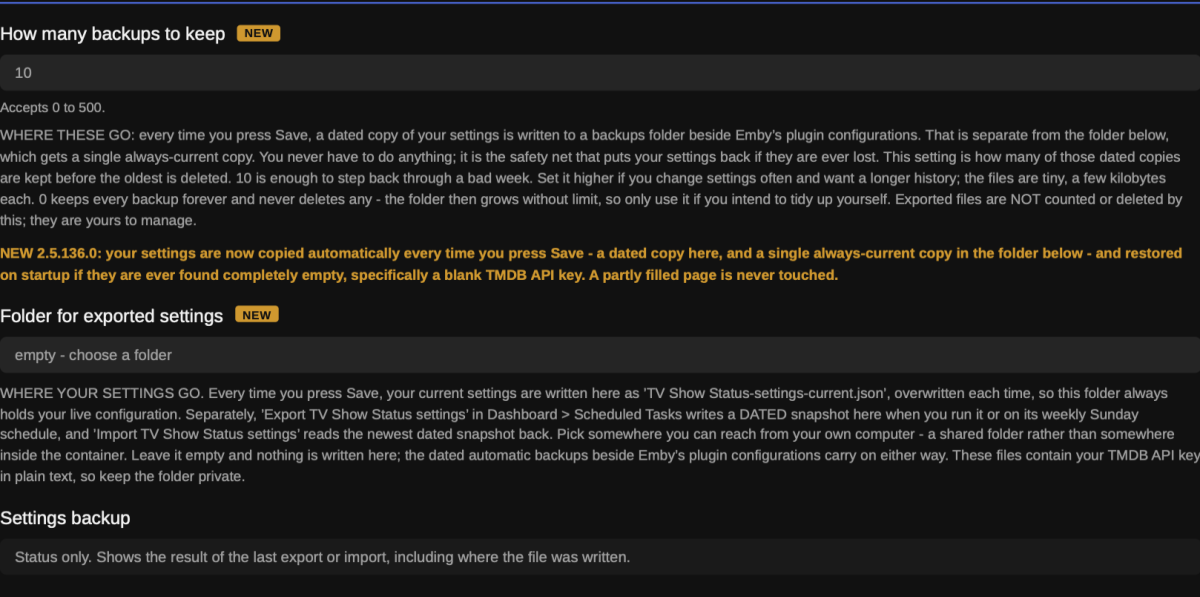
-
Sent 12:44, user TMC, playing "Just shot me"
- Today
-
Great news Eric, thanks
-
The base folder should be "Tenet (2020)". Why has Emby changed its behaviour? Probably in the course of fixing something else - cases which got away with it before now don't. Paul
-
Some significant updates have been made to this app starting with beta 2.1.57. Styling I'm updating some of the styling of components like menus and dialogs to be a bit more modern but, hopefully, still maintain the character of the app and, definitely, still maintain the exclusively large-screen presentation and navigation behavior. Usability I've added some usability enhancements that will, hopefully, be appreciated. Things like automatically focusing the last logged in user on the select user screen, remembering searched for subtitle languages and listing them first, etc. Fixes I've fixed several issues with series recordings. The app had not adjusted to changes on the server that made series recordings not really work properly. That should all be working now. New Features Starting to add some new features. One interesting one in this build that may appeal to you guys with dedicated, dark rooms and HDR screens - there is now a setting that will automatically dim the OSD and any other overlays like selection menus during playback of HDR/DV content. This should lessen the glaring effect you could get before when bringing up a menu in this context. The default dimming amount is 20% but you can set it to 35 or 50 or just turn it off if you don't like it. Only available if connected to an HDR capable display. I've extended the setting to show the logo in place of the text title from just the detail screen to also the EHS - with one additional enhancement there. The app will only use the logo on the EHS display if it is suitable to show there. Most logos run kind of like a line of text and are landscape oriented or even banner shaped. However, some logos like, "War for the Planet of the Apes" are stacked into more of a square or portrait shape and would look tiny or silly displayed in the available area for the title on the EHS. So, in those instances, the app will show the text title instead. This option (to show logo for text) has been turned on automatically with this release 1) because I think it looks good enough now to be the default and 2) to be sure and get good feedback on the feature. You can turn it off in the display settings if you wish. More to come... Please post issues and feedback in this thread. Thanks!
- 1 reply
-
- 3
-

-

-

Multi versions of movies wont show right since the new update
pwhodges replied to Visionaire's topic in General/Windows
The base folder name is "Tenet" when it should be "Tenet (2020)". Why do you have the extra folder in the middle, anyway? Paul -
@Luke I’d like to add another vote for a separate subtitle/closed-caption setting specifically for Live TV. My setup is Emby Server with an M3U tuner feeding Live TV to the latest Emby app on an NVIDIA Shield. For movies and TV shows, I do want subtitles/closed captions to follow my normal user preferences, but for Live TV I would like the option to have captions disabled by default. I recently tracked down an intermittent Live TV freezing issue and found that disabling the embedded EIA-608 closed captions appears to have resolved it. The stream itself was otherwise Direct Playing correctly — H.264 video and AAC audio — with Emby remuxing the MPEG-TS source to HLS. With captions enabled, playback would eventually freeze; with captions disabled, the same IPTV streams have been stable. Because of that, a separate Live TV subtitle mode such as “Off / Follow User Preference / Always On” would be very useful. It would allow users to keep subtitles enabled for their movie and TV libraries without risking playback issues on Live TV streams that contain problematic embedded captions.
-
Actually it loops now.
-
Hello Luke, any news here?
-
Got a new TV box coming today may speed it up, we will see. Resolution: 4K Ultra HD (3840 x 2160) at 60fps Processor (CPU): Realtek RTD1319C Graphics (GPU): Mali-G57 MC1 Memory (RAM): 4GB DDR4 @2666MHz Storage: 128GB eMMC (supports internal recording and TimeShift) Operating System: Android 12 Wireless: Tri-band Wi-Fi 6E (6th Generation AX Wireless) Ethernet: Gigabit LAN (1000M) Bluetooth: Version 5.2 Video & Audio Decoders: Dolby Vision, HDR10+, HLG, and Dolby Atmos support; AV1, H.265 (HEVC), and H.264 decoding
-
I very much do not feel that separate editions should be displayed as a separate entity in the library view. Star Wars for instance has so many separate editions that it would end up making the library look untidy and would also add a completely different nightmare adding different editions to collections (once I've watched A New Hope, I do not then want to watch 4K77). For that reason I feel that differentiation between versions and editions must exist within the same library entry. I feel that ultimately the best solution to this issue would be to have seperate "Version" and "Edition" conventions. If my understanding is correct then the existing version system was designed for the same video with different resolutions. IMHO this functionality should entirely invisible to the end user (always use the best quality version that the display can handle). Having the version functionality invisible to the end user would then allow the "version" dropdown to become an "edition" dropdown. Perhaps "Edition" names could be defined after the version with a bar character (|) as a delimiter. A simple interim improvement however would be to have the default selection when multiple versions exit, be the one that doesn't have anything after the "(year)". That would certainly make things workable for most users without any major changes. N.B If anybody has any workarounds to separate version and editions then I'd be thrilled to hear them.
-
Does merging across different folders mean moving the actual files to one folder or what ??
-
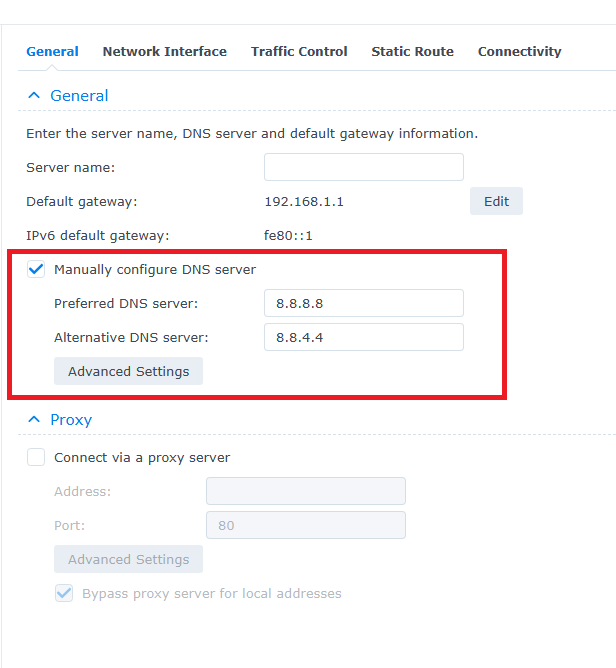
Thanks HERO for helping me, you solved the issue, the issue was from the DNS as you said (it was off), so I added google DNS and it work. Again, Thank you all,
-
Hopefully, TMC will be able to get me a new log and that will lead to whatever is happening for you too.
-
@ebr: I don't know what to do. What a shame, I'm sure we're close. It's as if, because the file is in stereo, it doesn't downmix, even though it's still necessary to speed things up
-
Can you please play something that displays this problem for a few seconds and then follow the instructions to send a log from the app?
-
Unfortunately, Android compressed all the relevant log lines in your log. Can you try sending the log directly from the player during playback right after trying to change speed? There should be an option under the cog on the OSD. @MAX92your logs are still empty.
-
Hi. What do you mean by "fast forwarding by chapters"? The Roku app doesn't do that.
-
TV Air Dates — corrects US and Canadian broadcast times to your timezone
Blueskies278 posted a topic in Plugins
TV Air Dates — what it is and how to use it An unofficial Emby Server plugin. Version 8.16.0.0, September 2026. The problem it solves A US show airs at 9pm Eastern on a Tuesday. TMDB records that as "Tuesday", because TMDB stores a plain calendar date with no time attached. In the UK that broadcast is 2am on Wednesday. In central Europe it is 3am Wednesday. So Emby shows the episode a day earlier than it actually reaches you, and your Upcoming list is wrong by one day for every US and Canadian show you follow. TV Air Dates fixes that. It fetches the real broadcast instant — date and time and timezone — from Trakt or Simkl, converts it to your server's local time, and keeps the calendar day that actually results. It only touches US and Canadian shows. A British or Australian show is already on the right day for a British viewer, and "correcting" it would create the very problem this solves. What it actually changes Two separate things: Episodes you already have. Their air dates are corrected in your library, one day forward where the conversion calls for it. This is a real edit to your metadata. Episodes you do not have yet. Emby has no data at all for an episode you have not downloaded, so Upcoming would be empty without help. This plugin supplies Emby with a full episode list for every show in your library, using the real air times, so Upcoming is both populated and on the right day. Optionally it can also write "Season Premiere" or "Season Finale" in front of an episode's title, which is the only way to mark those on clients that cannot draw badges. Before you start Back up your Emby server. This plugin writes to your library. If something goes wrong you want a way back. This is not boilerplate — take the backup. If you run Emby in Docker, that means the config folder. If you run a NAS package, use the NAS's own backup. On Windows, macOS or Linux, copy the Emby Server data folder somewhere safe while the server is stopped. Step 1 — get your keys You need two: TMDB, plus one air-date source. TMDB (required) Go to themoviedb.org/settings/api Create a free account if you do not have one, and request an API key Copy the API Key (v3 auth) value — not the read access token Free, instant, no approval. It is used to find out which shows are US or Canadian broadcasts, looked up once per show and cached permanently. Then one of these two Simkl — free, and the easier of the two: Go to simkl.com/settings/developer Create an app. Any name and redirect URL will do Copy the Client ID That page shows a Client ID and a Client Secret side by side and they look alike. The secret will not work. If dates stop being corrected the moment you switch to Simkl, this is almost always why — the log says so plainly. Trakt — the original source, but harder to get now: Go to trakt.tv/oauth/applications Create an application and copy the Client ID Since late July 2026, creating a Trakt API application requires an active VIP membership (around $4.99/month). It applies even though this plugin only ever reads public data, because a Client ID exists only as part of a registered app. Trakt has called the restriction temporary and its own API documentation does not mention it, so it is worth trying — but expect a wall if you are starting fresh. Free-account applications were reported removed at the same time, so a Client ID that worked before may have stopped. Separately, a free account can connect only one Community App at a time. This one is Trakt's own published rule, announced 22 July 2026, and it covers apps you authorise under Settings → Apps → Connected Apps. Existing connections above the limit are allowed to continue, but reconnecting one counts as new — so do not disconnect an app you depend on. This plugin is not one of those apps: it never authorises against your account and never appears in that list, so it should not use up your one connection. If any of that blocks you, use Simkl. Free, instant, no membership, and one setting away. Only the Client ID is needed either way. No login, no OAuth, no tokens. Step 2 — install the plugin The file is TVAirDates.dll. It goes in the plugins folder directly below your Emby Server data folder. Stop Emby Server first. Emby holds plugin files open while running. Where the data folder is Platform Data folder Windows C:\Users\<you>\AppData\Roaming\Emby-Server\programdata macOS /Users/<you>/.config/emby-server (older installs: /Users/<you>/emby-server) Linux (deb/rpm) /var/lib/emby Docker whatever you mapped to /config inside the container Synology DSM 7 /volume1/@appdata/EmbyServer Synology DSM 6 /volume1/Emby QNAP /share/CACHEDEV1_DATA/.qpkg/EmbyServer/programdata Asustor / TerraMaster /home/emby So on Windows the plugin goes in …\programdata\plugins\TVAirDates.dll, on Linux in /var/lib/emby/plugins/TVAirDates.dll, and so on. If you are not sure, Emby tells you: Dashboard → Help → Support → Server Paths shows the data folder for your install. Upgrading from Trakt Air Dates Delete the old TraktAirDates.dll from the plugins folder. If both files are present Emby tries to load the same plugin twice. Your settings are carried over automatically on first start — you do not need to re-enter your keys. Platform notes Windows — copy the DLL in, start Emby. Nothing else to do. macOS — the .config folder is hidden in Finder. Press Cmd+Shift+G and paste the path. Copy the DLL in, start Emby. Linux — the DLL must be readable by the user Emby runs as, usually emby. After copying: sudo chown emby:emby /var/lib/emby/plugins/TVAirDates.dll sudo chmod 644 /var/lib/emby/plugins/TVAirDates.dll Docker — copy into the mapped config folder from the host, or: sudo docker cp TVAirDates.dll <container>:/config/plugins/TVAirDates.dll sudo docker restart <container> NAS (Synology, QNAP, UGREEN, Asustor, TerraMaster) — same as Linux, and the permissions step matters most here. Step 3 — set it up Start Emby, then Dashboard → Plugins → TV Air Dates. Fill it in in this order: Air date source — Trakt or Simkl. Only the matching key box is shown Trakt Client ID or Simkl Client ID — whichever you chose TMDB API Key Supply episode lists from the selected source — turn this on. This is the main setting; without it the plugin corrects only episodes you already have, and Upcoming is untouched Enable corrections — turn this on Press Save Saving clears every cached answer and starts a fresh fetch, so the first Upcoming refresh afterwards is slow while it rebuilds. That is expected. It is also how you force fresh data any time later. Worth tuning How far ahead to show (days) — default 60. Every Emby app fetches a fixed number of Upcoming items and cuts the list by item count, not by day, so the last day you see can be a partial one with some of that day's shows missing. A smaller window means less reach but every day complete. On a busy library at roughly two episodes a day: 21 days ≈ 45 items, 30 days ≈ 70, 60 days ≈ 107. Keep these shows out of Upcoming — a daily show can eat fifteen or more of those slots on its own and push everything else off the end. Naming it here leaves it in your library untouched but keeps it out of Upcoming, including the Yesterday row at the top of that view. Mark season premieres and finales in the episode name — off by default, and it edits real episode titles. Turn it on only if you want those marked on clients that cannot show badges. Turning it back off restores the plain titles immediately. Step 4 — check it worked Open the settings page again and read the three status boxes at the bottom: Shows Being Covered — how many of your shows have an answer Unaired Episode Probe — how many future episodes are visible and dated Last Refresh — when the last pass ran and how many dates it corrected Then open Upcoming and compare a US show against its real broadcast day. A Tuesday-night US show should now read Wednesday for a UK viewer. Keeping your settings safe Your settings live in one file named after the plugin, and they include all your API keys. The plugin protects them two ways: Automatically, every time you press Save. Two copies are written, and it is worth knowing which is which. A dated copy goes to plugins/configurations/tvairdates-settings-backups/, beside Emby's own configuration files. That is the safety net: if your settings are ever found empty on startup, the newest one is restored by itself. How many backups to keep sets how many are kept — 10 by default, 0 keeps everything. At the same time, your current settings are written to the folder you set in Folder for exported settings, as a single file named TV Air Dates-settings-current.json, overwritten on each save. That folder therefore always holds your live configuration, somewhere you can reach it. Leave the folder empty and nothing is written there; the dated backups carry on regardless. After each save the Settings backup box names the file it just wrote, so you can see it happened rather than take it on trust. On demand — in Dashboard → Scheduled Tasks, under "TV Air Dates": Export TV Air Dates settings — writes a dated snapshot to the same folder, alongside the always-current file. Runs weekly on Sundays; press the play button to run it now. Use it to capture a known-good configuration before changing something, or before rebuilding a server Import TV Air Dates settings — reads the newest dated snapshot back. Only runs when you press it, and backs up what it is replacing first These files contain your API keys in plain text. Treat the folder like a password. If something is wrong The plugin does not appear in the list — permissions, nine times out of ten. See the NAS note above. Also check you deleted the old TraktAirDates.dll. Dates are not being corrected — check the Client ID is the ID and not the secret. Check Enable corrections and Supply episode lists from the selected source are both on. Then press Save to force a fresh fetch. Dates stopped being corrected on Trakt, having worked before — check the application still exists on your Trakt account. Free-account applications were reported deleted in late July 2026, and a revoked Client ID fails in exactly the same way as a wrong one. Switching to Simkl is one setting away. Upcoming is empty or short — give it a few minutes after saving; it rebuilds every show from scratch. If it stays short, look at How far ahead to show and at whether your app is cutting the list by item count. A show is missing from Upcoming — the plugin refuses to send Emby an episode list shorter than what you already have on disk, on purpose: a wrong date is recoverable, a show that vanishes is not. The log says which show and why. Everything is slow after saving — expected, once. Saving clears the caches deliberately. The server log is the place to look: Dashboard → Logs. Every line from this plugin is prefixed [TraktAirDates], which is the internal name and has deliberately not been renamed, so older troubleshooting notes still apply. Disclaimer This is an unofficial, hobby-built plugin. It is not made by, endorsed by, or affiliated with Emby, Trakt, Simkl or TMDB. It uses the Trakt API, the Simkl API and TMDB, none of whom endorse or certify it. It is beta software and it writes to your library: it changes the air dates of episodes you already have, and optionally adds "Season Premiere" or "Season Finale" to episode names. Those are real edits to your metadata. Take a backup of your Emby server before installing, and keep one. It is supplied as-is, with no warranty of any kind — you run it at your own risk, and I cannot be held responsible for anything it does to your library, your server or your data. You supply your own API keys and remain bound by the terms of whichever services you use. Please report bugs along with your Emby log. Thanks TV Air Dates 8.16.0.0 The plugin has been renamed. It was Trakt Air Dates; it is now TV Air Dates, because Trakt is no longer the only source it can use. Your settings carry over automatically the first time it starts — nothing to re-enter, including your API keys. Installing this version: the file is now TVAirDates.dll. Delete the old TraktAirDates.dll from your plugins folder. If both are present Emby will try to load the same plugin twice. This release covers everything since 8.11.0.0. New Air date source — choose between Trakt and Simkl. They are mutually exclusive: whichever you pick is the only one contacted, and the other's key box is hidden. Trakt stays the default, so nothing changes unless you change it. Simkl Client ID — free from simkl.com/settings/developer. No membership, no approval. This matters because since late July 2026 creating a Trakt API application requires an active VIP membership, which locks out anyone starting fresh. Trakt separately limits a free account to one connected Community App, but that covers apps you authorise against your account under Settings → Apps → Connected Apps, and this plugin is not one of them — it only ever reads public data, so it should not use up that connection. Careful: that page shows a Client ID and a Client Secret side by side and they look alike. The secret will not work. If corrections stop the moment you switch to Simkl, check which one you pasted — the log now says so in plain words instead of failing silently. Automatic settings backup — every time you press Save, a dated copy of your settings is kept beside Emby's plugin configurations, and a single always-current copy is written to the folder you choose in Folder for exported settings, so that folder always holds your live configuration. The Settings backup box names the file it just wrote. If your settings are ever lost, the newest dated copy is restored on startup. How many backups to keep controls the history: 10 by default, 0 keeps everything and deletes nothing. Export and import, in Dashboard → Scheduled Tasks under "TV Air Dates". Export writes a dated snapshot into that same folder, alongside the always-current file — useful for capturing a known-good configuration before you change something. It runs weekly on Sundays and can be run on demand; import reads the newest dated snapshot back, only when you press its button, and backs up your current settings first. These files contain your API keys, so keep the folder private. Fixed Excluded shows stayed out of the future but came back in the past. Keep these shows out of Upcoming held back episodes still to air, but Emby's Upcoming view opens with a Yesterday row — so an excluded show reappeared there the morning after each new episode. For a daily show that meant nearly every day. The cutoff now reaches two days back, so nothing an excluded show airs can land in that row. Invented episodes no longer appear in Upcoming. A source can list an episode that does not exist — one show gained a seventh episode of a six-episode season that had already finished. An episode is now dropped only when it sits beyond the end of TMDB's list for that season and has no title, so genuinely unannounced episodes still appear. "Season Finale" is no longer written into an episode name while a season is still being published. Two shows were marked as ending with most of their season still to run. The marker is now withheld when the episode has no real title yet, or when the season is running far shorter than that show's completed seasons. Shows with short seasons were being skipped entirely. An internal rule refused any answer containing fewer than ten episodes, so a six-part documentary or a four-part drama got no date corrections at all, silently, with nothing in the log to explain it. That rule is gone. The real safety check remains: no episode list shorter than what you already have on disk is ever sent to Emby. The Trakt Client ID setting now tells the truth. It said creating an app was "free, instant, and needs no approval". Since Trakt's July 2026 change that is false, and it sent new users to a wall. The text at the top of the page says the same thing before you start. Stale text removed. The settings page referred to a "native listener" that was retired in August, and Supply episode lists from Trakt was renamed to Supply episode lists from the selected source, since Trakt is no longer the only one. Known limitations Leaving the Client ID empty is allowed and nothing breaks, but upcoming episodes then come from TMDB with uncorrected dates — which is the thing the plugin exists to fix. If you are on Trakt and corrections stop having previously worked, check your Trakt account still has the application. When the July 2026 restrictions came in, applications belonging to free accounts were reported deleted rather than left alone, and a revoked Client ID fails in exactly the same way as a wrong one. Switching to Simkl is one setting away. Simkl's catalogue is shallower than Trakt's for some long-running shows, and occasionally deeper. Both were measured against each other and agreed on every corrected date where both could answer, but if a show you follow looks thin on Simkl, switching back to Trakt is one setting away. Saving the settings page clears every cached answer, so the next Upcoming refresh is slower while it rebuilds. That is also how to force fresh data after changing a key or the source. Disclaimer This is an unofficial, hobby-built plugin. It is not made by, endorsed by, or affiliated with Emby, Trakt, Simkl or TMDB. It uses the Trakt API, the Simkl API and TMDB, none of whom endorse or certify it. It is beta software and it writes to your library: it changes the air dates of episodes you already have, and optionally adds "Season Premiere" or "Season Finale" to episode names. Those are real edits to your metadata. Take a backup of your Emby server before installing, and keep one. It is supplied as-is, with no warranty of any kind — you run it at your own risk, and I cannot be held responsible for anything it does to your library, your server or your data. You supply your own API keys and remain bound by the terms of whichever services you use. Exported settings files contain those keys in plain text; treat them as passwords. Please report bugs along with your Emby log. Thanks New plugin name TVAirDates.dll TV-Air-Dates-settings-8_16_0_0.pdf TV-Air-Dates-guide-8_16_0_0.pdf
-

Multi versions of movies wont show right since the new update
Visionaire posted a topic in General/Windows
Hey, I have a problem with the newest Version of Emby. It broke my Multi-Version Naming Convention. It will show the full movie name instead of the version of this movie. For example lets take Tenet. My folder structure is as follows: W:\Movies\Tenet\Tenet (2020)\Tenet (2020) - 4K Remux.mkv W:\Movies\Tenet\Tenet (2020)\Tenet (2020) - 4K.mkv now it should only show 4K Remux and 4K as versions but it shows the whole movie name and the version. like Tenet (2020) - 4K Remux and Tenet (2020) - 4K instead of 4K Remux and 4K it never did that before this exact update. Can anyone help? -
This would have to be something you setup as Microsoft discontinued guide data six years ago. Most likely, you setup some sort of system that is ultimately getting the data from Schedules Direct which, ironically, gets their data from the exact same place we do - Gracenote. That would point to probably a lineup or channel-mapping difference or, less likely but possibly, some "extra sauce" SD is adding.
-
DDNS is not the same as DNS. Check DNS Synology server config. I don't use a Synology box my self so do not know where to look.

_svg.thumb.png.85e4ee6291ddd76347269c05175b5dda.png)