All Activity
- Past hour
-
 Allen817q joined the community
 -

Working on mobile DietPi emby sever, but have audio issue
Neminem replied to NotYourErnst's topic in Linux
This might be overkill for a simple road trip. Ecoflow but nice to have if you get strandet. Amazon.com: EF ECOFLOW: 𝐎𝐮𝐭𝐝𝐨𝐨𝐫 𝐒𝐞𝐚𝐬𝐨𝐧 -
 xiondria joined the community
 -
 Allen817 joined the community
 -
I'm just seeing version 3.8.6 which the release notes show as enabling better logging
-
 jorgemb10 joined the community
 -
 UErsel changed their profile photo
 -
 sakshii joined the community
 -
 Shabeir joined the community
 -
 Rgooody joined the community
 -
 Etmqueen joined the community
 -

Working on mobile DietPi emby sever, but have audio issue
NotYourErnst replied to NotYourErnst's topic in Linux
Two streams 50% CPU usage. Still looking for a Powerbank, which could deliver constant power for it, everything else works fine now. -

[Security Issue] Using Home Button Makes PIN Bypass Possible
ebr replied to Tigga5's topic in Android
Hi. I just want to confirm that this situation is not possible in the old Android TV app, correct? Just want to be sure we don't have two holes to fill. Thanks. -
If emby release this it’s everything we need to have a decent book player in emby, oh and the book reader on app
- Today
-
No compatible streams are currently available just on some devices.
ebr replied to mexsurf24's topic in General/Windows
Hi. Exactly when in this log did the issue occur? -
Feature Request: Display the number and list of active Emby Premiere devices
ebr replied to yoyo77yo's topic in Feature Requests
Hi, there's already an open request for this or something functionally equivalent. Please join in and contribute to the existing discussion at: -

Feature Request: Select/Deselect All and Default Sorting Options for User Device Access
yoyo77yo posted a topic in Feature Requests
Hello, I would like to suggest a usability improvement for the User Settings → Access → Device Access section. When configuring a user account, Emby allows the administrator to choose which devices that user is allowed to access. This is very useful, but managing the list becomes difficult when the server has many registered devices. I would like to request two improvements. 1. Add “Select All” and “Deselect All” buttons Please add two buttons above the device list: Select All Deselect All This would make it much easier to configure restricted access. For example, when I want to allow a user to access only one or two devices, I currently have to manually disable every other device one by one. With a Deselect All button, I could disable everything first and then enable only the required devices. Likewise, a Select All button would make it easy to restore access to every device. 2. Add sorting options and allow alphabetical sorting by default The device list currently appears to be sorted from the most recently connected device to the oldest. I would like to be able to sort the list by: Device name, from A to Z Device name, from Z to A Most recently connected Oldest connection It would also be useful if the administrator could choose and save the preferred default sorting method. Personally, I would prefer alphabetical sorting by device name as the default, because it is much easier to find a specific device when many devices are registered. Ideally, the selected sorting method should remain saved when leaving and reopening the user settings page. These changes would significantly improve device-access management for administrators running servers with many users and devices. Thank you for considering this request. Best regards.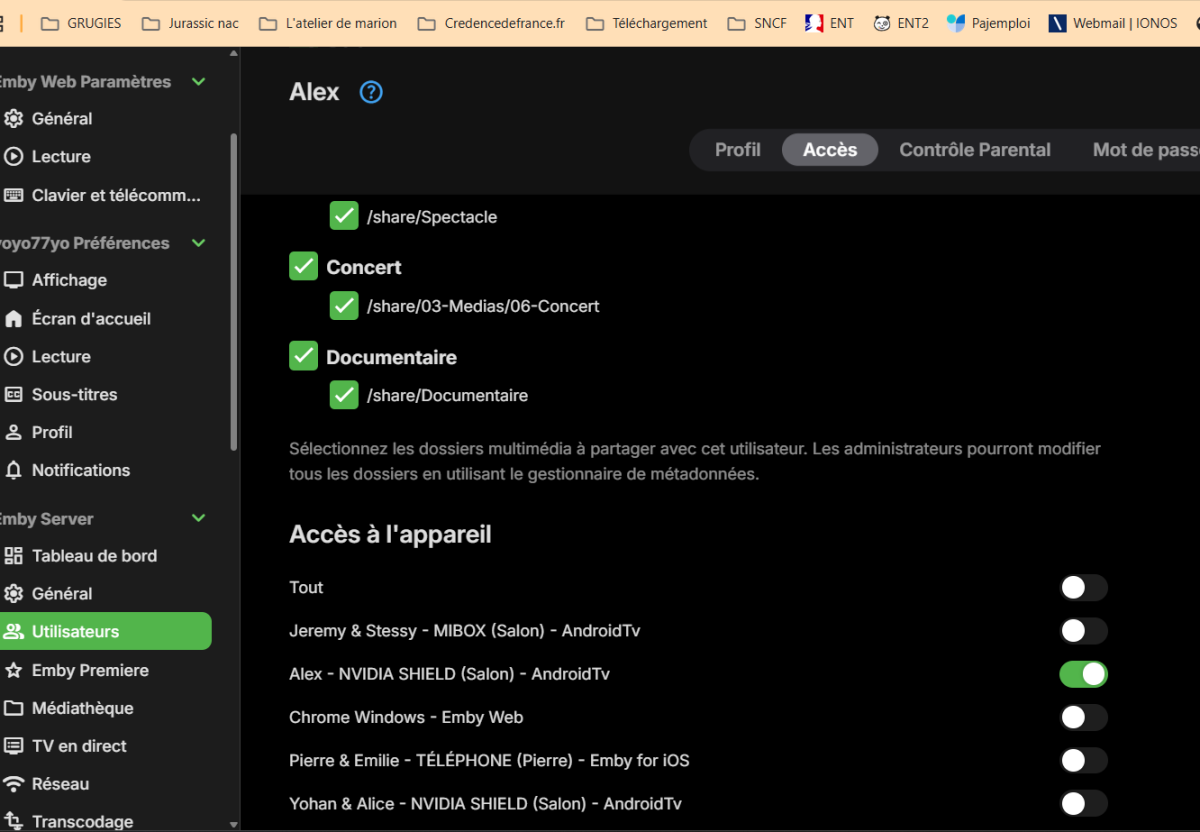
-
Feature Request: Display the number and list of active Emby Premiere devices
yoyo77yo posted a topic in Feature Requests
Hello, I would like to suggest a new feature for the Emby Premiere dashboard. I currently have an Emby Premiere Lifetime subscription, and my server devices listed in the Devices section. However, I understand that this list includes all devices and applications that have connected to the server over time, and that it does not represent the devices currently counted toward the Emby Premiere limit. At the moment, the Premiere page only displays a general message such as: “Your device usage is well below the limit.” This is reassuring, but it does not show the actual number of devices currently counted. It would be very useful to have a section displaying: The current number of Premiere devices, for example: 12 of 30 devices used The list of devices that have used a Premiere feature during the last seven days The device name The application used, such as Emby Web, Emby for Android, Android TV or Fire TV The date and time when the device last used a Premiere feature The date when the device is expected to stop counting toward the limit This would be especially helpful for users who have several televisions, Fire TV devices, NVIDIA Shield devices, mobile phones, browsers and different versions of the Emby application. For example, installing both Emby for Android TV and Emby for Android on the same physical device may create two separate client entries. Without a detailed Premiere device list, it is difficult to know whether both applications are currently being counted. If displaying identifiable device information creates privacy or security concerns, an anonymized list or simply an exact counter such as “12/30 active Premiere devices” would already be a major improvement. It would also be useful to clearly explain in the interface: What causes a device to count toward the Premiere limit How long it remains counted Whether reinstalling an application creates a new device entry Whether two Emby applications installed on the same physical device count separately Thank you for considering this feature. I believe it would make Emby Premiere device management much clearer and more transparent for server administrators. Best regards. -
Yeah I realize that. Was hoping they would have updated it to the newer flow version.
-
Emby's built-in Trakt plugin uses the old, legacy PIN flow.
-

There is a bug in version 2.3.8 with .ass files
MediaEmby1968 replied to MediaEmby1968's topic in Samsung Smart TV
Hi @Luke It's still the same. The same error. I'll leave it for later, until I uninstall Emby or have to format my PC. Thanks -
 upD8RP changed their profile photo
 -
installed app & server updates and still not fixed

-
BTW, I use for quite a while Yamtrack as selfhosted backup for Trakt. For the time being, it becomes my master now.
-
Looks like they updated Trakt to version 3.8.8 but it didn't make any difference in fixing the issue that it's having.
-

Email Notifications: Some notification types do not trigger Email Notifications
Fluxcompensator replied to Fluxcompensator's topic in Plugins
I'm sorry, I forgot. Here the log..txt embyserver.txt -

Email Notifications: Some notification types do not trigger Email Notifications
Luke replied to Fluxcompensator's topic in Plugins
Hi there, please attach the Emby server log from when the problem occurred: How to Report a Problem Thanks! -
Email Notifications: Some notification types do not trigger Email Notifications
Fluxcompensator posted a topic in Plugins
Environment Emby Server 4.9.5.0 ReadyNAS (Linux) Email Notifications plugin 3.2.2.0 (configured and working) Problem The Email Notifications plugin works correctly for some notification types but not for others. Notifications that work Send Test Email User Login Service Restart Notifications that do not work Backup Completed Maintenance Mode Server Restart (triggered from the web interface) When I restart the server from the Emby web interface, no email notification is sent, even though the notification type is enabled. The backup task also completes successfully: TaskManager: Emby Server Backup Completed after 22 seconds However, no email is sent afterwards and there are no log entries indicating that a notification is passed to the Email Notifications plugin. SMTP configuration is correct because other notification types are delivered successfully. Question Is this expected behavior, or is it a bug that these notification types do not trigger the Email Notifications plugin? -
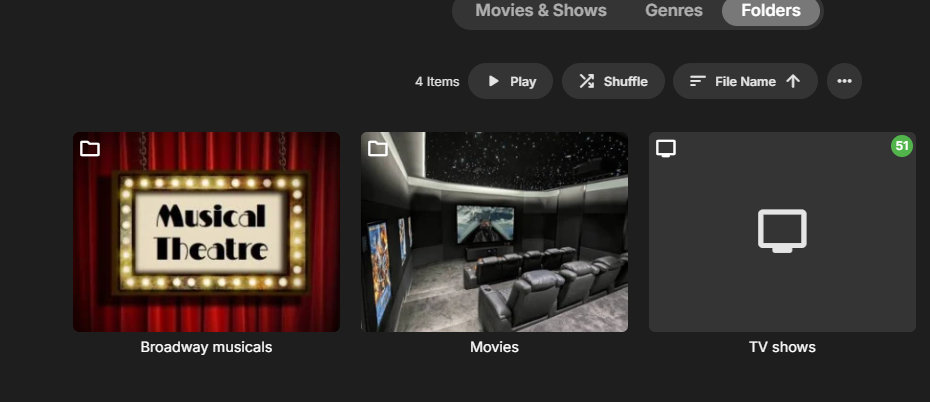
My library Keeps changing my main folder TV shows into a show and that makes everything into 1 big tv show and messes everything up how can i force it to stay a folder like the other folders. thanks for any help
-

Emby server/client - ReplayGain or R128 volume normalization support for music
ryancey replied to Espen JQ's topic in Feature Requests
@LukePlease do not add the insult to the injury by just ignoring our messages now... This is a legit feature request that's been lasting for years, and you refuse to provide a clear answer or explanation on why it isn't being worked on yet. Long time users that built their media center on Emby are hoping this will land someday and you're kind of keeping us on a leash until you decide to reject or work on this feature. -
Abs2Emby — AudioBookShelf Local Metadata Plugin for Emby I wrote a server plugin that lets Emby read metadata and cover art directly from AudioBookShelf's sidecar files — no internet, no API keys, just the metadata.json and cover.jpg that ABS already generates beside your audiobook files. GitHub: https://github.com/Jdiesel87/Abs2Emby What it does Drop the plugin DLL into your Emby plugins folder, enable the providers in your library settings, and on the next library scan Emby reads the ABS sidecar files and populates your audiobooks with metadata and covers. It works with both library types: Books library → Book entity (authors as people credits, narrators as actors) Audio Books library → MusicAlbum + Audio (authors map to Artists/AlbumArtists, narrators map to Composers) Field mapping highlights ABS field Maps to title Name + Album subtitle Tagline description Overview authors[] PersonInfo{Writer} (Book) or Artists/AlbumArtists (MusicAlbum/Audio) narrators[] PersonInfo{Actor} (Book) or Composers (MusicAlbum/Audio) series[]/seriesName Appended to Name as " - Series Name #N" publishedYear ProductionYear isbn/asin ProviderId publisher Studio genres[]/tags[] Genres/Tags cover files Primary image When a series is present, Name becomes something like "The Fellowship of the Ring - The Lord of the Rings #1". The Album field always holds the raw title. Config toggles Three settings in Dashboard → Plugins → ABS Import → Settings, all default on: MapAuthorsAsAlbumArtists — write authors to Artists/AlbumArtists on album/audio items MapNarratorsAsComposers — write narrators to Composers on album/audio items EnableNfoFallback — try .nfo/desc.txt/reader.txt if metadata.json is absent Expected file layout Author Name/ Book Title (1994)/ metadata.json ← generated by AudioBookShelf cover.jpg ← optional, used as primary art audiobook.m4b Why I use AudioBookShelf to manage my audiobooks, but also want them in Emby for the wider media experience. ABS already writes sidecar files — this plugin just picks them up so I don't have to maintain metadata in two places. Looking for testers This is early but functional. If you use both ABS and Emby, I'd appreciate any feedback: Does metadata apply correctly for your library type (Books vs Audio Books)? Any issues with the sidecar file format (older ABS versions use different JSON shapes — I've tried to handle the variants but there may be edge cases) Cover art showing up as expected? Settings page working in the dashboard? Open an issue on GitHub or reply here. Thanks for taking a look. ABS_Import.dll
-

Feature Request — Windowed video playback on external display
Jack998 posted a topic in Apple iOS / macOS
Hi Emby team, Problem: When iPad is connected to an external monitor, the Emby iOS app forces video into fullscreen on the external display. The iPad screen shows only playback controls. There is no option for windowed playback. Steps to reproduce: 1. Connect iPad Pro to external monitor via USB-C 2. Open Emby iOS app, play any video 3. Video takes over the entire external display; iPad shows only controls Expected: An option to play video in a resizable window on the external display, allowing multitasking (Stage Manager, other apps alongside video). Why: The forced fullscreen limits multitasking on iPadOS. Environment: • iPadOS 26.5.2 • Emby App latest Thank you. -

Advice please - getting the maximum from my EMBY Setup / Samsung HW-Q990C (Atmos and TrueHD)
Robnaeyaert replied to Robnaeyaert's topic in Hardware
Awesome!! I'm getting concerned for you @RanmaCanadadid AI take your job or something? You seem to have some major issues? Perhaps a cup of tea and a wee lie down? [reply provided by ChatGPT] -
Hm Are there any news on this? It is still a real pain in the you know what to scroll through already now more then 4200 titles within the media library to select a specifig title from it. Are there any plans on adding a navigation with letters on the right side instead of dots?
-
This is excellent news. I can't see the option in the beta app though. Running 3.5.36 Edit - NVM, it's not on Android app, only Android TV