
All Activity
- Past hour
-
 Geremby joined the community
 -
 Mała joined the community
 -
 Andrjuxa008 joined the community
 -
 hjsretxghugali joined the community
 -
 wwwwwxxzzxzz joined the community
 -
 parthvala9269 joined the community
 -
 jokedieonthisjk@gmail.com joined the community
 -
 Lordkev87 joined the community
 -
 weiyacheng joined the community
 -
Hi @softworkz, has the landscape changed in the last 1.5years in 4.9.1.90 sdk (latest stable i understand), I am trying to develop a responsive full screen DXgrid Dashboard handling a large amount of data,rows and subrows with action buttons.I assume trying to do as much as possible client side is desirable; is there more to explore now client side or should i be focusing on "server-side grid interaction" alone still. re any documentation, I would love to be able to point claude at a repository of information so Claude can just build it, but from the class definitions alone (and my limited ability to help) Claude is getting (almost) nowhere fast . The pluginui demo in sdk doesnt demonstrate a very wide set of dxgrid patterns, is there a public plugin that goes to town on what s possible that i could use for my and ai learning, do you know?
-
 滤芯 joined the community
 - Today
-
Thank you Do you have 2 computers named: PORTATIL and JPCEFM ?
-

There is a bug in version 2.3.8 with .ass files
SamES replied to MediaEmby1968's topic in Samsung Smart TV
Can you try deleting the server from the client, then re-add it and try again. It seems like something has become corrupted. It might even be worth fully uninstalling the app from the TV, then remove power from the TV for a few minutes, then try reinstalling the client. -
New beta up (v5.55.0) in the catalog. Added support for music libraries. Please report any bugs found to me either here or in a private message. @NeminemYou got a music library?
-

There is a bug in version 2.3.8 with .ass files
MediaEmby1968 replied to MediaEmby1968's topic in Samsung Smart TV
From the Server (The PC), I don't have any problems, the problem is in the TV app. There I cannot access, either through the "Continue Viewing" section or by directly accessing the library, it gives me an error. And it is not only with .ass subtitles, but also with external .srt subtitles (Checked this morning), if they are internal there is no problem. Here I leave you a capture of multimedia information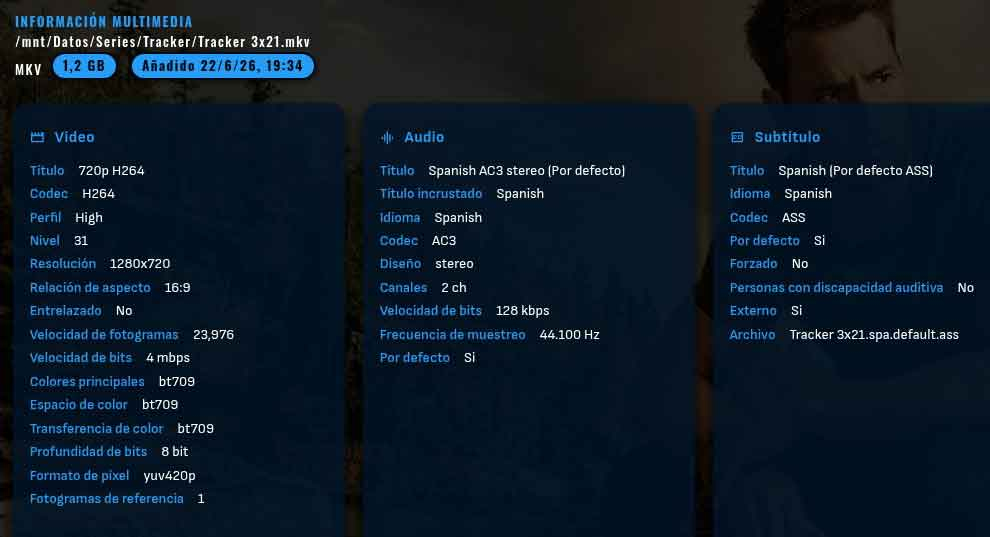
-

Philips OLED809 chooses HDR10+ instead of Dolby Vision in Emby
GrimReaper replied to yzxvw's topic in Android
Since it's DirectPlay, I tend to lean more on TV itself being the culpit, but it doesn't have to necessarily be. First, are you using Emby for Android or Emby for AndroidTV client app? Whichever it is, if you install the other one, does the same occur? Also, does it happen on all DV items or only that particular one? You can also put it on a stick and try to play it with native player, does DV get triggered in that scenario? -
Sorry for the long post. When mapping my provider's M3U playlist URL directly into the WebStreams plugin, the connection consistently times out or fails. Testing the raw URL stream reveals a mandatory 30-second delay from the exact moment the URL request is executed to the moment data actually begins downloading. Technical Breakdown of the 30-Second Delay; 1. Server-Side Database Compilation (15–20 Seconds): The provider link is not a static file sitting ready on a server; it is an active database query (get.php?username=...). When the WebStreams plugin calls the URL, the IPTV provider's server must authenticate the credentials, query its database, and compile hundreds of thousands of lines of live channels, VOD movies, and series paths into a massive raw text payload (approx. 400MB). This server-side compilation takes up the bulk of the initial wait time. 2. Stream Interception & Header Allocation (5–10 Seconds): Because the stream returns a massive .php script payload rather than a static file extension (like .m3u), the plugin's underlying network stack must pause to parse the initial stream headers, verify the data payload type, and allocate memory buffers to handle a text file of this magnitude before it can safely begin processing the byte-by-byte data transfer. Impact on the WebStreams Plugin (Why it Fails): Because the plugin's default network timeout window is shorter than the 30 seconds the provider's server requires to assemble the database, the plugin drops the connection. It assumes the server is dead or unresponsive before the provider has even finished building the payload to send back. Furthermore, any automatic background re-tries or header checks sent by the plugin while the server is compiling can trigger the provider's firewall filters, resulting in "Forbidden" or "Resource Changed" connection drops. Technical Question for the Developer / Community: Is there an existing configuration file or hidden setting where I can manually increase the network connection timeout limit (e.g., setting it to 45 or 60 seconds)? Alternatively, is there a way to force the plugin to ignore initial .php headers and wait out the server compilation phase before dropping the socket?
-
You're best to wait until the LG review is complete. It's not possible to supply the IPK for this app.
-
There is a bug in version 2.3.8 with .ass files
SamES replied to MediaEmby1968's topic in Samsung Smart TV
This doesn't really make sense to me. For the file you tested in the previous server log, can you please send a screenshot of the Media Info detail at the bottom of the item detail screen on the server? I'm interested to see what streams it has identified. I can't understand why you don't have an option to turn off the subtitles. -
Hola, adjunto varias ejecuciones de la aplicacion, junto con el PML, a ver si hay suerte. Verifica que esta vez aparece el proceso 'Emby*', porque en el procmon, es bastante confuso ver si el proceso en cuestion aparece o no. He probado a desactivar WireGuard, y sigue fallando. Este solo se usa cuando salgo (no es el caso). Saludos y gracias. emby.7z
-
I wanted to share a little side project I've been working on — a lightweight Docker container that turns your Radarr/Sonarr release calendar into a "Coming Soon" library right inside Emby. What it does: Syncs upcoming releases from Radarr & Sonarr automatically Generates a folder structure that you can add as a mixed-content library in Emby — complete with poster art (with badges), backdrop, .nfo metadata (release date, description, genres, rating, cast for movies), and a placeholder .mp4 Adds visual badges on posters: UPCOMING, a countdown ("5 Days"), and episode badge for shows (e.g. S03E07) Cleans up entries that are no longer upcoming Runs on a schedule (default every 6h) via Docker Built for Unraid, but works on any Docker host. Testet with Emby Beta v4.10.0.17 It's vibe coded — built with AI — so review the code before using it in production. Use at your own risk! GitHub: https://github.com/mrt187/release-poster-sync
-
You must enable expert mode for kodi addons and then enable the delete options in the "Interface" section.
-
So whilst you are still getting the same error message as before: "Windows cannot access the specified device, path, or file. You may not have the appropriate permissions to access the item.", you are no longer getting an "Application Error" in the windows Application Event Log and no Application crash Strange that this change behavior is happening without a change to the Emby Windows application version - still version 2.310.2.0 I noticed from the procmon PML file that you run wireguard - could it be blocking the Emby Windows attempt to access whatever it was trying to access? I suggest we revisit getting procmon PML file again and making sure the filter is reset and it is run on the same PC that Emby Windows is being launched on and note down the time the pop-up error message appears - to the second - so noting down hh:mm:ss time and then I can look at see what was happening at that time in the embyclient.txt log and procmon PML file. In the last log we have at 20:30:17 / 20:30:18 2026-07-04 20:30:17.296 Info MainWindow: AppWindow_Visible: Invoke LoadWebView 2026-07-04 20:30:17.307 Info MainWindow: LoadWebView: Before EnsureCoreWebView2Async 2026-07-04 20:30:17.311 Info MainWindow: WebView2X: Start Init 2026-07-04 20:30:17.461 Info MainWindow: WebView2X: Fixed runtime path: C:\Program Files\WindowsApps\EmbyMedia.EmbyTheater_2.310.2.0_x64__svmepx4c03f7m\WebView2\x64 2026-07-04 20:30:18.025 Info MainWindow: WebView2X: environment.UserDataFolder: C:\Users\administrador\AppData\Local\Packages\EmbyMedia.EmbyTheater_svmepx4c03f7m\LocalState 2026-07-04 20:30:18.033 Info MainWindow: WebView2X: Window Handle: 132616 2026-07-04 20:30:18.129 Info Application: ApplicationStateMonitorWinUI.Window_Activated - State: Deactivated and then at 20:30:25 2026-07-04 20:30:25.480 Info MainWindow: AnimationWindow_ShowLogo invoked 2026-07-04 20:30:25.541 Info MainWindow: AnimationWindow_AnimationHidden invoked 2026-07-04 20:30:25.683 Info Application: ApplicationStateMonitorWinUI.Window_Activated - State: CodeActivated and then at 20:30:27 2026-07-04 20:30:27.816 Info MainWindow: ==== APP CLOSING ==== it would be good to know if the error "Windows cannot access the specified device, path, or file. You may not have the appropriate permissions to access the item" was 20:30:25 and if you acknowledged the prompt at 20:30:27 and with a PML procmon capure for the period, we should see what was happening
-

Android application cannot playback audiostream (DTS-HD MA Stereo in *.mkv)
voodoo5_6k replied to voodoo5_6k's topic in Android
Well, sometimes. Never initially. Only after switching tracks, it sometimes plays. But this isn't because of transcoding. That can be done too without it, sometimes. One log with transcoding allowed for the user, one without, plus the server log. (Still wonder why it would record the public IP in its logs?) Maybe I should make the file available for testing? emby_android_1783235266311.txt emby_android_1783236378231.txt embyserver.txt -

Github Repo Plugin Installer (Install plugins from github)
GrimEvil replied to bakes82's topic in Plugins
@bakes82If no one else has said this thank you for the plugin, it works great with a couple of the plugins I use that are not in the catalogue. -

TV Show Status — TMDB-powered Returning/Ended/Cancelled badges for series
Blueskies278 replied to Blueskies278's topic in Plugins
Thank you. I will try to upload it today. still finding small bugs. -
Thanks, did work for me. Not the ideal way, but good to know.
-
You need to remove the plugin and refetch metadata of all libraries affected by the plugin atm.
-

TV Show Status — TMDB-powered Returning/Ended/Cancelled badges for series
sh0rty replied to Blueskies278's topic in Plugins
I really appreciate that the Emby plugin section receives more love driven by the community. Well done! Happy to test this out when it becomes available. -

Workaround: customize UpNext / Next Episode prompt timing in Emby Web
lolotux replied to lolotux's topic in General/Windows
Here is an Howto HowTo - Emby Web: show the Next Episode prompt at 96% playback Version: 2026-07-05 Tested on: Debian 12, Emby Web 4.9.5.0 1. Goal This HowTo changes when the Next Episode / Up Next prompt appears in Emby Web. The target behavior is: Show the prompt when 96% of the episode has been played. In other words, the prompt appears when about 4% of the episode remains. The native Emby Web behavior uses a hardcoded fallback of roughly 30 / 35 / 40 seconds before the end, depending on the episode duration. It may also use a CreditsStart marker when one is available. This workaround replaces that behavior with a percentage-based trigger. 2. File involved /opt/emby-server/system/dashboard-ui/videoosd/videoosd.js This is the Emby Web video OSD JavaScript file. 3. Backup the original file Create a backup directory and copy the current JavaScript file before changing anything. sudo mkdir -p /root/backup_emby_ui sudo cp -a /opt/emby-server/system/dashboard-ui/videoosd/videoosd.js /root/backup_emby_ui/videoosd.js.BAK_$(date +%Y%m%d_%H%M%S) 4. Apply the 96% patch The patch does two things: 1. It ignores the CreditsStart marker for this UpNext calculation by forcing creditsInfo=0. 2. It replaces the native fixed timing logic with runtimeTicks*.96. The command below works whether the file still contains the native 40/35/30 values or an older test using 120/120/120. sudo python3 - <<'PY' from pathlib import Path import re p = Path('/opt/emby-server/system/dashboard-ui/videoosd/videoosd.js') s = p.read_text() s = s.replace( 'creditsInfo=(null==creditsInfo?void 0:creditsInfo.start)||0', 'creditsInfo=0' ) pattern = r'runtimeTicks-1e3\*\(fiftyMinuteTicks<=runtimeTicks\?\d+:fortyMinuteTicks<=runtimeTicks\?\d+:\d+\)\*1e4' s2 = re.sub(pattern, 'runtimeTicks*.96', s, count=1) if s2 == s and 'runtimeTicks*.96' not in s: raise SystemExit('UpNext timing expression not found. Please check videoosd.js manually.') p.write_text(s2) print('OK UpNext 96 percent patch applied') PY 5. Restart Emby Restart the Emby server so it serves the modified file. sudo systemctl restart emby-server 6. Verify server-side content This command bypasses the browser cache by adding a random query parameter. curl -s 'http://debian12:8096/web/videoosd/videoosd.js?check='$(date +%s) \ | grep -oE 'creditsInfo=0|runtimeTicks\*\.96|runtimeTicks-1e3\*\(fiftyMinuteTicks<=runtimeTicks\?[0-9]+:fortyMinuteTicks<=runtimeTicks\?[0-9]+:[0-9]+\)\*1e4' Expected result: creditsInfo=0 runtimeTicks*.96 If the old runtimeTicks-1e3*(...) expression still appears, the patch did not apply correctly. 7. Force the browser cache to reload Important trap observed during testing: Chromium may keep serving an old cached file for this exact versioned URL: /web/videoosd/videoosd.js?v=4.9.5.0 Open Emby Web in the browser, open DevTools, go to the Console, and run: fetch('/web/videoosd/videoosd.js?v=4.9.5.0', {cache:'reload'}) .then(r => r.text()) .then(t => console.log( 'PCT96=', t.includes('runtimeTicks*.96'), 'CREDITS0=', t.includes('creditsInfo=0'), 'HAS_NATIVE=', /fiftyMinuteTicks<=runtimeTicks\?\d+:fortyMinuteTicks<=runtimeTicks\?\d+:\d+/.test(t) )); Expected console result: PCT96= true CREDITS0= true HAS_NATIVE= false Then close and reopen the Emby tab, or use: Ctrl+F5 If your Emby Web version is different, adapt the v=4.9.5.0 value to the version actually shown by your browser. 8. What 0.96 means in practice runtimeTicks*.96 means that the prompt appears after 96% of the episode runtime. Episode duration Prompt appears with about 40 min 1 min 36 sec remaining 50 min 2 min remaining 60 min 2 min 24 sec remaining Formula: remaining time = total duration * 4% 9. Rollback Restore the backup file, restart Emby, and force the browser cache to reload again. sudo cp -a /root/backup_emby_ui/videoosd.js.BAK_YYYYMMDD_HHMMSS /opt/emby-server/system/dashboard-ui/videoosd/videoosd.js sudo systemctl restart emby-server Then rerun the browser fetch(..., {cache:'reload'}) command from section 7. 10. Important notes Do not delete these directories for this issue: /var/lib/emby/metadata /var/lib/emby/cache The issue is not caused by Emby metadata or image cache. The relevant parts are: videoosd.js browser cache for videoosd.js?v=... Also note: This is not an official Emby setting. Emby updates may overwrite videoosd.js. Always keep a backup. A proper official UI setting for the UpNext prompt timing would be better. creditsInfo.start corresponds to the CreditsStart marker. The patch forces creditsInfo=0 so the percentage-based trigger is always used. 11. Short forum summary Tested workaround for Emby Web 4.9.5.0: The UpNext / Next Episode prompt timing is handled in: /opt/emby-server/system/dashboard-ui/videoosd/videoosd.js The native fallback uses hardcoded 30/35/40 seconds before the end. I replaced that fallback with: runtimeTicks*.96 This makes the prompt appear at 96% playback, so about 4% of the episode remains. I also forced creditsInfo=0 in the UpNext calculation so CreditsStart markers do not override the percentage-based trigger. After changing the file: - restart Emby - force browser cache reload for /web/videoosd/videoosd.js?v=4.9.5.0 This is only a workaround and may be overwritten by Emby updates. An official UI option would still be much better. -

Custom library images dissapearing
MediaIntelNUC replied to MediaIntelNUC's topic in General/Windows
Gotcha! The wierd thing is that when i do a individual library scan, using the three dots in the right hand corner, this does not occur, only the "scan all librarys". But Im willing to give everything a shot at this point, thanx! N. -
Check out webOS Homebrew for details. Some apps you can install without requiring full root access but you still need to enable developer mode to install anything. I don't run full root but am able to install "Ad Free Youtube" for example.
-
Since posting the above I have been ripping a bunch of media. In all cases, the AVC files are much smaller than mkv/H264 media, without any artifacts or appreciable loss of quality, this is including all the available English language audio tracks. As an example, a 3 hour 1080p movie @ 65 gig in h264 is 18 gig in AVC. Can't say anything about 4k as almost all my 4k stuff came as AVC already....
-
This is a matter of the fact the system was designed by Sony with a "make it always play audio" mandate. It only asks what level audio all devices can play, not which devices can play it. IE: If you have a TV that only supports lossy DTS, no matter what other equipment you have - you get lossy DTS. And even if you have an ancient Yamaha RXV456 AVR, if the TV supports lossless DTS - you get lossless DTS, like I do. Roku does nothing but passthrough DTS, it doesn't process it, or modify it, all it does is pick the stream ALL your devices can play, since it doesn't know which device is playing it? You get the the stream ALL YOUR DEVICES can play, whether they play audio or not.
-
Quick Start How is the Emby Premiere Key Delivered to Me?










