All Activity
- Past hour
-
 JonathanWick25 joined the community
 -
 Hadddddddddl joined the community
 -
 LovelyJoy joined the community
 -
 lznrn joined the community
 -
 songsomber joined the community
 -
 teosarmiento joined the community
 -
 mavlik joined the community
 -
 Harden75 joined the community
 -
 aurelibujold joined the community
 -
 bobbythomas26 joined the community
 -

Showing old/wrong Album Art, must be cached or downloading it from Internet
Luke replied to ColinPostsHere's topic in General/Windows
by the way this is off by default. but even if it's on, it's not really "from the internet", it's really from your enabled sources. so if you have none enabled, then it won't do much. so in your case, leaving it on would be harmless, although it would cause some occasional unnecessary scanning. -
BUG Live TV recording stopped early when a remote viewer stopped watching the same channel
Luke replied to nargg's topic in Live TV
HI, we are looking into this. Thanks. -

Showing old/wrong Album Art, must be cached or downloading it from Internet
ColinPostsHere replied to ColinPostsHere's topic in General/Windows
That was the problem. I must have never tried that before (or maybe only before I fully removed and re-added the album). Thought I had tried all of these, but it definitely worked this time. HUGE THANKS!! Feel stupid for somehow having failed to find this on my own, but far more grateful that it's fixed. The album and all songs now show the correct Artwork. So if anyone else lands here with a similar problem (Emby showing something other than album art in your MP3 files), @Luke's explanation worked. Here is the summary of the steps: Go to the "Manage Emby Settings" gear icon in the upper right Select Library on the left. Hover over the graphic for the correct Library, which will reveal the 3-dot menu in the lower right Click that 3-dot menu and select Edit Under Collections, set "After initial import, automatically refresh metadata from the Internet" to "Never" (I think this is the only setting needed to stop Emby from pulling images from the Internet, but I also deselected all options under "Album image fetchers" and "Download images in advance") Go back to Home For any album that shows the wrong art, browse for that album and hover over the album's image, which will reveal the 3-dot menu in the lower right Click the 3-dot menu and select Refresh Metadata Select "Replace existing images" (NEEDED to pull images from the MP3 files. This worked for me. -
Suggestions for Monitor w/Speakers as playback device
Luke replied to Mister Steve's topic in Hardware
Yea but our windows app can probably decode it in-app so you wouldn't have to rely on server transcoding. I'd be surprised if there exists a monitor that can accept passthrough of premium audio formats. - Today
-

Nvidia Shield not available for sale - alternatives?
Mister Steve replied to Mister Steve's topic in Android TV / Fire TV
Does anyone have a suggestion on a device that runs Android TV interfaces via HDMI Supports side-loading and custom launchers. Aside from Emby I use SmartTube Next and a few other utils Costs less than $200 It does not need to be as "beefy" as a Shield. This device will drive a kitchen area TV. -

Watched states don't sync reliably with server for Downloaded media
Modify3453 replied to Modify3453's topic in Android
One month later - still very functional and reliable - I don't have to manually mark episodes watched on the server anymore, not once in the 30 days since updating to 3.5.55. Going to mark this as fixed - it is frictionless - it is functional - good stuff Emby team! -
Please add audio language filter/complex filters
Modify3453 replied to Modify3453's topic in General/Windows
Working in tandem with the Home Screen Companion plugin, audio languge filters are now also possible - really good improvements Emby! -
Web Streams plugin and M3U file: Which path to store local meta files?
Luke replied to Achim71's topic in Synology
I think you need to format the paths in the m3u the same way that you added paths to Emby library setup. So I wouldn’t do the file: prefix -
Suggestions for Monitor w/Speakers as playback device
Mister Steve replied to Mister Steve's topic in Hardware
It seems PC monitors have very little or no codec support, so an Emby client would almost always have to transcode. I'd rather avoid always transcoding. So perhaps a TV would work better, assuming I can get one where it can transparently use an HDMI input (for my application I need to use an offboard HDMI device and not the TV app suite). -
Feature Request: Native Plugin UI Support for Seerr & Music Requests + Albums, Singles & EPs Separation
Luke replied to Samus512's topic in Developer API
Hi, yes all of that is possible but there’s also a lot you could do right now using tag based sections and just have your plugin automate adding and removing tags on media. -
Hi, we are looking into it. Thanks
-
Folder not showing up despite refreshing library and metadata in Emby Server 4.10.1.0
Luke replied to ssybesma's topic in General/Windows
How are your files named and organized? -
Does rescanning the library help with the collection order being recognized?
-
Folder not showing up despite refreshing library and metadata in Emby Server 4.10.1.0
Luke replied to ssybesma's topic in General/Windows
What settings are you referring to? What makes you think it won’t save them? -
Folder not showing up despite refreshing library and metadata in Emby Server 4.10.1.0
Luke replied to ssybesma's topic in General/Windows
Hi there, what makes you think it can be difficult to use? What makes you think it changes metadata? -
Reorganizing my library: here are two things I'd like to see improved
Luke replied to Anon42's topic in General/Windows
Can you show screenshots of the file system organization? Thanks. -

Nvidia Shield not available for sale - alternatives?
marriedman replied to Mister Steve's topic in Android TV / Fire TV
Guess I am just the odd man out, I gave mine away to my neice because I just wasn't impressed with it. -
If you find this happens a lot then you may want to disable metadata fetching on the library and just have it populate from guide data only.
-

Folder not showing up despite refreshing library and metadata in Emby Server 4.10.1.0
ssybesma replied to ssybesma's topic in General/Windows
I figured out the solution to two of my problems. 1. Go to the page where libraries are created. Click on the three-dot menu on the existing library. Click Remove. That keeps your files intact. 2. Create new library as content type "Home videos & photos". That prevents Emby from renaming folders and shows only what Windows shows. I have control over this app now! -

Folder not showing up despite refreshing library and metadata in Emby Server 4.10.1.0
user24 replied to ssybesma's topic in General/Windows
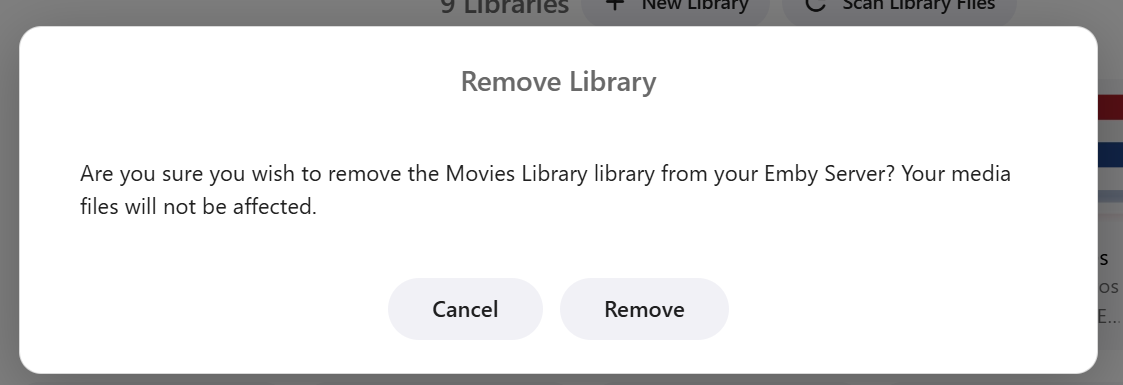
Hi, if you want to remove a library from Emby without deleting your files you should be able to do this from your library settings. Clciking the above Remove option gives a warning prompt and advises that your files will not be removed. As with all software applications/UIs there's a learning curve to finding your way around all the functions and options. Perhaps it's worth experimenting with small test libraries (and keeping backups) so you don't mess up your main media files. Cheers!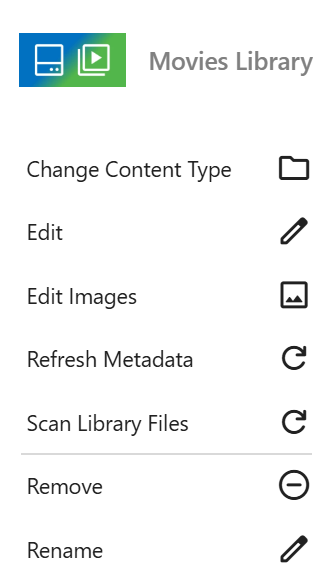
- Yesterday
-
Folder not showing up despite refreshing library and metadata in Emby Server 4.10.1.0
ssybesma replied to ssybesma's topic in General/Windows
Is there anyway to delete libraries without deleting all my files as in my first post? Using Emby is total frustration! Update: After googling, there is apparently no way to delete libraries in Emby without also deleting all your files. -
Folder not showing up despite refreshing library and metadata in Emby Server 4.10.1.0
ssybesma replied to ssybesma's topic in General/Windows
Another example of Emby's screwy behavior is a Windows folder named "Land of the Giants". Emby decided to call it "Scenes from DVD". What's worse I can't override that decision. Emby has a mind of its own. -
OK, so the "Delete All" didn't break it... it's just that it's taking days to repopulate But, the Dune thing... it's constantly trying to put Dune 1984 stuff into my Dune 2021.
-

Feature Request: Native Plugin UI Support for Seerr & Music Requests + Albums, Singles & EPs Separation
Samus512 replied to Samus512's topic in Developer API
I’ve done some more testing since my original post because I wanted to understand where the limitation actually is instead of just assuming it was a server or plugin issue. What I’ve found is that the native apps already have the pieces needed to display this kind of content. For example, on an artist page the iOS app already creates native sections for Albums, Albums as Contributing Artist, Albums as Composer, Included In, More Like This, etc. The problem is that a server plugin doesn’t seem to have a way to tell the client, “Here’s another section and here are the Emby items that belong in it.” So I think even a very small generic extension point could be really useful. Something where a plugin could basically tell Emby: Section title: Singles & EPs Items: [list of existing Emby item IDs] Then the client would render it using the same native row it already uses everywhere else. The plugin wouldn’t be providing HTML, Javascript, CSS, or its own UI. Emby would still completely control how it looks and behaves on iOS, Android, TV, etc. For my music project, that would let my plugin provide things like: Singles & EPs Live Compilations Other Releases Missing Releases I already have the MusicBrainz classification side of that working, so the plugin already knows which releases belong in each section. The missing piece is just a way to hand those sections to the native client. The other generalized feature that I think would be useful is plugin-defined actions. The “report broken video/missing subtitles” example mentioned above is actually a perfect example of what I mean. A plugin could register something like Report Problem, and Emby could display that using its normal native button or More menu. Selecting it would just send the item ID and action back to the server plugin. My Request button would simply be another use of that same system. Emby wouldn’t have to know anything about the service behind it or maintain an integration with it. The plugin handles all of that. So rather than giving plugins the ability to create arbitrary client UI, I’m thinking of something much more limited: Plugin provides the data/action → Emby renders it using native UI → plugin handles the server-side logic. That seems like it could be useful for a lot more than what I’m doing, while still keeping the clients and UI completely under Emby’s control. I also confirmed that Home Sections aren’t quite the answer here. They work great for adding content to the Home screen, but they don’t provide a way to add another section inside an artist/item detail page. Would something along the lines of plugin-defined detail sections and plugin-defined detail actions be the kind of generalized functionality you were thinking about? If it would help, I can also post screenshots of what I have working in the Web client versus what the same artist currently looks like in the iOS app. -
Folder not showing up despite refreshing library and metadata in Emby Server 4.10.1.0
ssybesma posted a topic in General/Windows
I tend not to use Emby very much because it can be very difficult to use and by default tries to change metadata from the way I want it set. I don't want Emby to change anything. It won't save New Library settings, which people have asked about for years. That is a big pain because there are so many options I have to turn off. Before I sent this it turned out the folder with a mysterious name and only one file showing was actually the folder I wanted to show up but the name I gave the folder in Windows was much different. The name Emby gave the folder was "Star Trek Season". The name I gave it in Windows was "Star Trek TOS (30+)". When I deleted the Emby-named folder from the web interface, it took out all the files in the Windows folder I was trying to get to show up. Hours of work wasted because your software makes no sense to me in how it displays folders!!! I expect all folders and files in Emby to show exactly as Windows shows them. Is that even possible? Emby works against what I want to do, and that is frustrating.