All Activity
- Past hour
-
 Bin_M joined the community
 -
 Musaed91 joined the community
 -
 Japs joined the community
 -
 uisai3082595 joined the community
 -
 denisconde joined the community
 -
 Josué 1 joined the community
 -
 Schmidis joined the community
 -
 Sage12 joined the community
 -
 Jamesbrodeur joined the community
 -

Scan Media Library Task performs remote metadata lookups despite “Never” setting
nospotify replied to denzoid's topic in General/Windows
So this relates to a topic I have been asking about repeatedly over several years here. How do we stop Emby from reaching out for new metadata *at all* when importing new music content? -
Yep, same IP.
-
Same here. 152.175.29.59 Hong Kong
-
If you're only Cloudflare, does it not have an option to whiltelist traffic, and block everything else? I honestly do not know as I do not use it. apparently there is. https://developers.cloudflare.com/waf/custom-rules/use-cases/allow-traffic-from-ips-in-allowlist/
-
take a look at my git (in my signature). I have a plugin that should help you.
-

Plugin: EmbyCredits, detect end credits and add auto skip.
yocker replied to yocker's topic in Plugins
When enabled in EmbyCredits it will only look for end credits for any file that it runs detection on. If found it will use the time stamps from TheIntroDB and skip detection. For anything more you will need the other plugin. -

why is the video being touched by Emby server?
horstepipe replied to horstepipe's topic in Samsung Smart TV
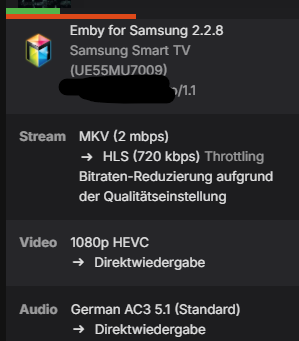
But why should it do that? The user is not allowed to transcode to a lower Bitrate, so why does the server transmux to hls (and seems to show a wrong info in UI)? -

Scan Media Library Task performs remote metadata lookups despite “Never” setting
Luke replied to denzoid's topic in General/Windows
It doesn’t actually look to fill in anything continuously after the initial import. Something is causing them to be refreshed, probably a media file change, nfo file change, image file change, etc. I see you use strm files do also if the contents change. Whenever it refreshes it goes through the full chain of all your embedded providers. -

Scan Media Library Task performs remote metadata lookups despite “Never” setting
denzoid replied to denzoid's topic in General/Windows
It seems to spend 15-20 minutes every scan looking for the same thing, is there anyway to disable this or any workaround? - Today
-

Scan Media Library Task performs remote metadata lookups despite “Never” setting
ebr replied to denzoid's topic in General/Windows
I believe that setting applies to changing existing metadata. The server is going to look to fill in missing metadata continuously. -
Based on my understanding the option for allow remote connections doesn't prevent the connection entirely, it just prevents logins. If the port is open, then it's open. You'd have to close the port/Cloudflare tunnel to fully disable remote connections. I can't test on my system at the moment to confirm that.
-
Ah, right, I couldn't see it because it disappears if you disable all remote connections. There really ought to be a way to add an address directly to that list from the “failed login attempt” alert. Still no idea how they bypassed the CloudFlare block, or how they connected when all remote connections were disabled in Emby, or why I've suddenly had a bunch of attacks come in.
-
I did not. That's on the Network page.
-
Not sure if you saw my second edit, as you posted only a few seconds after I made it. Which settings page is this screenshot from?
-
Scan Media Library Task performs remote metadata lookups despite “Never” setting
denzoid posted a topic in General/Windows
Problem I'm running Emby Server 4.9.5.0 on Unraid. My Music library is configured with: After initial import, automatically refresh metadata from the internet: Never Metadata downloaders: Discogs, MusicBrainz, TheAudioDB Same Image fetchers are enabled. When I manually run Scan Media from Scheduled Tasks, Emby spends a significant amount of time identifying/processing music and makes external metadata requests. The attached log shows Emby making requests to: TheAudioDB Discogs Fanart.tv MusicBrainz For example: DiscogsArtistImageProvider.GetImages and: Emby.Providers.Manager.MetadataService.ExecuteRemoteProviders Discogs is also returning HTTP 429 TooManyRequests because of the volume of requests. My understanding is that a normal Scan Media Library should detect new/changed files and should not perform a remote metadata refresh when the library is set to Never after the initial import. Is this expected behavior in 4.9.5.0, or is there a setting I'm missing? If this is a bug, is there a known workaround or fix? I'll attach the relevant embyserver.txt log showing the requests. embyserver (2).txt -
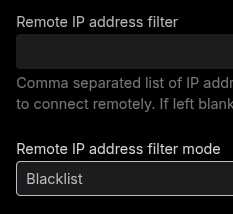
Sounds like you need to review your Cloudflare config or talk to them. Otherwise:
-
The OP request "a way to default closed captions off on live tv". As in, a dedicated setting to enable/disable Live TV subtitles.
-

Plugin: EmbyCredits, detect end credits and add auto skip.
GMEMedia replied to yocker's topic in Plugins
@yockerI'm currently using EmbyCredits and https://github.com/TheIntroDB/emby-plugin. I see your latest changes include TheIntroDB lookups. Does this mean I no longer need the other plugin? -
No idea how they're getting to it, as it's a Hong Kong IP address and CloudFlare is blocking traffic from outside Australia. Three failed login attempts in the past ten minutes, one trying to log in as “root.” I see the alerts on my dashboard, but what I don't see is any way to block the offending IP? Not sure what autoban conditions exist, but since I'm on my server machine right now it seems silly to wait for it to kick in when I could just push a button. Is there no way to do that? And if it does get autobanned, I assume that's only for a period of time. Not sure what other steps I should be taking here. EDIT: I've disabled all remote connections for now, but it's obviously not the best solution. EDIT 2: It's not a solution at all, it seems, as even with remote connections disabled I've just had another two failed login attempts, this time from Kansas City (the US is also on my CloudFlare whitelist, so that at least makes more sense than the Hong Kong efforts, though how it's connecting with all remote connections disallowed I don't know).
-
I have CloudFlare blocking traffic from outside Australia, but I just had two failed login attempts from an IP that seems to be located in Hong Kong?
-
why is the video being touched by Emby server?
Luke replied to horstepipe's topic in Samsung Smart TV
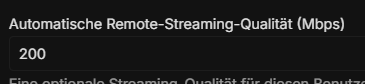
Hi, doesn’t your second screenshot explain it? -
Hello I am wondering why Emby thinks to touch / transmux this video, what exactly is happening here? I set an automatic remote streaming quality for that user. Does this mean that the user changed the value from automatic to something else? BR ffmpeg-directstream-7ebb51af-b871-47ad-934b-1b88c7999e02_1.txt
-
Can anyone help with setup? I'm trying to add my first channel but after clicking save and close or save and preview it just endlessly spins. Is there some kind of step by step guide for some examples on what values to put in perhaps? Thanks
-
Hi, what does Coco Player documentation say?
-
“Coco Player mein server create nahi ho raha. Android phone par server add karne ki koshish kar rahi hoon. Please guide me how to get a working Emby server URL for Coco Player.”