All Activity
- Past hour
-
The Roku player is very particular about everything in the video conforming exactly to spec so it could be something slightly off that it just doesn't adjust to like some other players will.
-
 Ronal the king joined the community
 -

new version doesn't play what it used to
ebr replied to groovejumper's topic in Android TV / Fire TV
55 and 54 are identical. I just had to bump the version number to get Google to look at it again. -
I forgot to remove it. I have uploaded current database.
-

Live TV - Emby - On Roku TV Sound is not synced with program.
GaryG replied to GaryG's topic in Roku
Thanks. Ill reach out to them, But I doubt theyll help. Since its isolated to a ROKU TV, and only specific channels, theyll probably blame ROKU. Ill try it again today turning off those settings to make sure I did it right. Let me know if you have any other thoughts. The problematic channels only a problem on a ROKU TV, Android TV fine, PC, channels are fine. and this just started recently. -
 705061654 joined the community
 -
 jkpimp joined the community
 -
 schneefrau joined the community
 -

TV Show Status — TMDB-powered Returning/Ended/Cancelled badges for series
Blueskies278 replied to Blueskies278's topic in Plugins
TV Show Status — 2.5.18.0 Release notes covering everything since 2.5.15.0. Fixed Status box no longer shows raw HTML tags. 2.5.16.0 tried to colour the fix command with a <span>. Emby displays status text exactly as typed, so the tags appeared on screen instead of colouring anything. Removed. Permission failures now tell you how to fix them. If the plugin couldn't write its script file, the status box only said "see server log for details" — no cause, no fix. The full platform-specific instructions were already written but were only wired to one of the two failure paths. Both now use them. The fix command is readable. It used to be buried mid-sentence in a single paragraph. Now it's three parts — what's wrong, the command on its own line, what to do next. Changed The settings page no longer suggests copying tmdb-status-plugin.js into dashboard-ui by hand. That could never work on its own, because the plugin also has to add a <script> tag to index.html. It now explains the real cause — Emby doesn't own its own web folder — and points at the status box for the exact command. "Prepend status to show description" is offered as the alternative if you'd rather not change permissions at all. Worth knowing Every Emby app update resets the web folder to root, which breaks the badge until the chown is re-run. Confirmed live going from 4.10.0.24 to 4.10.0.25. The status box says so plainly now. The badge is delivered through dashboard-ui only. The Trakt Air Dates listener route was removed in that plugin's 7.0.0.0 and no longer exists. Emby does not render markup in a status message. No HTML, no markdown. Line breaks do work, and they're what made the message readable. Installing Copy EmbyTVShowStatus.dll into your Emby plugins folder Restart Emby Open the plugin's settings page and check the status box If it reports a permission problem, run the command it gives you — then restart Emby again Re-run step 4 after any Emby app update. EmbyTVShowStatus.dll -

High RAM usage on Emby Server 4.9.3.0 even with Direct Play and rclone mounts
iloveparks replied to jordan888's topic in Linux
All good, I appreciate you trying to help either way! Forcing a library scan on just one library brings my memory usage from 5.70GB to 6.25GB. Can see here in the logs when the scan started and finished: 2026-08-17 09:04:26.208 Info ItemRefreshService-0HNNRAJBFAAGR:00000006: Refresh metadata requested on 84321 2026-08-17 09:04:26.208 Info ItemRefreshService-0HNNRAJBFAAGR:00000006: http/1.1 Response 204 to host1. Time: 5ms. POST http://emby_remote_ip/emby/Items/84321/Refresh?Recursive=true&ImageRefreshMode=Default&MetadataRefreshMode=Default&ReplaceAllImages=false&ReplaceAllMetadata=false&X-Emby-Client=Emby Web&X-Emby-Device-Name=Firefox Windows&X-Emby-Device-Id=x_device_id_x&X-Emby-Client-Version=4.9.5.0&X-Emby-Token=x_secret3_x&X-Emby-Language=en-us. 2026-08-17 09:04:26.258 Info ProviderManager: RefreshItem Start: 84321 CollectionFolder /config/root/default/Movies 2026-08-17 09:04:33.595 Info ProviderManager: RefreshItem Complete: 84321 CollectionFolder /config/root/default/Movies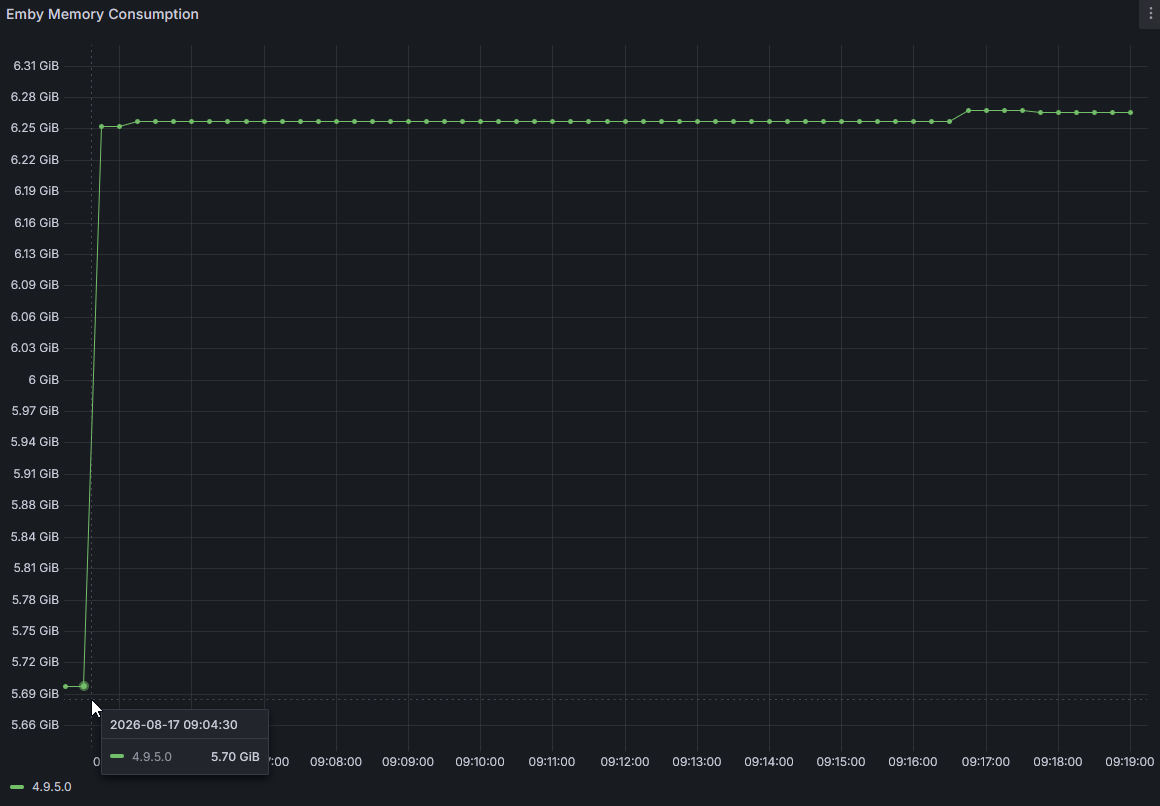
-
 RalleEmby joined the community
 -
 wangpansf joined the community
 -
 AdrianLara joined the community
 -
Hello, is there any news on the LG update? I'm still using Emby 4.8.11.0, and version 4.9.5.0 is still showing subtitles in the top left corner. It's been 8 months since this bug was reported, and we still haven't heard anything?
-

Can't move Emby when installed as an app in Edge
Luke replied to IdeasMan's topic in General/Windows
Hi, we’ll take a look at it. Thanks -
 DoinaK joined the community
 -
 jbgcnb joined the community
 -
 jose.gbv joined the community
 -
Hi. The feature is not broken. Did you interact with the remote at all? Are you sure you had the setting in the app set? It is app-specific, so if you turned it on in your web app settings that would not carry forward to any other app. If you are still having a problem, please open a new topic in the forum for the app you are using with specific details. Thanks.
-
Fully Qualified Domain Name
-
So you closed my feature request that i just opened, but after 7 years it's still too hard to implement... Are you strill watching isn't functioning at all. i have let it play a whole season of episodes (24 to be exact)... and not once did it pop up... The feature is broken...
- Today
-
Request... Custom settings for Are you still Watching
ebr replied to previousaddress's topic in Feature Requests
Hi, there's already an open request for this or something functionally equivalent. Please join in and contribute to the existing discussion at: -
Hi, it might be due to this: https://www.bleepingcomputer.com/news/microsoft/microsoft-confirms-github-is-down-worldwide/amp/ Please give it a try again later today and let us know. Thanks.
-
Hi, we’ll take a look at it. Thanks.
-
Hi, I am about to start setting up my new Emby box on WIndows before I migrate my current setup. When I try to install it it has an error as below. Error Downloading Package. There may be a problem communicating with the update server. Please try again. System.NullReferenceException Object reference not set to an instance of an object. I did some research and I have the FW off and no AV running for the mo. Any ideas? Thanks
-

High RAM usage on Emby Server 4.9.3.0 even with Direct Play and rclone mounts
yocker replied to jordan888's topic in Linux
Yeah you would have to watch a good deal of movies for that amount of memory. In case it has interest to you, what was found out in my case was it was the system it self caching a lot of files and that running a library scan in scheduled task would free the memory. Your case does seem different though. Sorry I'm not of any help. -

A request to Emby - please clarify the situation with the AndroidTv app
FrostByte replied to ecrispy's topic in Android TV / Fire TV
Supposedly, but Eric has also been adding a few minor things (i.e. HEVC transcoding) which are in the new app. Looking at the release notes of each show both are still being worked Eric is still busy working on the older app -

A request to Emby - please clarify the situation with the AndroidTv app
mrmech replied to ecrispy's topic in Android TV / Fire TV
Final Clarification! Emby For Android (Icon w/Black Circle) is actively developed. Emby For Android TV (Icon w/White Circle) is simply maintained. -
new version doesn't play what it used to
FrostByte replied to groovejumper's topic in Android TV / Fire TV
I believe you pushed .55 to stable on GitHub, the beta links haven't changed -
High RAM usage on Emby Server 4.9.3.0 even with Direct Play and rclone mounts
iloveparks replied to jordan888's topic in Linux
Yes there is definitely media being added consistently throughout the day but it is not too crazy in my opinion. Yesterday was ~15 movies and ~30-40 episodes of TV. -

High RAM usage on Emby Server 4.9.3.0 even with Direct Play and rclone mounts
sa2000 replied to jordan888's topic in Linux
That and hourly scans have been seen to give rise to increasing memory after every scan That has been seen to avoid the issue - but may be you have new media coming in continuously -
I'm not sure why this is only a recent thing but after a recent update in Microsoft Edge, I've noticed it's no longer possible to move the Emby window when you "install" Emby as an app in Edge. This is because Edge is no longer displaying the title bar for the window. From what I've gleamed, it looks like the app-region style is missing from the div where the custom title region has been defined. It looks like you've employed the Display content in the title bar area using Window Controls Overlay stuff because the window's title bar is now gone. This leaves a few pixels to the left of the ellipses where you can drag the window using the window's control buttons overlay. If you attempt to move the window by clicking anywhere the title bar should be, you'll notice you can't. If you inspect the page using DevTools and select the div whose container-name is appheader, you'll notice the app-region style is set to none. If you explicitly add this style to the div with the value of drag, you can now move the window around by clicking the pseudo header. The only other way to move the window is to use an old Windows 3.11 trick of using the Move command from the window's system menu. Emby Server: v4.9.5.0. Reproduction steps: Navigate to your Emby server in Edge. Click the ellipses > Move Tools > Apps > Install <ServerName>. Click Install. Emby will reload the tab into its own window as an "app". Attempt to move the window using the title region where the title bar should be in the window. Notice you can't. Open DevTools. Locate the div whose class attribute contains headerTop. Edit the style attribute to include app-region: drag; Attempt to move the window using the title region where the title bar should be. You can now move it.
-

Playing an Emby playlist downloaded to Iphone, play via Apple Car Play - How do you do it?
ginjaninja posted a topic in Apple iOS / macOS
What are the best solutions out there people have found? i dont think Emby supports offline play via Car Play, and has no concept of offline playlists in any case, is that right? Best solution i have so far is install vlc, slect the vlc app folder as a custom download folder in Emby. Play with VLC, unfortuately the playlist is not downloaded so you just have to rely on VLCs natural segmentation (Album, artist, songs, genres etc). -
High RAM usage on Emby Server 4.9.3.0 even with Direct Play and rclone mounts
iloveparks replied to jordan888's topic in Linux
Database Cache Size - I have never changed this - it is currently 128Mb. Scan Media Library Task - This used to be scheduled for every 15 minutes and was like that for years. I have used Emby since before TrueNAS had docker support and Folder Watch was buggy on TrueNAS builds back in those days, so I needed full library scans every 15 minutes. I saw some forum posts about increasing the time between scheduled scans and/or using Folder Watch exclusively. I chose to disable all scheduled scans and just use Folder Watch. I have been testing this off and/on the past few weeks but have not seen any difference. As I mentioned earlier, I don't accept waiting 24 hours for my media to appear, especially when this was not the case previously. This server does have a decent amount of memory - 256GB - however it has a lot of other duties. This Emby instance is only for my personal use, so there has basically only ever been one stream at a time.. And memory slowly creeps up, regardless of if anything is playing it seems. 4.9.5.0 vs 4.9.3.0 memory consumption - still looks high (if not higher so far) for 4.9.5.0. Comparing memory usage after ~1 day for 4.9.3.0 - it was at about 3.5GB And looking at 4.9.5.0 after ~1 day: 5.3GB: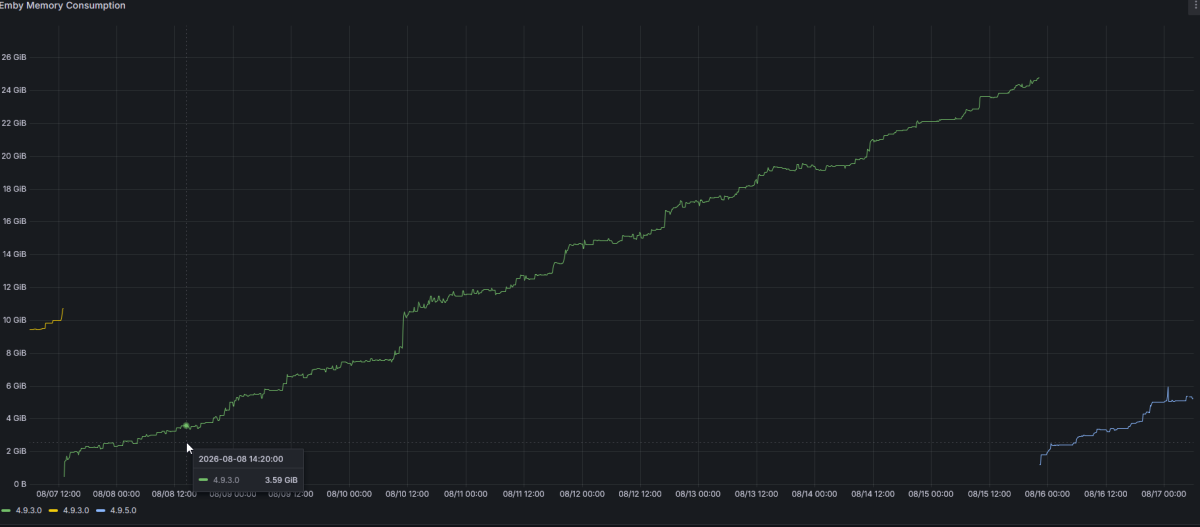
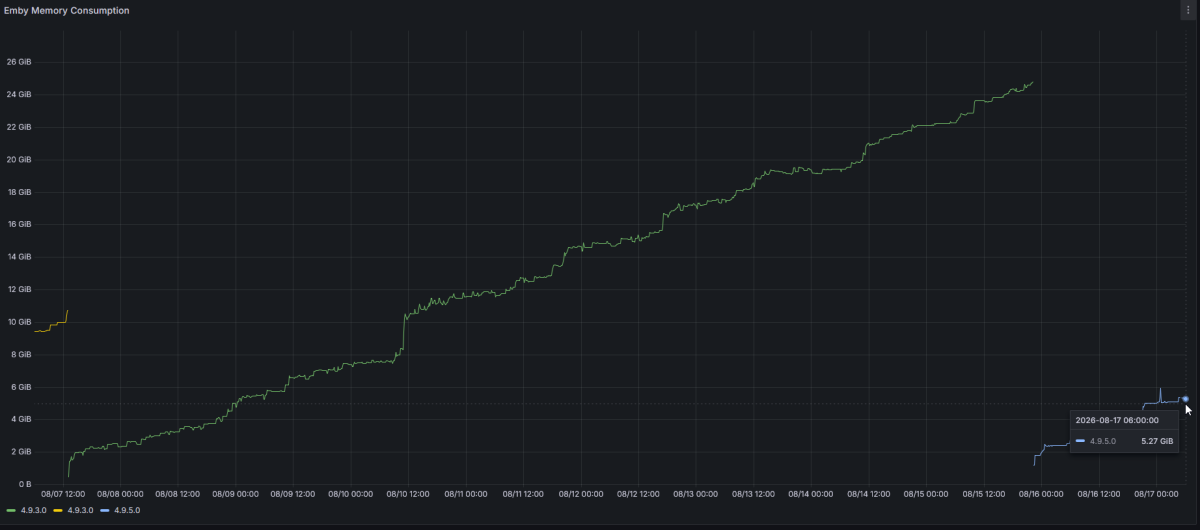
-
Hi there. Since few weeks i´ve started noticing that outside my house there are some films and series that don´t reproduce on TVs. One of them is grand torino and if i try to play it in my house nuc everything works ok but on my parent´s in law tv it shows the loading screen and after that it show an error like: can´t reproduce right now because there is no streams available. In the other hand, few movies that work or don´t, shows trailers that aren´t even related before playing the actual movie/series. How can i get rid of it? I attach the emby logs so you can see it. Thank you in advance. hardware_detection-63922575201.txt ffmpeg-transcode-9c8fc3b3-df21-448a-9c00-dafb9b70b21a_1.txt embyserver-63922575189.txt