All Activity
- Past hour
-
OK I'm guessing the docker container must be adding an extra layer that's preventing it from working. Perhaps there's something to configure there. I'm not sure. This is something you may just want to reevaluate once we have a native package.
-
I think that it should delay a bit longer before appearing, it is very brief yes but probably a 1.5 delay would be the max that is reasonable (on top of the 1 second), likely 2 seconds overall is a fair target.
-
 iyadelouahabi joined the community
 -
 uelna9686888 joined the community
 -
 zummbb joined the community
 -
It comes up and disappears so fast I can't even read it. Don't know how anyone could be mashing any keys in that short of time.
-
It could be possible to include SSL in Emby without owning or taking over anything because Let's Encrypt can now issue certificates for public IPs. There are .Net ACME client libraries available for integration.
-

Is it possible to prevent specific movies from auto-creating collections
swarnock89 replied to swarnock89's topic in General/Windows
Hey just wondering if there is a way I can put in a feature request for this -
Hallo, ich bin neu bei emby und habe das gleiche Problem wie Eggi001. Mein Xoro 8100 ist mit TV Mosaic Community Edition verbunden. Da ich nur 2 Kabel angeschlossen habe gehen über TV Mosaic 2 Streams gleichzeitig. Wenn ich es über das Plugin in emby nutzen will bricht der erste Stream an wenn ich mit einem zweiten Gerät ebenfalls streamen will. Ich habe die aktuelle Version von der Homepage auf meiner Synology installiert und auch das aktuellste TV Plugin. Gibt es inzwischen eine Lösung dafür? Bei der Suche im Internet habe ich gelesen dass emby nur maximal einen Stream unterstützt. Da ich nach Möglichkeit aber auf zwei Geräten gleichzeitig Fernsehen möchte lohnt es sich für mich nicht den Lifetime Pass zu kaufen. Falls Logs benötigt werden versuche ich die bereitzustellen, befasse mich aber erst seit wenigen Tagen mit emby weshalb ein kleiner Hinweis wo ich die finde nett wäre.
-
 Davi Lamarche Muniz joined the community
 -
Yes mate
-
That's with the native synology package?
-
 Travel Junkie joined the community
 -
 Zerberus1001 joined the community
 -
 Dunbaba joined the community
 -

Continue Watching, libraries show two entries for same video when it is included in multiple libraries
pwhodges replied to nmalinoski's topic in General/Windows
On the somewhat rare occasions that I want a movie to appear both as a series extra and in its own right, I simply duplicate the file in the two libraries with appropriate naming. In my case the waste of space is trivial, but if it concerns you, you could use a link for the second instance. I don't recall getting duplicated Continue Watching entries. Paul -
@bingbong69_????
-
The only other option when creating the storage pool was ext4 and I don’t like the limitations so I chose btrfs as most users would do with large storage pools. I have 6 x 18TB drives and want to use snapshots. I cannot do that with ext4. Also my current Synology NAS uses btrfs and Emby runs fine on that picks up any changes to the media folders.
-
 garyred joined the community
 -
Do you have to use btrfs ? INotify probably does not support that.
- Today
-

Continue Watching, libraries show two entries for same video when it is included in multiple libraries
Luke replied to nmalinoski's topic in General/Windows
Hi, what you're doing is not really supported. It's not supported to use the same path in more than one library unless the content type is the same for all libraries. And even then, the library options should match as well, otherwise, which options get used ? If you follow those requirements then you should not see the same file appear more than once in continue watching. -

Emby for Android on Shield TV no longer passing through dolby digital 5.1 or DTS
ebr replied to Kramerika's topic in Android TV / Fire TV
Aha. Go into the Shield audio settings and use the custom option to turn off support for DD and DD+ (as well as any other advanced codecs). -

Continue Watching, libraries show two entries for same video when it is included in multiple libraries
nmalinoski posted a topic in General/Windows
Emby Server 4.9.5.0 installed via Apps on TrueNAS Scale 25.10.4. The initial problem I was trying to solve was addressing TV movies. I wanted a TV movie to show up both in my Movies library as a movie, as well as in my TV Shows library as a special attached to the relevant TV series as defined in TVDB, without duplicating the video file and while maintaining watch progress regardless of which library it was accessed from. I have Movies and TV Shows directories to match the aforementioned libraries, so I got the bright idea to create a separate TV Movies directory for these files, added the TV movie into the same parent directory as the TV show (`The X-Files (1993)/Specials`) with the requisite naming to get it to show up as a special for the TV series, and then added this directory to both the Movies and TV Shows libraries. While it does show up in the TV Shows library, it's unfortunately showing two entries in the TV Shows library (one has the unwatched episode count, the other just read 1, for the TV Movie file), and Continue Watching shows two separate entries for the same file with the same progress. It does not show up in the Movies library, even though it shows up when digging into the Movies library in the metadata manager; and, there, it picks up the same automatic "Special - " prefix from the TV Shows library. What I was expecting was that the TV movie would be correctly identified and given the correct IMDB/TVDB IDs (it is), and then show up in the Movies library the same was any any non-TV movie, show up in the TV Shows library as a TV special, and the system treat the same file, with the same path, existing in both libraries, as the same piece of media, so it only shows up once in Continue Watching. Replication instructions: Create separate Movies, TV Movies, and TV Shows folders Create a Movies library containing the Movies and TV Movies folders Create a TV Shows library containing the TV Movies and TV Shows folders Add episodes from a TV show that has a movie as a special to a folder in the TV Shows folder (I use `TV Show Name (year)/Season 1/{episodes}`) Add the TV movie for the TV Show to the TV Movies directory (I use `TV Show Name (year)/Specials/{TV movie}`), named as you would for a TV special (`TV.Show.Name.S00E01.*`) Play the TV movie long enough for the progress to display in Continue Watching -
so I'm a new emby user and I'm wondering if around 30gb of files and 1-2 continuous streams is enough for my ram. my ram is 4gb
-
1st let me say this is a great plugin! and now my question as I don't create plugins myself, but would it be possible to get this to work for movies 1080p, 4k etc. not just TV Shows and if so, would you consider adding that feature to this plugin or maybe creating another?
-
For some context, I rebuilt my entire music server. So what did I do? I renamed all files different and uniform, then I changed genres, folder.jpgs and renamed some titles. I noticed that if I cut the album from my music drive to my local pc to "replace" wrong metadata, that emby just entirely removes it from all playlists without exception. So my idea is since most of us have songs a few times, why not make emby server recognising "Oh! Song 2 From Artist 1 in Album 3, got removed, but I have Song 2 From Artist 1 in Album 5" And a context menu to ask the user if Emby should replace them, or a menu that shows the user at least that song 1234 got removed from playlist 123. Not sure how realistic that functionality is, but I think it would be very usful for people like me who kind of rebuild their music server. Because for my part I did not have a list what I had in my playlists before, and now I spent a few hours in finding some songs again.
-
Your app version not server.
-
You can setup a program called Caddy. It's very easy to use and handles the SSL registration automatically. I believe there is a thread on this forum made to help people with it. You can get Caddy at: https://caddyserver.com/ If you have any questions the developers and/or people in here are always willing to help.
-

Emby for Android on Shield TV no longer passing through dolby digital 5.1 or DTS
ChateauPlex replied to Kramerika's topic in Android TV / Fire TV
If the file shows as 'Dolby' anything (even mono) I have to run playback correction three times after hitting play to get audio. Audio hardware path is Shield Pro > bus-powered 'dumb' (no software) USB stereo DAC. I have tried two different DACs with the same results. All hardware has been the same for five+ years. YouTube and Nebula play flawlessly every time. -

[Plugin] EmbyCast – A Multi-Message Toolkit for Your Dashboard
SoliFlix replied to SoliFlix's topic in Plugins
Update – v1.1.1 New: Tile-based dashboard The dashboard is now a grid of tiles instead of one long scrolling page. Drag & drop the tiles into whatever order you prefer. Live badges show open scheduled messages and an active countdown. An "Open items" list below the tiles shows everything still pending (upcoming scheduled messages, active countdown). New: Web-browser-only delivery for Media News Media News lists can get long — there's now an option to only deliver them to web-browser sessions, where there's room to actually show everything. New: Scheduled Cleanup Automatically expires old undelivered messages and old history entries after a configurable number of days, so the plugin's storage doesn't grow forever. Get the latest version Current version: v1.1.1 GitHub: https://github.com/solistvbox-rgb/embycast Releases: https://github.com/solistvbox-rgb/embycast/releases EmbyCast.Plugin.dll Still needs more testing Work in progress—tested on limited Emby clients. Please report any delivery or timing issues on your setup!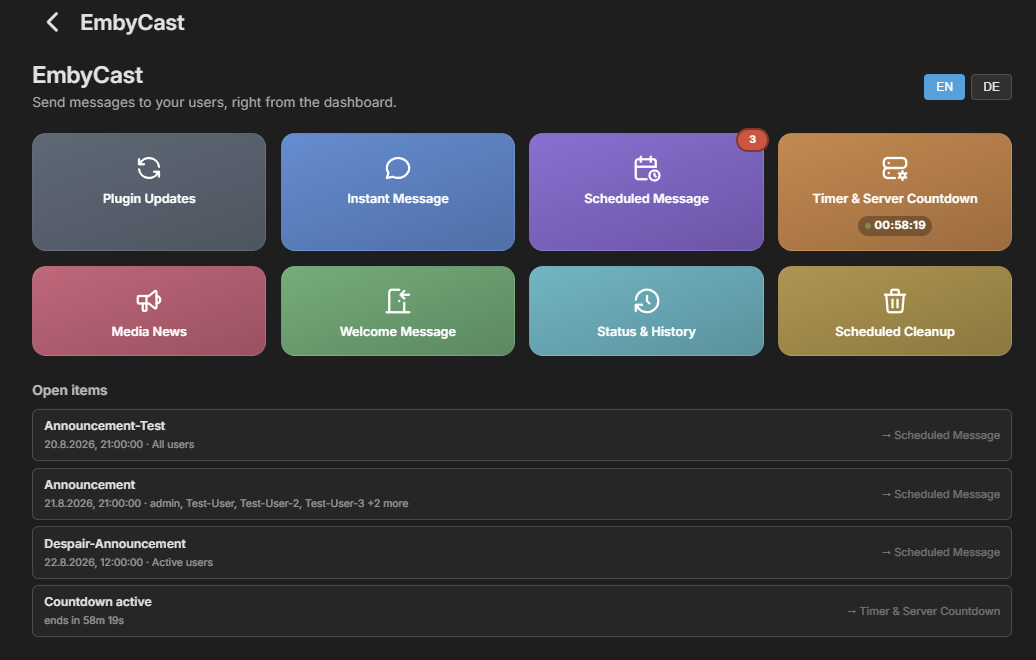
-
Yes it’s on the NAS in volume2/media/movies btrfs file system. Volume 2 also has a 2TB M.2 read cache volume1 is an M.2 NVME drive for system apps, docker and virtual machines etc
-
is the media on the nas?
-
This is an update on the upcoming release AND, yes, an upsell pitch. If neither interest you, stop here and accept my apologies for bothering you. Everyone else, read on! · Better Track Searching While working on the ability to play a specific song/track by an artist, I found and fixed a bug that was affecting search accuracy. With the fix: Ear Wax Basic: track-location accuracy increases to around 70% Ear Wax Select: track-location accuracy increases to over 95% That improvement will be included in the upcoming release. · Ear Wax Select — Genre Exclusion Select users can now tell Ear Wax what they do not want to hear. For example: “Alexa, ask Ear Wax to play some music except Holiday.” Ear Wax will build the random music queue while excluding that genre. Because Holiday music on summer vacation? Maybe not. You can also change your mind after the music has already started. Start normally: “Alexa, ask Ear Wax to play some music.” Then, while the mix is playing: “Alexa, ask Ear Wax no more Holiday.” Ear Wax will remove that genre from the remaining queue, and it will stay excluded for the rest of that listening session. · Ear Wax Select — Decade Radio I almost forgot this one! Plex users can now use Decade Radiothrough Ear Wax Select. Want music from the ’70s? ’80s? ’90s? Ask Ear Wax for the decade, and it will use the music already in your Plex library to build the listening experience. Alexa, Ask Ear Wax to Play 80s Radio. Remember it is based on the music YOU own!! Emby users sorry, not yet. I’m looking into what Emby makes available so I can see whether I can bring Decade Radio to Emby as well. · Spell the Artist Sometimes Alexa simply does not understand the artist’s name you are saying. Now, when Ear Wax cannot locate an artist, Select users can be given the option to spell the artist’s name. So if Alexa cannot understand the name but the artist exists in your library: If you can spell it, Ear Wax can play it. This has been working extremely well in testing. And most importantly, all of these additions were made without breaking the existing Basic functionality. · And Now... the Upsell For about the price of a Starbucks latte, you can unlock the expanded functionality of Ear Wax Select. If you are already enjoying Ear Wax Basic and want the additional search, music-control, and discovery features, consider upgrading to Ear Wax Select. · What’s Next for Ear Wax Select? Currently in development: Music Leveling — reducing those annoying volume differences between tracks. Fade In / Fade Out — smoother transitions when music starts, stops, or changes. Decade Radio for Emby — currently being investigated. And, as always, more to come.