
All Activity
- Past hour
-
 uemby103624 joined the community
 -
 PheMedia joined the community
 -
Perhaps an indicator. I don't think separating is good because it breaks up the chronological order.
-

Client video max bitrate auto detection deny transcode option
Luke replied to Zhadum101's topic in Feature Requests
Hi, yes it is a new thing so there is potential to expand on it in future updates. -
 OrtizColinas22 joined the community
 -
 disdav123 joined the community
 -
 Louie726 joined the community
 -
but also, how are the emby user audio settings configured?
-
The track is compatible, but with the Roku video player, there is no way to tell it to play a secondary track. So in this example, even if you manually select the second track, you will still get a server-side remuxing process to make the second track the first track.
-
 Niels959 joined the community
 -
 Aldo79 joined the community
 -
Did you try what I suggested? Remember that you need to have at least two episodes per season.
-
Here's the log from the session where the Roku won't select the second track thats compatible, but instead Emby decides to transcode the audio. ffmpeg-remux-939dd66b-2f60-4892-ba78-2809dfdd7da7_1.txt
-
 Shalin joined the community
 -
 Sareena joined the community
 -
 Shailey joined the community
 -
It's not just that series that isn't getting updated skip intro... None are, despite them appearing in Emby. It appears to only be scanning that episode. Tested and no different.
-
Ah, TV Display mode would have been helpful to note earlier. I see what you're talking about now.
-
First we need to confirm this. Did you try what lessaj suggested? What I said about vacuuming is correct - it does not affect the data. It just moves things around to try and shrink the database file size.
-

Arabic keyboard not working on Android TV – works on iPad
Mohammedts posted a topic in Android TV / Fire TV
Arabic Keyboard/Input Not Working on Android TV – Works Correctly on iPad Hello Emby Team, I’m experiencing an Arabic keyboard/input issue specifically with the Emby app on my Xiaomi Android TV. Arabic input works perfectly in Emby on my iPad. I can search for Arabic movie and TV show titles without any problem. However, on my Xiaomi Android TV, I cannot switch to or use the Arabic keyboard inside the Emby search screen. Arabic is already enabled on the Xiaomi TV and works correctly in other applications, so the issue appears to be specific to the Emby Android TV app. Comparison: Emby on iPad → Arabic search/input works correctly. Other apps on Xiaomi Android TV → Arabic keyboard works correctly. Emby on Xiaomi Android TV → Arabic keyboard/input is unavailable in Search. Could you please check whether this is an issue with Arabic IME/keyboard support in the Android TV version of Emby? If needed, I can provide the Emby app version, Xiaomi TV model, Android TV version, screenshots, or a video demonstrating the issue. Thank you. - Today
-
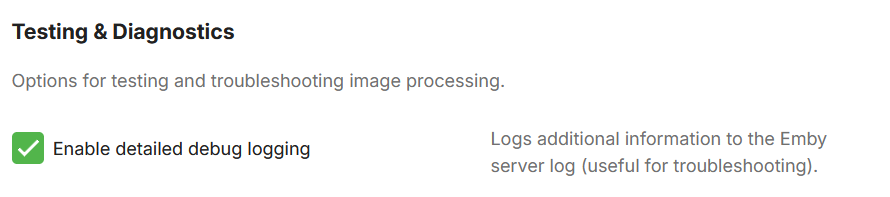
Then i'm sad to say that i'm pretty sure it's a settings problem on your end. But try and activate: It's in the advanced tab in the settings. Move an icons position, save, go into a library to see if anything changed and then send me the emby log file. Also if you can, send me the embyicons.xml file in the plugins/configuration folder. That way i can be sure.
-
How could I tell that? I didn’t notice anything different when I search for the series and open it. Would it say/show somewhere? thanks
-
Maybe it's being merged with another series folder?
-
I downgrade but still the problem.
-
HI there, can you please provide a specific example? How to Report a Problem Thanks !
-
Try refreshing the metadata on the season. After that, the next time the task runs, it will redetect for those episodes.
-
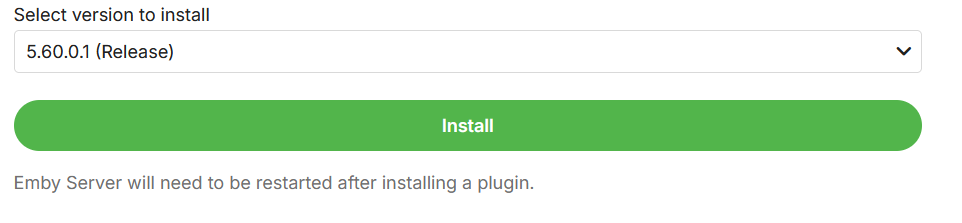
You can downgrade to the stable by selecting this.
-
Same : Go back to no beta version I couldn't test until next friday
-
I added the latest work i have worked on as beta v5.60.5.0, try that one. Been working on a check to see if an install of Emby has Skia or not before the plugin will use it. Might be what is going wrong. If that doesn't work try and downgrade to the release and see if that fixes it.
-
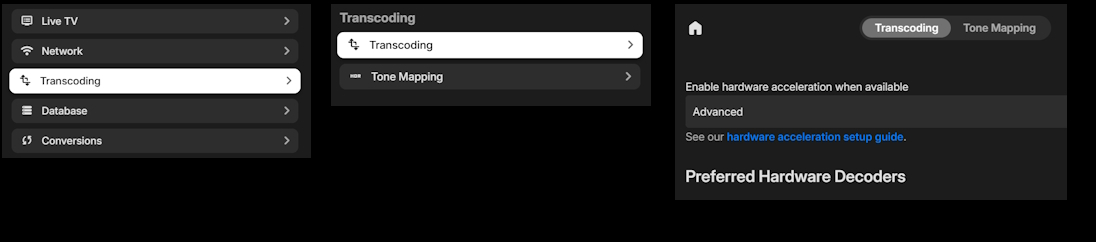
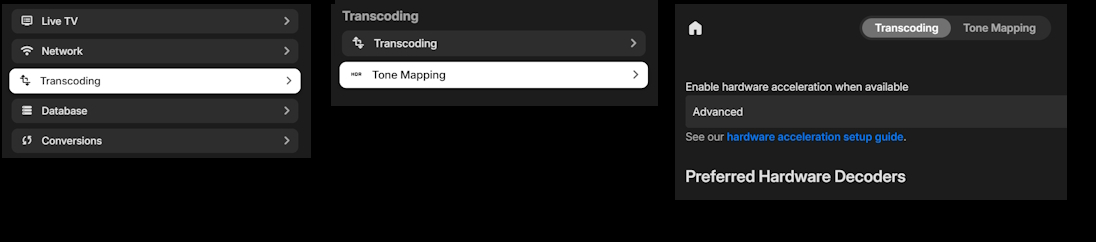
This is a navigation issue, not a last visited issue. I will use the Transcoding as an example: Menu flow when selecting "Transcoding" and the "Transcoding" sub menu: Menu flow when selecting the "Transcoding" and the "Tone Mapping" sub menu: They both land on the same tabbed page with the "Transcoding" tab selected. What is the purpose of this new sub menu if it takes you to the same page and selected tab. I think the expected result should be: Selecting the "Transcoding" sub menu it should take you to the "Transcoding" page with the "Transcoding" tab selected. Selecting the "Tone Mapping" sub menu it should take you to the "Transcoding" page with the "Tone Mapping" tab selected. This new "Sub Menu" feature was added on Emby Web 26.0.26. Emby Web 26.0.25 did not have this "Sub Menu" and went directly from "Transcoding" menu item to the "Transcoding" tabbed paged. Using TV Display mode.
-
Hi there, let's look at an example. Please attach the information requested in how to report a media playback issue. Thanks!
-
Nope a lot
-
Hi, we'll take a look at this. Thanks.
-
Is it only that one file ?
-
@Akirainblaare you playing from your own Emby Server, or someone else's server?





