All Activity
- Past hour
-
 0547772077 joined the community
 -
 snakyu joined the community
 -
 franciscopino.osiris joined the community
 -

Plugin: EmbyCredits, detect end credits and add auto skip.
RedNo7 replied to yocker's topic in Plugins
Sure - which log file are you referring to? ...have added embyserer.txt in case that is what you are referring to. "Save Debig logs to File" is not currently enabled in EmbyCredits - would you like me to turn it on? EmbyCredits.xml attached EmbyCredits.xml embyserver.txt -
 Homem7 joined the community
 -
 yazer842 joined the community
 -
 yaten840 joined the community
 -
 yasom839 joined the community
 -
 yapen838 joined the community
 -
 Chorretians joined the community
 -
 yanum837 joined the community
 -
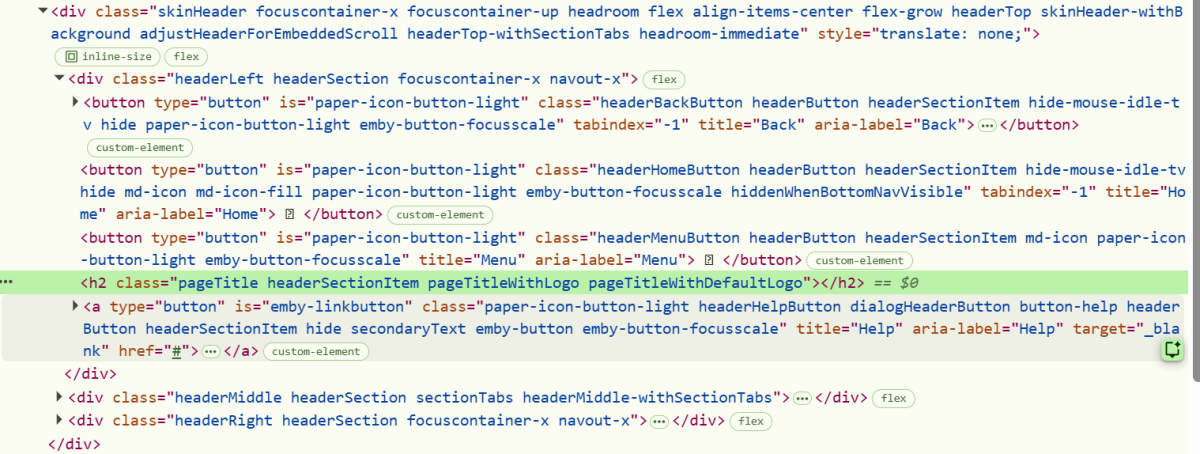
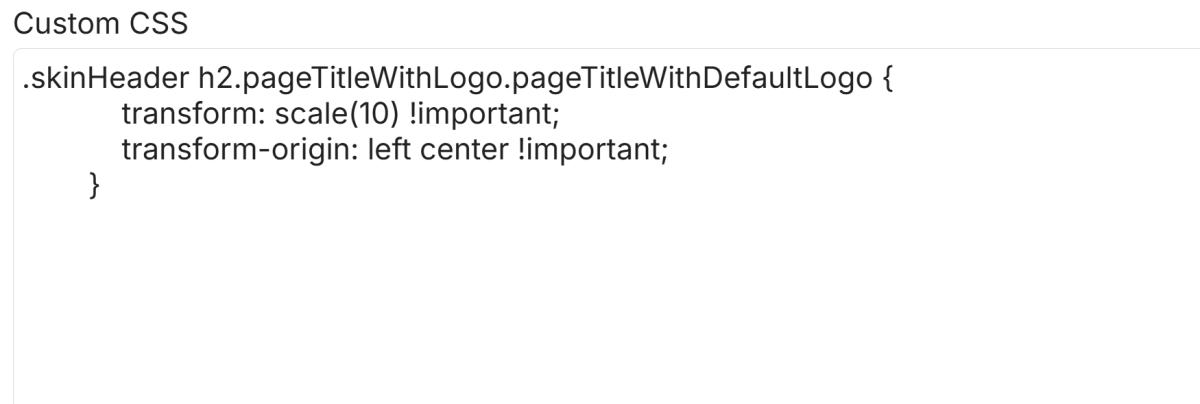
You could even try something more simple like this perhaps: .pageTitleWithDefaultLogo { transform: scale(10) !important; transform-origin: left center !important; } this gave me a massive 10x logo - cropped by the parent row height (which is very obvious to see, though not what you want): I guess you are doing the basic things such as: Save the css, refresh the page, try clearing caches in your browser settings...??? Beyond that, you could inspect the logo element with DevTools in your setup, to make sure the logo is the same class as I used. Right click the logo and then select "Inspect" you should see something like this: Depending upon your version of Emby, and what other customizations you are running, you might have different classes, and/or different parent containers and need different CSS targeting than what works on my setup. Maybe this gives you some clues - or perhaps some prompts to ask whichever AI LLM you prefer - ChatGPT, Claude, Gemini, Copilot... Perhaps other community members may be able to suggest other things for you to try...

-

Plugin: EmbyCredits, detect end credits and add auto skip.
yocker replied to yocker's topic in Plugins
Strange. Pretty sure Emby doesn't have a built in time limit so might indeed be something wrong i just can't think about what i might be. Do you by chance have log file i can see? The EmbyCredits settings file in the plugin folder would also be nice to see. I'm working on a version that auto resumes if a fault happens but if the process gets actively canceled (by Emby) or some setting is wrong then it won't work. - Today
-
 AABRDE32 changed their profile photo
 -
Unfortunately, this doesn't seem to change anything. Am I doing it wrong?
-
Thank you very much for your investigation. I have passed all your feedback to the development team Thank You
-
Plugin: EmbyCredits, detect end credits and add auto skip.
RedNo7 replied to yocker's topic in Plugins
back to as before this morning. I've deleted it and created a new one (and started manual detection). I'll check again tomorrow.
-

4K HEVC shows as 1080p, think I can't find any setup to fix?
Teddyknuddel replied to PeteGul's topic in Android
@Luke Same as always – NOTHING is changing! -
Which Emby Server version are you using? Separate rows for each YouTube channel require Emby Server 4.10+, which is currently beta. On 4.9, only top-level channel folders are supported. The titles are present, but the thumbnails are missing. They may appear after “Refresh Internet Channels” finishes and the client is reloaded. If not, please send the plugin log.
-

[Beta] ROMote – play your retro game collection in the browser (NES → PlayStation)
GrimEvil replied to digitalirony's topic in Plugins
@digitalironyany update -
There i Not sure if by “IPTV” you mean a regular Emby library using an M3U playlist or actual video files, or an actual Live TV setup in Emby. If it’s just a regular Emby library with an M3U playlist or video files, you can set a custom badge with whatever label you want. You can do this under that specific library in Tags and Library. If what you’re trying to do is simply display badges based on the file’s resolution or format, like 4K, HDR, 1080p, etc., like grim said there are already some plugins that can do this, such as Emby Icon by @yocker, which is also available in the Emby Catalog.
-

How to stream from OBS to RTSP and watch on Emby without transcoding
Luke replied to YKEmbyMedia's topic in Synology
HI, so you want to control that other app from Emby ? -
Hi, what have you configured for your skip forward duration?
-
Hi, yes of course it should work either way. We'll look into it. Thanks.
-

Atrium — a native tvOS app for your Emby server
arrbee99 replied to vdatanet's topic in Third Party Apps
I was kind of wondering why yours seems to stop at 128 episodes, whereas mine seems to stop at 128 series, but I think its basically cause I try pretty hard to only add series - if I'm missing the last few episodes I wait till they're all they're than add in one bunch. I'd imagine I'm a bit weird with channels, there's probably quite a few who say why would I have channel 3 near the top of page one of the guide and the other version on page 4, what difference does the source make...anyway, as you said, see what others say. Anyhoo, time to use Emby for the purpose intended -
Thank you @FranBeltran for your effortless work in this issue. Hope the devs will implement your fix
-
I wouldn't say fast. I'll time it later today for you.
-

Atrium — a native tvOS app for your Emby server
vdatanet replied to vdatanet's topic in Third Party Apps
Enjoy dinner. Two answers waiting for you. The 15: neither of your guesses, and I had to go and count. That library has 45 series and 903 episodes in it, so it isn't a toy server, and there's no window of my own in there — I ask for the newest N and take what comes back. Grouped, it hands me 15 series. Ungrouped, asking for 128 hands me 128 episodes belonging to six series, 75 of them one sitcom. That's the whole of it: the row shows series, and a big batch of one show collapses into a single card. So yours filling up means you've genuinely added things across more than 128 different series. Mine hasn't. Sorting: two options, same as before — I changed what one of them asks for, not how many there are. But your question caught something better than that. The first pill was labelled "Number" whenever your channels had numbers, and that label was honest right up until I changed the sort: back then I asked for nothing, what came back was number order, and calling it anything else would have hidden the one thing you recognise. Now that I actually ask for the list order, "Number" was describing something the app no longer does — in two places, including the line above the list. Both say list order now. Nobody inside the code noticed that; you did, from the outside, without having seen any of it. A third option is a fair thought. The pill is a two-value switch by design, so a third one means a picker, and I'd rather know first whether anyone actually wants number order — you clearly don't. If someone does, say so here and it stops being a guess. -
Atrium — a native tvOS app for your Emby server
arrbee99 replied to vdatanet's topic in Third Party Apps
I guess with my 128, it just shows the latest 128 items added. There doesn't seem to be a time limit. 128 can go back pretty far. Am just wondering if your 15 is what you consider to be, or have set as somehow, new stuff, or whether you've got a test server going with 15 series in total in that test server....if it really matters. The channel order thing you fixed, just wondering, did you replace the existing way or add a new way i.e. are there still two sorting options or now 3 (extra might be useful for others...). Anyway, dinner... -
Is this implemented in 4.10.0.30? Just to be sure to test the right thins
-
Atrium — a native tvOS app for your Emby server
vdatanet replied to vdatanet's topic in Third Party Apps
You're not the one being slow here — I gave you a number without saying what it was a number of. Yes: a new episode shows up as its series, one card per series, not one per episode. What I should have said is that the 15 was my library, not a limit. I have 15 series with anything new in them, so mine stops at 15 whatever I ask for; you have more than 128, so yours fills up. Nothing to fix, and sorry for the confusion. Back landing: that's much more useful than what I had. The grid does put you back on the poster you left from, so the library is doing its job — it's the home screen that isn't, on the way back to it. That's a far smaller thing to go looking for than what I was imagining, so thank you. Channel order: you found the thing I hadn't, and it turns out I'd told you something worse than wrong — I'd told you something that sounded right. I said I don't ask for any sort, so you get that endpoint's default. True. What I never checked is what that default is, and it's channel number. So "not asking" was never neutral: it was asking for precisely the order you don't want, which is your 1,2,3,3,4,4 with both tuners numbering from 1. It's fixed. I now ask for the tuner's own list order — the one your dashboard shows and the one the other app calls default channel order. Written and tested against both servers; no date from me. And one thing worth passing on, since you went and looked it up for me: the value that sounds like the right one to send is called "Default", and on Emby it answers 500 and takes the whole channel list down with it. Two others do the same. I only know because I tried all thirty instead of picking the one that read best, which I had very nearly done. And the numbers column: your "a lot more numberless iptv than numbered dvb-s" confirms it. The column hides itself when most of the list has no number, so you were left sorted by something you couldn't see. Two things to fix there, then, and they're the same trip. The two highlights: those steps are enough to chase it. That one only shows itself on a TV, so it goes on the list I keep for when I'm in front of one. -
Atrium — a native tvOS app for your Emby server
arrbee99 replied to vdatanet's topic in Third Party Apps
I'm not, as you might have noticed, too bright. so I'm still not getting the TV Series thing. Are you saying when something is added under Lastest TV Series, its actually adding its included episodes as well, so it adds up to a lot of items ? Otherwise, I'll just say I have 128 for TV Series as well as movies (and documentaries) and it works just fine. Back landing - go to Movies (or...). Pick a Movie, go to details, press back, its back to the right poster, click back again, its back to top left highlight Play button. Looking in the Emby Apple TV app, it says channel sorting is by default channel order, not channel number, and it shows dvb-s ch no's 1,2,3,4,5 not 1,2,3,3,4,4 as Atrium does (I only have channels 1 and 2 in dvb-s). I do have a lot more numberless iptv channels than numbered dvb-s ones, hence... Haven't quite got the two thumbs being highlighted yet, but its something to do with - be on Movies (say), go down to first recently added to Movies item, back up again, down and across to a different one, go up, it briefly highlights/goes to the one above, say TV Series them back to highlight just Movies again. -
Atrium — a native tvOS app for your Emby server
vdatanet replied to vdatanet's topic in Third Party Apps
Correction to what I told you, and the sooner the better: I sent you to check the wrong setting, and it can't have been that. The button is behind the same autoplay switch the card is, so with autoplay off you wouldn't have seen a button at all. You saw one — so that wasn't it, and sorry for the detour. What it actually was is in your own description: "after a few seconds". The button used to give up 30 seconds before the end of the episode, because that's where tvOS's own card is meant to come in. When the credits mark lands only a little before that — which is common, plenty of shows have short credits — you get a button that appears and then leaves while you're reaching for it. Nothing you did brought it back because by then it no longer existed. It now stays until the episode ends. In those last 30 seconds you may see both it and the system's card; they do the same thing, and I'd rather offer it twice than take it away mid-reach. It's written and tested — no date from me. One thing I'd still like to know, if you remember: when the button went, did the system's own next-episode card turn up in its place, or was there nothing at all? That one's a different problem and I'd rather know than assume. -
Hi, on windows I would suggest grabbing the portable download from our website. this will bypass the installer altogether: https://emby.media/windows-server.html I would not try Docker on windows because we have not tested that at all.
-
Legend!
-
Atrium — a native tvOS app for your Emby server
vdatanet replied to vdatanet's topic in Third Party Apps
That isn't meant to happen, and I think I know why. The button lives between the credits mark and the last 30 seconds of the episode. It stops there deliberately: that's where tvOS's own next-episode card is supposed to take over, and having both at once would be offering you the same thing twice. But the card only appears if autoplay next episode is switched on — and the button doesn't know that. So with autoplay off, the button goes away and nothing replaces it, which is exactly what you're describing. Could you check that setting for me? If it's off, that's the bug, and the fix is the obvious one: when there's going to be no card, there's no reason to stop the button early. If it's on, then your episode's credits mark just lands a few seconds before the handover, and my question becomes whether the card turned up at all. Skip intro works from a different mark, with an end to its window, so it shouldn't behave this way — but if you ever see it vanish the same way, that's worth knowing.