
All Activity
- Past hour
-
@BlackDub HI there, can you please provide a specific example? How to Report a Problem Thanks !
-
 drakinfar joined the community
 -
 carolinasisa99 joined the community
 -
i have the same problem with two servers, one debian and one docker. Its freeze the server completly
-
 JohnGoetze joined the community
 -
DSM 7.1.1-42962 Update 9
-

Increase the number of media items in the list for the “Latest Media” section of the home page
PeteGul replied to Mister_U's topic in QNAP
To bad, should just being a simple setting. But it is what it is. Can't everything we want -
 zeroo6trois joined the community
 -
 susanalbright joined the community
 -
I run the installer (setup.exe), but nothing gets updated. I'll see it works in the background and download something. But I'm still on .31 beta.
-
And what version of dsm are you on?
-
I mean the movie release date. When someone is looking at my library, I would like them to see the latest (newest) movies out, not some random 1980s movie I thought I might want to watch one day or something I found a better copy of. It is just a suggestion
-
The version I installed was emby-server-synology7_4.10.0.40_armv7 My NAS is a DS218J
-
 Adamheppy joined the community
 -
Yes they are in the same library .. I have a Library called Sci-Fi, and I add the two folders, one from UHD and one from HD. I do this so I can add only the HD folders to users with external access (so I am not transcoding unnecessarily).. The movies are still joined. The easiest way to replicate this is to install the old version, create two folders, one called HD and one called UHD Add them both to a library In the HD folder, add a movie folder which includes the movie like 'moviename - HD.mkv or mp4', a poster.jpg and the do a file scan. View the result which should be as expected Edit the metadata and make the date added 2025 sometime Add a second movie using above process, but make the date added metadata to be sometime in early 2026 Add a second version of the first movie you added to the UHD folder, 'moviename - 4K.mkv or mp4', but no poster and do a filescan What you will notice is that the movie without the poster still has a poster showing in Latest <Library> on the homepage, you will see it is indeed joined as you can see it in the dropdown, but you will also see that it is still 'older' in the latest section.. ie. it hasnt detected the UHD as being newer than the second movie that had the 2026 date Then upgrade to the newest version, you will now see the 4K version sitting to the left on the homepage (Latest), and it will have no poster. But seriously, if this is how it 'should' work, I would prefer to work around it then have someone spend time on it.
-

[Plugin] Emby Purge - Cleanup for old plugin files, devices & Live TV tuners
SoliFlix posted a topic in Plugins
I've been trying out a lot of plugins lately on my test server, and noticed that many of them leave data behind after being uninstalled - orphaned config files, leftover folders, that kind of thing. I also ran into a stuck, empty Live TV tile on the home screen - turned out that you should remove the entry under Live TV / TV Sources before uninstalling a Live TV plugin. So I built this plugin (with the help of Claude) for myself to clean that up. Figured it might be useful to someone else too, so I'm sharing it here. What it does: - Plugin Files - scans for and removes leftover config files/folders from already-uninstalled plugins (searches ../programdata/plugins, plugins/configurations and data) - Devices - lists every device/session, with "Select all", a live search, an inactivity filter and bulk delete (my own take on Emby's Devices list) - Live TV Tuners - finds tuner entries whose plugin is gone and is able to remove them, with a restorable backup in case you remove the wrong one Added an admin-only check on every endpoint - so normal users can't see the plugin or delete anything with it. Everything runs on demand only - no background/scheduled tasks. Tested on my own QNAP and Windows servers (4.10.0.40), but only by me so far. Use at your own risk, especially since it performs deletions. Installation: 1. Download the .dll 2. Copy it into your Emby Server's plugin folder 3. Restart your Emby Server EmbyPurge.dll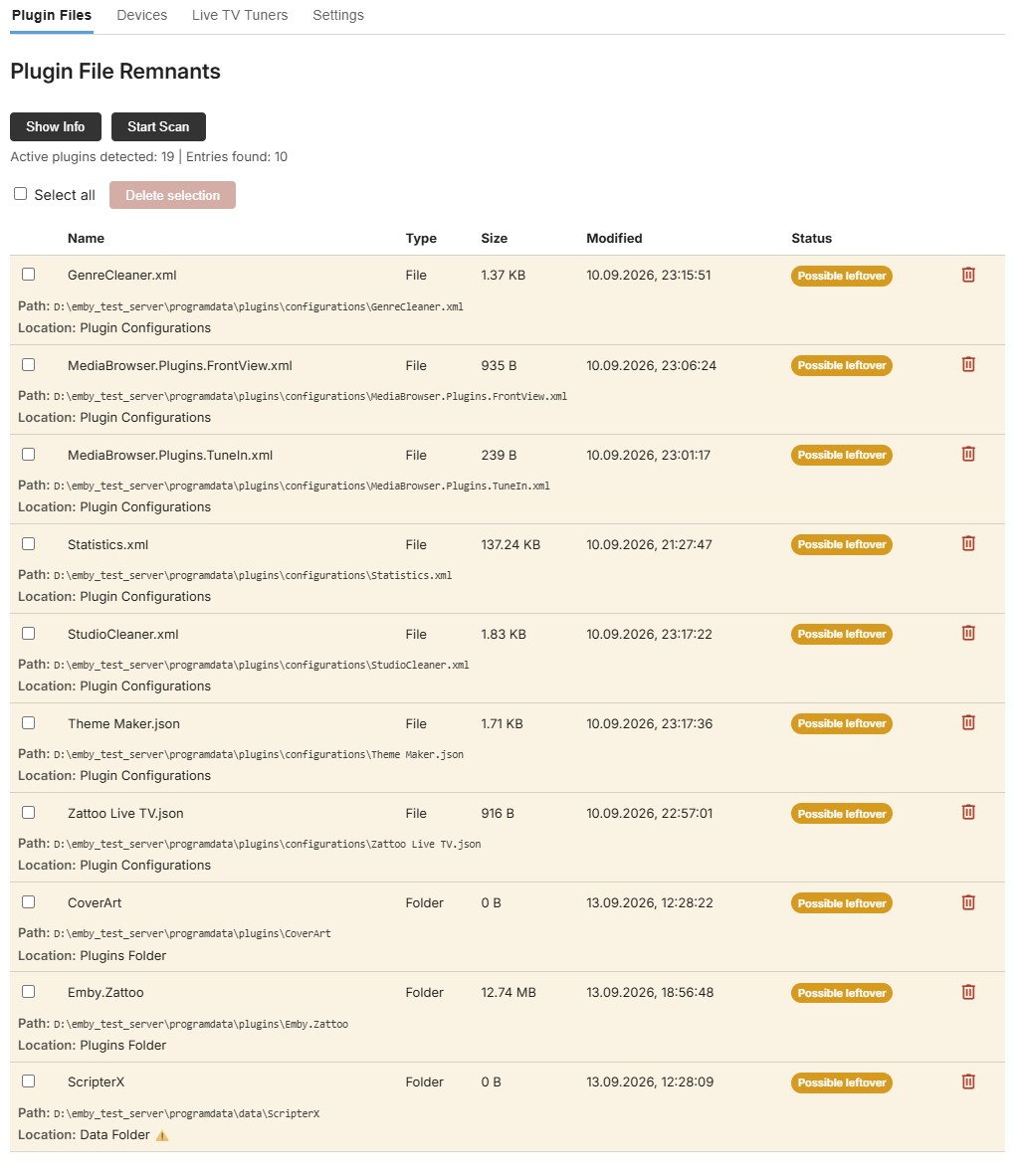
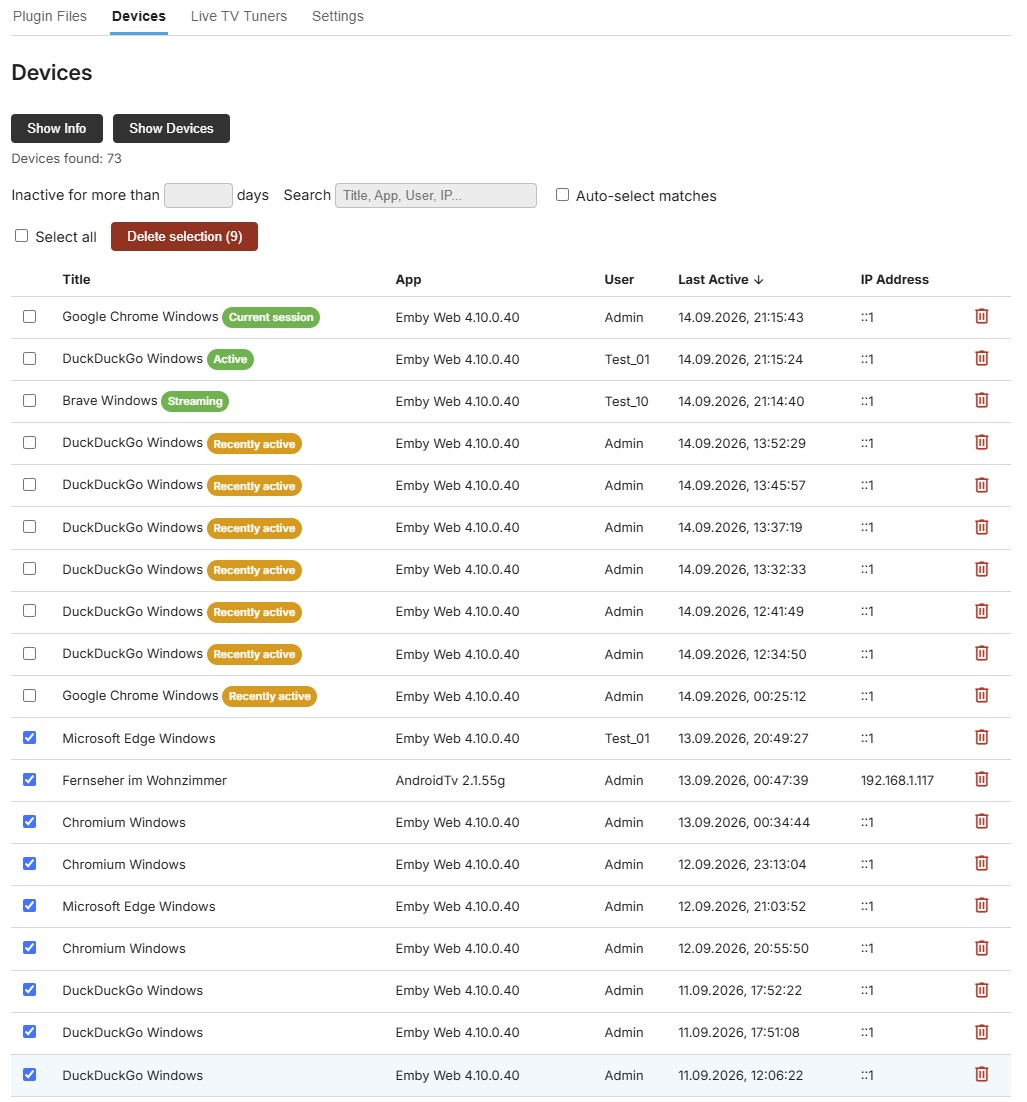
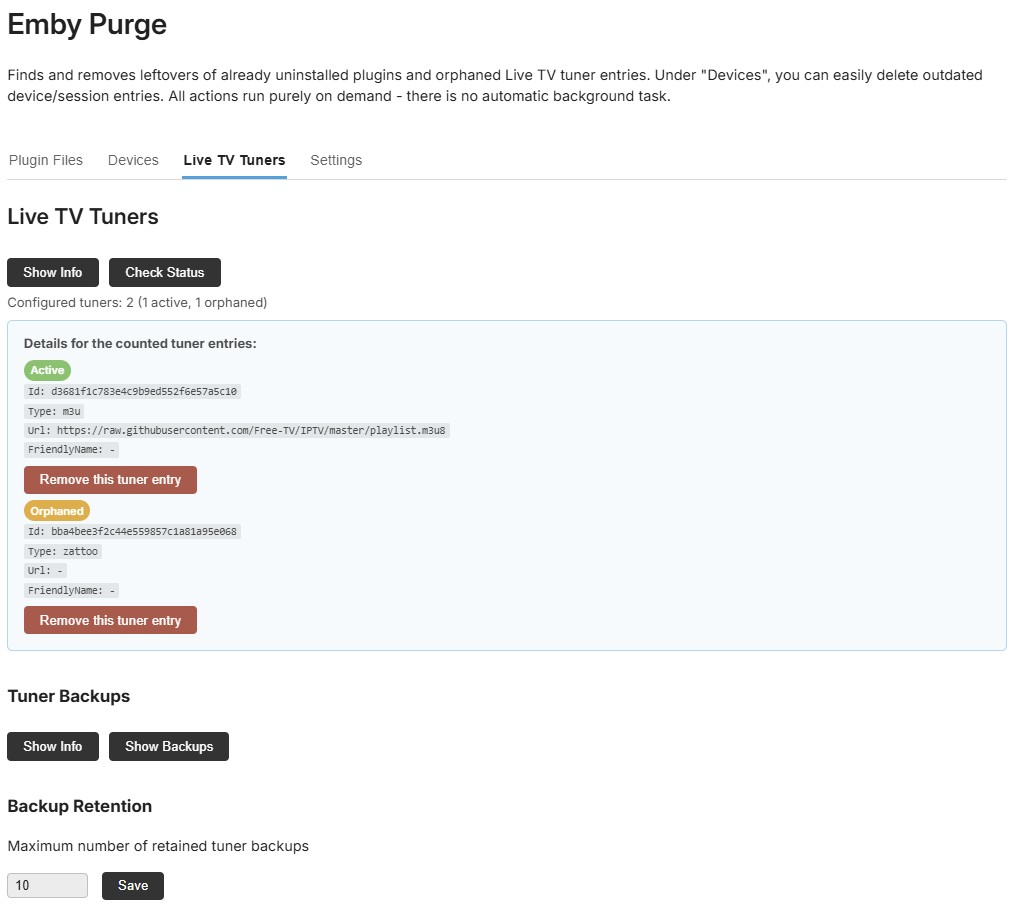
-

[Plugin / Beta] DLNA Renderer Filter – hide selected DLNA devices from “Play on”
Marcidarci posted a topic in DLNA
Hi everyone, I would like to introduce DLNA Renderer Filter, a small Emby Server plugin for users who have DLNA/UPnP renderers that they do not want to see in Emby's Play on device list. What it does The plugin detects the DLNA/UPnP MediaRenderer devices discovered by Emby Server and lists them on its settings page. Each renderer can then be enabled or hidden individually. A hidden renderer is filtered only from Emby's DLNA PlayTo discovery path. The plugin does not change the device itself, does not add firewall rules and does not patch Emby.Dlna.dll. New renderers are visible by default. Important limitation This plugin filters DLNA/UPnP renderers only. Chromecast targets and active Emby client sessions are discovered through different paths and are therefore not listed or filtered by this plugin. Compatibility / current testing Current release: v0.1.4 Tested successfully with: Emby Server 4.9.5.0 Synology DSM 7.2 Denon AVR-X4400H Sony soundbar custom DLNA-to-HEOS bridge renderer The plugin targets netstandard2.0. Technical note Emby's public device discovery API does not expose a per-renderer ignore hook. The plugin therefore uses reflection to replace only the DeviceDiscovered callback belonging to Emby.Dlna.PlayTo.PlayToManager with a proxy. The implementation is deliberately fail-open: if a future Emby release changes that internal handler and the plugin cannot locate it, nothing is blocked and Emby continues normally. Download / source GitHub repository: https://github.com/celle150190-prog/emby-dlna-renderer-filter Latest release: https://github.com/celle150190-prog/emby-dlna-renderer-filter/releases/latest The release contains Emby.DlnaRendererFilter.dll. Feedback requested I would especially appreciate tests on: Windows Linux Docker other NAS platforms other Emby Server 4.9.x versions If something does not work, please include the Emby Server version, platform and any log lines containing DLNA Renderer Filter. The project is open source under the MIT license. Thanks for testing! Emby.DlnaRendererFilter.dll -
 dvdasolutions joined the community
 -
 ugyut8765700 joined the community
 -

Increase the number of media items in the list for the “Latest Media” section of the home page
arrbee99 replied to Mister_U's topic in QNAP
Guess its controlled by the app. I think a dev said a while ago they were concerned that asking for too many items would affect responsiveness then they'd be getting complaints and be spending time bug fixing. OTOH its available in the web (with bit of fiddling around) and there's a new app for Apple TV called Atrium being tested here where the limit is 128, not causing any problems, so far, touch wood. No idea about editing app - difficult I'd imagine. -

[Plugin] Image Overlay vs Default Image Inheritence
ginjaninja replied to ginjaninja's topic in Feature Requests
The status quo might be a little more nuanced. Inherited Episode Images (When an episode image inherits the show poster), do already work for overlays (the episode overlay on the inheirited image is present), so maybe this is just about about specific images such as thumbnail. (Im not the plugin developer so cant be sure on wether a workaround is in place, but it seems the overlay on inherited episode images is just 'working')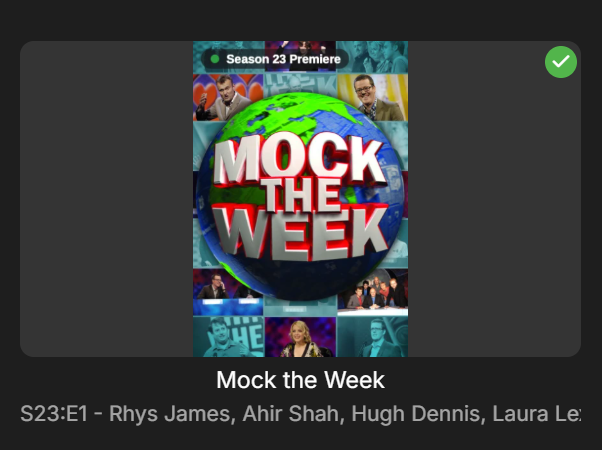
-
 Anas777 joined the community
 -
 Adriemb joined the community
 -
Feature Request: Sleep Timer for Remote / “Play On” Playback
Marcidarci replied to Marcidarci's topic in Android
Thanks for your Help -

UPNP setup of Emby Server has suddenly stopped working remotely
Luke replied to Beta8088_Proto's topic in General/Windows
It's probably something you should look at and determine because it is happening all the time. We go over how to do that here: Connecting from Client Apps In some rare cases the server may detect the wrong remote address. It's not an exact science, so it's a good idea to know your router's public facing remote ip address. -
Feature Request: Sleep Timer for Remote / “Play On” Playback
Luke replied to Marcidarci's topic in Android
Hi, yes implementing this with dlna is something we should look at. Thanks. -
Hi Emby Team, I would like to request an enhancement to the Sleep Timer feature in the Emby Android app. Currently, the Sleep Timer is available when audio is played directly on the Android device. However, as soon as I select another device as the playback target using “Play On” — in my case a Denon AVR used as a network/DLNA renderer — the Sleep Timer option is no longer available. This is unfortunate because the Sleep Timer would be especially useful when listening to music through an AVR or another remote playback device. Current behavior Audio playback directly on the Android device → Sleep Timer is available. Remote playback via “Play On” to an AVR / DLNA renderer → Sleep Timer is unavailable. Requested behavior Please make the Sleep Timer available for remote playback targets as well. Ideally, the timer should control the currently selected playback session instead of only the local Android player. For example: Stop playback after 15 / 30 / 45 / 60 minutes Stop playback after the currently playing track Optionally stop playback after the current album or playlist item Keep the Sleep Timer active even when the Android app is minimized or closed When the timer expires, Emby could simply send a Stop command to the currently controlled remote playback session. This would make the existing Sleep Timer much more useful for users who primarily use Emby as a controller for network players, AV receivers, DLNA renderers, or other “Play On” devices. Thanks for considering this feature.
-

UPNP setup of Emby Server has suddenly stopped working remotely
Beta8088Proto replied to Beta8088_Proto's topic in General/Windows
I am using the link exactly as the server has given me, and am not able to determine whether or not my ISP is using CGNat (I don't pay the bill in my household and I doubt the one who does would know what that even is) but if that's the case, then my remote connection option is completely hosed. -

Version 4.10.0.40 - My libraries, 11 of them, won't scan anymore
mathbernier replied to mathbernier's topic in General/Windows
I go into library, i click Scan Library files, it last 2 seconds max. It doesn't scan at all. If in on the home page, all my libraries are there, i right click, scan library files, the scan never starts. So scans won't work, won't start, even if i go into the Scheduled Tasks Application Rotate log file Last ran 16 hours ago, taking 0 seconds. Moves logging to a new file to help reduce log file sizes. Database Vacuum Database Last ran 4 days ago, taking 0 seconds. Schedules a database vacuum on the next server startup Disk Space Disk Space Almost Full Notification Last ran 7 minutes ago, taking 0 seconds. Notify Admin Accounts about full disk partitions. Downloads & Conversions Convert media Last ran 41 minutes ago, taking 0 seconds. Runs conversion jobs that were created using the convert media feature as well as downloads that require conversion to compatible formats. Transfer media Last ran 41 minutes ago, taking 0 seconds. Transfers completed conversions to their final destination. Used by the Download and Conversion features. Library Download subtitles Last ran 21 hours ago, taking 42 minutes and 56 seconds. Searches the internet for missing subtitles, if automatic subtitle downloading is enabled in Emby library setup. Scan Metadata Folder Last ran 10 hours ago, taking 16 minutes and 22 seconds. Run this task if you've modified the contents of Emby Server's internal metadata folder directly, so that Emby Server can discover the changes. Scan media library Last ran 1 second ago, taking 1 second. Scans your media library to check for new and updated files. Video preview thumbnail extraction Last ran 14 hours ago, taking 0 seconds. Creates thumbnails for videos. Playback Reporting Create Playlists Last ran 13 hours ago, taking 0 seconds. Creates playlists for most popular items based on user activity New Media Notification Last ran 10 hours ago, taking 1 second. Send new media report notification Run Backup Last ran 2 days ago, taking 0 seconds. Runs the report data backup Trim Db Last ran 16 hours ago, taking 0 seconds. Runs the report history trim task User Activity Notification Last ran 15 hours ago, taking 0 seconds. Send user activity report notification Let me know if i can show something else. Thanks Luke! -
OK. Perhaps it's just not getting data quickly enough?
-

Remote Connections not working with Emby 4.10.0.40 Server Update
Bradum replied to Bradum's topic in General/Windows
Emby server is not going through the VPN. I have split tunneling enabled in "include" mode which means only applications I select go through the VPN. Several days after the fact I turned the VPN off to confirm it did not affect my public IP for Emby Server, and that it wasn't causing issues in some unexpected way. They are unable to connect with the VPN on or off. Also, no VPN settings were changed when the issue occurred; they were able to connect and watch episodes while the VPN was on, and when the update occurred they were suddenly unable to load the next episode or reconnect to the server. The VPN is running locally on my machine, not network wide or configured through the router. I am also able to confirm that my public IP matches what Emby Server is showing an it is not possible to connect to the server remotely. -
UPNP setup of Emby Server has suddenly stopped working remotely
Luke replied to Beta8088_Proto's topic in General/Windows
Assuming you are using the correct remote address (?), have you checked to see if your ISP has changed anything? Maybe they are using a CGNat now? This is becoming more and more common. -

Roku 4.1.70 receives valid ImageTags but never requests artwork – posters missing only on Roku
tabenroth replied to tabenroth's topic in Roku
Sorry I meant 2:03PM. I was typing and not watching what I was typing. -
Y: es la unidad. Es virtual debido a que mis archivos estan en la nube
-
Remote Connections not working with Emby 4.10.0.40 Server Update
Luke replied to Bradum's topic in General/Windows
When the VPN is on vs when it is off, wouldn't that require a different remote address to be used?
_svg.thumb.png.85e4ee6291ddd76347269c05175b5dda.png)



