All Activity
- Past hour
-
 Dana JUMA rashid joined the community
 -
 Dana Alhmoudi joined the community
 -
 淬火浴春 joined the community
 -
 Ashley87 joined the community
 -
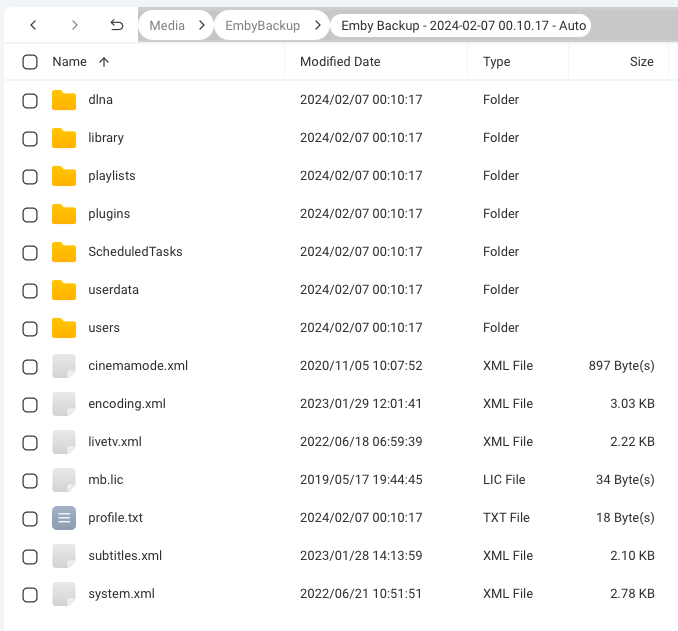
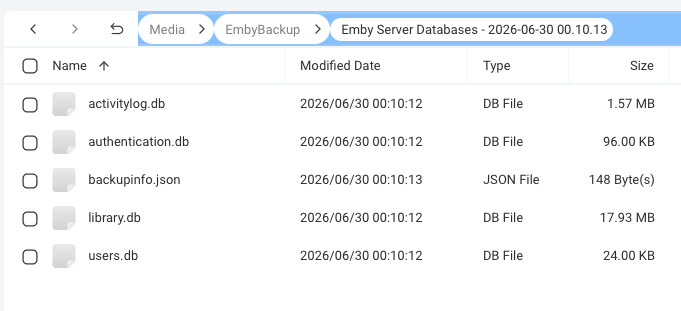
I have been running my Emby Server on a QNAP NAS for a number of years. Though I have the Backup and Restore plugin configured with all options checked and to keep 10 copies, I just noticed that what is being backed up has changed. And it seems like it changed a while ago. In my backup folder, I have 2 sets of folders. The first is 10 folders titled "Emby Backup -" with dates from 2024-01-19 to 2024-02-07. Each of these has a number of sub folders and some other files. See attached screenshot. The second is 11 folders titled "Emby Server Databases" with dates from 2026-06-21 to 2026-07-01. These only contain .db files and a backup info.json file. Why can I not access my playlists or other data that used to be backed up? Server Version 4.9.5.0 Backup Plug-in Version 1.8.3.0
-
 argt joined the community
 -
 Mike327 joined the community
 -
 Biggie898 joined the community
 -
 muggles joined the community
 -
 joe.cox joined the community
 -
“Please provide the macOS x64 build of Emby Server 4.8.0.32 (manual-launch .app). File name: EmbyServer-macos-x64-4.8.0.32.app”
-
 Phuqsake joined the community
 -
Thanks, figured as much.
-
Out of curiosity, if you mount that share so that locally you can also see "/mnt/Qmultimedia/Movies/FirstdonoHarm.mkv" at the exact same path, does that play?
-
Could someone help here please? My setup is multiple Emby servers and clients on Windows and Linux with a QNAP NAS as the place where all my media is stored. As I host a non-English audience. I decided to try to create libraries with non-English metadata which has .strm files pointing to the actual .mkv files which are held on the NAS. Generally this has worked well. On a Windows client (with Windows server) the libraries are displayed in foreign language, where it is available, and Movies and TV shows play correctly. The .strm file just has a pointer to the locally mounted drive on the QNAP. On the Ubuntu clients (with Linux server), again the libraries are populated with foreign language descriptions of films and TV shows but I simply can't get the content to play (the screen just hangs, no error message). From the log files I can see "Directory or File does not Exist". I have tried many variations of the URL in the .strm files such as; /mnt/Qmultimedia/Movies/<folder>/<film name>.mkv With this variant I see "file:" prefixed to the URL in the log so I tried adding it; file:///mnt/Qmultimedia/Movies/<folder>/<film name>.mkv file://localhost/mnt/Qmultimedia/Movies/<folder>/<film name>.mkv I have even tried stripping off the <Cr> which one google search told me could be a problem as the files are created on a PC running windows. I have checked the path using something like; sudo -u emby ls -la "/mnt/Qmultimedia/Movies/FirstdonoHarm.mkv". This returns details of the file (so it is found) and is executable; -rwxr-xr-x 1 root root 3856642267 Feb 24 2022 /mnt/Qmultimedia/Movies/FirstdonoHarm.mkv (I stripped out the spaces and brackets in the file name in case this was an issue). Does anyone know the correct way to format the URL in a .strm file to play a locally mounted .mkv file? Thanks.
- Today
-
The functionality you are looking for all currently exists if you edit your actual music files using MP3Tag or similar software.
-

Collections Fails and Images Don't fully download
GrimReaper replied to ab123ga's topic in General/Windows
Is that a community plugin? -

I built the Plexamp "Sonic Analysis" experience for Emby — self-hosted. Anyone Interested? Want to test it?
ginjaninja replied to kaj's topic in Third Party Apps
Chrome f12 suggested the status error in plugin is caused by CORS further reinforced by the fact that if i launch chrome with websecurity disabled the status page says connected Start-Process "C:\Program Files (x86)\Google\Chrome\Application\chrome.exe" -ArgumentList "--user-data-dir=`"$env:TEMP\chrome_dev`"", "--disable-web-security"
-
I've struggled with finding good plugins for adult film metadata, but I came across swapsmut.com recently. It features a solid collection of amateur videos in diverse categories and could be a fun alternative while plugin issues are sorted out. Plus, the community aspect there is pretty engaging with comment and upload features. Might be worth checking out while waiting for an Emby solution.
-
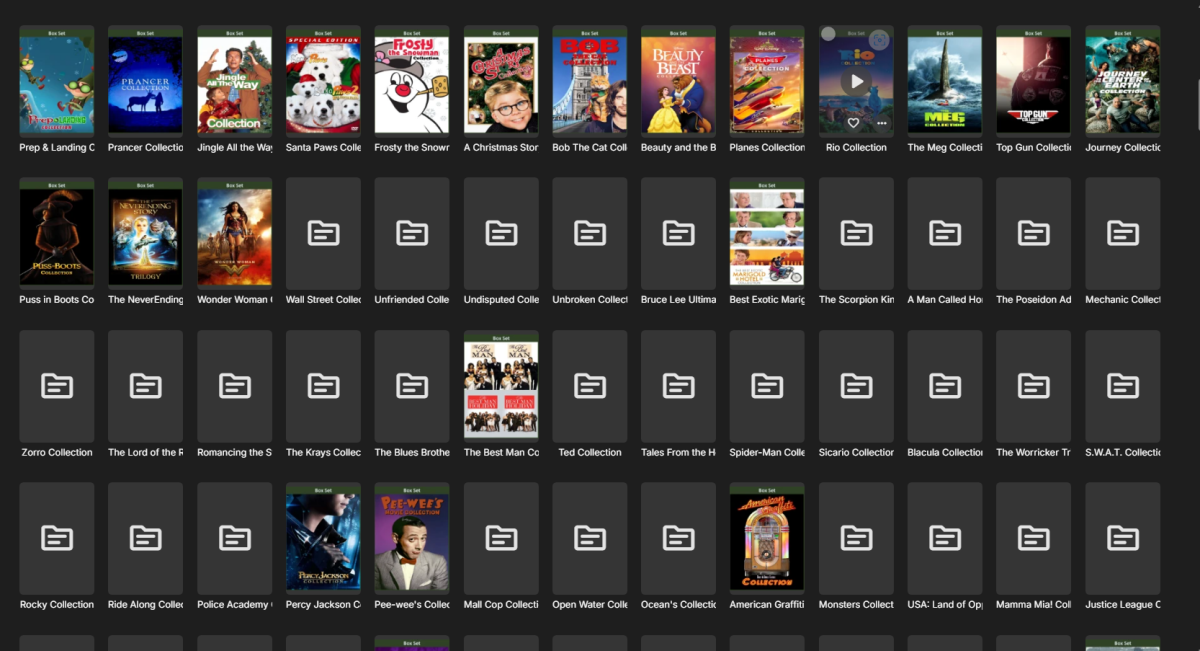
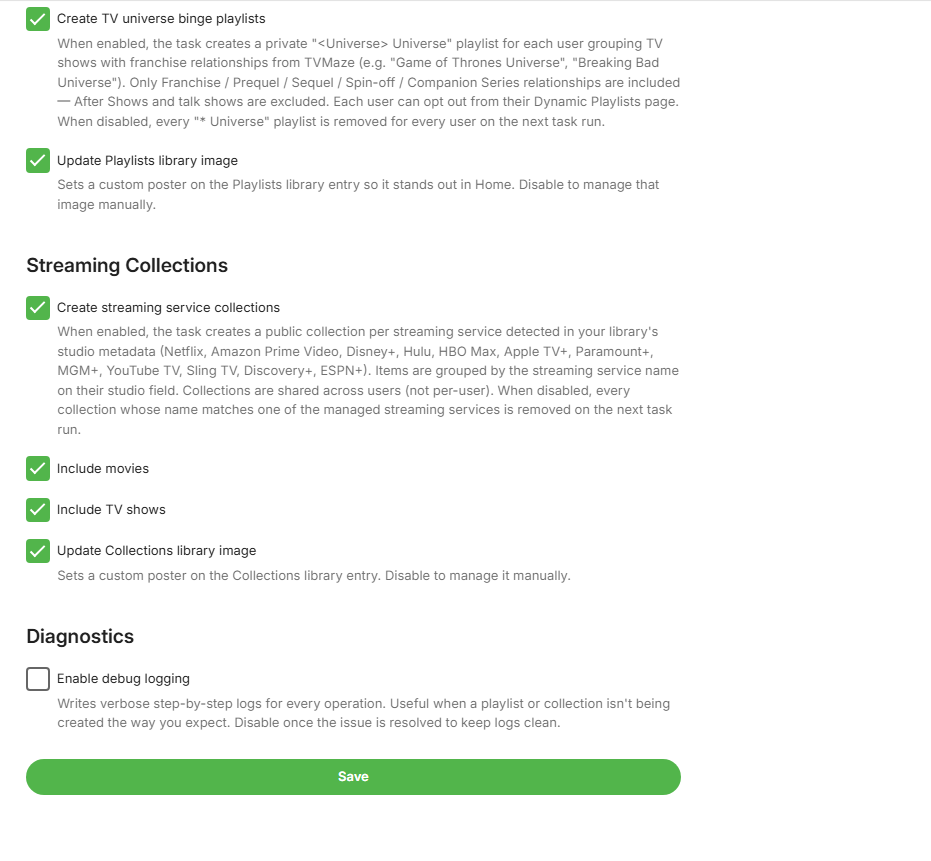
Several weeks ago I installed a new version of Emby. Ever since then I've had an issue /w collections. 1) The collections manager runs 1/day and it fails every time. I specifically ran it again today at 2026-07-03 10:19:59.756 ET. Fails. 2) A large % of the collections built do not have a collection image applied. If I add the poster manually or I refresh the metadata and include images, that works. But it should work for all without me having to do this 1 by 1. embyserver (2).txt
-
Thank you!
-
OK we’ll take a look at it. Thanks.
-

[Security Issue] Using Home Button Makes PIN Bypass Possible
Luke replied to Tigga5's topic in Android
How have you configured the startup option in the app? -
Not sure if the last app on IOS version is broken
Luke replied to LoLoEmby's topic in Apple iOS / macOS
Hi, we’ll take a look at it. Thanks. -
OK we’ll take a look at it. Thanks.
-
For now I logrotate every 15 minutes and remove old logs via a cronjob so it's under control and I'll block on the firewall when able to do so. I'll probably hear from him sometime in the near future, I'll then try to get a better idea on how he managed to do this. Knowing him, he opened 20 clients at the same time when it didn't start playing immediately and then clicked everywhere as fast as possible, he's very good at creating/finding bugs Fingers crossed that a reboot will fix this. Thanks,
-
@jellis413 Thanks a lot for the details. That exact error has been fixed just two days ago. A new stable release will be out by the end of the weekend. Thanks again for reporting!
-
Hi, I had this same issue after upgrade to TOS7. Some media files was played ok, and same not. I try also beta versions, but no change. Then I noticed that same media file was failed using my browser and same time it was ok when there was a android client. Server logs show transcoding errors like this 2026-06-30 06:22:20.192 Info MediaInfoService-XXXXXXXX: User policy for emby. EnablePlaybackRemuxing: True EnableVideoPlaybackTranscoding: True EnableAudioPlaybackTranscoding: True EnableTranscodingQuality: True 2026-06-30 06:22:20.192 Info MediaInfoService-XXXXXXXX: Bitrate exceeds DirectPlay limit: media bitrate: 4763567, max bitrate: 4000002 2026-06-30 06:22:20.192 Info MediaInfoService-XXXXXXXX: Bitrate exceeds DirectStream limit: media bitrate: 4763567, max bitrate: 4000002 Transcode settings was "no limit" After change that to example 4K everything works fine. My Terra-Master NAS is F4-425 Plus with latest TOS7 updates
-
It sounds to me like a bug under some very specific and rare conditions. If the user with the client cannot be contacted, then I think that blocking it at the firewall level is the best option for the moment.
-
Not sure what process it could be in that would cause that. @softworkz