All Activity
- Past hour
-
 calmmoon8354 joined the community
 -
 yola86 joined the community
 -
 buckhouston joined the community
 -
Fantastic, thank you very much for checking it
-

FIX FOUND - devs please look: Emby unnecessarily transcoding HEVC streams with the native AVKit player
Geordie replied to Geordie's topic in Apple TV
I’m not as upset about it anymore because there are now plenty of excellent third party apps & playback engines for Apple devices so Emby’s HLS pipeline is no longer needed. mpv & vlc used by all the legacy apps are terrible on Apple devices (for people who care about proper playback of modern formats). That said, the fix here should be trivial for the team as hevc already works with Safari which, like the Apple TV, also uses AVPlayer. So the pipeline is already there. All that’s needed is updating the device profile on the tvOS client to request media files in an AVPlayer friendly format. -
 Vicky1203 joined the community
 -
 Kingcastro10 joined the community
 -
 swiftwind9020 joined the community
 -
 darksand1617 joined the community
 -
 Fer Avendaño joined the community
 -
Please check your DMs.
-
 Nadia Esha joined the community
 -

LG TV is Internet blocked: Emby App asks for premiere / lags when pressing play
speechles replied to Utini's topic in LG Smart TV
@LukeIs that Luna API being utilized on the LG to delay network requests until ready? -
 ismaelsit joined the community
 -

LG TV is Internet blocked: Emby App asks for premiere / lags when pressing play
Utini replied to Utini's topic in LG Smart TV
Exciting history lol. Thanks, I didn't know that and can now relate. However, I am whitelisting the domain but still face the issue when starting Emby the first time after powering on the TV -

Live TV Channels No Longer Included in Global Search
Killahcriss replied to Killahcriss's topic in General/Windows
Yes I use nginx proxy for remote connections. I reconfigured some things in nginx proxy. I think I have it figured out now. -
115.70.108.233 That is your offending IP for those attacks I've mentioned. They were trying to exfiltrate data from your server-ip to theirs. Your server-ip is masked/hidden but their host port is not in the logs. Because of that we can identify where they were at that point. But they may have other countries and that might be a VPN they have access to. Meaning they can strike you from anywhere. But you might've looked boring to them. But even still I would ban that entire subnet of ranges it has. It looks like they have a list of IP's they abuse, and you happen to be on that list from a portscan or something. You can tell it is a list because it takes a few minutes before they pound you again with a new attack vector. You might need to whitelist access to your Emby server to dissuade them from having you on their list. Then monitor logs to see if they tried to evade the whitelist. They are seriously trying to get your bitcoin, credit cards, passwords, anything that can be monetized. This isn't just to steal your proxy/vpn.
-
Library Y:\1950s - 1960s Drive runs out of room so I added this path to the library G:\1950s - 1960s (this has 9 movies) Then added another path: F:\1950s - 1960s (this has 3 movies) Folder view shows 3 folders and y:\1950s - 1960s has 229 movies and G:\1950s - 1960s has 9 movies and F:\1950s - 1960s has 3 movies. Once I click one of these 3 folders it does not show the gray folder and the screen shows no options of Movies - Folders etc Movies view shows 241 movies. This seems to be the main factor somehow, otherwise is seems to be a few that don't follow that pattern... I'll narrow it down
-
@sobeitjediI just rechecked the log and i missed this before. I found this in the log "-noskia". EmbyIcons uses Skia for the drawing on the icons and without it will not work. I never thought about adding a check for that, which is embarrassing, so the plugin will just fail with the "-noskia". I'm very sorry about that!! Going to add a check for future version of EmbyIcons so this won't happen again!
-
....and nothing threw any flags about this? That would've been useful advice back when those logs still existed, but they're long gone. I did a quick search through the logs from yesterday, and nothing jumps out as being similar to what you pulled from the first lot of logs.
-
Sorry about that and thanks.
-
LG TV is Internet blocked: Emby App asks for premiere / lags when pressing play
speechles replied to Utini's topic in LG Smart TV
Bad actors. This is why we cannot have nice things. Because people can fake their server credentials. You may not remember. Years earlier when Emby was 100% open source. But because of implementing things costs rose it became necessary to close source and monetize certain features. Emby went closed source to keep the project going in the current direction. These other guys first created an Emby-unlocked branch. The unlocked branch would spoof active premiere licenses and try to fake official Emby apps into validating with the spoofed credentials. It became necessary for the apps to also check the validity of the premiere key that the Emby server it is connected to actually exists. Then no longer could the Emby-unlocked branch exist. It was pointless. The official Emby apps were now onto them and denied their spoofed server. They had to move. So they renamed it to JellyFin and started to claim the reason their branch existed was to keep it open source. When really it was created to allow pirate servers to have an unlimited amount of applications/clients/devices that could play from their unlocked-Emby server. So pretty much you can blame JellyFin why your LG Emby app must validate the credentials directly rather than trust the servers own determination. -
Hi. I split this out to its own topic. Thanks.
-
That's strange. Will look into it. Possible for you to grab a log ?
-
I have now made a simple test, and it seems to be working without issues on the beta. I have NOT tested all functionality, but i don't see any reason why it shouldn't work.
- Today
-
HI there, what makes you think you made it worse?
-
There was an issue with our release notes automation yesterday but I'll put a new build up today.
-
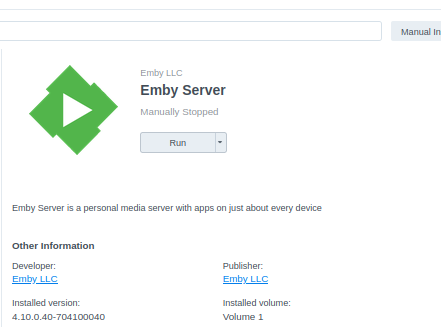
Installed, restarted Emby, but now Emby isn't coming back online, when I press run on my Synology NAS, after a few moments it says Manually Stopped ...
-
2026-09-08 07:02:27.786 Info Server-0HNOCNNMM76IL:00000001: http/1.1 Response 404 to host20. Time: 0ms. GET http://host3/RDWeb. 2026-09-08 07:02:31.028 Info Server-0HNOCNNMM76IO:00000001: http/1.1 Response 404 to host20. Time: 0ms. GET http://host3/Remote. 2026-09-08 07:02:32.100 Info Server-0HNOCNNMM76IP:00000001: http/1.1 Response 404 to host20. Time: 0ms. GET http://host3/RDWeb/Pages/en-US/login.aspx. 2026-09-08 07:02:46.305 Info Server-0HNOCNNMM76IR:00000001: http/1.1 Response 404 to host21. Time: 0ms. POST http://host3/wsman. 2026-09-08 07:04:06.867 Info Server-0HNOCNNMM76J1:00000001: http/1.1 GET http://host3/api/sonicos/auth. Source Ip: host22, Host=115.70.108.233, User-Agent=Mozilla/5.0 (Macintosh; Intel Mac OS X 10_15_7) AppleWebKit/537.36 (KHTML, like Gecko) Chrome/92.0.4515.159 Safari/537.36, Accept-Encoding=gzip, X-Real-IP=74.207.240.7, X-Forwarded-For=74.207.240.7 2026-09-08 07:07:17.412 Info Server-0HNOCNNMM76J9:00000001: http/1.1 Response 404 to host23. Time: 0ms. GET http://host3/+CSCOT+/oem-customization?app=AnyConnect&type=oem&platform=..&resource-type=..&name=+CSCOE+/portal_inc.lua. 2026-09-08 07:07:44.435 Info SyncService-0HNOCNNMM76JB:00000002: http/1.1 POST http://192.168.0.2:8096/Sync/Data?TargetId=116f23d7-a0de-6360-ea5c-6686e8076f78. Source Ip: host1, UserAgent: EmbyMedia.13848C33ED80B/2.322.2.0 2026-09-08 07:07:44.435 Info SyncService-0HNOCNNMM76JB:00000002: http/1.1 Response 200 to host1. Time: 1ms. POST http://192.168.0.2:8096/Sync/Data?TargetId=116f23d7-a0de-6360-ea5c-6686e8076f78. 2026-09-08 07:08:01.248 Info Server-0HNOCNNMM76JC:00000001: http/1.1 Response 404 to host23. Time: 0ms. GET http://host3/.env. 2026-09-08 07:08:46.035 Info Server-0HNOCNNMM76JD:00000001: http/1.1 Response 404 to host23. Time: 0ms. GET http://host3/.ftpconfig. 2026-09-08 07:09:27.432 Info Server-0HNOCNNMM76JE:00000001: http/1.1 Response 404 to host23. Time: 0ms. GET http://host3/.git/config. 2026-09-08 07:10:07.256 Info Server-0HNOCNNMM76JF:00000001: http/1.1 Response 404 to host23. Time: 0ms. GET http://host3/.idea/WebServers.xml. 2026-09-08 07:10:52.461 Info Server-0HNOCNNMM76JG:00000001: http/1.1 Response 404 to host23. Time: 0ms. GET http://host3/.remote-sync.json. 2026-09-08 07:11:36.450 Info Server-0HNOCNNMM76JH:00000001: http/1.1 Response 404 to host23. Time: 0ms. GET http://host3/.vscode/ftp-sync.json. 2026-09-08 07:12:13.134 Info Server-0HNOCNNMM76JI:00000001: http/1.1 Response 404 to host23. Time: 0ms. GET http://host3/.vscode/sftp.json. They were throwing everything but the kitchen sink at you. Trying to exfiltrate data too. Not just hack but entirely pwn.
-
Hello folks, long time Synology NAS installed base, old DS-418 play unit, completely up-to-date, DSM-wise. Also Emby up to date with premiere from a few years ago, I was trying to fix an HTTPS issue fiddling with the DSM reverse proxy to fully publish Emby to the internet to share it with some friends and I think I made it worse, now I can only use Emby local within my LAN. At least before the changes, I could use it via the app on my android phone, but not anymore now. How can I start to ask for help?
-
As i thought.. I uploaded another version to the catalog v5.60.0.5. That should work correctly.
-
embyserver.txt
-
LG TV is Internet blocked: Emby App asks for premiere / lags when pressing play
Utini replied to Utini's topic in LG Smart TV
Link works but issue is still there. I need to spam play button several times until after a few min I get tons of "get premier" pop ups so that I can then start a playback -

library no longer appears in Continue Watching after upgrading to Emby 4.10.0.40
flashls82 replied to Deihmos's topic in General/Windows
Having this exact same issue -- glad you guys are on it (and thanks for the workaround suggestion below). -
2026-09-08 07:00:47.861 Info Server-0HNOCNNMM76IC:00000001: http/1.1 Response 404 to host17. Time: 0ms. GET http://host3/version. 2026-09-08 07:00:48.958 Info Server-0HNOCNNMM76ID:00000001: http/1.1 Response 404 to host17. Time: 6ms. GET http://host3/api/v1/pods. 2026-09-08 07:01:46.528 Info Server-0HNOCNNMM76IG:00000001: http/1.1 POST http://host3/v1/statement. Source Ip: host18, UserAgent: python-urllib3/2.7.0 2026-09-08 07:01:46.529 Info Server-0HNOCNNMM76IG:00000001: http/1.1 Response 404 to host18. Time: 1ms. POST http://host3/v1/statement. 2026-09-08 07:02:09.291 Info Server-0HNOCNNMM76IH:00000001: http/1.1 Response 404 to host19. Time: 0ms. GET http://host3/dana-na/nc/nc_gina_ver.txt. 2026-09-08 07:02:10.235 Info Server-0HNOCNNMM76II:00000001: http/1.1 Response 404 to host19. Time: 0ms. GET http://host3/dana-cached/hc/HostCheckerInstaller.osx. 2026-09-08 07:02:11.264 Info Server-0HNOCNNMM76IJ:00000001: http/1.1 GET http://host3/dana-na/auth/url_default/welcome.cgi. Source Ip: host19, Host=115.70.108.233, User-Agent=Mozilla/5.0 (Macintosh; Intel Mac OS X 10_15_7) AppleWebKit/537.36 (KHTML, like Gecko) It is this. Somebody is trying to hack you hoping you are running a reverse proxy, vpn, or something and take control. They are trying to run exploits against your server. It isn't coming from Emby but being shoveled down Emby's port you have opened facing the internet. It doesn't look like they can do anything. But they can likely send "casting" commands and cause incorrect media to play and other shenanigans. If they gain access to your correct user with admin they can delete things. The IP shown on the one sending the welcome.cgi appears to be from Superloop (Australia) Pty Ltd. Find the corresponding IP to match Host3 in your unsantized logs. You will have the offending IP. Ban it. Ban its subnet.