All Activity
- Past hour
-
Emby for Android 3.5.60 Released Changes 3.5.60 Core UI Update Only Core UI Changes from 26.0.26 to 26.0.27 Various spotlight bug fixes and improvements
-
What is the content type of the library? What version of the server are you running?
-
 fampep joined the community
 -
 Ulrich avolonto joined the community
 -
 Orhana01@hotmail.fr joined the community
 -
 Shakal57 joined the community
 -
 uxavi8839970 joined the community
 -
 xxdr8 joined the community
 -
 3bero joined the community
 -

TV Show Status — TMDB-powered Returning/Ended/Cancelled badges for series
Blueskies278 replied to Blueskies278's topic in Plugins
When I feel it's stable enough for release, and if it passes Emby's guidelines -
 lemaitre-elie joined the community
 -
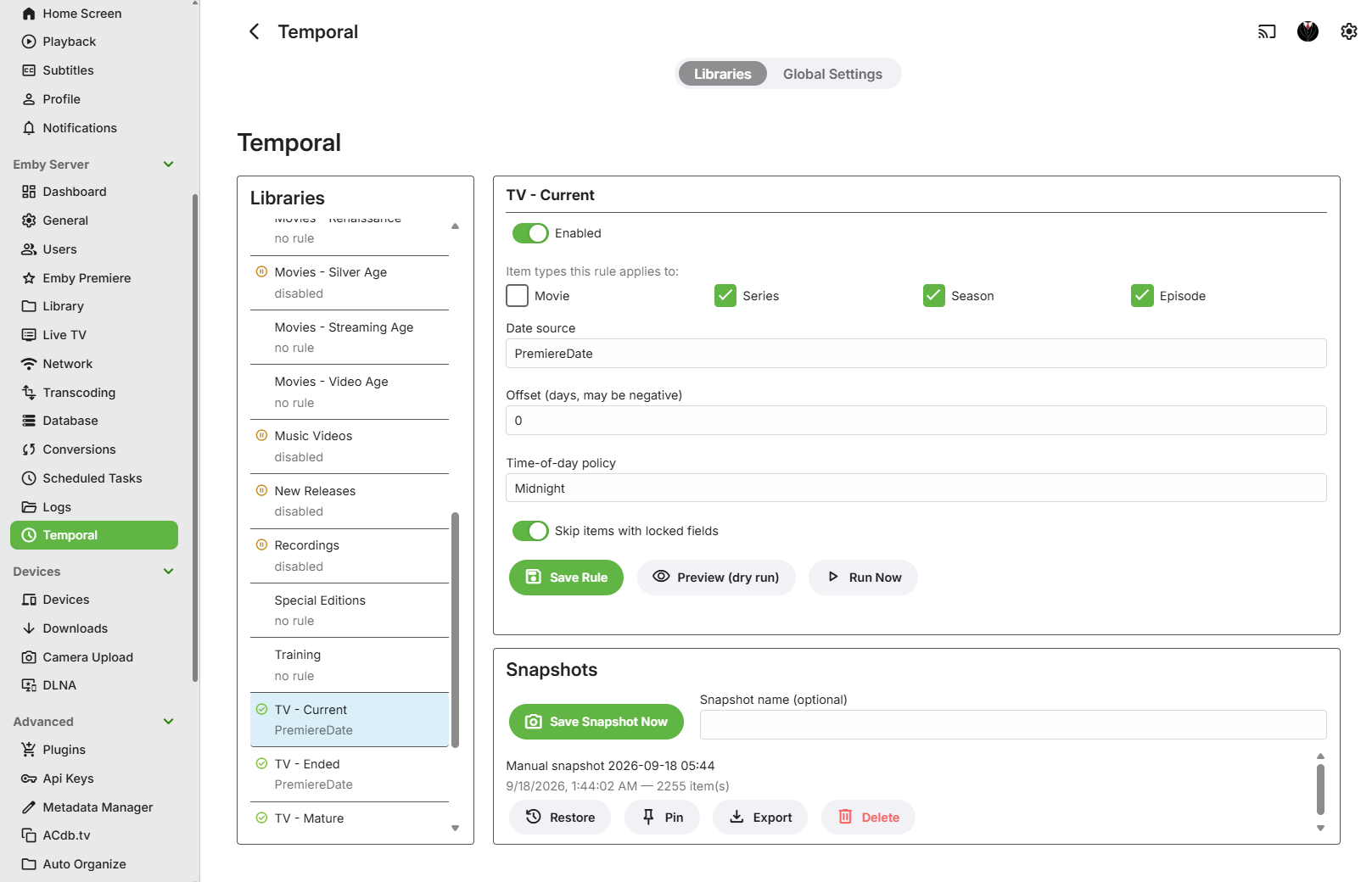
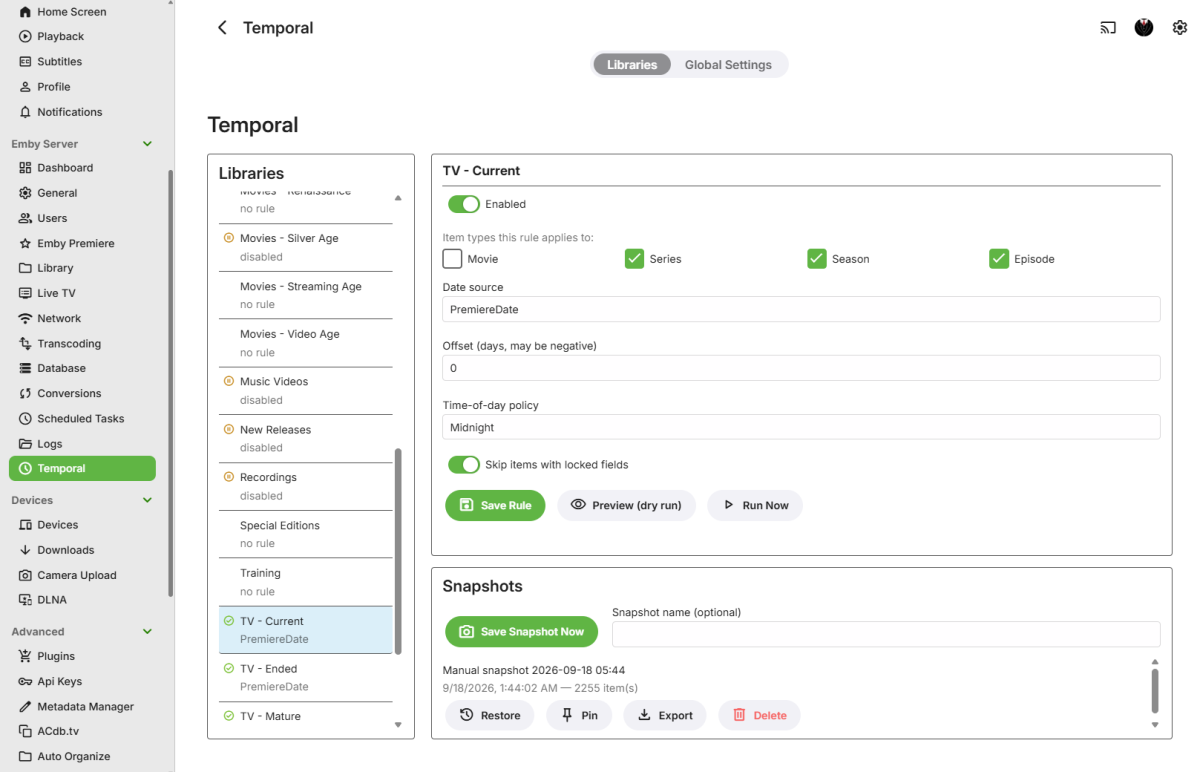
Temporal: Time Management I've wanted to build this for years, as my own library has grown larger and more complex. Temporal replaces Emby's "Date Added" value with one derived from an item's own metadata, chosen independently for each library. No more one-size-fits-all date handling across a varied collection that doesn't work that way. NOTE: It was compiled for Emby Server 4.10+. Source is closed, but it's free to use. The problem Emby's built-in "Date added behavior for new content" handling gives you a global choice: date scanned, or file creation date. That's fine until you have libraries where you want different logic. Other plugins I have used are basically an "all or nothing" that is more like a blunt instrument than a precision tool. Maybe you have a "New Releases" library where file date is genuinely useful, but you have a general TV Show/Movies library where you'd rather sort by Air Date/Premiere Date, and an old-film collection where all you really want is the production year. There was also no quick way to recover an item's original date once something has overwritten it. Temporal makes the date source a per-library choice, and gives you an actual undo path. What it actually changes Each library gets its own rule, and every rule is disabled by default. Temporal touches nothing until you explicitly turn a library on. Pick exactly one date source per library: Premiere Date, Production Year (Jan 1), File Created Date, or File Modified Date. No fallback chains. If the source you picked can't be resolved for an item, that item is left completely alone and shows up as "unresolved" in the run summary. It will never quietly substitute a different source. It only ever touches Emby's own DateCreated/DateModified fields on the items it manages. It never writes to any file on disk; file dates are read-only inputs, never outputs. Items with any locked metadata field are skipped by default (there's a per-library toggle if you want Temporal to override locks instead). Series/Season with a file-based source use the earliest file date among their child episodes, scoped to just that season, or the whole series. Undo is via named Library Snapshots. Save one manually from the config page at any time, and restore it later if a rule change didn't do what you wanted. Snapshots are exportable, pinnable, and covered by retention settings so they don't grow forever. (An automatic "snapshot before rule change" prompt is planned but not wired up yet. For now, snapshotting is a manual step you take yourself.) Scope for v1: Movies, Series, Seasons, and Episodes only. No Music/Books/Photos yet. I have a few other time-related functions I've been wanting to add, so we'll see how it pans out going forward. Real-world testing I've been running Temporal in it's current state for about a week on a Linux/Docker Emby host, against a networked media library over CIFS. I have had no issues so far, including on the file-date sources, but see the caveat below on FileCreatedDate, since CIFS/SMB is one of the setups where filesystem "birthtime" support can be inconsistent. Installing it Unzip and drop "Emby.Temporal.Plugin.dll" into your Emby Server plugins folder. Restart your Emby Server, it should pick up the plugin right away. It will show up under Emby Server in the left-hand Dashboard menu as Temporal. Click it to open the config page. Here's what the config page looks like, live on my server: Configuring a library On the Temporal config page, each of your libraries shows up with its own rule. I don't have any gating yet on which libraries show up, so you will just see all your libraries in the list. Simply choose a library and the rule configuration will pop up on the right: Enabled: off by default. Turning it off later pauses management without undoing anything already written. Item Types: which of Movie/Series/Season/Episode this rule covers. Date Source: the single field to resolve dates from. Offset (days): shift the resolved date forward or backward. Time of Day: Midnight, Preserve Original Time, or Run Time. Respect Item Exclusions: on by default; controls whether locked items get skipped. Be sure to click Save Rule if you edit the settings. Preview (dry-run diff, no writes) and Run Now (runs immediately, bypassing the Enabled flag) are both on the same page. Snapshots Before making any changes, or hitting run, it's a good idea to make a snapshot of the library, just in case the date change didn't turn out like you expected. You can optionally name snapshots for your own reference. Each snapshot can be Restored, Pinned, Exported or Deleted, everything should work as you would expect it to. Just click Save Snapshot Now, and you don't have to worry if it messes up your dates. NOTE: Export is mostly for reference right now, but I will support import in the future. Global settings A separate tab on the config page controls settings shared across every library: Dry Run Default (on): whether Preview opens with dry-run pre-selected. Batch Size (200): items written per batch during a run. Throttle (ms) (250): delay between write batches, to avoid hammering the Emby database on large libraries. Log Verbosity (Normal): Minimal / Normal / Verbose logging. Max Snapshots Per Library (10): snapshot retention limit (0 = unlimited); pinned snapshots are exempt. Max Snapshot Age (days) (90): snapshot retention age limit (0 = unlimited); pinned snapshots are exempt. Scheduling Everything runs through Emby's own Scheduled Tasks, no custom scheduler: Temporal: Incremental Date Update: safe to run hourly or more. Only touches items changed since the library's last successful run, and skips no-op writes. Temporal: Full Validation Pass: re-checks every item regardless of watermark. Heavier; good for a daily/weekly cadence or a manual "Run now" after a rule change or metadata refresh. Both respect each library's Enabled flag and skip orphaned rules (rules pointing at a library you've since removed get flagged, not deleted). Feedback is welcome, especially from anyone with unusual library setups (network shares, mixed filesystems), since the file-date sources are best-effort on some of those. Emby.Temporal.Plugin.1.0.0.40.zip
-
 urica7341969 joined the community
 -
 wiigy joined the community
 -

Movie Theme Videos Plugin Questions and Support Thread
Scott310 replied to radeon's topic in Plugins
I ran it a few times in the beginning just testing. My bad. If I can confirm it is working I will just leave it alone and let it do its thing over time. I can be patient when I know its working lol. Thanks again brother. -

NVIDIA Shield screensaver appears while paused, then playback resumes behind it
dbott replied to Dr. Technolust's topic in Android
Thank you for that. Also, interesting thought on having the Shield turn off with Energy Saver. But in my case, it would shut down the entire theater with automation. (Receiver off, projector off, open blinds, turn on lights.) Though I do have that happening after 30 mins just in case. -
This would be amazing. To get around this currently, I have found a top 30 trending shows (smaller quantity) then set it to random and added it as a spotlight. This works very well, netflix style. Some requests from me and forgive me I do not know the limitations you work with Soderlund. for AI can we somehow have a single playlist and for each user its passes in their own watch history. This avoids having to create so many sources for each unique user. To be honest this would be amazing for most of the features to have "Current User"
-

Atrium — a native tvOS app for your Emby server
vdatanet replied to vdatanet's topic in Third Party Apps
Atrium 1.93 is on the App Store. @jasonmcroythis is the one with your two Apple TVs. Nothing to set, just update. One correction to my last post: when I wrote "it's fixed", only the rows were. With the enhanced home, the header kept showing the old progress until you moved the focus, and it took one more build to catch that. This version has both. If you get a minute, try your exact case: leave Atrium open in the bedroom without force closing it, watch something in the living room, then go back. It should already be there. Dolby Vision through the server. When a film can't be played straight from the file and has to come through Emby instead, a Dolby Vision one used to arrive converted to SDR and re-encoded, because the app never told the server your TV could take Dolby Vision. It does now, and the server sends the film as it is: nothing re-encoded, and the TV switches to HDR. To be exact, that's HDR10 from the film's own base layer, not the TV's Dolby Vision mode; that last step needs the server to label the stream as Dolby Vision, and it's been raised with them. HDR10 films on that path still arrive in SDR, and that one is on the server side as well. The guide. When the first channels in the list had no listings, pressing down from the buttons at the top did nothing and the remote seemed dead. It now goes down into the grid. As always: what's missing or wrong, say it here. -

Android app requests images smaller than it renders them (Google TV)
redoXiD posted a topic in Android TV / Fire TV
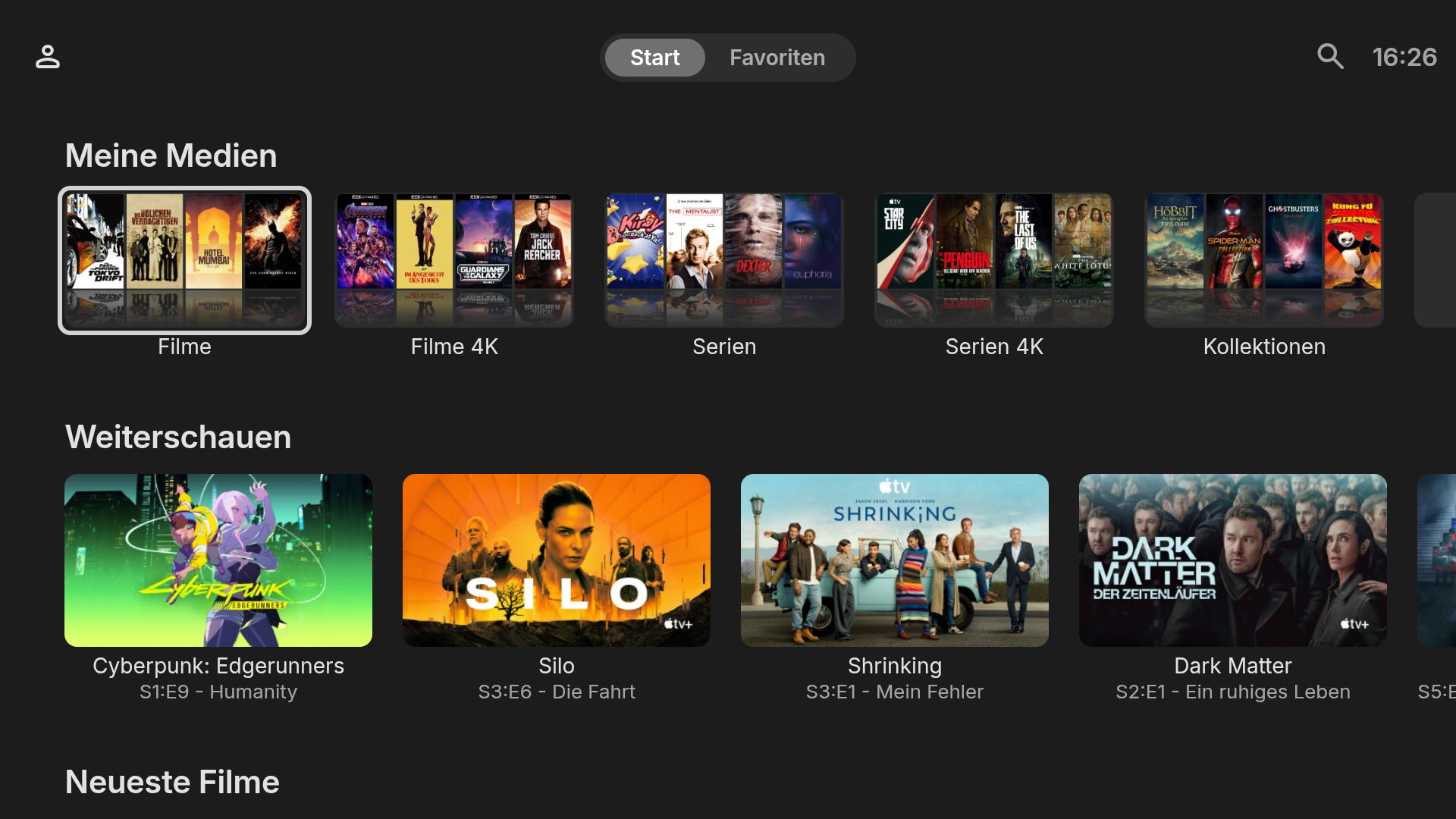
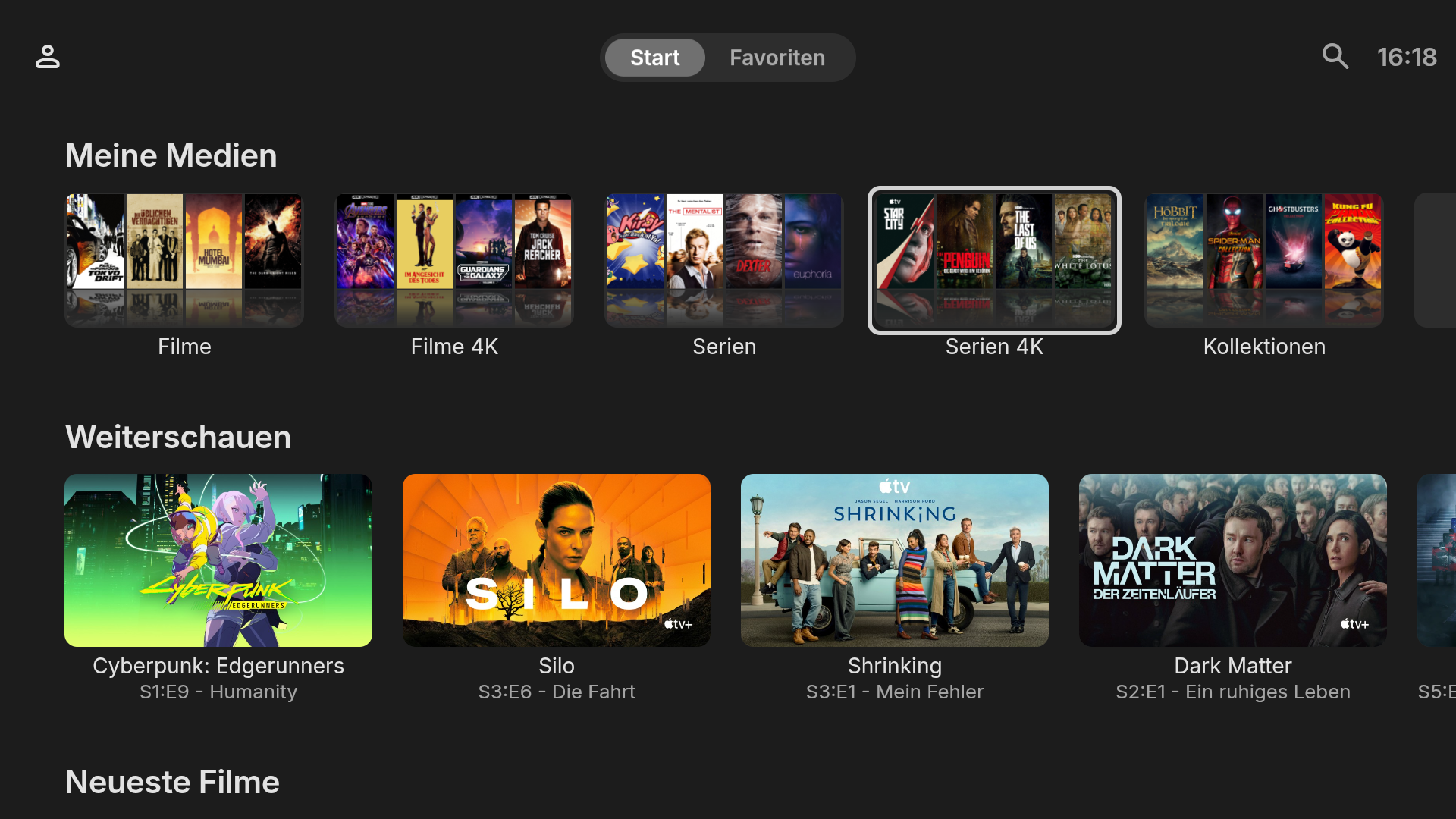
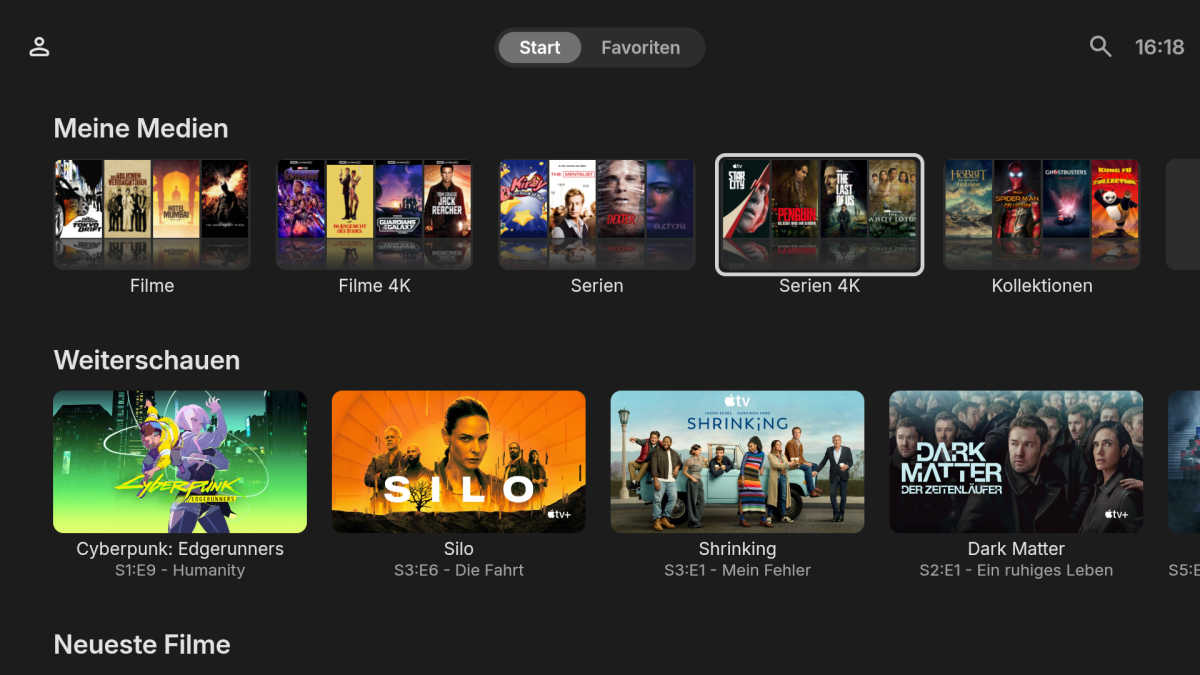
Server: Emby Server 4.11.1.0 beta (Docker (LSIO), Unraid) Client: Emby for Android 3.5.55 Device: TCL 65Q8C, Google TV/Android 14 Display: - Panel/output: 3840x2160 - UI framebuffer: 1920x1080 (vendor size override, not changeable without root) - Density: 320 -> devicePixelRatio 2.0, so the web client lays out at 960x540 CSS px Problem: The Emby client requests images at a smaller pixel size than the size it actually draws them at. Every image is therefore upscaled once by the WebView, before the compositor upscales the whole 1080p UI to 4K. The result is visibly softer/unsharper artwork with less details than other clients on the same device like Plex or Plezy with similar artwork sizes. Measurements: Rendered sizes were measured from screenshots via `adb exec-out screencap`, which returns a 1920x1080 image, so these are framebuffer pixels and directly comparable to the requested sizes. Movie poster (Primary): requested maxWidth=216 & maxHeight=324, rendered ~256x383 -> ~18.5% upscale Horizontal thumb: requested maxWidth=366 & maxHeight=206, rendered ~406x228 -> ~11% upscale Server log excerpt (full log attached): GET /emby/Items/690908/Images/Primary?maxHeight=324&maxWidth=216&tag=...&quality=90 UserAgent: Mozilla/5.0 (Linux; Android 14; Smart TV Pro Build/UTT2.250416.001; wv) AppleWebKit/537.36 (KHTML, like Gecko) Version/4.0 Chrome/151.0.7922.202 Mobile Safari/537.36 embyserver (5).txt What I would expect: The requested size should be at least the element's rendered size in CSS px multiplied by devicePixelRatio, i.e. >= 256x383 for the poster and >= 406x228 for the thumb on this device. Some further observations: The shortfall differs per card type (~18.5% vs ~11%), so it doesn't look like a single devicePixelRatio miscalculation All image types seem to be affected including actor images and possibly also logos The same server and library on my phone and tablet (higher DPR) requests appropriately larger images and looks correct, so this is TV-layout specific rather than a server, source-artwork or cache issue. Source posters are 1000x1500 or larger. Plex and Plezy on the same TV render noticeably sharper artwork, which is consistent with them requesting at the rendered size. UI still renders at 1080p but the images have a lot more detail. The only way of requesting higher resolution images natively seems to be setting Settings>General>Image size to something like "Larger", though unfortunately this also changes the grid size. For testing purposes I set up a Caddy reverse proxy which modifies the incoming image requests and sets maxHeight/maxWidth=800 and configured the Emby app to use it. The result is much sharper images which show a lot more detail than the default resolution images. This is especially noticeable on thumbs/posters with small text (like the "Cyberpunk Edgerunners" title or "Shrinking" actor names). Default: Modified: Default: Modified: A fix would be very much appreciated! Related reports (possibly the same root cause):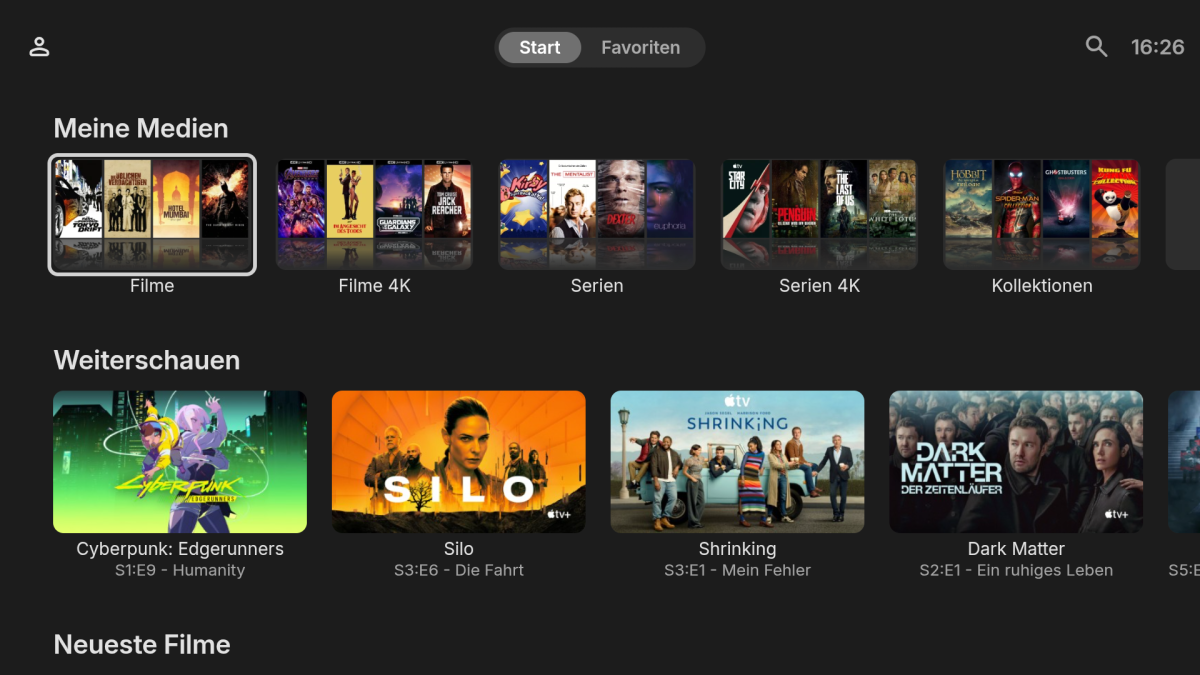


-
Atrium — a native tvOS app for your Emby server
vdatanet replied to vdatanet's topic in Third Party Apps
You haven't missed it — the app doesn't read any of that yet. And yes, I think it's doable. I went and looked before answering. The new home screen lives on the server now: each row is a section, and a spotlight is a section shown big at the top. The useful part for an app like this one is that the server works out what goes in each section and hands it over ready, so the app doesn't have to understand how the section was built. That's what makes it doable rather than a rewrite. The spotlight is the easier half, because Atrium already has one: the billboard at the top of the home screen. Your spotlight could be one more thing it can show, next to the choices it already has in Settings. Your own rows are the bigger half. Getting them from the server is the easy part; the work is fitting the built-in ones (Continue Watching, Latest, My Media and so on) onto the rows the app draws itself, and deciding what to do with the rest. And one thing I found on the way that you should know: the app follows the order of your home screen rows, but it reads that order from where Emby kept it before this new editor. If you reorder your rows in the new one, the app won't follow. On the server I test against the two orders still agree, so nothing looks wrong yet, but it will the first time you move a row. So it's on the list, measured, and no date from me. - Today
-
Hey Soderlund, awesome Plugin, thanks a lot for developing this! Lots of people have been waiting for better home screen functionalities, and now with the new emby features and this plugin it's finally coming together. Personally, I want to use the plugin mainly to create two "trending now" rows for movies and for series. It should be based on the trakt "trending now" lists. It works pretty well already out of the box, only getting the sorting of the imported list is a bit tricky. For movies, it works by using the "top lists" feature as a work around. For series however, there is no top lists feature, so right now I just sort by date-added. It's not a big deal, but getting the real sorting of the original lists from trakt, mdblist etc. would be awesome. Any plans on adding this?
-

NVIDIA Shield screensaver appears while paused, then playback resumes behind it
JoshuaAJones replied to Dr. Technolust's topic in Android
That feature is still active under personal Preferences/Playback. Currently, I just turned Screensaver off. I have the Shield turn off after 20 minutes with Energy Saver. When I turn everything back on, Emby is still paused in the same spot. -
NVIDIA Shield screensaver appears while paused, then playback resumes behind it
dbott replied to Dr. Technolust's topic in Android
Yeah, sure. However sometimes you pause to go do something quickly, only for it to not be so quickly and it starts to play in the background. It still is a bug that should be resolved. (I also do miss the rewind like 5 to 10 seconds on restart.) I have told Luke about a few other things I would love to have back in this version...So far, still waiting. -
Hi. Being able to select the title would double the amount of remote clicks necessary to navigate vertically so we want to avoid that in TV apps. If the row is made up of a playlist you will get an item at the end to open the playlist. We'll look to expand that to some of the dynamic rows where possible.
-
Oooh, think you might have pissed it off running it so much haha. And apologies, been away for work a lot recently. I'll see if I can import cookies to use an account but there is a chance that will get burnt if it's hitting so hard.
-
and by future he means at some unknown point in the very distant futures
-
@Luke@softworkz is there something I missed about the “resume” feature for Webstreams? It still does not work here. Is that still on your todo or should it already work and is related to my setup?
-
NVIDIA Shield screensaver appears while paused, then playback resumes behind it
JoshuaAJones replied to Dr. Technolust's topic in Android
Still... wouldn't this be the easiest solution to the problem? Screensaver start = Stop video If I've walked away for 5 minutes, it's OK to stop it. I can hit Resume, when I get back. -
I upgraded my Emby server to 4.10, which comes with allot a new cool features THANK YOU! ON the server I was able to create some new Home screen layouts. based on Dynamic media, and Single collections. One of the collections I created was for all kids movies I have. On the web I can see the Kids section, and it lets me scroll all the moves, or I can select the Title (Kids ) and it bring it up to a new screen where I am able to view all the movies in that collection. However on the Emby Roku app, The kids home section only scrolls to a max of 24 movies. The roku app even shows at the top 1of 24. It seems like 24 is is max you can view. The emby app on Roku also does ot allow you to click on the Title to take you to a screen to see all movies. Not sure if there a new update for Roku coming to allow some of the features to work correctly.
-

Plugin: EmbyCredits, detect end credits and add auto skip.
yocker replied to yocker's topic in Plugins
Will be in the next one after that. This was just a small quick fix to the black frame detection fallback. -

Plugin: EmbyCredits, detect end credits and add auto skip.
fbourg replied to yocker's topic in Plugins
2.8.9.3 is new version ? -

[Release] Emby Theater 4.0.0 for Linux & Raspberry Pi (Tauri rewrite)
hatharry posted a topic in Linux & Raspberry Pi
Hi all, I've been building a Emby Theater client for Linux, and v4.0.0 is now available. It's a ground-up rewrite of the Theater lineage (the old Electron app ended at 3.0.21) — this one is built on Tauri + WebKitGTK, so there's no bundled Chromium: ~2.6 MB packages and a fraction of the memory footprint. GitHub: https://github.com/hatharry/emby-theater-tauri Release: https://github.com/hatharry/emby-theater-tauri/releases/tag/4.0.0 What you get - The real Emby Theater TV web client in a native window (TV layout, remote friendly), plus a desktop layout - Hardware-accelerated playback through GStreamer (VA-API/NVDEC on x86, V4L2 MPP on Pi/RK platforms), with per-device profiles tuned for the Raspberry Pi - HDMI-CEC support: control playback with your TV remote (volume, navigation, power commands) - Wake-on-LAN and automatic server discovery on the login screen - Shutdown/restart of the host from the in-app back menu Platforms & packages - amd64: .deb, .rpm, and a self-contained .AppImage (90 MB, bundles GStreamer — runs on any x86_64 distro) - arm64: .deb (Raspberry Pi OS 64-bit, other aarch64) - armhf: .deb (Raspberry Pi OS 32-bit) Raspberry Pi notes Tested on a Pi 4 (1 GB+) running Raspberry Pi OS (bookworm/trixie, labwc or GNOME). H.264 decodes in hardware; HEVC falls back to H.264 (the Pi 4 has no HEVC block). Subtitles (embedded and external) render through the client's own parsers. Install (Debian/Ubuntu/Raspberry Pi OS): sudo apt install ./emby-theater_4.0.0_amd64.deb # pick your arch Run: emby-theater Feedback welcome — especially from Pi 5 / RK3588 users on how the device profiles behave. -

Extremely Faint Item Background Image on Home and Detail pages on v2.3.6
visproduction replied to Monkey1971's topic in Samsung Smart TV
A darkened mask over the background image is shown in one and not the other. It would seem that style display is handled differently between the two setups. This can vary per TV app, possibly even per TV. Web browser Emby can be adjusted to remove masks, using a custom css. All other TV apps versions have style built inside the code and in my understanding, cannot be adjusted by users. The dark mask style was popular to allow any text and buttons to be easily read. This was probably a requested feature at some point. I like having full color in the background, but I also don't mind having food mixed on my dinner plate. Ha! You can control masks with the web app but there are many built in for the base Emby styles and removing them is complex. With Web Emby, you may want to look into the custom .css channel for user created themes that don't have the darken masks. https://emby.media/community/forum/144-web-app-css/ WIth TV Apps, you have to wait for updates to see if it changes or an option to remove masks is offered. -
Newbie, so going to make basic mistakes. I was looking to sign into the Server, but got confused that the server download opens a web page, not an application. So once I clicked on that I was able to access.
-
Hi. Exactly what version?