All Activity
- Past hour
-
 niklasFMV joined the community
 -

media deletions are not logged in admin Dashboard > Activity
Luke replied to justinrh's topic in General/Windows
Once you manually merge or split something then you will have to manually manage that item forever in terms of merging and splitting. You should be able to get to everything unmerged in the metadata manager. From there you can delete the specific version that you wish. -
 Mox332 joined the community
 -

media deletions are not logged in admin Dashboard > Activity
pwhodges replied to justinrh's topic in General/Windows
You can split the versions apart, then delete the one you wish to. Paul -
 NBespecial joined the community
 -

TV Show Status — TMDB-powered Returning/Ended/Cancelled badges for series
Blueskies278 replied to Blueskies278's topic in Plugins
Hi sh0rty can you please this new updated beta. Thanks Update: broader compatibility + more robust status updates Two under-the-hood improvements in this build: Wider Emby Server version compatibility. The previous build was accidentally compiled against an exact Emby Server version, so it would fail to load entirely on any other version. That's now fixed - the plugin should load across a much broader range of Emby Server versions instead of just one specific release. Status updates now use Emby's own metadata provider system. Previously, the plugin used a background timer plus a reactive "fix it if something else overwrites it" approach. It now implements a proper metadata provider that runs as part of Emby's own refresh pipeline (the same mechanism TMDB/TVDB providers use) - so hitting "Identify" or a scheduled library scan now applies the status correctly the first time, in the same pass as everything else, rather than needing a follow-up correction afterward. This should make status updates more reliable and consistent, especially right after a metadata refresh. As always, happy to hear if anyone hits issues on their specific Emby Server version - that's genuinely useful info for a wider beta. EmbyTVShowStatus.dll -
Hi there, let's look at an example. Please attach the information requested in how to report a media playback issue. Thanks!
-
 pholover joined the community
 -
 HEROJOK joined the community
 -
 AnaLoaeza9096 joined the community
 -
 Mayarrr joined the community
 -
 escamezagustin joined the community
 -
Yes this is what it looks like to me. Solution is to fix the language codes in the file. Portuguese Brazil would be pob or pt-br. The language code you have in the file is probably just regular Portuguese pt or por.
-
 Sir_Loin33 joined the community
 -
Hi, yes we can add a toggle to control the grouping.
-
hi, can you please show a screenshot of the message that you get? Thanks.
-
Allow playback of highlighted item, when in season detail page.
Luke replied to Kyouma's topic in Apple TV
HI, yes we are looking into it. Thanks. -
@LukeI have noticed occasional crashes when playing high bit rate content, such as 4k HDR video. Usually only happens when you start the content, but once it is playing it doesn't crash
-
Unfortunately, it didn’t went well by( one of the reasons is very bad customer service, and I’m saying this is not based only on today’s conversation nothing but trouble there…) I have my vpn and static ip by Nordvpn. The told me that they are not going to provide gateway, it supposed to be generated automatically by dsm. I don’t know much about it, but I think something is not right here. Anyway…. I was wondering if there is maybe a way to set up EMBY without messing around with DSM? Because I’ve noticed that every time Emby restarts there is a different IP number for wan access.
-
This is the second time I'm scratching my head on your issues today. Have you tried removing that Audio Books library and rebuild it from scratch? If same occurs, post server log afterwards. How to Report a Problem
-

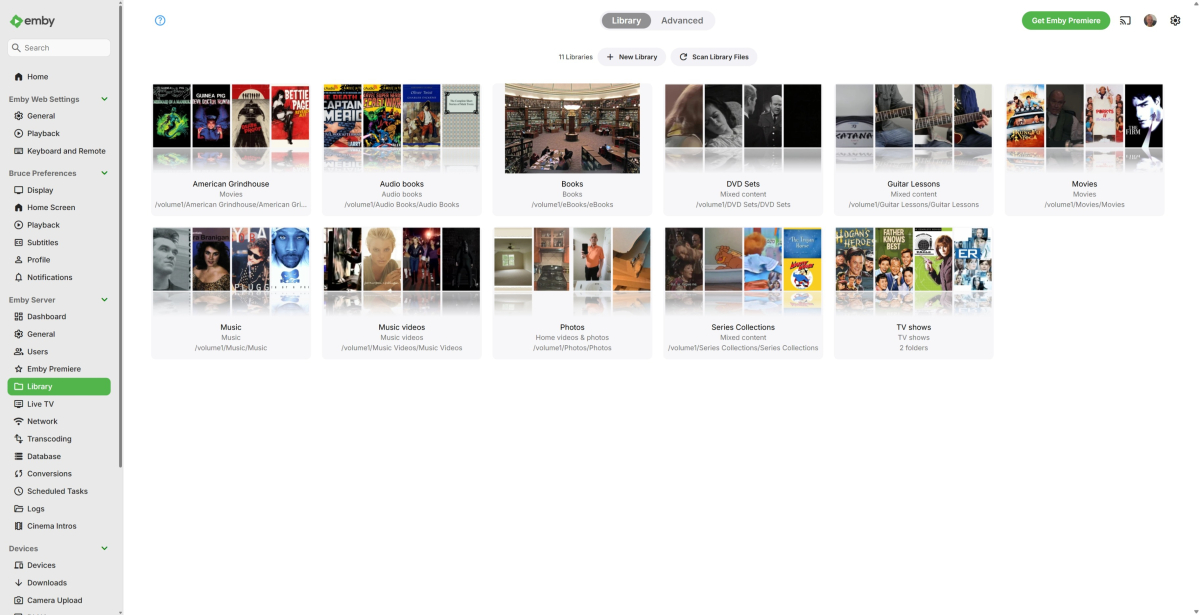
Library picking up content in another source
BruceCPippin replied to BruceCPippin's topic in Synology
-
Hi, I don't see anything obvious here. Are you able to get to the plugin catalog to remove plugins? I would try removing these plugins: 2026-07-04 07:20:43.704 Info App: Loading ChapterApi, Version=1.4.0.0, Culture=neutral, PublicKeyToken=null from /share/CACHEDEV3_DATA/.qpkg/EmbyServer/programdata/plugins/ChapterApi.dll 2026-07-04 07:20:43.705 Info App: Loading MovieThemeSongs, Version=1.9.6.2, Culture=neutral, PublicKeyToken=null from /share/CACHEDEV3_DATA/.qpkg/EmbyServer/programdata/plugins/moviethemesongs.dll 2026-07-04 07:20:43.705 Info App: Loading ThemeSongs, Version=1.9.6.2, Culture=neutral, PublicKeyToken=null from /share/CACHEDEV3_DATA/.qpkg/EmbyServer/programdata/plugins/themesongs.dll 2026-07-04 07:20:43.705 Info App: Loading ClassificationMapper, Version=1.0.0.4, Culture=neutral, PublicKeyToken=null from /share/CACHEDEV3_DATA/.qpkg/EmbyServer/programdata/plugins/ClassificationMapper.dll Then restart the server and see how things compare.
-
Something doesn't sound right there. Could you share a screenshot of your server Settings>Library tab in the sidebar, where all your libraries and their paths are listed?
-
Really? User marked as solved.
-

[Plugin] EmbyWeeklyDigest — automatic weekly "what's new" popup
sftech13 replied to sftech13's topic in Plugins
yes, currently a user will see items from libraries they don't have access to. I can work on some changes for this but will take some time as I have a few other priorities rite now. -

Optimising Screen Updates and User Experience in the GenericEdit Framework
softworkz replied to ginjaninja's topic in Developer API
I still don't understand what you mean by "you need to clear the field" - which "field" do you mean? 20260706-1721-46.7512967.mp4 -

Issue with playing music with app when connected through Tailscale
Gjonesesq replied to Gjonesesq's topic in Apple iOS / macOS
embyserver.txt -
HI, yes we are still looking at this. Thanks.
- Today
-
Cannot install Emby for Android TV app on Nvidia Shield
BruceCPippin replied to BruceCPippin's topic in Android TV / Fire TV
Step 3 did the trick. Although "I" had never used external storage, apparently the previous user of the SHIELD did. Even though no device was listed, it still allowed me to "forget" it. This pointed installs and updates back at internal storage. Problem solved. Thanks! -

Cannot install Emby for Android TV app on Nvidia Shield
GrimReaper replied to BruceCPippin's topic in Android TV / Fire TV
Here's Gemini's take on it: That is a super frustrating glitch, but it's actually a known Android TV bug where the system gets confused about its own directory paths. If you've never connected an external drive, the Play Store is likely getting tripped up by a corrupt "Media Storage" database or a temporary glitch in the Google Play backend cache. Let's walk through how to clear this out and force the Shield to look back at its built-in internal storage. Step 1: Clear the System Media Database This is usually the culprit. Android uses a background system app called "Media Storage" to index where files live. If it gets corrupted, it can report that your internal storage is missing or external. Go to Settings (the gear icon on your home screen). Select Apps ➔ See all apps. Scroll all the way to the bottom and click Show system apps. Look for Media Storage (you may have to scroll a bit as it's alphabetical). Click it, select Clear Data, and confirm. Do the exact same thing for Clear Cache. Step 2: Flush the Google Play Store Cache Next, we need to wipe the memory of the Play Store app itself so it stops looking for a non-existent drive. While still under Show system apps (or back out to See all apps), find the Google Play Store. Click it, then select Clear Data and Clear Cache. Go back one step, find Google Play Services, and do the exact same thing (Clear Data / Clear Cache). Step 3: Check for "Ghost" Removable Storage Even though you haven't connected a drive, occasionally a connected accessory (like a USB keyboard, a controller with a headphone jack, or a specific remote dongle) can register incorrectly as a storage device. Go to Settings ➔ Device Preferences ➔ Storage. Look at the list. If you see anything listed under "Removable Storage" besides your "Internal Shared Storage," click on it and select Forget this storage or Eject. Step 4: The Hard Reboot Once you have cleared those caches, do not just tap the power button to sleep the Shield. Go to Settings ➔ Device Preferences ➔ Restart. Alternatively, pull the physical power plug from the back of the Shield, wait 30 seconds, and plug it back in. Once it boots back up, give it a minute or two to rebuild its media database, then open up the Play Store and try downloading an app. It should default right back to your internal drive.