All Activity
- Past hour
-
 Tati4442 joined the community
-
 Shuqh837 joined the community
-
 ommijakk joined the community
-
 Newberry96 joined the community
-
 AMansour joined the community
-
 sigma121234 joined the community
-
 Ha1234 joined the community
-
 BossClod joined the community
-
 0889 joined the community
-
 Tobbelito joined the community
-
why isnt this available on the plugin catalogue? for us noobies this would be a perfect companion app within emby instead of tinkering around to get it to work
-
Hi, thanks for the plugin, it's working well. Quick question about how two settings interact: - Only Scan Unrated Items: ticked - Enable Tiered Rescanning: ticked (Recent Release Age 30 days) If an item already has a community rating, does "Only Scan Unrated Items" stop it from being rescanned, even when it's a recent release that tiered rescanning would normally re-check? Or does tiered rescanning take priority for recent releases? In other words, should I untick "Only Scan Unrated Items" if I want ratings on new releases to keep updating while they settle? Thanks!
-

Issues with .srt subtitle recognition
manuelvejarano replied to manuelvejarano's topic in General/Windows
Hi, Luke: More context: this only happens in the Emby app for Android TV. There’s no issue on my Android tablet. I tried what you suggested, but it didn’t work. Just to clarify, the .srt file was located right next to the video in the same folder (video.mkv, video.srt)—it wasn’t being loaded from elsewhere. As a final test, I removed the files from Emby, and they no longer appeared in the app. I then moved the files into their own separate folder (previously, they were mixed in with other files) and placed that folder where Emby looks for videos. They reappeared in Emby, but the problem persists: the subtitle is identified as Spanish in the video details, yet when I start playback, nothing loads until I manually select the French subtitle, just like in the photo I sent earlier. -
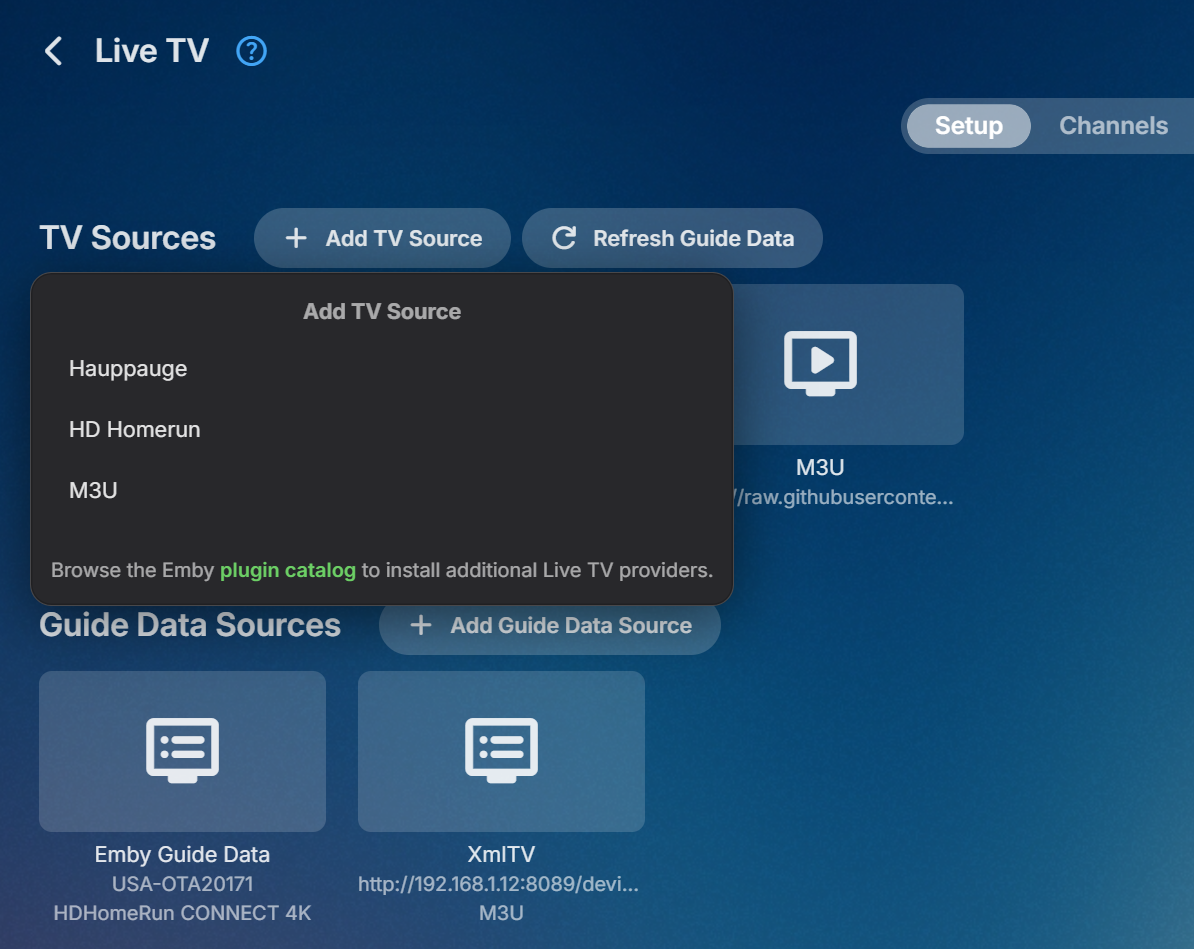
Actually, I think I found it. Looks like it's in the guide data source.
- Today
-
I think I found another good m3u generator (GitHub - BuddyChewChew/app-m3u-generator: Pluto, Samsung, Plex, Roku, Tubi Channels ( With EPG ) · GitHub) for some of these sources, but now I can't find this setting. Did the setting move? I thought it was here, but now I don't see it.
-
As I wrote earlier, unfortunately, I am not able to do that. I am sorry about that.
-

A lot of videos are stopping only 10 seconds into playback
Napsterbater replied to dimitrik's topic in LG Smart TV
I'm having this issue with rather low bit rate hevc files with AAC audio. These are simple 845 x 626 resolution files at a 510 kbps bitrate. I have to use playback correction on each episode. At which point it trans codes it into h264, with the same audio, and then it plays fine. I went to playback settings in the Emby player to force transcoding for all HEVC videos, but that's not an option, plenty of other options there but not HEVC. Can that be added as an option? Might be useful even after this exact issue is fixed in case some other one comes up. -
Freut mich, dass es geklappt hat! Gern geschehen.
-
Mornin' SoliFlix, mit deiner Anleitung hat's geklappt - vielen herzlichen Dank!
-

Arloes: a TRUE modern Android TV client for Emby
kalg replied to Pejamas's topic in Third Party Apps
Good morning. started trying this look awesome very good work one thing that i would like you to address is the virtualTV plugin dont work at all in this any chance you could fix that then this will be my daily driver for emby -
It's not a plugin, it's a standalone software, which you can install in a docker. And yes, it will integrate with Radarr and Sonarr to monitor for new downloads and automatically download trailers. in fact you have a lot more options to manage the trailers and quality needed. Downside is that Emby requires the trailers to be stored with the media, which means if you are spinning down drives (like in Unraid) then drives will spin up to play the trailer. For that reason is why I made the plugin to edit the YouTube trailer links, then you avoid drive spin ups, and well you load the trailer faster. I wish there was a way to store trailers not with the media like with metadata but right that isn't an option, not unless you do some creative/stupid folder mapping.
-
-
Hello this bug is so annoying, i cannot use Emby anymore if it not resolved. Any plan for a new LG release? Thanks
-
 just_random_guy changed their profile photo
-
New Emby Server 4.10.2.0 Released
just_random_guy replied to Emby Releases's topic in General/Windows
Hi, I recently noticed some strange behavior in the music library. I believe this may have been present in an earlier version as well, so it is not necessarily an issue specific to the latest version. When I go to "Songs" under the music section and apply filters—for instance, by checking the "Favorites" box—the filters are applied visually, and only my marked favorites are displayed. However, when I then select "Play" or "Shuffle," the player includes all sorts of songs that happen to fall within the filter criteria, effectively ignoring the "Favorites" selection. It seems to be a problem with the Android app. -

Takes 4 minutes to skip forward 30 minutes in a video.
softworkz replied to turleym's topic in General/Windows
At least half of that AI response is not applicable to our playback.or can be quickly ruled out from viewing the log file. -
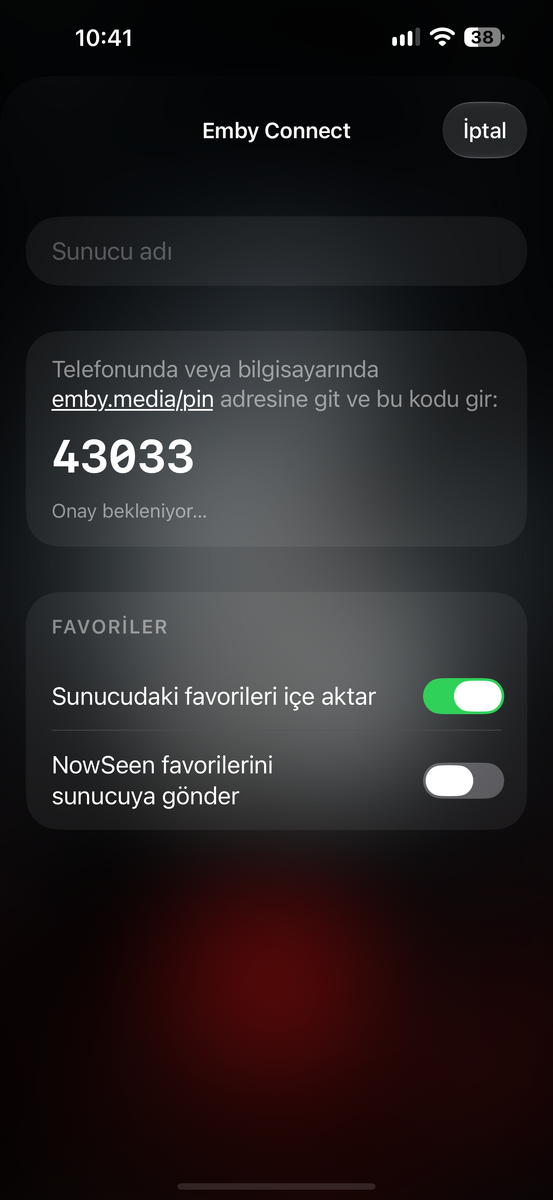
Hello, where do I enter the NowSeen code?
-
Hi, what exactly makes you think nothing happened?
-
Some might just be extracting the video URL’s and playing with their own player, but that is violating YouTube terms of service.
-
How do 3rd party apps implement YouTube trailers without subtitle etc?
-
@diaz1510It's this I guess. nandyalu/trailarr: Trailarr is a self-hosted app to download and manage trailers for your media libraries.
-
I’m trying to login to my Emby account but i couldn’t!! I clicked on forgot password but nothing happened!! I have the server and the Port number , username & password but it’s still not working! Tried to reset the password but nothing happened !!
-
We are continuing to reevaluate this. It seems to be a moving target. My guess is that even though Google still allows embedding of their content, I don’t think they’re as happy about it as they might have been in the past. It wouldn’t surprise me if at some point down the road they stop allowing it.
-
Thanks! That makes sense.
-
Is that GitHub URL still valid?
-

NVidia Shield TV with LG OLED, Dolby Vision Prompt Keeps Popping Up
CLLDR replied to planedrop's topic in Android TV / Fire TV
I came across this thread while troubleshooting the same issue with my NVIDIA Shield Pro and LG OLED, and although I didn’t find a solution here, it helped me think through what might be happening. My setup: NVIDIA Shield Pro Onkyo AV receiver LG C2 OLED Shield connected to Onkyo, with Onkyo HDMI output connected to the TV. Playback of file with Dolby Vision and TrueHD 7.1 Atmos I have the Shield connected directly to the Onkyo receiver and the receiver connected to the TV (not using eARC). The issue was that the Dolby Vision notification would randomly keep appearing in the top-right corner of the TV during playback. The picture itself never flickered, dropped out or went black. The TV remained in Dolby Vision picture mode, and playback statistics showed no change. I tried various things, including changing the Shield’s Dolby Audio Processing and Low Latency Dolby Vision settings, clearing the cache and investigating the HDMI connection none of this provided a permanent solution. I may have finally found something that works. On the LG TV, I changed: Settings → Sound → Advanced Settings → Select HDMI Input Audio Format I selected the HDMI input connected to my Onkyo receiver and changed it from Bitstream to PCM. The result: Dolby Vision continues working. The Onkyo still reports Dolby TrueHD 7.1 Atmos. The Onkyo continues decoding and playing Atmos through my speakers. The repeated Dolby Vision notification stops appearing. I also tested switching the setting back to Bitstream, and the notification returned. Switching back to PCM stopped it again. My theory is that the Onkyo is passing audio signalling through its HDMI output to the TV, even though I have no need for the TV to receive a bitstream audio signal. Changing the LG’s HDMI input audio format to PCM appears to avoid whatever interaction is causing the repeated Dolby Vision notifications. I haven’t established the exact technical cause which may still be an LG specific issue, but the PCM/Bitstream comparison has been reproducible in my setup. Hopefully this helps someone else experiencing the same issue! I’d be interested to hear whether anyone using a similar setup can reproduce this fix.