All Activity
- Past hour
-
 c.kaileah.m joined the community
 -

[Beta / feedback wanted] System Account Login plugin - log in with Windows/Linux OS accounts
Oratorian posted a topic in Plugins
Hi all, I've built an Emby Server authentication plugin and I'm looking for a few people to test it and give feedback before I clean it up for wider release. What it does It lets users sign in to Emby with their operating-system account credentials instead of an Emby-native password: Windows - validates against the local account database via LogonUser (optional AD domain validation too). Linux - validates via PAM. One DLL handles both; it detects the OS at runtime. Features Auto-creates a matching Emby user on first successful login (optional). Group-based access control, configured from the dashboard: Allowed groups (a user must be in one of these OS groups to log in) Admin groups (members become Emby admins). Password is never written to disk, logs, or the command line. Its own settings page + menu entry in the dashboard. Status — what I've actually tested Confirmed working on my own machines: Windows 11, Emby 4.9.5.0 - local account login and group-to-admin mapping working (correctly picks up localized group names, e.g. "Administratoren" on a German install). Linux - login via the PAM helper, with access-group and admin-group mapping working. It's functional, but it's had a lot of iteration and I'd like more eyes and environments on it before calling it done. Supported platforms (important) Because it authenticates against the host OS accounts, it only works where Emby runs directly on the OS and you have host access: Windows (bare metal / VM) Linux (bare metal / VM) Docker / containers - the container has its own empty account database, not the host's Synology / QNAP / NAS packages - no root, compiler, or PAM access If you're on Docker or a NAS, this isn't the right tool (LDAP/OIDC plugins are), but I'd still value your thoughts. The Linux catch (please read before testing on Linux) On Linux, an unprivileged process can't verify other users' passwords via PAM (unix_chkpwd refuses cross-user checks unless real-uid is 0). Emby runs unprivileged, so the plugin shells out to a tiny setuid-root helper (a ~150-line C file) that does nothing but the PAM check. You compile and install it yourself — full instructions are in the attached zip (INSTALL.md). On Windows none of this applies; the DLL is all you need. Install (Windows — simplest) Drop EmbySystemLogin.dll (attached) into your plugins folder (...\Emby-Server\programdata\plugins\). Restart Emby. Dashboard → System Account Login settings → enable it, set your Allowed/Admin groups. Single self-contained DLL, no other files needed on Windows. What I'd love feedback on Does it load and work on your Emby version / OS? Group detection — do your OS group names show up and map the way you expect? (Enable it, try a login, and the server log prints the detected groups: [SystemAccountLogin] 'user' groups=[...] | allowedGroups=[...] adminGroups=[...].) The security model for the Linux helper — anything you'd do differently? Anything confusing in the setup. Security note The Linux helper runs as root, so it's deliberately tiny and auditable: it drops supplementary groups, scrubs its environment before calling PAM, and refuses to authenticate system/low-uid accounts. Source is included in the zip please do look it over. Thanks in advance to anyone who kicks the tyres. Happy to answer questions and share the full source. Attachments EmbySystemLogin.dll - the plugin (Windows: just drop it in; Linux: also needs the helper below) emby-pam-helper-src.zip - Linux setuid helper source + Makefile + INSTALL.md (compile on your Linux box) -
 BAYAN.HR joined the community
 -
 rauldelfin joined the community
 -
 As12hk joined the community
 -
 joker12345 joined the community
 -
 SShaikhaa joined the community
 -
 Karliux0 joined the community
 -
 esamapolas joined the community
 -
 Julian.G joined the community
 -
 Middyc joined the community
 -

Optimising Screen Updates and User Experience in the GenericEdit Framework
softworkz replied to ginjaninja's topic in Developer API
You are welcome but I won't even read this again. What you are describing sounds like a bug, possibly on our side. Can you share a minimal repro of this issue? (public or privately, just as you prefer) -

media deletions are not logged in admin Dashboard > Activity
justinrh replied to justinrh's topic in General/Windows
Got that. So something like this is not an error? 2026-07-01 07:30:50.864 Info App: Removing item from database, Type: Movie, Name: Law Abiding Citizen, Path: E:\media\Recorded TV\Law Abiding Citizen (2009)\Law Abiding Citizen (2009)-MKV.mkv, Id: 1703723 2026-07-01 07:30:50.864 Info App: Deleting directory E:\media\Recorded TV\Law Abiding Citizen (2009) ... 2026-07-01 07:30:51.186 Debug ImageProcessor: Getting image size for item Movie E:\media\Recorded TV\Law Abiding Citizen (2009)\poster.jpg 2026-07-01 07:30:51.186 Debug ItemsService-0HNMF43P33BJC:00000083: http/1.1 Response 200 to 127.0.0.1. Time: 2ms. GET http://localhost:8096/emby/Users/84744d332e034d1c853fdbc1c422c39f/Items?IncludeItemTypes=Movie&Fields=BasicSyncInfo,CanDelete,CanDownload,PrimaryImageAspectRatio,ProductionYear,Status,EndDate&StartIndex=50&SortBy=SortName&SortOrder=Ascending&ParentId=4&EnableImageTypes=Primary,Backdrop,Thumb&ImageTypeLimit=1&Recursive=true&Limit=50&EnableTotalRecordCount=false&X-Emby-Client=Emby service.X-Emby-Device-Name=Firefox Windows&X-Emby-Device-Id=b5e47c03-ff4e-487d-a285-132c43ddf86c&X-Emby-Client-Version=4.9.5.0&X-Emby-Token=x_secret2_x&X-Emby-Language=en-us. 2026-07-01 07:30:51.187 Error ImageProcessor: Error getting size from libvips for E:\media\Recorded TV\Law Abiding Citizen (2009)\poster.jpg *** Error Report *** ... Yeah, okay, maybe Emby is trying to re-read the meta data files but they are already gone. So if you fix the root issue then these should no longer show, right? - Today
-

Carplay - There was a problem loading this content
sjkiss replied to DonMacaroni's topic in Apple iOS / macOS
I miss Emby, but this was so fatal that I shifted over to Plex and have not looked back. -
HI there, can you please provide a specific example? What exactly is the problem? How to Report a Problem Thanks !
-

media deletions are not logged in admin Dashboard > Activity
Luke replied to justinrh's topic in General/Windows
There's no delete error. The directory is gone but the item is still in the database. That's causing the UI to want to display the image, which isn't there anymore. -
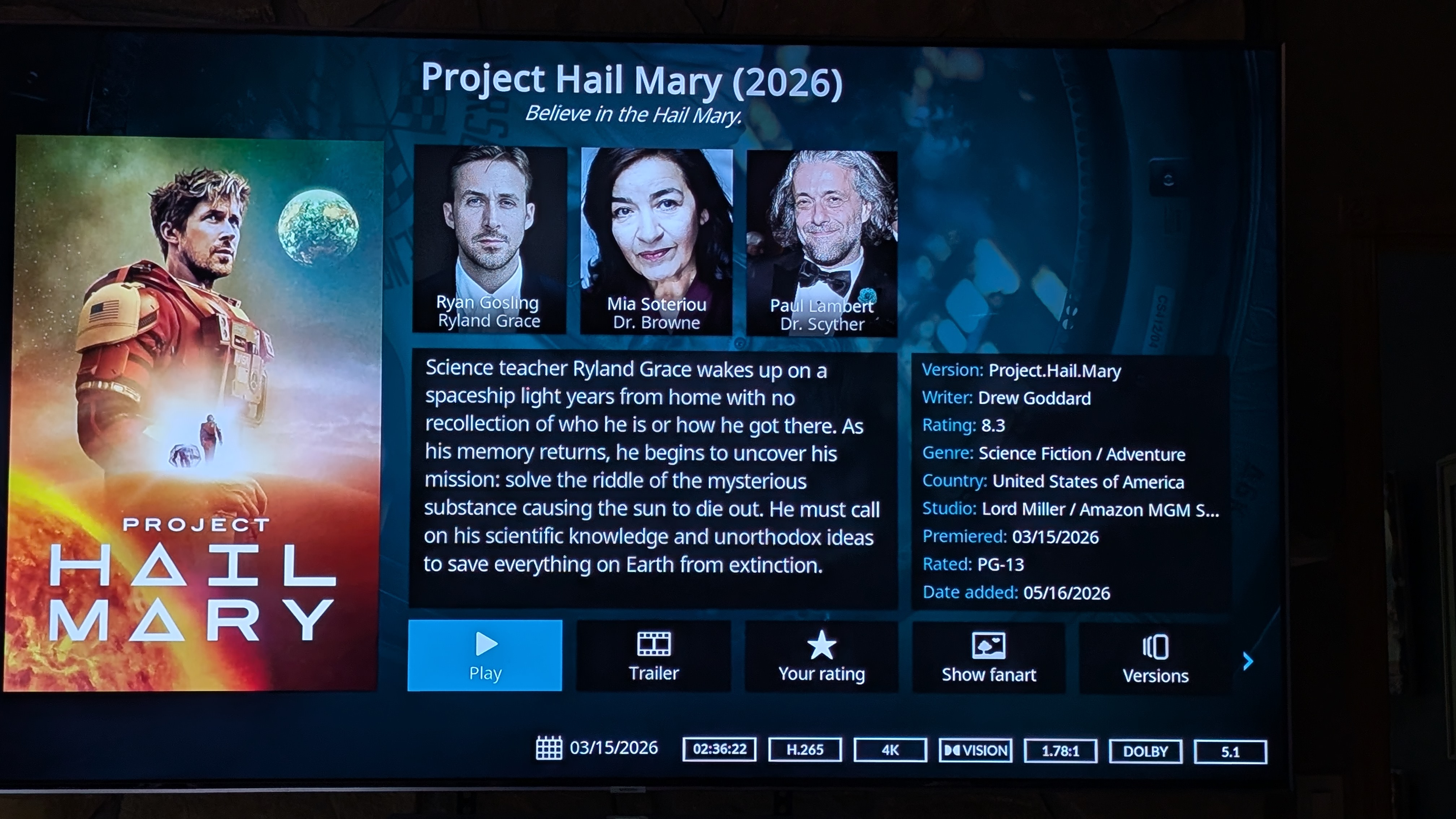
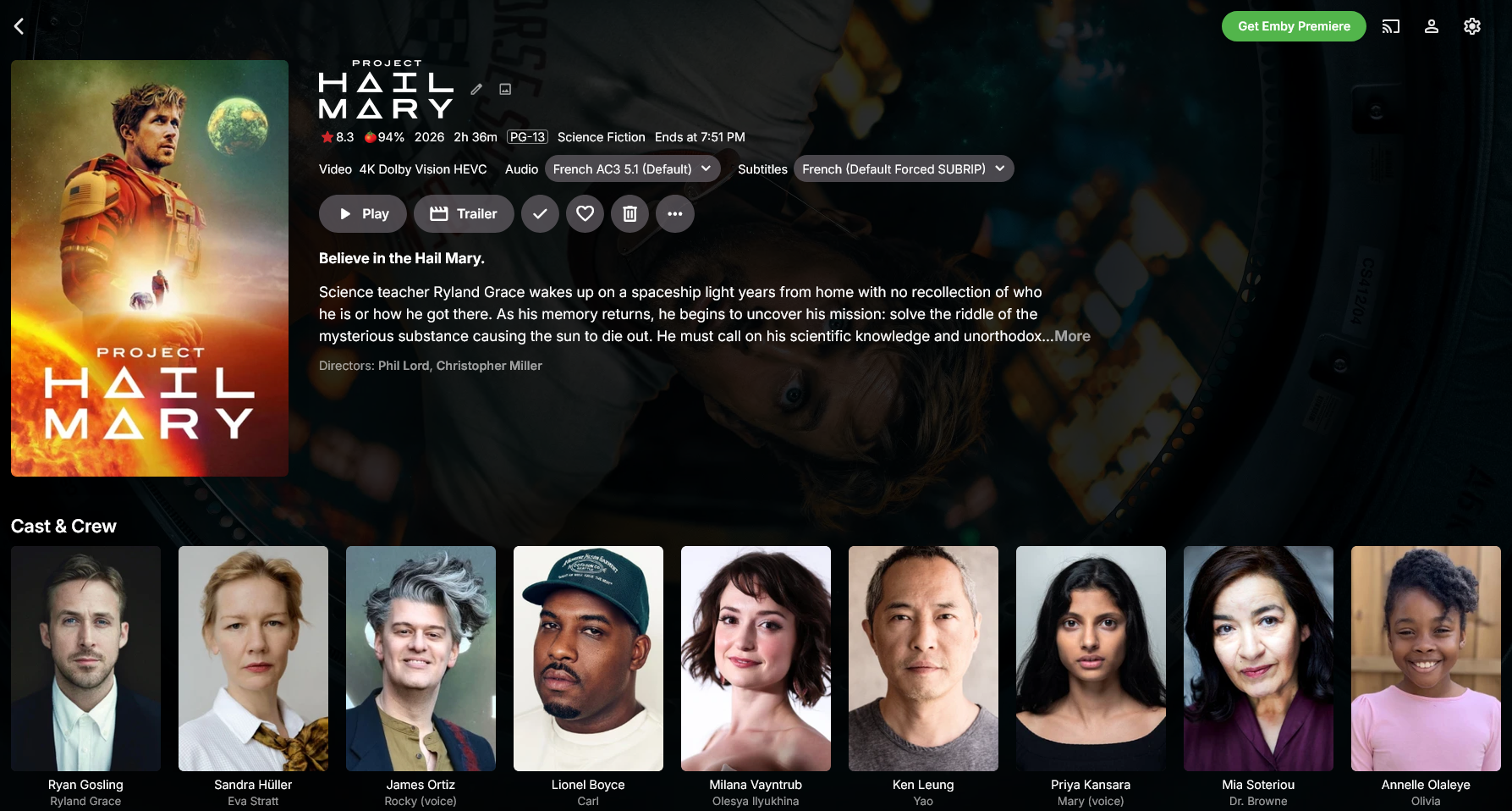
Howdy, folks. I traded up to a UGREEN NAS and successfully installed Emby with docker. Everything is working fine... but... for some reason full metadata is not synchronized to my client, an Nvidia Shield running Kodi with the Emby plugins both on server and client. However, all information is in the library, so I'm rather puzzled about what's going on here. Can anyone help? Here ares creen shot sof the server (on port 8096) and my TV running the Shield.
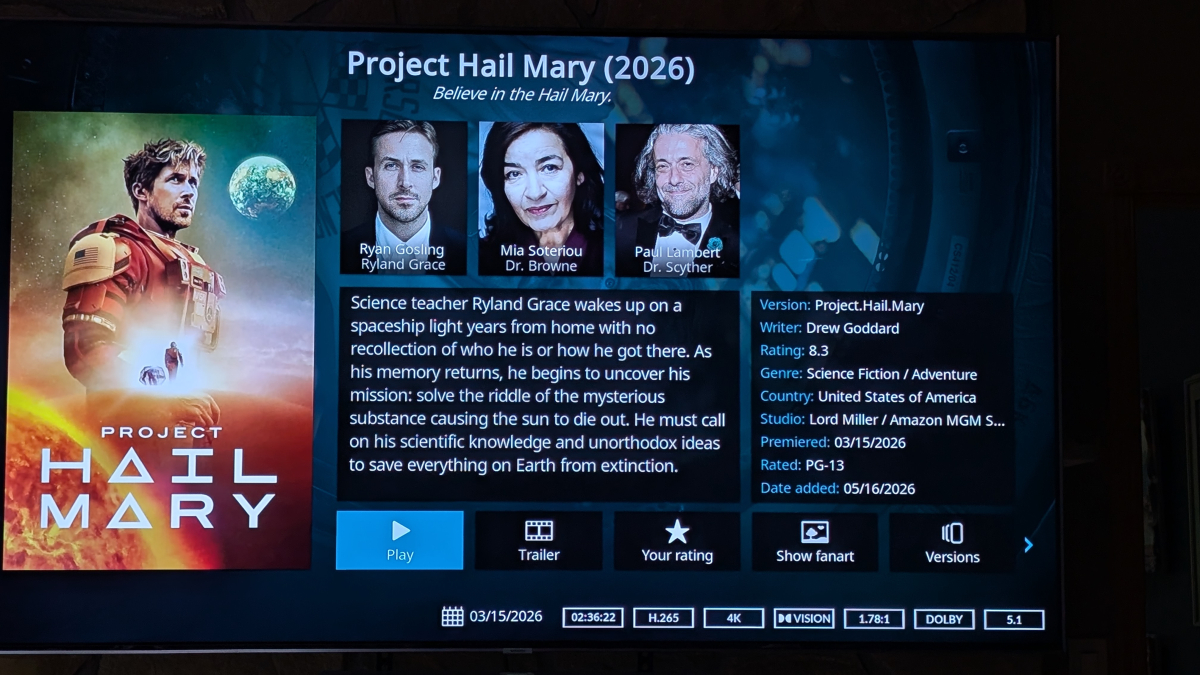
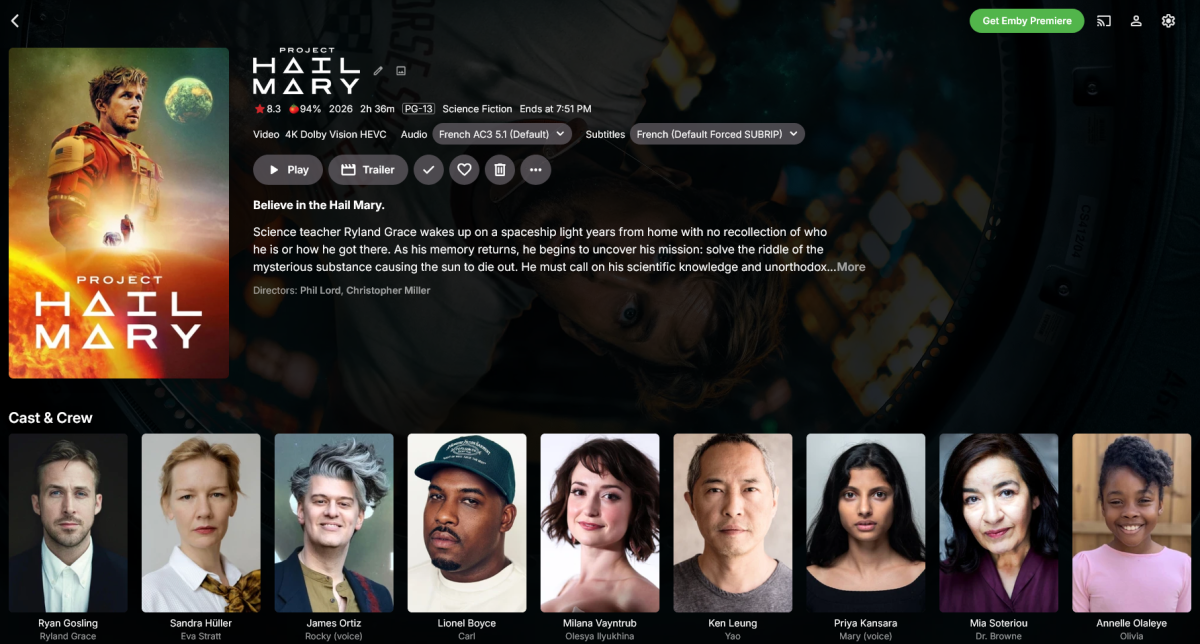
-
media deletions are not logged in admin Dashboard > Activity
justinrh replied to justinrh's topic in General/Windows
Cool. Is that only why the item card hangs around, or does that also explain the delete errors? -
If any one want to help they can provide me with some icons for music formats that looks like the ones already in the plugin. That would be a good start.
-
Atm. the plugin does not work with music as that requires looking up different things than videos. You are not stupid! The plugin does as just said not work with music atm. Basically i use Tidal/Spotify my self and thought 99% of people would do the same so never felt the need to add music support. I will look into it but no ETA.
-
media deletions are not logged in admin Dashboard > Activity
Luke replied to justinrh's topic in General/Windows
OK I see what is happening. When you delete the multi-version it removes one from the database and deletes the whole folder. The other version is still in the database. It gets cleaned up on the next library scan. So they either need to both be deleted immediately, or not remove the whole folder, and then ultimately we need to let you pick which ones to delete. -
Allow playback of highlighted item, when in season detail page.
Luke replied to Kyouma's topic in Apple TV
@SamES -
Hello, when you are inside a season and press play on the remote, while an item is highlighted, it will always ignore that and play the first item instead. Here is a recording of what I mean: 20260701_214001.mp4 It would be great if we could play the actual highlighted item.
-
Emby Watch Party - Synchronized Viewing for Friends & Family
Oratorian replied to Oratorian's topic in Tools and Utilities
Security notice — Emby Watch Party 1.6.6 **Emby Watch Party `1.6.7` is live** Security-only patch for [CVE-2026-48804] Changed: python-socketio is bumped from the pinned `5.14.0` to `>=5.16.2,<6.0`, which pulls in the patched upstream. No other changes -- this is a safe drop-in for anyone on `:latest` / `:1.6.6`. **Get it:** docker pull ghcr.io/oratorian/emby-watchparty:latest or pin explicitly with :1.6.7 First patch under the "security-only maintenance through 2026-12-31" policy for the 1.x line. Source: <https://github.com/Oratorian/emby-watchparty> Changelog: <https://github.com/Oratorian/emby-watchparty/blob/main/CHANGELOG.md> Sorry again for the friction. Thanks for the patience. -

Pixelsmash Vulnerability in ffmpeg (CVE-2026-8461) - Is Emby vulnerable?
RanmaCanada replied to CHBMB's topic in General/Windows
Yeah and I'm sure the CEO's of those companies answer questions directly on their forums, RIGHT? Comparing Emby to multi billion or trillion dollar companies is just the epitime of ignorance. Thanks for continuing to validate my points. Have a great day. -

Carplay - There was a problem loading this content
DonMacaroni replied to DonMacaroni's topic in Apple iOS / macOS
For me, it no longer shows up in Carplay at all… Having some weird unrelated issues, will test later. -

Carplay - There was a problem loading this content
ebr replied to DonMacaroni's topic in Apple iOS / macOS
Hi. I think all of your issues should be addressed with the next release of the app. -
Sorry. Add registro. embyserver.txt
-
I second that. Tried to add a poster tag for audio language depending on "English" in filename but did not get it to work with any image name setting I tried. But perhaps I am just a stupid.
-

Carplay - There was a problem loading this content
Tremas replied to DonMacaroni's topic in Apple iOS / macOS
I've tried the latest iOS Carplay after not using it for some time. It does seem to start up much faster, but I'm also on a new phone since last time I tried it, so some of the perceived responsiveness may be hardware related. It did not have a problem connecting to content, but I did not experience that issue much in the past... just sloooow load times. That said, in the car I listen mostly to playlists and there is no way I can find to shuffle playlists through emby Carplay. Shuffle is not available when selecting a playlist out of a menu, and a shuffle control is not present in the "now playing" interface. To play a playlist, you navigate to Library->playlists->select playlist->select a song and then you have to just listen from there as there is no shuffle. In addition, there is the emby server shortcomings with Playlists. Playlists do not show in Favorites, Recently Played, or Latest. The only way to get to them is to navigate to Library and then playlists. There is no way to pin them to the front page, unless that is something that is coming with server 4.10. In Narjo I can select a playlist on the home screen, shuffle it, enjoy cross-fading and replay gain, persistent queues, and the ability to rate songs from the "now playing" interface. Still a long way to go for emby. -

Micro-stutters with 25 FPS content on Apple TV Emby app
SultanOfTux replied to SultanOfTux's topic in Apple TV
I'll test it over the next few days and let you know how it goes. Thanks for your help. -
You don’t need to two profiles but it’s two different detection methods. So in the profile editor you need to fill out both identification sections.
-

Invalid id and password error - Amazon Fire Stick
Zubalea replied to Zubalea's topic in General/Windows
That worked ebr, not sure what issue is with Emby for Fire Tv, but Android Emby has no issue. -
Uh - i try to remember... First I made a profile for starting playback from the TV. This is the way I mentioned above, that ist working. As far as I remember I needed to make another profile for the playback via the Emby-app on the phone, because the device shows antoher name. Sorry - I am not deep into this stuff... So I have two profiles: <?xml version="1.0"?> <Profile xmlns:xsi="http://www.w3.org/2001/XMLSchema-instance" xmlns:xsd="http://www.w3.org/2001/XMLSchema"> <Name>[TV] Samsung 6 Series (43) per Galaxy S24+</Name> <SupportedMediaTypes>Audio,Photo,Video</SupportedMediaTypes> <MaxStreamingBitrate>140000000</MaxStreamingBitrate> <MusicStreamingTranscodingBitrate>320000</MusicStreamingTranscodingBitrate> <MaxStaticMusicBitrate xsi:nil="true" /> <DeclaredFeatures /> <DirectPlayProfiles> <DirectPlayProfile container="asf" audioCodec="mp3,ac3,wmav2,wmapro,wmavoice" videoCodec="h264,mpeg4,mjpeg" type="Video" /> <DirectPlayProfile container="avi" audioCodec="mp3,ac3" videoCodec="h264,mpeg4,mjpeg" type="Video" /> <DirectPlayProfile container="mkv" audioCodec="mp3,ac3,aac" videoCodec="h264,mpeg4,mjpeg4,hevc" type="Video" /> <DirectPlayProfile container="mp4,m4v" audioCodec="mp3,aac" videoCodec="h264,mpeg4m,hevc" type="Video" /> <DirectPlayProfile container="3gp" audioCodec="aac,he-aac" videoCodec="h264,mpeg4" type="Video" /> <DirectPlayProfile container="mpg,mpeg" audioCodec="ac3,mp2,mp3,aac" videoCodec="mpeg1video,mpeg2video,h264" type="Video" /> <DirectPlayProfile container="vro,vob" audioCodec="ac3,mp2,mp3" videoCodec="mpeg1video,mpeg2video" type="Video" /> <DirectPlayProfile container="ts" audioCodec="ac3,aac,mp3,eac3" videoCodec="mpeg2video,h264,vc1,hevc" type="Video" /> <DirectPlayProfile container="asf" audioCodec="wmav2,wmavoice" videoCodec="wmv2,wmv3" type="Video" /> <DirectPlayProfile container="mp3,flac" type="Audio" /> <DirectPlayProfile container="jpeg" type="Photo" /> </DirectPlayProfiles> <TranscodingProfiles> <TranscodingProfile container="mp3" type="Audio" audioCodec="mp3" estimateContentLength="false" enableMpegtsM2TsMode="false" transcodeSeekInfo="Auto" copyTimestamps="false" context="Streaming" minSegments="0" segmentLength="0" breakOnNonKeyFrames="false" allowInterlacedVideoStreamCopy="false" maxManifestSubtitles="0" maxWidth="0" maxHeight="0" fillEmptySubtitleSegments="false" /> <TranscodingProfile container="ts" type="Video" videoCodec="h264" audioCodec="ac3" estimateContentLength="false" enableMpegtsM2TsMode="false" transcodeSeekInfo="Auto" copyTimestamps="false" context="Streaming" minSegments="0" segmentLength="0" breakOnNonKeyFrames="false" allowInterlacedVideoStreamCopy="false" maxManifestSubtitles="0" maxWidth="0" maxHeight="0" fillEmptySubtitleSegments="false" /> <TranscodingProfile container="jpeg" type="Photo" estimateContentLength="false" enableMpegtsM2TsMode="false" transcodeSeekInfo="Auto" copyTimestamps="false" context="Streaming" minSegments="0" segmentLength="0" breakOnNonKeyFrames="false" allowInterlacedVideoStreamCopy="false" maxManifestSubtitles="0" maxWidth="0" maxHeight="0" fillEmptySubtitleSegments="false" /> </TranscodingProfiles> <ContainerProfiles /> <CodecProfiles> <CodecProfile type="VideoAudio" codec="wmav2,dca,aac,mp3,dts"> <Conditions> <ProfileCondition condition="LessThanEqual" property="AudioChannels" value="6" isRequired="true" /> </Conditions> <ApplyConditions /> </CodecProfile> </CodecProfiles> <ResponseProfiles> <ResponseProfile container="avi" type="Video" mimeType="video/x-msvideo"> <Conditions /> </ResponseProfile> <ResponseProfile container="mkv" type="Video" mimeType="video/x-mkv"> <Conditions /> </ResponseProfile> <ResponseProfile container="flac" type="Audio" mimeType="audio/x-flac"> <Conditions /> </ResponseProfile> <ResponseProfile container="m4v" type="Video" mimeType="video/mp4"> <Conditions /> </ResponseProfile> </ResponseProfiles> <SubtitleProfiles> <SubtitleProfile format="srt" method="Embed" allowChunkedResponse="false" /> <SubtitleProfile format="subrip" method="Embed" allowChunkedResponse="false" /> <SubtitleProfile format="srt" method="External" didlMode="CaptionInfoEx" allowChunkedResponse="false" /> <SubtitleProfile format="ass" method="Embed" container="mkv" allowChunkedResponse="false" /> <SubtitleProfile format="ssa" method="Embed" container="mkv" allowChunkedResponse="false" /> </SubtitleProfiles> <UserId>dfbab89665a64f41bad143ae23039fb1</UserId> <AlbumArtPn>JPEG_SM</AlbumArtPn> <MaxAlbumArtWidth>640</MaxAlbumArtWidth> <MaxAlbumArtHeight>480</MaxAlbumArtHeight> <MaxIconWidth>48</MaxIconWidth> <MaxIconHeight>48</MaxIconHeight> <FriendlyName /> <Manufacturer>Emby</Manufacturer> <ManufacturerUrl>https://emby.media</ManufacturerUrl> <ModelName>Windows Media Player Sharing</ModelName> <ModelNumber>12.0</ModelNumber> <ModelUrl>https://emby.media</ModelUrl> <SerialNumber /> <EnableAlbumArtInDidl>true</EnableAlbumArtInDidl> <EnableSingleAlbumArtLimit>true</EnableSingleAlbumArtLimit> <EnableSingleSubtitleLimit>false</EnableSingleSubtitleLimit> <ProtocolInfo>http-get:*:video/mpeg:*,http-get:*:video/mp4:*,http-get:*:video/vnd.dlna.mpeg-tts:*,http-get:*:video/avi:*,http-get:*:video/x-matroska:*,http-get:*:video/x-ms-wmv:*,http-get:*:video/wtv:*,http-get:*:audio/mpeg:*,http-get:*:audio/mp3:*,http-get:*:audio/mp4:*,http-get:*:audio/x-ms-wma*,http-get:*:audio/wav:*,http-get:*:audio/L16:*,http-get:*image/jpeg:*,http-get:*image/png:*,http-get:*image/gif:*,http-get:*image/tiff:*</ProtocolInfo> <TimelineOffsetSeconds>0</TimelineOffsetSeconds> <RequiresPlainVideoItems>false</RequiresPlainVideoItems> <RequiresPlainFolders>false</RequiresPlainFolders> <IgnoreTranscodeByteRangeRequests>false</IgnoreTranscodeByteRangeRequests> <SupportsSamsungBookmark>true</SupportsSamsungBookmark> <Identification> <FriendlyName>Samsung Galaxy S24+</FriendlyName> <ModelNumber /> <SerialNumber /> <ModelName /> <DeviceDescription /> <ModelUrl>samsung.com</ModelUrl> <Manufacturer /> <ManufacturerUrl /> <Headers> <HttpHeaderInfo name="User-Agent" value="SEC_" match="Substring" /> </Headers> </Identification> <ProtocolInfoDetection> <EnabledForVideo>false</EnabledForVideo> <EnabledForAudio>true</EnabledForAudio> <EnabledForPhotos>true</EnabledForPhotos> </ProtocolInfoDetection> </Profile> <?xml version="1.0"?> <Profile xmlns:xsi="http://www.w3.org/2001/XMLSchema-instance" xmlns:xsd="http://www.w3.org/2001/XMLSchema"> <Name>Samsung GU43TU6979U</Name> <SupportedMediaTypes>Audio,Photo,Video</SupportedMediaTypes> <MaxStreamingBitrate>140000000</MaxStreamingBitrate> <MusicStreamingTranscodingBitrate>320000</MusicStreamingTranscodingBitrate> <MaxStaticMusicBitrate xsi:nil="true" /> <DeclaredFeatures /> <DirectPlayProfiles> <DirectPlayProfile container="asf" audioCodec="mp3,ac3,wmav2,wmapro,wmavoice" videoCodec="h264,mpeg4,mjpeg" type="Video" /> <DirectPlayProfile container="avi" audioCodec="mp3,ac3" videoCodec="h264,mpeg4,mjpeg" type="Video" /> <DirectPlayProfile container="mkv" audioCodec="mp3,ac3,aac" videoCodec="h264,mpeg4,mjpeg4,hevc" type="Video" /> <DirectPlayProfile container="mp4,m4v" audioCodec="mp3,aac" videoCodec="h264,mpeg4m,hevc" type="Video" /> <DirectPlayProfile container="3gp" audioCodec="aac,he-aac" videoCodec="h264,mpeg4" type="Video" /> <DirectPlayProfile container="mpg,mpeg" audioCodec="ac3,mp2,mp3,aac" videoCodec="mpeg1video,mpeg2video,h264" type="Video" /> <DirectPlayProfile container="vro,vob" audioCodec="ac3,mp2,mp3" videoCodec="mpeg1video,mpeg2video" type="Video" /> <DirectPlayProfile container="ts" audioCodec="ac3,aac,mp3,eac3" videoCodec="mpeg2video,h264,vc1,hevc" type="Video" /> <DirectPlayProfile container="asf" audioCodec="wmav2,wmavoice" videoCodec="wmv2,wmv3" type="Video" /> <DirectPlayProfile container="mp3,flac" type="Audio" /> <DirectPlayProfile container="jpeg" type="Photo" /> </DirectPlayProfiles> <TranscodingProfiles> <TranscodingProfile container="mp3" type="Audio" audioCodec="mp3" estimateContentLength="false" enableMpegtsM2TsMode="false" transcodeSeekInfo="Auto" copyTimestamps="false" context="Streaming" minSegments="0" segmentLength="0" breakOnNonKeyFrames="false" allowInterlacedVideoStreamCopy="false" maxManifestSubtitles="0" maxWidth="0" maxHeight="0" fillEmptySubtitleSegments="false" /> <TranscodingProfile container="ts" type="Video" videoCodec="h264" audioCodec="ac3" estimateContentLength="false" enableMpegtsM2TsMode="false" transcodeSeekInfo="Auto" copyTimestamps="false" context="Streaming" minSegments="0" segmentLength="0" breakOnNonKeyFrames="false" allowInterlacedVideoStreamCopy="false" maxManifestSubtitles="0" maxWidth="0" maxHeight="0" fillEmptySubtitleSegments="false" /> <TranscodingProfile container="jpeg" type="Photo" estimateContentLength="false" enableMpegtsM2TsMode="false" transcodeSeekInfo="Auto" copyTimestamps="false" context="Streaming" minSegments="0" segmentLength="0" breakOnNonKeyFrames="false" allowInterlacedVideoStreamCopy="false" maxManifestSubtitles="0" maxWidth="0" maxHeight="0" fillEmptySubtitleSegments="false" /> </TranscodingProfiles> <ContainerProfiles /> <CodecProfiles> <CodecProfile type="VideoAudio" codec="wmav2,dca,aac,mp3,dts"> <Conditions> <ProfileCondition condition="LessThanEqual" property="AudioChannels" value="6" isRequired="true" /> </Conditions> <ApplyConditions /> </CodecProfile> </CodecProfiles> <ResponseProfiles> <ResponseProfile container="avi" type="Video" mimeType="video/x-msvideo"> <Conditions /> </ResponseProfile> <ResponseProfile container="mkv" type="Video" mimeType="video/x-mkv"> <Conditions /> </ResponseProfile> <ResponseProfile container="flac" type="Audio" mimeType="audio/x-flac"> <Conditions /> </ResponseProfile> <ResponseProfile container="m4v" type="Video" mimeType="video/mp4"> <Conditions /> </ResponseProfile> </ResponseProfiles> <SubtitleProfiles> <SubtitleProfile format="srt" method="Embed" allowChunkedResponse="false" /> <SubtitleProfile format="subrip" method="Embed" allowChunkedResponse="false" /> <SubtitleProfile format="srt" method="External" didlMode="CaptionInfoEx" allowChunkedResponse="false" /> <SubtitleProfile format="ass" method="Embed" container="mkv" allowChunkedResponse="false" /> <SubtitleProfile format="ssa" method="Embed" container="mkv" allowChunkedResponse="false" /> </SubtitleProfiles> <UserId>dfbab89665a64f41bad143ae23039fb1</UserId> <AlbumArtPn>JPEG_SM</AlbumArtPn> <MaxAlbumArtWidth>640</MaxAlbumArtWidth> <MaxAlbumArtHeight>480</MaxAlbumArtHeight> <MaxIconWidth>48</MaxIconWidth> <MaxIconHeight>48</MaxIconHeight> <FriendlyName /> <Manufacturer>Emby</Manufacturer> <ManufacturerUrl>https://emby.media</ManufacturerUrl> <ModelName>Windows Media Player Sharing</ModelName> <ModelNumber>12.0</ModelNumber> <ModelUrl>https://emby.media</ModelUrl> <SerialNumber /> <EnableAlbumArtInDidl>true</EnableAlbumArtInDidl> <EnableSingleAlbumArtLimit>true</EnableSingleAlbumArtLimit> <EnableSingleSubtitleLimit>false</EnableSingleSubtitleLimit> <ProtocolInfo>http-get:*:video/mpeg:*,http-get:*:video/mp4:*,http-get:*:video/vnd.dlna.mpeg-tts:*,http-get:*:video/avi:*,http-get:*:video/x-matroska:*,http-get:*:video/x-ms-wmv:*,http-get:*:video/wtv:*,http-get:*:audio/mpeg:*,http-get:*:audio/mp3:*,http-get:*:audio/mp4:*,http-get:*:audio/x-ms-wma*,http-get:*:audio/wav:*,http-get:*:audio/L16:*,http-get:*image/jpeg:*,http-get:*image/png:*,http-get:*image/gif:*,http-get:*image/tiff:*</ProtocolInfo> <TimelineOffsetSeconds>0</TimelineOffsetSeconds> <RequiresPlainVideoItems>false</RequiresPlainVideoItems> <RequiresPlainFolders>false</RequiresPlainFolders> <IgnoreTranscodeByteRangeRequests>false</IgnoreTranscodeByteRangeRequests> <SupportsSamsungBookmark>true</SupportsSamsungBookmark> <Identification> <FriendlyName>[TV] Samsung 6 Series (43)</FriendlyName> <ModelNumber>AllShare1.0</ModelNumber> <SerialNumber>0DDD3SFNB04015J</SerialNumber> <ModelName>GU43TU6979UXZG</ModelName> <DeviceDescription>GU43TU6979U</DeviceDescription> <ModelUrl>http://www.samsung.com/sec</ModelUrl> <Manufacturer>Samsung Electronics</Manufacturer> <ManufacturerUrl>http://www.samsung.com/sec</ManufacturerUrl> <Headers> <HttpHeaderInfo name="User-Agent" value="DLNADOC/1.50 SEC_HHP_[TV] Samsung 6 Series (43)/1.0 UPnP/1.0" match="Equals" /> </Headers> </Identification> <ProtocolInfoDetection> <EnabledForVideo>false</EnabledForVideo> <EnabledForAudio>true</EnabledForAudio> <EnabledForPhotos>true</EnabledForPhotos> </ProtocolInfoDetection> </Profile>
-
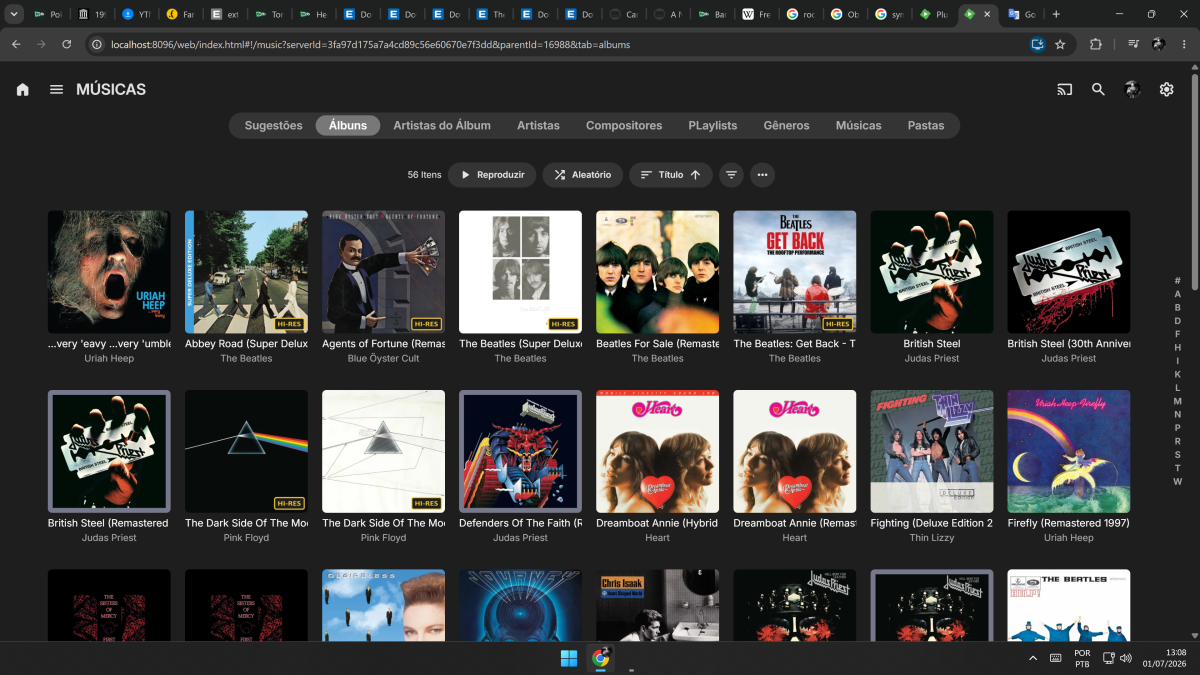
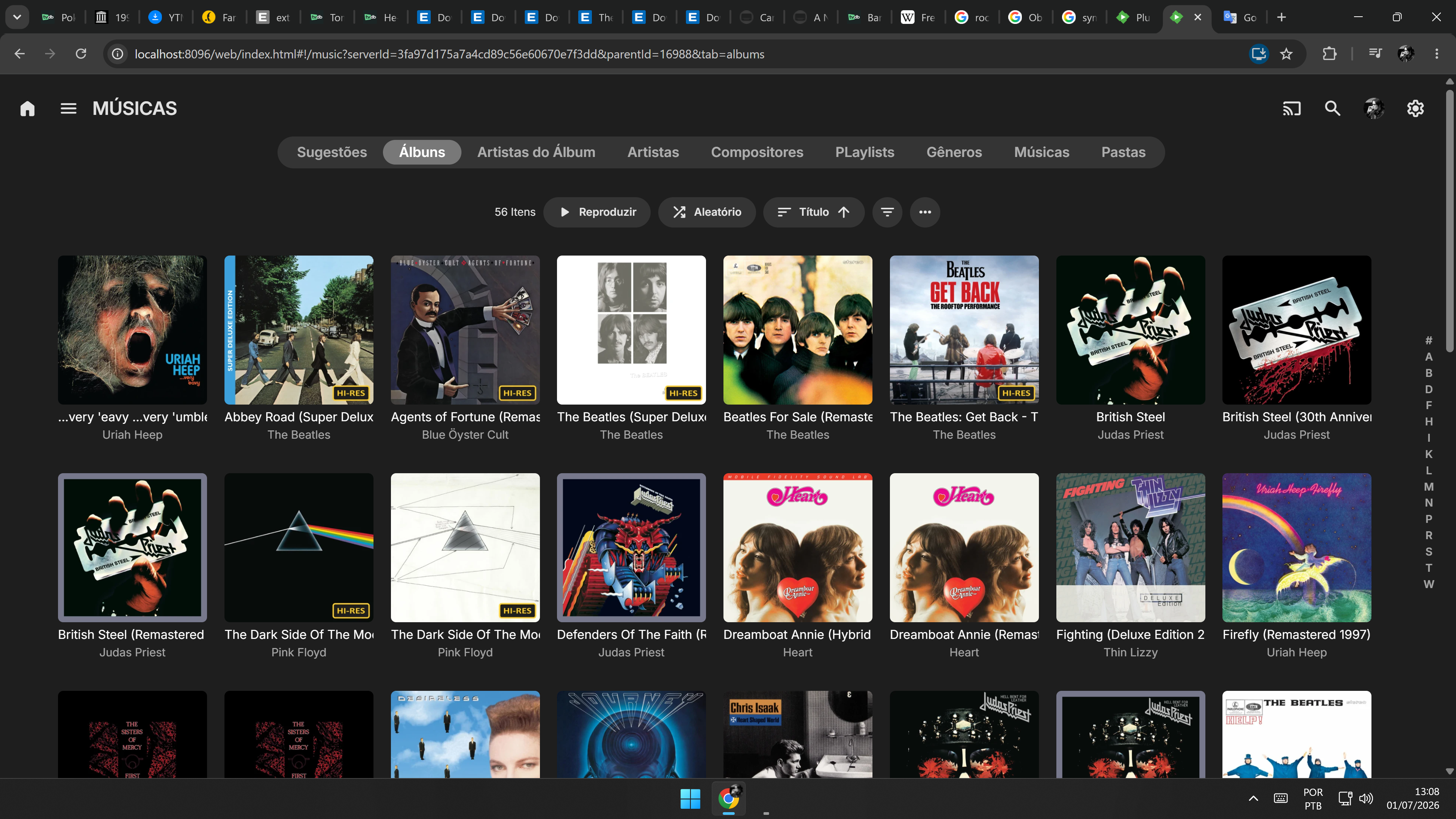
I’m not sure if this is the right place to make requests, but please allow these features to be implemented for audio, music, and album covers from metadata, etc, not only movies. I really want "Hi-Res" (with custom tags) badges on my covers without having to use an image editor + mp3tag. Thank you.