All Activity
- Past hour
-
 mingodjmontya joined the community
 -
 wjhs joined the community
 -
 Hellau217 joined the community
 -
 CaesarChen joined the community
 -
 Sebo29562 joined the community
 -
 Justin-Tin joined the community
 -
 Frg joined the community
 -
 shambob joined the community
 -
 Faisl99 joined the community
 -
 Ghnoda joined the community
 -
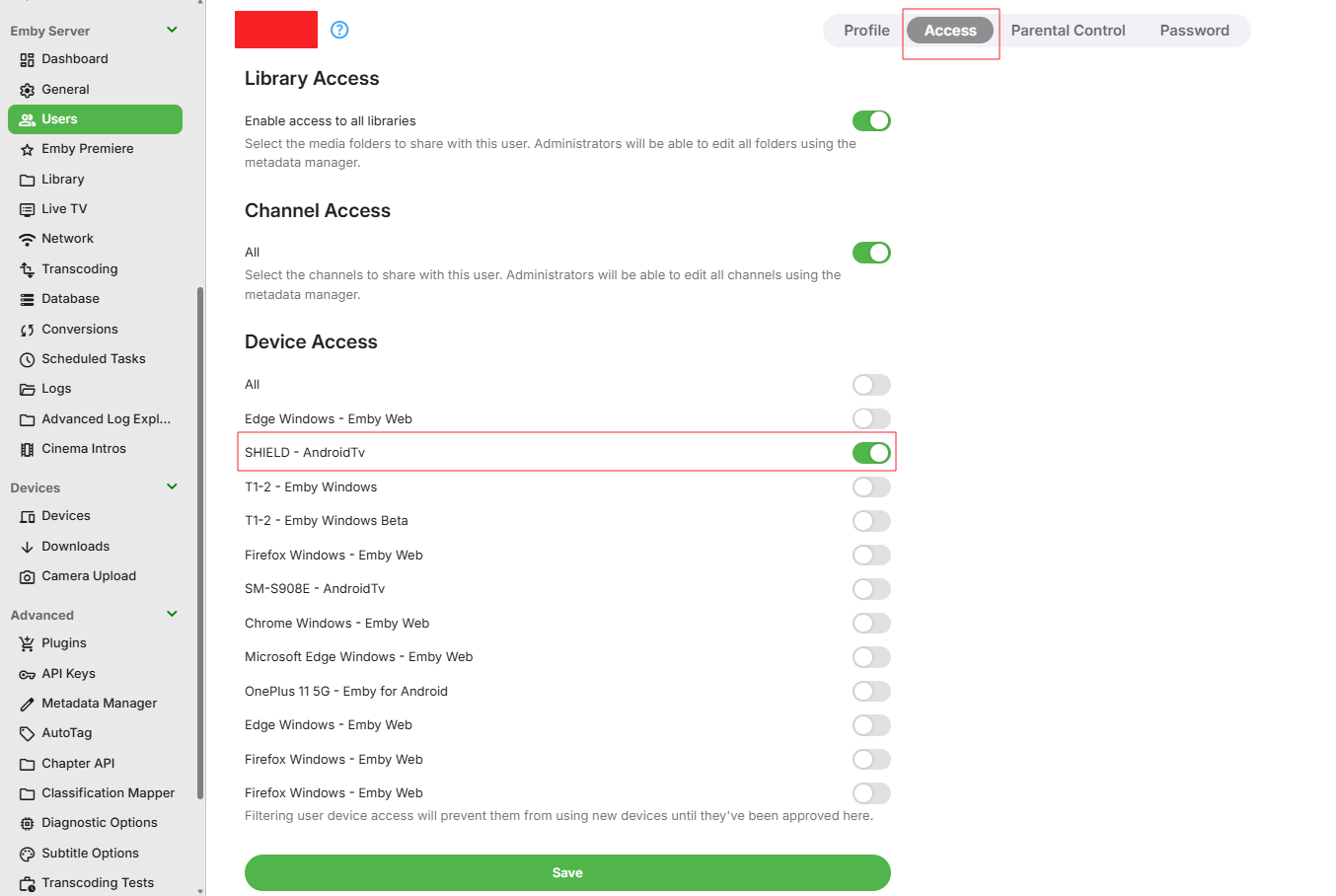
I thought i would add it as a feature request as the option to do it within Emby isn’t there without a lot of manual administration. We should just be about to limit a user to one device per account. Does this option allow the user to purchase the application via the Emby app and then I allow access? I don’t see how this option works with devices being removed from my Emby premier list but thank you very much for the information.
-
Se here
-
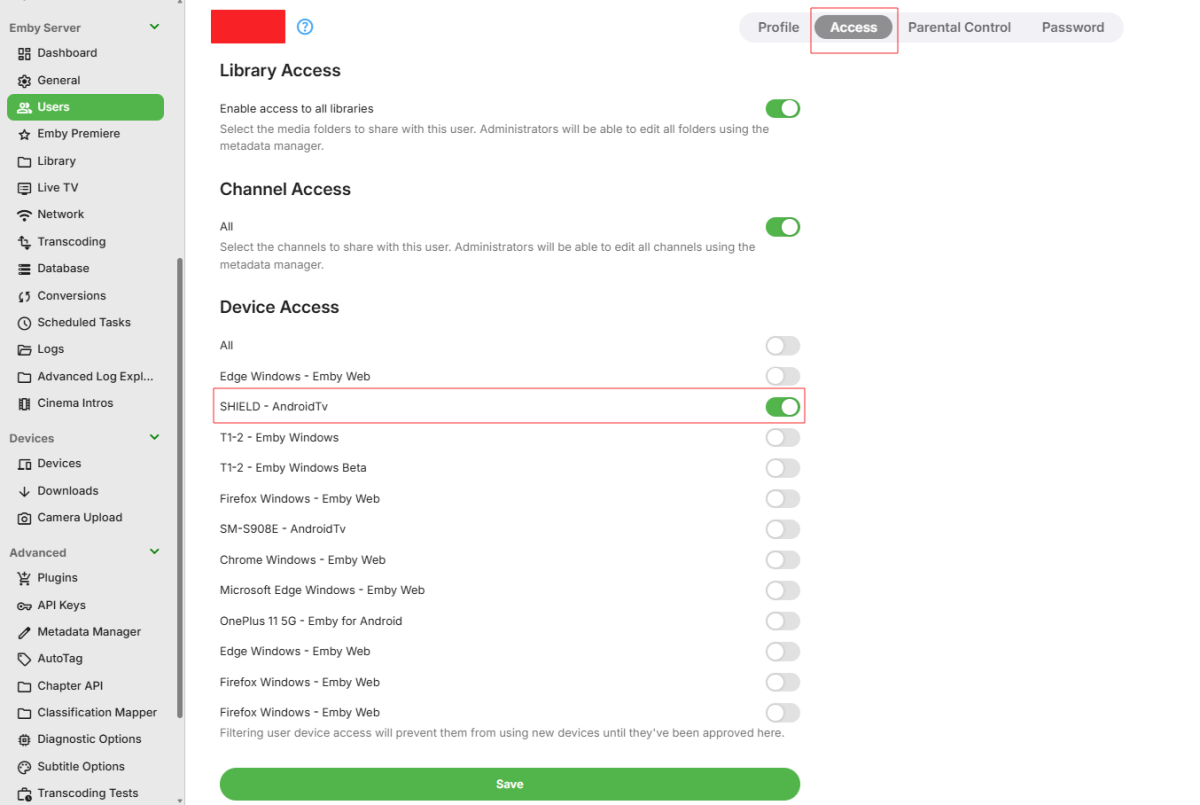
First how is this a FR when its a question But this is what I do.
-
Hello, Please can anyone tell me if there is a way to limit a user to one device, I have friends who access my Emby server and some of them install it on every device they have reducing my limit. I can’t find any option on the server, there is limit streams but nothing about devices. Ideally I would like to assign an Amazon Fire Stick 4K MAX or a Smart TV to a user and that would be there free device, if they want it on anything else then they can purchase it directly through the Emby app for the device they are using. It Would be great if we can limit the device per users. The simultaneous streams don't prevent to user to login on another device and it is chewing up the devices limits on my Emby Premiere. Can anyone advise please. Thank you. Cheers, Chris
-
Hello, Please can anyone tell me if there is a way to limit a user to one device, I have friends who access my Emby server and some of them install it on every device they have reducing my limit. I can’t find any option on the server, there is limit streams but nothing about devices. Ideally I would like to assign an Amazon Fire Stick 4K MAX or a Smart TV to a user and that would be there free device, if they want it on anything else then they can purchase it directly through the Emby app for the device they are using. It Would be great if we can limit the device per users. The simultaneous streams don't prevent to user to login on another device and it is chewing up the devices limits on my Emby Premiere. Can anyone advise please. Thank you. Cheers, Chris
- Today
-
Thank you very much for the info
-

Can I install two versions of emby side by side on Sony Android TV?
FrostByte replied to ivnivnivnivnivn's topic in Android TV / Fire TV
I've kept both updated on my Shield and playback for typical 4K remuxes appears to be the same with both for me. I think it pretty much comes down which one you prefer right now. To me it's nice to have both to compare things whenever I do have issues. Emby has said for a while now that their plan is to eventually discontinue the AndroidTV app, though ebr has been keeping it at least updated with new betas whenever there is a server change or major bug found. -
I have a pair of Rokid XR AR glasses, they play videos just fine from every other app (Apple TV app, VLC app, Safari), and as of last February worked fine with Emby. I haven't used them for a few months, but when I tried to use them today, I get the audio, and I can see the controls on the screen. But the moment I plug them in the video goes black. Unplugging them does not make the video return, stopping the playback and restarting it without them plugged in makes the video work again. But either plugging them in while playing, or plugging them in before playing, the video playback is just black. I see the on screen controls fine, and the audio playback is fine. Since I see the on screen controls in the glasses, I know the video is working. The glasses are treated by iOS as an external video. They connect via USB-C. And as I said before, everything else displays fine on them, and Emby used to work on them as recently as February. This is the playback info from the server while the movie is playing: Emby for iOS 2.2.53 iPhone 10.0.0.110 http/1.1 Stream MP4 (787 kbps) Direct Play Video 480p HEVC Direct Play Audio English AAC 6 ch (Default) Direct Play The activity log just says: emby is playing <movie name redacted> on iPhone 6/20/26, 1:25 AM Server Info: Version 4.9.5.0 Emby Server is up to date Running on http port 8096 I'm fairly sure this is a bug in the Emby iOS app, since #1) it used to work. #2) all other apps still work #3) I see the Emby controls, and when it's not trying to play a movie, I see all the UI and everything. Also, when I play Emby from within Safari it works fine, it's just not as convenient.
-

After Ver 4.9.5.0 updated, my RPi4 Kodi boxes would not play files from my TV folder
quickmic replied to ItsDrBob's topic in Emby For Kodi Next Gen
I also recommend the 12.X plugin (beta version). -
Two months or two years? XDDDDDD
-
For forced scans, emulating what can be achieved in the dashbaord, i end up using post to api within the items/X/refresh endpoint. Couldnt get this to work from native methods. private async Task CallRefreshEndpointAsync( IHttpClient httpClient, string baseUrl, long internalId, string roleLabel, string apiKey, MetadataRefreshMode mode, string stageLabel, CancellationToken token) { string url = string.Format( "{0}/Items/{1}/Refresh?Recursive=true&MetadataRefreshMode={2}&ImageRefreshMode={2}&ReplaceAllMetadata=false&ReplaceAllImages=false&api_key={3}", baseUrl.TrimEnd('/'), internalId, mode, Uri.EscapeDataString(apiKey)); this.logger.Info( "[{0}] POST /Items/{1}/Refresh — target=({2}) InternalId={1} Mode={3}", stageLabel, internalId, roleLabel, mode); var options = new HttpRequestOptions { Url = url, CancellationToken = token, TimeoutMs = 15000, LogErrors = true, }; using (var response = await httpClient.Post(options).ConfigureAwait(false)) { this.logger.Info( "[{0}] POST /Items/{1}/Refresh ({2}) returned (2xx implied)", stageLabel, internalId, roleLabel); } } For disk moves Ai gave me this pattern. Its not tested to destruction but its going the job of persisting a movie id on path change ctx.Movie.Path = ctx.MovieNewVideoPath; ctx.Movie.ParentId = ctx.DestinationFolder.InternalId; this.itemRepository.SaveItem(ctx.Movie, token); LogItemState("Pipeline/Advanced - tag+path+ParentId SaveItem (persisted directly)", "Movie", ctx.Movie); this.libraryManager.UpdateItem(ctx.Movie, ctx.DestinationFolder, ItemUpdateType.MetadataEdit, null); LogItemState("Pipeline/Advanced - UpdateItem (cache/event refresh)", "Movie", ctx.Movie);
-
Hallo, habe den Fehler auch. In der Übersicht sind ARD und ZDF noch da, im Ordner "/var/lib/emby/plugins/" gibt's die nicht mehr!? was tun? Danke
-

Plugin: EmbyCredits, detect end credits and add auto skip.
yocker replied to yocker's topic in Plugins
Just made this in time for me to leave for the next summer event. New beta up in the catalog (v2.6.4.0) Added ability for the plugin to read and import metadata time chapters from MKV files. If a credit (or some close variant) is detected it will be converted and imported into Emby as CreditStart. The setting can be found in the Performance section.
-

Can I install two versions of emby side by side on Sony Android TV?
ivnivnivnivnivn replied to ivnivnivnivnivn's topic in Android TV / Fire TV
Thanks guys. I have taken the risk and installed the latest Emby for my old SONY TV, and it turns out ok, so the latest emby app works on my SONY TV now. After installing the latest app, it suggests to use the standard android version, so I also installed the standard Android one, it works a bit slower than the TV one. Apart from that, it seems all good. Just out of curiosity, apart from response time, which one is better for viewing HEVC 4K HDR10+ movies? the Android TV version or Android arm7 version? Thanks -

Can I install two versions of emby side by side on Sony Android TV?
GrimReaper replied to ivnivnivnivnivn's topic in Android TV / Fire TV
Ah, I get you - I've obviously misread the request. Thanks. -
Can I install two versions of emby side by side on Sony Android TV?
ivnivnivnivnivn replied to ivnivnivnivnivn's topic in Android TV / Fire TV
When I try to install the latest version of Emby for Android TV, the TV prompts me to update and overwrite the existing app. -
Can I install two versions of emby side by side on Sony Android TV?
ivnivnivnivnivn replied to ivnivnivnivnivn's topic in Android TV / Fire TV
Let me clarify. The Emby app currently installed on my TV is an older version specifically designed for Android TV. What I would like to know is whether I can download a newer Android TV APK and install it as a separate app, without overwriting the existing version, so that both versions can remain installed on the TV. thank you guys. -
The default movie node from Kodi cannot handle libraries but the custom/plugin nodes can deal with it. I don't know how you skin works, but I assume at some point it sill uses the default nodes or the skin nodes.
-
We are building with their native toolkit, which is still very new and as a result we’re going through a back and forth dialogue of questions, things we need, etc. So I don’t think it will be months but it’s not days away either.
-

After Ver 4.9.5.0 updated, my RPi4 Kodi boxes would not play files from my TV folder
ItsDrBob posted a topic in Emby For Kodi Next Gen
Running a couple of Raspberry PI4s with Kodi21 and using Emby for Kodi Next Gen 10.0.47. They connect to my Synology with two directories, Movies and Television. After Emby updated on my Synology server I could no longer play anything in my Television folder with either RPi. It would come back as 'Unable to play' but Movies played fine. Restarted everything- no difference. Doing the 'update library' on Kodi did nothing. The resolution for me was to go to Add-ons/ Services and configure the settings in Emby for Kodi Next Gen/ Sync/Manage libraries/ and choose Repair Libraries. It went thru and put my episodes back so they would all play. Maybe someone will see this and save some time trying to figure out how to force a resync. -
Yes, that's why I'm asking whether there could be artifacts in the Emby database. I have done the Emby dance multiple times including multiple scans and even restarting the server entirely while all of these files were nowhere near the Emby library directory. So why, @Luke, is Emby still showing Musicbrainz ID, when, as you can see from the files uploaded above, there is no musicbrainz ID anywhere in the individual Flac files. How are "albums" created that would have a musicbrainz ID associated with them, when not a single one of the individual track files has that information inside it.?
-
The logs you provided do not contain any outgoing requests to musicbrainz.
-
I believe we have a sanity check in place to ignore unrealistic dates such as 1594. That’s probably why it is blank.
-
But what if you change the messsage? Wouldn't you want the user to see it? That would not be possible if there was a "Do not show me this again" button too. The "Got It" allows you to collapse that item. It disappears. Suppose you update the message now "Server will be down Friday, June19th 5pm-7pm" but they used the do not show me again button. They now do not understand why your server disappeared. You get angry calls from family between the hours of 5pm and 7pm on Friday, June19th. We could store the message on the Roku to know if it changes or not. Then the "Do not show me this again" could be possible since the app could know the message has changed and then is going to show it to you since it is different. That would be possible too. At first I think we should just correct the issue of the text not wrapping and those issues. Then afterwards if we need to do something with an extra button we could perhaps look at doing that at that later time. But at first I think the bigger issue is the text is being cut off with just 1 line.
-

Can I install two versions of emby side by side on Sony Android TV?
EZEd replied to ivnivnivnivnivn's topic in Android TV / Fire TV
Both the DroidTV and standard Emby app can be loaded on the same device simultaneously but it may be that the OP is asking if 2 versions of DroidTV app can be loaded simultaneously and the answer is no. OP can you clarify?




_svg.thumb.png.85e4ee6291ddd76347269c05175b5dda.png)