
All Activity
- Past hour
-
Hi. The Roku app does not currently have a context menu but have you tried just hitting the play button on the remote?
-
 Visionaire joined the community
 -

External subtitles (srt) reset after app suspended
ebr replied to sjsadowski's topic in Android TV / Fire TV
Do you have "Remember subtitle track selections" enabled in that same config screen? -
There would be a security implication by what he suggested because it would open an attack vector that isn't currently there.
-
Same issue here... "/Volume1/@apps/emby/emby-server/-ffdetect/"
-
 Brandon91M joined the community
 -
 3absi joined the community
 -
 PDMG joined the community
 -
 chekoo joined the community
 -
 oporwarit joined the community
 -
 mxkdi joined the community
 -

External subtitles (srt) reset after app suspended
sjsadowski posted a topic in Android TV / Fire TV
Like the title says, if the app is suspended (example: paused for long enough for TV screensaver to start) during playback or on the show episode selection screen, the subtitle defaults back to none. The subtitles were previously manually set. Subtitles are set to smart, no language is set for the audio channel. Pretty sure this is not the expected behavior, my expectation is that if I manually select a subtitle, it stays set until I change it. Emby Server Version: 4.9.5.0 Emby for Android TV Version: 2.1.51g -
 LuizSplinter joined the community
 -
 sohney joined the community
 -
 夜の joined the community
 -
As I said, the passwords are already saved on the devices, so there are no security implications here.
-
Hi, if 1. I use the Roku 2. I am in a folder with a bunch of random stuff in it How do I select an item and do "play all from here" On other apps I can use the 3 dot menu or similar, but I don't see any way on the Roku. Selecting the item and hitting * just takes me to some display settings. I don't use the Roku very often so forgive my ignorance. Thanks...
-
thanks! Like you, I'm new. I have just set them up as users. Tbh, I haven't shared it with the family yet, but would like the played state 'correct' when I do.
-
Just pushed release 1.0.9.0 to GitHub. No new functionality. Just added an icon/graphic for the plugin.
-
I'm not sure if I can get played status for Friends. Played state may be stored in their own Plex account. But I'll look into it. Also, does Emby have a "Friends" feature like Plex? Or would I just sync with a user that I setup? I'm new to Emby and don't have any other Friends who currently use it.
- Today
-
new version doesn't play what it used to
ebr replied to groovejumper's topic in Android TV / Fire TV
Can you please reproduce the problem and then follow the instructions to send a log from the app? -
Thank you
-

Ear Wax Select for Emby music—optional power features, with Core remaining free
MarvinB posted a topic in Amazon Alexa
Hi Emby music listeners, I’m the developer of Ear Wax, a voice-control experience for personal music libraries. Ear Wax Core lets you ask for an artist, album, playlist, song, genre, or random mix, with support for shuffle and repeat. Core is free today, and Ear Wax Core will always remain free. I’ve now added an optional power-user tier called Ear Wax Select for $5.99/month. Available in Select now: Switch between multiple music providers Metadata and artwork features Playback reporting and scrobbling The Select roadmap also includes Artist Radio, dynamic custom queues, Smart DJ, Favorites, more control over random playback, “Go Deep” discovery, and multiple spoken languages. These are a few planned ideas, while the list also contains some Select features that are currently available.. If you use Emby for music, I’d love your input. Which feature would improve your daily listening the most? I’m particularly interested in how Emby users want provider switching, scrobbling, and discovery to behave. Attached is the roadmap.. Some select features are currently available. Thanks for taking a look. I’ll be following the discussion and answering questions directly. Road Map.xlsx -
@ebr I'm actually trying to do — the port arrangement is a workaround, not the goal. And you're probably right that the address-switching option is niche; I'd rather not need it at all. The problem: US and Canadian shows air in the evening Eastern, which is already the next calendar day in the UK. TMDB stores air dates as a bare date with no time or timezone, so those episodes show on the wrong day for anyone in Europe. Trakt returns first_aired as a true UTC instant, so it converts correctly for any timezone — which is why Kodi with Trakt shows the right day without any patching. For episodes already in the library this is straightforward: my plugin shifts PremiereDate and writes it back via ILibraryManager.UpdateItem, re-applying if a later metadata refresh overwrites it. That part works fine and needs nothing unusual. The difficulty is /Shows/Upcoming — episodes not yet downloaded. As far as I can find there's no plugin hook that fires for those: a metadata provider never sees them, and they aren't reachable by library query either. I originally corrected TheMovieDb's cached season files, but MovieDb 1.9.2.0 stopped reading them, so that approach is dead. That left intercepting the /Shows/Upcoming request itself — an HttpListener inside the plugin that answers that one endpoint with corrected dates and forwards everything else to Emby untouched. That's the only reason the listener takes the port clients already use and the server moved to 8098. Configuring Emby back to 8096 puts it in front of the listener again and disables the correction entirely. So the real question: is there a supported extension point for upcoming/virtual episodes? If a plugin could adjust those directly, the listener, the port swap and the address-switching problem all disappear together. The strategy: concede the small point, establish you've done the obvious things properly, then ask for the hook that would make the workaround unnecessary. If they say yes, the architecture gets simpler and beta testers need no port setup at all. Is there's a better way to achieve this? I have been working on this plugin for weeks and always hitting a brick wall. Thanks
-
I would suggest updating your server...
-
Hi. This is the most important question - why are you trying to create collections for TV seasons when those are already created for you in a proper TV library?
-
Hi, first thanks for this nice project! But do I have to do this manually under "chapter"? The website shows a "Skip Recap" button in the demo, but I can't find it in Emby. So the files run normally, even though something was found, and there's no graphical way to skip it. What am I misunderstanding?
-
IMO that is going to create more problems than it solves. This use case is truly < 1% Why don't you configure the server so it uses the port you really want to?
-

[Beta] ROMote – play your retro game collection in the browser (NES → PlayStation)
GrimEvil replied to digitalirony's topic in Plugins
I will do this and send it over later no problem. -
Parental Ratings - Use BBFC Rating Symbols
ebr replied to abroadhursthall's topic in Feature Requests
IMO that is far from an improvement over this: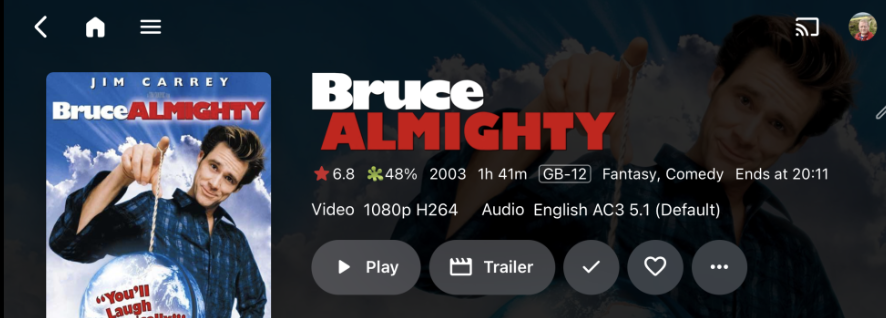
-
This would be amazing if it could be added Thanks
-
An option could be added to the app's setup process to not switch to server reported addresses.
-
OK that's strange. We'll have a new build up today. I've added one more change so please let us know if that resolves it. Thanks.
-
@Luke So I rolled back my database (actually rolled back to a snapshot before upgrading to beta) and made sure I had a working 4.9.5.0 install, but the change to the TM app store version of 4.9.5.0 did not go so well. Downloaded 4.9.5 from TM app store and installed it, HOWEVER this doesn't work as the build is NOT correctly setting the APP_DATA_DIR. It is instead using the folder "/Volume1/@apps/emby/emby-server/-ffdetect/" Following a suggestion from another post on the Emby forums I edited the file "/Volume1/@apps/emby/emby-server/bin/emby-server" and replaced the line -programdata $APP_DATA_DIR/ with -programdata $APP_DATA_DIR/Volume1/Emby \ This seems to indicate that a previous line in the same file does not correctly set $APP_DATA_DIR APP_DATA_DIR=$(ter_share_add -name "Emby") The build as supplied by the TM App Store is broken. Also, hardware encoding does not work, falls back to software.








