All Activity
- Past hour
-
 gustavomejia joined the community
 -
Website Feature: This interface appears to be a Rich Content Editor commonly found in Learning Management Systems (LMS) or community forums for creating new discussion posts. Media Uploads: The editor allows for dragging and dropping files or choosing them directly from your device, with a maximum total size limit of 195.31 MB. [1] Formatting Options: Users can format text using standard tools such as bolding, italics, underlining, strikethrough, lists, and alignment adjustments. [1] Required Fields: The "Title" field is mandatory, and according to the red warning text, the main content body field is also required to submit the topic. [1] 3 sites Creating Custom Report Sections – How can we help? 8 Sept 2023 — Creating Custom Report Sections – How can we help? Custom Reporting. Articles in this section. Customize Report Themes and Brandin... Zendesk Community Forums | Forma.Lms Documentation Community Forums | Forma. Lms Documentation. Details. Revision #1. Created 2 years ago by Lorenzo Polizzi. Updated 1 year ago by L... Forma.Lms Documentation How do I resize the Rich Content Editor? - Instructure Community 17 Mar 2026 — How do I resize the Rich Content Editor? - Instructure Community. Find your Canvas URL. Use our tool to quickly find your Canvas l... Instructure Community


-
 emb728 joined the community
 -
 kaylawoohoo joined the community
 -
 mariana35 joined the community
 -
 jhayem0014 joined the community
 -
 Chico58mike joined the community
 -
 tg1962 joined the community
 -
 Azoz506 joined the community
 -
 Tarik9 joined the community
 -
 fargo69 joined the community
 -
Can you please stop repeatedly suggesting we use a browser. We do not want to rely on a web browser. We want support for our entire library. We do not want to have half our library transcoded. We have numerous reasons for wanting to avoid using a browser, and some reasons for wanting to avoid using the AMD64 build on an AArch64 laptop through a translation layer. The feature request in this discussion is simple, and to the point: We would like to have a native build for Windows on ARM, just like we have it for Linux. So please, kindly stop suggesting us browsers.
-
Hi, does your xmltv source contain program images?
-
Which one was it?
-

Emby server not binding to https port after 4.10.0.17-beta update
Mbiboy replied to Mbiboy's topic in General/Windows
Yes.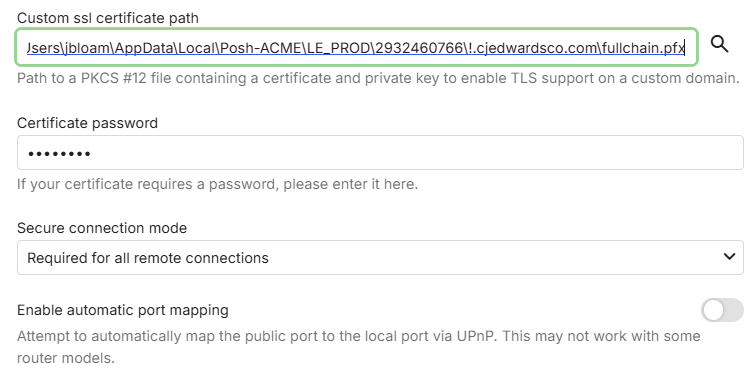
-
Hi, can you please show the complete screenshot? Thanks.
-

Emby server not binding to https port after 4.10.0.17-beta update
Luke replied to Mbiboy's topic in General/Windows
Hi, do you have a certificate configured in server network settings? -
Ok yes that could potentially make sense.
-
I appreciate all the hard work put into Live TV and DVR features. That's more valuable to me than music metadata.
-
Emby server not binding to https port after 4.10.0.17-beta update
Mbiboy posted a topic in General/Windows
Hi! As the title says. I can no longer access my Emby server on the configured https port. Only http currently. Logs attached. Nothing in my config has changed between the two. Emby media server Windows x64 4.10.0.17-beta In the startup logs on 4.10.0.16-beta, I see - 2026-06-29 08:01:56.815 Info App: Adding HttpListener prefix http://+:8096/ 2026-06-29 08:01:56.815 Info App: Adding HttpListener prefix https://+:8920/ 4.10.0.17-beta, I only see. 2026-07-02 21:57:46.520 Info App: Adding HttpListener prefix http://+:8096/ Netstat cmd embyserver-4.10.0.16-beta.txt embyserver-4.10.0.17-beta.txt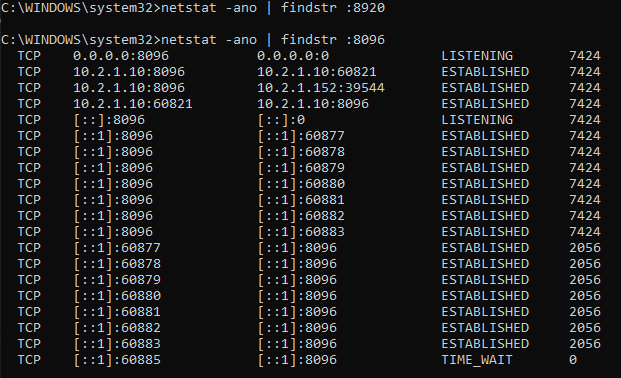
- Today
-
Could the Bitrate and Simple rates be rendered as text, like IMDB Ratings are on Movies/Series? That way you'd just need a single kilohertz (kHZ) and kilobit (kbps) icon, and would remove the need to have the snap-to functionality. Audio Codecs can just use the same icons used by Audio streams in video files. Most are the same the same technology, just add in the ones not already included like .FLAC and .ALAC. Also, for some songs in my Music Library, I have both a .MP3 and a .FLAC version. Might a "multiple files" icon be useful, or will EmbyIcons group simply same-type icons together like on video posters? I take it HIRES and REMUX would be equivalent to Source icons (Extended, Deleted, etc). Would there be need for the decisive "Explicit Lyrics" icon? And just to make things more difficult, I can't help but wonder how long before someone requests Bit- and Sample-rate icons for audio streams in video files.
-
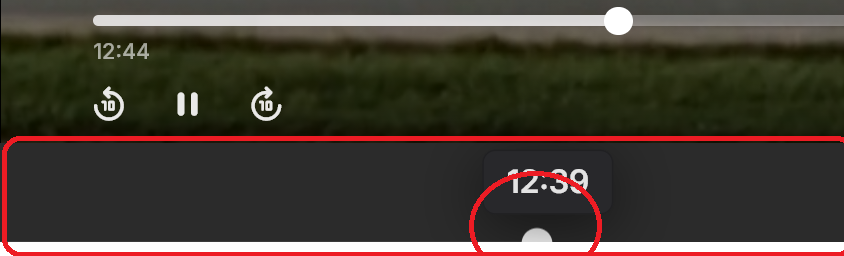
when playing a movie, something is wrong with the player. I get 2 sliders and a gray bar. The 2nd slider (at 12:39) controls the playback position like the 1st one (above) very strange bug.
- Yesterday
-
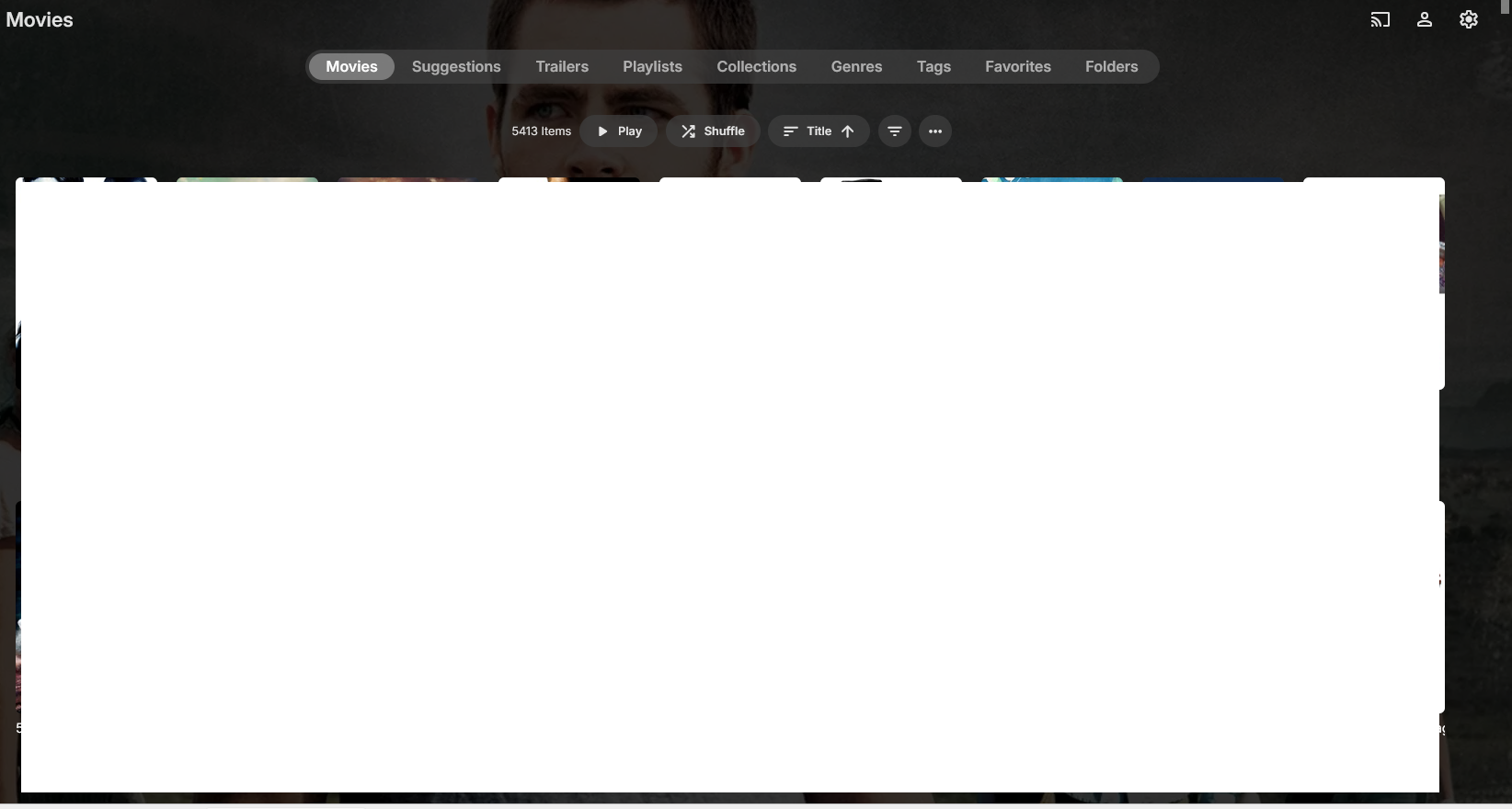
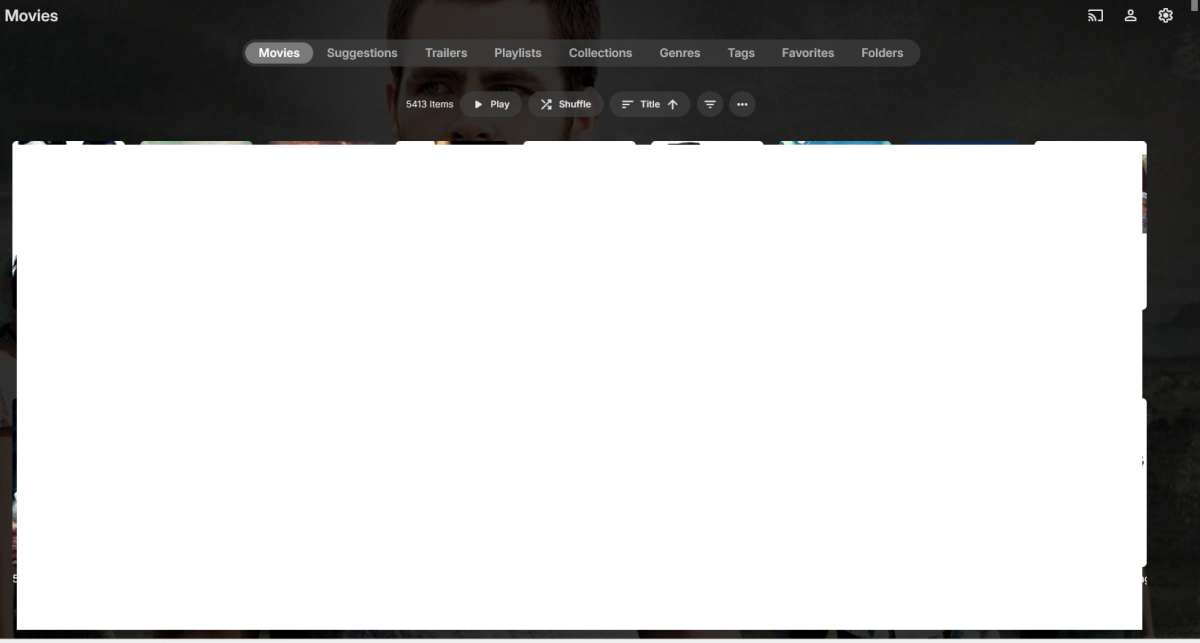
Just happened again. Firefox version: I loaded a new browser tab with my Emby web client, clicked on the Movies library and the library loaded fine in Date Added order (how I had last looked at it). I then switched to Title order and again, I don't have the "#ABC..." on the right side: Then I changed to Title descending and the "#ABC..." shows up (screen shot not included).
-
See my post here, figured I would start my own topic in case they are different issues: Here was my original post in that thread: I figured I would add-on to this thread, but if it should be separated out into its own, that is fine as well. Since the latest Windows client update, sometimes it immediately exits out/closes and I have to go back into it. This usually only happens once, rarely twice (but when I turned on debug logging, it happened three times in a row). Then when I go to play something, about 50% of the time it will exit/close out and I have to go back in and then it will usually play fine (sometimes it will close twice). If it helps, I use the WIndows Client with Zero Tier as my virtual network (same concept as Tailscale if you are not familiar) and this is the only Windows Client I have. This does not happen with any of my other Android clients (local network to the server or over ZeroTier network). I will PM the log files you listed above. I should also note that everything was fine (and nothing has changed) before the Windows client was updated. Let me know if you need anything else from me. Thank you. I sent the debug log files via PM to softworkz yesterday based on the info requested from Crusher11
-
Thank you. The font is called 11S01 Black Tuesday, It was from this website: https://www.picturetopeople.org/ I also found this link: https://www.cdnfonts.com/11s01-black-tuesday.font
-

Plugin: EmbyCredits, detect end credits and add auto skip.
yocker replied to yocker's topic in Plugins
Sadly don't know, sorry. Tesseract and PaddleOCR are docker containers i have modified slightly to clean up the images after them self when done with them, in fact you could use the originals with the plugin if you wanted. You can find Tesseract at: tesseract-ocr/tesseract: Tesseract Open Source OCR Engine (main repository) They are open source, highly known and used so i'm 99.9% sure it's nothing nefarious or people would have caught it by now. -

ScripterX Help to see if I'm doing Things correctly? in windows.
Leafstrider replied to Leafstrider's topic in Plugins
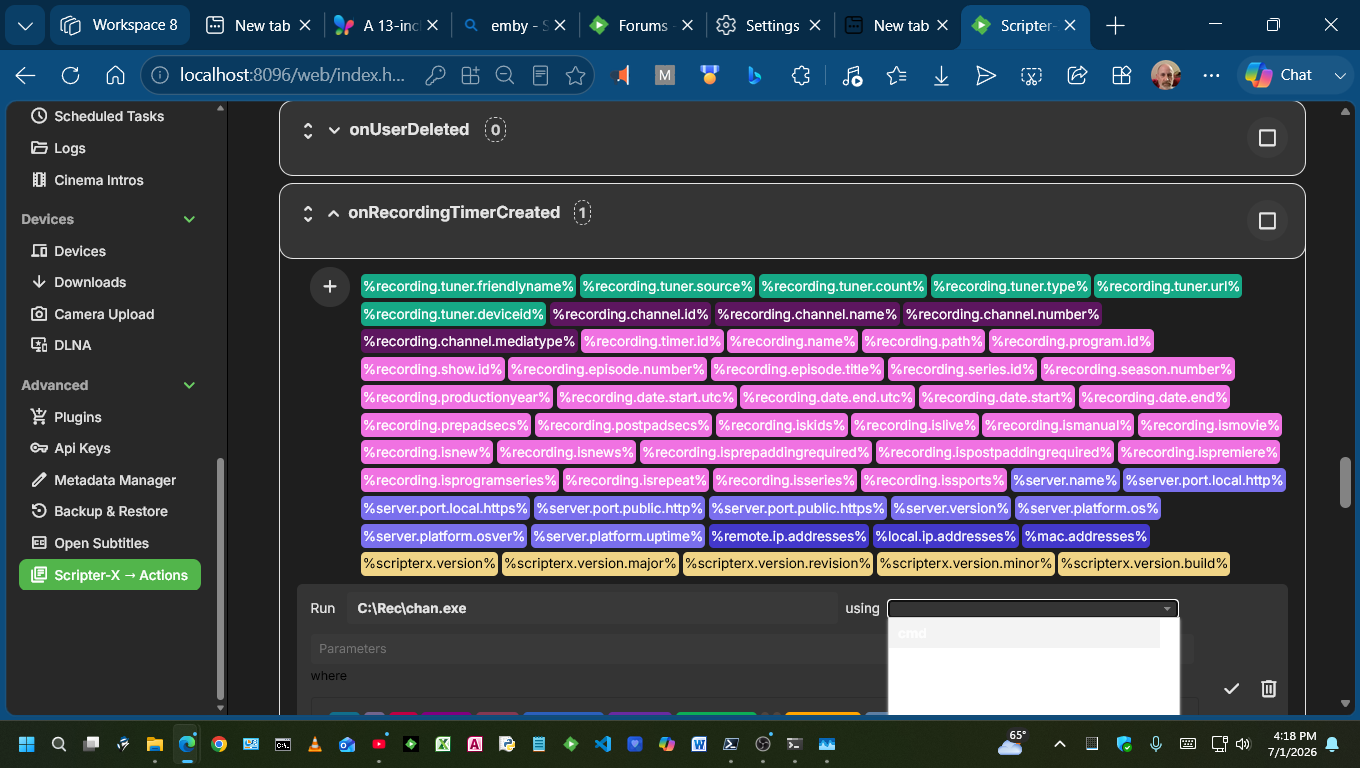
WELL IT DID NOT WORK ITS SO FRUSTRATING. So I created a batch file that does not do anything other than showing it ran. just incase an exe is not accepted. Thenset up more scriptx runs on live tv record start and on l9ivetv record stop and entered them all differently. some with quotes some with full paths. Im going to reinstall scripterx 6.1.0.1 and hope that changes things ..Well nothings changed ,still not working though it does show in the log that it gets the argument. i am going to try webhooks. and yep they worked. finially got an X1 Xfinity set top box thats a rf "radio remote" to change channels, to record tv via hdmi to usb, 60 FPS, video captue for $20 from walmart, to automaticly take care of recording. it took me forever to do it all on one machine less the remote. and if the scripterx guy reads this, the windows version on the dropdown where cmd is, it is white box and white letters you cant read it unless one is very close and contrast is set just right it can barely be seen. I really like how deep the scripterx is i will try it again in 6 months as i really need it. and anyone want a crazy way to do xfinity channel changer just ask and ill write it up.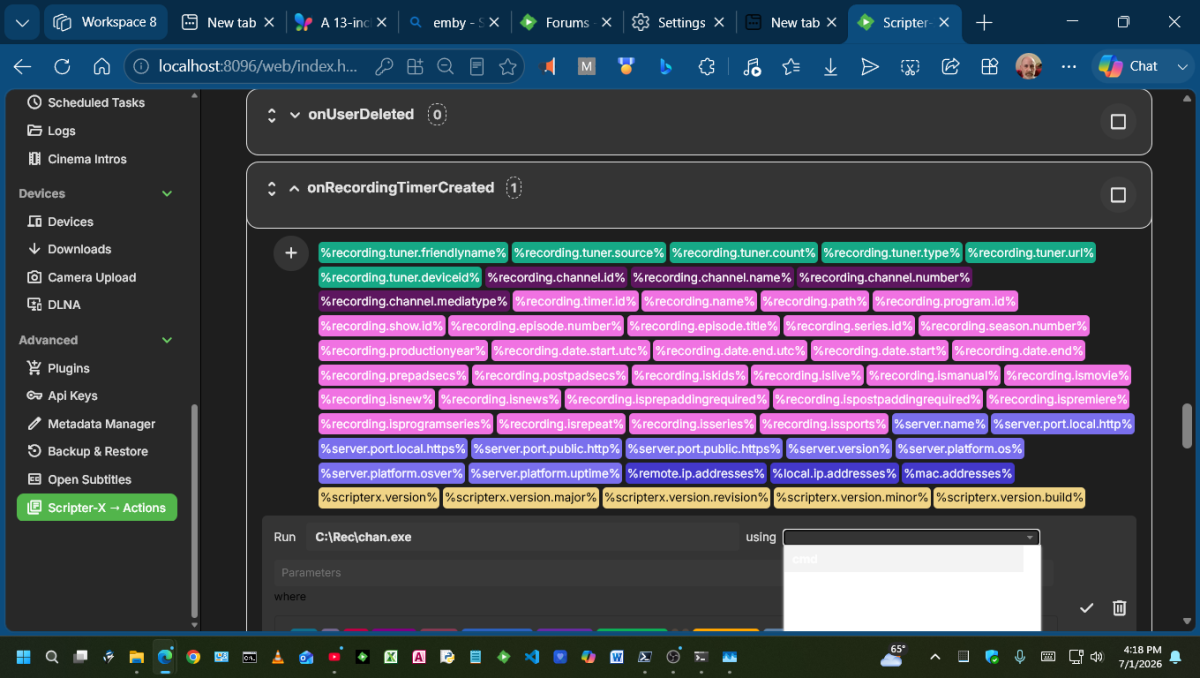
-

Plugin: EmbyCredits, detect end credits and add auto skip.
DarWun replied to yocker's topic in Plugins
@yockerI have a (possibly stupid) question about your tesseract container (yock1/embycreditocr). Most of the time Tesseract's status in Task Manager on my Synology is "Sleeping". But on occasion, it will go active and start utilizing the CPU even though the EmbyCredits plugin is not running. CPU usage is roughly 26% when it is active at those times. Is that expected behavior? If it is, what is Tesseract actually doing? I'm assuming it is doing maintenance (i.e. clean-up of remnant files). But I thought I would check just in case there is something else going on. -
I'm suggesting that if a track image is CUSTOMIZED in the GUI, THAT image should be stored as "Song Name.jpg" next to the track. If it is not specifically set, just default to the album image and don't store anything additional, just like now. The image would only be stored/used if someone wanted it to be, and that would necessarily use more space for those customized at the track level. But a user would have to manually do that. I'm not suggesting to automatically create a "Song Name.jpg" for every existing track. Only customized ones. If someone updates the album image, it would have no effect. If a song was customized, it would use that image for the song. Album image changes wouldn't matter. But a track image, if manually specified, should be given preference over the album until a user deletes the custom track image. The issue is that if a user customizes an image, it gets lost if the server dies for some reason because it's only stored internally in Emby's cache. From what I understand, restoring a backup to a new server only pulls in the custom artwork if the paths match between the old and new servers. If a user customized hundreds of track images, that's lost if the paths are different.
-

I built the Plexamp "Sonic Analysis" experience for Emby — self-hosted. Anyone Interested? Want to test it?
kaj replied to kaj's topic in Third Party Apps
Thanks @ginjaninja Some real world bugs there and in the DM...I've replied in more detail in the DM and hopefully get you up and running more easily. -

media deletions are not logged in admin Dashboard > Activity
justinrh replied to justinrh's topic in General/Windows
@Lukeanother oddity with multi-version, in the web app I poke the Delete button and it shows a specific version but not the one that is set to play, so there is no way to delete a specific one though you can delete only one.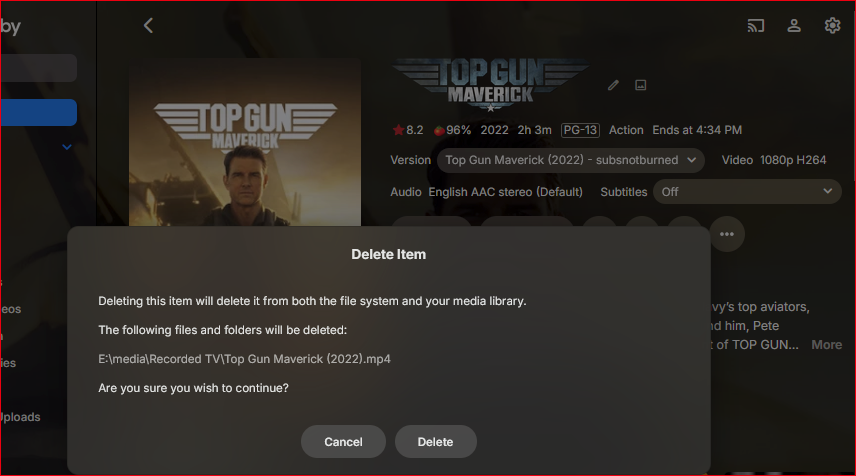
-
You can search for missing episodes on a per-show and/or per-season basis. You can also lend your support here:
-

Interactive Duplicate Actor/Person Merger
Abobader replied to noobilly's topic in Tools and Utilities
Hello noobilly, ** This is an auto reply ** Please wait for someone from staff support or our members to reply to you. It's recommended to provide more info, as it explain in this thread: Thank you. Emby Team -
Hi everyone, Like many of you, I have run into the issue where Emby creates duplicate actor or director profiles (usually due to different metadata providers or slight spelling variations). Merging these manually through the web interface is pretty tedious, especially if an actor has multiple duplicate IDs. To fix this, I asked Google Gemini to help me build a Windows tool for merging duplicate Actor/Person profiles automatically. I have compiled it into an easy-to-use .exe file. How to use it: 1. Set up your config file Before running the tool, you need to add your server details. Open the config.json file and fill in your information exactly like this (make sure to include http://): { "EMBY_URL": "http://192.168.30.248:8096", "API_KEY": "abcdefghijklmnopqrstuvwxyz1234567" } 2. Run the tool Double-click emby_actor_merge_manually.exe. Input the name of the duplicate actor or director you want to fix and press Enter. The tool will search your server and list all profiles matching that name. Type the ID of the one you want to keep and press Enter. Press Enter one last time to confirm the merge. 3. Cleanup Once the tool finishes moving everything over to the main profile, just go to your Emby Scheduled Tasks and run a Scan Media Library. Emby will automatically delete the leftover empty ghost profiles. Source Code Lastly, here is the source code of the .exe file written in Python, in case anyone prefers to run it manually as a script. Hopefully, Emby developer will implement a similar built-in function for users to do this easily as an Admin in the future import requests import urllib.parse import json import os import sys # ========================================== # CONFIGURATION LOADER # ========================================== CONFIG_FILE = "config.json" def load_config(): if not os.path.exists(CONFIG_FILE): default_config = { "EMBY_URL": "http://YOUR_SERVER_IP:8096", "API_KEY": "YOUR_API_KEY_HERE" } with open(CONFIG_FILE, 'w') as f: json.dump(default_config, f, indent=4) print(f"[{CONFIG_FILE} not found!]") print(f"I just created a blank '{CONFIG_FILE}' in this folder.") print("Please open it, paste your Emby URL and API Key, save it, and run this script again.") sys.exit() with open(CONFIG_FILE, 'r') as f: try: config = json.load(f) return config.get("EMBY_URL", "").strip('/'), config.get("API_KEY", "") except json.JSONDecodeError: print(f"Error: {CONFIG_FILE} is not formatted properly.") sys.exit() EMBY_URL, API_KEY = load_config() if not EMBY_URL or not API_KEY or "YOUR_API_KEY_HERE" in API_KEY: print(f"Error: Please add your actual Emby URL and API Key to {CONFIG_FILE}.") sys.exit() # ========================================== headers = { "X-Emby-Token": API_KEY, "Content-Type": "application/json", "Accept": "application/json" } def main(): search_name = input("Enter the name of the actor/director to search for: ").strip() if not search_name: print("Name cannot be empty. Exiting...") return print("\nAuthenticating and locating Admin User ID...") res_users = requests.get(f"{EMBY_URL}/emby/Users", headers=headers) if res_users.status_code != 200: print(f"Error fetching users. Status: {res_users.status_code}") return users = res_users.json() admin_id = None for u in users: if u.get("Policy", {}).get("IsAdministrator"): admin_id = u["Id"] break if not admin_id: print("Could not find an Admin user. Falling back to the first user.") admin_id = users[0]["Id"] print(f" -> Success! Using Admin ID: {admin_id}") print(f"\nSearching for profiles matching '{search_name}'...") safe_search_name = urllib.parse.quote(search_name) search_url = f"{EMBY_URL}/emby/Users/{admin_id}/Items?SearchTerm={safe_search_name}&IncludeItemTypes=Person&Recursive=true" res_search = requests.get(search_url, headers=headers) if res_search.status_code != 200: print(f"Error searching for actor. Status: {res_search.status_code}") return items = res_search.json().get("Items", []) if not items: print(f"No profiles found matching '{search_name}'. Exiting...") return found_profiles = {} for item in items: person_id = item.get("Id") if person_id: found_profiles[person_id] = item.get("Name", "Unknown") if len(found_profiles) == 1: print(f"\nOnly 1 profile found for '{search_name}'. No duplicates exist! Exiting...") return print(f"\nFound {len(found_profiles)} matching profiles:\n") print("=======================================================") for pid, pname in found_profiles.items(): print(f" ID: {pid} | Name: {pname}") print("=======================================================\n") keep_id = input("Enter the ID of the profile you want to KEEP: ").strip() if keep_id not in found_profiles: print(f"Error: '{keep_id}' is not in the list of found profiles. Exiting...") return keep_name = found_profiles[keep_id] duplicates_to_merge = [pid for pid in found_profiles.keys() if pid != keep_id] print(f"\n[Settings Locked]") print(f" -> KEEPING: {keep_name} ({keep_id})") print(f" -> MERGING: {len(duplicates_to_merge)} duplicate(s) into the kept profile.") confirm = input("Press ENTER to begin the merge, or type 'Q' to quit: ") if confirm.strip().lower() == 'q': print("Canceled. Exiting...") return for duplicate_id in duplicates_to_merge: duplicate_name = found_profiles[duplicate_id] print(f"\n=======================================================") print(f" Hunting down media for: {duplicate_name} (ID: {duplicate_id})") print(f"=======================================================") dup_search_url = f"{EMBY_URL}/emby/Users/{admin_id}/Items?PersonIds={duplicate_id}&Recursive=true&Fields=People" res_dup = requests.get(dup_search_url, headers=headers) if res_dup.status_code != 200: print(f"Error fetching items for {duplicate_id}. Status: {res_dup.status_code}") continue dup_items = res_dup.json().get("Items", []) print(f"Found {len(dup_items)} items containing this duplicate.") if not dup_items: print("No merging needed. This duplicate has no attached media.") continue for item in dup_items: item_id = item["Id"] item_name = item.get("Name", "Unknown") print(f"\nProcessing: {item_name} (ID: {item_id})") item_get_url = f"{EMBY_URL}/emby/Users/{admin_id}/Items/{item_id}" res_item = requests.get(item_get_url, headers=headers) if res_item.status_code != 200: print(f" -> Failed to fetch full metadata. Error {res_item.status_code}") continue full_item = res_item.json() people = full_item.get("People", []) keep_exists = any(str(p.get("Id")) == str(keep_id) for p in people) new_people = [] changed = False for p in people: if str(p.get("Id")) == str(duplicate_id): if keep_exists: print(f" -> Dropping duplicate (Main person already exists here).") changed = True continue else: print(f" -> Replacing duplicate with '{keep_name}'...") p["Id"] = keep_id p["Name"] = keep_name changed = True new_people.append(p) if changed: full_item["People"] = new_people update_url = f"{EMBY_URL}/emby/Items/{item_id}" update_res = requests.post(update_url, headers=headers, json=full_item) if update_res.status_code in [200, 204]: print(f" -> Successfully updated metadata!") else: print(f" -> Failed to update. Error {update_res.status_code}") else: print(" -> No changes needed.") print("\nMerge complete! Run 'Scan Media Library' in Emby to wipe the leftover duplicate profiles.") if __name__ == "__main__": main() emby_actor_merge_manually.exe config.json
-
I am using a pc usually when i look at this in metadata manager. It doesn’t not work at all on ios half the screen is blocked off. I would like a way to collapse show that has tons of missing episodes if possible or hide them somehow so i don’t have to scroll through them all each time.