All Activity
- Past hour
-
 duncan85mt joined the community
 -
 LiJinwang0816 joined the community
 -

Emby Home Screen not showing all sections
Rhondamannuzza@gmail.com replied to sobeitjedi's topic in Samsung Smart TV
What is the port -
 Asim Ejaz joined the community
 -
 Deldeek joined the community
 -
 Krish Dharecha joined the community
 -
 sandi1903 joined the community
 -
 Shaileshbhai joined the community
 -
 AndyLaw joined the community
 -
 jc8k1021 joined the community
 -

Suggestions for Monitor w/Speakers as playback device
RanmaCanada replied to Mister Steve's topic in Hardware
I would honestly say just get a TV. Issues you will run into is brightness, size issues, and refresh rate. The only codecs you need to worry about in regards to TV's is HDR and DV profiles, unless you are using the monitor itself as your playback with no intermediary device like a firestick or PC. If that is the case, abandon all hope as Smart monitors absolutely suck and you're back to the TV option. What size are you looking to get? What content are you playing on it. We would need more information so we can suggest something proper. -
 ramfan joined the community
 -
Any update on rolling the SQlite update to the stable? Literally can't use certain searches due to the search issue. Just looking for an update.
-

Emby has stop and fails to record programs sellected directly on the "Guide".
Rolando1948 replied to Rolando1948's topic in QNAP
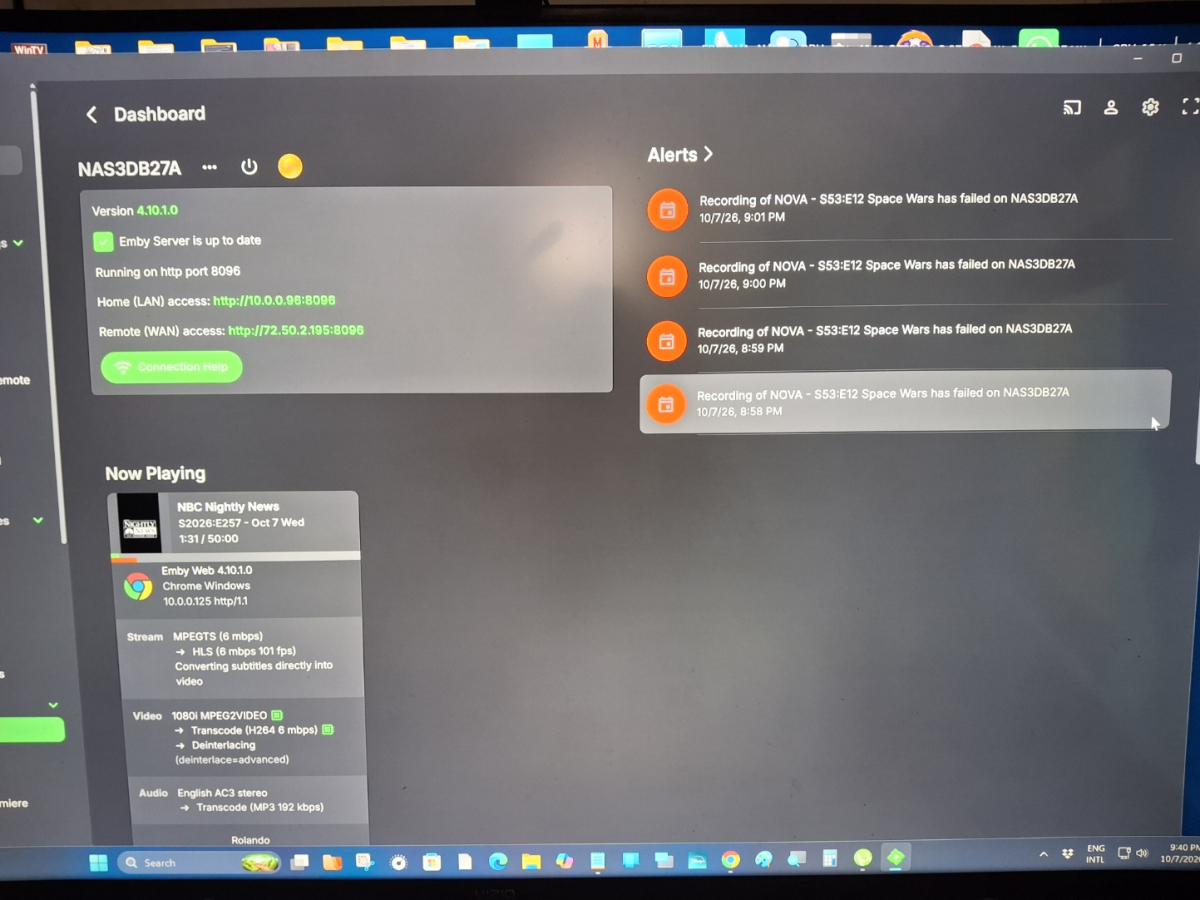
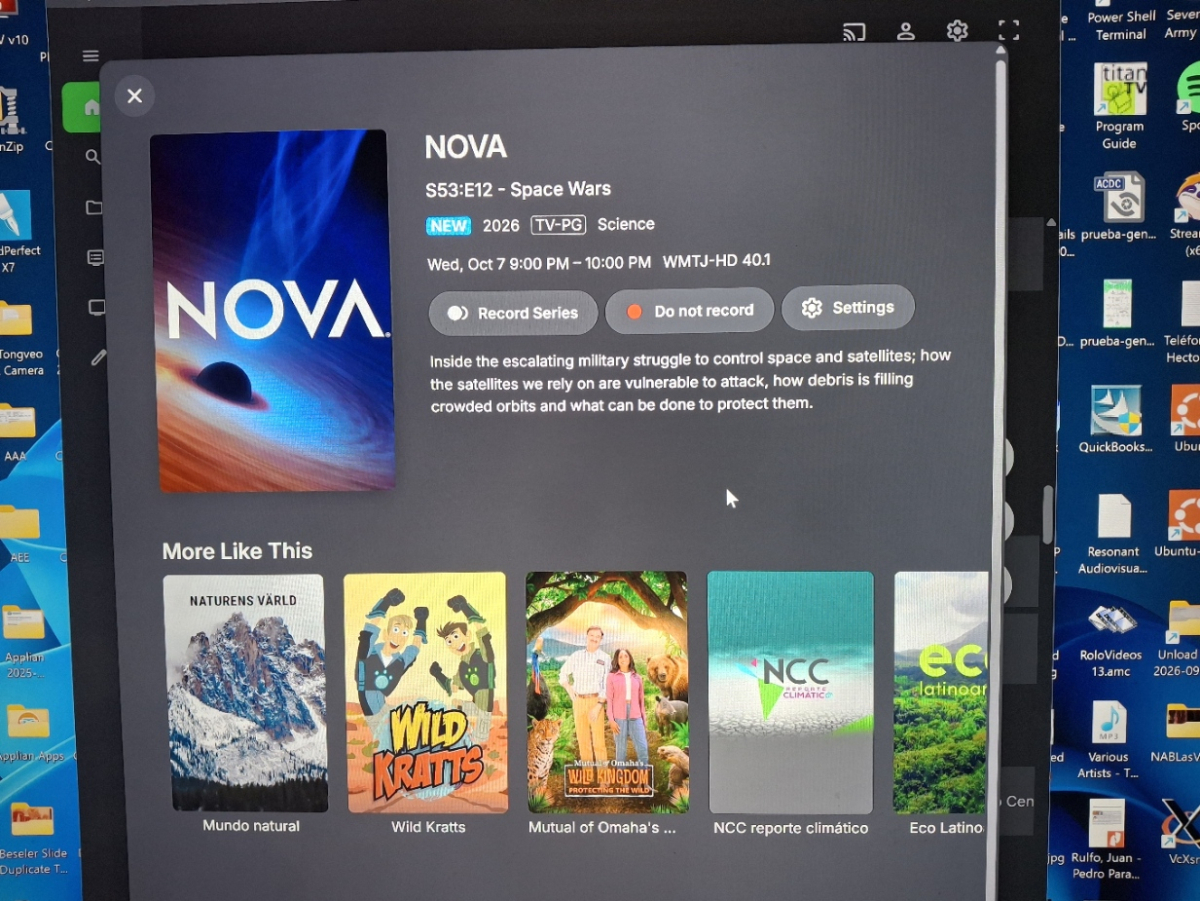
I waited until today 10/07/2026, on which I had selected directly on the Emby Guide, a recording of a PBS Nova program that was being aired at 9pm Eastern Time. As I stated in my previous message, the exact same behavior occurred, all my previously manually setup series daily recordings were performed and playback without any issues. But the Nova airing, despite appearing in the "Schedule" next to the other series recordings, Emby failed to record it. I had been observing this behavior with programing that I select to record directly on the "Guide". I am attaching the "log" and some photos, which despite my not knowing how to read and interpret the documented activities and events, I was able to scroll to time 20:50:00 and observed that the Nova recording was mentioned, put the cause and reason for the recording failure remains to be determined under your expertise. I am not sure when this abnormal behavior has stated, but as best than I can recall, until a few months ago, in addition the Emby successfully recording all my manually setup recordings, anything I would select on the "Guide" would also record without any issues. But as stated, if I currently select something on the "Guide", I do confirm that it does appears in the "Schedule", but fails to record. embyserver.txt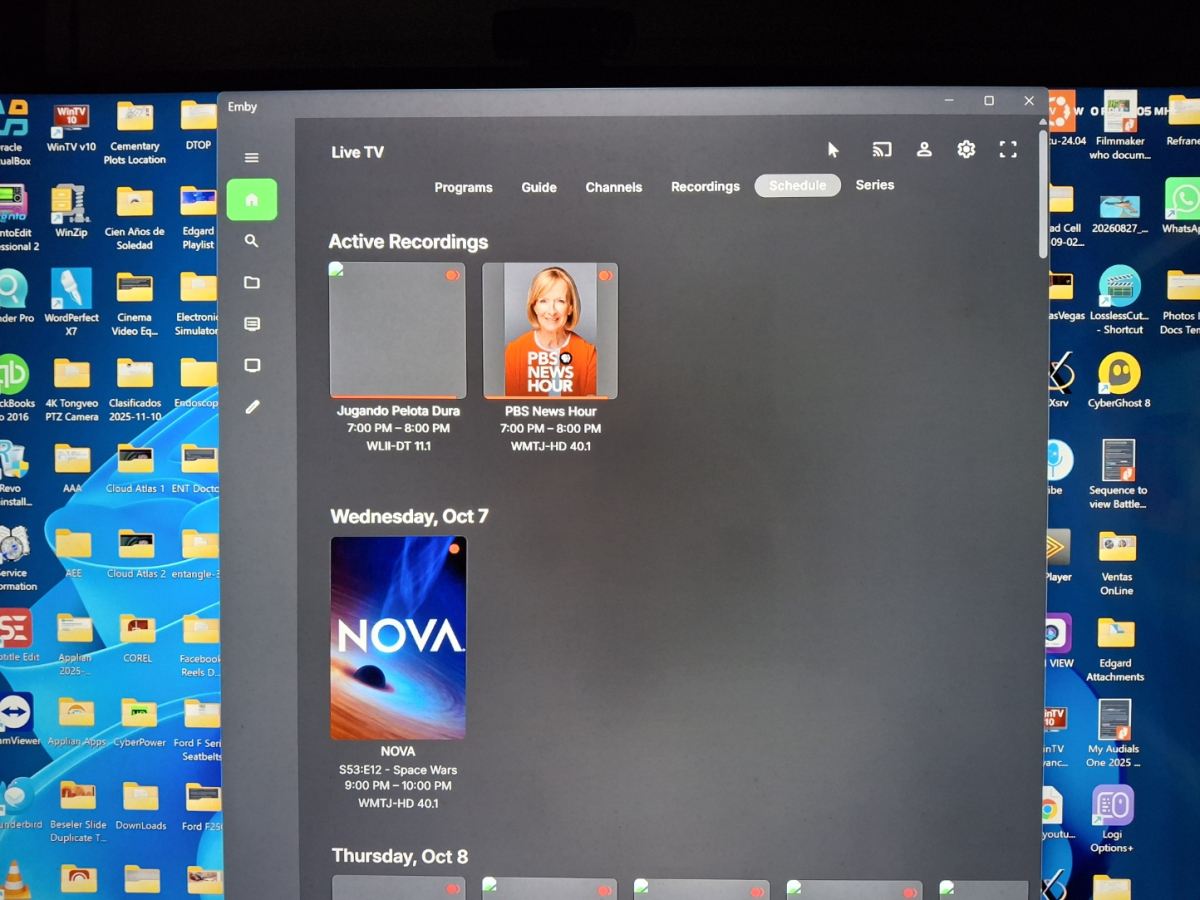
- Today
-

ILibraryPostScanTask any way to tell what changed?
Luke replied to HawkXP71's topic in Developer API
Hi, library manager has an item added event. -
The problem is your Library Locations. In Windows these are described as either NTFS folder locations or as network locations or mapped drives. What I would do is prepare your linux machine. Instead of network locations or mapped drives you use mount statements in /etc/fstab, combined with a folder in either /mnt or /media folder. A mount statement for an NFS mount would be something like: 100.100.1.100:/volume1/Videos /media/Videos nfs rw,sync, 0 0 That would connect the videos directory of my nas to the mount point /media/Videos. Then pointing Emby at that /media/Videos points Emby to my files in that location. That said, if you set up your Linux, make your mount points, configure your fstab to connect your files to those mount points, and set the permissions for the mount points and files so Emby can see and read them, you SHOULD be able to add the mount points manually to each library, backup and restore and in theory you should just carry on. The most important parts are, - mount points set. - permissions set properly so emby can see and read files. - new and old file locations in Emby. Then, when it all works: - when it all works remove the old library locations. I myself would create a test library with a few files. Mount it, get the permissions right and set everything else the same with the same permissions so it works, then do the restore.
-

Latest Emby Update - RAM usage creep - Anyone else seen it ? Docker/Linux.
vaise replied to vaise's topic in Linux
I posted above that I removed them all except the shipped plus the playback reporting, discord. -

ILibraryPostScanTask any way to tell what changed?
HawkXP71 replied to HawkXP71's topic in Developer API
WHile I couldnt find a solution on my own, I was able to do the following. Added a method to get the latest movie or episode added. Note, If you need it to work for music as well, just add that to the IncludeItemTypes public BaseItem? GetLastMovieOrEpisodeAdded() { var query = new InternalItemsQuery { IsFolder = false, OrderBy = new[] { new ValueTuple<string, SortOrder>( ItemSortBy.DateCreated, SortOrder.Descending ) }, IsVirtualItem = false, IncludeItemTypes = new[] { "Movie", "Episode" }, Recursive = true, Limit = 50 }; var items = _embyInterfaces!._libraryManager!.GetItemList( query ); foreach( var item in items ) { if( item.DateCreated.DateTime == DateTime.MinValue ) continue; return item; } return null; } Note, I get more than 1, purely because I want to make sure DateCreated is valid, I am convinced this is 100% unnecessary but I have no proof. When my task runs, I store the DateCreated of the last item added in my plugin's database. When the task gets run after the media scan, it compares the stored last item added date with the current one. If the library returns a more recent date, it runs the analysis (which updates the database). If not, it ends, since no analysis is necessary for the plugin. -

Latest Emby Update - RAM usage creep - Anyone else seen it ? Docker/Linux.
sa2000 replied to vaise's topic in Linux
There is an open issue for this and there was an attempt to fix it but the issue remains. -
You could revert it if you want, it's not needed after installation, but saying that, it is always enabled on 7, 10 11 etc, so it poses no issues. Server just has tighter security enabled out of the box. I don't know if ongoing server updates use the same download process in the background though, Luke might want to weigh in on that.
-

Latest Emby Update - RAM usage creep - Anyone else seen it ? Docker/Linux.
yocker replied to vaise's topic in Linux
What plugins are you using? -

RTM (inotify) doesn't seem to be working on Diskstation 7.1
Manp82 replied to Manp82's topic in Synology
Yes, volume1 is the main nas volume running on the 4 internal drives, everything is on there. -
Is it possible to move this to another thread? I feel like things have gotten a bit off the rails here. I'm using a Roku, not an Amazon fire stick. And my issue is pretty straightforward. No second devices involved, no other complications.
- Yesterday
-
When a task is called after the scan has finished, is there anyway to tell what changed in the last scan? For each library, were items added/removed? Is there access to this data anywhere?
-

ThemeFetcher - Farshad | Movie & TV Theme Music
farshadyaghi replied to farshadyaghi's topic in Plugins
-
Latest Emby Update - RAM usage creep - Anyone else seen it ? Docker/Linux.
vaise replied to vaise's topic in Linux
OK - Reporting back. I have stopped my normal process of having a management tab open in my safari browser all the time. That was Tuesday morning. Its now Thursday morning and under 4GB ram usage. I suspect its still early days yet, but I will report back next week. I assume if this is the issue, it will be fixed in a later release ? -
Thanks Luke.
-
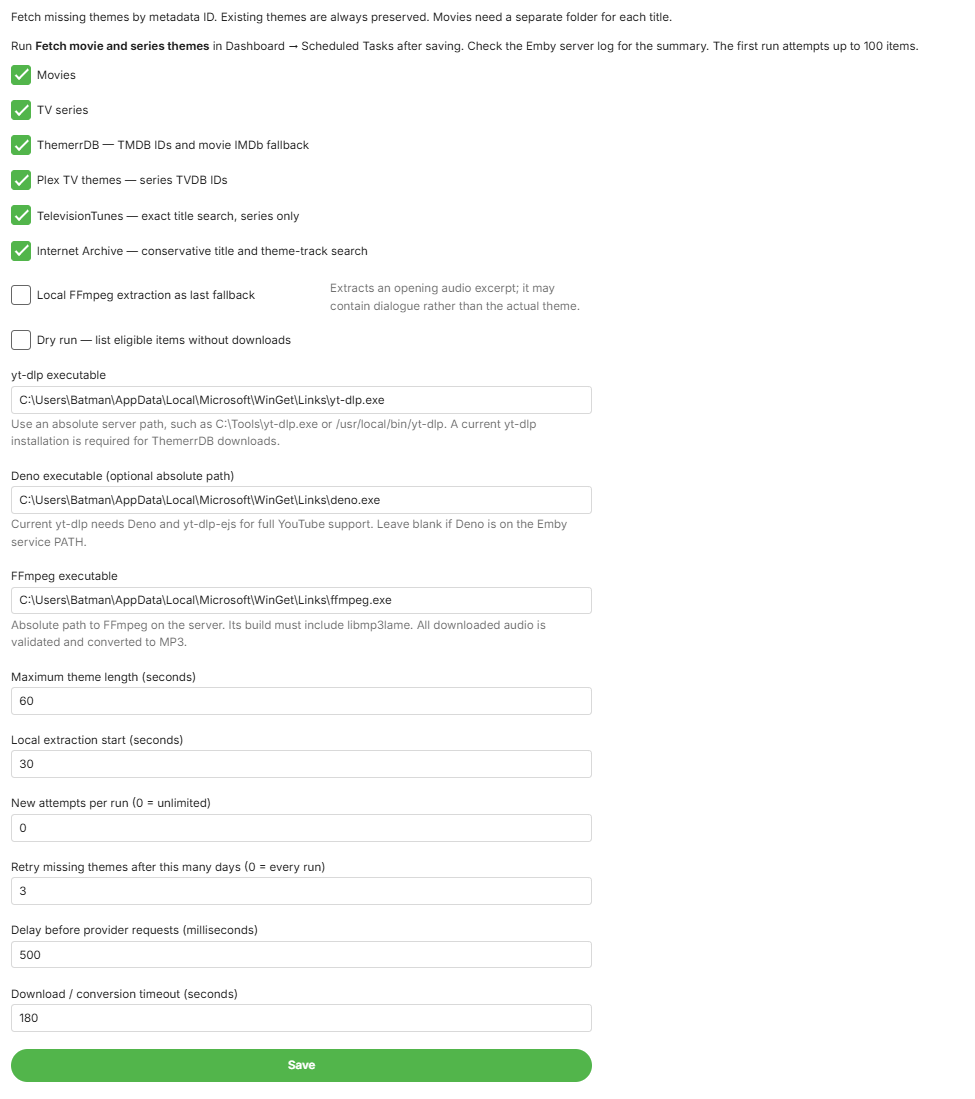
Hi everyone, I’m sharing ThemeFetcher - Farshad, an Emby Server plugin that fetches missing theme music for movies and TV series. The DLL is attached to this post. This is an initial community release, and feedback is welcome. What it does Saves the finished audio as theme.mp3 in the movie or series folder. Preserves existing themes, including other supported audio formats and files in theme-music. Provides configurable duration, batch limits, retry intervals and provider options. Runs through Emby’s Scheduled Tasks, with progress and results in the server log. Theme sources ThemerrDB: TMDB IDs, with an IMDb fallback for movies. Plex TV themes: TV series with TVDB IDs. TelevisionTunes: optional title search for TV series. Internet Archive: optional search for matching theme tracks. Local audio extraction: optional last fallback that extracts an audio excerpt from the media file. This may contain dialogue rather than the actual theme. ThemerrDB and Plex are enabled by default. The other options are disabled by default. Required tools Install these on the machine running Emby Server. They are not included in the attached DLL. FFmpeg, with the libmp3lame encoder — required to convert audio to MP3. https://ffmpeg.org/download.html yt-dlp — required for ThemerrDB’s YouTube downloads. Use a current official standalone executable. https://github.com/yt-dlp/yt-dlp/releases Deno — used by yt-dlp for YouTube’s JavaScript challenges. https://docs.deno.com/runtime/getting_started/installation/ Official standalone yt-dlp executables include the EJS scripts. Other installation methods may require additional setup: https://github.com/yt-dlp/yt-dlp/wiki/EJS Installation Stop Emby Server completely. Copy the attached MediaBrowser.Plugins.ThemeFetcher.dll directly into Emby’s actual plugins directory. Find the server’s program data path in its startup log. If updating, replace the previous DLL. Keep only one installed copy. Start Emby Server. Open Dashboard → Plugins → Installed Plugins → ThemeFetcher - Farshad → Settings. This is a manual installation; it will appear under Installed Plugins rather than the plugin catalog. Configure and run Replace the prefilled executable paths with the actual paths on your server. Example Windows paths: yt-dlp: C:\Tools\yt-dlp.exe Deno: C:\Tools\deno.exe FFmpeg: C:\Tools\ffmpeg.exe The account running Emby must be able to execute these tools and write to your media folders. Docker users need tools and paths accessible inside the container. Select your providers and click Save. Then open: Dashboard → Scheduled Tasks → ThemeFetcher - Farshad → Fetch movie and series themes Start with a small batch, such as 20 attempts, and inspect the results before processing your entire library. The default limit is 100; setting the limit to 0 allows unlimited attempts. After themes are saved, run an Emby library scan. Theme playback also depends on your client and its playback settings. Defaults and limitations The default maximum theme length is 45 seconds. Missing themes normally have a 7-day retry interval, while failed attempts have a 1-hour retry interval. No automatic schedule is installed; you can add a trigger in Scheduled Tasks. Movies should have a separate folder for each title. Shared folders containing different movies are skipped. Not every title has an available theme. Deleted YouTube videos, access restrictions and limited provider coverage can prevent downloads. Internet Archive matches should be previewed, especially for titles with remakes or similar names. Retry and run-summary files are stored centrally in Emby’s data directory, outside the media folders. Testing and feedback Built against Emby SDK 4.8.11, targeting .NET Standard 2.0. Earlier builds successfully downloaded and saved themes on my Windows server. Version 1.0.4 passes local checks, but compatibility across all Emby versions and platforms has not been verified. The current build includes a fix so unavailable individual YouTube videos do not disable ThemerrDB downloads for other titles. If you encounter an issue, please include your Emby Server version, operating system, enabled providers and relevant [ThemeFetcher] log lines. Remove access tokens and other private information before sharing logs. Thanks for trying it! Farshad MediaBrowser.Plugins.ThemeFetcher.dll
- 1 reply
-
- 1
-

-
Would have been quicker just to install from the store even with a temp internet connection.. Your server needs access anyway for updates, coverart and more.
-
@matsushita - Wor, that's great. Thanks a lot for your contribution. Same to all other contributors, you are awesome!
-
Hi, I’m happy to report that the Japanese translation on Emby Translate is now 100% complete for all currently available components. Over the past several days, I reviewed and updated the Japanese translations across: - EmbyApps - Emby.Client - EmbyServer - Shared / UIEssentials - Shared / Terminology This included not only filling untranslated strings, but also reviewing existing translations for consistency, terminology, placeholders, UI wording, and technical context. I also completed the Japanese AlexaCommands translation. Since AlexaCommands is not a normal UI resource, I treated it as a Japanese interaction model rather than doing a literal translation of the English utterances. The sentence order, particles, spoken expressions, and device-name pronunciations were adjusted for natural Japanese speech while keeping all internal keys, slots, AMAZON.* identifiers, placeholders, and invocationName unchanged. The Shared terminology glossary was also reviewed and aligned with the completed Japanese UI, so future translations should have a more consistent terminology base. At this point, Emby Translate shows Japanese as fully translated across all currently exposed components. There are still a few source-side items I would appreciate confirmation on: 1. Core subtitle font size The description says the valid range is 5–50, while the validation range appears to allow 5–80. 2. Core subtitle margin The description says 1–200, while the validation range appears to allow 0–200. 3. Closed-caption standard One source string refers to “EIA-607/EIA-708”. Is “EIA-607” intentional, or should this be “EIA-608”? 4. Alexa invocation name The Japanese AlexaCommands model currently keeps: `m. b. home` unchanged, consistent with the source and other locales. Please let me know if a different invocation name is expected for ja-JP. Everything else on the Japanese side is now translated and reviewed. Thank you for providing access to the translation system and for the additional contributor permissions. Best regards,
-

Unable to connect using Emby on VegaOS
stevied421 replied to Wonderstuf's topic in Android TV / Fire TV
Ok -
If you just want to do it to resolve this specific issue then it's probably just worth waiting for the fix. The https option was just a work around in case you already had https configured.
-
Just the Emby app on the FireStick. It's resolved in v0.1.5 which should come fairly quickly to the store
-
Nvidia Shield not available for sale - alternatives?
yocker replied to Mister Steve's topic in Hardware
Might look into it again then, thanks! Now PCs just need to have the HDMI-CEC issue solved.