
All Activity
- Past hour
-

Home "Collections" row ignores Collections library sort order (Date Added)
dagTom replied to dagTom's topic in Feature Requests
Thanks for the clarification. I noticed that the Home screen Movies row appears to respect the sort order configured for the Movies library. It would be nice if the Collections row worked the same way and used the sort order configured for the Collections library (e.g. Date Added). This would provide a more consistent user experience. -
 hal_tv joined the community
 -
Didn't see as I only have one guide anyway. Rearranging isn't easy with long lists, as mentioned above. Maybe just add numbering down the left hand side and add a moving option - 'move to after number'...67 or whatever. Adding hover help, or whatever its called, to the = icon on the right would be nice. There's one for the three dots but I avoid the = in case its delete or something.
-
 kaffu joined the community
 -
 DinoDylan2246 joined the community
 -
 jackjones1 joined the community
 -
 Cornellouis joined the community
 -
Hi, I've been using Moonfin and it works very well, almost as well as or better than the original Emby version, but I'm having a problem with the games, haha. I still can't get them to work. Is there a tutorial for beginners? Also, in the TV Live section, I'd like a search function or a way to see the channels like in the regular version, instead of just a list, since sometimes there are too many channels in an M3U file and it's tedious to find the last one. Everything else I've tested works excellently. I've tested it on Android TV, Xiaomi Chromecast 4 and Q96, as well as a Roku, and it works very well.
-
 Christian1391 joined the community
 -

Can’t connect to my Emby server from Android TV, but it works on my phone
Naveb12 posted a topic in Android TV / Fire TV
Title: Got logged out of Emby on Android TV and can’t sign back in Hi everyone, My Emby app on Android TV suddenly logged me out, and now I can’t sign back in. The strange part is that everything works perfectly on my phone using the same account, so the server is definitely online and accessible. I’ve already tried: Restarting the Emby server. Restarting the Android TV. Reinstalling the Emby app. Signing in again. It just won’t let me log in on the Android TV. Has anyone experienced this or knows what could be causing it? Thanks in advance! -
 zacharywhite joined the community
 -
 Luz_Daris joined the community
 -
 Edoedin joined the community
 -
I'm using the AppleTV Moonfin client on Emby and it's more stable than the Emby client with one exception -- it does not playback live TV via HDHomerun devices. LiveTV from other M3U sources such as the FrndlyTV work fine.
-

LG 1.0.50 breaks horizontal scrolling on homescreen
unisoft replied to unisoft's topic in LG Smart TV
Don't get any horizontal scrolling on oled48b46la on homescreen and scrolling in music library on the Oled55G56ls in Folders view just stops when you go into a folder and start pressing the down arrow to scroll downwards as soon as you enter the folder and onlybaffects music library. -

Row-wise flexing emby.media/download server and client
Luke replied to Wiwiwi's topic in Feature Requests
Hi, yes I agree this makes sense. Thanks.- 1 reply
-
- 1
-

- Today
-

Trying to set Caddy up as reverse proxy
Kyouma replied to RedNo7's topic in Non-Emby General Discussion
Did you adjust the network settings in emby? Setting "secure connection mode" to "handled by reverse proxy" was something I missed, when setting up caddy. -

Plugin: Ginjaninja Tools - Manage Coming Soon - Allow your users [non admins] to submit requests
ginjaninja replied to ginjaninja's topic in Plugins
0.0.0.5 uploaded. Added Support for TV Shows. Improved User UI / wording / status. TV shows are a bit of a faff compared to movies, and i havent done much testing so feel free to report any issues. -
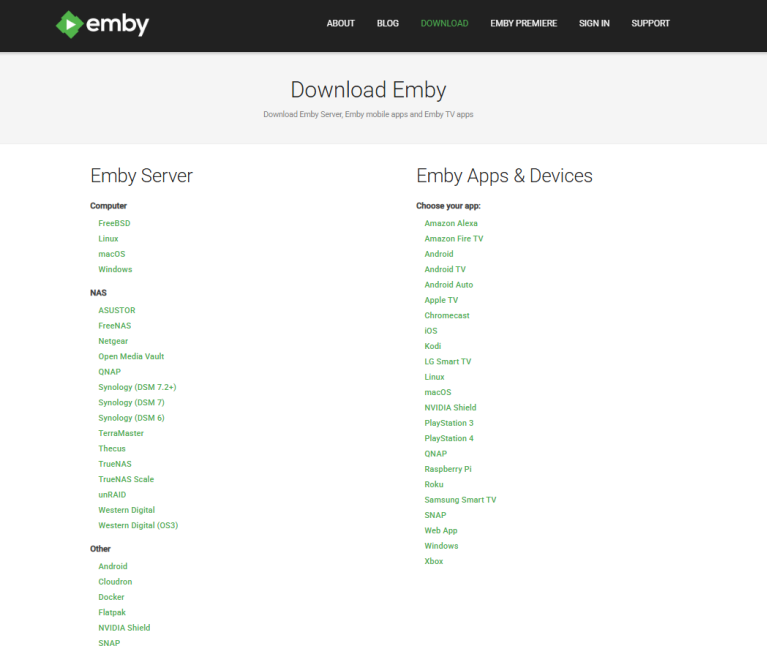
Its a recurring issue amongst visitors of every platform browsing the download subsite of downloading the Emby Server thinking theyre getting an emby client, because its the first glance item on the page. Wouldnt it make a lot more sense to just flex the Server and Client elements horizontally next to eachother like so? it should be easily achieveable on mobile too.
- 1 reply
-
- 1
-

-

Possible de trouver un m3u avec les chaines tnt fonctionnelles ?
MAX92 replied to Swaf's topic in French
J'ai essayé de nouveau mais pas de Tf1 ni en 576p ni 720p -
Home "Collections" row ignores Collections library sort order (Date Added)
Luke replied to dagTom's topic in Feature Requests
hi, these are two separate screens and how you configure the sorting for one does not impact the other. -
Emby for Android "universal emby" is a one stop shop that simply works out the box for all Android devices and makes maintenance easier, I get why they did it. On touch screen devices it works well. However, with a TV controller on an Android TV, it's horrible IMO and slower on most TVs because they're chronically under-powered unlike their mobile siblings. As someone else pointed out, the larger icons for the Emby TV edition of the app and the design around exclusive remote use is highly appreciated it. The Emby TV app is the better app IMO if you're picking just for a tv. I agree that a "universal emby" Android version should exist. But i also feel very strongly that a separate TV client version is vital. A TV is not a "normal client", it IS the premium, common sense target, number 1 target, priority client - after all this is a media server we're talking about here people. And the existing TV app needs a complete overhaul IMO, like really, how hard can it really be to just have a UI that looks mostly like Netflix. Claude Opus 4.8 has been out for a while now, and AI is extremely proficient at front end design...Emby TV for Android works great for TVs, it just doesn't look nearly as polished as apps like Infuse, (probably Plex) and Netflix. Creating a gorgeous UI to me seems like such low hanging fruit in order to attract new people. The average person, particularly for media servers, will pick the one that looks the nicest.
-

Playback failing on iPad without a transcode attempt
flashls82 replied to flashls82's topic in Apple iOS / macOS
Alrighty, here you go. Another failed playback attempt at the very end here. embyserver.txt -

'Audio Output' option removed from Android TV 'Playback Settings' menu
SuperCitizenEmb posted a topic in Android TV / Fire TV
In the past, sometimes you couldn't change playback speed if the audio codec wasn't compatible, so you had to go to Playback Settings on Android TV app, scroll down to Audio Output, and deselect 'Auto' and change it to something like 'force downsamping to Stereo" (or something like that) then it would force your tv to CPU transcode audio so you could change playbook speed for any video. This is the option that was recently removed, old menu: But this option is now GONE! Instead Audio Output has been replaced with 'Convert AAC' which does not seem to do the same thing. Server: 4.9.5.0 Emby TV: 2.1.51g So how do i change the video speed now for some videos where the playback speed setting is missing? -

Trying to set Caddy up as reverse proxy
RedNo7 replied to RedNo7's topic in Non-Emby General Discussion
I just want to access Emby remotely and securely. -
Home "Collections" row ignores Collections library sort order (Date Added)
dagTom posted a topic in Feature Requests
Hi, I'm using Emby Server 4.9.5.0 (Premiere enabled) and noticed what appears to be inconsistent behavior regarding Collections sorting. Current behavior: My Collections library is configured to sort by Date Added. When I open the Collections library, the sort order is correct and newly added collections appear first. However, the "Collections" row on the Home screen does not use this sort order. It always appears to be sorted alphabetically (or by Sort Name). Expected behavior: I would expect the Home "Collections" row to respect the sort order configured for the Collections library, just as it is displayed when opening the library itself. Question: Is this the intended behavior, or is it a bug? If it is intentional, is there currently any way to configure the sort order of the Home "Collections" row independently? Thanks! -
Playback issues with certain shows on Sony Bravia using Emby app
Luke replied to Zaryt's topic in Android TV / Fire TV
OK we are looking into it. Thanks. -
No, it depends more on the permissions of the user that launched the server.
-
Hi, yes it is.
-
Any update on hardware (Nvidia) transcoding support on ARM64 platforms?
Luke replied to WayneZ's topic in Linux
@WayneZdid you try the part where it says gpus: all ? -
Right, so given the occasional problems with season/episode mismatch, it would genuinely help if I could mark something as "already in my library."
-
@danergo?
-
Hi @Luke, What would you like me to do with the log file? Bob
-

Has the way Emby Premiere devices are counted changed recently?
Jdiesel replied to Juanrendon's topic in General/Windows
Full playback on mobile apps has always been a Premiere or per app unlock. Every change to the matrix can be view using the Wayback Machine. Feel free to go back and look for any changes. https://web.archive.org/web/20240324073007/https://emby.media/support/articles/Premiere-Feature-Matrix.html



