All Activity
- Past hour
-
 parkerbryant877 joined the community
 -
I was singed into my account when I clicked on Logs
-
 wdssy4 joined the community
 -
There is nothing of value in those logs. Did you try to login in, in these logs. Your logs cover under a minut and are of no use.
-
 Halo1966 joined the community
 -
Movie Naming I use this folder nameing and file nameing Folder : 300 (2007) {TmdbId-1271} File : 300 (2007) {TmdbId-1271}.mvk Adding that TmdbId really helps Emby to find the right metadata. And changing the name to (Future, The (2011)) does not help. The movie is named (The Future (2011)) Guessing its this movie The Future (2011) — The Movie Database (TMDB)
-
 embymx9377@gmail.com joined the community
 -
 abdul00 joined the community
 -
I posted the logs does anybody know why I can't play anything
-
 Mhesslfvn joined the community
 -
 yellowhqs joined the community
 -
 Ganouch770 joined the community
 -
 Rupepu joined the community
 -
I have a large library of over 5,000 movies on an Unraid Server. Everything runs smoothly for the most part, but in a recent addition of movies, I noticed that one of my movies (Future, The (2011)) was not being recognized and didn't show up in the library. I tried moving it's folder to another recognized library folder, but it still did not show up. Finally, I changed the name to something unrelated, and the item showed up in my library with the new wrong name. I then edited used the 'Identify' to accurately pull up the correct metadata. Then I went back to the storage location, renamed the folder and movie back to the correct title and did a rescan. Now the data is correct and the item is in the library where it should be. This caused me to think that I may have other movies that are not showing up in the library, as I don't always go back and check to see if a newly added movie actually made it. Is there some report or simple way to audit the library to see if all of the movies in the file system are actually recognized and added to the library?
-
As a quick fix you can try to delete the Roku devices from the device list on your Emby server. On your server Dashboard, the Devices tab, find any and all Roku devices and delete them. Don't worry the next time someone connects with a Roku their access token will be stashed and the device recreated. They won't know you did anything at all. Sometimes you can authenticate with the token but the server name or something has changed on the Emby server side. The Roku has the old server name or outdated info. Which then invalidates the token even though it appears correct and valid. The hash is derived from the server name combined with the username. The Roku doesn't yet understand this condition when it happens. It doesn't understand that the token can be correct but you can still be locked out. We need to code something in to better know when this happens and to invalidate the token it has stored for that user rather than stash it. But to do the same thing you can delete the Roku devices from the server dashboard devices tab. That will cause the server to not compare, but instead regenerate a new token. That new token should then allow you into the server if that is what was happening. The Roku will just log in afterwards without issue. If it still doesn't work after doing this it is definitely some kind of timeout in the app happening that we would need to investigate. Let us know if you still have problems.
-

Starting Emby Server launches browser/web app - Fedora Plasma 44
rckymtnrfc replied to rckymtnrfc's topic in Linux
The shortcut I removed was just the Emby Server that was listed in the Autostart section of the System Settings. After adding it back, with no launch arguments, it again starts the server but also opens the browser. So it seems Emby is opening the browser somehow, since removing that Autostart also stops the browser launch. Also, not sure if this is related. When the server starts, I see the Emby icon on the system tray for a moment, then it's gone. The server is still running but the icon vanishes. It's not hidden in the popup either. I'm not really worried about that, just sharing in case it's relevant. -

4K HEVC and HDR Colours look incorrect
visproduction replied to bighops15's topic in Apple iOS / macOS
You probably have looked into compatabilty already. Here are some links of interest: https://www.videoproc.com/iphone-video-processing/fix-unsupported-video-format-on-iphone.htm https://discussions.apple.com/thread/254875786?sortBy=rank https://www.captureguide.com/iphone-video-format/ From search: https://duckduckgo.com/?q=iPhone+iPAd+codec+Video+accept+options+change&ia=web - Today
-
What are the folder and file names and how have you setup any subfolders? TV naming conventions must be used. https://emby.media/support/articles/TV-Naming.html
- 1 reply
-
- 1
-

-
What if there is no TVDB ID?
-

Working on mobile DietPi emby sever, but have audio issue
Neminem replied to NotYourErnst's topic in Linux
This might be overkill for a simple road trip. Ecoflow but nice to have if you get strandet. Amazon.com: EF ECOFLOW: 𝐎𝐮𝐭𝐝𝐨𝐨𝐫 𝐒𝐞𝐚𝐬𝐨𝐧 -
I'm just seeing version 3.8.6 which the release notes show as enabling better logging
-
 UErsel changed their profile photo
 -

Working on mobile DietPi emby sever, but have audio issue
NotYourErnst replied to NotYourErnst's topic in Linux
Two streams 50% CPU usage. Still looking for a Powerbank, which could deliver constant power for it, everything else works fine now. -

[Security Issue] Using Home Button Makes PIN Bypass Possible
ebr replied to Tigga5's topic in Android
Hi. I just want to confirm that this situation is not possible in the old Android TV app, correct? Just want to be sure we don't have two holes to fill. Thanks. -
If emby release this it’s everything we need to have a decent book player in emby, oh and the book reader on app
-
No compatible streams are currently available just on some devices.
ebr replied to mexsurf24's topic in General/Windows
Hi. Exactly when in this log did the issue occur? -
Feature Request: Display the number and list of active Emby Premiere devices
ebr replied to yoyo77yo's topic in Feature Requests
Hi, there's already an open request for this or something functionally equivalent. Please join in and contribute to the existing discussion at: -

Feature Request: Select/Deselect All and Default Sorting Options for User Device Access
yoyo77yo posted a topic in Feature Requests
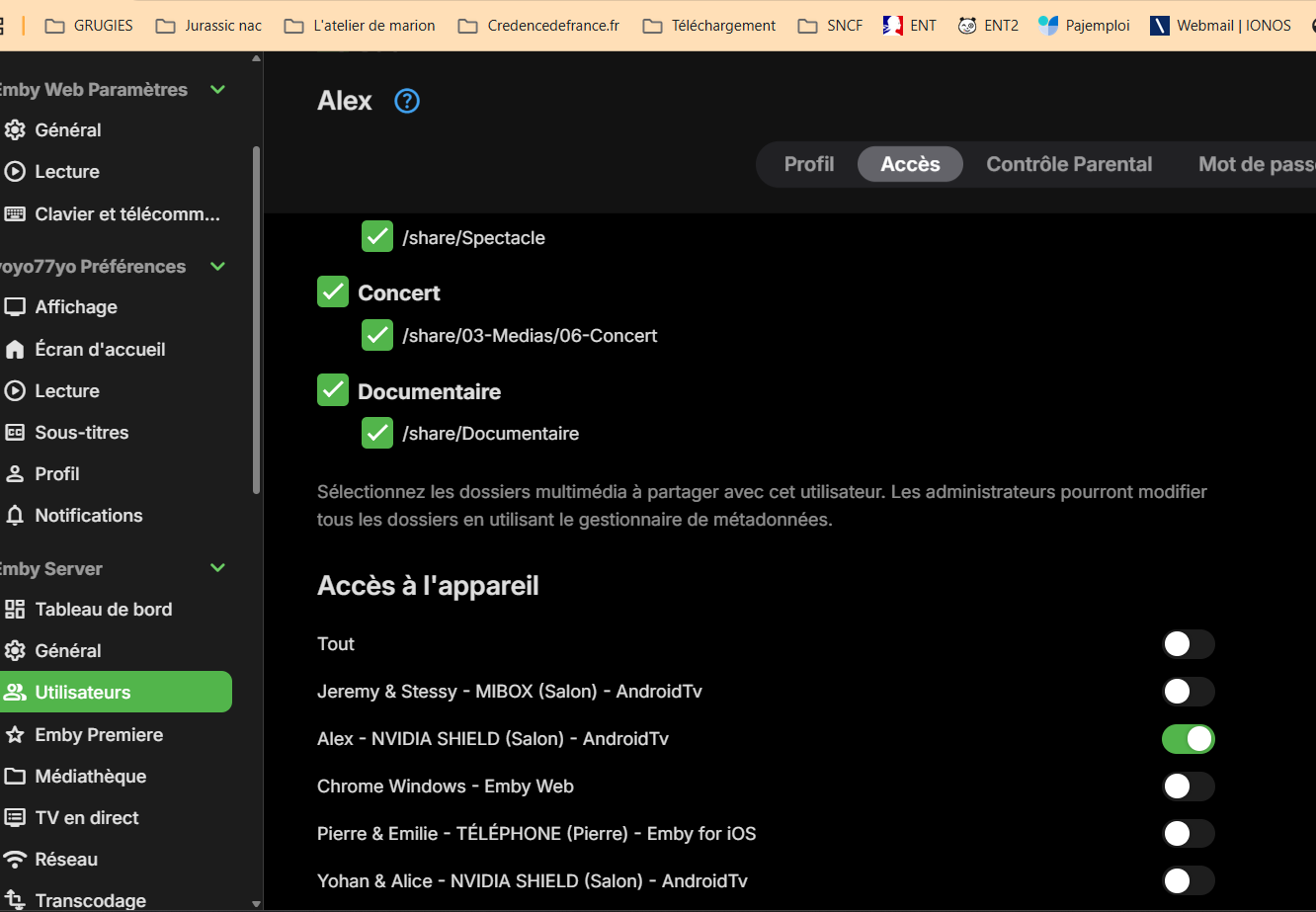
Hello, I would like to suggest a usability improvement for the User Settings → Access → Device Access section. When configuring a user account, Emby allows the administrator to choose which devices that user is allowed to access. This is very useful, but managing the list becomes difficult when the server has many registered devices. I would like to request two improvements. 1. Add “Select All” and “Deselect All” buttons Please add two buttons above the device list: Select All Deselect All This would make it much easier to configure restricted access. For example, when I want to allow a user to access only one or two devices, I currently have to manually disable every other device one by one. With a Deselect All button, I could disable everything first and then enable only the required devices. Likewise, a Select All button would make it easy to restore access to every device. 2. Add sorting options and allow alphabetical sorting by default The device list currently appears to be sorted from the most recently connected device to the oldest. I would like to be able to sort the list by: Device name, from A to Z Device name, from Z to A Most recently connected Oldest connection It would also be useful if the administrator could choose and save the preferred default sorting method. Personally, I would prefer alphabetical sorting by device name as the default, because it is much easier to find a specific device when many devices are registered. Ideally, the selected sorting method should remain saved when leaving and reopening the user settings page. These changes would significantly improve device-access management for administrators running servers with many users and devices. Thank you for considering this request. Best regards.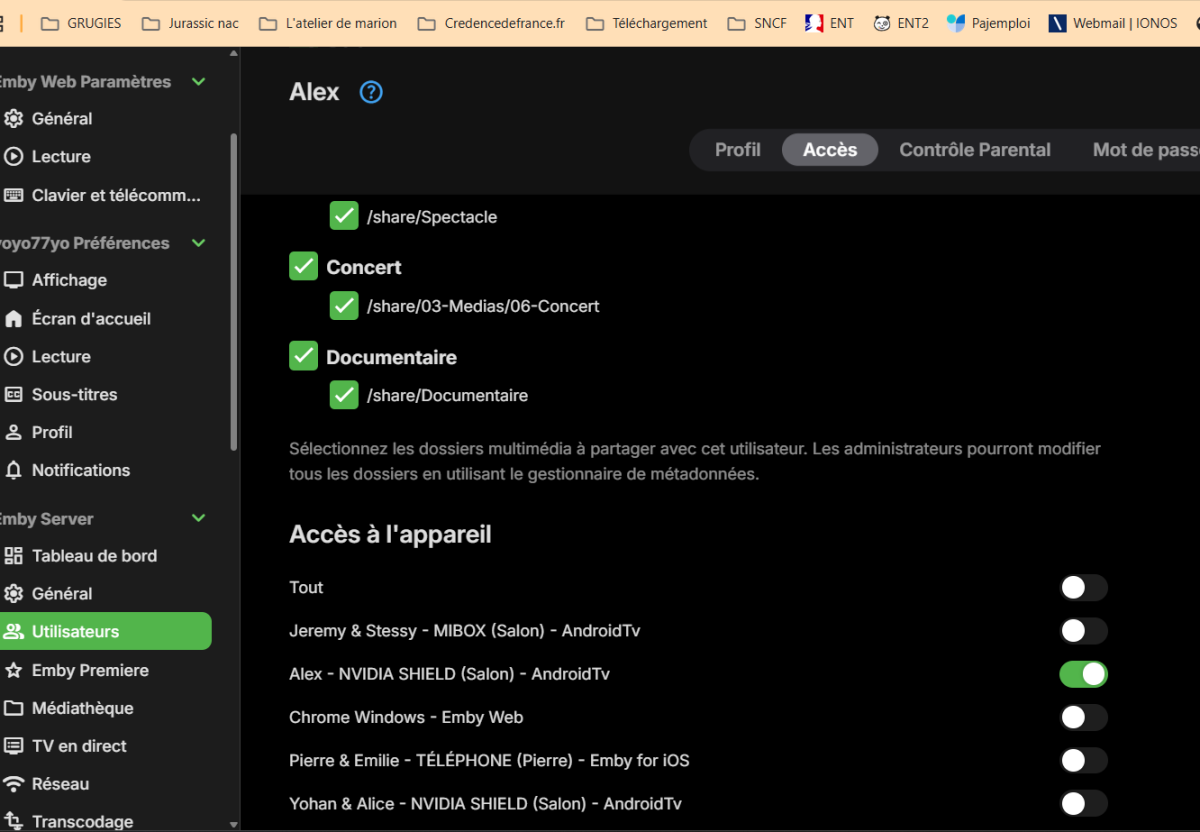
-
Feature Request: Display the number and list of active Emby Premiere devices
yoyo77yo posted a topic in Feature Requests
Hello, I would like to suggest a new feature for the Emby Premiere dashboard. I currently have an Emby Premiere Lifetime subscription, and my server devices listed in the Devices section. However, I understand that this list includes all devices and applications that have connected to the server over time, and that it does not represent the devices currently counted toward the Emby Premiere limit. At the moment, the Premiere page only displays a general message such as: “Your device usage is well below the limit.” This is reassuring, but it does not show the actual number of devices currently counted. It would be very useful to have a section displaying: The current number of Premiere devices, for example: 12 of 30 devices used The list of devices that have used a Premiere feature during the last seven days The device name The application used, such as Emby Web, Emby for Android, Android TV or Fire TV The date and time when the device last used a Premiere feature The date when the device is expected to stop counting toward the limit This would be especially helpful for users who have several televisions, Fire TV devices, NVIDIA Shield devices, mobile phones, browsers and different versions of the Emby application. For example, installing both Emby for Android TV and Emby for Android on the same physical device may create two separate client entries. Without a detailed Premiere device list, it is difficult to know whether both applications are currently being counted. If displaying identifiable device information creates privacy or security concerns, an anonymized list or simply an exact counter such as “12/30 active Premiere devices” would already be a major improvement. It would also be useful to clearly explain in the interface: What causes a device to count toward the Premiere limit How long it remains counted Whether reinstalling an application creates a new device entry Whether two Emby applications installed on the same physical device count separately Thank you for considering this feature. I believe it would make Emby Premiere device management much clearer and more transparent for server administrators. Best regards. -
Yeah I realize that. Was hoping they would have updated it to the newer flow version.
-
Emby's built-in Trakt plugin uses the old, legacy PIN flow.
-

There is a bug in version 2.3.8 with .ass files
MediaEmby1968 replied to MediaEmby1968's topic in Samsung Smart TV
Hi @Luke It's still the same. The same error. I'll leave it for later, until I uninstall Emby or have to format my PC. Thanks -
 upD8RP changed their profile photo
 -
installed app & server updates and still not fixed

-
BTW, I use for quite a while Yamtrack as selfhosted backup for Trakt. For the time being, it becomes my master now.
-
Looks like they updated Trakt to version 3.8.8 but it didn't make any difference in fixing the issue that it's having.