All Activity
- Past hour
-
 Manpreet01 joined the community
 -
 tuyenbmfc joined the community
 -

Emby for Android on Shield TV no longer passing through dolby digital 5.1 or DTS
seanbuff replied to Kramerika's topic in Android TV / Fire TV
Always remember to provide the important detail as requested in that link: -
 Gasga joined the community
 -
 GOJOSATORO joined the community
 -
 老坤君君 joined the community
 -
 Coco_moco joined the community
 -

Tips to set up emby on a QNAP NAS using Docker with HW Transcoding
quized replied to Ikario's topic in QNAP
Hello, I need your help, i have a same problem with emby and hardware transcoding. HW is down after the last update of QTS 5.2.9. before the update it's run successfully I try your docker compose with jellyfin and it's OK i try with emby and it's down (i have a premium key) Emby Server 4.9.5.0 Command line: /app/emby/system/EmbyServer.dll -programdata /config -ffdetect /app/emby/bin/ffdetect -ffmpeg /app/emby/bin/ffmpeg -ffprobe /app/emby/bin/ffprobe -restartexitcode 3 Operating system: Linux version 5.10.60-qnap (root@mini-builder-01) (x86_64-QNAP-linux-gnu-gcc (toolchain config: [gcc-4.9.2 binutils-2.25 glibc-2.21]) 4.9.2, GNU ld (G OS/Process: x64/x64 Framework: .NET 8.0.25 Runtime: app/emby/system/System.Private.CoreLib.dll Processor count: 8 Data path: /config Application path: /app/emby/system Docker compose file : services: emby-qnap: build: dockerfile: /share/Container/repository/emby-qnap/Dockerfile context: /share/CACHEDEV1_DATA/.qpkg/NVIDIA_GPU_DRV/usr container_name: emby-built environment: PUID: 1000 PGID: 100 GIDLIST: 0 TZ: Europe/Paris volumes: - /share/Container/repository/emby-qnap/config:/config - /share/mediatheque:/mediatheque - /share/Container/repository/emby-qnap/scratch:/scratch ports: - 8096:8096 # HTTP port - 8920:8920 # HTTPS port - 7359:7359 - 1900:1900 devices: - /dev/nvidia0 - /dev/nvidiactl - /dev/nvidia-uvm restart: unless-stopped image: embyhwtrc2 network_mode: bridge embyserver.txt hardware_detection-63919621670.txt -
 Coconut water joined the community
 -
 Cookie2979 joined the community
 -
 Omogg joined the community
 -
quized joined the community
-
Incidentally, the old Windows Theater app worked fine. I've just pulled that from Github to test and it works. I guess if nothing else works I can still use the old version.
-
No, that folder doesn't exist. Everything up to /LocalCache is there, but there is no log dir. It's not a cloud VM but it is a VM. My other apps, including those from the Windows Store, all work fine. It's only Emby that doesn't launch. I also tried launching the app as an admin but that didn't make a difference other than to give me the elevation prompt by Windows. It's not part of a domain and there shouldn't be any group policies as it's a pretty standard Parallels VM that runs a handful of apps. I'm guessing the nature of it being a VM is part of the issue but it seems strange my other apps work fine. I wonder if there's anything I can try?
- Today
-
Maybe in 10 more years
-

Live TV on Android TV stick (Strong Leap 4K) - problem with SD content
Luke replied to stevenpuk's topic in Android TV / Fire TV
Hi there, let's look at an example. Please attach the information requested in how to report a media playback issue. Thanks! -
I may have found the problem in my setup. Not sure yet but will observe it. I am using the projectivity launcher and hitting the home button just brings me to the custom launcher. I now closed the launcher and used stock Android. And it seems to update the continue watching section when I reopen emby from the stock launcher. I am not deep enough into Android to know if this makes a difference.
-
I installed the app from the google playstore. Should be the latest stable version. yes I do close the app with the home button. If I use the exit command and open the app it refreshes the progress.
-
+1 by country
-

Emby Connect can't reach server (connection works fine via direct domain/reverse proxy)
smity3 replied to smity3's topic in General/Windows
No problem, there was a log attached to my original post on this thread that I'll reattach here, as well as a new one for today. embyserver.txt embyserver.txt -

Emby Android Server USB Drive Can't Read Directory
jscheeren replied to jscheeren's topic in Android Server
G'day. I tried this again on an Android 14 tablet after following this thread on and off over the years. I downloaded the apk from the Emby site, Version 4.10.0.19. It did not want initially to install, Android quoting that it was for an older version of Android and was missing therefore several security features. I overrode that. It then asked (from Emby Server) to allow All files access. I selected that. Small print in that dialog box said Allow this app to read, modify and delete all files......including connected storage volumes. In the USB C port I had placed a Samsung T7 4TB solid state drive and checked that Xplore could see it and its directories. Emby Server could not in the initial dialog show the external drive as far as I could tell, so I went to Xplore and it showed me it was at /storage/5AEE-B089, which I then added manually - and now Emby Server found my directories and was able to scan them. Hooray. -
Well, I never got around to hitting that API endpoint, I think I just abandoned the idea at the time because I didn't want to try to ping 100s of thousands of URLs to get their information. I was just searching for how to do this exact probe and found this thread, so @TeamBthanks again! I did figure out how to get jellyseerr (now seerr) to recognize media in the library. I ended up re-having this issue recently and ended up using mitmproxy to sit in front of emby and modify the data in the API responses that emby sends to seerr so it will mark the content as available. https://github.com/bruor/EmbySeerrSTRMproxy
-
Thanks! Quick question: In which Emby Server version (4.9.5, 4.10, beta?) is this live? I want to test it on my setup.
-

Emby for Android on Shield TV no longer passing through dolby digital 5.1 or DTS
ChateauPlex replied to Kramerika's topic in Android TV / Fire TV
File played and correction ritual performed then logs sent. - Yesterday
-
Thank you for the reply. It's not showing up in my library, I'll have to check the mount is set up correctly and the permissions on the files are right. HS
-

Emby Beta 4.10.0.15+: Crashing due to Out of Memory on DS918+ Package Center Install
DarWun replied to DarWun's topic in Synology
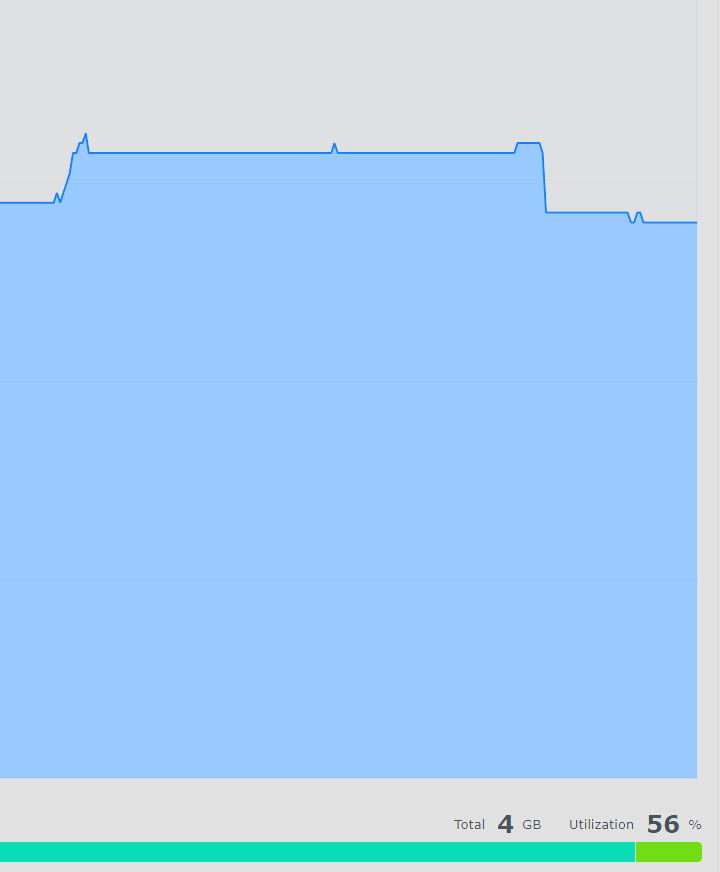
Another observation: One task that causes a jump in memory usage is backup. Emby Memory usage jumps by 200MB or more every time it runs. Having said that, it does appear the memory was quickly released after the backup.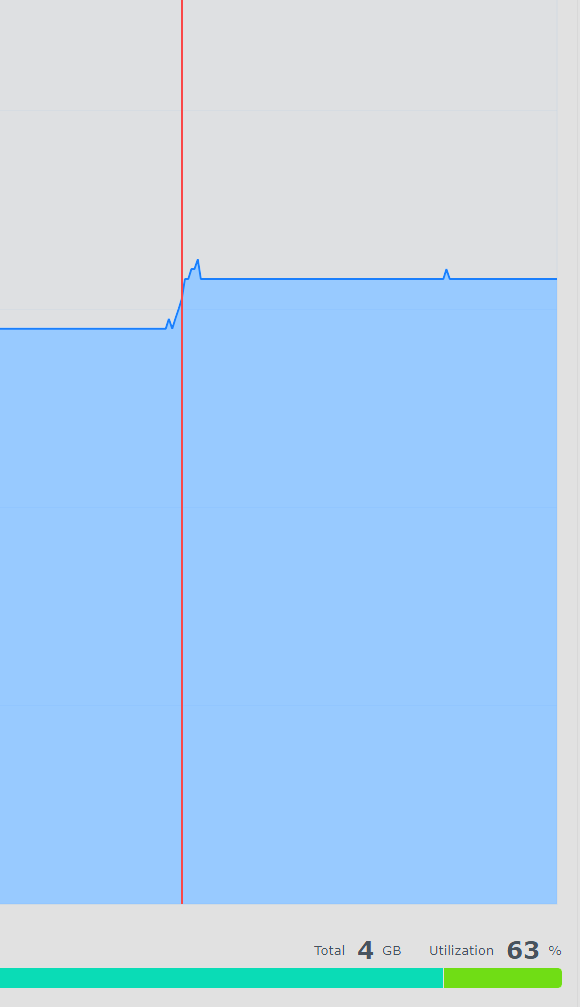
-
@Cat091Hi, what version number of the app do you have installed?
-
The server has native support for youtube now where emby apps will use the youtube sdk on the client device and play the YT video in a google-approved way. You may want to consider updating your plugin to do that instead.
-
Emby Beta 4.10.0.15+: Crashing due to Out of Memory on DS918+ Package Center Install
DarWun replied to DarWun's topic in Synology
After making the setting changes, nothing seems to have changed with respect to memory usage by Emby on the Synology platform. Within 6hours of restarting the server with cache reduced to 128MB, library scan changed to 12hours (instead of 8 hours as recommended), and doing only individual library scans when new media is added, memory usage is sitting at 1.2GB as per the norm. No sudden spikes in memory usage. So that is good so far. And here is I went off script. I reinstalled several of the plugins that Luke asked to be uninstalled. Yesterday, I reinstalled TimelordTV, TimeLord Movies, and Statistics. I had library updates I was doing that required them. After doing so, the memory utilization did not change. Within 24hours, Emby was utilizing around 900MB to 1GB of memory as per the norm. This morning, I accidentally manually ran the scheduled library scan task after I added new media to my library instead of scanning the individual library. Whoops! Old habits die hard. Emby's memory utilization almost doubled immediately. This time Emby did release the memory without shutting down. I captured the memory jump with the script running. Unfortunately, I don't have the full history from server restart to the memory jump as my PC went to sleep at some point last night and shutdown the puTTy connection. I restarted the script when I woke up this morning about 20minutes before the memory utilization jumped. Whether or not it is of use? I have no idea. But I'm providing it anyway. Library scan started at around 8:54am. I'll shutdown the potentially "problematic" plugins again later tonight and continue monitoring with the script enabled. MediaStorage_emby_memory_log_2026-07-13.csv embyserver-63919547583.txt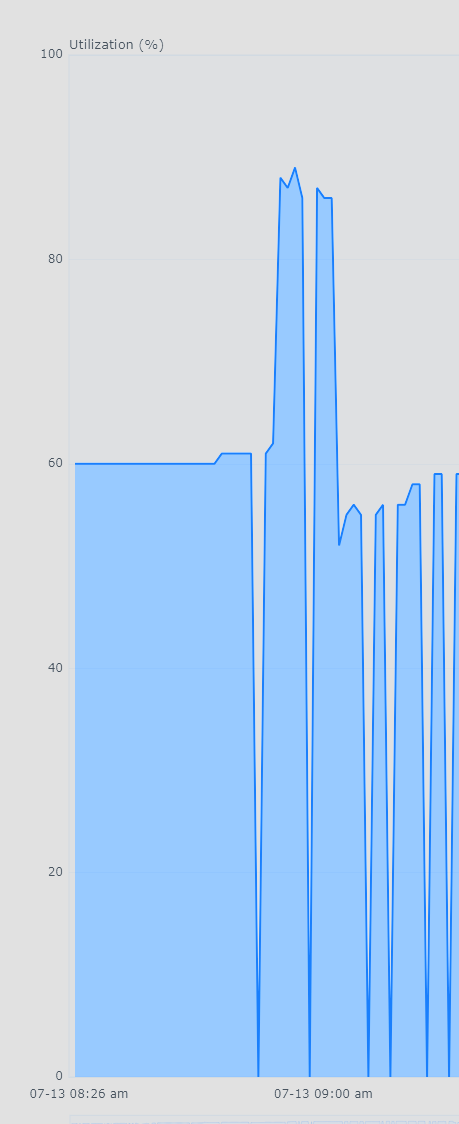
-
Hi, what option are you referring to exactly?
-
@CelsoCruzthe log does not contain the snippet that you provided above. Are you sure this is the right one?
-

Next Episode Pop-up won't show up for the credits chapter
SamES replied to Kyouma's topic in Apple TV
Please check this in the next update when it is released. Thanks -
[Trakt plugin] Since June 13th 2025 the plugin is duplicating or multipiyng the number of plays.
Luke replied to Drift3556's topic in Plugins
OK the 3.8.4 plugin update has added support for their new paging requirements. Thanks. -
OK the 3.8.4 plugin update has added support for their new paging requirements. Thanks.
-

Emby not working after upgrading to Premiere
BoogieBish replied to BoogieBish's topic in Android TV / Fire TV
Sorry, it was an error from my side, I was not signed on correctly!