All Activity
- Past hour
-
 51522zzwlwlbb joined the community
 -
 Troverwu12 joined the community
 -
 lhjx joined the community
 -
 Miclam1217 joined the community
 -
 hxj51522zzwlwlbb joined the community
 -
 hxj51522 joined the community
 -
 Mubarak91 joined the community
 -
 dashti_q8 joined the community
 -
 l02if joined the community
 -
 Wqz991209 joined the community
 -
Hi, I would suggest posting in the dedicated topic for the plugin to ensure that the developer will see this. Thanks.
-

XMLTV seekback/catchup (ability to play previously shown programmes, ability to seekback)
EEEEEEEEEEEEEEE posted a topic in Feature Requests
Hello, Currently, Emby only has ability to play only live IPTV streams. However, it's possible to play previously shown programmes, or even seekback on currently shown IPTV programme using M3U playlist and XMLTV in other apps! Here are few examples where it's explained how to: https://siptv.app/howto/ has instructions on how this tool parses XMLTV in order to replay previously shown programmes https://github.com/kodi-pvr/pvr.iptvsimple this IMO has widest support of catchup/seekback support, all explained in README. Could you guys please implement this functionality into Emby? -

VideoToolbox H.264 Hardware Encoding Fails on Apple Silicon (M1 Ultra) - Invalid Profile Parameter
rockinyp replied to rockinyp's topic in MacOS
@LukeMy Mac Studio server is running Emby Server 4.9.5.0 and I can still reproduce the VideoToolbox H.264 failure. Environment Emby Server: 4.9.5.0 Hardware: Apple Silicon Mac Studio (M1 Ultra, arm64) OS: macOS 26.5.2 Bundled FFmpeg: 5.1-emby_2023_06_25_p4 Reproduction Play a 480i MPEG-2 DVR recording remotely at 1.808 Mbps, which requires H.264 video transcoding/deinterlacing. Emby first launches FFmpeg with -c:v:0 h264_videotoolbox and -profile:v:0 77. That VideoToolbox transcode exits with code 1. Emby immediately retries with -c:v:0 libx264, and playback continues via software encoding. This happened on July 29, 2026 at 07:19:05 EDT. The attached full server log and FFmpeg transcode log are downloaded from Emby’s Logs UI/API endpoint for that playback attempt. Relevant server-log sequence: 07:19:05.149 h264_videotoolbox ... -profile:v:0 77 ... 07:19:05.422 Process exited with code 1 - Failed 07:19:05.430 libx264 ... 07:20:28.694 Process exited with code 0 So yes: H.264 VideoToolbox hardware encoding is still failing in 4.9.5.0 on this M1 Ultra, and Emby is falling back to CPU software encoding (libx264). embyserver-63920966400.txt ffmpeg-transcode-42d2f5f9-55ef-4465-b729-27f5e85c5d80_1.txt -
Hi, we’ll take a look at it. Thanks for reporting.
-
Hi, what exactly do you mean by nothing is at that link?
-

Is there a way to disable the Download permission for all users at once?
Luke replied to Juanrendon's topic in Linux
Hi, there is no way to do this with multi select but bulk edit features are planned for future updates. Thanks. -
Error Exception of type 'SQLitePCL.pretty.SQLiteException' was thrown when users try to login to Emby server
Luke replied to booga69's topic in Synology
Hi, sounds like the server somehow has only read access to the database file: SQLitePCL.pretty.SQLiteException: ReadOnly: attempt to write a readonly database first thing I would try is rebooting the machine. If that doesn’t help then you’ll need to look at permissions on the database file. -
Correct yes.
-
Bring back middle click > 'open in new tab'
Luke replied to Maximus Naxsus's topic in General/Windows
I think ideally it would have been better to have never lost this, but it would take some significant reworking of things to bring it back. - Today
-

Using keyboard navagation in desktop/Mobile/tablet modes.
Smitty018210 replied to Smitty018210's topic in Web App
@Luke You guys removed the clickable headers and left only the horizontal row view that I hate and that was why I was so upset. I was forced to use desktop mode to still have them. I don't know when you put them back. Last I used TV mode was a few months ago, but I am very happy to see their return! I can go back to using TV Mode which is the mode I want to use! Would still love to see cast and crew get same treatment (open to vertical view) but I am happy to have these back! -
I have the exact same issues. After waiting for a long while on the loading bar screen, the interface shows up though. Same sluggishness as well. The issues are not present in the beta.
-
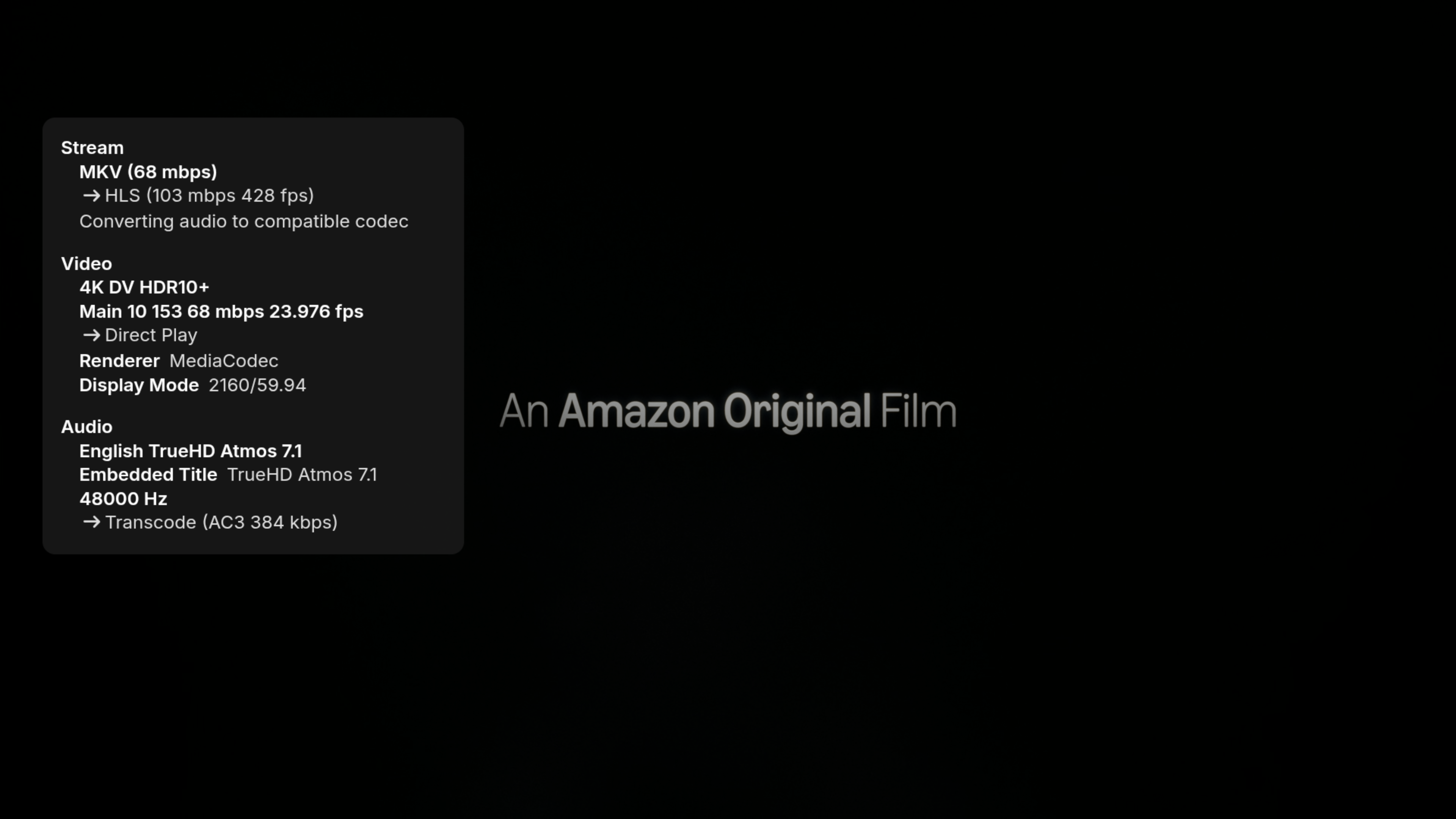
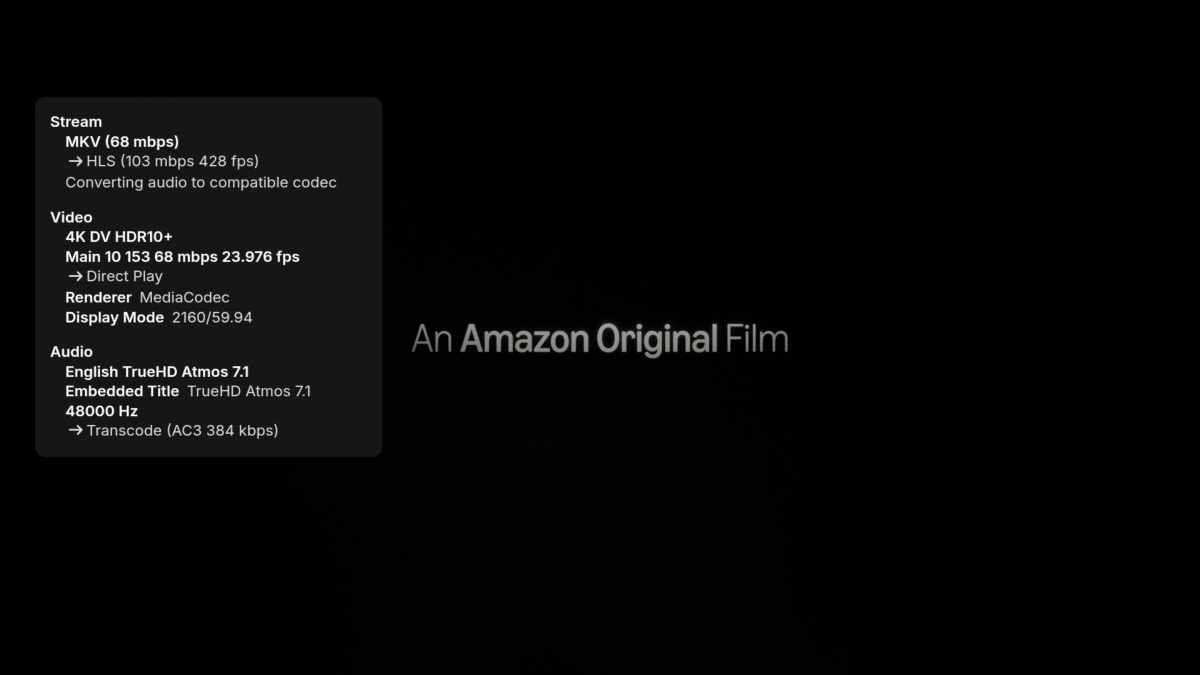
SFN doesn't display the number of channels when converting, but I could hear sound out the rear speakers and below is the ffmpeg code showing it used 6 channels -sn -c:v:0 copy -bsf:v:0 hevc_mp4toannexb -c:a:0 ac3 -ab:a:0 384000 -ar:a:0 48000 -ac:a:0 6
-
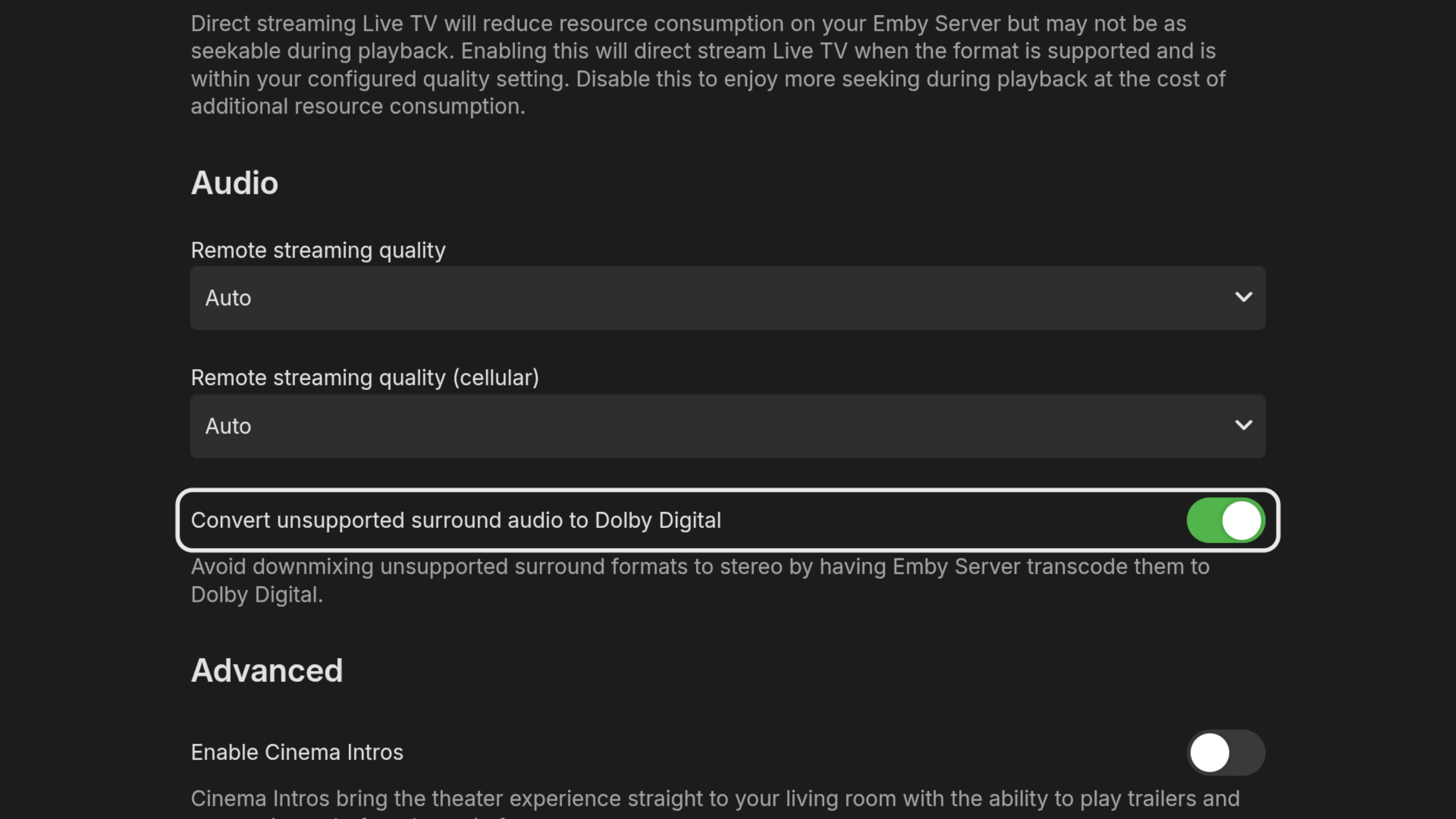
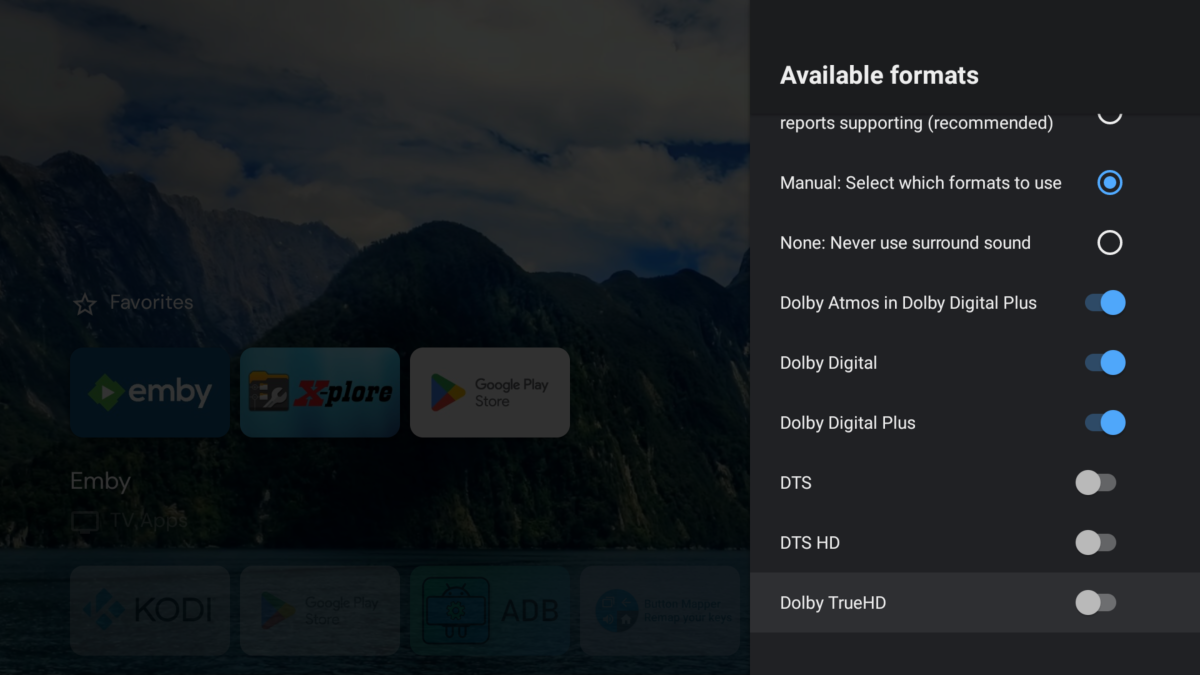
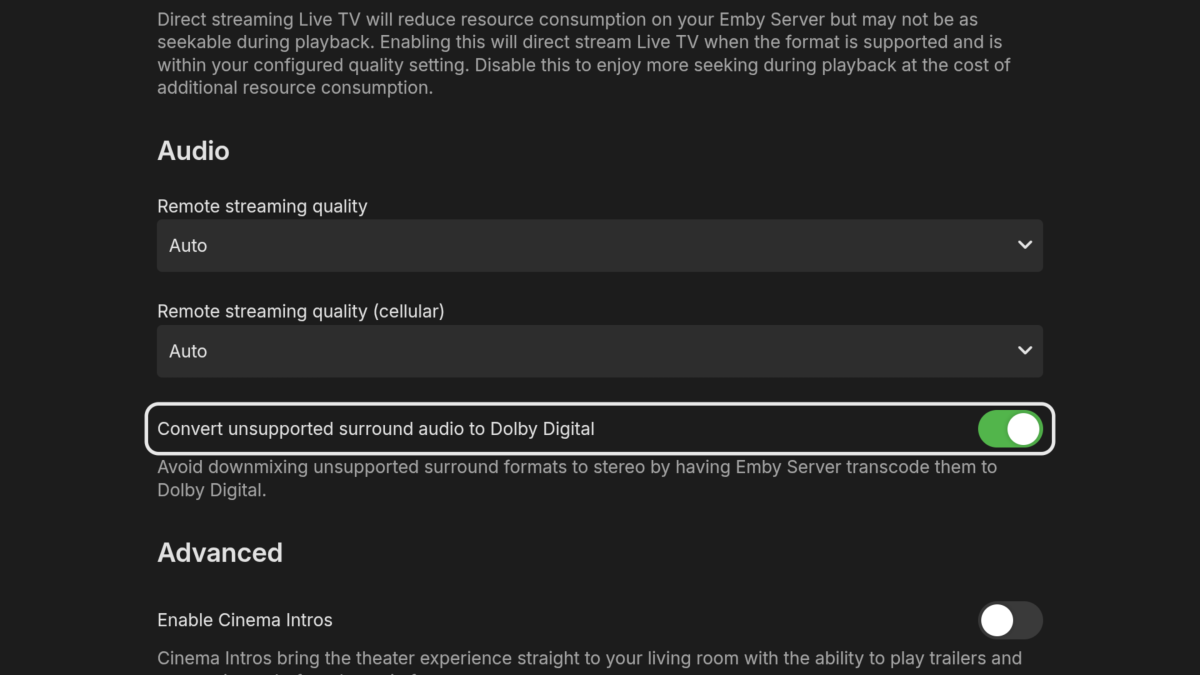
I just tested the following settings and the new app was converting TrueHD to AC3 5.1 for me When I turned "Convert unsupported surround audio" off then it was direct playing TrueHD and I couldn't hear anything out the rear speakers. So, I assume I was getting PCM 2.0 but my soundbar doesn't tell me if it's playing PCM (just Atmos and DTX) so I can't say for sure.
-
Love seeing that people like the plugin, makes it all worth it!
-
 DCamp31 changed their profile photo
 -
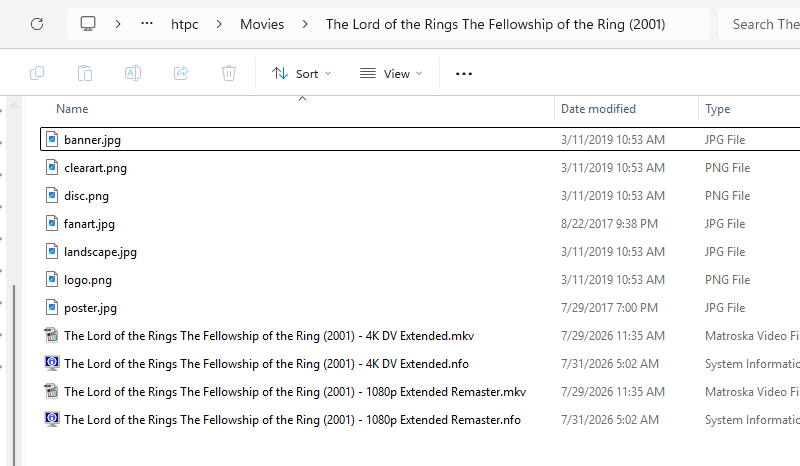
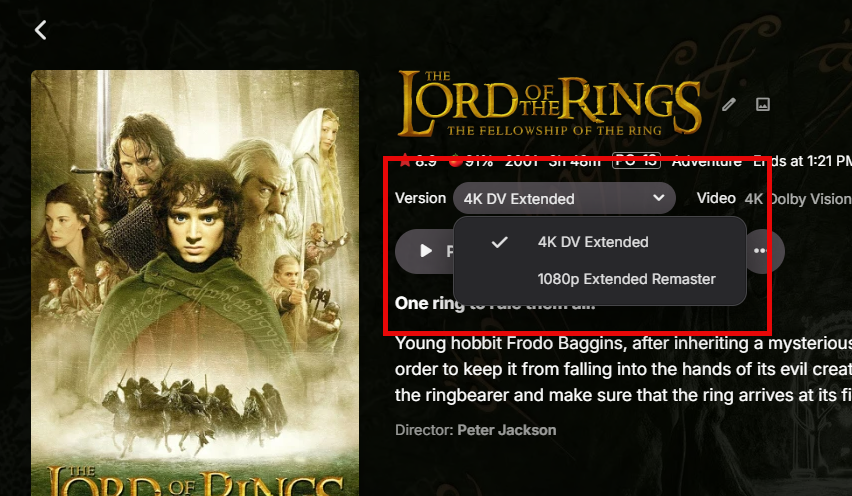
I wasn't sure the thread to post this, so I'm aiming for general help. If this should be in a different thread (Developer API or Plugin), let me know and I will move it. As a note, I am running my Emby Server 4.9.5.0 on QNAP. My end goal is to use the EmbyIcons plugin to show informative icons over posters. The plugin is great, but there is one bit missing: multiple versions. There is no in-built detection for an item having multiple versions. However, EmbyIcons allows you to define custom rules tied to the metadata, so I figured if I can automate adding a tag ("MultiVersion") to any item that has multiple versions (Logan, for example, which has color and black and white or even a movie where I have both 4K and 1080p versions). This led me to the Scripter-X plugin, which sounds exactly what I need, but I'm having trouble getting it to work. First, I'm sure the python script I wrote is not even getting executed. But before that, I'm trying to write a basic python script that, if provided with some identifying information like the Emby item ID, will go in and add the "MultiVersion" tag. To this end, I am trying to use the REST API to get the information, but am struggling with how to determine versions. The problem I'm getting is that the different versions have different IDs. In my particular example, I have 4K DolbyVision of LOTR: The Fellowship of the Ring and the 1080p version. In all Emby clients I've checked (Web Interface, Shield TV, and Android phone app), the entry shows as expected. Web Interface screenshot The URL in the web interface is: /web/index.html#!/item?id=354397&serverId=... If I go to the API link at the bottom of the dashboard to test out a REST API call, I only get a single video item back. It turns out that the 4K item, has a separate ID (354398). Since I may have items that are manually entered (not linked to a tmdb or thetvdb entry), I'm trying to find a reliable way to write a script to do the detection and tagging and run it with Scripter-X. Can anyone offer insight into: 1) How to determine if an item (movie or episode) has multiple versions via REST API? 2) How to get my Scripter-X working? URL in REST Call: /emby/Items?Fields=MediaSources&Ids=354397&api_key=... Output (I have removed the ServerId from the output below for security / privacy reasons): { "Items": [ { "Name": "The Lord of the Rings: The Fellowship of the Ring", "ServerId": HIDDEN_SERVERID, "Id": "354397", "Container": "mkv", "MediaSources": [ { "Chapters": [], "Protocol": "File", "Id": "mediasource_354397", "Path": "\\\\KSMEDIANAS\\HTPC\\Movies\\The Lord of the Rings The Fellowship of the Ring (2001)\\The Lord of the Rings The Fellowship of the Ring (2001) - 1080p Extended Remaster.mkv", "Type": "Default", "Container": "mkv", "Size": 18868053412, "Name": "1080p Extended Remaster", "IsRemote": false, "HasMixedProtocols": false, "RunTimeTicks": 136913860000, "SupportsTranscoding": true, "SupportsDirectStream": true, "SupportsDirectPlay": true, "IsInfiniteStream": false, "RequiresOpening": false, "RequiresClosing": false, "RequiresLooping": false, "SupportsProbing": true, "MediaStreams": [ { "Codec": "h264", "Language": "eng", "ColorTransfer": "bt709", "ColorPrimaries": "bt709", "ColorSpace": "bt709", "TimeBase": "1/1000", "VideoRange": "SDR", "DisplayTitle": "1080p H264", "DisplayLanguage": "English", "NalLengthSize": "4", "IsInterlaced": false, "BitRate": 11024773, "BitDepth": 8, "RefFrames": 1, "IsDefault": true, "IsForced": false, "IsHearingImpaired": false, "Height": 804, "Width": 1920, "AverageFrameRate": 23.976025, "RealFrameRate": 23.976025, "Profile": "High", "Type": "Video", "AspectRatio": "160:67", "Index": 0, "IsExternal": false, "IsTextSubtitleStream": false, "SupportsExternalStream": false, "Protocol": "File", "PixelFormat": "yuv420p", "Level": 41, "IsAnamorphic": false, "ExtendedVideoType": "None", "ExtendedVideoSubType": "None", "ExtendedVideoSubTypeDescription": "None", "AttachmentSize": 0 }, { "Codec": "eac3", "Language": "eng", "TimeBase": "1/1000", "DisplayTitle": "English EAC3 5.1 (Default)", "DisplayLanguage": "English", "IsInterlaced": false, "ChannelLayout": "5.1", "BitRate": 1024000, "Channels": 6, "SampleRate": 48000, "IsDefault": true, "IsForced": false, "IsHearingImpaired": false, "Type": "Audio", "Index": 1, "IsExternal": false, "IsTextSubtitleStream": false, "SupportsExternalStream": false, "Protocol": "File", "ExtendedVideoType": "None", "ExtendedVideoSubType": "None", "ExtendedVideoSubTypeDescription": "None", "AttachmentSize": 0 }, { "Codec": "ass", "Language": "eng", "TimeBase": "1/1000", "Title": "English", "DisplayTitle": "English (ASS)", "DisplayLanguage": "English", "IsInterlaced": false, "IsDefault": false, "IsForced": false, "IsHearingImpaired": false, "Type": "Subtitle", "Index": 2, "IsExternal": false, "IsTextSubtitleStream": true, "SupportsExternalStream": true, "Protocol": "File", "ExtendedVideoType": "None", "ExtendedVideoSubType": "None", "ExtendedVideoSubTypeDescription": "None", "AttachmentSize": 0, "SubtitleLocationType": "InternalStream" }, { "Codec": "ass", "Language": "eng", "TimeBase": "1/1000", "Title": "English SDH", "DisplayTitle": "English (ASS)", "DisplayLanguage": "English", "IsInterlaced": false, "IsDefault": false, "IsForced": false, "IsHearingImpaired": false, "Type": "Subtitle", "Index": 3, "IsExternal": false, "IsTextSubtitleStream": true, "SupportsExternalStream": true, "Protocol": "File", "ExtendedVideoType": "None", "ExtendedVideoSubType": "None", "ExtendedVideoSubTypeDescription": "None", "AttachmentSize": 0, "SubtitleLocationType": "InternalStream" } ], "Formats": [], "Bitrate": 11024773, "RequiredHttpHeaders": {}, "AddApiKeyToDirectStreamUrl": false, "ReadAtNativeFramerate": false, "ItemId": "354397" } ], "RunTimeTicks": 136913860000, "Size": 18868053412, "Bitrate": 11024773, "IsFolder": false, "Type": "Movie", "ImageTags": { "Primary": "bf3b07641d0b4f393ab0d823685b9997", "Art": "ba2a29d3e2c4549162d6367ba6810b50", "Banner": "faa410f0a07c2a34a6823c12e8d55dff", "Disc": "66b6e0835807582a2734693b8cafb80c", "Logo": "ed0a319dbdc716f4cd47ad8f54ddb129", "Thumb": "fbde7c997bb9440221a20159cb5fd6d8" }, "BackdropImageTags": [ "46150c0aedee3bdb8c840030c754f6c5" ], "MediaType": "Video" } ], "TotalRecordCount": 1 } Thank you for any insight anyone can offer. antilog17
-

Not sure if the last app on IOS version is broken
LoLoEmby replied to LoLoEmby's topic in Apple iOS / macOS
Hi Luke, the error is the same so the logs I already provided is still the affective -
The instructions for creating a server PIN and how to create a PIN allowing a new app install to connect to your server were already posted above.
-
Quiero mi pin para mi servidor
-

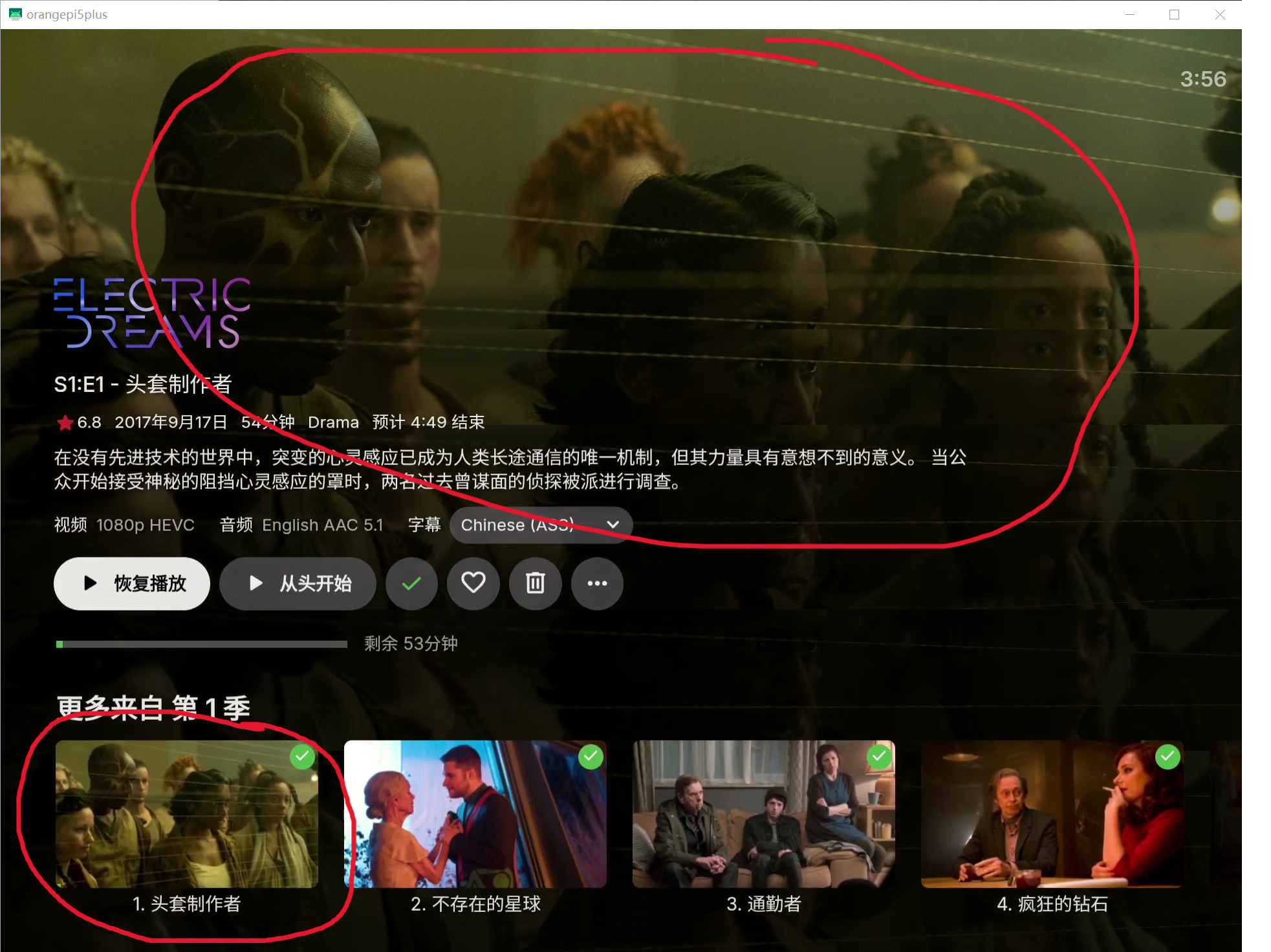
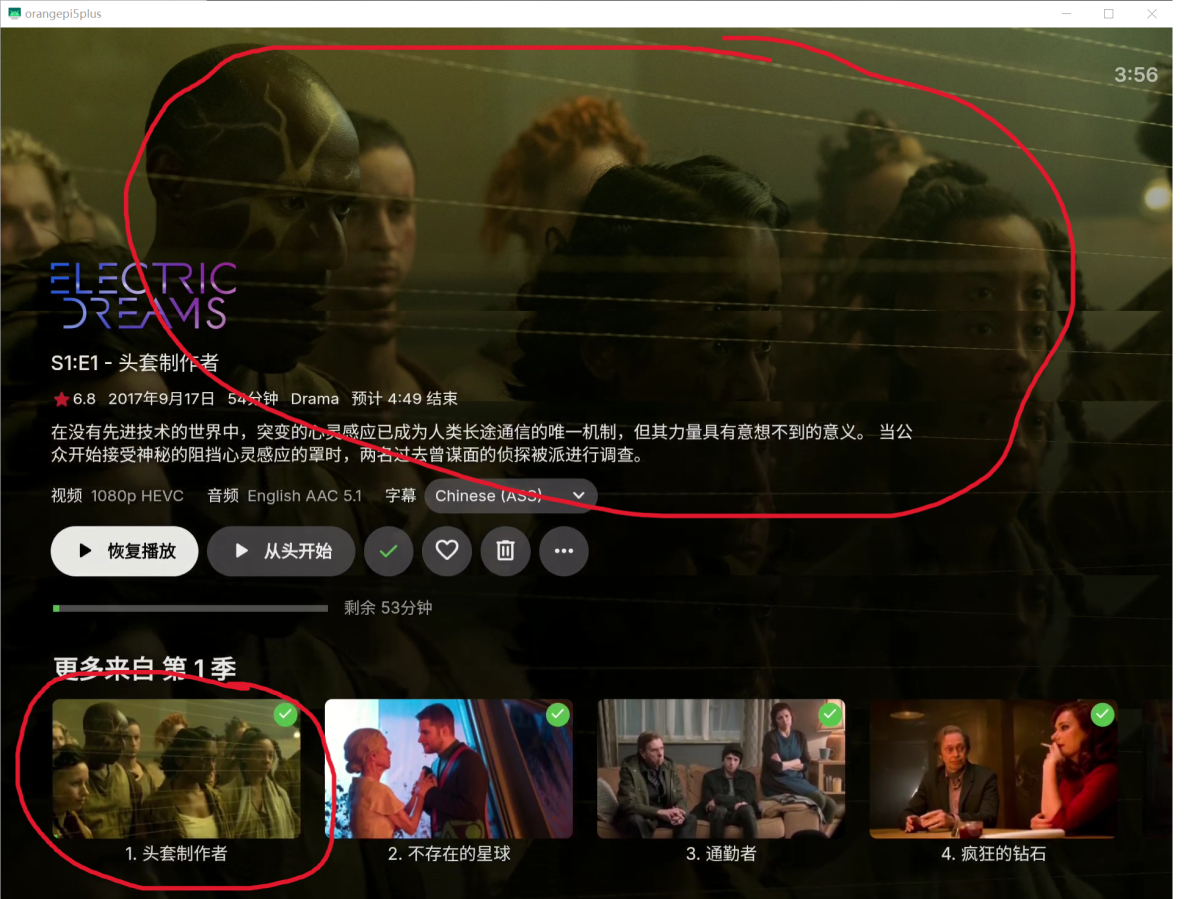
Display a poster of the current episode as the background for the TV show (just like on Android phone)
ebr replied to chuwz's topic in Feature Requests
Hi. We will monitor this request for support. Thanks. -
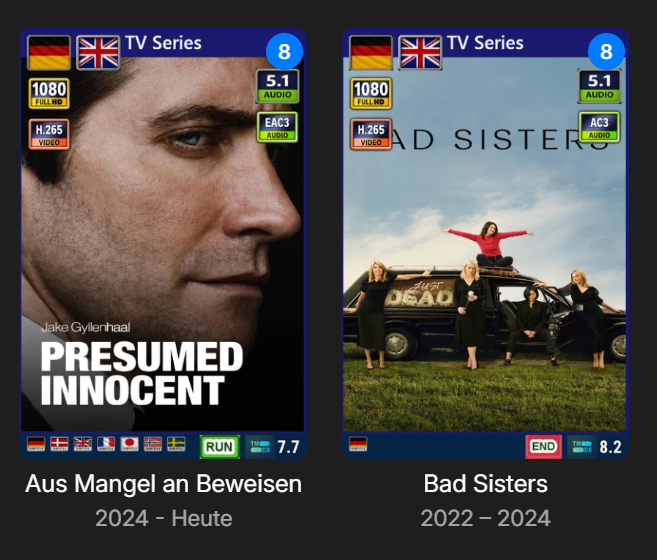
The advantage of good support and a plugin like this—with so many customization options, you really thought of everything—is that it allows you to explore things yourself and find your own solution! Thanks for that! I've now created my own icon; it's not amazing, but perfectly fine for me! And for anyone who needs it, I've attached it. Thanks again for that great tool - I love it!


-
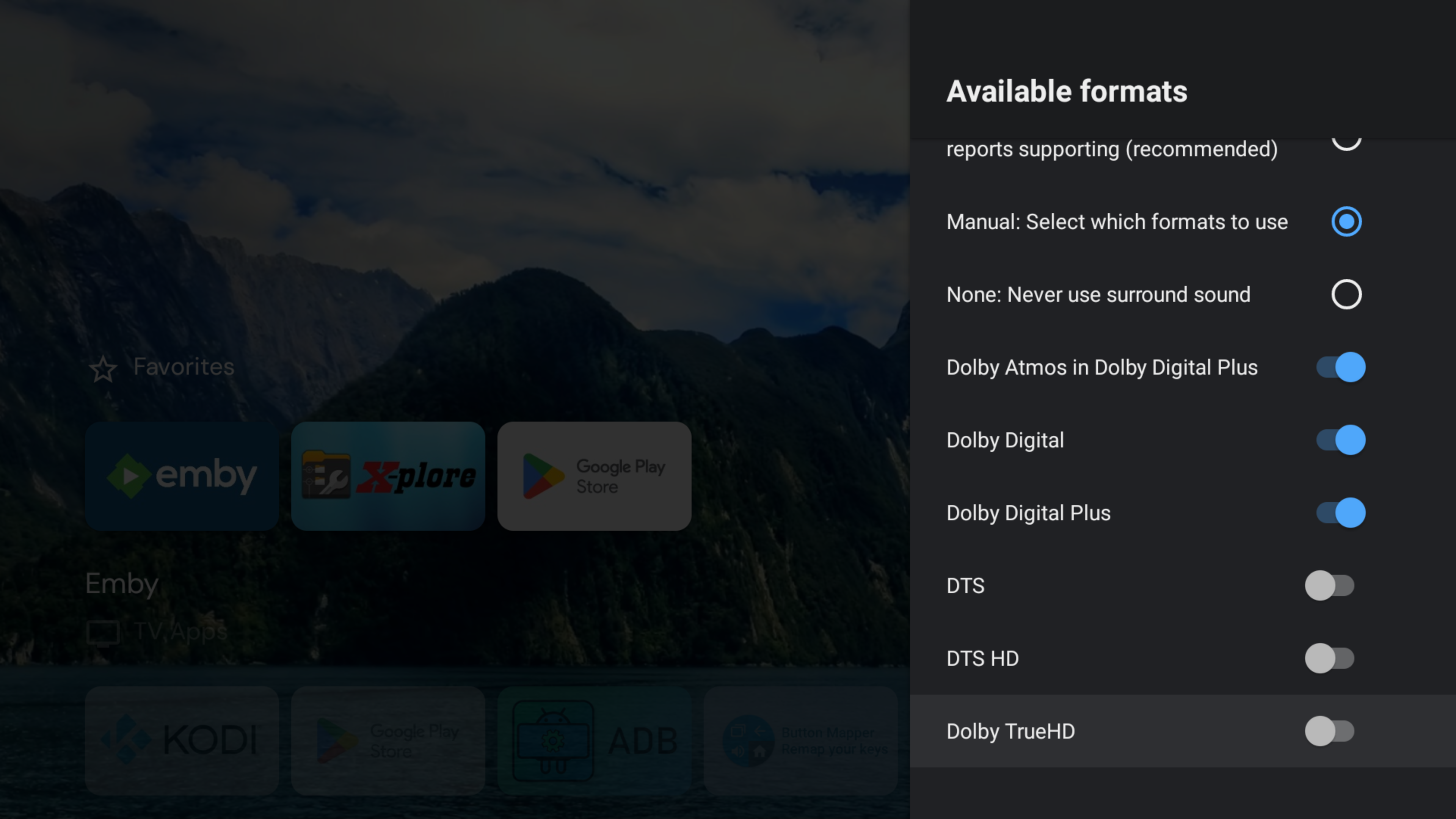
The reason I'm a bit confused is because in your first post your said "the standard Android client currently lacks an option to pass through raw audio streams (such as DTS-HD MA, TrueHD, Dolby Digital, etc.)" and then you said it's passing through everything, and you get PCM 2.0
-
Yes, they will both passthrough everything by default. What is it you want the new app to do? Do you want the new app NOT to passthrough certain codecs and have the server convert to DD 5.1? If I recall correctly the SONOS doesn't support TrueHD, DTSHD, or DTS which is why those 3 settings are in ATV. If you don't want the new app to passthrough those formats, then all you should have to do is go into your Shield settings and tell it your soundbar doesn't support them and then check that box in the picture above to get DD 5.1. Or, are you wanting the Shield to convert it to PCM 2.0? Then all you should have to do is uncheck that box in the new app to let the server passthrough. Then the Shield should convert it to PCM 2.0 if your Shield settings reflect that you have a soundbar which doesn't support DTSHD. What are the Shield settings for the audio formats you're having an issue with? @CBerssaid he will test it tonight if he has the chance as he has a SONOS
-

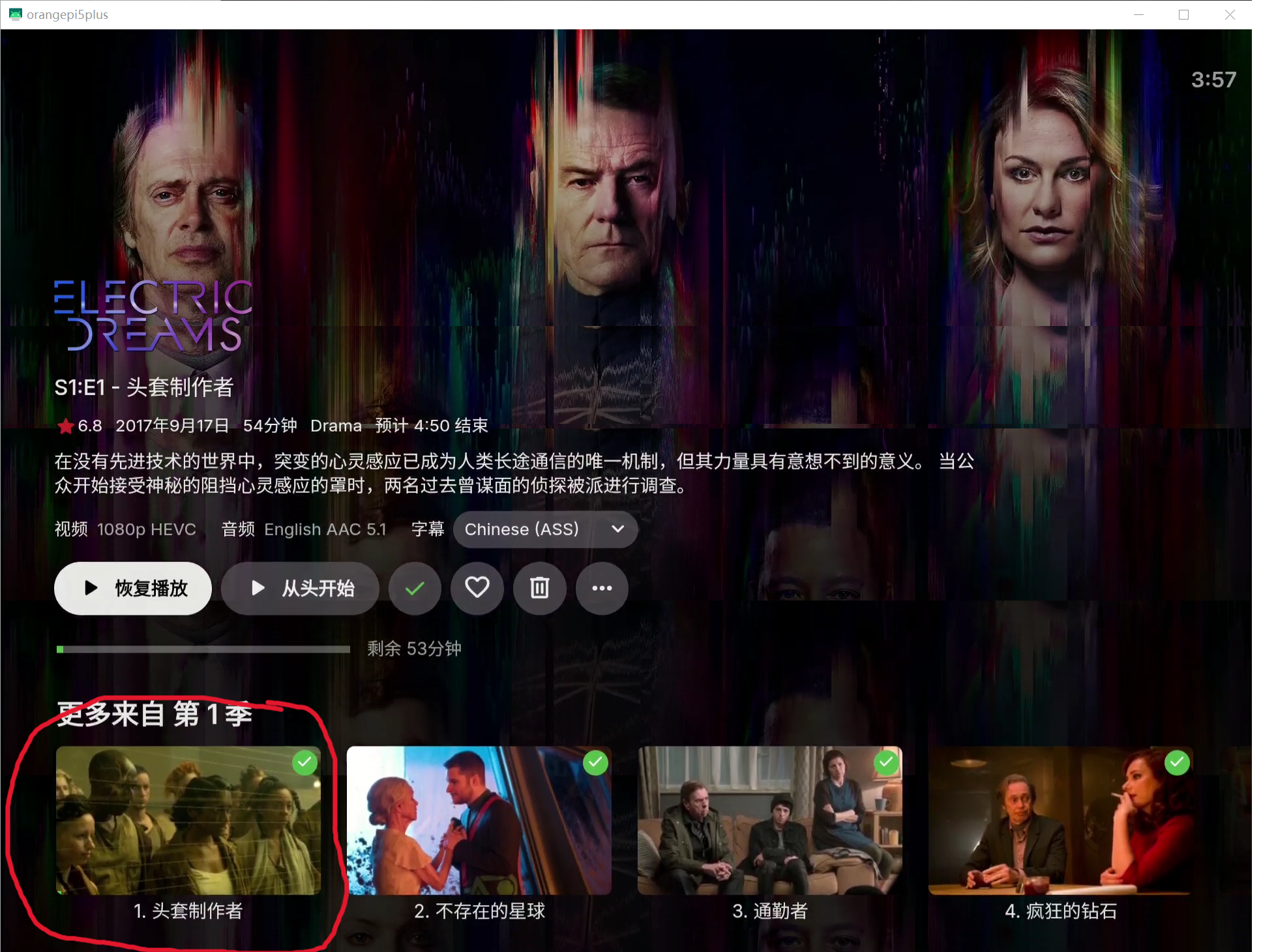
Display a poster of the current episode as the background for the TV show (just like on Android phone)
chuwz replied to chuwz's topic in Feature Requests
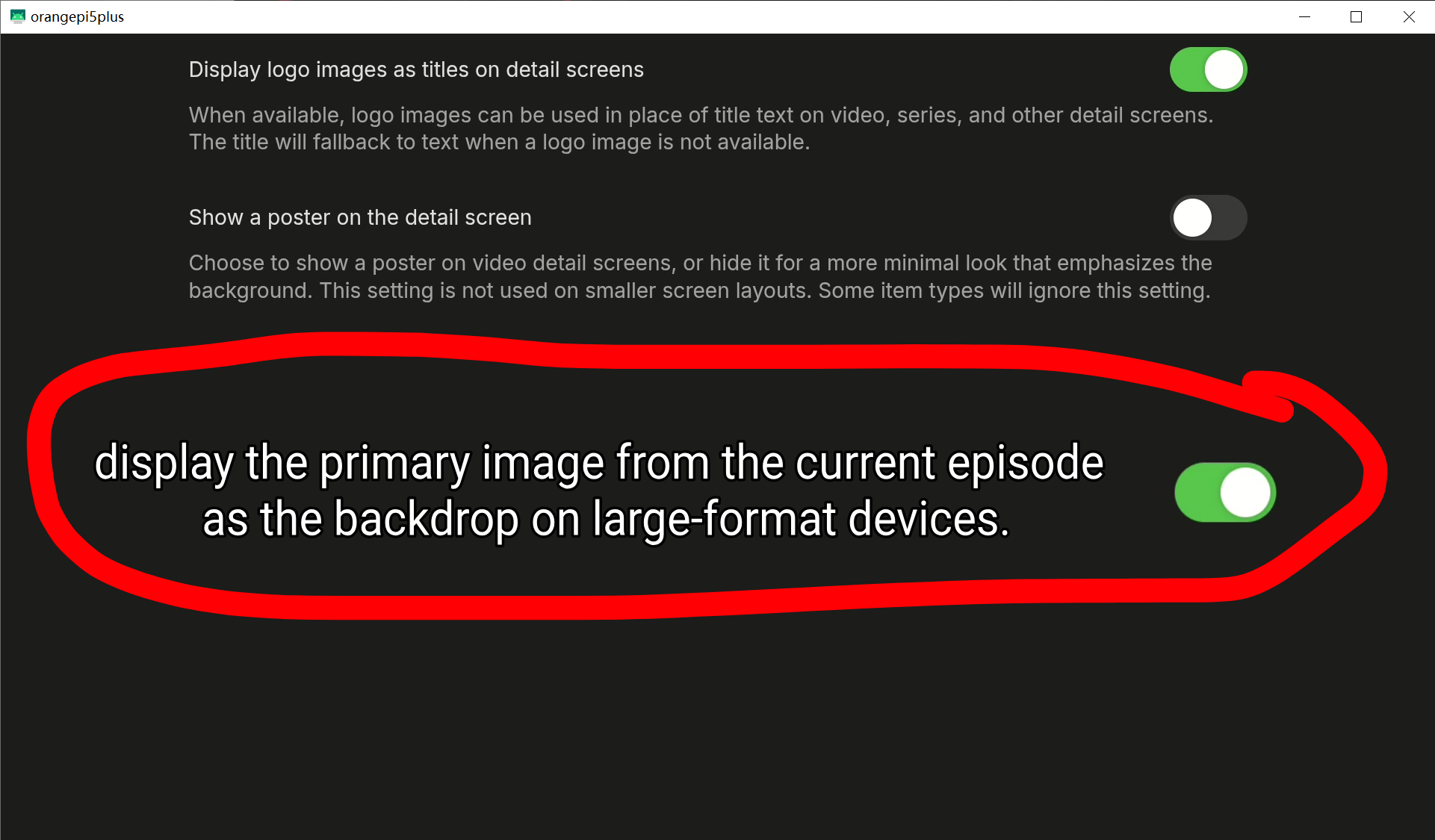
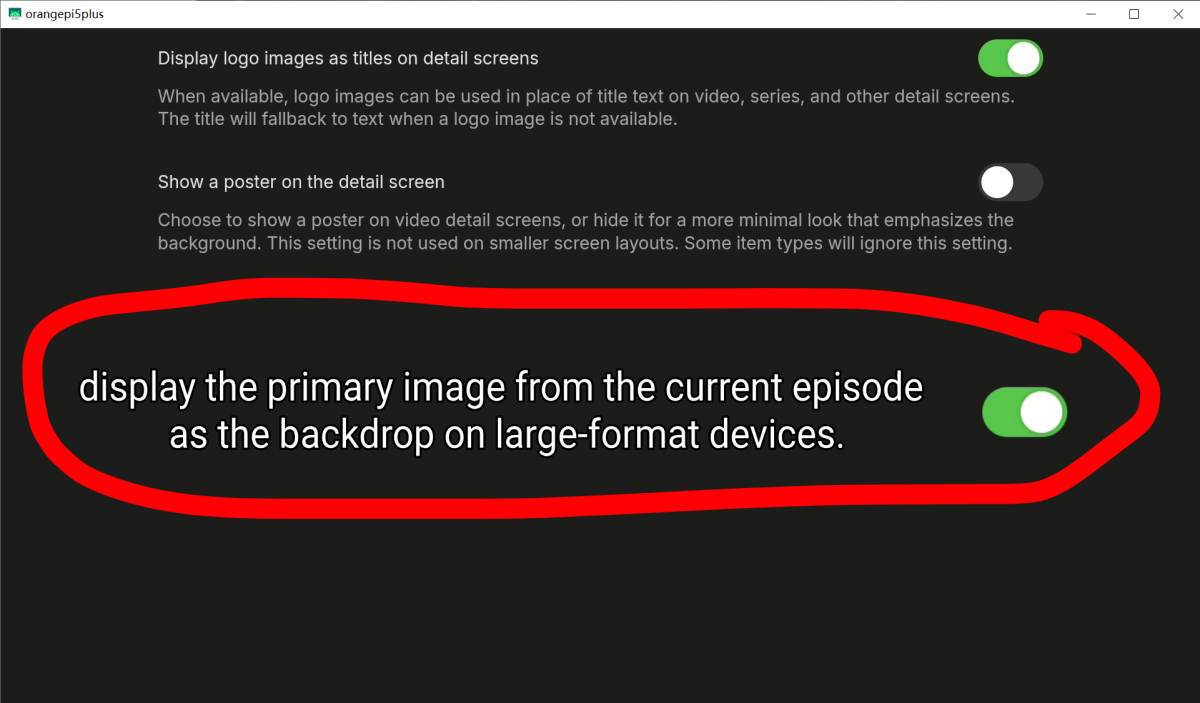
Okay, maybe I didn't explain it quite right—maybe what's inside the red circle isn't actually a poster? @Luke@ebrI just want to display the content inside this red circle as the background. I'm not sure what you mean by “backdrop.” If you mean manually creating one, that would be way too much trouble... I have so many TV shows to process—there's no way I could do that... This is an Xposed plugin I wrote using Claude Code (if you don't trust this .apk, feel free to delete it—no need to let me know). display the primary image from the current episode as the backdrop on large-format devices..apk By injecting this Xposed module, I was able to achieve the effect I wanted. Automatically display the primary image from the current episode as the backdrop on large-format devices. I can confirm that the current official version of Emby doesn't support this feature. So, could you please support this feature request? You could create a toggle option that can be turned on or off, which would satisfy both those who like this feature and those who hate this feature.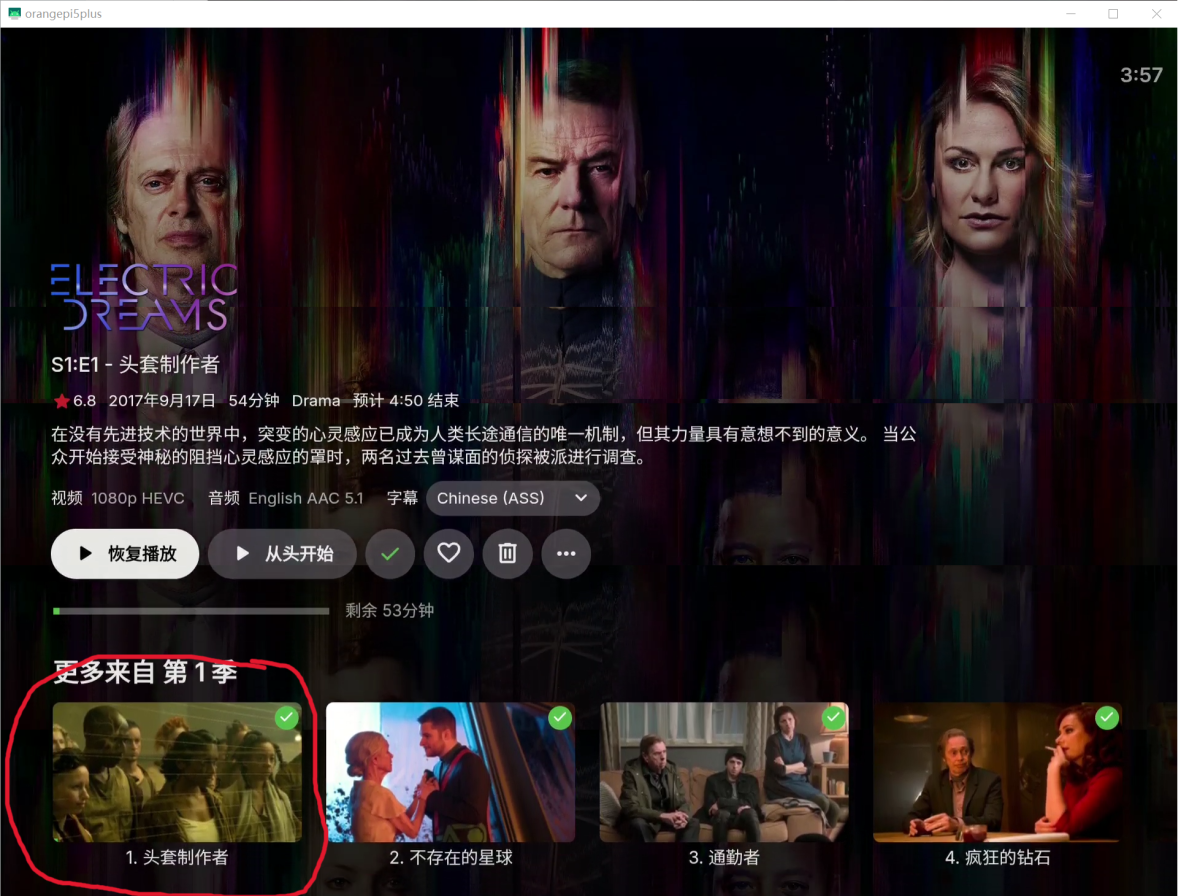
-
Let's not enter a Windows vs. Linux discussion, we all know how these end There was a very simple reason why the earlier beta was Windows only: A Windows release is very easy to build and I was able to easily provide even 3 updates to the beta group on a single day. Our Linux builds are way more complex (alone due to the wide variety). They have their own build server and there are like two "production lanes": Beta and Stable. Intrroducing a 3rd lane would require an amount of effort that cannot be justified. It would also cause distraction from the actual subject for testing, as we would have to deal with packaging problems as well. For the Linux client, this made sense, because those packages were the ones to be eventually released, but for a TVnext special beta, these would not have any higher-goal purpose. This does not mean that TVnext does not support tuner hardware on Linux. It has a remote tuner feature which allows us to test this in the same way as when Emby Server would be running on the Linux machine itself. During the beta, we even managed to use the tuner from a SAT-TV set-top box with MIPS architecture (running Linux) and a USB tuner plugged into Nvidia Shield. In other words: TVnext does not have any platform limitations, it was (and might again be) merely about the distribution packages we were able to provide during the private beta testing.
-

Emby search and season view - what happened
Maximus Naxsus replied to Maximus Naxsus's topic in General/Windows
@NeminemThanks! Point 2 is resolved. I restored the oringal Season overview. (I cannot edit the first post anymore) @Luke is possible to respect the 'orginal' server settings when adding new features like this? I would love that