
All Activity
- Past hour
-
 Wildsurfer joined the community
 -

Spotlight's progress bar's current percent is square on ends and not curved like other apps
Luke replied to FrostByte's topic in Samsung Smart TV
Yea there’s probably something we’re doing that’s not supported on the older rendering engine.- 1 reply
-
- 1
-

-
 Licano1975 joined the community
 -
 jairoangel joined the community
 -
 Cifuent joined the community
 -
 Delsy joined the community
 -
 shawnii.savage joined the community
 -
 Jordan0850 joined the community
 -
 Marcosloezic766705 joined the community
 -

Spotlight's progress bar's current percent is square on ends and not curved like other apps
FrostByte posted a topic in Samsung Smart TV
Problem: In the spotlight the progress bar's current percent line is square and not curved at the ends like other apps Expected: that the current progress line be curved on the ends Server: 4.11.0.5 beta App 2.50 TV: 2018 Q8FN Picture below is of the Android app because it was hard to see in my phone pic of the TV app. Pic shows a curved white line on the left of the progress bar (circled) showing the current progress with a grayish background. It's that white line which is square on the left at 0% on the Samsung app and not curved like it is below in the Android app. The gray oval in the back however is curved on both ends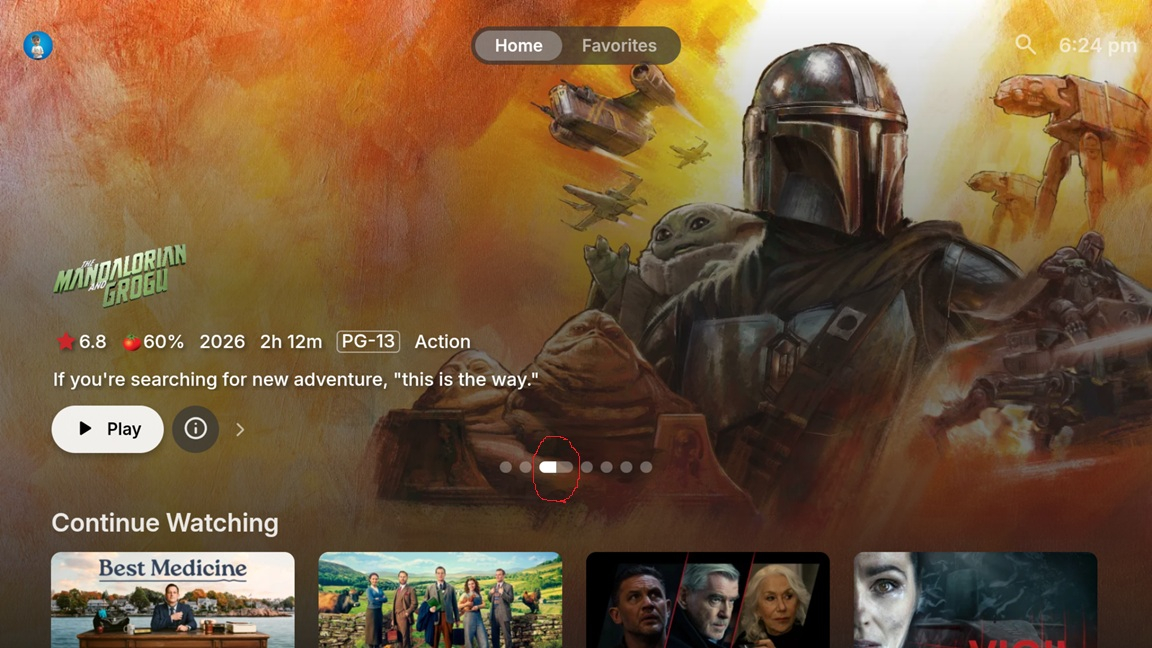
- 1 reply
-
- 1
-

-
 Dhey joined the community
 -
 CameronE14 joined the community
 -
EmbyServer.exe -nointerface
-
The backdrops in the spotlight aren't displayed except the first one on startup. When it loops around then again, you can see the backdrop on the first item, but only that one and it keeps going on forever. However, if when a movie without a backdrop is shown you scroll all the way down to the bottom of the home screen and then back up, then the backdrop for the current item is somehow refreshed and displays. But you have to do this for every movie in the spotlight. So every time a new movie comes up in the spotlight you then have to scroll all the way down to the bottom and back up for the backdrop of that movie to display. Server 4.11.05 beta App 2.50 TV is a 2018 Q8FN
-
Please add the ability to NOT lauunch embytray. Just as there is an option to launch emby on windows startup, and another option to launch a browser for emby. It would be great if launching embytray was an option.
-
If there were any of the open source plugins using PluginUi it would be better
- Today
-
Decided to go ahead and share the logs. I sent the Roku log, and the server log is attached. Mainuser 5:44pm Played, then paused "Say Anything." After pressing play again, the movies stutters. embyserver.txt
-
Cool, I got it fixed now. Thanks for your help.
-
That's strange, i have put limits in on how big the cache can get. And this is not a problem in the 5.60.0.1 you say? I havn't change anything really between the two that would change anything that much.
-
When I delete that plugin, my media library loads in under a second.
-
I checked and found that my memory has been offloaded to virtual memory; I allocated 64GB of RAM to Emby, but it was exhausted long ago, so I’ve had to temporarily remove the plugin.
-
But the issue I see is that my storage simply cannot hold the images from a petabyte-scale media library.
-
Doubling the amount of data stored on disk is acceptable, but the encroachment on memory and CPU resources is unacceptable.
-
Emby already stores those images as you descripe (if i understand you correctly) in programdata/cache. Having EmbyIcons also do it would just double the amount of same rendered images. If you mean the cache keys then the work for that is very small after a reboot, all it does is check them to see if they are up to date.
-
I'm happy to do that, but I did it previously. Any chance you have my old post so I don't have to do it again, only to find out it isn't fixable?
-
Given the size of my media library, an in-memory solution won't work; I have to use local disk storage. Otherwise, the sheer number of entries would cause the server to crash, regardless of whether the files themselves are hosted on a cloud server.
-
This is certainly not a concurrency issue; if left unhandled, the posters simply wouldn't display at all. I believe the correct approach is to store the processed images persistently and retrieve them directly when needed.
-
I will look into adding a limit on how many posters it will work on at a time. I don't think it will solve it but i would be very happy to be proven wrong! Will write back when the the feature is ready.
-
Every load is a nuclear explosion.
-
The problem is that there are too many media files on my server, causing timeouts every time it loads.
-
What I mean is, why not store it in a local folder instead of the cache? Storing it in the cache places immense pressure on my server; every load overwhelms the server, especially given the vast amount of media I have.
-
I haven't enabled those markers, and I have a plugin that extracts media info into NFO files, so that’s not the issue. My images and metadata are stored on the Emby server, not on a cloud server. The problem actually lies with the images.
-
Hi there, let's look at an example. Please attach the information requested in how to report a media playback issue. Thanks!
-
EmbyIcons does not clear the cache on every reboot and only updates items in it's cache that are out of date. Only out of date items will get cleared. When updating the plugin it will also clear the cache for compatibility reasons. Besides that i don't think i can help you sadly. The plugin only reacts on what Emby gives it and it in your case tries to give EmbyIcons a poster on a path that doesn't exist. This is what causes the error in the log. EmbyIcons isn't really that useful for strm files anyway as they in general don't have the information that EmbyIcons needs for adding icons to the posters like for example "4K" and "HDR". You will just end up with posters that have no icons on them until Emby it self populates the video info. From testing i have just made with adding strm files to Emby it's not possible (for me) to get any media info to show for them (thus EmbyIcons have nothing to do). Sorry.
-
I think I previously posted on this but can't find it. And it has been a very long time. When I pause media on Roku, then replay, the media stutters, sometimes multiple times. Sometimes I need to stop and restart the get the stuttering to stop. This has been an issue since I started using Roku. I shifted back to Firestick, partially because of this issue, and I'm a bit disappointed it hasn't been resolved yet. What can I do to make it stop?




