All Activity
- Past hour
-

Minor Issues: Two shows sharing same TVDB ID.
Smitty018210 replied to Smitty018210's topic in General/Windows
I don't use emby at all for metadata. All providers are turned off. I use TMM for all metadata. -
 clxnb joined the community
 -

Plugin: EmbyCredits, detect end credits and add auto skip.
yocker replied to yocker's topic in Plugins
@RedNo7 In the scheduled task do you have a time limit set ?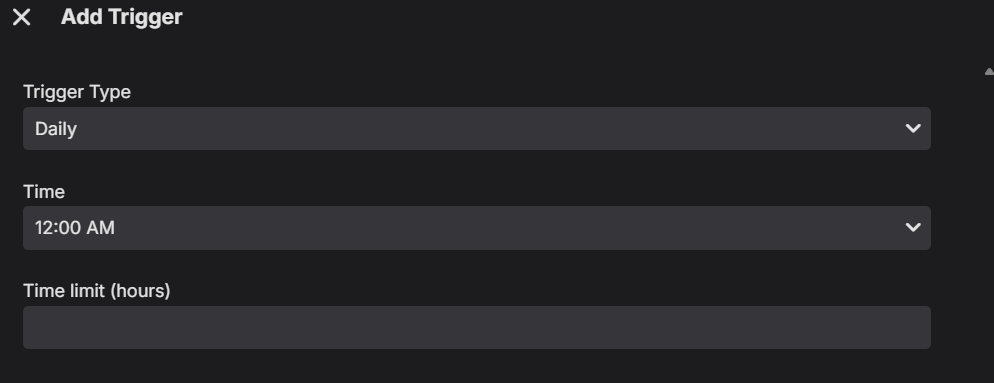
-

Minor Issues: Two shows sharing same TVDB ID.
GrimReaper replied to Smitty018210's topic in General/Windows
That strictly depends on your primary library meta-provider (as that's the one used to identify an item): if you had TMDB as top-preferred one, you wouldn't encounter that occurrence (as those are two distinct entries with two separate IDs); if you have (and likely had) TVDB as the one, there's only a single ID and considered as same TV show. -
Plugin: EmbyCredits, detect end credits and add auto skip.
yocker replied to yocker's topic in Plugins
From a quick look i see some errors happening i need to fix but nothing serious that should stop the detection. I will keep looking. -
 FranMurcia joined the community
 -
Full log attached. embyserver-63925130700.txt
-

Plugin: EmbyCredits, detect end credits and add auto skip.
RedNo7 replied to yocker's topic in Plugins
Attached. The schedule was set to run at 5am local/BST (4am UTC) embyserver.txt -
Just a weird/minor issue I ran into today and wanted to report. ================================================================================================================== One TV show missing from Shows but was still showing under Folders view. I ran into a strange issue with Animaniacs (1993) and Animaniacs (2020). Both are in separate folders and are supposed to be separate shows in my library. C:\Tv Shows\720p\1\Animaniacs (1993) [imdbid=tt0105941] C:\Tv Shows\1080p\A\Animaniacs (2020) [imdbid=tt6951546] When I added Animaniacs (2020) to my library there was no issues. Both shows appeared in library. At some point (unknown time) it disappeared from TV show library. I confirmed that the folder was still where it should have been and started to look for why it was not showing on main TV Show library list. I looked for it in folder view and there it was. Just where it should be. ================================================================================================================== Knowing that other animated shows have weird metadata issues I thought that might be the issue so looked though the nfo for each show. I noticed both shows had the same TVDB ID. Animaniacs (1993)- TVDB: 72879 - TMDb: 82 - IMDb: tt0105941 Animaniacs (2020)- TVDB: 72879 - TMDb: 107124 - IMDb: tt6951546 ============================================================================================================================== It looks like this happens because TVDB considers the 2020 Animaniacs revival part of the original 1993 series, while TMDb and IMDb treat the 2020 version as a separate show. There is already an older Emby thread about this Animaniacs metadata issue: https://emby.media/community/topic/126569-probl%C3%A8me-de-d%C3%A9tection-dune-s%C3%A9rie/ There are also a couple of other reports where a show was available under Folders but was missing from the normal Shows view: - https://emby.media/community/topic/133269-tv-show-doesnt-show-up/ - https://emby.media/community/topic/146230-tv-shows-are-only-showing-in-folders-tab/ ====================================================================================================== Those had different causes, but the symptom was similar. For my case, I removed the TVDB ID from the Animaniacs (2020) tvshow.nfo. I left these IDs in place: - TMDb: 107124 - IMDb: tt6951546 I didn't change anything on Animaniacs (1993). Then I ran a normal library scan. Animaniacs (2020) immediately showed back up in the main TV Shows list. - No database rebuild - No removing and recreating the TV library - No moving folders around - No changes to any of the other shows Just removing the conflicting TVDB ID from the 2020 show and rescanning fixed it. I understand why the metadata conflict exists since TVDB and TMDb handle Animaniacs differently. ====================================================================================================== Animated shows can get messy because TVDB, TMDb, and IMDb do not always group series the same way. In this case, TVDB treats Animaniacs (2020) as part of the original series, while TMDb and IMDb treat it as a separate show. ====================================================================================================== The other strange part is that this setup had worked before. It only became a problem recently. (That I noticed) I found a solution, but I feel that Emby should have still be able to see that they were different shows based on other IDs. So Bug? Database ID issue? Not really sure how to classify this.
-
 Saroom joined the community
 -
Plugin: EmbyCredits, detect end credits and add auto skip.
yocker replied to yocker's topic in Plugins
Please send a log and since it might be rather big please also mention the time it happened. -
 monseu joined the community
 -
Plugin: EmbyCredits, detect end credits and add auto skip.
RedNo7 replied to yocker's topic in Plugins
It's restarted again. I'm not sure why though. The schedule start is ~6 hours ago. I'll cancel the schedule and see what happens over time (to rule that out). edit: When I stopped the task, I got this showing: ...which is the exact runtime if the process had been triggered by the schedule (and had stopped/restarted the already running manually-triggered process).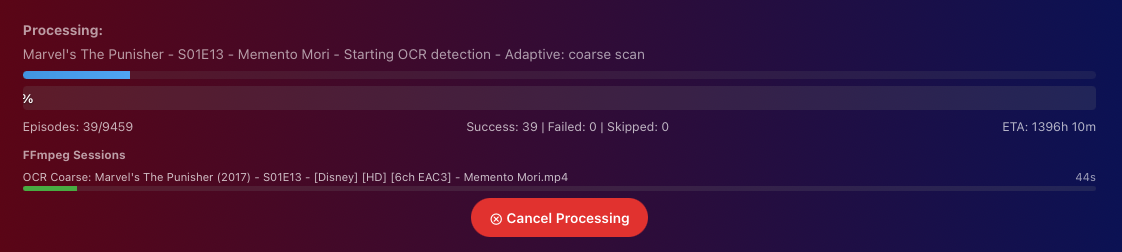

-
 princebosa joined the community
 -

Movies don't resume, they start from beginning
Nabukodonosor replied to Nabukodonosor's topic in Android TV / Fire TV
At the moment yes. But I had the Amazon version before. Tried all of them. -
 21Daniel97 joined the community
 -
 syy985 joined the community
 -
 muyu666 joined the community
 -
 max132 joined the community
 -

Latest version of Emby - Random lockups - Connection Timeout to https://api4.thetvdb.com
vaise replied to vaise's topic in General/Windows
Same thing happened tonight, and 24 hours later - also around 7PM. Checked logs. Different stuff. Lots of covert processing - I have deleted that plugin. Will pay close attention tomorrow at the same time. -
 liakhs.aggelos joined the community
 - Today
-
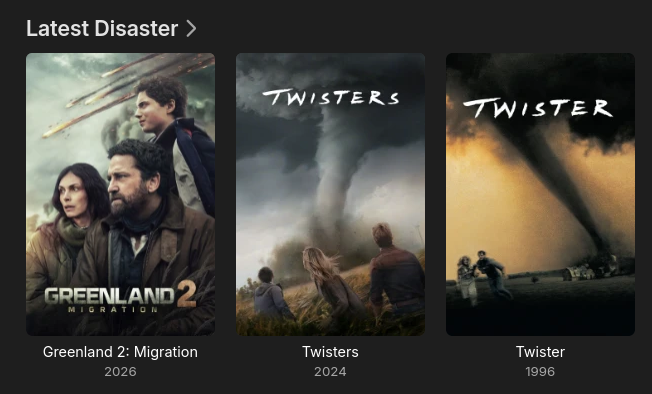
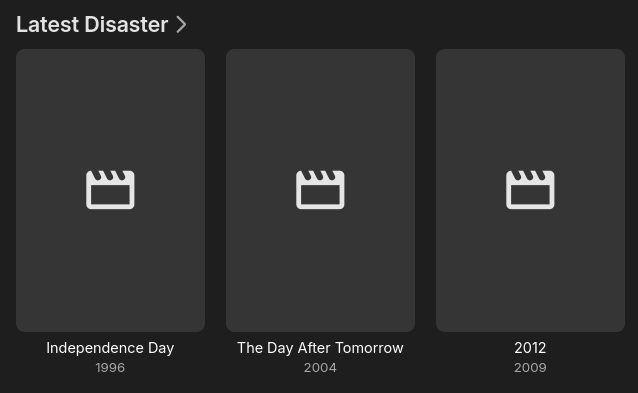
Here are some screenshots... This is just one library. The structure is like this movies - HD - Disaster - Movie (year) - movie (year) - HD.mkv - poster.jpg - UHD - Disaster - Movie (year) - movie (year) - 4K-HDR.mkv Then I have a library Disaster and I add the /HD/Disaster and /UHD/Disaster to it It joins the files perfectly as shown in join.png I have since added a few 4K movies to my library, and after the upgrade (as shown in 4.10.png), it now has the new 4K files showing as latest additions and no poster. If I add a poster to the folder and scan files, they appear fine In summary, 4.10 treats the newly added 4K files as their own entry in 'Latest' where in 4.9 they were ignored and seen as an addition to the original HD version. They are still joined, just the metadata seems to be reflected. As mentioned, I think I have been leveraging a previous bug and I honestly dont care if you just accept this is how it should be as I will work around it, I am just pointing out this upgrade changed things.
-
yes, but it is just a single 'row' where if I select Latest Media I see a row for every library
-
They sure did sadly It makes the latest stable completely unusable for me, I had to revert to last stable release. Thank god for backups
-

Plugin: Tracearr SSE - real-time playback, session, and library events
Dan_86 replied to Gallapagos's topic in Plugins
Can we get this in the catalog? -
I’ve never had this issue before but now multi word searches are completely broken across most apps for me… I’m running 4.10.0.40
-
I mean, kind of. The filter is doing what it is being told to do, yes. But I think we can all agree that a FSBS 3D movie is definitely not a 4K movie. I assume that right now it just looks at the actual resolution of the file and goes off of that. What I think might be the easiest to do is to just add a check to see if the mkv file is using the display height and display width fields. If it is, go off of those values whether it is a 4K video or not. If those fields are not used, then use the actual resolution. That would solve this problem as well as leaving open the possibility for having a 3D movie that is actually 4K.
-
So what is to be done about this? You said I was wasting time for vacuuming the database several times because I thought that might be a tool to address this possible explanation, which was flagged by another user and that you have now confirmed is a possibility. So please tell me what exactly I should be looking for and where: which files in which locations and which code.
-
It's certainly not impossible.
-

EMBY cause or consequence my files on hdd get corupted ?
David Patt replied to David Patt's topic in General/Windows
yes smart show everything ok after windows fix hdd , its just i power on pc one day and want watch movie and error and then i see movie file is 0 kb , or emby dont start at all and find out some files are 0kb , i have folder on hdd with gog installers and they dont get corrupt at all -

Exploring AudioMuse‑AI: A Self-Hosted Sonic Analysis Service for Music
Trevor68 replied to Relocate0604's topic in Third Party Apps
It is a real shame there is no Emby Plugin for this. Both Navidrome and Jellyfin have plugins, that symfonium takes advantage of for smart playlists. -
It doesn’t have to be. The latest release lets you pick what libraries go into it.
-
Unless I am mistaken, 'Recently Released Movies' or 'Recently Released Episodes' is across the all libraries and combined into a single stream, where 'Latest Media' is per library. Movies is a bit problematic for me as I have a library for each genre. That said, it could be solved by adding a new item to your dropdown 'Date Added behaviour for new content' to be 'Date Released'. You already have that date in the database, so I am just assuming you can just pass that to whatever you are using for sort order
-
That's what I asked Luke several times: is there a chance the db was keeping an artifact.
-
Might be worth checking in library.db if there's any trace of it after you remove it. I -think- this should work to pull something up if it is somehow still in there. I believe type 12 are albums. select * from MediaItems where type=12 and Name='Madrigals, Book 1'