All Activity
- Past hour
-
 Ramy12 joined the community
 -
 Col1967 joined the community
 -
 Yesa02 joined the community
 -
 hannapitti joined the community
 -
 Matthewunb joined the community
 -
 Xv9il joined the community
 -
 amazy26223 joined the community
 -
 Marty58 joined the community
 -
 Lucy2501 joined the community
 -
 wk7029 joined the community
 -

Library Real Time Monitoring needs SAFETY CHECK
Lessaj replied to MacGyver27's topic in General/Windows
If your storage is normally mounted to /srv/media then when it's not mounted /srv/media will exist as an empty folder, but /srv/media/YouTube would not. To my knowledge the server already has a check in place wherein if the mapped folder does not exist at all it does not try to scan and delete. You mentioned docker specifically, so I believe if you're running the container with mapped paths and those paths don't exist that it will still map them anyway (it will create the path on the host?), so the Emby server running inside the container would yes see the folders as being empty and then clear out. It would be better to require your storage to be mounted before starting the docker container, or mapping a lower path instead so that your actual folders would not exist and you would not have that problem. So if you map /srv/media into the container, then only map the library paths as /srv/media/YouTube and /srv/media/.downloads/ADV, if /srv/media is not mounted those folders would not exist and it won't delete anything. -

Library Real Time Monitoring needs SAFETY CHECK
RanmaCanada replied to MacGyver27's topic in General/Windows
This is not an Emby problem, this is a problem with your hardware being faulty. Replace it. -
Thanks Luke. Marked that as the answer. If you need any help debugging the installer, let me know. Tenured full-stack C/C++ and .NET engineer here. Good to know about the Docker situation. Would be cool to have a native Docker image using process isolation mode for Windows-on-windows convenience, especially since I think a good chunk of Emby is in .NET (but I haven't kept up with that sort of thing in a while), and as I mentioned earlier, I'm a bit of a newbie when it comes to the actual docker hosting for production use (versus a development sandbox). -sz
-

embyforkodi (next-gen) 12.X.X support
quickmic replied to quickmic's topic in Emby For Kodi Next Gen
Still didn't review the vantage point addon. I'm not familiar with it, I use Emby's CInema Intro's addon and works with custom trailer-folder. Also I cannot even see any remote trailers on your setup, but again. You use the vantage point addon and this needs to be review. It takes several hours only to figure out how the addon works and reports data via Emby's API. Then I need a sync strategy to Kodi (if possible) etc. This all takes time and frankly has a low priority, as Kodi actually updated it's databases in the last days at two times. This could result in showstoppers and has priority one. Howver, what I can tell you yet, the Emby server config doesn't matter. The actual trailer playback must be configured in the Kodi addon and will only work if the addon can sync the trailers.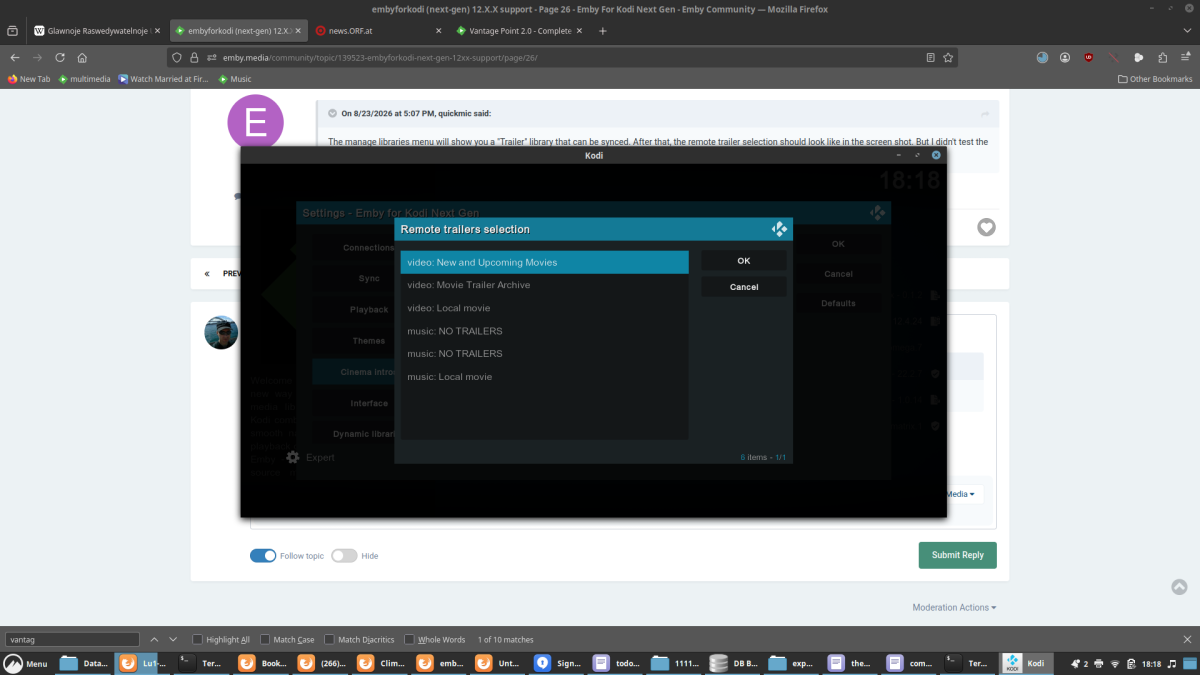
- Today
-

embyforkodi (next-gen) 12.X.X support
Eisi2005 replied to quickmic's topic in Emby For Kodi Next Gen
-
embyforkodi (next-gen) 12.X.X support
Eisi2005 replied to quickmic's topic in Emby For Kodi Next Gen
Hi, I’d like to bring up Cinema Mode again. I’ve installed the Cinema Intros on the Emby server. However, I can’t find anywhere to specify the path for my trailers. I don’t want to play the trailers that come with my movies; instead, I want to play trailers from a separate folder. I tried specifying this path in the “Custom Intros” section as a test, but even then it doesn’t play any trailers from that folder. -

Grey letterbox bars on HDR playback with Emby for Android universal - Sony TVs.
kricker replied to kricker's topic in Android
I just tried 3.5.55 and 3.5.56, and they both still exhibit grey bars on HDR content that does not fill the screen. The same content is fine in the AndroidTV version. -

Atrium — a native tvOS app for your Emby server
Grumpy1 replied to vdatanet's topic in Third Party Apps
a minor thing When you put Atrium in the top row on the tvos homepage the headers( continue watching) are not the proper language for my setup. -
I am using the github EPG and it is using different sources and maybe from channel website too, it is not really one source that we can ask
-

Plugin: EmbyCredits, detect end credits and add auto skip.
yocker replied to yocker's topic in Plugins
Depends on if you have the same libraries activated in scheduled task as in the manual detection. I can see from one of your screenshot that you only have one library activated for schedule task. I am going through your logs and settings now, I will report if anything stand out. -
User fix here:
-

Plugin: EmbyCredits, detect end credits and add auto skip.
RedNo7 replied to yocker's topic in Plugins
Thanks, but I have 17,824 shows - has it done them all (according to the original ETA it was going to take 300 hrs to complete). The manual processing says ~6,400 episodes skipped which surely means it's only ~1/3rd done? I'll try it anyway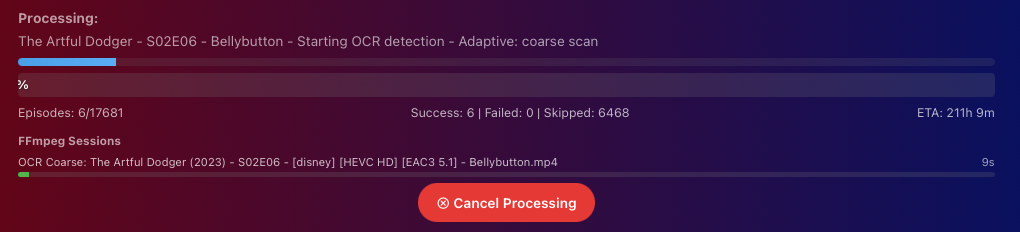
-
Plugin: EmbyCredits, detect end credits and add auto skip.
yocker replied to yocker's topic in Plugins
@RedNo7Looking in the logs there is nothing wrong. It ran and stopped as it should. 2026-09-03 11:16:28.891 Info Plugin: Processing complete: 46 succeeded, 0 failed It skipped a lot of files that already has end credits in them hence why it might have been so fast. Have you enabled the schedule task to run in all the libraries that you want detections in? I saw from your screenshot that you have 2 libraries and only one is enabled. Edit: I have just uploaded a new version to the catalog as i found and fixed a small bug that could cause the schedule task to run in dry run. In short i had set a line to be enabled and not disabled by mistake. I don't think this is the problem you have but worth a try. -
Plugin: EmbyCredits, detect end credits and add auto skip.
yocker replied to yocker's topic in Plugins
Saving debugs would be preferred but i will look in that log for now. Should be enough. I've forgotten to say, the scheduled task is meant more for any new files and not for whole library detections. It should still work though. I will look into it. -
I honestly have to give you credit for this app. You can really see how much time, thought, and effort you put into it. Every detail feels carefully designed, and it’s clear that you didn’t just build an app, you genuinely cared about making something great. Taking an idea and turning it into something this polished, useful, and impressive is no small achievement. You should be really proud of what you created. Huge respect and a massive well done!
-
Plugin: EmbyCredits, detect end credits and add auto skip.
RedNo7 replied to yocker's topic in Plugins
Sure - which log file are you referring to? ...have added embyserer.txt in case that is what you are referring to. "Save Debig logs to File" is not currently enabled in EmbyCredits - would you like me to turn it on? EmbyCredits.xml attached EmbyCredits.xml embyserver.txt -
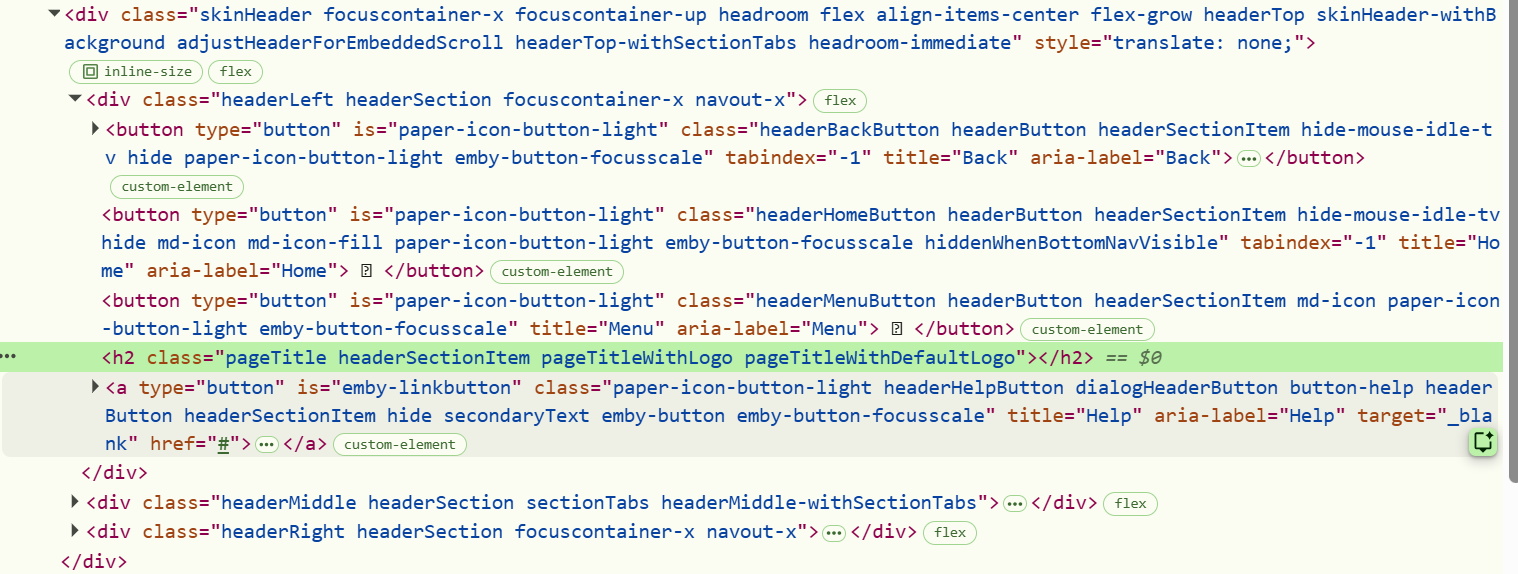
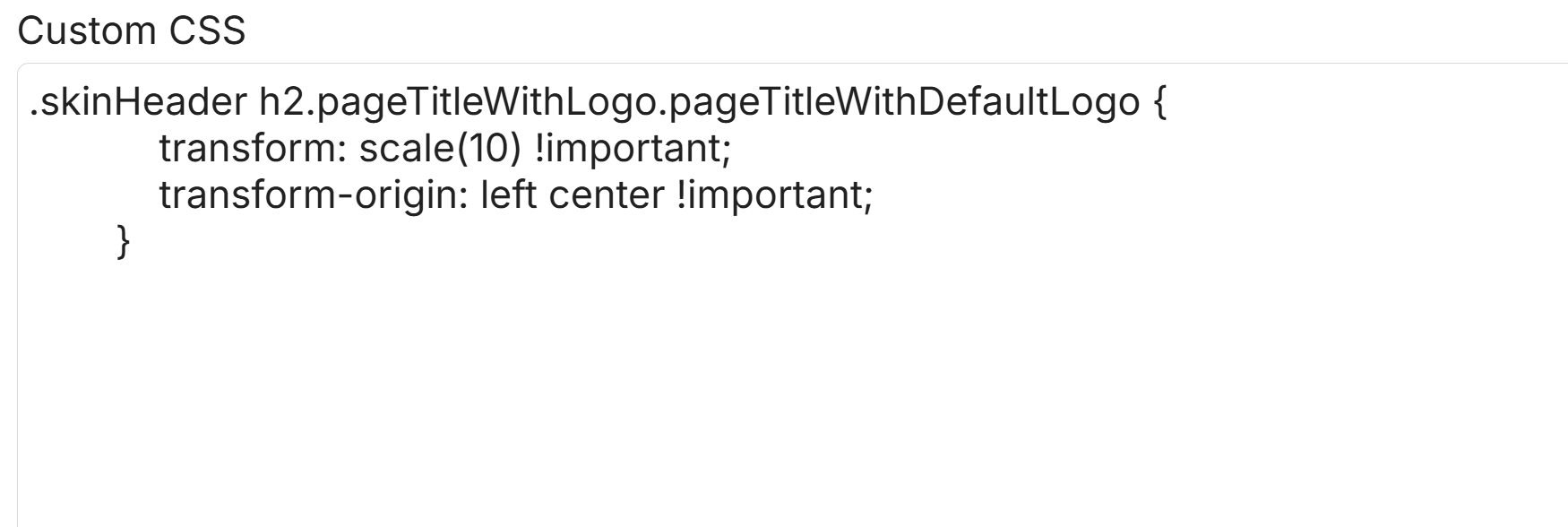
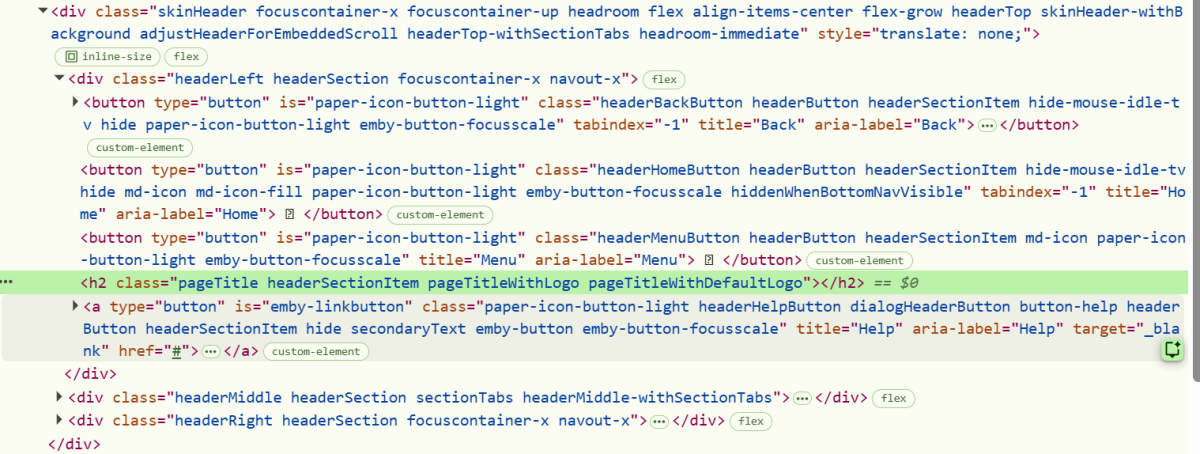
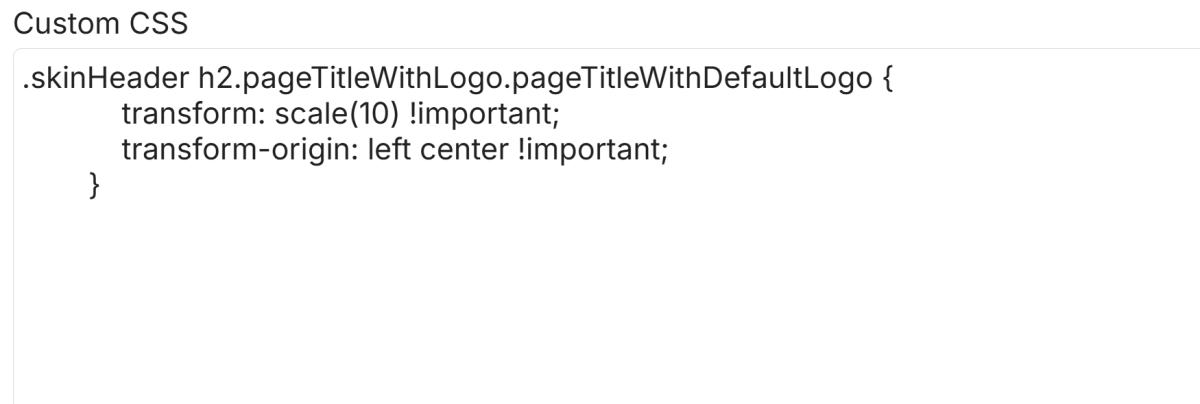
You could even try something more simple like this perhaps: .pageTitleWithDefaultLogo { transform: scale(10) !important; transform-origin: left center !important; } this gave me a massive 10x logo - cropped by the parent row height (which is very obvious to see, though not what you want): I guess you are doing the basic things such as: Save the css, refresh the page, try clearing caches in your browser settings...??? Beyond that, you could inspect the logo element with DevTools in your setup, to make sure the logo is the same class as I used. Right click the logo and then select "Inspect" you should see something like this: Depending upon your version of Emby, and what other customizations you are running, you might have different classes, and/or different parent containers and need different CSS targeting than what works on my setup. Maybe this gives you some clues - or perhaps some prompts to ask whichever AI LLM you prefer - ChatGPT, Claude, Gemini, Copilot... Perhaps other community members may be able to suggest other things for you to try...

-
Plugin: EmbyCredits, detect end credits and add auto skip.
yocker replied to yocker's topic in Plugins
Strange. Pretty sure Emby doesn't have a built in time limit so might indeed be something wrong i just can't think about what i might be. Do you by chance have log file i can see? The EmbyCredits settings file in the plugin folder would also be nice to see. I'm working on a version that auto resumes if a fault happens but if the process gets actively canceled (by Emby) or some setting is wrong then it won't work. -
 AABRDE32 changed their profile photo
 -
Unfortunately, this doesn't seem to change anything. Am I doing it wrong?
-
Thank you very much for your investigation. I have passed all your feedback to the development team Thank You
-
Plugin: EmbyCredits, detect end credits and add auto skip.
RedNo7 replied to yocker's topic in Plugins
back to as before this morning. I've deleted it and created a new one (and started manual detection). I'll check again tomorrow.
-

4K HEVC shows as 1080p, think I can't find any setup to fix?
Teddyknuddel replied to PeteGul's topic in Android
@Luke Same as always – NOTHING is changing! -
Which Emby Server version are you using? Separate rows for each YouTube channel require Emby Server 4.10+, which is currently beta. On 4.9, only top-level channel folders are supported. The titles are present, but the thumbnails are missing. They may appear after “Refresh Internet Channels” finishes and the client is reloaded. If not, please send the plugin log.
-

[Beta] ROMote – play your retro game collection in the browser (NES → PlayStation)
GrimEvil replied to digitalirony's topic in Plugins
@digitalironyany update -
There i Not sure if by “IPTV” you mean a regular Emby library using an M3U playlist or actual video files, or an actual Live TV setup in Emby. If it’s just a regular Emby library with an M3U playlist or video files, you can set a custom badge with whatever label you want. You can do this under that specific library in Tags and Library. If what you’re trying to do is simply display badges based on the file’s resolution or format, like 4K, HDR, 1080p, etc., like grim said there are already some plugins that can do this, such as Emby Icon by @yocker, which is also available in the Emby Catalog.