All Activity
- Past hour
-
 amosjr joined the community
 -
Could you share the source code so that everyone could self-host their own instance? That would be really great. Thank you for the project
-
 usupe7445417 joined the community
 -
 Codexa joined the community
 -
 douglasio joined the community
 -

TV Show Status — TMDB-powered Returning/Ended/Cancelled badges for series
Blueskies278 replied to Blueskies278's topic in Plugins
TV Show Status Release Notes Changes 2.5.79.0 Fix two badges appearing on every card when the poster overlay and library card badges were both on Fix duplicate "Season Premiere" badge on episode 1 in Continue Watching Fix Season Finale missing on completed seasons of shows that are still airing Fix "Badge style: None" also switching off the poster overlay Fix cancelled shows showing "Ended" on the poster overlay Fix badges disappearing when the server has no internet connection Fix web badge needing a page refresh to appear Fix web badge disappearing when marking an episode watched or unwatched Fix badge colours not matching between the poster and the series page Add colour settings for ended, cancelled, still airing and complete Add Season Premiere and Season Finale badges on episodes Change ended badge default from red to amber Change badge font for better readability when scaled down EmbyTVShowStatus.dll -
 razrfone joined the community
 -
 Baolave joined the community
 -
 Jesus47 joined the community
 -
 Kvill1 joined the community
 -
 Elisem285 joined the community
 -
 Johnnymak joined the community
 -
@ebrCould it be possible to make this available in the Android Tv app. Currently can set playback to 1000 Mbps Would be good to have it the same as the others: Up to 4k - 200Mpbs Up to 1080p - 60 Mbps This should then allow people to set to max 1080 and then it will play the 1080 version if both exist Thanks
- Today
-
TV Show Status — TMDB-powered Returning/Ended/Cancelled badges for series
Blueskies278 replied to Blueskies278's topic in Plugins
Uploading images and the Emby log makes it quicker to solve the bugs. Thanks for reporting -
Hi, not yet. It’s on the to do list. Thanks
-
TV Show Status — TMDB-powered Returning/Ended/Cancelled badges for series
Blueskies278 replied to Blueskies278's topic in Plugins
Thanks for reporing -
I find it simply annoying AF.
-
wow. the connecting to server is longer after the update
-

Setting to revert latest mixed content view?
Wyatt239 replied to Halliphax's topic in General/Windows
@LukeHow about now? - Yesterday
-
No idea what went wrong but something prevented it from being downloaded. I've reuploaded it to the catalog as version v5.7.3.0 and it seems to work now. Sorry about it all! This last version has been a bit of a sh*tshow and i hate to have to make people reboot their servers multiple times!
-
I do not plan on upgrading MB or CPU anytime soon. The gpu you suggested above would probably be something I will look at. I still have room for 2 more drives in current setup. My server is really just for Emby. I would like to set up automation for torrents however, I do not have the time or knowledge for a arr stack yet.
-

Stumped trying to get an API key to work with Powershell for Movies reporting
js28194 replied to FatherSaint's topic in General/Windows
There is a reports plugin that compiles this data for all your movies already. I have found that you can change the default from 100 to all then export to excel and do some excel ju-jitsu. By that I mean using the data filter tool in excel. All that takes 5 minutes vs. trying to develop a script that takes hours or days. Fun if your just trying to learn, but re-inventing the wheel seems a bit much. Just sayin.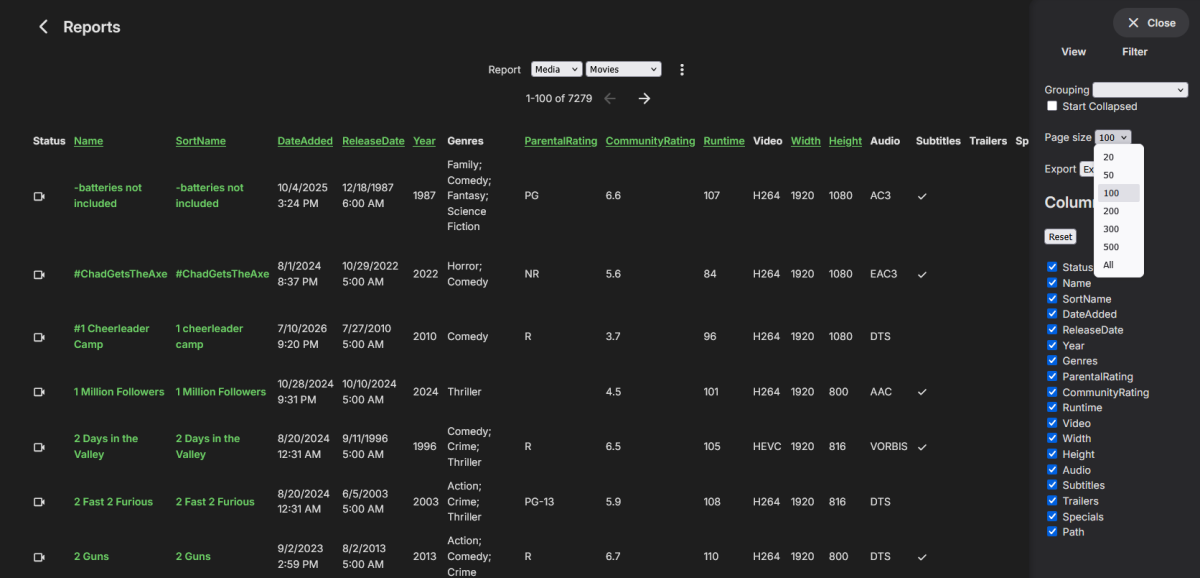
-
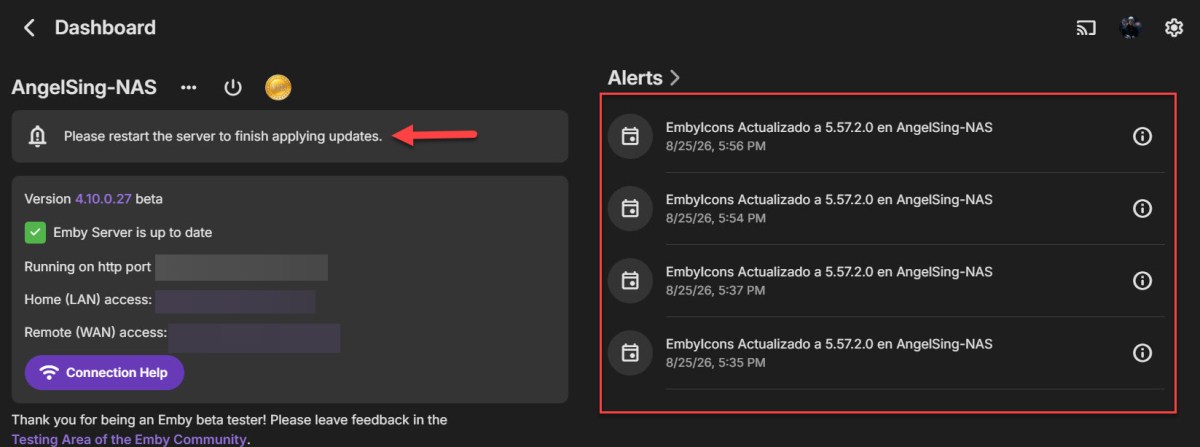
@yockerHi! Hope you're doing well. I wanted to check in and see if you might know what’s going on with your plugin. For a little while now, I’ve been constantly getting notifications saying a new version of EmbyIcons was installed and that Emby needs to restart. I’ve restarted Emby several times and even rebooted the entire NAS, but the notification keeps popping up. Any idea what might be causing this or how to fix it?
-
Any update on this? I am not able to sideload on my GM so I don’t think I have a workaround either
-
I have a powerful machine and disk, but more importantly, the language chosen in both of those checkboxes says nothing to the sort of what you just said, and both as written is unqualified and as you have written is unqualified. I suspect a top of the line intel i9 is better than "some systems" .... I'd argue, it is better than MOST systems. An RTX5080 is better than most GPUs..... a 500TB+ disk setup with all high end (albiet 7200RPM) disks, is better than avg.... unless someone is using SSD...... is still better than avg..... Again, all language that is unqualified, and again, ****** WITH THE CHECKBOX CHECKED, implies "it might crash ****** not....... that with the checkbox unchecked, it WILL CRASH. Respectuflly, does this explain why I am painting the f*****ed eitherway, and neither toggle is definitive?
-

Moonfin, a new cross platform client
MediaEmby1968 replied to bingbong69_'s topic in Third Party Apps
This looks interesting, but what I'm not clear on is how to install it on both an Emby and a 2016 Samsung TV. I think it would be good to clarify this on the website. Can someone tell me how to install it on both an Emby and a 2016 smart TV? Do I need a Premiere account to install it? -

Stumped trying to get an API key to work with Powershell for Movies reporting
Lessaj replied to FatherSaint's topic in General/Windows
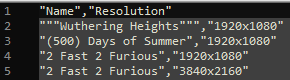
I ran the query against my instance with api_key and it accepted it. I ran the exact script with my own variable too and it worked, I just changed the api_key name I mentioned. You should be able to manually run a curl with the path looking like this: EDIT: Could be HTTP instead as well, I used "https://path.to.my.emby" for the variable, but "http://ip.address:port" should work too.
-
I don’t quite understand this point. Watching a movie won’t delete it from the library, or are you filtering the library by unwatched and it is still showing even though it has been watched? Can explain the steps to reproduce and how you have the library folder view/sorting/filtering configured?
-

Incorrect Artist Identification / Search Results
Rumzzz replied to Rumzzz's topic in General/Windows
It's true this may have been an issue from a previous server version (I've been using Emby for a while). I don't really have a way to test this on a fresh install but even when I manually delete the album containing the "incorrect" artist identification, after a rescan the issue persists. I agree that nailing down the original cause would be hard to do, mostly just throwing this out there. If anything, I am more so interested in how to get Emby to clean up / recognize any incorrect artist identifications -

Stuck at Ready to Transfer (Windows Emby App)
Luke replied to mrtechnologist's topic in Windows & Xbox
Hi, we are looking into this. Thanks. -
Correct. It is server-wide.
-
Going over your first issue again, it's hard to say what might have happened when this content was first imported into your database. Do you have a way of testing this with a fresh install, or with all new content where the tracks, album and artists have never been in your server database before? Otherwise we're kind of guessing about how it got that way, whether be through some defect in an older server version, various tinkering you might have done, etc.
-
Hi. And...
-
Edit: This is the 3rd post explaining how to do and revert the patches. The 2nd post (the one explaining the 2nd fix) got limited or something and is hidden until mods or someone approves it. Emby 4.10.x search-freeze workarounds — how to apply and revert each patch These are the workarounds referenced in my two bug reports (the "recent searches query freezes the server" thread and the "SearchTerm slowness / degenerate planner statistics" thread). They fixed, on our server (~191,000-item library): the whole server freezing for 1–2 minutes whenever someone opened search (100+ s → 16 ms), searches like lord taking a flat ~13 s (→ under 1 s), 1–2-letter searches from TV apps (which search per keystroke) taking 30–50 s and stalling everyone else (→ under 0.3 s). Read before starting At your own risk. These modify the live Emby database (an index and planner statistics) and system.xml. They are workarounds until the Emby team fixes this properly. Make the backups in Step 0 first. Applies to the 4.10.x beta schema (tables MediaItems, UserDatas, AncestorIds2). If those tables don't exist in your library.db, you're on 4.9.x or older — this guide does not apply. Paths below are for the Linux .deb install (/var/lib/emby). Docker: run the commands where the config volume is mounted. Windows: the same SQL applies via any SQLite tool against library.db in your programdata folder. Commands use python3 (preinstalled on most Linux servers) so you don't need the sqlite3 CLI. If you have the CLI, the SQL statements inside work there too. Run as root. "Cookie poke": SQLite only re-plans cached queries when the schema version changes. ANALYZE and statistics edits don't change it, so after Patches 2/4 the running server keeps its old (slow) query plans until you either restart Emby or "poke" the schema version by creating and dropping a dummy index. The poke is included in the commands below. Patch 1 (real DDL) needs no poke. Never edit system.xml while Emby is running — Emby rewrites it from memory on shutdown and your edit is silently lost. Always stop → edit → start. # Patch Fixes Downtime 0 Backups — none 1 Partial index on UserDatas Search page freezing the whole server none 2 Full ANALYZE Flat ~13 s searches (bad statistics) none 3 system.xml settings Flat ~13 s searches (bad statistics) ~1 min restart 4 Statistics override for AncestorIds2 Stops Emby re-creating the bad statistics; bigger DB pool none Step 0 — Backups (do this first) Consistent snapshot of the live database (safe while Emby runs, uses SQLite's VACUUM INTO mkdir -p /root/emby-backups python3 -c " import sqlite3, time con = sqlite3.connect('file:/var/lib/emby/data/library.db?mode=ro', uri=True, timeout=60) dest = '/root/emby-backups/library-backup-' + time.strftime('%Y%m%d') + '.db' con.execute(\"VACUUM INTO '\" + dest + \"'\") con.close(); print('backup written:', dest)" Copy of the config file: cp /var/lib/emby/config/system.xml /root/emby-backups/system.xml.bak-$(date +%Y%m%d) Snapshot of the current planner statistics (lets you revert Patch 2/4 exactly): python3 -c " import sqlite3, time con = sqlite3.connect('file:/var/lib/emby/data/library.db?mode=ro', uri=True) rows = con.execute('SELECT tbl, idx, stat FROM sqlite_stat1').fetchall() dest = '/root/emby-backups/sqlite_stat1-backup-' + time.strftime('%Y%m%d') + '.sql' with open(dest,'w') as f: f.write('DELETE FROM sqlite_stat1;\n') for t,i,s in rows: f.write(f'INSERT INTO sqlite_stat1(tbl,idx,stat) VALUES({t!r},{i!r},{s!r});\n') print('stats snapshot written:', dest)" Patch 1 — Partial index for the "recent searches" query Problem it fixes: opening the search page fires Items?...WasSearched=true&SortBy=DateLastSearched before you even type. There is no index on UserDatas.DateLastSearchedInt, and the planner can pick a plan that scans your whole library with expensive per-row visibility subqueries — 100+ seconds of CPU during which everything else on the server queues. This tiny partial index (it only covers the handful of rows where the column is set) makes the plan trivially correct in every case. Apply (safe while Emby runs, ~0.2 s, takes effect immediately): python3 -c " import sqlite3 con = sqlite3.connect('/var/lib/emby/data/library.db', timeout=60) con.execute('PRAGMA busy_timeout=60000') con.execute('CREATE INDEX IF NOT EXISTS idx_custom_UserDatas_LastSearched ON UserDatas(UserId, DateLastSearchedInt) WHERE DateLastSearchedInt IS NOT NULL') con.commit(); con.close(); print('index created')" Revert: python3 -c " import sqlite3 con = sqlite3.connect('/var/lib/emby/data/library.db', timeout=60) con.execute('PRAGMA busy_timeout=60000') con.execute('DROP INDEX IF EXISTS idx_custom_UserDatas_LastSearched') con.commit(); con.close(); print('index dropped')" Verify: open search in Emby Web, then check the request time in the server log — should be milliseconds: grep 'WasSearched=true' /var/lib/emby/logs/embyserver.txt | grep -oE 'Time: [0-9]+ms' | tail -5 Survives restarts, server updates, and VACUUM. Emby doesn't know about it; drop it once an official fix ships. Patch 2 — Full ANALYZE (fix the planner statistics) Problem it fixes: Emby's default DatabaseAnalysisLimit=5000 makes its maintenance run a sampled ANALYZE. On the heavily skewed AncestorIds2 table (folder hierarchy) the sample produces wildly wrong statistics ("1 row per folder" when big folders have tens of thousands), and the planner then picks catastrophic plans for search queries. A full, unlimited ANALYZE records correct statistics. Apply (safe while Emby runs, ~1–2 s, poke included): python3 -c " import sqlite3 con = sqlite3.connect('/var/lib/emby/data/library.db', timeout=60) con.execute('PRAGMA busy_timeout=60000') con.execute('ANALYZE'); con.commit() con.execute('CREATE INDEX IF NOT EXISTS idx_custom_statspoke ON ItemExtradataTypes(Name)'); con.commit() con.execute('DROP INDEX IF EXISTS idx_custom_statspoke'); con.commit() con.close(); print('ANALYZE done + plans refreshed')" Note: running plain ANALYZE also erases Patch 4 if you applied it — the combined recipe at the end reapplies both in one go. Revert (restore the statistics snapshot from Step 0 — only useful for debugging): python3 -c " import sqlite3, glob con = sqlite3.connect('/var/lib/emby/data/library.db', timeout=60) con.execute('PRAGMA busy_timeout=60000') snap = sorted(glob.glob('/root/emby-backups/sqlite_stat1-backup-*.sql'))[-1] con.executescript(open(snap).read()); con.commit() con.execute('CREATE INDEX IF NOT EXISTS idx_custom_statspoke ON ItemExtradataTypes(Name)'); con.commit() con.execute('DROP INDEX IF EXISTS idx_custom_statspoke'); con.commit() con.close(); print('restored', snap)" Patch 3 — system.xml settings Problems these fix: the first two stop Emby's own maintenance from re-creating the bad statistics (undoing Patches 2 and 4 at every shutdown); the pool increase keeps writes (playback progress reporting) flowing when heavy queries are running. Note: a bigger pool alone does NOT stop search convoys — Emby serializes list-type queries internally — which is why Patch 4 matters. In /var/lib/emby/config/system.xml change: <DatabaseAnalysisLimit>0</DatabaseAnalysisLimit> <!-- was 5000 --> <OptimizeDatabaseOnShutdown>false</OptimizeDatabaseOnShutdown> <!-- was true --> <MaxLibraryDatabaseConnections>10</MaxLibraryDatabaseConnections> <!-- was 5; ~your CPU core count is a reasonable value --> Apply (stop → edit → start; ~1 min downtime, streams drop and auto-resume): systemctl stop emby-server nano /var/lib/emby/config/system.xml systemctl start emby-server Revert: same procedure with the original values (see your Step 0 backup of the file; prefer editing values individually over copying the whole file back, in case you changed other settings via the dashboard since). Verify the pool size after start: grep 'SqliteItemRepository: Initializing PooledDatabaseConnectionManager' /var/lib/emby/logs/embyserver.txt | tail -1 Re-check these values after Emby package updates. Patch 4 — Statistics override for AncestorIds2 (the TV-search fix) Problem it fixes: even correct statistics only store the average rows-per-folder (a few), while the top-level library folders used in per-user visibility checks hold thousands to tens of thousands of items. SQLite (without STAT4, which Emby's build lacks) can't see the skew, so inside the per-row visibility subqueries it still drives from the folder side. Every search pays ~1–10 ms per matched item — 1–2-letter searches from TV apps (thousands of matches) take 30–50 s and stall other list queries. This override deliberately overstates the folder-side cost so the planner always probes from the item side instead. The first number in the stat is your table's row count, so it's computed dynamically: Apply (safe while Emby runs, instant, poke included): python3 -c " import sqlite3 con = sqlite3.connect('/var/lib/emby/data/library.db', timeout=60) con.execute('PRAGMA busy_timeout=60000') n = con.execute('SELECT COUNT(*) FROM AncestorIds2').fetchone()[0] con.execute('UPDATE sqlite_stat1 SET stat=? WHERE tbl=? AND idx=?', (f'{n} 3000 1','AncestorIds2','idxAncestorIds2_1')) con.commit() con.execute('CREATE INDEX IF NOT EXISTS idx_custom_statspoke ON ItemExtradataTypes(Name)'); con.commit() con.execute('DROP INDEX IF EXISTS idx_custom_statspoke'); con.commit() con.close(); print(f'override applied: {n} 3000 1')" (3000 approximates the real descendant count of large library folders; the exact value isn't critical — it just needs to be much larger than the item side's few rows.) Revert (a plain full ANALYZE restores honest measured statistics): python3 -c " import sqlite3 con = sqlite3.connect('/var/lib/emby/data/library.db', timeout=60) con.execute('PRAGMA busy_timeout=60000') con.execute('ANALYZE'); con.commit() con.execute('CREATE INDEX IF NOT EXISTS idx_custom_statspoke ON ItemExtradataTypes(Name)'); con.commit() con.execute('DROP INDEX IF EXISTS idx_custom_statspoke'); con.commit() con.close(); print('override removed')" Verify it's in place (second number should be 3000): python3 -c " import sqlite3 con = sqlite3.connect('file:/var/lib/emby/data/library.db?mode=ro', uri=True) print(con.execute(\"SELECT stat FROM sqlite_stat1 WHERE idx='idxAncestorIds2_1'\").fetchone())" If the second number is small (e.g. 1 or 4), the override was erased by something running ANALYZE — see the recovery recipe below. Symptom of loss: short/common-term searches suddenly take 30–50 s again. Results measured on our server after all patches: ST 52 s → 0.08 s, the (29k matches) 27 s → 0.25 s, lord 13 s → 0.008 s, recent-searches 100+ s → a few ms. No regressions in Continue Watching / Next Up / home screens. Recovery recipe: "searches got slow again after an update/restart" Refreshes statistics properly AND reapplies the Patch 4 override, then refreshes plans: python3 -c " import sqlite3 con = sqlite3.connect('/var/lib/emby/data/library.db', timeout=60) con.execute('PRAGMA busy_timeout=60000') con.execute('ANALYZE'); con.commit() n = con.execute('SELECT COUNT(*) FROM AncestorIds2').fetchone()[0] con.execute('UPDATE sqlite_stat1 SET stat=? WHERE tbl=? AND idx=?', (f'{n} 3000 1','AncestorIds2','idxAncestorIds2_1')) con.commit() con.execute('CREATE INDEX IF NOT EXISTS idx_custom_statspoke ON ItemExtradataTypes(Name)'); con.commit() con.execute('DROP INDEX IF EXISTS idx_custom_statspoke'); con.commit() con.close(); print('stats refreshed + override reapplied')" Removing all patches when Emby ships the official fix These are workarounds. When an Emby release notes say the search/statistics issues are fixed, remove the patches in the same maintenance window as that update, so the fixed version runs with a stock schema, stock statistics, and stock config. (For ordinary updates where no fix is mentioned: keep the patches, update normally, and afterwards run the recovery recipe above plus re-check the system.xml values.) 1. While the server is still running (old version), drop the custom index (Patch 1): python3 -c " import sqlite3 con = sqlite3.connect('/var/lib/emby/data/library.db', timeout=60) con.execute('PRAGMA busy_timeout=60000') con.execute('DROP INDEX IF EXISTS idx_custom_UserDatas_LastSearched') con.commit(); con.close(); print('custom index removed')" 2. Stop Emby: systemctl stop emby-server 3. Restore system.xml defaults (Patch 3): set DatabaseAnalysisLimit back to 5000 and OptimizeDatabaseOnShutdown back to true. (MaxLibraryDatabaseConnections is ordinary performance tuning, not part of the bug — keep your higher value or restore 5, your choice.) nano /var/lib/emby/config/system.xml 4. Remove the statistics override (Patches 2/4) by refreshing statistics on the stopped database — no poke needed since every connection will be new on start: python3 -c " import sqlite3 con = sqlite3.connect('/var/lib/emby/data/library.db', timeout=60) con.execute('ANALYZE'); con.commit(); con.close(); print('statistics reset to honest values')" With the defaults restored in step 3, Emby's own maintenance manages statistics again from here on — nothing custom remains in the database or config. 5. Install the update, then start: systemctl start emby-server Verify after the update that search is still fast on the fixed version; if it is not, the patches can be reapplied from the top of this guide at any time. (The Step 0 backups are unrelated to this procedure — they exist only as a safety net in case something goes wrong while patching.)
-

Stumped trying to get an API key to work with Powershell for Movies reporting
FatherSaint replied to FatherSaint's topic in General/Windows
This is ALL Co-Pilot, I don't know what I'm doing when it comes to scripts and programming. That's a good catch, I didn't see it but do now that you ask about it. I just tried that way and still got the error. Unless Tiny Media Manager doesn't give me a proper report, I'm not going to pursue this. Thank you for posting!